面向 GPU 环境的操作系统、Docker 与 Kubernetes 调优
Chapter 3. OS, Docker, and Kubernetes Tuning for GPU-Based Environments
本章目录
- 操作系统
- NVIDIA 软件栈
- GPU 驱动程序
- CUDA 工具包与运行时
- CUDA 在各代 GPU 硬件间的向前与向后兼容性
- C++ 与 Python CUDA 库
- PyTorch 及更高层的 AI 框架
- 为 GPU 环境配置 CPU 与操作系统
- NUMA 感知与 CPU 绑核
- NUMA 友好的显存分配与内存锁页
- 透明大页
- 调度器与中断亲和性
- 虚拟内存与交换
- 文件系统缓存与回写
- CPU 频率与 C 状态
- 调优主机 CPU 内存分配器
- 面向性能的 GPU 驱动与运行时设置
- GPU 持久化模式
- 多进程服务(MPS)
- MIG
- GPU 时钟频率与 ECC
- GPU 显存超额订阅、碎片化与 OOM 处理
- 针对 GPU 的容器运行时优化
- NVIDIA Container Toolkit 与 CUDA 兼容性
- NVIDIA Container Runtime
- 避免容器叠加文件系统的开销
- 减小镜像体积以加快容器启动
- 利用 Kubernetes 实现拓扑感知的容器编排与网络
- 使用 Kubernetes Topology Manager 编排容器
- 使用 Kubernetes 与 SLURM 进行作业调度
- 使用 MIG 切分 GPU
- 优化 Kubernetes 网络通信
- 减少 Kubernetes 编排抖动
- 提升资源保障
- 内存隔离与避免 OOM Killer
- 处理 I/O 隔离
- 关键要点
- 结语
Even with highly optimized GPU code and libraries, system-level bottlenecks can limit performance in large-scale AI training. The fastest GPU is only as good as the environment feeding it data and instructions. In this chapter, we explore how to tune the operating system and container runtime to let GPUs reach their full potential.即使拥有高度优化的 GPU 代码和库,系统级瓶颈仍可能限制大规模 AI 训练的性能。再快的 GPU,其表现也取决于为其提供数据和指令的环境。本章将探讨如何调优操作系统和容器运行时,让 GPU 充分发挥其全部潜力。
We begin by exploring the foundational GPU software stack. We then dive into key CPU and memory optimizations such as NUMA affinity and hugepages. These ensure that data flows efficiently from storage through the CPU to the GPU. In parallel, we discuss critical GPU driver settings like persistence mode, Multi-Process Service (MPS), and Multi-Instance GPU (MIG) partitions. These help maintain maximum GPU utilization by reducing overhead and synchronizing resources effectively.我们首先探索基础的 GPU 软件栈,接着深入探讨关键的 CPU 与内存优化,例如 NUMA 亲和性和大页。这些优化可确保数据从存储经 CPU 高效流向 GPU。与此同时,我们还将讨论关键的 GPU 驱动设置,例如持久化模式、多进程服务(MPS)和多实例 GPU(MIG)分区。这些设置通过减少开销并有效同步资源,帮助维持 GPU 的最大利用率。
Using solutions like the NVIDIA Container Toolkit, Container Runtime, Kubernetes Topology Manager, and Kubernetes GPU Operator, you can create a unified and highly optimized software stack for GPU environments. These solutions enable efficient resource allocation and workload scheduling across single-node and multinode GPU environments—and ensure GPU capabilities are fully utilized.借助 NVIDIA Container Toolkit、Container Runtime、Kubernetes Topology Manager 和 Kubernetes GPU Operator 等解决方案,你可以为 GPU 环境构建统一且高度优化的软件栈。这些解决方案能够在单节点和多节点 GPU 环境中实现高效的资源分配与工作负载调度——并确保 GPU 的能力得到充分利用。
Along the way, you’ll build intuition for why these optimizations matter. In essence, they minimize latency, maximize throughput, and ensure your GPUs are constantly fed with data and operating at their peak performance. The result is a robust, scalable system that delivers significant performance gains—and a high goodput percentage— for both training and inference workloads.在此过程中,你将逐步培养出对这些优化为何重要的直觉。本质上,它们能将时延降至最低、将吞吐量提升至最高,并确保 GPU 持续获得数据、始终以峰值性能运行。其结果是一个健壮且可扩展的系统,能够为训练和推理工作负载带来显著的性能提升——以及很高的有效吞吐占比。
操作系统
Operating System
The operating system (OS) is the foundation that everything runs on. GPU servers typically run a Linux distribution such as Ubuntu Server LTS or Red Hat with an updated kernel that supports the latest GPU hardware. The NVIDIA driver installs kernel modules that create device files like /dev/nvidia0, /dev/nvidia1, and /dev/ nvidia2—one for each GPU. The driver also creates /dev/nvidiactl for driver control operations, /dev/nvidia-uvm for unified virtual memory, and /dev/nvidia-modeset for mode-setting and buffer management.操作系统(OS)是一切运行的基础。GPU 服务器通常运行 Linux 发行版,例如 Ubuntu Server LTS 或 Red Hat,并配备支持最新 GPU 硬件的更新内核。NVIDIA 驱动程序会安装内核模块,创建诸如 /dev/nvidia0、/dev/nvidia1 和 /dev/nvidia2 之类的设备文件——每个 GPU 对应一个。该驱动程序还会创建用于驱动控制操作的 /dev/nvidiactl、用于统一虚拟内存的 /dev/nvidia-uvm,以及用于模式设置和缓冲区管理的 /dev/nvidia-modeset。
The OS manages CPU scheduling, memory, networking, and storage—all of which should be tuned for high GPU throughput. As such, the OS should be configured to avoid interfering with GPU tasks. For example, GPU nodes should disable swapping or set vm.swappiness to 0 to avoid any OS-initiated memory swapping that could interfere with GPU workloads. Part of our job as performance engineers is to adjust these OS settings to set the GPUs up for maximum performance.操作系统负责管理 CPU 调度、内存、网络和存储——所有这些都应针对高 GPU 吞吐量进行调优。因此,应将操作系统配置为不干扰 GPU 任务。例如,GPU 节点应禁用内存交换,或将 vm.swappiness 设置为 0,以避免任何可能干扰 GPU 工作负载的、由操作系统发起的内存交换。作为性能工程师,我们工作的一部分就是调整这些操作系统设置,为 GPU 实现最大性能创造条件。
A GPU-focused server might want to run additional daemons, or background processes, such as the NVIDIA Persistence Daemon to keep the GPU driver and hardware context loaded and ready—even when no GPU jobs are running. In addition, the Fabric Manager manages GPU interconnect topology. And the NVIDIA Data Center GPU Manager (DCGM) monitors GPU system health metrics.以 GPU 为核心的服务器可能需要运行额外的守护进程(后台进程),例如 NVIDIA Persistence Daemon,用于让 GPU 驱动和硬件上下文始终保持加载并就绪——即使没有任何 GPU 作业在运行。此外,Fabric Manager 负责 GPU 互连拓扑的管理,而 NVIDIA Data Center GPU Manager(DCGM)则监控 GPU 系统健康指标。
NVIDIA 软件栈
NVIDIA Software Stack
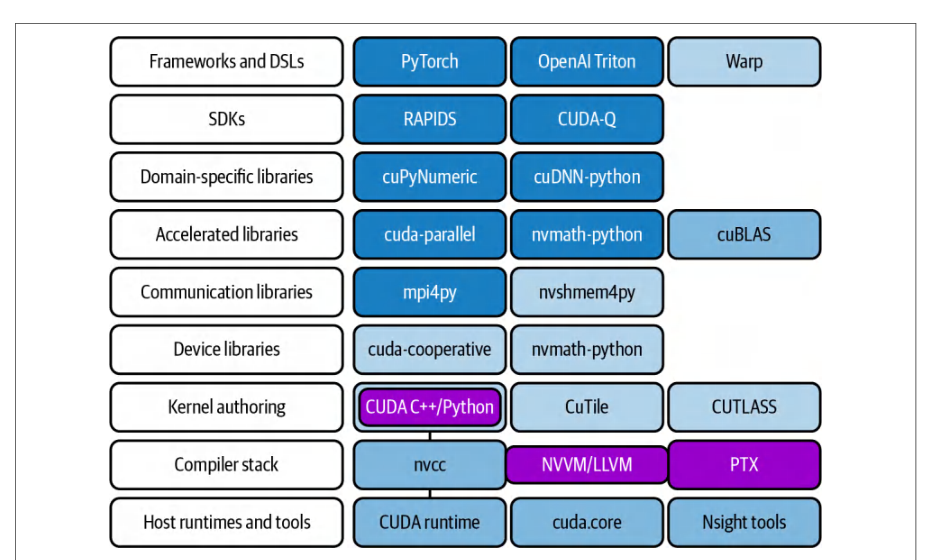
Running a multi-petaFLOP GPU cluster involves more than just writing high-level PyTorch, TensorFlow, or JAX code. There is a whole software stack underpinning GPU operations, and each layer can affect performance. Figure 3-1 shows a common set of frameworks, libraries, compilers, runtimes, and tools used to develop and productionize modern LLM workloads, including PyTorch, cuDNN, cuBLAS, CUT-LASS, CUDA C++, nvcc, and the CUDA Runtime API (e.g., CUDA tools, driver, etc.).运行一个多 petaFLOP 级的 GPU 集群,绝不仅仅是编写高层的 PyTorch、TensorFlow 或 JAX 代码。GPU 运算的背后有一整套软件栈支撑,其中每一层都可能影响性能。图 3-1 展示了用于开发现代 LLM 工作负载并将其投入生产的一组常见框架、库、编译器、运行时和工具,包括 PyTorch、cuDNN、cuBLAS、CUT-LASS、CUDA C++、nvcc 以及 CUDA Runtime API(例如 CUDA 工具、驱动等)。
In addition, the NVIDIA GPU and CUDA ecosystem embraces Python libraries and allows you to create CUDA kernels in Python using frameworks like OpenAI’s Triton domain-specific language (DSL) and NVIDIA’s Warp framework—as well as NVIDIA’s CUDA Python, cuTile, and CUTLASS libraries.此外,NVIDIA GPU 与 CUDA 生态系统也全面支持 Python 库,让你能够使用 OpenAI 的 Triton 领域专用语言(DSL)和 NVIDIA 的 Warp 框架在 Python 中创建 CUDA 内核——还可以使用 NVIDIA 的 CUDA Python、cuTile 和 CUTLASS 库。
GPU 驱动程序
GPU Driver
At the base is the NVIDIA GPU driver, which interfaces between the Linux OS and the GPU hardware. The driver manages low-level GPU operations, including memory allocation on the device, task scheduling on GPU cores, and partitioning the GPU for multitenant usage.最底层是 NVIDIA GPU 驱动程序,它充当 Linux 操作系统与 GPU 硬件之间的接口。驱动程序管理底层的 GPU 操作,包括设备上的显存分配、GPU 核心上的任务调度,以及为多租户使用而对 GPU 进行分区。
The GPU driver turns on the GPUs’ features and keeps the hardware fed with work. It’s important to keep the NVIDIA driver up-to-date. New driver releases often unlock performance improvements and support the latest GPU architectures and CUDA features.GPU 驱动程序负责开启 GPU 的各项特性,并确保硬件持续获得工作任务。保持 NVIDIA 驱动程序为最新版本非常重要。新发布的驱动程序通常会带来性能提升,并支持最新的 GPU 架构和 CUDA 特性。
Tools such as nvidia-smi come with the driver and allow you to monitor temperatures, measure utilization, query error-correcting code (ECC) memory status, and enable different GPU modes like persistence mode.nvidia-smi 等工具随驱动程序一同提供,可用于监控温度、测量利用率、查询纠错码(ECC)内存状态,以及启用持久化模式等不同的 GPU 模式。
CUDA 工具包与运行时
CUDA Toolkit and Runtime
On top of the driver sits the CUDA Runtime and libraries called the CUDA Toolkit. The toolkit includes the CUDA compiler, nvcc, used to compile CUDA C++ kernels. When compiled, CUDA programs link against the CUDA runtime (cudart). The CUDA runtime communicates directly with the NVIDIA driver to launch work and allocate memory on the GPU.在驱动程序之上是 CUDA 运行时和一系列库,它们统称为 CUDA 工具包(CUDA Toolkit)。该工具包包含 CUDA 编译器 nvcc,用于编译 CUDA C++ 内核。编译完成后,CUDA 程序会链接 CUDA 运行时(cudart)。CUDA 运行时直接与 NVIDIA 驱动程序通信,以在 GPU 上启动工作并分配内存。
Additionally, the CUDA Toolkit provides many optimized libraries: cuDNN for neural network primitives, cuBLAS for linear algebra, NCCL for multi-GPU communication, etc. As such, it’s critical to use the latest CUDA Toolkit version that supports your GPU’s compute capability (CC) since an up-to-date toolkit has the latest compiler optimizations and libraries specific to your GPU. We will cover the CUDA compiler and programming model—as well as CUDA (and PyTorch) optimizations—in more detail in the upcoming chapters.此外,CUDA 工具包还提供了许多优化库:用于神经网络原语的 cuDNN、用于线性代数的 cuBLAS、用于多 GPU 通信的 NCCL 等。因此,务必使用支持你的 GPU 计算能力(CC)的最新 CUDA 工具包版本,因为最新的工具包包含针对你的 GPU 的最新编译器优化和专用库。我们将在后续章节中更详细地介绍 CUDA 编译器与编程模型,以及 CUDA(和 PyTorch)优化。
CUDA 在各代 GPU 硬件间的向前与向后兼容性
CUDA Forward and Backward Compatibility Across GPU Hardware Generations
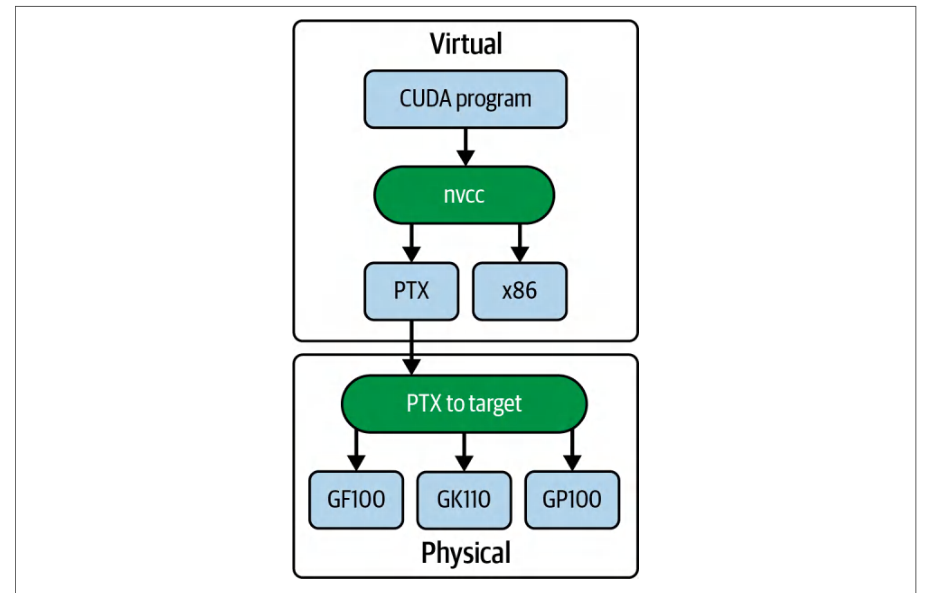
An important feature of NVIDIA’s GPU programming model is its compatibility across hardware generations. When you compile CUDA code, the resulting binary includes virtual, or intermediate, PTX code as well as physical device code (e.g., ARM, x86, GPU instructions), as shown in Figure 3-2.NVIDIA GPU 编程模型的一个重要特性是其跨硬件代际的兼容性。编译 CUDA 代码时,生成的二进制文件既包含虚拟(即中间表示)的 PTX 代码,也包含物理设备代码(例如 ARM、x86、GPU 指令),如图 3-2 所示。
This allows newer GPUs to just-in-time (JIT) compile the PTX so your program runs on future architectures—and allows newer GPUs to execute older binary code for prior architectures. This compatibility is achieved through NVIDIA’s fatbinary model, which contains PTX for future-proofing and CUBIN, or architecture-specific CUDA device code binaries, for known architectures.这使得较新的 GPU 能够对 PTX 进行即时(JIT)编译,使你的程序可以运行在未来的架构上——同时也允许较新的 GPU 执行针对先前架构的旧二进制代码。这种兼容性通过 NVIDIA 的 fatbinary 模型实现:该模型包含用于面向未来保障的 PTX,以及针对已知架构的 CUBIN(即架构特定的 CUDA 设备代码二进制文件)。
CUBIN is the binary produced by nvcc using the -cubin option. It contains compiled GPU streaming assembler (SASS) instructions for a given NVIDIA architecture. It’s packaged into a fatbinary for loading by the CUDA driver at runtime. Unlike PTX, which is an intermediate, forward-compatible representation, CUBIN binary files allow direct execution on known GPU architectures. When included alongside PTX in a fatbinary, CUBIN supports both JIT-compiling PTX for future GPUs and running older CUBIN code on newer hardware.CUBIN 是 nvcc 使用 -cubin 选项生成的二进制文件,包含针对特定 NVIDIA 架构编译的 GPU 流式汇编(SASS)指令。它会被打包进 fatbinary(胖二进制文件)中,供 CUDA 驱动在运行时加载。与作为中间表示且具备前向兼容性的 PTX 不同,CUBIN 二进制文件可以直接在已知 GPU 架构上执行。当 CUBIN 与 PTX 一同包含在 fatbinary 中时,它既支持为未来的 GPU JIT 编译 PTX,也支持在更新的硬件上运行旧的 CUBIN 代码。
In short, CUDA provides forward compatibility when PTX is embedded because the driver can JIT-compile PTX for newer architectures at runtime. CUBIN objects are architecture-specific and are not forward-compatible to future GPU architectures, so you should include PTX or ship fat binaries (aka “fatbinaries” or just “fatbins”) that contain both SASS for the current architectures and PTX for forward compatibility.简而言之,当嵌入 PTX 时,CUDA 能够提供前向兼容性,因为驱动可以在运行时针对更新的架构 JIT 编译 PTX。CUBIN 对象是架构特定的,无法前向兼容未来的 GPU 架构,因此你应当包含 PTX,或者交付同时包含当前架构 SASS 与用于前向兼容的 PTX 的胖二进制文件(fat binaries,也称 “fatbinaries” 或简称 “fatbins”)。
C++ 与 Python CUDA 库
C++ and Python CUDA Libraries
While most CUDA toolkit libraries are C++, NVIDIA’s current Python-facing options include CUDA Python (e.g., low-level driver and runtime access); cuPyNumeric, CuTe DSL, cuTile, and CuPy for array programming; and NVIDIA Warp for author-ing GPU kernels in Python. CUTLASS is a C++ templated library used under the hood by libraries such as cuBLAS rather than a Python library.尽管大多数 CUDA 工具包库都是 C++ 库,NVIDIA 目前面向 Python 的选择包括:CUDA Python(例如底层驱动与运行时访问);用于数组编程的 cuPyNumeric、CuTe DSL、cuTile 和 CuPy;以及用于在 Python 中编写 GPU 内核的 NVIDIA Warp。CUTLASS 是一个 C++ 模板库,在底层被 cuBLAS 等库所使用,而不是 Python 库。
While most of the CUDA Toolkit libraries are C++ based, more and more Python-based libraries are emerging from NVIDIA that are prefixed with “Cu” and built upon the C++ toolkit. For instance, cuTile and cuPyNumeric are Python libraries launched in early 2025. They are targeted at lowering the barrier to entry for Python developers to build applications for NVIDIA GPUs using CUDA.尽管 CUDA Toolkit 中的大多数库都基于 C++,NVIDIA 正涌现出越来越多以 “Cu” 为前缀、构建于 C++ 工具包之上的 Python 库。例如,cuTile 和 cuPyNumeric 是 2025 年初发布的 Python 库。它们旨在降低 Python 开发者使用 CUDA 为 NVIDIA GPU 构建应用程序的门槛。
cuTile is a Python library designed to simplify working with large matrices on GPUs by breaking them into smaller, more manageable submatrices called tiles. It provides a high-level, tile-based abstraction that makes it easier to perform block-wise computations, optimize memory access patterns, and efficiently schedule GPU kernels.cuTile 是一个 Python 库,旨在通过将大矩阵拆分为更小、更易于管理的子矩阵(称为 tile)来简化在 GPU 上处理大矩阵的工作。它提供高层级的基于 tile 的抽象,使分块计算、优化显存访问模式以及高效调度 GPU 内核变得更加容易。
By dividing a large matrix into tiles, cuTile helps developers take full advantage of the GPU’s parallelism without needing to manage low-level details manually. This approach can lead to improved cache usage and overall better performance in applications that require intensive matrix computations.通过将大矩阵划分为 tile,cuTile 帮助开发者充分利用 GPU 的并行性,而无需手动管理底层细节。这种方法可以改善缓存利用率,并在需要密集矩阵计算的应用中带来整体上更好的性能。
cuPyNumeric is a drop-in replacement (import cupynumeric as np) for the popular numpy Python library that utilizes the GPU. It provides nearly the same functions, methods, and behaviors as NumPy, so developers can often switch to it with minimal changes to their code. Under the hood, cuPyNumeric leverages CUDA to perform operations in parallel on the GPU. This leads to significant performance gains for compute-intensive tasks such as large-scale numerical computations, matrix operations, and data analysis.cuPyNumeric 是流行的 numpy Python 库的直接替换(drop-in replacement)(import cupynumeric as np),可利用 GPU。它提供的函数、方法和行为与 NumPy 几乎相同,因此开发者通常只需对代码做极少的修改即可切换过来。在底层,cuPyNumeric 利用 CUDA 在 GPU 上并行执行操作。这为大规模数值计算、矩阵运算和数据分析等计算密集型任务带来了显著的性能提升。

By offloading work to the GPU, cuPyNumeric accelerates computation and improves efficiency for applications handling massive datasets. Its goal is to lower the barrier for Python developers to harness GPU power without having to learn a completely new interface, making it a powerful drop-in alternative to NumPy for high-performance computing.通过将工作卸载到 GPU,cuPyNumeric 为处理海量数据集的应用加速计算并提升效率。它的目标是降低 Python 开发者利用 GPU 能力的门槛,而无需学习一套全新的接口,使其成为高性能计算中 NumPy 的强大直接替代方案。
Another notable Python-based programming model is OpenAI’s open source Triton language and compiler. Triton is a Python DSL that allows writing custom GPU kernels in Python. While not an NVIDIA library, Triton complements CUDA by allowing developers to write high-performance kernels directly in Python.另一个值得关注的基于 Python 的编程模型是 OpenAI 的开源 Triton 语言和编译器。Triton 是一种 Python 领域特定语言(DSL),允许用 Python 编写自定义 GPU 内核。虽然它不是 NVIDIA 的库,但 Triton 让开发者能够直接用 Python 编写高性能内核,从而对 CUDA 形成补充。
We cover Triton and various Triton-based optimizations in a later chapter, but just know that Triton reduces the need for handwritten CUDA C++ in many cases. And it’s integrated into PyTorch’s compiler backend to automatically optimize and fuse GPU operations for better performance. Let’s now turn the discussion to PyTorch.我们将在后面的章节中介绍 Triton 以及各种基于 Triton 的优化,但只需知道,在许多情况下 Triton 减少了对手写 CUDA C++ 的需求。此外,它已集成到 PyTorch 的编译器后端中,可自动优化并融合 GPU 操作以获得更好的性能。下面我们将讨论转向 PyTorch。
PyTorch 及更高层的 AI 框架
PyTorch and Higher-Level AI Frameworks
Some popular Python-based frameworks built on CUDA are PyTorch, TensorFlow, JAX, and Keras. These frameworks provide high-level interfaces for deep learning while leveraging the power of NVIDIA GPUs. This book primarily focuses on PyTorch’s compilation and graph optimization features, including the torch.compile stack.一些基于 CUDA 构建的热门 Python 框架包括 PyTorch、TensorFlow、JAX 和 Keras。这些框架在利用 NVIDIA GPU 强大能力的同时,为深度学习提供了高层接口。本书主要关注 PyTorch 的编译与图优化特性,包括 torch.compile 技术栈。
The PyTorch compiler stack consists of TorchDynamo, AOT Autograd, and a backend like TorchInductor or Accelerated Linear Algebra (XLA), which automatically capture and optimize your models. TorchInductor is the most common backend, and it uses OpenAI’s Triton under the hood. Triton fuses kernels and performs kernel autotuning for your specific GPU and system environment, as we’ll cover in Chapter 14.PyTorch 编译器技术栈由 TorchDynamo、AOT Autograd 以及 TorchInductor 或加速线性代数(Accelerated Linear Algebra,XLA)等后端组成,它们会自动捕获并优化你的模型。TorchInductor 是最常用的后端,其底层使用了 OpenAI 的 Triton。Triton 会融合内核,并针对你的特定 GPU 和系统环境执行内核自动调优,我们将在第 14 章中介绍。
When you perform operations on PyTorch tensors using GPUs, they are moved from the CPU to the GPU in what appears to be a single Python call. However, this single call is actually translated into a series of calls to the CUDA runtime utilizing various CUDA libraries, as shown in Figure 3-3.当你使用 GPU 对 PyTorch 张量执行操作时,张量看似通过一次 Python 调用就从 CPU 移动到了 GPU。然而,这一次调用实际上被转换为一系列对 CUDA 运行时的调用,并利用了各种 CUDA 库,如图 3-3 所示。
When you perform matrix multiplications, for example, PyTorch delegates these tasks to libraries such as cuBLAS. cuBLAS is part of the CUDA Toolkit and optimized for GPU execution. Behind the scenes, PyTorch ensures that operations like forward and backward passes are executed using low-level, optimized CUDA functions and libraries.例如,当你执行矩阵乘法时,PyTorch 会将这些任务委托给 cuBLAS 等库。cuBLAS 是 CUDA Toolkit 的组成部分,并针对 GPU 执行进行了优化。在幕后,PyTorch 确保前向传播和反向传播等操作通过底层的、经过优化的 CUDA 函数和库来执行。
In short, PyTorch abstracts away the complexity of direct CUDA programming, allowing you to write intuitive Python code that ultimately calls highly optimized CUDA routines, delivering both ease of development and high performance. We will discuss CUDA programming and optimizations in Chapters 4 and 5—as well as PyTorch optimizations in Chapter 9.简而言之,PyTorch 抽象掉了直接进行 CUDA 编程的复杂性,让你能够编写直观的 Python 代码,而这些代码最终会调用高度优化的 CUDA 例程,从而兼顾开发便捷性与高性能。我们将在第 4 章和第 5 章讨论 CUDA 编程与优化,并在第 9 章讨论 PyTorch 优化。
All of these components—OS, GPU Driver, CUDA Toolkit, CUDA libraries, and PyTorch—must work together to create the ideal GPU-based development environment. When a researcher submits a training job, the scheduler reserves nodes, the OS provides the GPU devices and memory allocations using the NVIDIA driver, and the container provides the correct software environment (including the optimized, hardware-aware CUDA libraries). The user code (e.g., PyTorch, TensorFlow, JAX) uses these CUDA libraries, which ultimately communicate with the driver and hardware.所有这些组件——操作系统、GPU 驱动、CUDA Toolkit、CUDA 库和 PyTorch——必须协同工作,才能构建理想的基于 GPU 的开发环境。当研究人员提交训练作业时,调度器预留节点,操作系统借助 NVIDIA 驱动提供 GPU 设备和显存分配,容器提供正确的软件环境(包括经过优化的、硬件感知的 CUDA 库)。用户代码(例如 PyTorch、TensorFlow、JAX)使用这些 CUDA 库,而这些库最终与驱动和硬件通信。
The optimizations described in this chapter are designed to make each layer of this stack as efficient as possible. They will help the GPUs stay busy with actual useful training and inference work—instead of the GPU waiting on the CPU, waiting for memory or disk I/O, or waiting on other GPUs to synchronize.本章所述的优化旨在让该技术栈的每一层都尽可能高效。它们将帮助 GPU 持续忙于实际有用的训练和推理工作——而不是让 GPU 等待 CPU、等待内存或磁盘 I/O,或等待其他 GPU 完成同步。
A well-tuned system ensures that models split across dozens of GPUs are not bottlenecked by I/O or OS overhead. System-level tuning is often overlooked in favor of model optimizations, but system-level optimizations can yield substantial performance gains. In some cases, you can get double-digit percentage improvements with small tweaks to your OS-level configuration. At the scale of a big AI project, this can save tens or hundreds of thousands of dollars in compute time.经过良好调优的系统可确保拆分到数十个 GPU 上的模型不会因 I/O 或操作系统开销而遭遇瓶颈。系统级调优常常被忽视,人们更倾向于模型优化,但系统级优化可以带来可观的性能提升。在某些情况下,只需对操作系统级配置稍作调整,就能获得两位数百分比的改进。对于大型 AI 项目而言,这可以在计算时间上节省数万乃至数十万美元。
为 GPU 环境配置 CPU 与操作系统
Configuring the CPUs and OS for GPU Environments
One of the most common reasons that GPUs don’t reach full utilization is that the CPU isn’t keeping them fed with useful work. In a typical training loop, the CPU is responsible for preparing the next batch of data, including loading the data from disk, tokenizing the data, transforming it, etc. In addition, the CPU is responsible for dispatching GPU kernels and coordinating between threads and processes.GPU 未能达到满负荷利用率的最常见原因之一,是 CPU 未能持续为其提供有效的工作。在典型的训练循环中,CPU 负责准备下一批数据,包括从磁盘加载数据、对数据进行分词、执行变换等。此外,CPU 还负责分发 GPU 内核,并在线程与进程之间进行协调。
If these host-side tasks are slow—or if the OS schedules them poorly—the expensive GPU can find itself idle, twiddling its transistors and waiting for the next task or batch of data. To avoid this, we need to optimize how the CPU and OS handle GPU workloads.如果这些主机侧任务执行缓慢,或者操作系统对它们的调度不佳,昂贵的 GPU 就可能陷入闲置,空转其晶体管,等待下一个任务或数据批次。为避免这种情况,我们需要优化 CPU 和操作系统处理 GPU 工作负载的方式。
These optimizations include setting the CPU affinity to avoid cross-NUMA-node traffic so the right cores handle the right data, using memory-allocation strategies to avoid NUMA penalties and applying OS-level changes to eliminate unnecessary latency. This way, the GPU is never starved for data. Part of this involves isolating background daemons and OS tasks on their own cores—and away from the cores that feed the GPUs, which we’ll discuss next.这些优化包括:设置 CPU 亲和性(CPU affinity)以避免跨 NUMA 节点的流量,让合适的核心处理合适的数据;采用显存分配策略以避免 NUMA 带来的性能损失;以及实施操作系统层面的调整以消除不必要的时延。这样,GPU 就不会陷入数据饥饿。其中一部分工作是将后台守护进程和操作系统任务隔离到各自专用的核心上——使其远离为 GPU 供给数据的那些核心,我们将在下文讨论这一点。
NUMA 感知与 CPU 绑核
NUMA Awareness and CPU Pinning
Modern server CPUs have dozens of cores and are often split into multiple NUMA nodes. A NUMA node is a logical grouping of CPUs, GPUs, network interface controllers (NICs), and memory that are physically close to one another. Being aware of the system’s NUMA architecture is important for performance tuning. Accessing resources within a single NUMA node is faster than accessing resources in other NUMA nodes.现代服务器 CPU 拥有数十个核心,且通常被划分为多个 NUMA 节点。*NUMA 节点*是物理上彼此邻近的 CPU、GPU、网络接口控制器(NIC)和内存的逻辑分组。了解系统的 NUMA 架构对性能调优十分重要。访问同一 NUMA 节点内的资源,比访问其他 NUMA 节点中的资源更快。
For example, if a process running on a CPU in NUMA node 0 needs to access a GPU in NUMA node 1, it will need to send data across an internode link, which will incur higher latency. In fact, memory access latency can nearly double when crossing to the other NUMA nodes.例如,如果运行在 NUMA 节点 0 中某个 CPU 上的进程需要访问 NUMA 节点 1 中的 GPU,就必须经由节点间链路传送数据,从而产生更高的时延。事实上,跨 NUMA 节点访问时,显存访问时延几乎会翻倍。
On many dual-socket systems, remote memory access latency can be significantly higher than local memory access. In one experiment, local NUMA node memory access latency is ~80 ns compared to remote (cross-node) memory access latency of ~139 ns. This is roughly a 75% increase in latency, which is a huge difference in access speed between local and remote NUMA node memory access.在许多双插槽(dual-socket)系统上,远程显存访问时延可能显著高于本地内存访问。在一项实验中,本地 NUMA 节点的显存访问时延约为 80 ns,而远程(跨节点)显存访问时延约为 139 ns。这相当于时延增加了约 75%,本地与远程 NUMA 节点显存访问在速度上的差异十分巨大。
By binding a process to a CPU on the same NUMA node as its GPU, we can avoid this extra overhead. For instance, you can use numactl --cpunodebind=<node> --membind=<node> to bind both CPU threads and memory allocations to the GPU’s local NUMA node. You’ll learn more about this in a bit. The key idea is to keep CPU execution and memory access local to the GPU that it’s serving.通过将进程绑定到与其 GPU 位于同一 NUMA 节点的 CPU 上,我们可以避免这种额外开销。例如,可以使用 numactl --cpunodebind=<node> --membind=<node> 将 CPU 线程和显存分配一并绑定到 GPU 所在的本地 NUMA 节点。稍后你会了解更多相关内容。关键思想是让 CPU 的执行和显存访问都保持在为其服务的 GPU 的本地。
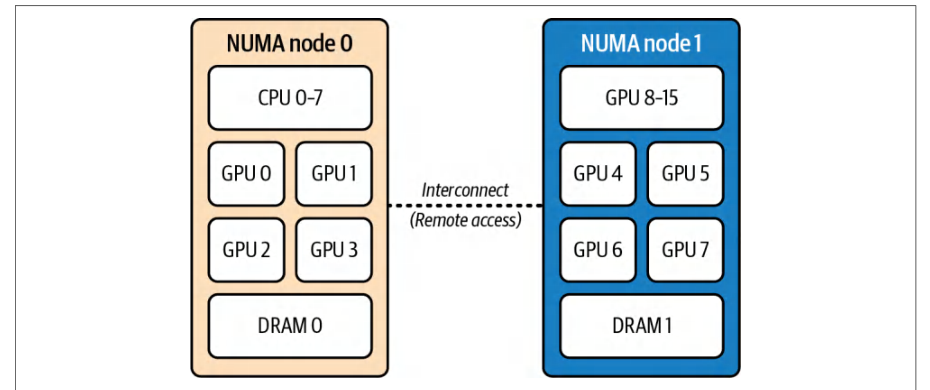
To explicitly specify NUMA-affinity, you need to “pin” processes or threads to specific CPUs that are connected to the same NUMA node as the GPU. This type of CPU affinity is called CPU pinning. Suppose you have eight GPUs in a node, with four GPUs connected to NUMA node 0 and the other four to NUMA node 1.要显式指定 NUMA 亲和性,你需要将进程或线程“固定”(pin)到与 GPU 位于同一 NUMA 节点的特定 CPU 上。这种 CPU 亲和性称为 CPU 绑核。假设某个节点上有八块 GPU,其中四块连接到 NUMA 节点 0,另外四块连接到 NUMA 节点 1。
If you launch eight training processes, one per GPU, you should bind each training process to a CPU core—or set of CPU cores—connected to the same NUMA node as the GPUs. In this case, GPUs 0–3 are connected to NUMA node 0 and GPUs 4–7s are connected to NUMA node 1’s cores, as shown in Figure 3-4.如果你启动八个训练进程(每块 GPU 一个),就应当将每个训练进程绑定到与其 GPU 位于同一 NUMA 节点的 CPU 核心(或一组 CPU 核心)上。在本例中,GPU 0–3 连接到 NUMA 节点 0,GPU 4–7 连接到 NUMA 节点 1 的核心,如图 3-4 所示。
This way, when a CPU process wants to feed data to GPU 4, it should be running on a CPU connected to NUMA node 1 since GPU 4 is connected to NUMA node 1. Linux provides tools to do this, including numactl --cpunodebind=<node> --membind= <node>, which launches a process pinned to the given NUMA node.这样,当某个 CPU 进程需要向 GPU 4 供给数据时,它应当运行在与 NUMA 节点 1 相连的 CPU 上,因为 GPU 4 正是连接到 NUMA 节点 1。Linux 提供了用于实现这一点的工具,包括 numactl --cpunodebind=<node> --membind= <node>,它可以启动一个绑定到指定 NUMA 节点的进程。
You can also use taskset to pin processes to specific core IDs. Here is an example using numactl to bind the train.py script to a CPU running in the same NUMA node 1 as GPU 4:你也可以使用 taskset 将进程固定到特定的核心 ID。下面示例使用 numactl 将 train.py 脚本绑定到与 GPU 4 位于同一 NUMA 节点 1 的 CPU 上运行:
numactl --cpunodebind=1 --membind=1 \
    python train.py --gpu 4
This assumes we know the NUMA node ID and that we are binding the script to only one GPU. Binding the train.py to multiple GPUs to an unknown NUMA node is a bit more complicated. The following script dynamically queries the topology using nvidia-smi topo and binds the script to GPUs using the local NUMA node:这里假设我们已知 NUMA 节点 ID,并且只将脚本绑定到一块 GPU。将 train.py 绑定到多块 GPU 且 NUMA 节点未知时,情况会稍微复杂一些。下面的脚本使用 nvidia-smi topo 动态查询拓扑,并依据本地 NUMA 节点将脚本绑定到 GPU:
#!/bin/bash
for GPU in 0 1 2 3; do
  # 查询此 GPU 的 NUMA 节点
  NODE=$(nvidia-smi topo -m -i $GPU \
         | awk '/NUMA Affinity/ {print $NF}')
  # 启动绑定到该 NUMA 节点的训练进程
  numactl --cpunodebind=$NODE --membind=$NODE \
    bash -c "CUDA_VISIBLE_DEVICES=$GPU python train.py --gpu $GPU"
done
#!/bin/bash
for GPU in 0 1 2 3; do
  # Query NUMA node for this GPU
  NODE=$(nvidia-smi topo -m -i $GPU \
         | awk '/NUMA Affinity/ {print $NF}')
  # Launch the training process pinned to that NUMA node
  numactl --cpunodebind=$NODE --membind=$NODE \
    bash -c "CUDA_VISIBLE_DEVICES=$GPU python train.py --gpu $GPU"
done
Here, we use topo -m to get both CPU and NUMA affinities. We then extract the single-node ID from the NUMA Affinity column. Finally, we bind both --cpunodebind and --membind to that node to ensure your process’s threads and memory allocations stay local to the GPU’s NUMA domain.这里,我们使用 topo -m 同时获取 CPU 和 NUMA 亲和性信息。然后从 NUMA Affinity 列中提取单一节点 ID。最后,我们将 --cpunodebind 和 --membind 都绑定到该节点,以确保进程的线程 和 显存分配都保持在 GPU 的 NUMA 域内。
Many deep learning frameworks also let you set thread affinities programmatically. For instance, PyTorch’s DataLoader exposes worker_init_fn so you can set CPU affinity for each worker process during initialization, as shown here:许多深度学习框架还支持以编程方式设置线程亲和性。例如,PyTorch 的 DataLoader 暴露了 worker_init_fn,让你可以在初始化阶段为每个工作进程设置 CPU 亲和性,如下所示:
import os
import re
import glob
import subprocess
import psutil
import ctypes
import torch
import torch.distributed as dist
from torch.nn.parallel import DistributedDataParallel as DDP
from torch.utils.data import DataLoader, Dataset
from functools import partial
# 可选:GPU↔NUMA 映射优先使用 NVML
try:
    import pynvml as nvml  # pip install nvidia-ml-py3
    _HAS_NVML = True
except Exception:
    _HAS_NVML = False
# --- 使用 libnuma 进行内存绑定
_libnuma = ctypes.CDLL("libnuma.so")
if _libnuma.numa_available() < 0:
    raise RuntimeError("NUMA not available on this system")
_libnuma.numa_run_on_node.argtypes = [ctypes.c_int]
_libnuma.numa_set_preferred.argtypes = [ctypes.c_int]
import os
import re
import glob
import subprocess
import psutil
import ctypes
import torch
import torch.distributed as dist
from torch.nn.parallel import DistributedDataParallel as DDP
from torch.utils.data import DataLoader, Dataset
from functools import partial
# Optional: NVML is preferred for GPU↔NUMA mapping
try:
    import pynvml as nvml  # pip install nvidia-ml-py3
    _HAS_NVML = True
except Exception:
    _HAS_NVML = False
# --- libnuma for memory binding
_libnuma = ctypes.CDLL("libnuma.so")
if _libnuma.numa_available() < 0:
    raise RuntimeError("NUMA not available on this system")
_libnuma.numa_run_on_node.argtypes = [ctypes.c_int]
_libnuma.numa_set_preferred.argtypes = [ctypes.c_int]
def parse_physical_cpu_list(phys_str: str):
    """Parse '0-3,8-11' -> [0,1,2,3,8,9,10,11]."""
    cpus = []
    if not phys_str:
        return cpus
    for part in phys_str.split(','):
        part = part.strip()
        if not part:
            continue
        if '-' in part:
            start, end = map(int, part.split('-'))
            cpus.extend(range(start, end + 1))
        else:
            cpus.append(int(part))
    return cpus
def get_numa_cpus_for_node(node: int):
    """Read /sys/devices/system/node/node{node}/cpulist."""
    path = f"/sys/devices/system/node/node{node}/cpulist"
    with open(path, "r") as f:
        return parse_physical_cpu_list(f.read().strip())
def get_numa_cpus_and_memory():
    """Return (current_cpu_mask, preferred_node) from numactl --show."""
    out = subprocess.run(["numactl", "--show"],
        capture_output=True, text=True).stdout
    phys = re.search(r"physcpubind:\s*([\d,\-\s]+)", out).group(1)
    cpus = parse_physical_cpu_list(phys)
    node = int(re.search(r"preferred node:\s*(-?\d+)", out).group(1))
    return cpus, node

def get_gpu_numa_node(device: int) -> int:
    """
    Determine NUMA node for a GPU (prefer NVML; fall back to sysfs;
    final fallback to current preferred node).
    """
    # NVML 路径(首选)
    if _HAS_NVML:
        try:
            nvml.nvmlInit()
            props = torch.cuda.get_device_properties(device)
            pci = props.pci_bus_id  # '0000:03:00.0' 或 '00000000:03:00.0'
            # 如需供 NVML 使用,规范化为 8 位十六进制域
            try:
                domain, bus, devfn = pci.split(':')
                if len(domain) < 8:
                    domain = domain.rjust(8, '0')
                pci8 = f"{domain}:{bus}:{devfn}"
            except ValueError:
                pci8 = pci
            try:
                handle = nvml.nvmlDeviceGetHandleByPciBusId_v2(pci8)
def parse_physical_cpu_list(phys_str: str):
    """Parse '0-3,8-11' -> [0,1,2,3,8,9,10,11]."""
    cpus = []
    if not phys_str:
        return cpus
    for part in phys_str.split(','):
        part = part.strip()
        if not part:
            continue
        if '-' in part:
            start, end = map(int, part.split('-'))
            cpus.extend(range(start, end + 1))
        else:
            cpus.append(int(part))
    return cpus
def get_numa_cpus_for_node(node: int):
    """Read /sys/devices/system/node/node{node}/cpulist."""
    path = f"/sys/devices/system/node/node{node}/cpulist"
    with open(path, "r") as f:
        return parse_physical_cpu_list(f.read().strip())
def get_numa_cpus_and_memory():
    """Return (current_cpu_mask, preferred_node) from numactl --show."""
    out = subprocess.run(["numactl", "--show"],
        capture_output=True, text=True).stdout
    phys = re.search(r"physcpubind:\s*([\d,\-\s]+)", out).group(1)
    cpus = parse_physical_cpu_list(phys)
    node = int(re.search(r"preferred node:\s*(-?\d+)", out).group(1))
    return cpus, node

def get_gpu_numa_node(device: int) -> int:
    """
    Determine NUMA node for a GPU (prefer NVML; fall back to sysfs;
    final fallback to current preferred node).
    """
    # NVML path (preferred)
    if _HAS_NVML:
        try:
            nvml.nvmlInit()
            props = torch.cuda.get_device_properties(device)
            pci = props.pci_bus_id  # '0000:03:00.0' or '00000000:03:00.0'
            # Normalize to 8-hex-digit domain if needed for NVML
            try:
                domain, bus, devfn = pci.split(':')
                if len(domain) < 8:
                    domain = domain.rjust(8, '0')
                pci8 = f"{domain}:{bus}:{devfn}"
            except ValueError:
                pci8 = pci
            try:
                handle = nvml.nvmlDeviceGetHandleByPciBusId_v2(pci8)
            except AttributeError:
                handle = nvml.nvmlDeviceGetHandleByPciBusId(pci8)
            # 若驱动直接暴露,则使用直接的 NUMA ID
            try:
                numa_id = nvml.nvmlDeviceGetNUMANodeId(handle)
                if isinstance(numa_id, int) and numa_id >= 0:
                    return numa_id
            except Exception:
                pass
            # 从 NVML CPU 亲和性推导
            cpu_count = psutil.cpu_count(logical=True)
            elems = (cpu_count + 63) // 64
            mask = nvml.nvmlDeviceGetCpuAffinity(handle, elems)
            cpus = []
            for i, m in enumerate(mask):
                m = int(m)
                for b in range(64):
                    if m & (1 << b):
                        cpu_id = i * 64 + b
                        if cpu_id < cpu_count:
                            cpus.append(cpu_id)
            # 从 sysfs 构建 CPU→NUMA 映射并选择占多数的节点
            cpu2node = {}
            for node_path in sorted(glob.glob("/sys/devices/system/node/node*")):
                node_id = int(os.path.basename(node_path).replace("node", ""))
                with open(os.path.join(node_path, "cpulist"), "r") as f:
                    for c in parse_physical_cpu_list(f.read().strip()):
                        cpu2node[c] = node_id
            counts = {}
            for c in cpus:
                n = cpu2node.get(c)
                if n is not None:
                    counts[n] = counts.get(n, 0) + 1
            if counts:
                return max(counts.items(), key=lambda kv: kv[1])[0]
        except Exception:
            pass
    # sysfs 回退
    try:
        props = torch.cuda.get_device_properties(device)
        pci = props.pci_bus_id
        sysfs_path = f"/sys/bus/pci/devices/{pci}/numa_node"
        with open(sysfs_path, "r") as f:
            val = int(f.read().strip())
            return val if val >= 0 else 0
    except Exception:
        pass
    # 最后手段:当前首选节点
            except AttributeError:
                handle = nvml.nvmlDeviceGetHandleByPciBusId(pci8)
            # Direct NUMA ID if driver exposes it
            try:
                numa_id = nvml.nvmlDeviceGetNUMANodeId(handle)
                if isinstance(numa_id, int) and numa_id >= 0:
                    return numa_id
            except Exception:
                pass
            # Derive from NVML CPU affinity
            cpu_count = psutil.cpu_count(logical=True)
            elems = (cpu_count + 63) // 64
            mask = nvml.nvmlDeviceGetCpuAffinity(handle, elems)
            cpus = []
            for i, m in enumerate(mask):
                m = int(m)
                for b in range(64):
                    if m & (1 << b):
                        cpu_id = i * 64 + b
                        if cpu_id < cpu_count:
                            cpus.append(cpu_id)
            # Build CPU→NUMA map from sysfs and choose majority node
            cpu2node = {}
            for node_path in sorted(glob.glob("/sys/devices/system/node/node*")):
                node_id = int(os.path.basename(node_path).replace("node", ""))
                with open(os.path.join(node_path, "cpulist"), "r") as f:
                    for c in parse_physical_cpu_list(f.read().strip()):
                        cpu2node[c] = node_id
            counts = {}
            for c in cpus:
                n = cpu2node.get(c)
                if n is not None:
                    counts[n] = counts.get(n, 0) + 1
            if counts:
                return max(counts.items(), key=lambda kv: kv[1])[0]
        except Exception:
            pass
    # sysfs fallback
    try:
        props = torch.cuda.get_device_properties(device)
        pci = props.pci_bus_id
        sysfs_path = f"/sys/bus/pci/devices/{pci}/numa_node"
        with open(sysfs_path, "r") as f:
            val = int(f.read().strip())
            return val if val >= 0 else 0
    except Exception:
        pass
    # last resort: current preferred node
    _, node = get_numa_cpus_and_memory()
    return node if node >= 0 else 0
def set_numa_affinity(node: int):
    """Bind current process to CPUs and memory of the given NUMA node."""
    cpus = get_numa_cpus_for_node(node)  # 重要:目标节点的 CPU
    psutil.Process(os.getpid()).cpu_affinity(cpus)
    _libnuma.numa_run_on_node(node)
    _libnuma.numa_set_preferred(node)
    print(f"PID={os.getpid()} bound to NUMA node {node} (CPUs={cpus})")
    return cpus
def _worker_init_fn(worker_id: int, node: int, cpus: list):
    """Reapply binding in each DataLoader worker (no CUDA calls here)."""
    psutil.Process(os.getpid()).cpu_affinity(cpus)
    _libnuma.numa_run_on_node(node)
    _libnuma.numa_set_preferred(node)
    print(f"Worker {worker_id} (PID={os.getpid()}) bound to NUMA node {node}")

 # ----- 以下为用法示例 -----
class MyDataset(Dataset):
    def __len__(self): return 1024
    def __getitem__(self, idx): return torch.randn(224*224*3, device='cpu')
def main():
    # DDP 设置
    dist.init_process_group(backend="nccl", init_method="env://")
    device = torch.cuda.current_device()
    # 确定 GPU 的 NUMA 节点并绑定此进程
    gpu_node = get_gpu_numa_node(device)
    cpus = set_numa_affinity(gpu_node)
    # 使用基于闭包的 worker_init_fn 构建数据加载器
    dataset = MyDataset()
    init_fn = partial(_worker_init_fn, node=gpu_node, cpus=cpus)
    dataloader = DataLoader(
        dataset,
        batch_size=32,
        num_workers=4,
        pin_memory=True,
        persistent_workers=True,  # 减少 worker 反复重启带来的抖动
        worker_init_fn=init_fn,
        prefetch_factor=2,
    )
    # 模型与 DDP
    model = torch.nn.Linear(224*224*3, 10, bias=True).to("cuda")
    ddp_model = DDP(model, device_ids=[device], static_graph=True)
    for batch in dataloader:
        batch = batch.to("cuda", non_blocking=True)
    _, node = get_numa_cpus_and_memory()
    return node if node >= 0 else 0
def set_numa_affinity(node: int):
    """Bind current process to CPUs and memory of the given NUMA node."""
    cpus = get_numa_cpus_for_node(node)  # IMPORTANT: CPUs of target node
    psutil.Process(os.getpid()).cpu_affinity(cpus)
    _libnuma.numa_run_on_node(node)
    _libnuma.numa_set_preferred(node)
    print(f"PID={os.getpid()} bound to NUMA node {node} (CPUs={cpus})")
    return cpus
def _worker_init_fn(worker_id: int, node: int, cpus: list):
    """Reapply binding in each DataLoader worker (no CUDA calls here)."""
    psutil.Process(os.getpid()).cpu_affinity(cpus)
    _libnuma.numa_run_on_node(node)
    _libnuma.numa_set_preferred(node)
    print(f"Worker {worker_id} (PID={os.getpid()}) bound to NUMA node {node}")

 # ----- Example usage below -----
class MyDataset(Dataset):
    def __len__(self): return 1024
    def __getitem__(self, idx): return torch.randn(224*224*3, device='cpu')
def main():
    # DDP setup
    dist.init_process_group(backend="nccl", init_method="env://")
    device = torch.cuda.current_device()
    # Determine GPU's NUMA node and bind this process
    gpu_node = get_gpu_numa_node(device)
    cpus = set_numa_affinity(gpu_node)
    # Build dataloader with closure-based worker_init_fn
    dataset = MyDataset()
    init_fn = partial(_worker_init_fn, node=gpu_node, cpus=cpus)
    dataloader = DataLoader(
        dataset,
        batch_size=32,
        num_workers=4,
        pin_memory=True,
        persistent_workers=True,  # reduces worker respawn churn
        worker_init_fn=init_fn,
        prefetch_factor=2,
    )
    # Model and DDP
    model = torch.nn.Linear(224*224*3, 10, bias=True).to("cuda")
    ddp_model = DDP(model, device_ids=[device], static_graph=True)
    for batch in dataloader:
        batch = batch.to("cuda", non_blocking=True)
        out = ddp_model(batch)
        # ... 损失、反向传播、优化器 ...
if __name__ == "__main__":
    main()
        out = ddp_model(batch)
        # ... loss, backward, optimizer ...
if __name__ == "__main__":
    main()
This script binds the main training process and each DataLoader worker process to the GPU’s local NUMA node to prevent cross-NUMA memory access. In the DataLoader, we pass a closure-based worker_init_fn that reapplies the precomputed NUMA binding inside each worker. And we do this without touching any CUDA APIs in the worker.该脚本将主训练进程和每个 DataLoader 工作进程绑定到 GPU 的本地 NUMA 节点,以避免跨 NUMA 的显存访问。在 DataLoader 中,我们传入一个基于闭包的 worker_init_fn,在每个工作进程内部重新应用预先计算好的 NUMA 绑定。而且,我们在工作进程中无需调用任何 CUDA API 即可做到这一点。
At startup, the process uses NVML to map the current GPU to its NUMA node and CPU-affinity mask. When available, we read the node directly via nvmlDeviceGet NUMANodeId. Otherwise, we derive it from the GPU’s CPU-affinity mask (nvmlDevice GetCpuAffinity). If NVML is unavailable or does not expose the node, we fall back to the kernel’s sysfs entry at /sys/bus/pci/devices/<PCI_ID>/numa_node. As a last resort, we use the process’s current preferred node.启动时,进程使用 NVML 将当前 GPU 映射到其 NUMA 节点和 CPU 亲和性掩码。在该调用可用时,我们通过 nvmlDeviceGet NUMANodeId 直接读取该节点;否则,我们从 GPU 的 CPU 亲和性掩码(nvmlDevice GetCpuAffinity)推导得出。如果 NVML 不可用或未暴露该节点,我们回退到位于 /sys/bus/pci/devices/<PCI_ID>/numa_node 的内核 sysfs 条目。作为最后手段,我们使用进程当前的首选节点。
We then compute the CPU list for that node from /sys/devices/system/node/ node<N>/cpulist and apply CPU affinity to those cores with psutil. We also bind all future allocations to that node using libnuma (numa_run_on_node + numa_set_ preferred).随后,我们从 /sys/devices/system/node/ node<N>/cpulist 计算出该节点对应的 CPU 列表,并使用 psutil 对这些核心应用 CPU 亲和性。我们还使用 libnuma(numa_run_on_node + numa_set_ preferred)将所有后续分配绑定到该节点。
Because some launchers, container runtimes, or kernels do not reliably propagate NUMA policy to children, we explicitly reapply and verify the binding in every forked worker. It’s not safe to rely on inheritance alone.由于某些启动器、容器运行时或内核无法可靠地将 NUMA 策略传播给子进程,我们会在每个 fork 出的工作进程中显式地重新应用并验证绑定。仅依赖继承并不安全。
Remember to set pin_memory=True and use non_blocking=True on H2D copies so that page-locked host buffers stay on the correct NUMA node. Prefer persis tent_workers=True to avoid re-forking workers and losing their affinity between epochs. And do not call torch.cuda.* in worker_init_fn. Instead, pass the GPU index using a closure or environment variable.请记得设置 pin_memory=True,并在 H2D 拷贝时使用 non_blocking=True,以确保锁页主机缓冲区驻留在正确的 NUMA 节点上。优先使用 persis tent_workers=True,以避免在各 epoch 之间重新 fork 工作进程并丢失其亲和性。另外,不要在 worker_init_fn 中调用 torch.cuda.*,而应通过闭包或环境变量传入 GPU 索引。
The result is that data preparation and batch loading happen entirely in local memory. This way, your GPUs stay busy and never need to pause for a remote-NUMA hop. With this code, you get robust, topology-aware affinity on any Linux server with libnuma and numactl installed.其结果是,数据准备和批量加载完全在本地内存中进行。这样,GPU 可以保持忙碌状态,无需因一次远程 NUMA 跳转而暂停。借助这段代码,在任何安装了 libnuma 和 numactl 的 Linux 服务器上,你都能获得健壮的、拓扑感知的亲和性。
By default, numactl applies its CPU and memory policy to a process and is documented to inherit that policy to all forked children. In practice, however, threads spawned by Python frameworks or exec’d subprocesses don’t always pick up the same settings on every kernel or Linux distribution. When using framework-managed worker processes, you should explicitly reassert the CPU and memory policy inside of each worker.默认情况下,numactl 将其 CPU 和内存策略应用于某个进程,并且文档说明该策略会被所有 fork 出的子进程继承。然而在实践中,由 Python 框架生成的线程或通过 exec 启动的子进程,并非在所有内核版本或 Linux 发行版上都能获得相同的设置。使用框架管理的工作进程时,应在每个工作进程内部显式重新应用 CPU 和内存策略。
In practice, pinning can eliminate unpredictable CPU scheduling behavior. It ensures that a critical thread such as a data-loading thread for your GPU doesn’t suddenly get migrated by the OS to a core on a different NUMA node in the middle of training or inferencing. In practice, it’s possible to see 5%–10% training throughput improvements just by eliminating cross-NUMA traffic and CPU core migrations. This also tends to reduce performance jitter and variance.在实践中,绑核可以消除不可预测的 CPU 调度行为。它确保关键线程(例如为 GPU 供数的数据加载线程)不会在训练或推理过程中被操作系统突然迁移到另一个 NUMA 节点上的核心。实践中,仅通过消除跨 NUMA 流量和 CPU 核心迁移,就有可能获得 5%–10% 的训练吞吐量提升。这也有助于降低性能抖动和波动。
Many high-performance AI systems evaluate CPU simultaneous multithreading (SMT), or hyperthreading as it’s often called—and sometimes disable it for more predictable per-core performance, but the benefit is workload-dependent. These systems may also reserve a handful of cores exclusively for OS background tasks by setting the isolcpus kernel parameter to isolate them from the general scheduler. You can also use Kubernetes CPU isolation for system daemons. This ensures that the remaining cores are dedicated entirely to training and inference threads and doing useful work.许多高性能 AI 系统会评估 CPU 同时多线程(SMT,即通常所称的 超线程),并且有时会为了获得更可预测的单核性能而将其禁用,但其收益取决于具体工作负载。这些系统还可能通过设置 isolcpus 内核参数,将少量核心专门保留给操作系统后台任务,使其与通用调度器隔离。你也可以针对系统守护进程使用 Kubernetes CPU 隔离。这样可以确保其余核心完全专属于训练和推理线程,用于执行有效工作。
It’s important to note that for integrated CPU-GPU superchips like NVIDIA’s Grace Blackwell, many of the traditional concerns about CPU-to-GPU data transfer are alle-viated because the CPU and GPU expose a coherent shared virtual address space over NVLink-C2C, while CPU DRAM and GPU HBM remain distinct memory pools. This means that issues like cross-NUMA delays are minimized, and the data can flow more directly between the CPU and GPU.值得注意的是,对于 NVIDIA Grace Blackwell 这类 CPU-GPU 一体化超级芯片,传统上关于 CPU 到 GPU 数据传输的许多顾虑都得到了缓解,因为 CPU 与 GPU 通过 NVLink-C2C 暴露出一致的共享虚拟地址空间,而 CPU DRAM 和 GPU HBM 仍是各自独立的显存池。这意味着跨 NUMA 时延等问题被降至最低,数据可以在 CPU 与 GPU 之间更直接地流动。
Even with the tightly coupled CPU-GPU superchip architecture, it’s still important to optimize the stack by ensuring that the hardware and software are configured properly so that the integrated system operates at peak efficiency. Even in these tightly coupled architectures, you want to minimize any unnecessary delays in data handling to keep the GPU fully utilized. This includes configuring hugepages, using efficiency prefetching, and pinning memory, as you will see in the next sections.即便采用紧耦合的 CPU-GPU 超级芯片架构,优化整个软件栈仍然十分重要:要确保硬件和软件配置得当,使集成系统以峰值效率运行。即使在这些紧耦合架构中,也应尽量减少数据处理中任何不必要的时延,以保持 GPU 得到充分利用。这包括配置大页、采用高效的预取以及锁页内存,后续小节将对此进行介绍。
NUMA 友好的显存分配与内存锁页
NUMA-Friendly Memory Allocation and Memory Pinning
By default, a process will allocate memory from the NUMA node of the CPU it’s currently running on. So if you pin a process to NUMA node 0, its memory will naturally come from NUMA node 0’s local RAM, which is ideal. However, if the OS scheduler migrates threads—or if some memory was allocated before you did the pinning—you could end up with the nonideal scenario in which a process running in NUMA node 0 is using memory from NUMA node 1. In this case, every memory access has to hop to the other NUMA node, negating the benefit of CPU pinning.默认情况下,进程会从其当前所运行 CPU 所属的 NUMA 节点分配内存。因此,如果将进程绑定到 NUMA 节点 0,其内存自然会来自 NUMA 节点 0 的本地 RAM,这是理想情况。然而,如果操作系统调度器迁移了线程——或者部分内存是在执行绑定之前分配的——就可能出现不理想的情形:运行在 NUMA 节点 0 上的进程使用了来自 NUMA 节点 1 的内存。在这种情况下,每次显存访问都必须跨越到另一个 NUMA 节点,从而抵消了 CPU 绑核带来的收益。
To avoid this, the numactl --membind option forces memory allocation from a specific NUMA node, as mentioned in an earlier section. In code, there are also NUMA APIs or even environment variables that can influence this configuration. The general rule is to keep memory close to the CPU, which is close to the GPU. That way the chain of data movement from memory to CPU to GPU is all within a single NUMA node. Here is the same example as before but with --membind=1 to force memory allocation from the preferred NUMA node that includes NUMA node 1:为避免这种情况,可以使用 numactl --membind 选项强制从特定 NUMA 节点分配内存,如前文小节所述。在代码层面,也有 NUMA API 甚至环境变量可以影响这一配置。一般原则是让内存靠近 CPU,而 CPU 又靠近 GPU。这样,从内存到 CPU 再到 GPU 的数据搬运链路便全部位于单个 NUMA 节点之内。下面是与前文相同的示例,但改用 --membind=1 强制从包含 NUMA 节点 1 的首选 NUMA 节点分配内存:
numactl --cpunodebind=1 --membind=1 python train.py --gpu 5 &
It’s important to note that when you launch a process under numactl, both its CPU (--cpunodebind) and memory policies (--membind) are applied to that process and inherited by all of its child processes. As such, any worker subprocesses forked by your training script will automatically use the same NUMA memory binding. However, they must be created using a fork-based model. If you switch to a spawn start method, or otherwise exec a new program, those child processes do not inherit the parent’s memory policy.需要注意的是,在 numactl 下启动进程时,其 CPU 策略(--cpunodebind)与内存策略(--membind)都会应用于该进程,并被其所有子进程继承。因此,训练脚本 fork 出的任何工作子进程都会自动使用相同的 NUMA 内存绑定。不过,这些子进程必须通过基于 fork 的模型创建。如果改用 spawn 启动方式,或者以其他方式 exec 一个新程序,这些子进程将不会继承父进程的内存策略。
In addition, pinned memory, also called page-locked memory, is essential for efficient and direct GPU access. When memory is pinned, the OS won’t swap or move it. This leads to faster direct memory access (DMA) transfers. Copying data from pinned host memory to GPU can be 2–3× faster than from regular pageable memory since the GPU or NIC can perform DMA directly.此外,锁页内存(pinned memory)——也称 页锁定内存(page-locked memory)——对于高效且直接的 GPU 访问至关重要。内存被锁定后,操作系统不会将其换出或移动,从而带来更快的直接显存访问(DMA)传输。由于 GPU 或网卡(NIC)可以直接执行 DMA,从锁页主机内存向 GPU 复制数据的速度可比常规可分页内存快 2–3 倍。
In fact, this is the basis of NVIDIA’s GPUDirect technologies such as GPUDirect RDMA, which allows NICs like InfiniBand to directly exchange data with GPU memory. Similarly, GPUDirect Storage (GDS) allows NVMe drives to stream data into GPU memory without extra CPU overhead.实际上,这正是 NVIDIA 各项 GPUDirect 技术(例如 GPUDirect RDMA)的基础,这类技术允许 InfiniBand 等网卡直接与 GPU 显存交换数据。类似地,GPUDirect Storage(GDS)允许 NVMe 驱动器在无额外 CPU 开销的情况下将数据流式传输到 GPU 显存。
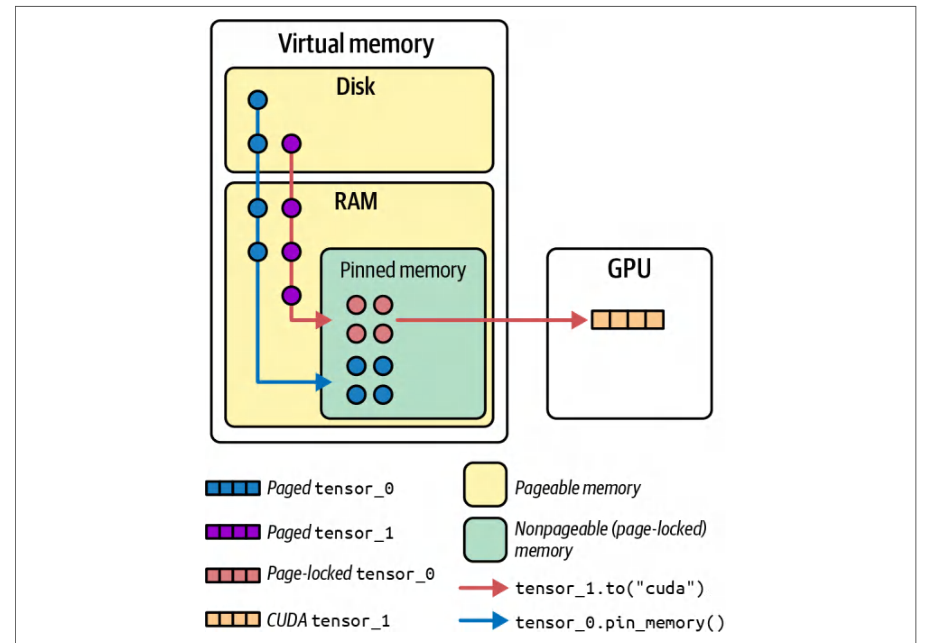
Deep learning frameworks provide options to use pinned memory for data loaders. For example, PyTorch’s DataLoader has a flag pin_memory=True, which, when true, means the batches loaded will be placed in pinned RAM, as shown in Figure 3-5.深度学习框架为数据加载器提供了使用锁页内存的选项。例如,PyTorch 的 DataLoader 提供了 pin_memory=True 标志,当其设为 true 时,表示加载的批次将被放置在锁页 RAM 中,如图 3-5 所示。
Memory pinning speeds up the tensor.to(device) operations because the CUDA driver doesn’t have to pin pages on the fly. It’s especially beneficial when you are using large batch sizes or reading a lot of data in each iteration. Many practitioners have noticed that just turning on pin_memory=True in PyTorch can improve performance up to 10%–20% by reducing data transfer bottlenecks and increasing host-to-device transfer throughput.内存锁定可加速 tensor.to(device) 操作,因为 CUDA 驱动无需在传输时即时锁定页面。当你使用较大的批大小或在每次迭代中读取大量数据时,这一点尤为有益。许多从业者发现,仅在 PyTorch 中开启 pin_memory=True,就能通过减少数据传输瓶颈、提升主机到设备的传输吞吐量,使性能提升多达 10%–20%。
In short, you should make sure that your data loader uses pinned memory (e.g., pin_memory=True in PyTorch DataLoader) and that GPUDirect RDMA and GDS are enabled for supported hardware. This will reduce data transfer latency.简而言之,你应确保数据加载器使用锁页内存(例如 PyTorch DataLoader 中的 pin_memory=True),并在支持的硬件上启用 GPUDirect RDMA 和 GDS。这将降低数据传输时延。
It’s important to note that the OS has a limit on how much memory a user can lock (pin). This is set with the ulimit -l <max locked memory> command. In containerized environments, you can adjust the container’s security context and Docker --ulimit memlock setting accordingly. This way, the container can lock sufficient memory.需要注意的是,操作系统对用户可锁定(pin)的内存量设有上限。该上限通过 ulimit -l <max locked memory> 命令设置。在容器化环境中,你可以相应调整容器的安全上下文以及 Docker 的 --ulimit memlock 设置。这样,容器便能锁定足够的内存。
透明大页
Transparent Hugepages
In addition to pinning memory and binding it to NUMA nodes, we should talk about transparent hugepages (THPs). Linux memory management typically uses 4 KB pages, but managing millions of tiny pages is inefficient when you have processes using tens or hundreds of gigabytes of memory, as in the case of deep learning datasets, prefetched batches, model parameters, etc.除了锁定内存并将其绑定到 NUMA 节点之外,我们还应该讨论透明大页(THP)。Linux 内存管理通常使用 4 KB 页,但当进程使用数十甚至数百 GB 的内存时(例如深度学习数据集、预取的批次、模型参数等),管理数百万个微小页面的效率很低。
Hugepages—2 MB or even 1 GB pages—can reduce the overhead of virtual memory management by making memory chunks bigger. The main benefits are fewer page faults and less pressure on the translation lookaside Buffer (TLB).大页——2 MB 甚至 1 GB 的页面——通过增大内存块来降低虚拟内存管理的开销。其主要好处是减少缺页次数,并降低对转译后备缓冲(TLB)的压力。
The TLB is a cache that the CPU uses to map virtual addresses to physical ones. Fewer, larger pages means the TLB can cover more memory with the same number of entries, reducing misses.TLB 是 CPU 用于将虚拟地址映射到物理地址的缓存。页面更少、更大,意味着 TLB 能以相同数量的表项覆盖更多内存,从而减少未命中。
Hugepages typically produce modest gains—often on the order of ~3%–5% throughput improvement. They do this by reducing page-fault overhead and TLB pressure. Enabling THP is a simple win on most systems since the kernel will automatically back large allocations with 2 MB pages. In scenarios with very large memory pools (e.g., preallocated pinned buffers for I/O), you may also consider explicit hugepages using vm.nr_hugepages or hugetlbfs for more deterministic performance.大页通常带来适度的收益——吞吐量提升通常在 ~3%–5% 的量级。其原理是降低缺页开销和 TLB 压力。在大多数系统上启用 THP 是一项简单易得的收益,因为内核会自动用 2 MB 页面来支持大型分配。在显存池非常大的场景中(例如为 I/O 预分配的锁页缓冲区),你还可以考虑使用 vm.nr_hugepages 或 hugetlbfs 的显式大页,以获得更确定性的性能。
It’s important to note that THP’s background compaction can introduce unpredictable pauses that are disastrous for latency-sensitive LLM inference workloads. Linux is configured by default to use THP to automatically allocate 2 MB pages whenever possible. This is often sufficient, but it’s worth testing for your workload.需要注意的是,THP 的后台整理可能引入不可预测的停顿,这对时延敏感的 LLM 推理工作负载而言是灾难性的。Linux 默认配置为使用 THP 在可能时自动分配 2 MB 页面。这通常已经足够,但值得针对你的工作负载进行测试。
You can disable THP, but you will need to manually allocate and control hugepages. This will incur extra complexity, but it might be needed for low-latency workloads like inference. With THP disabled, your system will avoid stalls caused by kernel-driven defragmentations.你可以禁用 THP,但需要手动分配并控制大页。这会带来额外的复杂性,但对于推理这类低时延工作负载可能是必要的。禁用 THP 后,系统将避免由内核驱动的碎片整理所导致的停顿。
Beyond CPU/memory pinning and hugepages, there are a few other OS-level tweaks worth mentioning. These include thread scheduling, virtual memory management, filesystem caching, and CPU frequency settings, which we’ll cover in the next few sections.除了 CPU/内存绑定与大页之外,还有一些其他操作系统层面的调整值得一提,其中包括线程调度、虚拟内存管理、文件系统缓存和 CPU 频率设置,我们将在接下来几节中介绍。
调度器与中断亲和性
Scheduler and Interrupt Affinity
On a busy system, you want to make sure that important threads such as data-pipeline threads aren’t interrupted frequently. Linux by default uses the Completely Fair Scheduler (CFS) that works well for most cases.在繁忙的系统上,你需要确保数据流水线线程等重要线程不会频繁被中断。Linux 默认使用完全公平调度器(CFS),它在大多数情况下表现良好。
But if you have a very latency-sensitive thread that feeds the GPU with data, for example, you could consider using real-time first in, first out (FIFO) or round-robin (RR) priority scheduling for that thread. This would make sure that the high-priority thread runs without being preempted by normal-priority threads.但举例来说,如果你有一个对时延非常敏感、负责为 GPU 供给数据的线程,可以考虑对该线程使用实时先进先出(FIFO)或轮转(RR)优先级调度。这可以确保高优先级线程在运行时不会被普通优先级线程抢占。
However, use this with caution, as real-time threads can starve other processes if not managed properly. In practice, however, if you’ve pinned your threads to dedicated cores, you often don’t need to mess with real-time thread priorities, but it’s worth keeping an eye on.不过,使用时需谨慎,因为若管理不当,实时线程可能导致其他进程饥饿。但在实践中,如果你已将线程绑定到专用核心,通常无需再去调整实时线程优先级,不过仍值得留意。
Another option is to isolate cores or create separate CPU partitions to further reduce interruptions on these dedicated compute resources. To do this, you can use cset, kernel parameters like isolcpus and nohz_full, or cgroup cpuset isolation. With isolation, the OS scheduler leaves those CPU cores for you to use as you wish.另一种选择是隔离核心或创建独立的 CPU 分区,以进一步减少这些专用计算资源上的中断。为此,你可以使用 cset、isolcpus 和 nohz_full 等内核参数,或 cgroup 的 cpuset 隔离。通过隔离,操作系统调度器会将这些 CPU 核心留给你自由支配。
You can assign each device’s hardware interrupts to cores on the same NUMA node. This will prevent cross-node interrupt handling that would otherwise incur extra latency and evict useful cache lines on a remote node. For example, if your GPU or NIC on NUMA node 0 raises an interrupt, you’d bind it to a core on node 0 so that no other node handles it. Without this binding, a CPU on a different NUMA node might process the interrupt. This would force cache coherency traffic and cross-node communication.你可以将每个设备的硬件中断分配到同一 NUMA 节点上的核心。这可以避免跨节点的中断处理,否则会引入额外时延,并逐出远程节点上有用的缓存行。例如,如果 NUMA 节点 0 上的 GPU 或网卡(NIC)发出中断,你应将其绑定到节点 0 上的某个核心,从而不让其他节点处理它。如果没有这种绑定,其他 NUMA 节点上的 CPU 可能会处理该中断,进而引发缓存一致性流量和跨节点通信。
In practice, performance-sensitive systems often disable the default irqbalance daemon or run it with bespoke rules. The other option is to manually set each interrupt’s affinity mask using /proc/irq/*/smp_affinity. By pinning every GPU and NIC interrupt to the nearest cores, you guarantee that those device interrupts are always serviced on the optimal NUMA node.在实践中,对性能敏感的系统通常会禁用默认的 irqbalance 守护进程,或以定制规则运行它。另一种做法是使用 /proc/irq/*/smp_affinity 手动设置每个中断的亲和性掩码。通过将每个 GPU 和网卡中断绑定到最近的核心,你可以确保这些设备中断始终在最优的 NUMA 节点上得到处理。
In short, the combination of dedicated cores, appropriate scheduling priorities, and NUMA-aware hardware interrupt bindings can help minimize jitter for data loading threads that are feeding the GPUs.简而言之,将专用核心、合理的调度优先级与 NUMA 感知的硬件中断绑定相结合,有助于将喂送 GPU 的数据加载线程的抖动降至最低。
虚拟内存与交换
Virtual Memory and Swapping
It goes without saying, but you should always try to avoid memory swapping. If any part of your process’s memory gets swapped to disk, you will see a catastrophic, multiple-orders-of-magnitude slowdown. GPU programs tend to allocate a lot of host memory for data caching. If the OS decides to swap some data out of memory and onto disk, the GPU will experience huge delays when it needs to access that data.不言而喻,你应始终尽量避免内存交换。一旦进程内存的任何部分被换出到磁盘,你就会看到灾难性的、多个数量级的性能下降。GPU 程序往往会分配大量主机内存用于数据缓存。如果操作系统决定将部分数据从内存换出到磁盘,GPU 在需要访问这些数据时将遭遇巨大的时延。
We recommend setting vm.swappiness=0, which tells Linux to avoid swapping except under extreme memory pressure. It effectively isolates your training job’s memory with cgroup limits to prevent any swapping.我们建议设置 vm.swappiness=0,它会让 Linux 除极端显存压力情况外避免交换。这实际上相当于通过 cgroup 限制将训练作业的内存隔离起来,从而杜绝任何交换。
You can also use sudo swapoff -a to temporarily disable all swap devices and files until the next reboot. Just make sure you have enough RAM for your workload—or put limits to prevent overcommit. Otherwise, the OOM killer may reap the process. Monitor swap usage using vmstat or free -m to make sure swap stays at zero.你还可以使用 sudo swapoff -a 临时禁用所有交换设备和交换文件,直到下次重启为止。只需确保你有足够的 RAM 来支撑工作负载,或者设置限制以防止超额分配(overcommit)。否则,OOM killer 可能会终止该进程。使用 vmstat 或 free -m 监控交换使用情况,确保交换量保持为零。
Another related setting is ulimit -l, as mentioned earlier for pinned memory. If you want to prevent memory from swapping, you should set that limit high or you may experience excessive memory swapping. Again, typically one sets this limit to unlimited for large AI workloads that utilize a lot of memory.另一个相关设置是 ulimit -l,即前面针对锁页内存所提到的那个。如果你想防止内存被交换,就应将该限制设置得足够高,否则可能会出现过多的内存交换。同样,对于占用大量内存的大型 AI 工作负载,通常会将此限制设为 unlimited。
文件系统缓存与回写
Filesystem Caching and Write-Back
A best practice for large training jobs is to write frequent checkpoints to disk in case you need to restart a failed job from a known good checkpoint. During checkpointing, however, huge bursts of data might fill up the OS page cache and cause stalls.对于大型训练作业,一项最佳实践是频繁地将检查点写入磁盘,以便在作业失败时可以从某个已知良好的检查点重启。然而,在检查点写入过程中,大规模的突发数据可能会填满操作系统的页缓存(page cache),从而造成停顿。
For storage, you can adjust vm.dirty_ratio and vm.dirty_background_ratio to tune the page-cache size for buffering writes. For example, with multi-GB checkpoints, using a higher dirty ratio lets the OS batch more data in RAM before flushing to disk. This will smooth out large checkpoint writes and reduce stalls in your training loop.在存储方面,你可以调整 vm.dirty_ratio 和 vm.dirty_background_ratio 来调优用于缓冲写入的页缓存(page cache)大小。例如,对于多 GB 的检查点,使用更高的脏页比例(dirty ratio)可让操作系统在刷写到磁盘之前在内存中批量缓存更多数据。这将使大型检查点写入更加平滑,并减少训练循环中的停顿。
Another option is to perform checkpointing in a separate thread. A more recent option in PyTorch is to write distributed checkpoint partitions from nodes across the cluster. In this case, the checkpoint partitions will be combined when the checkpoint is loaded after a failed-job restart.另一种选择是在单独的线程中执行检查点操作。PyTorch 中较新的一个选项是由集群中的各个节点写入分布式检查点分区。在这种情况下,当作业失败后重启并加载检查点时,这些检查点分区会被合并。
In latency-sensitive training workflows, it’s best to bypass the page cache entirely. For example, open checkpoint files with O_DIRECT or use Linux’s io_uring for asynchronous I/O to avoid page-cache stalls. After writing each checkpoint, call posix_fadvise (fd, 0, 0, POSIX_FADV_DONTNEED) to immediately drop those pages from cache and prevent memory pressure on subsequent iterations.在对时延敏感的训练工作流中,最好完全绕过页缓存。例如,使用 O_DIRECT 打开检查点文件,或使用 Linux 的 io_uring 执行异步 I/O,以避免页缓存造成的停顿。每次写入检查点后,调用 posix_fadvise (fd, 0, 0, POSIX_FADV_DONTNEED) 立即将这些页面从缓存中丢弃,防止在后续迭代中产生显存压力。
CPU 频率与 C 状态
CPU Frequency and C-states
By default, many compute nodes will run CPUs in a power-saving mode, which either downclocks a CPU or puts it to sleep when it’s idle. This helps save energy and reduce heat and lowers the cost. During model training, the CPUs might not always be 100% utilized as the GPUs are churning through the final batches of their dataset. However, these power management features could cause extra latency when the system wakes the CPUs up again when new work arrives.默认情况下,许多计算节点会让 CPU 运行在节能模式下,即在空闲时降低 CPU 频率或使其进入休眠。这有助于节省能源、减少发热并降低成本。在模型训练期间,当 GPU 正在处理数据集的最后几个批次时,CPU 的利用率可能不会始终达到 100%。然而,当新任务到来、系统重新唤醒 CPU 时,这些电源管理特性可能带来额外的时延。
For maximum and consistent performance, AI systems often configure the CPU frequency governor to “performance” mode, which keeps the CPU at max frequency all the time. This can be done using cpupower frequency-set -g performance or in the Basic Input/Output System (BIOS).为了获得最大且一致的性能,AI 系统通常将 CPU 频率调节器(frequency governor)配置为“性能”(performance)模式,使 CPU 始终保持最高频率。这可以通过 cpupower frequency-set -g performance 或在基本输入/输出系统(BIOS)中完成。
Likewise, disabling deep C-states can keep cores from going into a low-power sleep state. CPU C-states are power-saving modes defined by the system’s ACPI specification. When a CPU core is idle, it can enter a C-state to save energy. The deeper the C-state, the more power is saved but the longer it may take for the core to wake up when work arrives. Disabling deeper C-states can remove excessive latency spikes. C0 is active; everything above C0 represents a deeper state of sleep.同样,禁用深度 C 状态可以防止核心进入低功耗休眠状态。CPU 的 C 状态(C-states)是由系统 ACPI 规范定义的节能模式。当 CPU 核心空闲时,它可以进入某个 C 状态以节省能耗。C 状态越深,节省的电能越多,但工作到来时核心唤醒所需的时间也越长。禁用较深的 C 状态可以消除过大的时延尖峰。C0 为活动状态;C0 以上的所有状态都代表更深的休眠状态。
Essentially, we can trade a bit of extra power draw for more responsive CPU behavior. In a training scenario where GPUs are the big power consumers, a bit more CPU power usage is usually fine if it keeps the GPUs fed. For example, if a data loader thread sleeps while waiting for data and the CPU goes into the deep C6 state, significant portions of the CPU are powered down to maximize energy savings.本质上,我们可以用略高的功耗换取响应更及时的 CPU 行为。在以 GPU 为主要功耗来源的训练场景中,只要能让 GPU 持续得到数据供给,CPU 多消耗一点电能通常没有问题。例如,如果数据加载器线程在等待数据时休眠,而 CPU 进入深度 C6 状态,CPU 的相当大一部分会被断电以最大化节能效果。
If the CPU enters a deeper sleep state, it might take a few microseconds to wake up. While this is not a long time, many microseconds can add up and can cause GPU bubbles if not managed properly. Bubbles are periods of time when the GPU is waiting for the CPU to resume data processing. By keeping the CPU ready, we reduce such hiccups. Many BIOSes for servers have a setting to disable C-states—or at least limit them.如果 CPU 进入更深的休眠状态,唤醒可能需要几微秒。虽然这并不算长,但许多个微秒累加起来,若管理不当,就可能造成 GPU 气泡。气泡(bubble)是指 GPU 等待 CPU 恢复数据处理的时间段。让 CPU 保持就绪可以减少这类停顿。许多服务器 BIOS 都提供禁用 C 状态——或至少限制 C 状态——的设置。
调优主机 CPU 内存分配器
Tune Host CPU Memory Allocator
On a well-tuned GPU server, CPU usage may not be very high since GPUs handle most of the computation. However, CPU usage should remain steady and in lockstep with GPU activity. The CPUs must stay busy preparing each incoming batch while the current batch is being processed by the GPU.在一台调优良好的 GPU 服务器上,CPU 使用率可能不会很高,因为大部分计算由 GPU 承担。然而,CPU 使用率应保持稳定,并与 GPU 活动步调一致。在 GPU 处理当前批次的同时,CPU 必须持续忙碌地准备每一个传入批次。
Proper CPU-to-GPU handoff is crucial for sustaining high GPU utilization. By tuning your host’s memory allocator (jemalloc or tcmalloc), you can eliminate unpredictable pauses in data preparation. This will keep GPUs running at their peak— except for intentional synchronization points.CPU 到 GPU 的正确交接对于维持高 GPU 利用率至关重要。通过调优主机的显存分配器(memory allocator)(jemalloc 或 tcmalloc),你可以消除数据准备过程中不可预测的停顿。这将使 GPU 保持峰值运行——除了有意设置的同步点之外。
After tuning, you should see each GPU’s utilization hover near 100% and drop only at required synchronization barriers. The GPUs should never stall for data due to CPU-side delays. With jemalloc, you can shard allocations into per-CPU arenas (narenas), enable background_thread for off-path purging, and lengthen dirty_decay_ms/muzzy_decay_ms so that freed pages aren’t immediately returned to the OS. This will minimize lock contention and fragmentation.调优之后,你应该能看到每块 GPU 的利用率稳定在接近 100% 的水平,仅在必要的同步屏障处下降。GPU 绝不应因 CPU 侧的延迟而等待数据。使用 jemalloc 时,你可以将显存分配分片到按 CPU 划分的 arena(narenas)中,启用 background_thread 以便在分配路径之外进行清理,并延长 dirty_decay_ms/muzzy_decay_ms,使已释放的页面不会立即归还给操作系统。这将最大限度地减少锁竞争和显存碎片。
You can tune jemalloc with the MALLOC_CONF environment variable as follows:你可以通过 MALLOC_CONF 环境变量按如下方式调优 jemalloc:
export MALLOC_CONF="narenas:8,dirty_decay_ms:10000,muzzy_decay_ms:10000
,background_thread:true"
Similarly, tcmalloc benefits from tuning the TCMALLOC_MAX_TOTAL_THREAD_ CACHE_BYTES and TCMALLOC_RELEASE_RATE environment variables. These will provide larger per-thread caches so that small allocations avoid global locks and syscalls— keeping CPU threads ready to feed the GPU with low, predictable latency. You can do this as follows:类似地,tcmalloc 也能从调优 TCMALLOC_MAX_TOTAL_THREAD_ CACHE_BYTES 和 TCMALLOC_RELEASE_RATE 环境变量中获益。这些变量会提供更大的每线程缓存,使小显存分配得以避开全局锁和系统调用——让 CPU 线程随时保持就绪,以低且可预测的时延为 GPU 持续供给数据。具体做法如下:
export TCMALLOC_MAX_TOTAL_THREAD_CACHE_BYTES=$((512*1024*1024))
export TCMALLOC_RELEASE_RATE=16
In short, optimizing the allocator can reduce allocator overhead and fragmentation. This will keep CPU threads consistently fast and avoid unexpected stalls feeding the GPU. Experiment with these environment variables and tune them for your specific workload and environment.简而言之,优化显存分配器可以降低分配器开销和显存碎片,使 CPU 线程始终保持稳定的高速度,避免在为 GPU 供给数据时出现意外停顿。请针对你的具体工作负载和环境,对这些环境变量进行实验并加以调优。
面向性能的 GPU 驱动与运行时设置
GPU Driver and Runtime Settings for Performance
We’ve optimized the CPU side, but there are also important settings for the GPU driver and runtime that can affect performance—especially in multi-GPU and multiuser scenarios. NVIDIA GPUs have a few knobs that, when tuned properly, can reduce overhead and improve how multiple workloads share a GPU.我们已经优化了 CPU 侧,但 GPU 驱动和运行时中也有一些会影响性能的重要设置——尤其是在多 GPU 和多用户场景中。NVIDIA GPU 提供了一些可调参数,若调优得当,可以降低开销并改善多个工作负载共享 GPU 的方式。
Next, we’ll cover GPU persistence mode, the partitions of MPS, MIG, and a few other considerations like clock settings, ECC memory, and out-of-memory behavior.接下来,我们将介绍 GPU 持久化模式、多进程服务(MPS)与多实例 GPU(MIG)的分区,以及其他一些注意事项,例如时钟设置、ECC 内存和内存耗尽(out-of-memory)行为。
GPU 持久化模式
GPU Persistence Mode
By default, if no application is using a GPU, the driver may put the GPU into a lower-power state and unload some of the driver’s context. The next time an application comes along and wants to use the GPU, there’s a cost to initialize it. This can take on the order of a second or two for the driver to spin everything up.默认情况下,如果没有应用程序在使用 GPU,驱动可能会将 GPU 置于较低功耗状态,并卸载部分驱动上下文。当下一个应用程序要使用 GPU 时,初始化会产生开销。驱动完成全部初始化可能需要大约一两秒钟。
GPU initialization overhead can negatively impact performance for workloads that periodically release and reacquire the GPU. For instance, consider a training cluster where jobs are starting and stopping frequently. Or a low-volume inference cluster that has to wake up the GPU every time a new inference request arrives. In both of these cases, the overhead will reduce overall workload performance.对于会周期性释放并重新获取 GPU 的工作负载,GPU 初始化开销会对性能产生负面影响。例如,一个作业频繁启动和停止的训练集群,或者一个每次有新推理请求到达都必须唤醒 GPU 的低流量推理集群。在这两种情况下,该开销都会降低整体工作负载性能。
Persistence mode is enabled by running the nvidia-persistenced daemon. This keeps the GPU driver loaded and the hardware in a ready state even when no application is active. This requests that the system not fully power down the GPU when idle, which prevents power gating. Persistence keeps the GPU awake so that the next job has zero startup delay. This is generally recommended for long-running and latency-sensitive workloads. You can enable the persistence daemon at boot time using the following command:持久化模式通过运行 nvidia-persistenced 守护进程来启用。即使没有应用程序处于活动状态,它也能保持 GPU 驱动已加载且硬件处于就绪状态。它会请求系统在 GPU 空闲时不要将其完全断电,从而避免电源门控(power gating)。持久化使 GPU 保持唤醒状态,从而让下一个作业的启动时延为零。对于长时间运行和时延敏感的工作负载,通常建议启用该模式。你可以使用以下命令在系统启动时启用持久化守护进程:
systemctl enable nvidia-persistenced
On AI clusters, it’s common to just enable persistence mode on all GPUs at server boot time. This way, when a job begins, the GPUs are already initialized and can start processing immediately. It won’t make your actual compute any faster, as it doesn’t speed up the math operations, but it shaves off job-startup latency and prevents cold start delays.在 AI 集群上,常见的做法是在服务器启动时为所有 GPU 启用持久化模式。这样,当作业开始时,GPU 已经完成初始化,可以立即开始处理。这并不会让你的实际计算变快,因为它并不能加速数学运算,但它能削减作业启动时延,并避免冷启动延迟。
GPU persistence mode also helps with interactive usage, as without persistence, the first CUDA call you make after some idle time might stall while the driver reinitializes the GPU. With persistence on, that call returns quickly.GPU 持久化模式对交互式使用也有帮助:如果没有持久化,在一段空闲时间后发起的第一次 CUDA 调用,可能会因驱动程序重新初始化 GPU 而停顿。启用持久化后,该调用会快速返回。
The only downside of persistence is a slightly higher power draw when idle since the GPU stays in a higher readiness state. But, for most data center GPUs, this is an acceptable trade-off for better performance consistency. Once GPU persistence mode is set by an admin with sudo access, you can enjoy the benefits and move on to tackle other optimizations.持久化的唯一缺点是空闲时功耗略高,因为 GPU 会保持在较高的就绪状态。但对于大多数数据中心 GPU 而言,这是换取更佳性能一致性的可接受折中。一旦由拥有 sudo 权限的管理员设置好 GPU 持久化模式,你就可以享受其带来的好处,并转而攻克其他优化项。
多进程服务(MPS)
MPS
Normally, when multiple processes share a single GPU, the GPU’s scheduler time-slices between them. For example, if two Python processes each have some kernels to run on the same GPU, the GPU might execute one process’s kernel, then the other process’s kernel, and so on. If those kernels are short and there’s an idle gap between them, the GPU can end up underutilized as it’s doing “ping-pong” context switches and not overlapping the work.通常,当多个进程共享单个 GPU 时,GPU 的调度器会在它们之间进行时间片轮转(time-slicing)。例如,如果两个 Python 进程各自有一些内核要在同一个 GPU 上运行,GPU 可能会先执行一个进程的内核,再执行另一个进程的内核,如此往复。如果这些内核很短且彼此之间存在空闲间隙,GPU 最终可能利用率不足,因为它在进行“乒乓式”上下文切换,而没有让各项工作重叠执行。
NVIDIA’s MPS is a feature that creates a sort of umbrella under which multiple processes can run on the GPU concurrently and without strict time-slicing. With MPS, the GPU can execute kernels from different processes at the same time as long as the GPU resources (streaming multiprocessors [SMs], Tensor Cores, etc.) are available. MPS essentially merges the contexts of the processes into one scheduler context. This way, you don’t pay the full cost of switching and idling between independent processes.NVIDIA 的多进程服务(MPS)是一项特性,它相当于构建了一把“保护伞”,让多个进程能够在 GPU 上并发运行,而不受严格的时间片轮转限制。借助 MPS,只要 GPU 资源(流多处理器(SM)、张量核心等)可用,GPU 就可以同时执行来自不同进程的内核。MPS 本质上是将这些进程的上下文合并为一个调度器上下文。这样,你就无需承担独立进程之间切换和空闲的全部代价。
When is MPS useful? For model training, if you normally run one process per GPU, you might not use MPS. But if you have scenarios like running many inference jobs on one big GPU, MPS is a game changer. Imagine you have a powerful GPU or GPU cluster, but your inference job—or set of multiple inference jobs—doesn’t fully use it.MPS 何时有用?对于模型训练,如果你通常在每个 GPU 上只运行一个进程,可能就用不上 MPS。但如果你遇到诸如在一块大型 GPU 上运行多个推理作业之类的场景,MPS 就会带来颠覆性改变。想象一下,你拥有一块强大的 GPU 或一个 GPU 集群,但你的推理作业——或一组多个推理作业——并未充分利用它。


For instance, consider running four separate inference jobs on one 40 GB GPU, each using 5–10 GB and only 30% of GPU compute. By default, each inference job gets a time-slice, so at any moment, only one job’s work is actually running on the GPU. That leaves the GPU 70% idle on average.例如,假设在一块 40 GB 的 GPU 上运行四个独立的推理作业,每个作业使用 5–10 GB,且仅占用 30% 的 GPU 算力。默认情况下,每个推理作业都会分得一个时间片,因此在任一时刻,GPU 上实际只运行着一个作业的工作。这使 GPU 平均闲置 70%。
If you enable MPS for these inference jobs, the GPUs can interleave their work so that while one job is waiting on memory, another job’s kernel might fill the GPU, etc. The result is higher overall GPU utilization. In practice, if two processes each use 40% of a GPU, with MPS you might see the GPU at 80%–90% utilization serving both.如果为这些推理作业启用 MPS,GPU 就可以交错执行它们的工作:当一个作业在等待内存时,另一个作业的内核可以填补 GPU 的空闲,等等。其结果是整体 GPU 利用率更高。在实践中,如果两个进程各占用 GPU 的 40%,启用 MPS 后,你可能会看到 GPU 以 80%–90% 的利用率同时服务两者。
For instance, two training processes that each would take one hour on their own—on the same GPU, running sequentially—can run together with MPS and finish in a bit over one hour total in parallel instead of two hours sequentially. For instance, two training processes that each would take one hour on their own—on the same GPU, running sequentially—can run together with MPS. In this case, they would finish in a bit more than one hour total in parallel instead of two hours sequentially. The speedup from MPS can approach a near-doubling when kernels and memory bandwidth from concurrent clients complement one another. To visualize, imagine Process A and Process B each launching kernels periodically without MPS. The GPU schedule might look like A-B-A-B with gaps in between while each one waits, as shown in Figure 3-6.例如,两个各自单独运行需要一小时的训练进程——在同一块 GPU 上顺序运行——可以借助 MPS 一起运行,并以并行方式总共用一个多小时完成,而不是顺序运行的两小时。例如,两个各自单独运行需要一小时的训练进程——在同一块 GPU 上顺序运行——可以借助 MPS 一起运行。在这种情况下,它们并行运行总共只需一个多小时即可完成,而不是顺序运行的两小时。当并发客户端的内核与显存带宽相互补充时,MPS 带来的加速可以接近翻倍。为了直观说明,想象在没有 MPS 的情况下,进程 A 和进程 B 各自周期性地启动内核。GPU 的调度可能呈现为 A-B-A-B 的形式,中间夹杂着各自等待时的空闲间隙,如图 3-6 所示。
With MPS, the schedule overlaps A and B so that whenever A isn’t using some parts of the GPU, B’s work can use them simultaneously, and vice versa. This overlapping eliminates idle gaps, as shown in Figure 3-7.借助 MPS,调度会让 A 和 B 相互重叠,使得每当 A 未使用 GPU 的某些部分时,B 的工作就能同时使用这些部分,反之亦然。这种重叠消除了空闲间隙,如图 3-7 所示。
Setting up MPS involves running an MPS control daemon (nvidia-cuda-mps-control), which then launches an MPS server process that brokers GPU access. On modern GPUs, MPS is more streamlined as clients (the processes) can talk directly to the hardware with minimal interference from the compute node itself.设置 MPS 需要运行一个 MPS 控制守护进程(nvidia-cuda-mps-control),该守护进程随后会启动一个 MPS 服务器进程,负责代理 GPU 访问。在现代 GPU 上,MPS 更加精简,因为客户端(即各进程)可以直接与硬件通信,几乎无需计算节点本身介入。
Typically, you start the MPS server on a node—often one per GPU or one per user— and then run your GPU jobs with an environment variable that connects them to MPS. All jobs under that server will share the GPU concurrently.通常,你会在节点上启动 MPS 服务器——通常每个 GPU 一个或每个用户一个——然后通过设置一个环境变量来运行 GPU 作业,从而将其连接到 MPS。该服务器下的所有作业将并发共享 GPU。
Another feature of MPS is the ability to set an active thread percentage per client. This limits how many SMs (GPU cores, essentially) a client can use. This can be useful if you want to guarantee quality of service (QoS) where two jobs, for example, each get at most 50% of the GPU’s execution resources. In this case, you can set CUDA_MPS_ACTIVE_THREAD_PERCENTAGE=50 to cap a client to about 50% of SM execution capacity. If not explicitly set, the jobs will just compete and use whatever GPU resources they can.MPS 的另一个特性是可以为每个客户端设置活动线程百分比。这限制了客户端可以使用的流多处理器(SM)数量(SM 本质上就是 GPU 核心)。如果你想保证服务质量(QoS),例如让两个作业各自最多获得 GPU 执行资源的 50%,这会很有用。在这种情况下,你可以设置 CUDA_MPS_ACTIVE_THREAD_PERCENTAGE=50,将客户端限制在约 50% 的 SM 执行容量。如果未显式设置,各作业将直接竞争,尽可能占用可获得的 GPU 资源。
Note that MPS does not partition GPU memory, so all processes will share the full GPU memory space. MPS is mainly about compute sharing and scheduling. The issue is that one process could request a massive amount of GPU RAM, cause an OOM error on the GPU, and result in terminating all of the other processes running on the GPU. This is very disruptive. Also, if one program saturates the GPU 100% on its own, MPS won’t magically make it go faster, as you can’t exceed 100% utilization. It’s beneficial only when individual jobs leave some slack that others can fill.请注意,MPS 不会划分 GPU 显存,因此所有进程将共享完整的 GPU 显存空间。MPS 主要用于计算共享与调度。问题在于,某个进程可能请求大量 GPU 显存,在 GPU 上引发 OOM(显存不足)错误,进而导致 GPU 上运行的所有其他进程被终止,这会造成严重破坏。此外,如果某个程序独自将 GPU 占满至 100%,MPS 也无法神奇地让它变快,因为利用率不可能超过 100%。只有当各个作业自身留有余量、可供其他作业填补时,MPS 才能发挥作用。
Another limitation of MPS is that, by default, all MPS clients must run as the same Unix user since they share a context. In multiuser clusters, this means MPS is usually set up at the scheduler level such that only one user’s jobs share a GPU at a time. Otherwise, you can configure a system-wide MPS that’s shared by all users, but understand that the jobs are not isolated from a security standpoint.MPS 的另一个限制是,默认情况下所有 MPS 客户端必须以同一 Unix 用户身份运行,因为它们共享同一个上下文。在多用户集群中,这意味着 MPS 通常在调度器层面进行设置,使得同一时间只有一个用户的作业共享 GPU。否则,你也可以配置由所有用户共享的系统级 MPS,但要清楚,从安全角度来看这些作业之间并未隔离。
Modern NVIDIA drivers support multiuser MPS so that processes from different Unix users can share a single MPS server. This improves usability but does not provide memory isolation. Prefer MIG when strong isolation is required. One specific alternative to MPS is a feature for time-slicing GPUs in Kubernetes. Time-slicing on Kubernetes allows the device plugin to schedule different pods on the same GPU by time. For instance, if you configure a single GPU with a time-slicing replication factor of four, four pods on that GPU can each receive a time share.现代 NVIDIA 驱动支持多用户 MPS,使来自不同 Unix 用户的进程可以共享同一个 MPS 服务器。这提升了易用性,但不提供内存隔离。在需要强隔离时,应优先选用多实例 GPU(MIG)。MPS 的一种具体替代方案是 Kubernetes 中的 GPU 时间切片功能。Kubernetes 上的时间切片允许设备插件按时间在同一 GPU 上调度不同的 Pod。例如,如果你将单个 GPU 的时间切片副本因子配置为 4,那么该 GPU 上的 4 个 Pod 可以各自获得一份时间份额。
Kubernetes time-slicing is sort of an automated time-sharing algorithm that doesn’t require MPS. However, this doesn’t overlap execution. Instead, it just switches more rapidly than the default driver would. Time-slicing may be useful for interactive workloads where you prefer isolation at the cost of some idle time. For high-throughput jobs, overlapping with MPS or splitting the GPU with a MIG is usually better than fine-grained time-slicing, as discussed next.Kubernetes 时间切片类似于一种自动化的分时算法,不需要 MPS。但它并不会重叠执行,只是切换速度比默认驱动更快而已。时间切片可能对交互式工作负载有用——在这种场景下,你宁愿以一些空闲时间为代价来换取隔离性。对于高吞吐量作业,使用 MPS 重叠执行或用 MIG 划分 GPU 通常优于细粒度时间切片,下文将对此进行讨论。
MIG
MIG
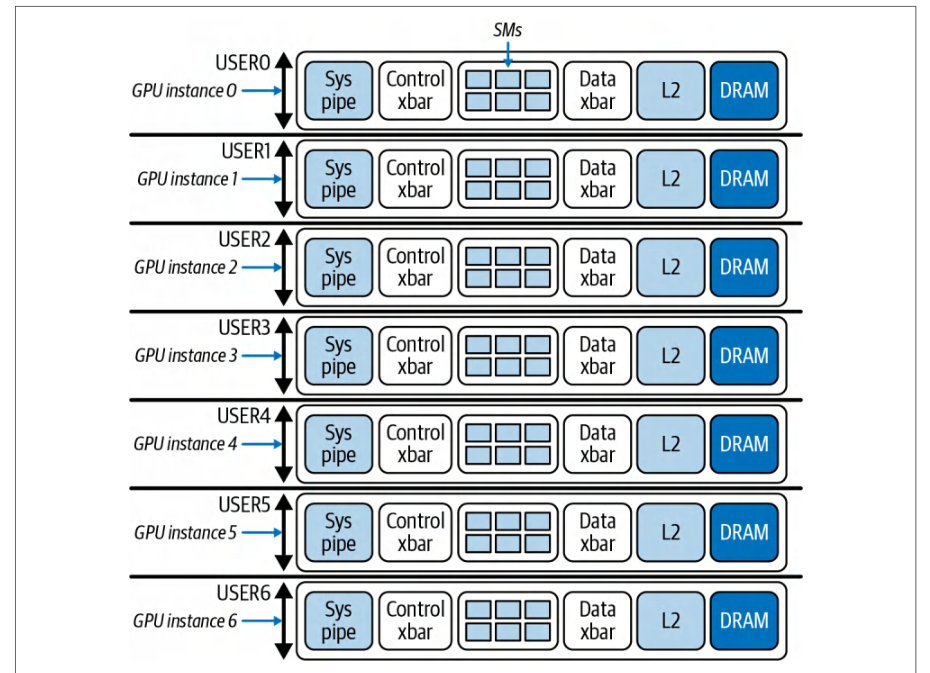
Modern GPUs can be partitioned at the hardware level into multiple instances using MIG. MIG is a form of virtualization but done in hardware. This way, the overhead is very low—maybe a few percent—due to the loss of some flexibility.现代 GPU 可以使用 MIG 在硬件层面划分为多个实例。MIG 是一种虚拟化形式,只不过在硬件中完成。这样一来,开销非常低——可能只有百分之几——代价是损失了一些灵活性。
If one instance is idle, it can’t lend its resources to another, as they are hard partitioned. MIG allows a GPU to be sliced into as many as seven smaller logical GPUs— each with its own dedicated portion of memory and compute units, or SMs, as shown in Figure 3-8.如果某个实例处于空闲状态,它无法将自己的资源借给其他实例,因为各实例之间是硬分区的。多实例 GPU(MIG)允许将一块 GPU 切分为多达七个更小的逻辑 GPU——每个逻辑 GPU 都拥有专属的一部分内存和计算单元,即流多处理器(SM),如图 3-8 所示。
By convention, NVIDIA’s MIG profile naming uses the prefix <X>g to denote the number of compute slices between 1 (min) and 7 (max) on modern GPUs. Each slice number represents a number of SM groups allocated to that partition. Each SM group is roughly a 1/7 slice of the total number of SMs.按照惯例,NVIDIA 的 MIG 配置文件(profile)命名使用前缀 <X>g to 表示现代 GPU 上介于 1(最小)与 7(最大)之间的计算切片数量。每个切片编号代表分配给该分区的 SM 组数量。每个 SM 组约占总 SM 数量的 1/7。
If a GPU has 132 SMs, each 1/7 slice represents 132 SMs × 1/7 = ~19 SMs in a group. As such, 1g represents ~19 SMs, 2g represents ~38 SMs, all the way up to 7g, which represents the total of ~132 SMs.如果一块 GPU 拥有 132 个 SM,则每个 1/7 切片代表一组 132 个 SM × 1/7 = 约 19 个 SM。因此,1g 代表约 19 个 SM,2g 代表约 38 个 SM,依此类推,直到 7g,代表全部约 132 个 SM。
| Profile name配置文件名称 | Fraction of memory内存占比 | Fraction of SMsSM 占比 | L2 cache sizeL2 缓存大小 | Copy engines拷贝引擎 | Number of instances实例数量 |
|---|---|---|---|---|---|
| MIG 1g.23gbMIG 1g.23gb | 1/81/8 | 1/71/7 | 1/81/8 | 22 | 77 |
| MIG 1g.45gbMIG 1g.45gb | 2/82/8 | 1/71/7 | 2/82/8 | 22 | 44 |
| MIG 2g.45gbMIG 2g.45gb | 2/82/8 | 2/72/7 | 2/82/8 | 33 | 33 |
| MIG 3g.90gbMIG 3g.90gb | 4/84/8 | 3/73/7 | 4/84/8 | 66 | 22 |
| MIG 4g.90gbMIG 4g.90gb | 4/84/8 | 4/74/7 | 4/84/8 | 88 | 11 |
| MIG 7g.180gbMIG 7g.180gb | Full整卡 | Full整卡 | Full整卡 | 1616 | 11 |
In contrast, and somewhat confusingly, the suffix <Y>gb specifies the exact amount of HBM GPU RAM in gigabytes that is reserved for that profile. The MIG profile values are fixed for each GPU generation and type and listed in the NVIDIA documentation. For the Blackwell B200, some of the MIG profile values are shown in Table 3-1.相比之下,略显令人困惑的是,后缀 <Y>gb 指定了为该 MIG 配置文件(profile)预留的 HBM GPU 显存的精确容量(以 GB 为单位)。MIG 配置文件的取值对每一代、每一种型号的 GPU 都是固定的,并已在 NVIDIA 文档中列出。对于 Blackwell B200,部分 MIG 配置文件的取值如表 3-1 所示。
The table also shows the number of hardware units, copy engines, and L2 cache frac-tions for each profile. These fixed profiles align with the GPU’s hardware memory controllers such that each memory slice maps to contiguous HBM channels.该表还给出了每个配置文件的硬件单元数量、拷贝引擎(copy engine)数量以及 L2 缓存份额。这些固定的配置文件与 GPU 的硬件显存控制器相契合,使得每个显存分片(memory slice)都映射到连续的 HBM 通道。
This two-part scheme separates compute capacity (number of SM groups) from memory capacity (total GB). Administrators can choose combinations of MIG profiles. The sum of allocated SMs and HBM does not need to exactly match the full GPU capacity. However, certain combinations are constrained by hardware partitioning. They cannot invent new slice sizes, for instance.这种两段式方案将计算容量(SM 组的数量)与显存容量(总 GB 数)分离开来。管理员可以选择各种 MIG 配置文件的组合。所分配的 SM 与 HBM 的总和不必与整块 GPU 的容量完全一致。不过,某些组合会受到硬件分区的限制。例如,它们无法凭空创造新的分片尺寸。
Administrators can enable or disable only the supported MIG profiles (e.g., 1g.23gb, 2g.45gb, 4g.90gb, etc.) on each GPU using tools like nvidia-smi -mig or using the NVIDIA Kubernetes GPU Operator’s nvidia.com/mig.config config map. Reconfi-guring MIG requires draining workloads and invoking MIG’s dynamic reconfiguration capability to apply the changes.管理员只能在每个 GPU 上启用或禁用受支持的 MIG 配置文件(例如 1g.23gb、2g.45gb、4g.90gb 等),方法是使用 nvidia-smi -mig 等工具,或使用 NVIDIA Kubernetes GPU Operator 的 nvidia.com/mig.config 配置映射(config map)。重新配置 MIG 需要排空(drain)工作负载,并调用 MIG 的动态重配置能力来应用更改。
Once a GPU is in MIG mode, modern GPUs can create and destroy MIG partitions dynamically without rebooting the entire system. You can adjust MIG instances on the fly after draining existing workloads, but to enable or disable MIG mode itself on a GPU, a reset of that GPU is needed.一旦 GPU 处于 MIG 模式,现代 GPU 就可以动态地创建和销毁 MIG 分区,而无需重启整个系统。在排空现有工作负载后,你可以即时调整 MIG 实例;但要在 GPU 上启用或禁用 MIG 模式本身,则需要重置该 GPU。
Each MIG instance acts like a separate GPU from the perspective of software since it has its own memory, its own SMs, and even separate engine contexts. The benefit of MIG is strong isolation and guaranteed resources for each job. If you have multiple users or multiple services that need only, say, 10 GB of logical GPU memory each, you can pack them onto one physical GPU without them interfering with one another’s memory or compute.从软件的角度看,每个 MIG 实例都像一块独立的 GPU,因为它拥有自己的内存、自己的 SM,甚至拥有独立的引擎上下文(engine context)。MIG 的优势在于为每个作业提供强隔离与有保障的资源。如果你有多个用户或多个服务,每个只需比如 10 GB 的逻辑 GPU 显存,就可以将它们打包到同一块物理 GPU 上,而不会相互干扰彼此的内存或计算。
Jobs can request MIG devices specifically, but you have to be careful to schedule in a way that uses all slices. For instance, if you have a 7-slice setup and a job takes only 1 slice, the other 6 should be packed with other jobs, or you’re leaving a lot idle. It’s possible to configure certain nodes in your cluster to use MIG for small inference jobs, for example, and configure other nodes for non-MIG workloads for large training jobs.作业可以专门请求 MIG 设备,但你在调度时必须小心,确保用满所有分片。例如,如果你的配置有 7 个分片,而某个作业只占用 1 个分片,其余 6 个就应当由其他作业填满,否则会闲置大量资源。例如,可以将集群中的某些节点配置为使用 MIG 来运行小型推理作业,而将其他节点配置为运行非 MIG 的大型训练作业。
One important operational note is that, in order to use MIG, you typically configure it at the system level—or at least at the node level. The GPU has to be put into MIG mode, the slices created, and the GPU reset. Once these happen, the slices appear as separate devices to the system—each with their own unique device ID.一个重要的运维注意事项是:要使用 MIG,通常需要在系统层面——或至少在节点层面——进行配置。必须将 GPU 置于 MIG 模式、创建分片,并重置 GPU。完成这些操作后,这些分片对系统而言就是独立的设备——每个都拥有自己唯一的设备 ID。
If you’re not using all of the available MIG slices because of poor upfront planning, you’ll end up wasting resources by leaving them fragmented and unused. It’s important to plan partition sizes upfront to match your workloads—and adjust the partition sizes when the workload changes. You will need to reset the GPUs to pick up the change.如果因为前期规划不佳而未能用尽所有可用的 MIG 分片,最终会因分片碎片化且闲置而浪费资源。重要的是提前规划好分区大小以匹配你的工作负载,并在工作负载发生变化时调整分区大小。你需要重置 GPU 才能使更改生效。
For large-scale model training jobs and inference servers that span many GPUs, MIG is typically not useful since we want access to the full set of GPUs. On the other hand, for multitenant, small-model inference servers that can run smaller GPU partitions, MIG and its isolation features could be useful.对于跨越多块 GPU 的大规模模型训练作业和推理服务器而言,多实例 GPU(MIG)通常没什么用处,因为我们希望访问完整的 GPU 集合。另一方面,对于可以运行较小 GPU 分区的多租户小模型推理服务器,MIG 及其隔离特性可能会很有用。
In short, enable MIG only when you need to run multiple independent jobs on the same GPU with strong isolation. Do not use MIG for large-scale distributed training or inferencing that spans GPUs, as you want access to the full power of the GPUs and their fast interconnects.简而言之,只有当你需要在同一块 GPU 上以强隔离方式运行多个独立作业时,才启用 MIG。不要将 MIG 用于跨越多块 GPU 的大规模分布式训练或推理,因为你需要充分利用 GPU 的全部算力及其高速互连。
In our context of large transformer-based model training and inferencing, we will leave MIG off. But it’s good to know that this feature exists. Perhaps a cluster might dynamically switch modes and run MIG during the day when lots of small training or inferencing experiments are happening, then turn MIG off at night to run big training jobs that use whole GPUs.在我们所讨论的基于 Transformer 的大规模模型训练与推理场景中,我们会将 MIG 保持关闭。但了解这一特性的存在是有益的。或许,集群可以动态切换模式:白天在大量小型训练或推理实验进行时运行 MIG,晚上再关闭 MIG,以运行使用整块 GPU 的大型训练作业。
GPU 时钟频率与 ECC
GPU Clock Speeds and ECC
NVIDIA GPUs have something called GPU Boost, which automatically adjusts the core clock within power and thermal limits. Most of the time, you should let the GPU just do its thing. But some users like to lock the clocks for consistency so that the GPU always runs at a fixed maximum frequency. This way, run-to-run performance is stable and not subject to variations in power or temperature.NVIDIA GPU 具有一项名为 GPU Boost 的功能,它会在功耗和温度限制范围内自动调整核心时钟频率。大多数情况下,让 GPU 自行运作即可。但有些用户喜欢锁定时钟频率以保持一致性,使 GPU 始终以固定的最大频率运行。这样,各次运行之间的性能保持稳定,不会受到功耗或温度变化的影响。
Fixing the clock is extremely important when performing benchmarks since later runs may be throttled due to excessive heat. If you do not account for this, you may inadvertently interpret the poor results of later runs incorrectly since the GPUs of these subsequent runs may be throttled due to excessive heat caused by previous runs.在执行基准测试时,固定时钟频率极为重要,因为后续运行可能因过热而降频。如果不考虑这一点,你可能会在无意中错误解读后续运行的糟糕结果,因为这些后续运行中的 GPU 可能已因前几次运行产生的过多热量而降频。
Specifically, NVIDIA’s GPU Boost will vary the core clock up or down to stay within power/thermal limits. Locking the clock at the max stable frequency using nvidia-smi -lgc to lock the core clock and -ac to lock the memory clock. This will make sure the GPU runs at a constant frequency—and prevents the GPU’s Boost default functionality from downclocking in later runs.具体来说,NVIDIA 的 GPU Boost 会在功耗/温度限制范围内上下调整核心时钟频率。可以使用 nvidia-smi -lgc 锁定核心时钟、-ac 锁定显存时钟,将时钟频率固定在最大稳定频率上。这可确保 GPU 以恒定频率运行,并防止 GPU 默认的 Boost 功能在后续运行中降频。
Locking the clocks is something to be aware of if you’re chasing the last bit of determinism and consistency. Typically, however, leaving the GPU in the default auto-boost mode is fine.如果你追求极致的确定性与一致性,那么锁定时钟频率是一个值得了解的手段。不过通常情况下,让 GPU 保持默认的自动加速模式即可。
Some teams purposely underclock the GPUs to reduce heat—especially if they are running very long jobs and don’t want to suffer the eventual thermal slowdown over time. Data center GPUs typically have enough temperature headroom—as well as proper air and liquid cooling—so that you don’t need to do this, but it’s good to know that it’s an option.一些团队会刻意调低 GPU 的时钟频率以减少发热——尤其是在运行耗时极长的作业、不希望随时间推移遭受热致性能下降的情况下。数据中心 GPU 通常具有足够的温度余量,并配备良好的风冷和液冷,因此你无需这样做,但了解这是一种可选方案是有益的。
Another approach is to use nvidia-smi -pl to set a power limit slightly below the maximum thermal design power (TDP) of the GPU. TDP is the maximum amount of heat, measured in watts, that a GPU can generate under sustained load. This dictates the amount of heat that must be dissipated to prevent overheating.另一种方法是使用 nvidia-smi -pl 将功率限制设置为略低于 GPU 的最大热设计功耗(TDP)。TDP 是 GPU 在持续负载下可产生的最大热量,以瓦特为单位,它决定了为防止过热而必须散发的热量。
If you set the power limit below TDP, the GPU Boost will auto-adjust clocks below the thermal throttle point. This can reduce peak heat generation, prevent throttling, and incur minimal performance impact.如果将功率限制设置在 TDP 以下,GPU Boost 会自动将时钟频率调整到热节流点以下。这可以降低峰值发热量、避免触发节流,且带来的性能影响极小。
ECC memory on GPUs is another consideration. ECC ensures that if there’s a single-bit memory error caused by cosmic rays, for example, the memory can be corrected on the fly. And if there’s a double-bit error, the error is detected and will throw an error to the calling code. ECC is usually enabled by default on NVIDIA data center GPUs.GPU 上的纠错内存(ECC)是另一个需要考虑的因素。ECC 可确保当出现由宇宙射线等原因导致的单比特内存错误时,内存能够即时纠正;而如果出现双比特错误,该错误会被检测到并向调用代码抛出错误。在 NVIDIA 数据中心 GPU 上,ECC 通常默认启用。
Disabling ECC can free up a small amount of memory since ECC requires extra bits for error checking. This might yield a marginal performance gain by reducing the overhead associated with on-the-fly error checking, but typically just a few percent. However, turning off ECC also removes critical memory-error protection, which can lead to system instability or undetected data corruption.禁用 ECC 可以释放少量内存,因为 ECC 需要额外的比特位用于错误检查。这或许能通过减少即时错误检查带来的开销而获得微小的性能提升,但通常只有几个百分点。然而,关闭 ECC 也会移除关键的内存错误保护,可能导致系统不稳定或未被检测到的数据损坏。
For NVIDIA’s data center GPUs, including Hopper and Blackwell, ECC comes enabled by default and is intended to remain enabled to ensure reliable, error-corrected computation and data integrity. For long training or inference jobs on huge models, a single memory error could crash the job completely or, even worse, silently corrupt your model without a warning.对于 NVIDIA 的数据中心 GPU(包括 Hopper 和 Blackwell),ECC 默认启用,并且应保持启用状态,以确保可靠的、经过纠错的计算和数据完整性。对于在超大模型上运行的长时间训练或推理作业,单个内存错误就可能使作业彻底崩溃,或者更糟的是,在毫无警告的情况下悄然损坏你的模型。
It’s recommended to always keep ECC on for any serious AI workload. The only time you’d possibly consider turning it off is in a research setting where you are fine with taking the risk because you need that extra sliver of memory for your model to fit into your limited-memory GPU cluster.对于任何严肃的 AI 工作负载,建议始终开启 ECC。唯一可能考虑关闭它的场景是研究环境:你愿意承担风险,因为你需要那一点点额外的内存,才能让模型装进内存有限的 GPU 集群。
Toggling ECC mode requires resetting the GPU and likely restarting jobs that are currently running on that GPU. So it’s not a toggle that you want to switch frequently. Keep ECC on for stability and reliability. The peace of mind outweighs the negligible speedup of turning ECC off.切换 ECC 模式需要重置 GPU,并且很可能需要重启当前在该 GPU 上运行的作业,因此这不是一个需要频繁切换的开关。为了稳定性和可靠性,请保持 ECC 开启。这份安心远胜于关闭 ECC 带来的微不足道的加速。
GPU 显存超额订阅、碎片化与 OOM 处理
GPU Memory Oversubscription, Fragmentation, and Out-of-Memory Handling
Unlike CPU RAM, by default there is no such thing as GPU “swap” memory. If you try to allocate more GPU memory than available, you will get an unfriendly OOM error along with an even-unfriendlier process crash. There are a couple of mechanisms to mitigate this issue: allow memory to grow dynamically, embrace unified memory across CPU and GPU, and utilize memory pools and caching allocators.与 CPU 内存不同,默认情况下并不存在 GPU “交换”显存这样的机制。如果尝试分配超过可用量的 GPU 显存,你会收到一个不友好的 OOM 错误,以及一个更不友好的进程崩溃。有几种机制可以缓解这一问题:允许显存动态增长、采用跨越 CPU 与 GPU 的统一内存,以及使用显存池和缓存分配器。
By default, some frameworks (e.g., TensorFlow) grab all of the available GPU memory at startup to avoid fragmentation and improve performance. If you don’t know this, it can be very bad in scenarios where you are sharing the GPU. PyTorch, by default, allocates GPU memory only as needed.默认情况下,某些框架(例如 TensorFlow)会在启动时占用全部可用 GPU 显存,以避免碎片化并提升性能。如果你不了解这一点,在共享 GPU 的场景中可能会造成严重问题。而 PyTorch 默认只在需要时才分配 GPU 显存。
TensorFlow has an option (TF_FORCE_GPU_ALLOW_GROWTH=true) to make it start small and dynamically grow the GPU memory usage as needed—similar to PyTorch. However, neither PyTorch nor TensorFlow lets you allocate more memory than the GPU has available. But this lazy allocation plays nicer in multitenant scenarios because two processes won’t both try to simultaneously allocate the maximum available GPU memory from the start.TensorFlow 提供了一个选项(TF_FORCE_GPU_ALLOW_GROWTH=true),使其从小显存起步,并按需动态增长 GPU 显存用量——与 PyTorch 类似。不过,PyTorch 和 TensorFlow 都不允许分配超过 GPU 可用量的显存。但这种惰性分配在多租户场景中表现更好,因为两个进程不会从一开始就同时尝试分配最大可用 GPU 显存。
CUDA’s Unified Memory system lets you allocate memory without predefining whether it resides on the CPU or GPU. The CUDA Runtime handles moving pages as needed. Modern NVIDIA GPUs like Hopper and Blackwell include hardware support for on-demand paging using the Page Migration Engine (PME).CUDA 的统一内存系统允许你在不预先定义内存位于 CPU 还是 GPU 的情况下分配内存,CUDA 运行时会根据需要处理页面迁移。Hopper 和 Blackwell 等现代 NVIDIA GPU 提供了硬件支持,可通过页迁移引擎(PME)实现按需分页。
PME automatically migrates memory pages between GPU memory and host CPU RAM when the GPU runs low on available memory. However, while PME provides flexibility, relying on it can introduce performance penalties compared to having enough GPU memory for your workload.当 GPU 可用显存不足时,PME 会自动在 GPU 显存与主机 CPU RAM 之间迁移显存页。不过,尽管 PME 提供了灵活性,但与为工作负载配备足够的 GPU 显存相比,依赖它可能带来性能损失。
This GPU-to-CPU memory offloading can be slow, however, since CPU memory I/O is slower than GPU high-bandwidth memory (HBM) I/O, as we learned in Chapter 2. This mechanism is mostly a convenience for practitioners trying to run models that don’t fit into GPU RAM.然而,这种从 GPU 到 CPU 的内存卸载可能很慢,因为 CPU 内存 I/O 比 GPU 的高带宽内存(HBM)I/O 慢,正如我们在第 2 章中所学。这一机制主要是为想要运行无法完全装入 GPU 显存 的模型的从业者提供的一种便利。
For performance-critical workloads, you generally want to avoid relying on unified memory oversubscription where possible. It’s there as a safety net instead of outright crashing your script, but your job will run slower when GPU memory is oversubscribed.对于性能关键型工作负载,通常应尽可能避免依赖统一内存超额订阅。它的作用相当于一个安全网,避免脚本直接崩溃,但当 GPU 显存被超额订阅时,你的作业运行速度会变慢。
Libraries like PyTorch use a caching allocator so that when you free GPU memory, it doesn’t return the memory to the OS immediately. Instead, it keeps it to reuse for future allocations. This avoids memory fragmentation and the overhead of asking the OS to repeatedly allocate the same block of memory.PyTorch 等库使用缓存分配器(caching allocator),因此当你释放 GPU 显存时,它不会立即将显存归还给操作系统,而是将其保留下来供后续分配复用。这既避免了显存碎片,也避免了反复请求操作系统分配同一块显存的开销。
You can configure PyTorch’s allocator using environment variables like PYTORCH_ALLOC_CONF (formerly PYTORCH_CUDA_ALLOC_CONF) to set a max pool size. We’ll cover optimizations to PyTorch’s memory-allocation mechanism in a later chapter.你可以使用 PYTORCH_ALLOC_CONF(旧称 PYTORCH_CUDA_ALLOC_CONF)等环境变量来配置 PyTorch 的分配器,以设置显存池的最大大小。我们将在后续章节中介绍针对 PyTorch 显存分配机制的优化。
If you run into the GPU OOM error, which you surely will at some point, it’s likely caused by memory fragmentation or excessive memory caching. You can try to clear the cache using PyTorch’s torch.cuda.empty_cache(), but it almost always means your workload legitimately needs that much memory.如果你遇到了 GPU 显存不足(OOM)错误——你迟早都会遇到——其原因很可能是显存碎片或过度的内存缓存。你可以尝试使用 PyTorch 的 torch.cuda.empty_cache() 清空缓存,但这几乎总是意味着你的工作负载确实需要那么多内存。
PyTorch also provides tools like torch.cuda.memory_stats() and torch.cuda.mem ory_summary() to help diagnose fragmentation by showing allocated versus reserved memory. NVIDIA’s Nsight Systems also shows GPU memory usage patterns to help identify memory leaks, long-lived allocations that correlate with leaks, CPU-GPUPyTorch 还提供了 torch.cuda.memory_stats() 和 torch.cuda.mem ory_summary() 等工具,通过展示已分配内存与保留内存的对比来帮助诊断显存碎片(fragmentation)。NVIDIA 的 Nsight Systems 也能显示 GPU 显存使用模式,帮助识别显存泄漏、与泄漏相关的长生命周期显存分配,以及 CPU-GPU
interconnect activity, and GPUDirect Storage timeline tracing. Additionally, the Nsight Compute profiler provides low-level kernel analysis, including occupancy, throughput, and NVLink usage. We’ll cover all of these in the upcoming chapters.互连活动,以及 GPUDirect Storage 时间线跟踪。此外,Nsight Compute 性能剖析器提供底层内核分析,包括占用率、吞吐量以及 NVLink 使用情况。我们将在接下来的章节中介绍所有这些内容。
Docker provides the --gpus flag to select and expose GPUs to a container, but it does not support setting a GPU memory limit. If you need hard isolation for GPU memory or compute, use MIG to partition the device or use Multi-Process Service (MPS) with active thread percentage for fair sharing. Configure limits in Kubernetes using MIG resources like nvidia.com/mig-2g.45gb when you require strict partitioning.Docker 提供 --gpus 标志,用于选择 GPU 并将其暴露给容器,但它不支持设置 GPU 显存限制。如果你需要对 GPU 显存或计算进行硬隔离,可以使用多实例 GPU(MIG)对设备进行分区,或者使用带活动线程百分比(active thread percentage)的多进程服务(MPS)来实现公平共享。当你需要严格分区时,可以在 Kubernetes 中使用 nvidia.com/mig-2g.45gb 之类的 MIG 资源来配置限制。
In multitenant nodes, this could be useful to isolate jobs. In a single-job-per-GPU situation, it’s not common to set a memory limit, as you want to let the job use as much of the GPU memory as it can get.在多租户节点上,这可能有助于隔离作业。而在每个 GPU 只运行一个作业的情况下,通常不会设置显存限制,因为你希望让作业尽可能多地使用它能获得的 GPU 显存。
In general, running out of GPU memory is something you can manage at the application level. For instance, you can reduce the data batch size, model weight precision, or even the model parameter count, if that’s an option.一般来说,GPU 显存耗尽是可以在应用层面进行管理的问题。例如,你可以减小数据批大小、降低模型权重精度,如果条件允许,甚至可以减少模型参数量。
A best practice is to monitor GPU memory usage with nvidia-smi or NVML APIs during model training and inferencing. If you’re close to the memory limit, consider workarounds like reducing batch size, using activation checkpointing for training, or other techniques to lower memory usage.最佳实践是在模型训练和推理过程中使用 nvidia-smi 或 NVML API 监控 GPU 显存使用情况。如果接近显存上限,可以考虑一些变通方法,例如减小批大小、在训练中使用激活检查点(activation checkpointing),或采用其他降低显存占用的技术。
Also, you should ensure that your CPU memory isn’t being swapped, as this would indirectly hurt your GPU utilization and goodput because each time your GPU tries to fetch something from the CPU host, but the host memory page has been swapped to disk, your performance will be bottlenecked by the much slower disk I/O. So it’s important to combine these memory-reduction best practices with the earlier advice about pinning memory, increasing the ulimit, and disabling swappiness, etc.此外,还应确保 CPU 内存没有发生交换(swap),因为这会间接损害 GPU 利用率和有效吞吐:每当 GPU 尝试从 CPU 主机获取数据,而主机内存页已被换出到磁盘时,性能就会受到慢得多的磁盘 I/O 的瓶颈制约。因此,务必将这些减少显存占用的最佳实践与前面关于锁页内存、提高 ulimit 以及禁用 swappiness 等建议结合使用。
In short, it’s recommended to always keep the GPU driver loaded instead of unload-ing the GPU driver between jobs. This is similar to GPU persistence mode but at a deeper level. Some clusters are configured to unload the driver when no jobs are running in order to free OS kernel memory and for security. However, if you do that, the next job has to pay the cost of reloading the GPU driver and, if MIG is used, reconfi-guring MIG slices.简而言之,建议始终让 GPU 驱动保持加载状态,而不是在作业之间卸载 GPU 驱动。这类似于 GPU 持久化模式,但层次更深。一些集群被配置为在没有作业运行时卸载驱动,以释放操作系统内核内存并出于安全考虑。然而,如果这样做,下一个作业就必须承担重新加载 GPU 驱动的代价,并且如果使用多实例 GPU(MIG),还需要重新配置 MIG 切片。
针对 GPU 的容器运行时优化
Container Runtime Optimizations for GPUs
Many AI systems use orchestration tools and container runtimes to manage the software environment. Kubernetes and Docker are popular in AI infrastructure. Using containers ensures that all dependencies, including CUDA and library versions, are consistent. This avoids the “but it works on my machine” problem. Containers introduce a bit of complexity and a tiny amount of overhead, but with the right configuration, you can get near bare-metal performance for GPU workloads using containers.许多 AI 系统使用编排工具和容器运行时来管理软件环境。Kubernetes 和 Docker 在 AI 基础设施中非常流行。使用容器可以确保所有依赖项(包括 CUDA 和库版本)保持一致,从而避免“在我机器上能正常运行”的问题。容器会带来一定的复杂性和极小的开销,但只要配置得当,使用容器运行 GPU 工作负载也能获得接近裸机的性能。
A container running on a node is not a traditional virtual machine (VM). In contrast to VMs, containers share the host OS kernel so that CPU and memory operations perform at near-native speed. And with the NVIDIA Container Toolkit, GPU access from within a Docker container is direct and does not incur overhead.运行在节点上的容器并不是传统意义上的虚拟机(VM)。与虚拟机不同,容器共享宿主机的操作系统内核,因此 CPU 和内存操作能以接近原生的速度执行。而且借助 NVIDIA Container Toolkit,从 Docker 容器内部访问 GPU 是直接的,不会产生额外开销。
NVIDIA Container Toolkit 与 CUDA 兼容性
NVIDIA Container Toolkit and CUDA Compatibility
One challenge when using containers with GPUs is making sure that the CUDA libraries inside the container match the driver on the host. NVIDIA solves this through their Container Toolkit and base Docker images. The host provides the NVI-DIA driver, which, remember, is tightly integrated with the kernel and hardware. Inside the container, you typically find the CUDA runtime libraries of a certain version.在容器中使用 GPU 的一个挑战是确保容器内的 CUDA 库与宿主机上的驱动相匹配。NVIDIA 通过其 Container Toolkit 和基础 Docker 镜像解决了这一问题。宿主机提供 NVIDIA 驱动——请记住,该驱动与内核和硬件紧密集成。容器内部通常包含特定版本的 CUDA 运行时库。
The general rule is that the host’s NVIDIA driver version must be at least as recent as the minimum driver version required by the CUDA version inside the container. For CUDA 13.x, the minimum required Linux host driver branch is R580 or newer. For CUDA 12.x, the minimum required Linux host driver branch is R525 or newer. Using a newer CUDA runtime with an older driver will cause the CUDA initialization to fail.一般规则是:宿主机的 NVIDIA 驱动版本不得低于容器内 CUDA 版本所要求的最低驱动版本。对于 CUDA 13.x,要求的最低 Linux 宿主机驱动分支为 R580 或更新;对于 CUDA 12.x,要求的最低 Linux 宿主机驱动分支为 R525 或更新。在较旧的驱动上使用较新的 CUDA 运行时会导致 CUDA 初始化失败。
For Docker and Kubernetes environments, the simplest approach is to use NVIDIA’s official base Docker images from the NVIDIA GPU Cloud (NGC) or DockerHub image repositories. These images (e.g., nvcr.io/nvidia/pytorch or similar) bundle the proper versions of the CUDA runtime, cuDNN, NCCL, etc. In addition, these Docker images list the minimum required CUDA driver, depending on the CUDA version. This way, you get support for the latest hardware without dependency headaches.对于 Docker 和 Kubernetes 环境,最简单的方法是使用来自 NVIDIA GPU Cloud(NGC)或 DockerHub 镜像仓库的 NVIDIA 官方基础 Docker 镜像。这些镜像(例如 nvcr.io/nvidia/pytorch 或类似镜像)捆绑了相应版本的 CUDA 运行时、cuDNN、NCCL 等。此外,这些 Docker 镜像会根据 CUDA 版本列出所需的最低 CUDA 驱动版本。这样一来,你就能获得对最新硬件的支持,而免受依赖问题的困扰。
NVIDIA Container Runtime
NVIDIA Container Runtime
Alternatively, NVIDIA’s container runtime can actually inject the host driver libraries into the container at runtime, so you don’t even need to ship the NVIDIA driver inside the image. Instead, you just rely on the host’s driver. Again, this works because the container isn’t fully isolated like a traditional VM. Docker containers are allowed to use host devices, volumes, and libraries.另一种做法是,NVIDIA 的容器运行时实际上可以在运行时将宿主机的驱动库注入容器,因此你甚至无需在镜像中打包 NVIDIA 驱动,而只需依赖宿主机的驱动即可。同样,这之所以可行,是因为容器并不像传统虚拟机(VM)那样完全隔离。Docker 容器可以使用宿主机的设备、卷和库。
Inside the container, your application uses the CUDA runtime libraries, such as libcudart.so from the container image, while the NVIDIA Container Toolkit injects the host’s driver libraries such as libcuda.so and libnvidia-ml.so at container start. The host driver libraries are invoked directly on the host so that everything just works.在容器内部,你的应用程序使用来自容器镜像的 CUDA 运行时库(例如 libcudart.so),而 NVIDIA Container Toolkit 则在容器启动时注入宿主机的驱动库(例如 libcuda.so 和 libnvidia-ml.so)。这些宿主机驱动库直接在宿主机上被调用,因此一切都能正常工作。
The split between CUDA runtime libraries (container) and NVIDIA Container Toolkit (host) is supported as long as the host driver meets the minimum version required by the CUDA Toolkit in the image. If you were to mismatch and try to use a newer CUDA version in the container with an old driver on the host, you’d likely get an error. It’s important to match the CUDA and driver versions.只要宿主机驱动满足镜像中 CUDA Toolkit 所要求的最低版本,CUDA 运行时库(容器侧)与 NVIDIA Container Toolkit(宿主机侧)之间的这种分工就是受支持的。如果版本不匹配——例如在容器中使用较新的 CUDA 版本,而宿主机上却是旧驱动——你很可能会遇到错误。务必使 CUDA 与驱动版本相匹配。
The key takeaway is that there is no hypervisor or virtualization layer involved when using containers for GPUs. The container is sharing the host kernel and driver directly, so when a kernel launches on the GPU, it’s as if it launched from the host.关键要点在于:使用容器运行 GPU 时,并不涉及虚拟机监控器(hypervisor)或虚拟化层。容器直接共享宿主机的内核和驱动,因此当内核在 GPU 上启动时,就如同它从宿主机上启动一样。
In other words, you aren’t losing performance to Docker-based virtualization—unless you are using something like VMware or Single Root Input/Output Virtualization (SR-IOV) virtual GPUs, which is a special scenario that requires some tuning. With Docker plus NVIDIA, it’s basically the equivalent of bare metal performance.换言之,你不会因基于 Docker 的虚拟化而损失性能——除非你使用的是 VMware 或单根输入/输出虚拟化(SR-IOV)虚拟 GPU 之类的方案,那是一种需要一些调优的特殊场景。使用 Docker 加 NVIDIA 的组合,性能基本上等同于裸金属。
避免容器叠加文件系统的开销
Avoiding Container Overlay Filesystem Overhead
The main difference when running in a Docker container versus running directly on the host might be in I/O. Containers often use a union filesystem that transparently overlays multiple underlying filesystems, like the host filesystem and the container filesystem, into a single, unified view.在 Docker 容器中运行与直接在宿主机上运行相比,主要差异可能体现在 I/O 上。容器通常使用联合文件系统(union filesystem),它将多个底层文件系统(例如宿主机文件系统和容器文件系统)透明地叠加为单一的统一视图。
In a union filesystem such as OverlayFS, files and directories from multiple sources will appear as if they belong to one filesystem. This mechanism is especially useful for containers, where the read-only filesystem from the base image layer is combined with a writable container layer.在 OverlayFS 这类联合文件系统中,来自多个来源的文件和目录看起来就像属于同一个文件系统。这种机制对容器尤其有用:来自基础镜像层的只读文件系统与可写的容器层组合在一起。
There is some overhead when using an overlay filesystem, however. This extra latency arises because the filesystem must check multiple underlying layers—both read-only and writable—to determine which version of a file should be returned. The additional metadata lookups and the logic for merging these layers can add a small amount of overhead compared to reading from a single, simple filesystem.不过,使用叠加文件系统(overlay filesystem)会带来一些开销。这种额外时延源于文件系统必须检查多个下层——既包括只读层也包括可写层——以确定应返回文件的哪个版本。与从单一、简单的文件系统读取相比,额外的元数据查找以及合并这些层的逻辑会增加少量开销。
Furthermore, there is overhead when writing to the copy-on-write (CoW) mechanism used by the overlay. CoW means that when you modify a file in the read-only layer (e.g., the base image), the file must first be copied to the writable layer. The write then happens to the copied writable file—instead of the original, read-only file. As mentioned earlier, reading a modified file requires looking at both the read-only and writable layers to determine which is the correct version to return.此外,向 overlay 所采用的写时复制(copy-on-write,CoW)机制写入时也存在开销。CoW 的含义是:当你修改只读层(例如基础镜像)中的某个文件时,必须先将该文件复制到可写层,随后的写入作用于复制出的可写文件,而非原始的只读文件。如前文所述,读取一个已被修改的文件时,需要同时查看只读层和可写层,以确定应返回哪个正确版本。
Model training often involves heavy I/O operations when reading datasets, loading a model, and writing model checkpoints. To work around this, you can mount a host directory—or network filesystem—into the container using bind mounts.模型训练在读取数据集、加载模型和写入模型检查点时,往往涉及大量 I/O 操作。为规避这一问题,可以使用绑定挂载(bind mount)将宿主机目录——或网络文件系统——挂载到容器中。
Bind mounts bypass the overlay and therefore perform similarly to disk I/O directly on the host. If the host filesystem is something like an NVMe SSD or an NFS mount, you get the full performance of that underlying storage device. We purposely do not package a multi-terabyte dataset inside the image. Instead, we bring the data in through the mounts.绑定挂载绕过了 overlay,因此其性能与直接在宿主机上进行磁盘 I/O 相当。如果宿主机文件系统是 NVMe SSD 或 NFS 挂载之类,就能获得底层存储设备的全部性能。我们刻意不将数 TB 规模的数据集打包进镜像,而是通过挂载方式引入数据。
For example, if your training data is on /data/dataset on the host, you’d run the container with -v /data/dataset:/mnt/dataset:ro, where ro means read-only mount. Then your training script reads from /mnt/dataset. This way, you’re reading directly from the host filesystem.例如,如果训练数据位于宿主机的 /data/dataset,则应使用 -v /data/dataset:/mnt/dataset:ro 来运行容器,其中 ro 表示只读挂载。然后,训练脚本从 /mnt/dataset 读取数据。这样便是在直接读取宿主机文件系统。
In fact, it’s a best practice to avoid heavy data reads/writes against the container’s writable layer. Instead, mount your data directory and output directory from the host into the container. You want to ensure that I/O is not bottlenecked by the overhead of the container’s CoW mechanism.实际上,最佳实践是避免针对容器可写层进行大量数据读写,而应将数据目录和输出目录从宿主机挂载到容器中。你需要确保 I/O 不会因容器 CoW 机制的开销而成为瓶颈。
减小镜像体积以加快容器启动
Reduce Image Size for Faster Container Startup
Container startup times can be quite a bit slower if the image is huge and needs to be pulled over the network. But in a typical long-running training loop, a startup time of a few minutes is negligible compared to the hours, days, or months of training time. It’s still worth keeping images reasonably slim by not including unnecessary build tools or temporary build files. This saves disk space and improves container startup time.如果镜像非常庞大且需要通过网络拉取,容器启动时间可能会慢上不少。但在典型的长时间运行训练循环中,几分钟的启动时间相较于数小时、数天乃至数月的训练时间而言可以忽略不计。尽管如此,仍值得通过不包含不必要的构建工具或临时构建文件来保持镜像适度精简,这既能节省磁盘空间,也能缩短容器启动时间。
Some HPC centers prefer Singularity (Apptainer) over Docker, because it can run images in user space without a root daemon. It also uses the host filesystem directly and tends to have virtually zero overhead beyond what the OS already has.一些 HPC 中心更倾向于使用 Singularity(Apptainer)而非 Docker,因为它可以在用户空间中运行镜像,而无需 root 守护进程。它还直接使用宿主机文件系统,除操作系统本身已有的开销之外,几乎不引入额外开销。
In either case, Docker or Apptainer (formerly Singularity), studies and benchmarks have shown that once properly configured, these container solutions measure only a couple percent difference between running a container or directly on the host. Essentially, if someone gave you a log of GPU utilization and throughput, it would be difficult to tell from the log alone whether the job ran in a container or not.无论是 Docker 还是 Apptainer(前身为 Singularity),研究和基准测试均表明,只要配置得当,这些容器方案在容器内运行与直接在宿主机上运行之间测得的性能差异仅为几个百分点。从根本上说,如果有人给你一份 GPU 利用率和吞吐量日志,仅凭日志很难判断任务是否运行在容器中。
利用 Kubernetes 实现拓扑感知的容器编排与网络
Kubernetes for Topology-Aware Container Orchestration and Networking
Kubernetes (also known as K8s) is a popular container orchestrator for AI training and inference. The NVIDIA device plugin for Kubernetes is a lightweight component that advertises GPU hardware (/dev/nvidia0, /dev/nvidiactl, etc.) to the scheduler. It mounts those device nodes into your pods when you request nvidia.com/gpu under resources.limits and optionally under resources.requests, if you want to set both explicitly. This way, when you deploy a container on Kubernetes with this device plugin, Kubernetes takes care of making the GPUs available to the container. The device plugin is topology aware, as well. This means it can prefer to allocate multiple GPUs from the same NVLink Switch or the same NUMA node for a given pod.Kubernetes(也称 K8s)是面向 AI 训练与推理的流行容器编排器。用于 Kubernetes 的 NVIDIA 设备插件(NVIDIA device plugin for Kubernetes)是一个轻量级组件,负责向调度器通告 GPU 硬件(/dev/nvidia0、/dev/nvidiactl 等)。当你在 resources.limits 下(如果希望显式设置两者,也可在 resources.requests 下)请求 nvidia.com/gpu 时,它会将这些设备节点挂载到你的 Pod 中。这样一来,当你借助该设备插件在 Kubernetes 上部署容器时,Kubernetes 会负责让容器能够使用这些 GPU。该设备插件同样具备拓扑感知能力,这意味着对于给定的 Pod,它可以优先从同一 NVLink Switch 或同一 NUMA 节点分配多个 GPU。
The NVIDIA Kubernetes GPU Operator automates the installation and lifecycle of all NVIDIA software, including driver libraries, the NVIDIA Kubernetes device plugin mentioned previously, and the NVIDIA Container Toolkit. It’s also responsible for node labeling using NVIDIA’s GPU Feature Discovery to label each GPU with its NUMA node and NVLink/NVSwitch ID. The scheduler can then use these labels to intelligently allocate GPUs to jobs. The GPU Operator also implements GPU monitoring using DCGM.NVIDIA Kubernetes GPU Operator 自动化了所有 NVIDIA 软件的安装与生命周期管理,包括驱动程序库、前文提到的 NVIDIA Kubernetes 设备插件(device plugin)以及 NVIDIA Container Toolkit。它还负责节点打标签,利用 NVIDIA 的 GPU Feature Discovery 为每块 GPU 标注其所属的 NUMA 节点和 NVLink/NVSwitch ID。调度器随后便可利用这些标签智能地为作业分配 GPU。GPU Operator 还借助 DCGM 实现 GPU 监控。
When using Kubernetes to orchestrate GPU-based containers, you want it to allocate resources to containers in a manner that is aware of the hardware topology, including the NUMA node and network bandwidth configurations. However, by default, Kubernetes is not topology-aware. It treats each GPU as a resource but doesn’t know if GPU 0 and GPU 1 are on the same NUMA node or if they use the same NVLink interconnect. This could make a big difference.使用 Kubernetes 编排基于 GPU 的容器时,你希望它以感知硬件拓扑的方式为容器分配资源,包括 NUMA 节点和网络带宽配置。然而,Kubernetes 默认并不具备拓扑感知能力。它将每块 GPU 视为一种资源,但不知道 GPU 0 和 GPU 1 是否位于同一 NUMA 节点,也不知道它们是否使用同一 NVLink 互连。而这可能带来巨大差异。
Consider an 8-GPU server with two sets of 4 GPUs—each connected by NVLink. If you request 4 GPUs from Kubernetes for a job, it would be ideal if K8s gave you four GPUs that are all interconnected with NVLink, as they can share data faster. However, if Kubernetes picks four arbitrary GPUs spread anywhere in the system, your job might be allocated two GPUs from one NVLink domain and two GPUs from a different NVLink domain.考虑一台配备 8 块 GPU 的服务器,其中包含两组各 4 块 GPU——每组内部通过 NVLink 互连。如果你为某个作业向 Kubernetes 请求 4 块 GPU,理想情况下 K8s 会给你 4 块全部通过 NVLink 互连的 GPU,因为它们可以更快地共享数据。然而,如果 Kubernetes 任意挑选散布在系统中各处的 4 块 GPU,你的作业可能被分配到来自一个 NVLink 域的 2 块 GPU 和来自另一个 NVLink 域的 2 块 GPU。
Allocating GPUs without topology awareness will introduce slow interconnects (e.g., InfiniBand or Ethernet) into the GPU-to-GPU route. This can cut your inter-GPU bandwidth in half. In this case, Kubernetes would ideally allocate four GPUs that are all interconnected by NVLink and use the same NUMA node rather than four that span different racks and NUMA domains.在没有拓扑感知的情况下分配 GPU,会在 GPU 到 GPU 的路径中引入慢速互连(例如 InfiniBand 或以太网)。这可能使 GPU 间带宽减半。在这种情况下,理想的做法是 Kubernetes 分配 4 块全部通过 NVLink 互连且位于同一 NUMA 节点的 GPU,而不是跨越不同机架和 NUMA 域的 4 块 GPU。
For instance, consider NVIDIA’s NVL72 rack built on NVLink 5 interconnects, which connects 72 GPUs into a single high-bandwidth domain with a combined ~130 TB/s throughput inside the rack (72 GPUs * 1.8 TB/s per GPU). In this configuration, if a Kubernetes scheduler isn’t topology aware, it might place a multi-GPU job across different NVLink domains—or even outside the NVL72 group. Allocating GPUs to a job without respecting the system’s topology would negate the benefits of the NVL72’s massive intra-rack bandwidth.例如,考虑 NVIDIA 基于 NVLink 5 互连构建的 NVL72 机架,它将 72 块 GPU 连接成单一高带宽域,机架内合计约 130 TB/s 的吞吐量(72 块 GPU × 每块 GPU 1.8 TB/s)。在这种配置下,如果 Kubernetes 调度器不具备拓扑感知能力,它可能将多 GPU 作业放置到不同的 NVLink 域——甚至放到 NVL72 组之外。在不遵循系统拓扑的情况下为作业分配 GPU,将使 NVL72 巨大的机架内带宽优势化为乌有。
To avoid resource contention, you should try to either reserve the resources that you need or request the entire node for your job. For the container/pod placements, you should align pods with CPU affinities and NUMA nodes using the Kubernetes Topology Manager component to bind the container’s CPUs to the same NUMA node as the GPUs that the container was allocated. Let’s discuss this next.为避免资源争用,你应当尽量预留所需资源,或为作业请求整个节点。在容器/Pod 放置方面,你应当利用 Kubernetes Topology Manager 组件使 Pod 与 CPU 亲和性及 NUMA 节点对齐,将容器的 CPU 绑定到与分配给该容器的 GPU 相同的 NUMA 节点上。接下来我们对此展开讨论。
使用 Kubernetes Topology Manager 编排容器
Orchestrating Containers with Kubernetes Topology Manager
Kubernetes Topology Manager can provide detailed topology information. For example, it can detect that GPU 0 is connected to NUMA node 0, NVLink domain A, and PCIe bus Z. The Kubernetes scheduler can then use this information to allocate containers to GPUs in an optimal way for efficient processing and communication.Kubernetes Topology Manager 可以提供详细的拓扑信息。例如,它可以检测到 GPU 0 连接至 NUMA 节点 0、NVLink 域 A 和 PCIe 总线 Z。Kubernetes 调度器随后可以利用这些信息,以最优方式将容器分配到 GPU 上,实现高效的处理与通信。
Topology-aware GPU scheduling is still maturing. In many clusters, administrators explicitly label nodes using Kubernetes labels to capture the GPU and system topology. These labels ensure that multi-GPU pods land on servers whose GPUs share the same NVLink interconnect or reside within the same NUMA domain.拓扑感知的 GPU 调度仍在发展成熟中。在许多集群中,管理员会使用 Kubernetes 标签显式地为节点打标签,以刻画 GPU 与系统拓扑。这些标签确保多 GPU Pod 落在其 GPU 共享同一 NVLink 互连或位于同一 NUMA 域内的服务器上。
For our purposes, if you’re running multi-GPU jobs in Kubernetes, make sure to enable topology-aware scheduling. This typically involves configuring --topology-manager-policy to best-effort, restricted, or, in some cases, single-numa-node. This policy configuration helps multi-GPU and CPU + GPU workloads achieve lower latency by avoiding remote memory access. This complements the OS-level NUMA tuning.就我们的目的而言,如果你在 Kubernetes 中运行多 GPU 作业,务必启用拓扑感知调度。这通常涉及配置 --topology-manager-policy to best-effort、restricted,或在某些情况下配置为 single-numa-node。这一策略配置通过避免远程显存访问,帮助多 GPU 以及 CPU + GPU 工作负载获得更低的时延。它是对操作系统级 NUMA 调优的补充。
Also, be sure to use the latest NVIDIA GPU device plugin and NVIDIA Kubernetes GPU Operator, mentioned in the previous section, as these are topology aware and support packing multi-GPU pods onto GPUs that are connected to the same NUMA node. These help optimize performance by minimizing cross-NUMA-node communication and reducing latency in multinode GPU workloads.此外,请务必使用上一节提到的最新 NVIDIA GPU 设备插件和 NVIDIA Kubernetes GPU Operator,因为它们具备拓扑感知能力,支持将多 GPU Pod 打包调度到连接至同一 NUMA 节点的 GPU 上。它们有助于通过最大限度减少跨 NUMA 节点通信、降低多节点 GPU 工作负载中的时延来优化性能。
On NVLink-5 NVL72 systems, a single rack-level NVLink domain provides up to 130 TB/s of aggregate bidirectional GPU-to-GPU bandwidth, equivalent to about 1.8 TB/s per GPU. When scheduling collective-heavy training, prefer placements that keep traffic inside the fast NVLink domain before crossing the slower network fabric.在 NVLink-5 NVL72 系统上,单个机架级 NVLink 域可提供高达 130 TB/s 的聚合双向 GPU 间带宽,相当于每块 GPU 约 1.8 TB/s。在调度以集合通信为主的训练任务时,应优先选择能让流量保持在高速 NVLink 域内、而非跨越较慢网络交换结构的部署位置。
使用 Kubernetes 与 SLURM 进行作业调度
Job Scheduling with Kubernetes and SLURM
In multinode deployments, job schedulers are essential for maximizing resource utilization across all nodes. Commonly, the Simple Linux Utility for Resource Management (SLURM) is used for training clusters, while Kubernetes is typically favored for inference clusters. However, hybrid solutions have emerged that integrate SLURM with Kubernetes. The open source Slinky project is an example solution to simplify cluster management across training and inference workloads.在多节点部署中,作业调度器对于最大化所有节点的资源利用率至关重要。通常,训练集群使用简单 Linux 资源管理工具(Simple Linux Utility for Resource Management,SLURM),而推理集群则通常更倾向于使用 Kubernetes。不过,目前已出现将 SLURM 与 Kubernetes 相集成的混合解决方案。开源的 Slinky 项目就是简化训练与推理工作负载集群管理的一个示例方案。
These systems handle the allocation of GPUs to jobs and coordinate the launch of processes across nodes. If a training job requests 8 nodes with 8 GPUs per node, the scheduler will identify eligible nodes and start the job using tools like mpirun or container runtimes such as Docker. This way, each process is aware of all available GPUs in the job. Many clusters also rely on well-tested Docker repositories like NVIDIA’s NGC Docker repository to guarantee a consistent software environment—including GPU drivers, CUDA toolkits, PyTorch libraries, and other Python packages—across all nodes.这些系统负责向作业分配 GPU,并协调跨节点的进程启动。如果某个训练作业请求 8 个节点、每节点 8 块 GPU,调度器将识别符合条件的节点,并使用 mpirun 等工具或 Docker 等容器运行时来启动作业。这样,每个进程都能感知作业中所有可用的 GPU。许多集群还依赖经过充分验证的 Docker 仓库(如 NVIDIA 的 NGC Docker 仓库),以确保所有节点上的软件环境保持一致——包括 GPU 驱动、CUDA 工具包、PyTorch 库以及其他 Python 包。
With SLURM, similar issues exist. SLURM has the concept of “generic resources” for GPUs, and you can define that certain GPUs are attached to certain NUMA nodes or NVLinks/NVSwitches. Then in your job request, you can ask for GPUs that are, say, connected to the same NUMA node.在 SLURM 中也存在类似问题。SLURM 针对 GPU 引入了“通用资源”(generic resources)概念,你可以定义某些 GPU 挂接到特定的 NUMA 节点或 NVLink/NVSwitch。然后,在提交作业请求时,你可以要求分配例如连接到同一 NUMA 节点的 GPU。
If not properly set, a scheduler might treat all GPUs as identical and provide nonideal allocations for your multi-GPU container requests. Proper configuration can avoid unnecessary cross-NUMA-node and cross-NVLink GPU communication overhead.如果设置不当,调度器可能将所有 GPU 视为完全相同,从而为多 GPU 容器请求提供非理想的分配。正确的配置可以避免不必要的跨 NUMA 节点和跨 NVLink GPU 通信开销。
SLURM supports scheduling MIG partitions as distinct resources as well. This can be useful for packing multiple jobs onto one GPU. This is analogous to how Kubernetes can schedule GPU slices using the Kubernetes device plugin. Next, we’ll discuss how to use MIG slices with Kubernetes.SLURM 还支持将 MIG 分区作为独立资源进行调度。这对于将多个作业打包到同一块 GPU 上非常有用。这类似于 Kubernetes 使用 Kubernetes 设备插件调度 GPU 切片的方式。接下来,我们将讨论如何在 Kubernetes 中使用 MIG 切片。
使用 MIG 切分 GPU
Slicing a GPU with MIG
When you enable NVIDIA’s MIG mode, introduced in an earlier section, a single physical GPU is sliced into smaller, fixed, and hardware-isolated partitions called MIG instances. Next is an example Kubernetes pod configuration for two of the nvidia.com/mig-2g.45gb MIG slices (this configuration assumes that the NVIDIA Kubernetes device plugin is configured to recognize MIG devices on each node):启用前一节介绍的 NVIDIA MIG 模式后,单个物理 GPU 会被切分为更小的、固定的、硬件隔离的分区,称为 MIG 实例。下面是一个针对两个 nvidia.com/mig-2g.45gb MIG 切片的 Kubernetes Pod 配置示例(此配置假定 NVIDIA Kubernetes 设备插件已配置为可识别每个节点上的 MIG 设备):
resources:
  limits:
    nvidia.com/mig-2g.45gb: "2"
Here, the configuration specifies running a pod on a node with at least two free 2g .45gb instances on one GPU; in other words, 2 slices in which each slice is 2/7 of the SMs (2g). If a GPU has a total of 132 SMs, each is 2/7 × 132 SMs = ~38 SMs. Multiply this by 2), and the pod is allocating a total of ~76 SMs. The total memory allocation is 45 GB of GPU RAM.这里,该配置指定在某个节点上运行 Pod,要求同一块 GPU 上至少有两个空闲的 2g .45gb 实例;换句话说,即 2 个切片,每个切片占流多处理器(SM)总数的 2/7(2g)。如果一块 GPU 总共有 132 个 SM,则每个切片为 2/7 × 132 个 SM = 约 38 个 SM。将其乘以 2,该 Pod 总共分配约 76 个 SM。总显存分配量为 45 GB GPU 显存。
Note that the scheduler cannot split these across GPUs or nodes. Kubernetes will schedule the pod only if a single node can provide both partitions. This is because pods cannot span multiple nodes. If no single node has two free 2g.45gb slices available for a total of 76 SMs and 45 GB of GPU RAM (as calculated previously), the pod remains in a Kubernetes Pending (unscheduled) state and therefore won’t run—even if other nodes collectively have enough MIG capacity.请注意,调度器无法将这些分区拆分到多个 GPU 或节点上。只有当单个节点能够同时提供这两个分区时,Kubernetes 才会调度该 pod。这是因为 pod 无法跨越多个节点。如果没有任何单个节点拥有两个空闲的 2g.45gb 切片以提供总计 76 个流多处理器(SM)和 45 GB 的 GPU 显存(如前文计算所示),该 pod 将保持 Kubernetes Pending(未调度)状态,因而无法运行——即使其他节点合计拥有足够的 MIG 容量。
This constraint highlights the importance of planning your MIG sizes according to typical workload needs. For instance, if many jobs request 2g.45gb slices, you might configure each GPU to host three 2g.45gb instances—among its seven possible slices —so that two such instances can co-reside on one GPU for a single pod.这一约束凸显了根据典型工作负载需求规划 MIG 规格的重要性。例如,如果许多作业都请求 2g.45gb 切片,你可以将每个 GPU 配置为承载三个 2g.45gb 实例——在其七个可能的切片之中——以便单个 pod 所需的两个此类实例能够共存于同一个 GPU 上。
An administrative drawback with MIG is that switching a GPU between MIG mode and normal (non-MIG) mode requires resetting the GPUs—or rebooting the compute node. So it’s not something the scheduler can easily do dynamically per job. However, you usually create MIG partitions in advance and leave the configuration running for some period of time.MIG 在管理上的一个缺点是,在 MIG 模式与普通(非 MIG)模式之间切换 GPU 需要重置 GPU——或者重启计算节点。因此,调度器无法针对每个作业轻松地动态执行这一操作。不过,你通常会预先创建 MIG 分区,并让该配置持续运行一段时间。
In a Kubernetes environment, the NVIDIA Kubernetes GPU Operator’s MIG Manager can automatically configure and preserve MIG partitions on nodes. This way, the MIG slices remain active across reboots and driver reloads.在 Kubernetes 环境中,NVIDIA Kubernetes GPU Operator 的 MIG Manager 可以在节点上自动配置并保留 MIG 分区。这样,MIG 切片就能在重启和驱动重新加载之后保持生效。
You can label one K8s node with “mig-enabled” and another as “mig-disabled” and let the scheduler place jobs/pods accordingly. This is more of an operational detail, but it’s good to know that MIG is a truly static partition—and not a product of a dynamic scheduler.你可以为一个 K8s 节点打上 “mig-enabled” 标签,为另一个节点打上 “mig-disabled” 标签,让调度器据此放置作业/pod。这更多是一个运维层面的细节,但值得了解的是,MIG 是一种真正的静态分区——而非动态调度器的产物。
优化 Kubernetes 网络通信
Optimizing Network Communication for Kubernetes
When you run multinode GPU workloads using containers with Kubernetes, the pods need to talk to one another. In Kubernetes, by default, pods have their own IP, and there might be an overlay network or network-address translation (NAT) between pods on different nodes. This can introduce complications and additional overhead.当你使用 Kubernetes 以容器方式运行多节点 GPU 工作负载时,pod 之间需要相互通信。在 Kubernetes 中,默认情况下每个 pod 拥有自己的 IP,不同节点上的 pod 之间可能存在覆盖网络(overlay network)或网络地址转换(NAT)。这可能带来复杂性并引入额外开销。
Often, the simplest solution for GPU clusters is to use host networking for these performance-sensitive jobs. That means the container’s network is not isolated, as it uses the host’s network interface directly. To enable this in Kubernetes, you set host Network: true on the pod specification. In Docker, you could run with --network=host.对于 GPU 集群而言,针对这些性能敏感的作业,最简单的解决方案通常是使用主机网络(host networking)。这意味着容器的网络不被隔离,而是直接使用主机的网络接口。要在 Kubernetes 中启用此功能,你需要在 pod 规范中设置 host Network: true。在 Docker 中,则可以使用 --network=host 来运行。
Using host networking allows a container to access the InfiniBand interconnect exactly as the host does—without any additional translation or firewall layers. This is particularly useful for MPI jobs because it eliminates the need to configure port mappings for every MPI rank.使用主机网络可以让容器以与主机完全相同的方式访问 InfiniBand 互连网络——无需任何额外的转换层或防火墙层。这对 MPI 作业尤其有用,因为它免去了为每个 MPI rank 配置端口映射的需要。
However, if host networking is not an option due to security policies, you must ensure that your Kubernetes container network interface (CNI) and any overlay network can handle the required traffic. In such cases, you may need to open specific ports to support the handshake of NCCL and data exchange, using environment variables like NCCL_PORT_RANGE and NCCL_SOCKET_IFNAME to help establish connections.然而,如果由于安全策略而无法使用主机网络,你必须确保 Kubernetes 容器网络接口(CNI)以及任何覆盖网络能够处理所需的流量。在这种情况下,你可能需要开放特定端口以支持 NCCL 的握手和数据交换,并使用 NCCL_PORT_RANGE 和 NCCL_SOCKET_IFNAME 等环境变量来帮助建立连接。
When operating over an overlay network, it’s critical that latency remains low and operations run in kernel space. Also, make sure that no user-space proxies throttle traffic between nodes. These factors can significantly impact performance.在覆盖网络上运行时,关键在于保持低时延并确保操作在内核空间中执行。此外,还要确保没有用户态代理对节点间的流量进行限速。这些因素会显著影响性能。
When using a Kubernetes environment and you want to enable RDMA, consider installing the Kubernetes RDMA device plugin from Mellanox. This plugin exposes在使用 Kubernetes 环境并希望启用 RDMA 时,可以考虑安装 Mellanox 提供的 Kubernetes RDMA 设备插件。该插件会
InfiniBand and GPUDirect RDMA endpoints on the pods interface to enable low-latency, zero-copy networking.在 Pod 接口上暴露 InfiniBand 与 GPUDirect RDMA 端点,从而实现低时延、零拷贝的网络通信。
减少 Kubernetes 编排抖动
Reducing Kubernetes Orchestration Jitter
Running an orchestrator like Kubernetes means there are some background processes running on every node (e.g., the Kubernetes “kubelet”), container runtime daemons, and (ideally) monitoring agents. While these services consume CPU and memory, the consumption is on the order of a few percent of a single core. So they won’t steal noticeable time from a GPU-based training job, which uses these cores for data loading and preprocessing.运行 Kubernetes 这类编排器意味着每个节点上都会有一些后台进程在运行(例如 Kubernetes 的“kubelet”)、容器运行时守护进程,以及(理想情况下)监控代理。虽然这些服务会消耗 CPU 和内存,但消耗量大约只占单个核心的百分之几。因此,它们不会明显抢占基于 GPU 的训练任务的时间,而这类任务正是利用这些核心来进行数据加载和预处理的。
However, if the training job is running on a node that is also running an inference workload, you may experience some jitter, or unpredictable variation, in the execution timing and throughput. This is common in any multitenancy situation, though. If another container on the same machine unexpectedly uses a lot of CPU or I/O, it will affect your container—whether training or inference—by competing for the same resources.然而,如果训练任务所在的节点同时还在运行推理工作负载,你可能会在执行时序和吞吐量方面遇到一些抖动,即不可预测的波动。不过,这在任何多租户场景中都很常见。如果同一台机器上的另一个容器意外占用了大量 CPU 或 I/O,就会通过争夺相同的资源而影响你的容器——无论是训练还是推理。
提升资源保障
Improving Resource Guarantees
To safeguard against resource contention, Kubernetes lets you define resource requests and limits for pods. For example, you can specify that your training job requires 16 CPU cores and 64 GB of RAM. Kubernetes will then reserve those resources exclusively for your job and avoid scheduling other pods on the same CPUs.为了防范资源竞争,Kubernetes 允许你为 Pod 定义资源请求(resource requests)和资源限制(limits)。例如,你可以指定训练任务需要 16 个 CPU 核心和 64 GB 内存。随后,Kubernetes 会将这些资源专门保留给你的任务,并避免将其他 Pod 调度到相同的 CPU 上。
These limits are enforced using Linux cgroups, so if your container exceeds its allocation, it can be throttled or even terminated by the OOM killer. It’s common practice to use resource requests—and optionally the CPU Manager feature to pin cores—to ensure that performance-critical jobs get exclusive access to the necessary CPU resources so that other processes cannot steal CPU time from your reserved cores.这些限制通过 Linux cgroups 来强制执行,因此如果你的容器超出了其分配额度,可能会被限流,甚至被 OOM killer 终止。常见的做法是使用资源请求——并可选地使用 CPU Manager 功能来进行 CPU 绑核——以确保对性能敏感的任务能够独占所需的 CPU 资源,使其他进程无法从你预留的核心中抢占 CPU 时间。
Another source of jitter is background kernel threads and interrupts, as we discussed in Chapter 2 in the context of using interrupt request (IRQ) affinity. Similar to Kubernetes, if other pods are using the same network or disks as your job, the other pods might cause a lot of interrupts and extra kernel work on the compute nodes that host your job. This will cause jitter and affect your job’s performance.抖动的另一个来源是后台内核线程和中断,正如我们在第 2 章讨论中断请求(IRQ)亲和性时所述。与 Kubernetes 的情况类似,如果其他 Pod 与你的任务使用相同的网络或磁盘,这些 Pod 可能会在承载你任务的计算节点上引发大量中断和额外的内核工作。这会造成抖动并影响任务的性能。
Ideally, a GPU node is fully dedicated to your job. However, if it’s not, you should ensure that the node is carefully partitioned using Linux cgroup controllers for I/O and CPU so that other workloads don’t interfere.理想情况下,GPU 节点应完全专属于你的任务。但如果并非如此,你应确保使用面向 I/O 和 CPU 的 Linux cgroup 控制器对节点进行细致分区,以免其他工作负载造成干扰。
Fortunately, Kubernetes supports CPU isolation, which ensures that pods get the dedicated CPU cores and memory they request—and prevents other pods from being scheduled on the same CPU core as yours. This avoids extra overhead from context switching and resource contention.幸运的是,Kubernetes 支持 CPU 隔离,这可以确保 Pod 获得其请求的专属 CPU 核心和内存,并防止其他 Pod 被调度到与你相同的 CPU 核心上。这避免了上下文切换和资源竞争带来的额外开销。
内存隔离与避免 OOM Killer
Memory Isolation and Avoiding the OOM Killer
Memory interference can also occur if not properly limited. Kubernetes provides first-class memory isolation support (using Linux cgroups). However, a greedy container, if unconstrained, could allocate too much memory on the host. This would cause the host to swap some of its memory to disk.如果未加以适当限制,内存干扰同样可能发生。Kubernetes 提供了一流的内存隔离支持(基于 Linux cgroups)。然而,一个贪婪的容器如果不受约束,可能会在主机上分配过多内存,从而导致主机将部分内存交换到磁盘上。
If an unbounded container uses too much memory on the host, the infamous Linux “OOM killer” will start killing processes—and potentially your Kubernetes job—even if your job wasn’t the one using too much memory.如果一个不受限制的容器在主机上占用过多内存,臭名昭著的 Linux “OOM killer” 就会开始杀掉进程——甚至可能杀掉你的 Kubernetes 作业——即使你的作业并不是占用内存过多的那个。
The OOM killer uses heuristics when deciding which pods to kill. Sometimes it decides to kill the largest running pod, which is likely your large training or inference job holding lots of data in CPU RAM to feed the GPUs. To avoid this, you can purposely not set strict memory limits on training or inference containers. This way, they can use all available memory, if needed.OOM killer 在决定杀掉哪些 Pod 时采用启发式策略。有时它会选择杀掉正在运行的最大 Pod,而这很可能就是你的大型训练或推理作业——它们在 CPU 内存中保存大量数据以供给 GPU。为避免这种情况,你可以有意不为训练或推理容器设置严格的内存限制,这样它们在需要时就能使用全部可用内存。
With proper monitoring and alerting, you can ensure the job doesn’t try to over-allocate beyond what you expect. If you do set a memory limit, make sure it’s above what you actually expect to use. This provides a bit of headroom to avoid getting kil-led by the OOM killer three days into a long-running training job.通过适当的监控和告警,你可以确保作业不会超额分配超出预期的内存。如果你确实设置了内存限制,请确保它高于实际预期用量。这样可以留出一些余量,避免长时间运行的训练作业在运行三天后被 OOM killer 杀掉。
处理 I/O 隔离
Dealing with I/O Isolation
As of this writing, Kubernetes does not offer native, first-class I/O isolation out of the box, unfortunately. While Linux does support I/O controls using cgroup controllers, Kubernetes itself does not automatically enforce I/O limits in the same way it does for CPU and memory.遗憾的是,截至撰写本书时,Kubernetes 并未原生提供开箱即用的一流 I/O 隔离。虽然 Linux 通过 cgroup 控制器支持 I/O 控制,但 Kubernetes 本身并不会像对 CPU 和内存那样自动强制执行 I/O 限制。
If you need to ensure that heavy I/O workloads on a GPU node don’t interfere with one another, you might need to manually configure I/O controls at the node level. This can involve adjusting the cgroup v2 I/O controller or using other OS-level configurations to partition I/O resources. In short, while Kubernetes prevents CPU contention through scheduling and resource requests, I/O isolation usually requires additional, manual tuning of the underlying Linux system.如果你需要确保 GPU 节点上的 I/O 密集型工作负载互不干扰,可能需要在节点层面手动配置 I/O 控制。这可能涉及调整 cgroup v2 I/O 控制器,或使用其他操作系统级配置来划分 I/O 资源。简而言之,虽然 Kubernetes 通过调度和资源请求来防止 CPU 争用,但 I/O 隔离通常需要对底层 Linux 系统进行额外的手动调优。
It’s important to note that, inside a container, some system settings are inherited from the host. For instance, if the host has CPU frequency scaling set to performance mode, the container will inherit that setting. But if the container is running in a vir-tualized environment such as a cloud instance, you might not be able to change these settings.需要注意的是,容器内的某些系统设置继承自主机。例如,如果主机的 CPU 频率调节设置为 performance 模式,容器将继承该设置。但如果容器运行在云实例等虚拟化环境中,你可能无法更改这些设置。
It’s a good idea to always ensure that the host machine is tuned since containers can’t change kernel parameters like hugepage settings or CPU governor limits. Usually, cluster admins set these parameters and settings through the base OS image. Or, in a Kubernetes environment, they might use something like the NVIDIA GPU Operator to set persistence mode and other sysctl knobs on each node.最好始终确保主机已完成调优,因为容器无法更改内核参数,例如大页设置或 CPU governor 限制。通常,集群管理员会通过基础操作系统镜像来设置这些参数和配置。或者,在 Kubernetes 环境中,他们可能会使用 NVIDIA GPU Operator 之类的工具在每个节点上设置持久化模式和其他 sysctl 配置项。
关键要点
Key Takeaways
Here is a list of key takeaways from this chapter, including optimizations across the operating system, driver, GPU, CPU, and container layers:以下是本章的关键要点,涵盖操作系统、驱动、GPU、CPU 和容器各层的优化:
- Data and compute locality is critical数据与计算局部性至关重要
- Ensure that data is stored and processed as close to the computation units as possible. Use local, high-speed storage such as NVMe SSD caches to minimize latency and reduce reliance on remote filesystems or network I/O.确保数据尽可能靠近计算单元进行存储和处理。使用本地高速存储,例如 NVMe SSD 缓存,以最小化时延并减少对远程文件系统或网络 I/O 的依赖。
- Implement NUMA-aware configuration and CPU affinity实现 NUMA 感知配置与 CPU 亲和性
- Optimize CPU-to-GPU data flow by aligning processes and memory allocations within the same NUMA node. Pin the CPU with tools like
numactlandtasksetprevents cross-node memory access. This will lead to lower latency and improved throughput.通过将进程和显存分配对齐到同一 NUMA 节点来优化 CPU 到 GPU 的数据流。使用numactl和taskset等工具进行 CPU 绑核,可防止跨节点显存访问,从而降低时延并提升吞吐量。
- Maximize GPU driver and runtime efficiency最大化 GPU 驱动与运行时效率
- Fine-tune the GPU driver settings, such as enabling persistence mode to keep GPUs in a ready state. Consider features like Multi-Process Service (MPS) for overlapping work from multiple processes on a single GPU. For multitenant environments, explore MIG partitions to isolate workloads effectively.精细调整 GPU 驱动设置,例如启用持久化模式使 GPU 保持就绪状态。可以考虑使用多进程服务(MPS)等特性,让多个进程的工作在单个 GPU 上重叠执行。对于多租户环境,可探索多实例 GPU(MIG)分区来有效隔离工作负载。
- Prefetch and batch data effectively高效预取与批处理数据
- Keep the GPUs fed by prefetching data ahead of time and batching small I/O operations into larger, more efficient reads. Leverage prefetching mechanisms like PyTorch’s DataLoader
prefetch_factor(along withnum_workers) to load multiple batches in advance.通过提前预取数据,并将小的 I/O 操作合并为更大、更高效的读取,让 GPU 持续获得数据供给。利用 PyTorch 的 DataLoaderprefetch_factor(配合num_workers)等预取机制,提前加载多个批次。
- Pin memory when data loading数据加载时锁定内存
- Combining data prefetching with memory pinning using PyTorch’s DataLoader
pin_memory=Trueuses pinned CPU memory (page-locked, not swappable to disk) for faster, asynchronous data transfers to the GPU. As a result, data loading and model execution can overlap, idle times are reduced, and both CPU and GPU resources are continuously utilized.使用 PyTorch 的 DataLoaderpin_memory=True将数据预取与内存锁定相结合,会采用锁页 CPU 内存(页锁定,不可换出到磁盘),以实现更快的异步数据传输至 GPU。因此,数据加载和模型执行可以重叠,空闲时间减少,CPU 和 GPU 资源都能持续利用。
- Optimize memory transfers优化内存传输
- Leverage techniques such as pinned, page-locked memory and hugepages to accelerate data transfers between the host and GPU. This helps reduce copy overhead and allows asynchronous transfers to overlap with computations.利用锁页(页锁定)内存和大页等技术,加速主机与 GPU 之间的数据传输。这有助于降低拷贝开销,并允许异步传输与计算重叠。
- Overlap communication with computation通信与计算重叠
- Reduce the waiting time for data transfers by overlapping memory operations like gradient synchronization and data staging with ongoing GPU computations. This overlap helps maintain high GPU utilization and better overall system efficiency.通过将梯度同步和数据暂存等内存操作与正在进行的 GPU 计算重叠,减少数据传输等待时间。这种重叠有助于维持高 GPU 利用率和更好的整体系统效率。
- Tune and scale the networking stack调优并扩展网络栈
- In multinode environments, use RDMA-enabled networks (e.g., InfiniBand/ Ethernet), and tune network settings such as TCP buffers, MTU, and interrupt affinities to maintain high throughput during distributed training and inference.在多节点环境中,使用支持 RDMA 的网络(例如 InfiniBand/以太网),并调优 TCP 缓冲区、MTU 和中断亲和性等网络设置,以在分布式训练和推理期间维持高吞吐量。
- Use containerization and orchestration for consistency使用容器化和编排实现一致性
- Use container runtimes like Docker with the NVIDIA Container Toolkit and orchestration platforms like Kubernetes with the NVIDIA GPU Operator and device plugin so that the entire software stack—including drivers, CUDA libraries, and application code—is consistent across nodes. These solutions help align CPU-GPU affinities and manage resource allocation based on hardware topology.使用 Docker 等容器运行时(配合 NVIDIA Container Toolkit)以及 Kubernetes 等编排平台(配合 NVIDIA GPU Operator 和设备插件(device plugin)),使整个软件栈——包括驱动、CUDA 库和应用代码——在各节点间保持一致。这些解决方案有助于对齐 CPU-GPU 亲和性,并基于硬件拓扑管理资源分配。
- Eliminate container runtime overhead消除容器运行时开销
- While containers increase reproducibility and ease of deployment, ensure that CPU and GPU affinities, host networking, and resource isolation are correctly configured to minimize any container overhead.容器能够提高可复现性并简化部署,但要确保正确配置 CPU 和 GPU 亲和性、主机网络以及资源隔离,以尽量减少任何容器开销。
- Use orchestration and scheduling best practices使用编排与调度最佳实践
- Robust container orchestrators like Kubernetes are essential components for ensuring efficient resource allocation. Advanced scheduling techniques—such as the Kubernetes Topology Manager—help ensure that GPUs with fast interconnects are clustered together.Kubernetes 等健壮的容器编排器是确保高效资源分配的关键组件。高级调度技术——例如 Kubernetes Topology Manager——有助于确保具有高速互连的 GPU 被聚集在一起。
- Strive for flexibility through dynamic adaptability and scaling通过动态适应与扩展追求灵活性
- The orchestration layer distributes work and dynamically manages workload segmentation across nodes. This flexibility is crucial for both scaling up training tasks and ensuring efficient runtime in inference scenarios where data loads and request patterns vary widely.编排层分发工作,并在各节点间动态管理工作负载切分。这种灵活性对于扩大训练任务规模以及确保推理场景中的高效运行时都至关重要,因为在这些场景中数据负载和请求模式差异很大。
- Tune continuously and incrementally持续且增量地调优
- System-level optimizations are not one-and-done. Regularly monitor performance metrics; adjust CPU affinities, batch sizes, and prefetch settings as workloads evolve; and use these small improvements cumulatively to achieve significant performance gains.系统级优化并非一劳永逸。应定期监控性能指标;随着工作负载演进调整 CPU 亲和性、批大小和预取设置;并将这些小改进累积起来,以实现显著的性能提升。
- Reduce bottlenecks across the stack减少全栈瓶颈
- The ultimate goal is to ensure that all components, from the OS and CPU to the GPU driver and runtime, work in harmony. Eliminating bottlenecks in one layer, such as CPU memory allocation or driver initialization, unlocks the full potential of the GPUs, which directly translates to faster training, lower costs, and more efficient resource usage.最终目标是确保从操作系统和 CPU 到 GPU 驱动和运行时的所有组件协同工作。消除某一层的瓶颈,例如 CPU 内存分配或驱动初始化,能够释放 GPU 的全部潜力,从而直接带来更快的训练、更低的成本和更高效的资源使用。
Together, these strategies work to minimize data transfer friction, reduce wait times, and ensure that your hardware is used to its fullest potential for efficient training and inference.这些策略协同作用,最大限度地减少数据传输摩擦、缩短等待时间,并确保硬件在高效训练与推理中得到最充分的利用。
结语
Conclusion
This chapter has demonstrated that even the most advanced GPUs can be hindered by inefficiencies in their surrounding environment. A well-tuned operating system, container runtime, cluster orchestrator, and software stack form the backbone of high-performance AI systems. By aligning data with compute through NUMA-aware pinning and local storage solutions, overlapping communication with computation, and fine-tuning both the host system and GPU drivers, you can reduce latency and increase throughput.本章表明,即使是最先进的 GPU,也可能因周边环境的低效而受到制约。经过良好调优的操作系统、容器运行时、集群编排器和软件栈构成了高性能 AI 系统的支柱。通过 NUMA 感知的绑核与本地存储方案使数据与计算对齐、让通信与计算重叠,并对主机系统和 GPU 驱动进行精细调优,你可以降低时延并提升吞吐量。
Think of your entire system as a precision-engineered sports car where each component (CPU, memory, GPU, network, containers, orchestrators, and programming stack) must work seamlessly together to deliver maximum performance. Small tweaks, such as enabling persistence mode or optimizing CPU scheduling, may seem minor on their own, but when combined and scaled across a large GPU cluster, they can lead to substantial savings in time and cost. These optimizations ensure that GPUs are consistently operating near their peak efficiency when training massive transformer models and running complex inference pipelines.不妨将整个系统想象成一辆精密工程打造的运动跑车,其中每个组件(CPU、内存、GPU、网络、容器、编排器和编程栈)都必须无缝协作,才能发挥最大性能。诸如启用持久化模式或优化 CPU 调度之类的微小调整,单独来看似乎无足轻重,但一旦组合起来并推广到大型 GPU 集群,就能在时间和成本上带来可观的节省。这些优化确保 GPU 在训练大规模 Transformer 模型和运行复杂推理流水线时,始终以接近峰值效率的状态运行。
As the field evolves and models continue to grow, the importance of system-level tuning will only increase. The techniques discussed in this chapter empower performance engineers and system architects to leverage every bit of hardware potential. This enables faster iteration cycles and more cost-effective AI deployments. Ultimately, a deeply optimized system accelerates research and makes cutting-edge AI applications more accessible to a broader audience.随着该领域的不断演进和模型的持续增长,系统级调优的重要性只会与日俱增。本章讨论的技术使性能工程师和系统架构师能够充分挖掘硬件的每一分潜力,从而实现更快的迭代周期和更具成本效益的 AI 部署。归根结底,一个深度优化的系统能够加速研究,并让前沿 AI 应用惠及更广泛的受众。
Finally, remember that while the hardware and software stack may seem like an unmanageable amount of interconnected knobs and switches, small tweaks can translate into significant savings in time and cost. By continuously monitoring performance metrics and incrementally refining each layer of the stack, you can transform potential bottlenecks into opportunities for efficiency gains. Let the data guide you, and you will unlock the full potential of your AI system.最后请记住,尽管硬件和软件栈看起来像是由无数相互关联的旋钮和开关组成的庞然大物,令人无从下手,但微小的调整也能转化为时间和成本上的显著节省。通过持续监控性能指标并逐层渐进地完善软件栈,你可以将潜在瓶颈转化为效率提升的契机。让数据指引方向,你将释放 AI 系统的全部潜力。