GPU 架构、CUDA 编程与最大化占用率
Chapter 6. GPU Architecture, CUDA Programming, and Maximizing Occupancy
本章目录
In this chapter, we’ll start by reviewing the single instruction, multiple-threads (SIMT) execution model and how warps, thread blocks, and grids map your GPU-based algorithms onto streaming multiprocessors (SMs).在本章中,我们首先回顾单指令多线程(SIMT)执行模型,以及线程束、线程块和网格如何将基于 GPU 的算法映射到流多处理器(SM)上。
We’ll review the SIMT execution model on modern NVIDIA GPUs, including how warps, thread blocks, and grids map to SMs. We’ll then dive into CUDA programming patterns, discuss the on-chip memory hierarchy (register file, shared/L1, L2, HBM3e), and demonstrate the GPUs asynchronous data transfer capabilities, including the Tensor Memory Accelerator (TMA) and the Tensor Memory (TMEM) that serves as the accumulator for Tensor Core operations.我们将回顾现代 NVIDIA GPU 上的 SIMT 执行模型,包括线程束、线程块和网格如何映射到 SM。随后,我们将深入探讨 CUDA 编程模式,讨论片上显存层次结构(寄存器文件、共享/L1、L2、HBM3e),并演示 GPU 的异步数据传输能力,包括张量内存加速器(TMA)以及作为张量核心操作累加器的张量内存(TMEM)。
We’ll also introduce roofline analysis to identify compute-bound versus memory-bound kernels. This will provide the fundamentals to push modern GPU systems toward their theoretical peak throughput ceilings.我们还将介绍屋顶线模型分析,以识别计算受限与显存受限的内核。这将提供基础知识,帮助推动现代 GPU 系统接近其理论峰值吞吐量上限。
理解 GPU 架构
Understanding GPU Architecture
Unlike CPUs, which optimize for low-latency single-thread performance, GPUs are throughput-optimized processors built to run thousands of threads in parallel. A simple CUDA programming flow between the CPU and GPU is shown in Figure 6-1.与优化低时延单线程性能的 CPU 不同,GPU 是面向吞吐量优化的处理器,旨在并行运行数千个线程。图 6-1 展示了 CPU 与 GPU 之间简单的 CUDA 编程流程。
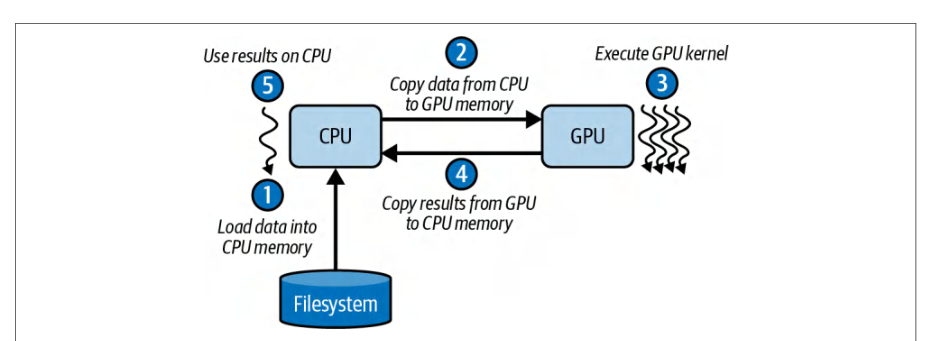
Initially, the host loads data into CPU memory. It then copies the data from the CPU to the GPU memory. After calling the GPU kernel with the data in GPU memory, the CPU copies the results back from GPU memory to CPU memory. Now the results live back on the CPU for further processing.最初,主机将数据加载到 CPU 内存中。然后将数据从 CPU 复制到 GPU 显存。在 GPU 显存中持有数据的情况下调用 GPU 内核后,CPU 将结果从 GPU 显存复制回 CPU 内存。此时结果回到 CPU 上进行进一步处理。
GPUs rely on massive parallelism to hide data-transfer latency such as the CPU-GPU data transfer described in Figure 6-1. Each GPU comprises many SMs, which are roughly analogous to CPU cores but streamlined for parallelism. Each SM can track up to 64 warps (32-thread groups) on Blackwell.GPU 依赖大规模并行性来隐藏数据传输时延,例如图 6-1 中描述的 CPU-GPU 数据传输。每个 GPU 包含许多 SM,它们大致类似于 CPU 核心,但针对并行性进行了精简。在 Blackwell 架构上,每个 SM 可以跟踪多达 64 个线程束(每组 32 个线程)。
Each GPU includes many SMs—similar to CPU cores but optimized for throughput. On modern GPUs, each SM tracks up to 64 warps (2,048 threads) concurrently. Blackwell GPUs feature 64K 32-bit registers per SM (256 KB total) and a combined 256 KB L1 cache/shared memory per SM. Up to 228 KB (227 KB usable) of that SRAM can be configured as user-managed shared memory per SM. Any single thread block can request up to 227 KB of dynamic shared memory (1 KB is of the 228 KB is reserved by CUDA). These help the SMs support the GPU’s high amount of thread-level parallelism.每个 GPU 包含许多 SM——类似于 CPU 核心但针对吞吐量进行了优化。在现代 GPU 上,每个 SM 可同时跟踪多达 64 个线程束(2,048 个线程)。Blackwell GPU 每个 SM 拥有 64K 个 32 位寄存器(总计 256 KB)以及每个 SM 256 KB 的 L1 缓存/共享内存组合。其中最多 228 KB(可用 227 KB)的 SRAM 可配置为每个 SM 的用户管理共享内存。任何单个线程块最多可请求 227 KB 的动态共享内存(228 KB 中有 1 KB 由 CUDA 保留)。这些特性有助于 SM 支持 GPU 的高线程级并行度。
Within a Blackwell SM, multiple warp schedulers issue instructions to the available pipelines; four independent warp schedulers allow up to four warps to issue instructions to the available pipelines on every cycle. Furthermore, each scheduler supports dual-issue capable of issuing two independent instructions (e.g., one arithmetic and one memory operation) per warp. Note that the dual-issue must come from the same warp—and not across warps.在 Blackwell SM 内部,多个线程束调度器向可用流水线发出指令;四个独立的线程束调度器允许每个周期最多四个线程束向可用流水线发出指令。此外,每个调度器支持双发射,即每个线程束每个周期可发出两条独立指令(例如,一条算术操作和一条内存操作)。请注意,双发射必须来自同一个线程束——而不是跨线程束。
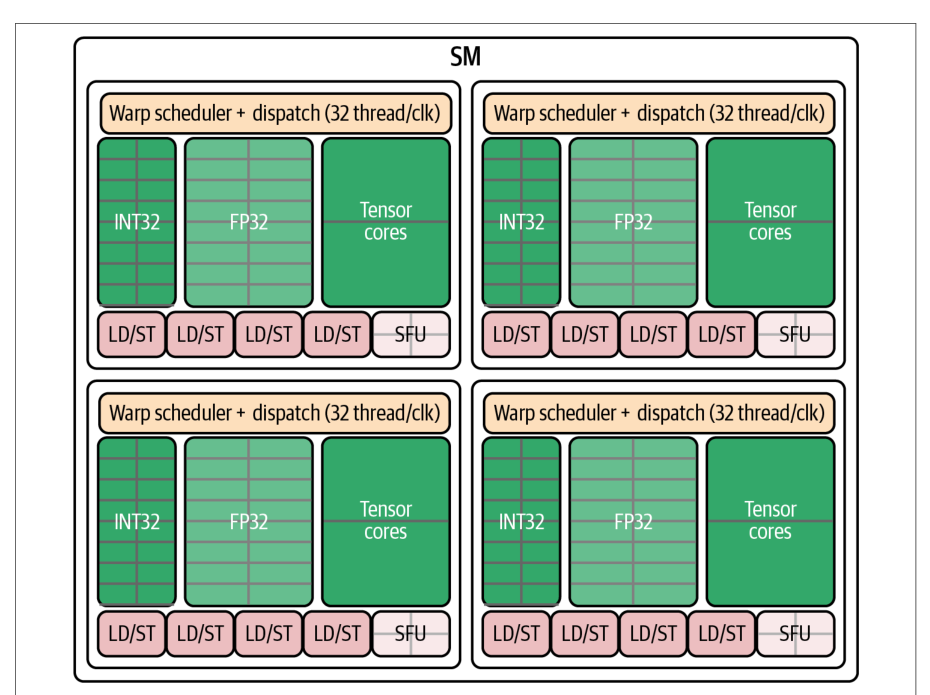
In the best case, one warp from each scheduler can issue an instruction concurrently each cycle, allowing four warps to execute in parallel per cycle. This further boosts throughput when instruction mixing is utilized, as shown in Figure 6-2.在最佳情况下,每个调度器的一个线程束可以在每个周期并发发出一条指令,从而允许每个周期并行执行四个线程束。当利用指令混合时,这进一步提升了吞吐量,如图 6-2 所示。
| Metric指标 | Value值 |
|---|---|
| Number of schedulers调度器数量 | Four4 个 |
| Maximum warps issued最大发射线程束数 | Four (one per scheduler)4 个(每个调度器 1 个) |
| Maximum math operations最大数学运算数 | Four (one per scheduler’s arithmetic issue)4 个(每个调度器的算术发射 1 个) |
| Maximum memory operations最大内存操作数 | Four (one per scheduler’s load/store issue)4 个(每个调度器的加载/存储发射 1 个) |
Here, each SM is subdivided into four independent scheduling partitions—each with its own warp scheduler and dispatch logic. You can think of the SM as four “mini-SMs” sharing on-chip resources. This lets the hardware pick ready warps and issue instructions from up to four different warps each clock cycle.在这里,每个 SM 被细分为四个独立的调度分区——每个分区拥有自己的线程束调度器和分发逻辑。你可以将 SM 视为四个共享片上资源的“迷你 SM”。这使硬件能够在每个时钟周期内从最多四个不同的线程束中挑选就绪线程束并发射指令。
Within each of the four “mini-SM” partitions, the scheduler can issue two instructions per cycle from the same warp: one arithmetic instruction (e.g., INT32, FP32, or Tensor Core) and one memory instruction (a load or store). This is why the scheduler is called dual-issue. Table 6-1 summarizes these numbers.在四个“迷你 SM”分区中的每一个内部,调度器每个周期可以从同一线程束发射两条指令:一条算术指令(例如 INT32、FP32 或张量核心指令)和一条内存指令(加载或存储)。这就是为什么该调度器被称为*双发射*。表 6-1 总结了这些数值。
So in the best case you could dual-issue four math and four memory instructions across four warps every cycle. This would maximize both compute and memory throughput simultaneously. These numbers are a result of the SM’s four-way partitioning—as well as its ability to pick one warp per partition and issue two orthogonal instructions each cycle.因此,在最佳情况下,你可以在每个周期内跨四个线程束双发射四条数学指令和四条内存指令。这将同时最大化计算和显存吞吐量。这些数值是 SM 四路分区以及其每个周期在每个分区中挑选一个线程束并发射两条正交指令的能力的结果。
The Special Function Unit (SFU) sits alongside the INT32, FP32, and Tensor Core pipelines. They handle transcendental operations (e.g., sine, cosine, reciprocal, square root). However, they are not part of the dual-issue math and memory pair. SFUs use a dedicated SFU pipeline that runs independently of the main INT32/FP32 and load/ store (LD/ST) pipelines.特殊功能单元(SFU)与 INT32、FP32 和张量核心流水线并列。它们处理超越运算(例如正弦、余弦、倒数、平方根)。然而,它们不属于双发射的数学和内存指令对。SFU 使用专用的 SFU 流水线,独立于主要的 INT32/FP32 和加载/存储(LD/ST)流水线运行。
Because SFUs occupy a separate pipeline and can execute in parallel when needed, the SM can continue issuing math and memory instructions without waiting for the slower functions to complete. This separation increases instruction-level parallelism and overall throughput even further for mixed-operation kernels. They keep complex math operations from stalling the core compute and memory pipelines.由于 SFU 占用独立的流水线,并且可以在需要时并行执行,因此 SM 无需等待较慢的函数完成,就能继续发射数学运算指令和内存指令。这种分离进一步提升了混合运算内核的指令级并行度和整体吞吐量。它们可避免复杂的数学运算阻塞核心的计算流水线和内存流水线。
Because there are four schedulers—and each can typically issue one warp instruction per cycle—up to four warps can make forward progress each cycle when there is sufficient independent work and issue-pairing. For instance, the memory operations can flow through the SM’s combined 16 load/store (LD/ST) pipelines (four LD/ST pipelines per scheduler). These will read or write data to L1/shared memory, L2 cache, or global memory (covered in an upcoming section).由于存在四个调度器——每个调度器通常每周期可以发射一条线程束指令——当有足够的独立工作和发射配对时,每个周期最多可以有四个线程束向前推进。例如,内存操作可以流经 SM 合计 16 条加载/存储(LD/ST)流水线(每个调度器四条 LD/ST 流水线)。这些流水线会向 L1/共享内存、L2 缓存或全局内存读写数据(将在后续小节介绍)。
In short, GPUs excel at data-parallel workloads, including large matrix multiplies, convolutions, and other operations where the same instruction applies to many elements. Developers write kernels directly in CUDA C++ or indirectly through high-level frameworks like PyTorch and domain-specific, Python-based GPU languages like OpenAI’s Triton.简而言之,GPU 擅长数据并行的工作负载,包括大型矩阵乘法、卷积,以及其他同一条指令作用于大量元素的操作。开发者可以直接用 CUDA C++ 编写内核,也可以通过 PyTorch 等高层框架,以及 OpenAI 的 Triton 等面向特定领域的、基于 Python 的 GPU 语言间接编写。
Before diving into kernel development and memory-access optimizations, let’s review the CUDA thread hierarchy and key terminology that underpins all of these practices.在深入内核开发和显存访问优化之前,让我们先回顾 CUDA 线程层次结构以及支撑上述所有实践的关键术语。
线程、线程束、线程块与网格
Threads, Warps, Blocks, and Grids
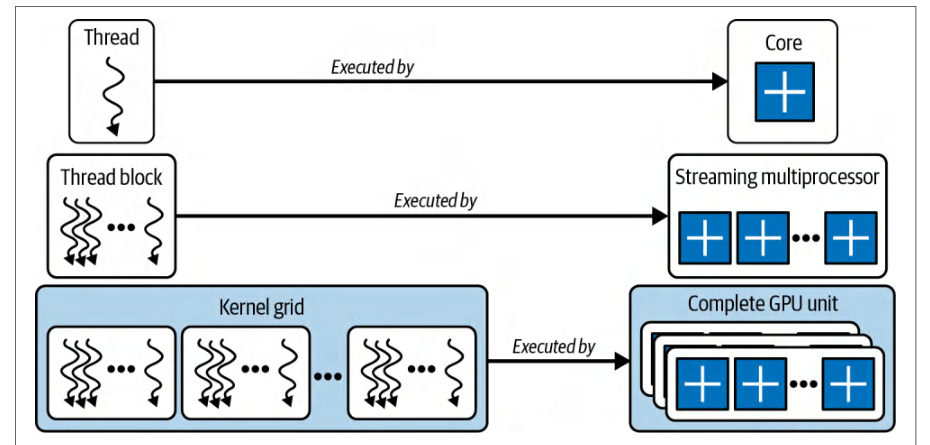
CUDA structures parallel work into a three-level hierarchy—threads, thread blocks (aka cooperative thread arrays [CTAs]), and grids—to balance programmability with massive throughput. At the lowest level, each thread executes your kernel code. You group threads into thread blocks of up to 1,024 threads each on modern GPUs. Thread blocks form a grid when you launch the kernel, as seen in Figure 6-3.CUDA 将并行工作组织为三级层次结构——线程、线程块(又称*协作线程数组*[CTA])和网格——以在可编程性与大规模吞吐量之间取得平衡。在最底层,每个线程执行你的内核代码。你将线程组织成线程块,在现代 GPU 上每个线程块最多包含 1,024 个线程。启动内核时,线程块构成一个网格,如图 6-3 所示。
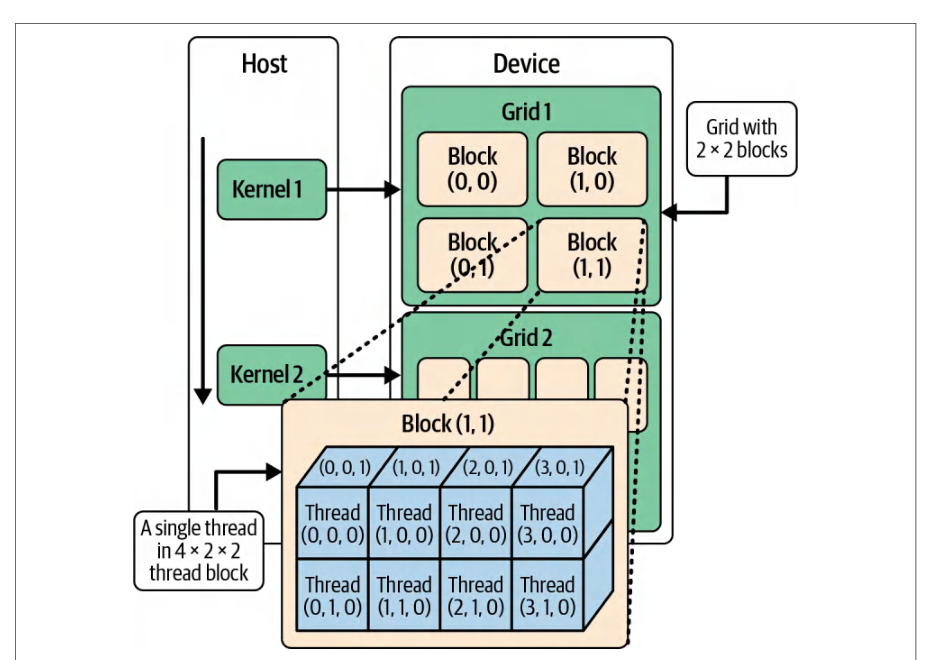
By sizing your grid appropriately, you can scale to millions of threads without changing your kernel logic. CUDA’s runtime (and frameworks like PyTorch) handle scheduling and distribution across all SMs. Figure 6-4 shows another view of the thread hierarchy, including the CPU-based host, which invokes a CUDA kernel running on the GPU device.通过合理设置网格大小,你可以在不改变内核逻辑的情况下扩展到数百万个线程。CUDA 运行时(以及 PyTorch 等框架)负责在所有 SM 上的调度与分配。图 6-4 展示了线程层次结构的另一个视图,其中包含基于 CPU 的主机,它调用在 GPU 设备上运行的 CUDA 内核。
Traditionally, threads from different thread blocks could not work with one another directly. However, modern GPU architectures and CUDA versions support thread block clusters. Threadblock clusters are groups of thread blocks that can communicate with one another across SMs.传统上,来自不同线程块的线程无法直接相互协作。然而,现代 GPU 架构和 CUDA 版本支持线程块集群。线程块集群是一组可以跨 SM 相互通信的线程块。
Specifically, within a thread block cluster, threads in different thread blocks can access one another’s shared memory and use hardware-supported, cluster-scoped barriers. These allow for much larger compute operations, including matrix multiplies, which are very common in today’s massive LLM workloads. Thread block clusters share a distributed shared-memory (DSMEM) address space between SMs that participate in the thread block cluster, as shown in Figure 6-5.具体而言,在一个线程块集群内,不同线程块中的线程可以访问彼此的共享内存,并使用硬件支持的、集群作用域的屏障。这使得更大规模的计算操作成为可能,包括矩阵乘法,而这在当今大规模 LLM 工作负载中非常常见。线程块集群在参与该集群的 SM 之间共享一个分布式共享内存(DSMEM)地址空间,如图 6-5 所示。
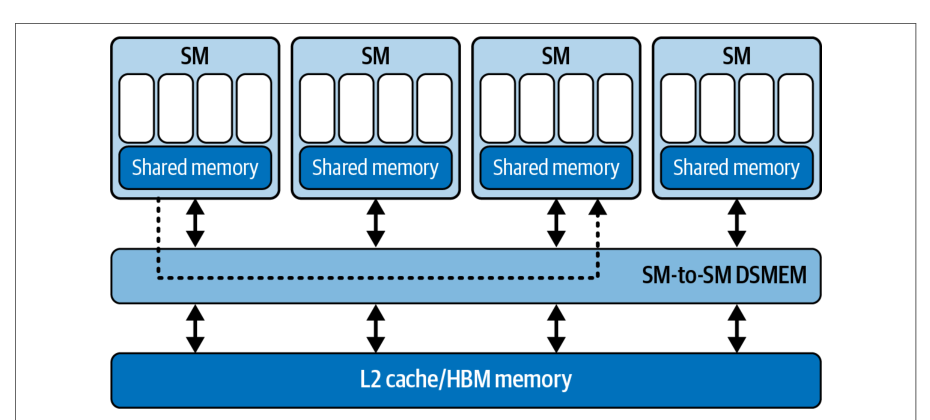
DSMEM is a hardware feature that links the shared-memory banks of all SMs into a thread block cluster over a fast on-chip interconnect. With DSMEM, the SMs share a combined multi-SM distributed shared-memory pool. This unification allows threads in different blocks to read, write, and atomically update one another’s shared buffers at on-chip speeds—and without using global memory bandwidth.DSMEM 是一种硬件特性,它通过快速的片上互连把所有 SM 的共享内存存储体连接成一个线程块集群。借助 DSMEM,各 SM 共享一个合并的多 SM 分布式共享内存池。这种统一化使不同线程块中的线程能够以片上速度读取、写入和原子更新彼此的共享缓冲区——而且不占用全局内存带宽。
Within each thread block, threads share data using low-latency on-chip shared memory and synchronize with __syncthreads(). Because each barrier incurs overhead, you should minimize synchronization points, as shown in Figure 6-6.在每个线程块内,线程通过低时延的片上共享内存共享数据,并使用 __syncthreads() 进行同步。由于每次屏障都会带来开销,应尽量减少同步点,如图 6-6 所示。
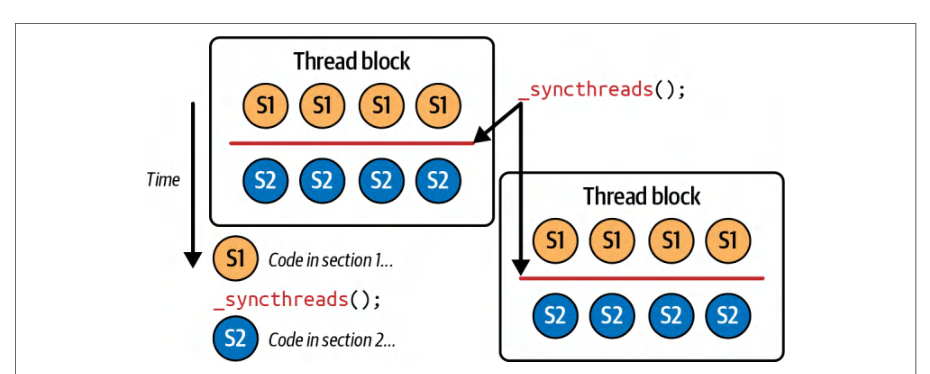
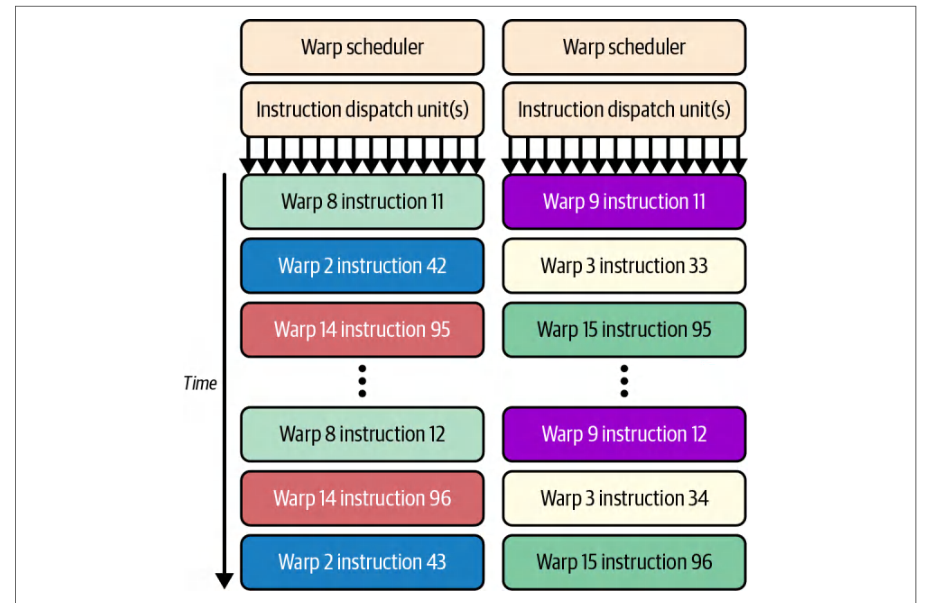
The goal is to minimize synchronization points. However, the GPU hardware will attempt to hide long-latency events such as global-memory loads, cache fills, and pipeline stalls by rapidly switching among warps.目标是尽量减少同步点。不过,GPU 硬件会通过在多个线程束之间快速切换,来尝试隐藏全局内存加载、缓存填充和流水线停顿等长时延事件。
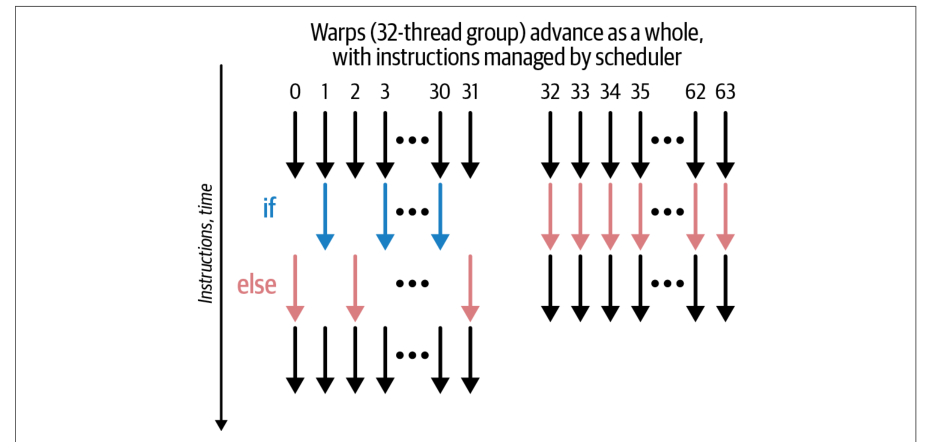
Thread blocks are subdivided into warps of 32 threads that execute in lockstep under the SIMT model using a warp scheduler. This is shown in Figure 6-7.线程块被划分为由 32 个线程组成的线程束,它们在 SIMT 模型下由线程束调度器驱动、以锁步方式执行。如图 6-7 所示。
Keeping more warps in flight is known as high occupancy on the SM. When your CUDA code allows high occupancy, it means that when one warp stalls, another is ready to run. This keeps the GPU’s compute units busy.让更多线程束保持在执行中,在 SM 上称为*高占用率*。当你的 CUDA 代码允许高占用率时,就意味着一个线程束停顿时,另一个线程束已准备好运行。这使 GPU 的计算单元保持忙碌。
However, high occupancy must be balanced against per-thread resource limits, such as registers and shared memory. Spilling registers to slower memory can create new stalls. Profiling occupancy alongside register and shared-memory usage helps you choose a block size that maximizes throughput without triggering resource contention.然而,高占用率必须与每线程资源限制(如寄存器和共享内存)相权衡。将寄存器溢出到较慢的内存会引入新的停顿。结合寄存器与共享内存使用情况来剖析占用率,有助于你选择既能最大化吞吐量又不会引发资源争用的线程块大小。
Thread blocks execute independently and in no guaranteed order. This allows the GPU scheduler to dispatch them across all SMs and fully exploit hardware parallelism. This grid–block–warp hierarchy guarantees that your CUDA kernels will run unmodified on future GPU architectures with more SMs and threads.线程块独立执行,且执行顺序没有任何保证。这使 GPU 调度器能够把它们分发到所有 SM 上,充分利用硬件并行性。这种网格—线程块—线程束的层次结构保证了你的 CUDA 内核无需修改即可在具有更多 SM 和线程的未来 GPU 架构上运行。
Throughput also hinges on warp execution efficiency. Threads in a warp must follow the same control-flow path and perform coalesced memory accesses. If some threads diverge such that one branch takes the if path and others take the else path, the warp serializes execution, processing each branch path sequentially. This is called warp divergence, and it’s shown in Figure 6-8.吞吐量还取决于线程束的执行效率。一个线程束中的线程必须遵循相同的控制流路径,并执行合并的显存访问。如果某些线程发生发散,例如一个分支走 if 路径而其他线程走 else 路径,线程束就会串行化执行,依次处理每条分支路径。这称为*线程束发散*,如图 6-8 所示。
By masking inactive lanes and running extra passes to cover each branch, warp divergence multiplies the overall execution time by the number of branches. We’ll dive deeper into warp divergence in Chapter 8—as well as ways to detect, profile, and mitigate it.通过屏蔽非活跃通道(lane)并运行额外的遍历来覆盖每个分支,线程束发散会把整体执行时间乘以分支数量。我们将在第 8 章深入探讨线程束发散,以及检测、剖析和缓解它的方法。
选择每块线程数和每网格块数
Choosing Threads-per-Block and Blocks-per-Grid Sizes
A critical aspect of GPU performance is choosing a thread block size that aligns with the hardware’s 32-thread warp size. As such, you typically pick thread block sizes that are exact multiples of 32. For example, a 256-thread block (8 warps = 256 ÷ 32) fully occupies each warp, whereas a 33-thread block will require two warp slots and use only 1/32 of the second warp’s lanes. This wastes parallelism opportunities since every warp occupies a scheduler slot whether it’s actively running 32 threads or just 1 thread.GPU 性能的一个关键方面是选择与硬件 32 线程线程束大小对齐的线程块大小。因此,你通常选择 32 的整数倍作为线程块大小。例如,256 线程的块(8 个线程束 = 256 ÷ 32)完全占用了每个线程束,而 33 线程的块则需要两个线程束槽位,且仅使用了第二个线程束 1/32 的通道。这浪费了并行机会,因为无论线程束是活跃运行 32 个线程还是仅 1 个线程,它都占用一个调度器槽位。
Additionally, different GPU generations have different hardware limits, including maximum threads per SM and the number of registers per SM. This naturally limits the size of our blocks if we want to maintain good performance. For instance, too large a block might require too many registers, which will cause register spilling and decrease the kernel’s performance.此外,不同代际的 GPU 具有不同的硬件限制,包括每个流多处理器(SM)的最大线程数和每个 SM 的寄存器数量。如果我们希望保持良好的性能,这自然限制了我们块的大小。例如,过大的块可能需要过多的寄存器,从而导致*寄存器溢出*并降低内核性能。
A large block might also require too much shared memory, which is finite in GPU hardware. Specifically, Blackwell provides only 228 KB (227 KB usable) per SM of shared memory addressable by all resident thread blocks running on the SM.大线程块还可能要求过多的共享内存,而 GPU 硬件中的共享内存是有限的。具体而言,Blackwell 架构每个 SM 仅提供 228 KB(可用 227 KB)的共享内存,供该 SM 上所有驻留的线程块寻址。
These hardware limits affect how many blocks/warps can be active on an SM at once. This is a measurement of occupancy, as we introduced earlier. Smaller blocks might enable higher occupancy if they allow more concurrent warps to run concurrently on the SM.这些硬件限制影响 SM 上同时可以激活的块/线程束数量。这就是我们之前介绍的占用率度量。如果较小的块允许更多并发线程束在 SM 上同时运行,则可能实现更高的占用率。
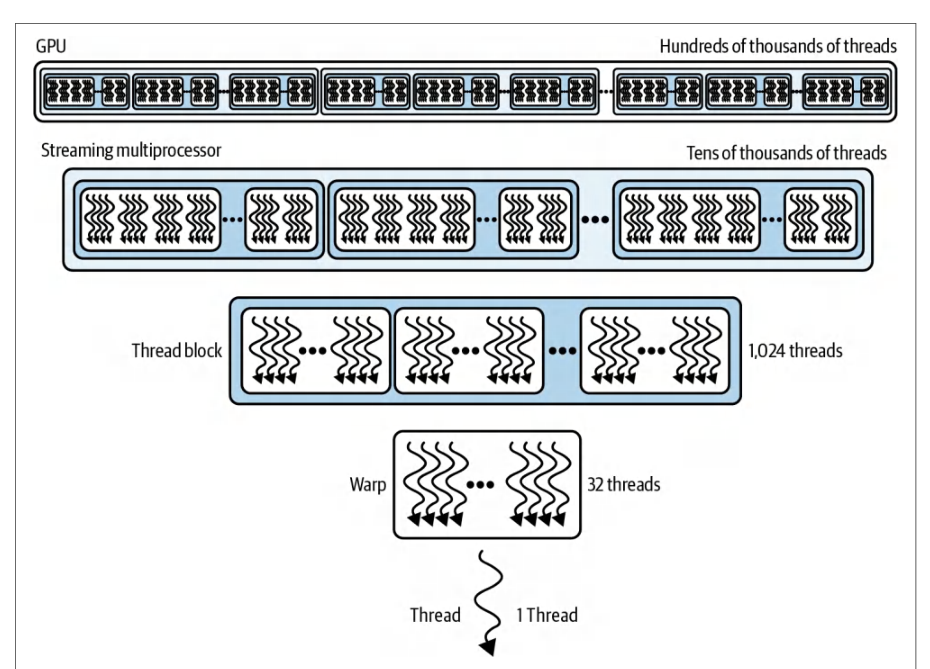
It’s important to understand the relative scale and hardware thread limits for your GPU generation, including number of threads, thread blocks, warps, and SMs. Figure 6-9 shows the relative scale of these resources, including their limits.了解你所在 GPU 代际的相对规模和硬件线程限制非常重要,包括线程数、线程块数、线程束数和 SM 数。图 6-9 展示了这些资源的相对规模及其限制。
| Resource资源 | Hardware limit硬件限制 | Notes说明 |
|---|---|---|
| Warp size线程束大小 | 32 threads32 线程 | The fundamental SIMT execution unit is 32 threads (a warp). Always use a multiple of 32 to avoid waste.基本的 SIMT 执行单元是 32 个线程(一个线程束)。始终使用 32 的倍数以避免浪费。 |
| Maximum threads per thread block每个线程块的最大线程数 | 1,024 threads1,024 个线程 | blockDim.x blockDim.y blockDim.z ≤ 1024.blockDim.x blockDim.y blockDim.z ≤ 1024。 |
| Maximum warps per thread block每个线程块的最大线程束数 | 32 warps32 个线程束 | (1,024 threads ÷ 32 threads-per-warp) = 32 warps max per block.(1,024 个线程 ÷ 32 个线程/线程束)= 每个块最多 32 个线程束。 |
Table 6-2 summarizes these GPU limits for the Blackwell B200 GPU. The rest of the limits are available on NVIDIA’s website. (Other GPU generations will have different limits, so be sure to check the exact specifications for your system.)表 6-2 总结了 Blackwell B200 GPU 的这些限制。其余限制可在 NVIDIA 网站上获取。(其他 GPU 代际的限制有所不同,因此请务必查阅您系统的确切规格。)
We already discussed the warp size limit of 32 threads, which encourages us to choose block dimensions that are multiples of 32 threads to create “full warps” and avoid underutilized warps. Note that each block can have up to 1,024 threads and, correspondingly, a block can contain only 32 warps. These limits affect your occupancy since, once a block is scheduled, each SM can host a limited number of warps and blocks simultaneously.我们已经讨论了 32 个线程的线程束大小限制,这促使我们选择 32 个线程倍数的块维度以创建“满线程束”并避免线程束利用率不足。请注意,每个块最多可以有 1,024 个线程,相应地,一个块只能包含 32 个线程束。这些限制会影响您的占用率,因为一旦块被调度,每个流多处理器(SM)可以同时托管有限数量的线程束和块。
| Resource (per SM)资源(每个 SM) | Hardware limit硬件限制 | Notes说明 |
|---|---|---|
| Maximum resident最大常驻 | 64 warps64 个线程束 | Hardware can keep up to 64 warps in flight (64 × 32 threads = 2,048 threads).硬件最多可保持 64 个线程束处于执行状态(64 × 32 个线程 = 2,048 个线程)。 |
| warps per SM每个 SM 的线程束数 | Note: This limit has held for many generations and remains true for Blackwell.注:此限制已持续多代架构,在 Blackwell 架构中依然成立。 | |
| Maximum resident最大常驻 | 2,048 threads2,048 个线程 | Equals 64 warps × 32 threads/warp. If each block uses 1,024 threads, then at most 2等于 64 个线程束 × 32 个线程/线程束。如果每个块使用 1,024 个线程,则最多有 2 |
| threads per SM每个 SM 的线程数 | such blocks (64 warps) can reside on one SM concurrently. Using smaller blocks (e.g., 256 threads) allows more blocks to reside on the SM (up to 8 blocks × 256 = 2,048 threads), which can increase occupancy and help hide latency—though too many tiny blocks can add scheduling overhead.个这样的块(64 个线程束)可以并发驻留在一个 SM 上。使用较小的块(例如 256 个线程)允许更多块驻留在 SM 上(最多 8 个块 × 256 = 2,048 个线程),这可以提高占用率并有助于隐藏时延——尽管过多的微小块会增加调度开销。 | |
| Maximum active最大活跃 | 32 blocks32 个块 | At most, 32 thread blocks can be simultaneously resident on one SM (if blocks are一个 SM 上最多可同时驻留 32 个线程块(如果块 |
| blocks per SM每个 SM 的块数 | smaller, more can fit up to this limit).较小,则可以容纳更多,直至达到此限制)。 |
| Grid dimension网格维度 | Limit限制 | Notes说明 |
|---|---|---|
| Maximum blocks in X, Y, or ZX、Y 或 Z 方向的最大块数 | X: 2,147,483,647 blocks Y: 65,535 blocks Z: 65,535 blocksX:2,147,483,647 个块 Y:65,535 个块 Z:65,535 个块 | A 3D grid can be as large as 2,147,483,647 × 65,535 × 65,535 blocks.3D 网格最大可达 2,147,483,647 × 65,535 × 65,535 个块。 |
| Maximum concurrent grids最大并发网格数 | 128 grids128 个网格 | Up to 128 kernels can execute concurrently on one device (i.e.,单个设备上最多可并发执行 128 个内核(即 |
| (kernels)(内核) | 128 grids resident at once).128 个网格同时驻留)。 |
Additionally, there are per-SM limits, or SM-resident limits as they are commonly called, for the different GPU generations. These SM-resident Blackwell limits are summarized in Table 6-3.此外,针对不同 GPU 代际,还存在每个流多处理器(SM)的限制,通常称为 SM 驻留限制。Blackwell 的 SM 驻留限制汇总于表 6-3。
Here, we see that the maximum number of concurrent warps per SM on Blackwell is 64. This hasn’t changed for recent GPU generations, so occupancy considerations carry over. Maximum active blocks on an SM is 32, and, correspondingly, maximum resident threads per SM is 2,048 threads. CUDA grids also have maximum dimensions, as shown in Table 6-4.由此可见,Blackwell 上每个 SM 的最大并发线程束数为 64。这一数值在近期 GPU 代际中未发生变化,因此占用率考量依然适用。每个 SM 的最大活动块数为 32,相应地,每个 SM 的最大驻留线程数为 2,048 个线程。CUDA 网格也有最大维度限制,如表 6-4 所示。
While it’s good to know the theoretical grid limits, you will typically be bound by the thread/block/per-SM limits shown previously. If you ever need more than 65,535 blocks in one dimension, you can launch a 2D or 3D grid to split your work across multiple kernel launches (multilaunch). We show an example of this in a later section. In practice, it’s rare to hit the grid size limit before hitting other resource limits.虽然了解理论上的网格上限很有用,但实际中你通常会先受限于前面展示的线程/线程块/每 SM 限制。如果你确实需要在某一维度上超过 65,535 个线程块,可以启动 2D 或 3D 网格,把工作拆分到多次内核启动(multilaunch)中。我们会在后面的小节给出一个示例。实践中,在触及网格大小上限之前,往往早已触及别的资源限制。
CUDA GPU 向后与向前兼容模型
CUDA GPU Backward and Forward Compatibility Model
One of CUDA’s core strengths is its forward and backward compatibility model. Kernels compiled today will generally run unmodified on future GPU generations—as long as you include PTX in your binary for forward compatibility. If you ship only SASS for a single architecture (e.g., sm_90 for Hopper or sm_100 for Blackwell) without PTX, that binary will not forward-run on newer architectures. Family-specific targets such as sm_100f or compute_100f restrict portability to devices in the same feature family. It’s best to ship a fatbin that includes both generic cubin/PTX and family-specific cubins needed (e.g., optimizations, etc.).CUDA 的核心优势之一是其向前与向后兼容模型。今天编译的内核通常无需修改即可在未来的 GPU 架构上运行——前提是你在二进制中包含了 PTX 以支持向前兼容。如果你只针对单一架构发布 SASS(例如面向 Hopper 的 sm_90 或面向 Blackwell 的 sm_100)而不包含 PTX,那么该二进制将无法在更新的架构上向前运行。诸如 sm_100f 或 compute_100f 这类特定特性家族的目标会把可移植性限制在同一特性家族内的设备上。最好发布一个 fatbin,其中同时包含通用的 cubin/PTX 以及所需的特定家族 cubin(例如优化等)。
You can verify compatibility by forcing PTX JIT compilation at load time by setting CUDA_FORCE_PTX_JIT=1 to JIT-compile the PTX and cache the result. If your binary lacks PTX, the kernel launch will fail. This forces you to rebuild with PTX support. This compatibility model is fundamental to the large CUDA ecosystem. It lets you target both legacy and cutting-edge hardware from a single codebase.你可以通过在加载时强制进行 PTX JIT 编译来验证兼容性:设置 CUDA_FORCE_PTX_JIT=1,对 PTX 进行 JIT 编译并缓存结果。如果你的二进制缺少 PTX,内核启动就会失败。这会迫使你重新构建并支持 PTX。这一兼容模型是庞大 CUDA 生态系统的根基,它让你可以用单一代码库同时面向旧有硬件与最前沿硬件。
CUDA 编程快速回顾
CUDA Programming Refresher
In CUDA C++, you define parallel work by writing kernels. These are special functions annotated with __global__ that execute on the GPU device. When you invoke a kernel from the CPU (host) code, you use the <<< >>> “chevron” syntax to specify how many threads should run—and how they’re organized—using two configuration parameters: blocksPerGrid for the number of thread blocks and threadsPerBlock for the number of threads within each block.在 CUDA C++ 中,你通过编写内核来定义并行工作。内核是用 __global__ 标注的特殊函数,在 GPU 设备上执行。当你在 CPU(主机)代码中调用内核时,使用 <<< >>>“尖括号”语法,通过两个配置参数来指定应运行多少线程以及它们如何组织:blocksPerGrid 表示线程块的数量,threadsPerBlock 表示每个线程块内的线程数。
Here is a simple example that demonstrates the key components of a CUDA kernel and kernel launch. This kernel simply doubles every element in the input array in place so no additional memory is created—just the input array. Behind the scenes, CUDA compiles the __global__ function into GPU device code that can be executed by thousands or millions of lightweight threads in parallel:下面是一个简单示例,展示了 CUDA 内核与内核启动的关键组成部分。该内核只是就地把输入数组中的每个元素翻倍,因此不会创建额外内存——只有输入数组。在幕后,CUDA 会把 __global__ 函数编译成 GPU 设备代码,可由成千上万个轻量级线程并行执行:
//-------------------------------------------------------
// 内核:myKernel 在设备(GPU)上运行
//   - input :指向长度为 N 的 float 数组的设备指针
//   - N   :输入中元素的总数
//-------------------------------------------------------
//-------------------------------------------------------
// Kernel: myKernel running on the device (GPU)
//   - input : device pointer to float array of length N
//   - N   : total number of elements in the input
//-------------------------------------------------------
__global__ void myKernel(float* input, int N) {
    // 计算唯一的全局线程索引
    int idx = blockIdx.x * blockDim.x + threadIdx.x;
    // 仅处理有效元素
    if (idx < N) {
        input[idx] *= 2.0f;
    }
}
// 此代码在主机(CPU)上运行
int main() {
    // 1) 问题规模:一百万个 float
    const int N = 1'000'000;
    float *h_input = nullptr;
    float *d_input = nullptr;
    // 1) 在主机上分配大小为 N 的输入 float 数组
    cudaMallocHost(&h_input, N * sizeof(float));
    // 2) 初始化主机数据(例如,全部为 1)
    for (int i = 0; i < N; ++i) {
        h_input[i] = 1.0f;
    }
    // 3) 在设备上为输入分配设备显存
    cudaMalloc(&d_input, N * sizeof(float));
    // 4) 将数据从主机复制到设备
    cudaMemcpy(d_input, h_input, N * sizeof(float),
      cudaMemcpyHostToDevice);
    // 5) 选择内核启动参数

    // 每个线程块的线程数(32 的倍数)
    const int threadsPerBlock = 256;
    // 每个网格的线程块数(N = 1000000 时为 3,907)
    const int blocksPerGrid = (N + threadsPerBlock - 1) /
      threadsPerBlock;
    // 6) 在 blocksPerGrid 个线程块上启动 myKernel
    // 每个线程块包含 threadsPerBlock 个线程
    // 传入指向设备数组 d_input 的引用
    myKernel<<<blocksPerGrid, threadsPerBlock>>>(d_input,
      N);
    // 7) 等待内核在设备上执行完毕
    cudaDeviceSynchronize();
    // 8) 执行完毕后,复制结果
    //    (存放在 d_input 中)从设备回传到
    //     主机(存放在 h_input 中)
__global__ void myKernel(float* input, int N) {
    // Compute a unique global thread index
    int idx = blockIdx.x * blockDim.x + threadIdx.x;
    // Only process valid elements
    if (idx < N) {
        input[idx] *= 2.0f;
    }
}
// This code runs on the host (CPU)
int main() {
    // 1) Problem size: one million floats
    const int N = 1'000'000;
    float *h_input = nullptr;
    float *d_input = nullptr;
    // 1) Allocate input float array of size N on host
    cudaMallocHost(&h_input, N * sizeof(float));
    // 2) Initialize host data (for example, all ones)
    for (int i = 0; i < N; ++i) {
        h_input[i] = 1.0f;
    }
    // 3) Allocate device memory for input on the device
    cudaMalloc(&d_input, N * sizeof(float));
    // 4) Copy data from the host to the device
    cudaMemcpy(d_input, h_input, N * sizeof(float),
      cudaMemcpyHostToDevice);
    // 5) Choose kernel launch parameters

    // Number of threads per block (multiple of 32)
    const int threadsPerBlock = 256;
    // Number of blocks per grid (3,907 for N = 1000000)
    const int blocksPerGrid = (N + threadsPerBlock - 1) /
      threadsPerBlock;
    // 6) Launch myKernel across blocksPerGrid blocks
    // Each block has threadsPerBlock number of threads
    // Pass a reference to the d_input device array
    myKernel<<<blocksPerGrid, threadsPerBlock>>>(d_input,
      N);
    // 7) Wait for the kernel to finish running on device
    cudaDeviceSynchronize();
    // 8) When finished, copy the results
    //    (stored in d_input) from the device back to
    //     host (stored in h_input)
    cudaMemcpy(h_input, d_input, N * sizeof(float),
               cudaMemcpyDeviceToHost);
    // 清理:释放设备与主机上的内存
    cudaFree(d_input);
    cudaFreeHost(h_input);
    // 成功时返回 0!
    return 0;
    cudaMemcpy(h_input, d_input, N * sizeof(float),
               cudaMemcpyDeviceToHost);
    // Cleanup: Free memory on the device and host
    cudaFree(d_input);
    cudaFreeHost(h_input);
    // return 0 for success!
    return 0;
Here, we are passing kernel input arguments, d_input and N, which are accessible inside the kernel function for processing. The processing is shared, in parallel, across many threads. This is by design.这里我们传入了内核输入参数 d_input 和 N,它们在内核函数内部可被访问以进行处理。处理工作由众多线程并行分担。这是有意为之的设计。
The full data flow is as follows:完整的数据流如下:
1. Allocate memory on the host (h_input).1. 在主机上分配内存(h_input)。
2. Copy data from the host (h_input) to device (d_input) using cudaMemcpy with cudaMemcpyHostToDevice.2. 使用 cudaMemcpy 并以 cudaMemcpyHostToDevice 将数据从主机(h_input)复制到设备(d_input)。
3. Run the kernel on the device with d_input.3. 在设备上使用 d_input 运行内核。
4. Synchronize to ensure the kernel has finished executing on the device.4. 同步,以确保内核已在设备上执行完毕。
5. Transfer the results (d_input) from device to host (h_input) using cudaMemcpy with cudaMemcpyDeviceToHost.5. 使用 cudaMemcpy 并指定 cudaMemcpyDeviceToHost,将结果(d_input)从设备传输到主机(h_input)。
6. Clean up memory on the device and host with cudaFree and cudaFreeHost.6. 使用 cudaFree 和 cudaFreeHost 清理设备与主机上的内存。
You can pass additional, advanced, CUDA-specific parameters to your kernel at launch time with <<< >>>, including shared-memory size (and many others), but the two core launch parameters, blocksPerGrid and threadsPerBlock, are the foundation of any CUDA kernel invocation. In the next section, we will discuss how to best choose these launch parameter values.启动时,你可以通过 <<< >>> 向内核传递额外的、高级的 CUDA 专有参数,包括共享内存大小(以及许多其他参数),但两个核心启动参数 blocksPerGrid 和 threadsPerBlock 是任何 CUDA 内核调用的基础。下一节我们将讨论如何最好地选择这些启动参数的值。
And you might be wondering why we have to pass N, the size of the input array. This seems redundant since the kernel should be able to inspect the size of the array. However, this is the core difference between a GPU CUDA kernel function and a typical CPU function: a CUDA kernel function is designed to work inside of a single thread, alongside thousands of other threads, on a partition of the input data. As such, N defines the size of the partition that this particular kernel will process.你可能想知道为什么必须传入 N,即输入数组的大小。这看起来是多余的,因为内核本应能够检查数组的大小。然而,这正是 GPU CUDA 内核函数与典型 CPU 函数的核心区别:CUDA 内核函数被设计为在单个线程内、与成千上万个其他线程一起,处理输入数据的一个分区。因此,N 定义了这个特定内核将要处理的分区大小。
Combined with the built-in kernel variables blockDim (1 in this case since we’re passing a one-dimensional input array), blockIdx, and threadIdx, the kernel calculates the specific idx into the input array. This unique idx lets the kernel process every element of the input array cleanly and uniquely, in parallel, across many threads running across many different SMs simultaneously.结合内核内置变量 blockDim(此处为 1,因为我们传入的是一维输入数组)、blockIdx 和 threadIdx,内核计算出输入数组中的具体 idx。这个唯一的 idx 使内核能够在同时运行于许多不同 SM 上的众多线程之间,并行地、干净且唯一地处理输入数组的每个元素。
Note the bounds check if (idx < N). This is needed to avoid out-of-range access (bounds check) since N may not be an exact multiple of the block size. For instance, consider a scenario in which the input array is size 63, so N = 63. The warp scheduler will likely assign two warps (32 threads each) to process the 63 elements in the input array.注意边界检查 if (idx < N)。由于 N 可能不是块大小的整数倍,因此需要它来避免越界访问(边界检查)。例如,考虑输入数组大小为 63 的场景,即 N = 63。线程束调度器很可能会分配两个线程束(每个 32 个线程)来处理输入数组中的 63 个元素。
The first warp will run 32 instances of the kernel simultaneously to process elements 0–31 and never exceed N = 63. That’s straightforward. The second warp, running in parallel with the first warp, will expect to process elements 32–64. However, it will stop when it reaches N = 63.第一个线程束将同时运行 32 个内核实例来处理元素 0–31,且绝不会超过 N = 63。这很直接。第二个线程束与第一个线程束并行运行,它期望处理元素 32–64。然而,当它到达 N = 63 时就会停止。
Without the if (idx < N) bounds check, the second warp will try to process idx = 64, and it will throw an illegal memory access error (e.g., cudaErrorIllegalAd dress). The bounds check ensures that every thread either works on a valid input element or exits immediately if its idx is out of range.如果没有 if (idx < N) 边界检查,第二个线程束将尝试处理 idx = 64,并抛出非法内存访问错误(例如 cudaErrorIllegalAd dress)。边界检查确保每个线程要么处理一个有效的输入元素,要么在其 idx 超出范围时立即退出。
CUDA kernels execute asynchronously on the device without per-thread exceptions; instead, any illegal operation (out-of-bounds access, misaligned access, etc.) sets a global fault flag for the entire launch. The host driver only checks that flag when you next call a synchronization or another CUDA API function, so errors surface lazily (e.g., as cudaErrorIllegalAddress or a generic launch failure).CUDA 内核在设备上异步执行,不存在逐线程异常;相反,任何非法操作(越界访问、未对齐访问等)都会为整个启动设置一个全局故障标志。主机驱动只会在你下次调用同步或另一个 CUDA API 函数时检查该标志,因此错误是延迟暴露的(例如表现为 cudaErrorIllegalAddress 或通用的启动失败)。
This design keeps the GPU’s pipelines and interconnects fully occupied but requires you to explicitly synchronize and poll for errors on the host—usually with cudaGet LastError() and cudaDeviceSynchronize() immediately after kernel launches. This way, you catch faults as soon as they occur.这种设计使 GPU 的流水线和互连保持满负荷运转,但要求你在主机上显式同步并轮询错误——通常是在内核启动后立即调用 cudaGet LastError() 和 cudaDeviceSynchronize()。这样,一旦发生故障你就能立刻捕获。
You will see a bounds check in a lot of CUDA kernels. If you don’t see it, you should understand why it’s not there. It’s likely there in some fashion—or the CUDA kernel developer can somehow guarantee the illegal memory access error will never happen.你会在许多 CUDA 内核中看到边界检查。如果没有看到,你应该弄清楚它为什么不在那里。它很可能以某种形式存在——或者 CUDA 内核开发者能够以某种方式保证非法内存访问错误永远不会发生。
And finally, we get to the actual kernel logic. After computing its unique index idx into the input array, this kernel (running separately on thousands of threads in parallel across many SMs) multiplies the value at index idx in the input array by 2. It then updates the value (in place) in the input array. In this specific kernel, no additional memory is needed except the temporary idx variable of type int.最后,我们进入真正的内核逻辑。在计算出自己在输入数组中的唯一索引 idx 之后,这个内核(在众多 SM 上以数千个线程并行、各自独立地运行)将输入数组中索引 idx 处的值乘以 2,然后就地更新输入数组中的该值。在这个特定的内核中,除了类型为 int 的临时变量 idx 之外,不需要任何额外的内存。
配置启动参数:每个网格的块数与每个块的线程数
Configuring Launch Parameters: Blocks per Grid and Threads per Block
As discussed earlier, using a block size that’s a multiple of the warp size (32) is critical. A threadsPerBlock size of 256 (eight warps) is a common starting point to balance occupancy and resource usage. This will help us avoid partially filled warps during kernel execution, hide latency, and balance SMs and other hardware resources:如前所述,使用线程束大小(32)的整数倍作为块大小至关重要。threadsPerBlock 取 256(八个线程束)是一个常见的起点,可兼顾占用率与资源使用。这有助于我们在内核执行期间避免出现未填满的线程束、隐藏时延,并平衡 SM 与其他硬件资源:
- Multiple of 32 threads32 个线程的整数倍
- Choosing a block size that is a multiple of 32 threads helps to avoid empty warp slots. Otherwise those underfilled warps occupy scarce scheduler resources— without contributing useful work.选择 32 个线程的整数倍作为块大小,有助于避免出现空的线程束槽位。否则,这些未填满的线程束会占用稀缺的调度器资源,却不贡献任何有用的工作。
- Latency hiding时延隐藏
- Hundreds of threads per SM are needed to hide DRAM and instruction-latency stalls. If you launch, say, eight blocks of 256 threads on an SM with 2,048 threads of capacity, you can keep the pipeline busy without oversubscribing.每个 SM 需要数百个线程才能隐藏 DRAM 与指令时延造成的停顿。例如,在一个容量为 2,048 个线程的 SM 上启动八个各含 256 个线程的块,就能让流水线保持忙碌而不会超额订阅。
- Occupancy占用率
- With 256
threadsPerBlock, for example, you need only eight warps per block. This tends to give good occupancy without running out of registers or shared memory per block.例如,当threadsPerBlock为 256 时,每个块只需要八个线程束。这通常能带来良好的占用率,同时不会耗尽每个块的寄存器或共享内存。
- Resource-balanced资源均衡
- 256 is small enough that you rarely exceed the 1,024-thread-per-block limit. And it’s large enough that you’re not leaving too many warps idle when threads in other warps stall.256 足够小,很少会超过每块 1,024 个线程的上限;又足够大,当其他线程束中的线程停顿时,不会让太多线程束处于空闲状态。
Starting with threadsPerBlock=256, you can tune up or down (128, 512, etc.) based on your kernel’s register and shared-memory requirements—as well as occupancy characteristics.从 threadsPerBlock=256 开始,你可以根据内核的寄存器与共享内存需求,以及占用率特征,向上或向下调整(128、512 等)。
For blocksPerGrid, you can base this on the number of N input elements and the value of threadsPerBlock. For instance, the blocksPerGrid is commonly set to (N + threadsPerBlock - 1) / threadsPerBlock to round up so that you cover all elements if N is not an exact multiple of threadsPerBlock. This is a common choice that guarantees every input element is covered by a thread. Here is the code that shows the calculation:对于 blocksPerGrid,可以基于输入元素个数 N 和 threadsPerBlock 的值来确定。例如,blocksPerGrid 通常设为 (N + threadsPerBlock - 1) / threadsPerBlock,以便向上取整,从而在 N 不是 threadsPerBlock 的整数倍时仍覆盖所有元素。这是一个常见选择,可保证每个输入元素都由一个线程负责。下面的代码展示了这一计算:
//-------------------------------------------------------
// 内核:myKernel 在设备(GPU)上运行
//   - input :指向长度为 N 的 float 数组的设备指针
//   - N   :输入中元素的总数
//-------------------------------------------------------
__global__ void myKernel(float* input, int N) {
    // 计算唯一的全局线程索引
    int idx = blockIdx.x * blockDim.x + threadIdx.x;
    // 仅处理有效元素
    if (idx < N) {
        input[idx] *= 2.0f;
    }
}
// 此代码在主机(CPU)上运行
int main() {
    // 1) 问题规模:一百万个 float
    const int N = 1'000'000;
    float* h_input = nullptr;
    cudaMallocHost(&h_input, N * sizeof(float));
    // 初始化主机数据(例如全部置为 1)
    for (int i = 0; i < N; ++i) {
        h_input[i] = 1.0f;
    }
    // 在设备上为输入分配设备显存(d_)
    float* d_input = nullptr;
    cudaMalloc(&d_input, N * sizeof(float));
    // 使用 cudaMemcpyHostToDevice 将数据从主机复制到设备
    cudaMemcpy(d_input, h_input, N * sizeof(float),
      cudaMemcpyHostToDevice);
    // 2) 调整启动参数
    const int threadsPerBlock = 256; // 32 的倍数
    const int blocksPerGrid = (N + threadsPerBlock - 1) /
      threadsPerBlock; // 本例中为 3,907
    // 在 blocksPerGrid 个线程块上启动 myKernel
    // 每个线程块包含 threadsPerBlock 个线程
    // 传入指向设备数组 d_input 的引用
    myKernel<<<blocksPerGrid, threadsPerBlock>>>(d_input, N);
    // 等待内核在设备上执行完毕
    cudaDeviceSynchronize();
    // 执行完毕后,将结果(存放在 d_input 中)从设备复制到主机
    // (存储在 h_input 中)使用 cudaMemcpyDeviceToHost
    cudaMemcpy(h_input, d_input, N * sizeof(float), cudaMemcpyDeviceToHost);
//-------------------------------------------------------
// Kernel: myKernel running on the device (GPU)
//   - input : device pointer to float array of length N
//   - N   : total number of elements in the input
//-------------------------------------------------------
__global__ void myKernel(float* input, int N) {
    // Compute a unique global thread index
    int idx = blockIdx.x * blockDim.x + threadIdx.x;
    // Only process valid elements
    if (idx < N) {
        input[idx] *= 2.0f;
    }
}
// This code runs on the host (CPU)
int main() {
    // 1) Problem size: one million floats
    const int N = 1'000'000;
    float* h_input = nullptr;
    cudaMallocHost(&h_input, N * sizeof(float));
    // Initialize host data (for example, all ones)
    for (int i = 0; i < N; ++i) {
        h_input[i] = 1.0f;
    }
    // Allocate device memory for input on the device (d_)
    float* d_input = nullptr;
    cudaMalloc(&d_input, N * sizeof(float));
    // Copy data from the host to the device using cudaMemcpyHostToDevice
    cudaMemcpy(d_input, h_input, N * sizeof(float),
      cudaMemcpyHostToDevice);
    // 2) Tune launch parameters
    const int threadsPerBlock = 256; // multiple of 32
    const int blocksPerGrid = (N + threadsPerBlock - 1) /
      threadsPerBlock; // 3,907, in this case
    // Launch myKernel across blocksPerGrid number of blocks
    // Each block has threadsPerBlock number of threads
    // Pass a reference to the d_input device array
    myKernel<<<blocksPerGrid, threadsPerBlock>>>(d_input, N);
    // Wait for the kernel to finish running on the device
    cudaDeviceSynchronize();
    // When finished, copy results (stored in d_input) from device to host
    // (stored in h_input) using cudaMemcpyDeviceToHost
    cudaMemcpy(h_input, d_input, N * sizeof(float), cudaMemcpyDeviceToHost);
    // 清理:释放设备与主机上的内存
    cudaFree(d_input);
    cudaFreeHost(h_input);
    return 0; // 成功时返回 0!
    // Cleanup: Free memory on the device and host
    cudaFree(d_input);
    cudaFreeHost(h_input);
    return 0; // return 0 for success!
This is the same kernel as previously but calculates the blocksPerGrid and threads PerBlock dynamically based on the size of N. Note the familiar if (idx < N) bounds check. This ensures that any “extra” threads in the final block that fall outside of N will simply do nothing—and not cause an illegal memory address error. Next, let’s explore multidimensional inputs like 2D images and 3D volumes.这与之前的核函数相同,但会根据 N 的大小动态计算 blocksPerGrid 和 threads PerBlock。注意那个熟悉的 if (idx < N) 边界检查。它确保最后一个线程块中落在 N 之外的任何“多余”线程只是什么都不做——而不会引发非法内存地址错误。接下来,我们来探讨二维图像和三维体数据等多维输入。
二维与三维内核输入
2D and 3D Kernel Inputs
When your input data naturally lives in two dimensions (e.g., images), you can launch a 2D grid of 2D blocks. For example, here’s a kernel that processes a two-dimensional 1,024 × 1,024 matrix using a 16 × 16 dimensional thread block for a total of 256 threads:当输入数据天然存在于二维空间(例如图像)时,你可以启动由二维线程块组成的二维网格。例如,下面这个内核使用 16 × 16 维的线程块(共 256 个线程)处理一个 1,024 × 1,024 的二维矩阵:
// 2d_kernel.cu
#include <cuda_runtime.h>
#include <iostream>
//-------------------------------------------------------
// 内核:my2DKernel 在设备(GPU)上运行
//   - input  :指向大小为 width×height 的 float 数组的设备指针
//   - width  :列数
//   - height :行数
//-------------------------------------------------------
__global__ void my2DKernel(float* input, int width, int height) {
    // 计算二维线程坐标
    int x = blockIdx.x * blockDim.x + threadIdx.x;
    int y = blockIdx.y * blockDim.y + threadIdx.y;
    // 仅处理有效像素
    if (x < width && y < height) {
        int idx = y * width + x;
        input[idx] *= 2.0f;
    }
}
int main() {
    // 图像尺寸
    const int width  = 1024;
    const int height = 1024;
    const int N      = width * height;
    // 1)分配并初始化主机图像
    float* h_image = nullptr;
    cudaMallocHost(&h_image, N * sizeof(float));
// 2d_kernel.cu
#include <cuda_runtime.h>
#include <iostream>
//-------------------------------------------------------
// Kernel: my2DKernel running on the device (GPU)
//   - input  : device pointer to float array of size width×height
//   - width  : number of columns
//   - height : number of rows
//-------------------------------------------------------
__global__ void my2DKernel(float* input, int width, int height) {
    // Compute 2D thread coordinates
    int x = blockIdx.x * blockDim.x + threadIdx.x;
    int y = blockIdx.y * blockDim.y + threadIdx.y;
    // Only process valid pixels
    if (x < width && y < height) {
        int idx = y * width + x;
        input[idx] *= 2.0f;
    }
}
int main() {
    // Image dimensions
    const int width  = 1024;
    const int height = 1024;
    const int N      = width * height;
    // 1) Allocate and initialize host image
    float* h_image = nullptr;
    cudaMallocHost(&h_image, N * sizeof(float));
    for (int i = 0; i < N; ++i) {
        h_image[i] = 1.0f;  // 例如,将所有像素初始化为 1.0f
    }
    // 2)分配设备图像并将数据复制到设备
    cudaStream_t s; cudaStreamCreateWithFlags(&s, cudaStreamNonBlocking);
    float* d_image = nullptr;
    cudaMallocAsync(&d_image, N * sizeof(float), s);
    cudaMemcpyAsync(d_image, h_image, N * sizeof(float),
                    cudaMemcpyHostToDevice, s);
    my2DKernel<<<blocksPerGrid2D, threadsPerBlock2D,
                 0, s>>>(d_image, width, height);
    cudaMemcpyAsync(h_image, d_image, N * sizeof(float),
                    cudaMemcpyDeviceToHost, s);
    cudaStreamSynchronize(s);
    cudaFreeAsync(d_image, s);
    cudaStreamDestroy(s);
    for (int i = 0; i < N; ++i) {
        h_image[i] = 1.0f;  // e.g., initialize all pixels to 1.0f
    }
    // 2) Allocate device image and copy data to device
    cudaStream_t s; cudaStreamCreateWithFlags(&s, cudaStreamNonBlocking);
    float* d_image = nullptr;
    cudaMallocAsync(&d_image, N * sizeof(float), s);
    cudaMemcpyAsync(d_image, h_image, N * sizeof(float),
                    cudaMemcpyHostToDevice, s);
    my2DKernel<<<blocksPerGrid2D, threadsPerBlock2D,
                 0, s>>>(d_image, width, height);
    cudaMemcpyAsync(h_image, d_image, N * sizeof(float),
                    cudaMemcpyDeviceToHost, s);
    cudaStreamSynchronize(s);
    cudaFreeAsync(d_image, s);
    cudaStreamDestroy(s);
Here, again, is the full kernel (device) and invocation (host) code. This same pattern generalizes to 3D by using dim3(x, y, z) for both blocksPerGrid and threadsPer Block, letting you map volumetric data directly onto the GPU’s thread hierarchy.这里再次给出完整的核函数(设备端)与调用(主机端)代码。同样的模式通过为 blocksPerGrid 和 threadsPer Block 都使用 dim3(x, y, z) 即可推广到三维,让你能够把体数据直接映射到 GPU 的线程层次结构上。
异步显存分配与显存池
Asynchronous Memory Allocation and Memory Pools
Standard cudaMalloc/cudaFree calls, as shown in the previous examples, are synchronous and relatively expensive. They require a full device synchronization (relatively slow) and involve OS-level calls like mmap/ioctl to manage GPU memory.如前几个示例所示,标准的 cudaMalloc/cudaFree 调用是同步的,且开销相对较高。它们需要完整的设备同步(相对较慢),并涉及 mmap/ioctl 之类的操作系统级调用来管理 GPU 显存。
This OS-level interaction incurs kernel-space context switches and driver overhead, which makes them relatively slow compared to purely device-side operations. As such, it’s recommended to use the asynchronous versions, cudaMallocAsync and cudaFreeAsync, for more efficient memory allocations on the GPU.这种操作系统级交互会引入内核态上下文切换和驱动开销,因此与纯设备端操作相比相对较慢。因此,建议使用异步版本 cudaMallocAsync 和 cudaFreeAsync,以便在 GPU 上实现更高效的显存分配。
By default, the CUDA runtime maintains a global pool of GPU memory. When you free memory asynchronously, it goes back into the pool for potential reuse in subsequent allocations. cudaMallocAsync and cudaFreeAsync use the CUDA memory pool under the hood.默认情况下,CUDA 运行时维护一个全局的 GPU 显存池。当你异步释放显存时,它会回到池中,供后续分配复用。cudaMallocAsync 和 cudaFreeAsync 底层使用的就是 CUDA 显存池。
A memory pool recycles freed memory buffers and avoids repeated OS calls to allocate new memory. This helps to reduce memory fragmentation over time by reusing previously freed blocks instead of creating new ones for each iteration in a long-running training loop, for instance. Memory pools are enabled by default in many high-performance libraries and runtimes such as PyTorch.显存池会回收已释放的内存缓冲区,避免反复调用操作系统来分配新内存。它通过复用先前释放的块,而不是在长时间运行的训练循环的每次迭代中都创建新块,从而有助于减少随时间推移产生的显存碎片。在许多高性能库和运行时(例如 PyTorch)中,显存池默认启用。
In fact, PyTorch uses a custom memory caching allocator, configured with PYTORCH_ALLOC_CONF (formerly PYTORCH_CUDA_ALLOC_CONF). The PyTorch memory caching allocator is similar in spirit to CUDA’s memory pool: it reuses GPU memory and avoids the cost of calling the synchronous cudaMalloc operation for every new PyTorch tensor created during each iteration of a long-running training loop, for instance.事实上,PyTorch 使用一个自定义的内存缓存分配器,通过 PYTORCH_ALLOC_CONF(原为 PYTORCH_CUDA_ALLOC_CONF)进行配置。PyTorch 内存缓存分配器在思路上与 CUDA 显存池类似:它复用 GPU 显存,避免在长时间运行的训练循环的每次迭代中,为每个新建的 PyTorch 张量都调用同步的 cudaMalloc 操作所带来的开销。
In CUDA applications that perform frequent, fine-grained allocations, it’s far more efficient to use the asynchronous pool-based routines—cudaMallocAsync and cuda FreeAsync—rather than the traditional synchronous cudaMalloc/cudaFree, which incur full-device synchronization and even OS-level calls. To use stream-ordered allocation, create a non-blocking stream:在执行频繁、细粒度分配的 CUDA 应用中,使用基于显存池的异步例程——cudaMallocAsync 和 cuda FreeAsync——要比使用传统的同步 cudaMalloc/cudaFree 高效得多,后者会带来全设备同步,甚至触发操作系统级调用。要使用流序分配(stream-ordered allocation),请创建一个非阻塞流:
cudaStream_t stream1;
cudaStreamCreateWithFlags(&stream1, cudaStreamNonBlocking);
Then, whenever you need a buffer of N floats, you allocate and free it on that stream using cudaMallocAsync and cudaFreeAsync, as shown here:然后,每当你需要一个包含 N 个 float 的缓冲区时,就在该流上使用 cudaMallocAsync 和 cudaFreeAsync 进行分配和释放,如下所示:
float* d_buf = nullptr;
cudaMallocAsync(&d_buf, N * sizeof(float), stream1);
// ... 向 stream1 中启动使用 d_buf 的内核 ...
myKernel<<<blocksPerGrid, threadsPerBlock, 0, stream1>>>(d_buf, N);
// 释放操作被推迟到 stream1 中的所有工作完成之后——
cudaFreeAsync(d_buf, stream1);
float* d_buf = nullptr;
cudaMallocAsync(&d_buf, N * sizeof(float), stream1);
// ... launch kernels into stream1 that use d_buf ...
myKernel<<<blocksPerGrid, threadsPerBlock, 0, stream1>>>(d_buf, N);
// Free is deferred until all work in stream1 completes—
cudaFreeAsync(d_buf, stream1);
These APIs allocate from a per-device memory pool but respect the ordering of the stream you pass, so frees are deferred until that stream’s work completes. And because cudaFreeAsync waits for only stream1 to finish, there is no expensive global cudaDe viceSynchronize and no implicit synchronization with other streams. The result is much lower allocation overhead when your code issues thousands—or millions—of allocate/free cycles, reducing fragmentation and smoothing out latency spikes. Overall, this pattern reduces global synchronization and fragmentation relative to traditional cudaMalloc and cudaFree.这些 API 从每设备的显存池中分配,但会遵循你传入的流的顺序,因此释放操作会推迟到该流的工作完成之后。而且由于 cudaFreeAsync 只等待 stream1 完成,因此不存在开销高昂的全局 cudaDe viceSynchronize,也不会与其他流发生隐式同步。结果是,当你的代码执行数千次——甚至数百万次——分配/释放循环时,分配开销会大幅降低,从而减少碎片并平滑时延尖峰。总体而言,相对于传统的 cudaMalloc 和 cudaFree,这种模式减少了全局同步和碎片。
You can further tune the behavior of stream-ordered allocations from the device’s memory pool—for example, by setting cudaMemPoolAttrReleaseThreshold to hint how much reserved memory the pool should retain before attempting to release it. You can also use cudaMemPoolTrimTo to proactively return memory. These will help balance total GPU memory footprint against fragmentation.你还可以进一步调整设备显存池中流序分配的行为——例如,通过设置 cudaMemPoolAttrReleaseThreshold 来提示显存池在尝试释放之前应保留多少预留内存。你也可以使用 cudaMemPoolTrimTo 主动归还内存。这些都有助于在 GPU 显存总占用与碎片之间取得平衡。
For simple, one-time buffers, a blocking cudaMalloc and cudaFree may suffice. In more complex, long-running loops where you repeatedly allocate and free memory, however, switching to cudaMallocAsync and cudaFreeAsync on dedicated streams and leveraging their pools will yield more consistent performance and higher throughput.对于简单的一次性缓冲区,阻塞式的 cudaMalloc 和 cudaFree 可能就足够了。然而,在更复杂、长时间运行的循环中反复分配和释放内存时,改用专用流上的 cudaMallocAsync 和 cudaFreeAsync 并利用其显存池,将带来更稳定的性能和更高的吞吐量。
Switching to cudaMallocAsync and cudaFreeAsync on dedicated streams and leveraging their pools will yield more consistent performance and higher throughput. You can further tune pool behavior with cudaMemPoolSetAttribute (for example, adjusting cudaMemPoolAttrReleaseThreshold) to tune release thresholds and strike the right trade-off between a minimal memory footprint and low fragmentation.改用专用流上的 cudaMallocAsync 和 cudaFreeAsync 并利用其显存池,将带来更稳定的性能和更高的吞吐量。你还可以通过 cudaMemPoolSetAttribute 进一步调整显存池行为(例如调整 cudaMemPoolAttrReleaseThreshold),以*调整释放阈值,并在最小显存占用与低碎片之间取得恰当的* 权衡。
理解 GPU 显存层级
Understanding GPU Memory Hierarchy
So far, we’ve been discussing memory allocations broadly at a high level and typically from global memory. These allocations come from a stream’s memory pool—including the default stream 0 memory pool.到目前为止,我们一直在高层面上宽泛地讨论显存分配,且通常是从全局内存进行分配。这些分配来自流的存储池——包括默认的流 0 显存池。
In reality, however, the GPU provides a multilevel memory hierarchy and helps balance capacity and speed. The hierarchy includes registers, shared memory, caches, global memory, and a specialized TMEM on Blackwell GPUs and beyond. TMEM, discussed in more detail in a bit, is a dedicated ~256 KB per-SM on-chip memory used by Blackwell’s 5th-generation Tensor Core instructions (tcgen05.*). It isn’t directly pointer-addressable from CUDA C++. Instead, data movement is orchestrated by TMA hardware (global memory ↔ SMEM) and tcgen05 Tensor Core data-movement instructions (SMEM ↔ TMEM implicitly using tensor descriptors.然而实际上,GPU 提供了多级内存层级,有助于在容量与速度之间取得平衡。该层级包括寄存器、共享内存、缓存、全局内存,以及 Blackwell 及之后 GPU 上的专用 TMEM。TMEM 稍后会详细讨论,它是 Blackwell 第五代张量核心指令(tcgen05.*)所使用的、每个 SM 约 256 KB 的专用片上内存。它无法从 CUDA C++ 直接通过指针寻址。相反,数据移动由 TMA 硬件(全局内存 ↔ SMEM)和 tcgen05 张量核心数据移动指令(SMEM ↔ TMEM,隐式使用张量描述符)来编排。
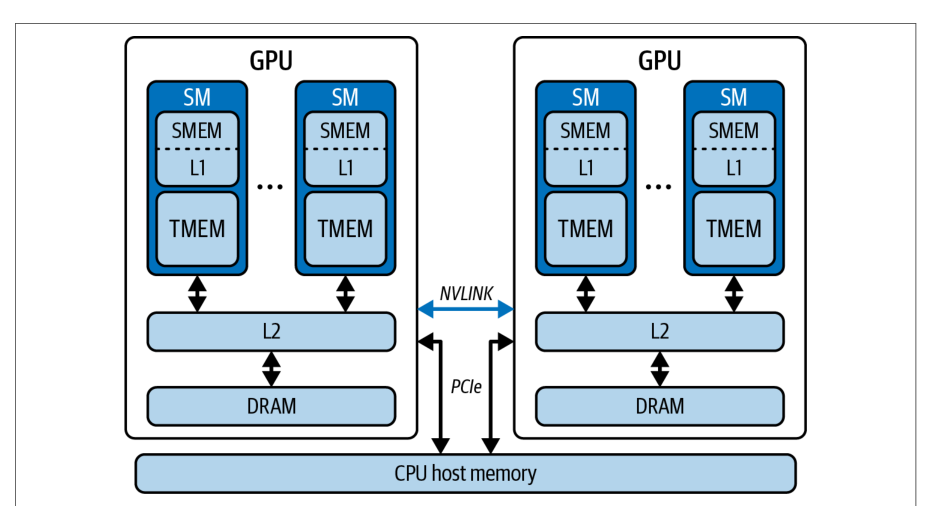
Global memory (HBM or DRAM) is large, off-chip, and relatively slow. Registers are tiny, on-chip, and extremely fast. L1 cache, L2 cache, and shared memory are somewhere in between. The benefit of caching and shared memory is that they hide the relatively long latency of accessing the large off-chip memory stores. A high-level view of the GPU memory hierarchy (including the CPU) is shown in Figure 6-10.全局内存(HBM 或 DRAM)容量大、位于片外,且相对较慢。寄存器极小、位于片上,且速度极快。L1 缓存、L2 缓存和共享内存则介于两者之间。缓存和共享内存的好处在于,它们隐藏了访问大型片外存储相对较长的时延。图 6-10 展示了 GPU 显存层级(包括 CPU)的高层视图。
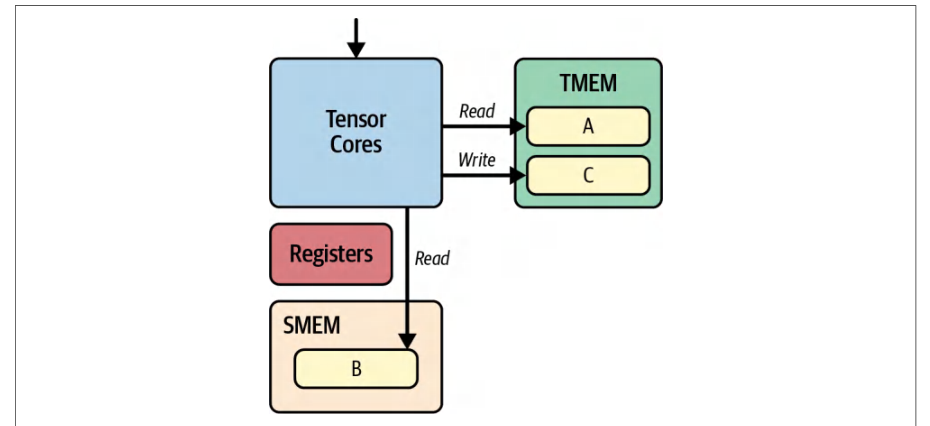
TMEM is a dedicated 256 KB per-SM buffer that transparently communicates with the Tensor Cores at tens of terabytes per second of bandwidth. This reduces the Tensor Core’s reliance on global memory. Figure 6-11 shows TMEM servicing the Tensor Cores—along with SMEM—to compute a C = A × B matrix multiply.TMEM 是每个 SM 专用的 256 KB 缓冲区,以每秒数十 TB 的带宽与张量核心透明通信。这降低了张量核心对全局内存的依赖。图 6-11 展示了 TMEM 与 SMEM 一起为张量核心提供服务,以计算 C = A × B 矩阵乘法。
Here, operand B is sourced from SMEM. Operand A is in TMEM (although it may be in SMEM, as well). The accumulator is in TMEM, as well. Tiles flow from global memory to SMEM through L2 cache using TMA (e.g., cuda::memcpy_async).在这里,操作数 B 来自 SMEM。操作数 A 位于 TMEM 中(不过它也可能位于 SMEM 中)。累加器同样位于 TMEM 中。数据块通过 TMA(例如 cuda::memcpy_async)经由 L2 缓存从全局内存流向 SMEM。
| Level层级 | Scope作用域 | Capacity容量 | Latency时延 | Bandwidth (approx.)带宽(近似值) |
|---|---|---|---|---|
| Registers寄存器 | Per thread (on SM)每线程(在 SM 上) | 64 K 32-bit registers per SM (max 255 per thread)每个 SM 64 K 个 32 位寄存器(每线程最多 255 个) | near-register latency (register reads/writes are single- cycle and essentially free)近寄存器时延(寄存器读写为单周期且基本无开销) | Tens of TB/s per SM (register‐file ports)每个 SM 数十 TB/s(寄存器文件端口) |
| Shared共享内存 | Per SM每个 SM | 228 KB (227 KB usable)228 KB(可用 227 KB) | ~20–30 cycles (L1/shared~20–30 周期(L1/共享内存) | TB/s per SM (bank-每个 SM TB/s(存储体带宽) |
| memory and内存和 | shared + remainder as L1/共享 + 剩余作为 L1/ | benchmarks)基准测试) | conflict-free)无冲突) | |
| L1 cacheL1 缓存 | data cache数据缓存 | |||
| TMEMTMEM | Per SM每个 SM | 256 KB SRAM per SM dedicated to Tensor Cores每个 SM 256 KB SRAM,专用于张量核心 | ~10 cycles (dedicated SRAM on the SM)~10 个周期(SM 上的专用 SRAM) | TB/s-scale communication with Tensor Cores与张量核心进行 TB/s 级通信 |
| Constant常量 | Per SM每个 SM | ~8 KB cache for 64 KB~8 KB 缓存,用于 64 KB | ~1 cycle (warp‐broadcast)~1 个周期(线程束广播) | TB/s-scale (broadcastTB/s 级(广播 |
| memory内存 | __constant__ space__constant__ 空间 | As fast as a register when cached缓存命中时与寄存器一样快 | throughput)吞吐量) | |
| cache缓存 | and all threads in a warp access the same address due to the constant cache and broadcast behavior. Divergent or missed cases serialize or incur higher latency由于常量缓存和广播行为,线程束中的所有线程访问相同地址。发散或未命中情况会串行化或导致更高时延 | |||
| L2 cacheL2 缓存 | GPU-wide (all SMs)GPU 全局(所有 SM) | 126 MB total总计 126 MB | ~200 cycles~200 个周期 | Multi TB/s aggregate多 TB/s 聚合 |
| Local本地 | Per thread每线程 | Near-unlimited (backed by近乎无限(由 | 100s → 1,000 cycles (DRAM‐like)数百 → 1,000 个周期(类似 DRAM) | ~8 TB/s (HBM3e)~8 TB/s(HBM3e) |
| memory内存 | (spills to DRAM)(溢出到 DRAM) | global memory)全局内存) | ||
| Global全局 | Device-wide全设备 | Up to 180 GB per Blackwell每块 Blackwell 最高 180 GB | 100s → 1,000 cycles (global-数百 → 1,000 个周期(全局 | ~8 TB/s total总计 ~8 TB/s |
| memory内存 | (off-chip(片外 | B200 GPU (up to ~288 GBB200 GPU(最高约 288 GB | memory latency)内存时延) | |
| (HBM or(HBM 或 | DRAM)DRAM) | per Blackwell B300 GPU)每块 Blackwell B300 GPU) | ||
| DRAM)DRAM) |
Operands move between SMEM and TMEM implicitly through Tensor Core instructions such as unified matrix-multiply-accumulate (UMMA) and tcgen05.mma.操作数经由统一矩阵乘累加(UMMA)和 tcgen05.mma 等张量核心指令,在 SMEM 与 TMEM 之间隐式传输。
Table 6-5 shows the different levels of memory and their characteristics for the Blackwell GPU. A description of each level of the memory hierarchy follows.表 6-5 展示了 Blackwell GPU 上不同层级的内存及其特性。下文将逐一介绍显存层次结构中的每一级。
Here, you can see why maximizing data reuse in registers, shared memory, and L1/L2 cache—and minimizing reliance on global memory and local memory (backed by global memory)—is essential for high-throughput GPU kernels. Next is a bit more detail about each of these levels of the hierarchy:由此可以看出,为什么在寄存器、共享内存和 L1/L2 缓存中最大化数据复用——并尽量减少对全局内存和本地内存(由全局内存支撑)的依赖——对于高吞吐 GPU 内核至关重要。下面进一步详细介绍层次结构中的每一级:
- Registers寄存器
- On Blackwell, every thread begins its journey at the register file, a tiny on-SM SRAM array that holds each thread’s local variables with essentially zero added latency. Each SM houses 64 K 32-bit registers (256 KB total), but the hardware exposes at most 255 registers per thread.在 Blackwell 上,每个线程的旅程都始于寄存器文件,这是一个位于 SM 上的小型 SRAM 阵列,用于保存每个线程的局部变量,几乎不增加任何时延。每个 SM 拥有 64 K 个 32 位寄存器(共 256 KB),但硬件最多只向每个线程提供 255 个寄存器。


Because reads and writes complete in a single cycle and contend with almost nothing else, register bandwidth can reach tens of terabytes per second per SM. However, if your kernel needs more registers—either through many thread-local variables or compiler temporaries—the overflow spills into local memory, mapped to off-chip DRAM, and incurs hundreds to over a thousand cycles of latency. This local memory is shown in Figure 6-12.由于读写均在一个周期内完成,且几乎不与其他操作争用,寄存器带宽可达每 SM 数十 TB/s。然而,如果内核需要更多寄存器——无论是由于大量线程局部变量还是编译器临时变量——溢出部分会写入本地内存,而本地内存映射到片外 DRAM,会带来数百到一千多个周期的时延。该本地内存如图 6-12 所示。
- Shared memory and L1 data cache共享内存与 L1 数据缓存
- One step up is a unified L1/data cache and shared-memory block. This is 256 KB of on-SM SRAM per SM that you can dynamically split between user-managed shared memory (up to 228 KB per block) using
cudaFuncSetAttribute()withcudaFuncAttributePreferredSharedMemoryCarveoutto select the memory carveout on architectures like Blackwell with unified L1/Texture/Shared Memory. The maximum dynamic shared memory per block is 227 KB (CUDA reserves 1KB per block), and the total allocatable shared memory per SM is also bounded by this limit.再往上一层是统一的 L1/数据缓存与共享内存块。每个 SM 上有 256 KB 的片上 SRAM,你可以通过cudaFuncSetAttribute()配合cudaFuncAttributePreferredSharedMemoryCarveout,在用户管理的共享内存(每块最多 228 KB)之间动态划分这部分容量,从而在 Blackwell 这类采用统一 L1/纹理/共享内存架构的平台上选择内存划分比例。每块的最大动态共享内存为 227 KB(CUDA 每块保留 1KB),每个 SM 可分配的共享内存总量同样受此上限约束。
Accesses here cost roughly 20–30 cycles, but if you design your thread blocks to avoid bank conflicts, you can achieve terabytes-per-second throughput. Thread-block shared memory is shown in Figure 6-13.此处的访问开销约为 20–30 个周期,但如果设计线程块时避免存储体冲突,就能达到每秒数 TB 的吞吐量。图 6-13 展示了线程块共享内存。
- TMEMTMEM
- TMEM is a dedicated on-chip memory per SM (256 KB on Blackwell) used by Tensor Core–specific operations and instructions including unified matrix-multiply-accumulate and
tcgen05, discussed in Chapter 10. It is not a normal pointer addressable space in CUDA C++. Instead, transfers are orchestrated with the Tensor Memory Accelerator (TMA) using descriptors. This frees the developer from having to manually manage data flow with the Tensor Cores. Some arithmetic operands, for instance, reside in shared memory, while theTMEM 是每个 SM 专用的片上内存(Blackwell 上为 256 KB),供张量核心专用的操作与指令使用,包括统一矩阵乘累加和tcgen05,这些将在第 10 章讨论。它不是 CUDA C++ 中可用普通指针寻址的空间。相反,数据传输通过张量内存加速器(TMA)使用描述符来编排。这使开发者无需手动管理张量核心的数据流。例如,某些算术操作数驻留在共享内存中,而
accumulator resides in TMEM. TMA is then responsible for moving the data between global memory, shared memory, and TMEM memory to perform the computations.累加器驻留在 TMEM 中。随后由 TMA 负责在全局内存、共享内存与 TMEM 之间移动数据,以完成计算。
- Constant memory cache常量内存缓存
- For tiny, read-only tables, Blackwell provides a per-SM constant memory cache of about 8 KB fronting the 64 KB
__constant__space. When all 32 threads in a warp load the same address, this cache broadcasts the value in a single cycle.对于极小的只读表,Blackwell 提供约 8 KB 的每 SM 常量内存缓存,位于 64 KB 的__constant__空间之前。当一个线程束中的全部 32 个线程加载同一地址时,该缓存可在单个周期内广播该值。
Divergent reads serialize across lanes. It’s perfect for sharing small lookup tables for rotary positional encodings, Attention with Linear Biases (ALiBi) slopes, LayerNorm γ/β vectors, and embedding quantization scales. These are shared across every thread without global-memory traffic.发散读取会在线程间串行化。它非常适合共享小型查找表,例如旋转位置编码、带线性偏置的注意力(ALiBi)斜率、LayerNorm 的 γ/β 向量以及嵌入量化缩放因子。这些数据在每个线程间共享,且不产生全局内存流量。
- L2 cacheL2 缓存
- Beyond on-chip SRAM sits the L2 cache, a 126 MB GPU-wide buffer that glues all SMs to off-chip HBM3e. With latencies near 200 cycles and aggregate bandwidth in the tens of terabytes per second, L2 absorbs spillover from L1.片上 SRAM 之外是 L2 缓存,这是一个 126 MB 的 GPU 全局缓冲区,将所有 SM 与片外 HBM3e 连接起来。L2 的时延接近 200 个周期,聚合带宽达每秒数十 TB,可吸收来自 L1 的溢出。
With the L2, data is fetched by one thread block and reused by other thread blocks without revisiting DRAM. To maximize L2’s benefits, structure your global loads into 128-byte, coalesced transactions that map cleanly to cache lines. We’ll show how to do this in a bit.借助 L2,数据由一个线程块取回后可被其他线程块复用,而无需再次访问 DRAM。为最大化 L2 的收益,应将全局加载组织为 128 字节的合并访问事务,使其清晰映射到缓存行。稍后我们将展示如何做到这一点。
- Global memory (HBM or DRAM)全局内存(HBM 或 DRAM)
- The global memory tier, local spill space and HBM, live off-chip. Any spilled registers or oversized automatic arrays reside in local memory, paying full DRAM latency (hundreds to more than 1,000 cycles) despite HBM3e’s ~8 TB/s bandwidth.全局内存层级——即本地溢出空间与 HBM——位于芯片之外。任何被溢出的寄存器或尺寸超大的自动数组都驻留在本地内存中,尽管 HBM3e 提供约 8 TB/s 的带宽,它们仍要付出完整的 DRAM 时延(数百到 1000 多个周期)。
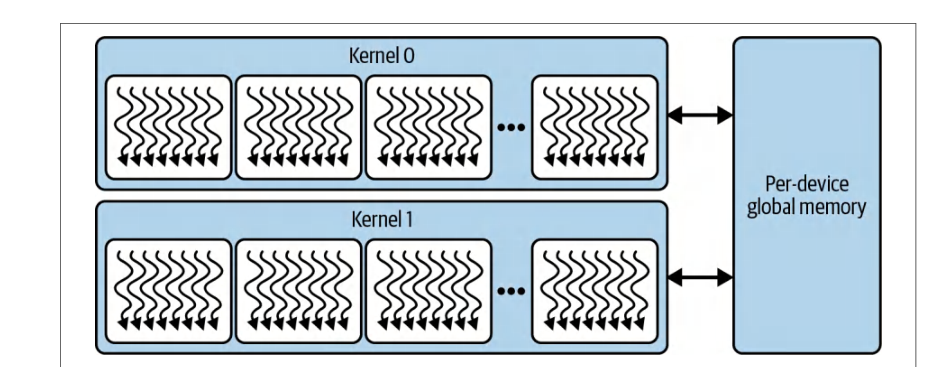
For Blackwell, the HBM3e tier provides up to 180 GB of device-wide storage at ~8 TB/s total. However, its high latency makes it the slowest link in the chain. Per-device global memory is shown in Figure 6-14.对于 Blackwell,HBM3e 层级提供高达 180 GB 的全设备存储,总带宽约 8 TB/s。然而,其高时延使其成为整条链路中最慢的一环。每设备的全局内存如图 6-14 所示。
Using tools like Nsight Compute to track spills and cache hit rates, you can keep your kernels operating as close as possible to the on-chip peaks of this memory hierarchy. These tools can help you orchestrate data effectively through registers, shared/L1, constant cache, and L2 cache. Modern GPUs like Blackwell allow kernel developers to exploit the memory hierarchy by using L2 caches and unified L1/shared memory to buffer and coalesce accesses to HBM, as we’ll soon see.借助 Nsight Compute 等工具跟踪溢出与缓存命中率,你可以让内核尽可能运行在这一内存层级的片上峰值附近。这些工具能帮助你有效地编排数据流经寄存器、共享内存/L1、常量缓存和 L2 缓存。像 Blackwell 这样的现代 GPU 允许内核开发者利用内存层级,使用 L2 缓存和统一的 L1/共享内存来缓冲并合并对 HBM 的访问,我们很快就会看到这一点。
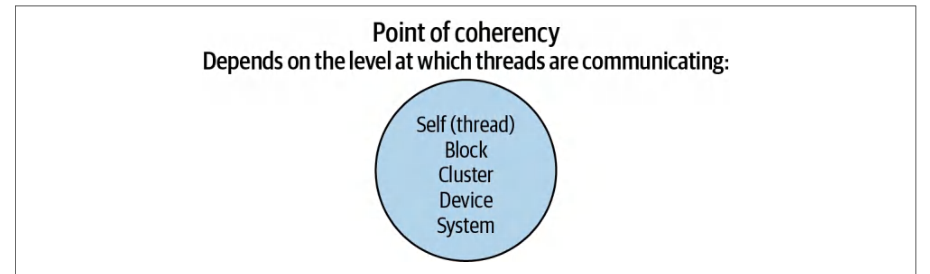
The point of coherency (PoC) for the different levels in the memory hierarchy depends on your needs and the level at which the threads are communicating. It typically happens at the following levels: thread, thread-block (aka CTA), thread block cluster (aka CTA cluster), device, or system, as shown in Figure 6-15.内存层级中不同层级的一致性点(point of coherency,PoC)取决于你的需求以及线程通信所在的层级。它通常发生在以下层级:线程、线程块(又称 CTA)、线程块集群(又称 CTA 集群)、设备或系统,如图 6-15 所示。
In summary, it’s important to understand the GPU’s memory hierarchy and target each level appropriately. By doing so, you can structure your CUDA kernels to maximize data locality, hide memory-access latency, increase occupancy, and fully leverage Blackwell’s massive parallel compute capabilities, as we’ll explore in a bit. First, let’s discuss NVIDIA’s unified memory, which is important to understand given the unified CPU-GPU superchip designs of Grace Hopper and Grace Blackwell.总之,理解 GPU 的内存层级并恰当地针对每一层级进行优化非常重要。这样做,你就能组织 CUDA 内核以最大化数据局部性、隐藏显存访问时延、提高占用率,并充分利用 Blackwell 的大规模并行计算能力,我们稍后会探讨这些内容。首先,让我们讨论 NVIDIA 的统一内存;考虑到 Grace Hopper 和 Grace Blackwell 的统一 CPU-GPU 超级芯片设计,理解这一点尤为重要。
统一内存
Unified Memory
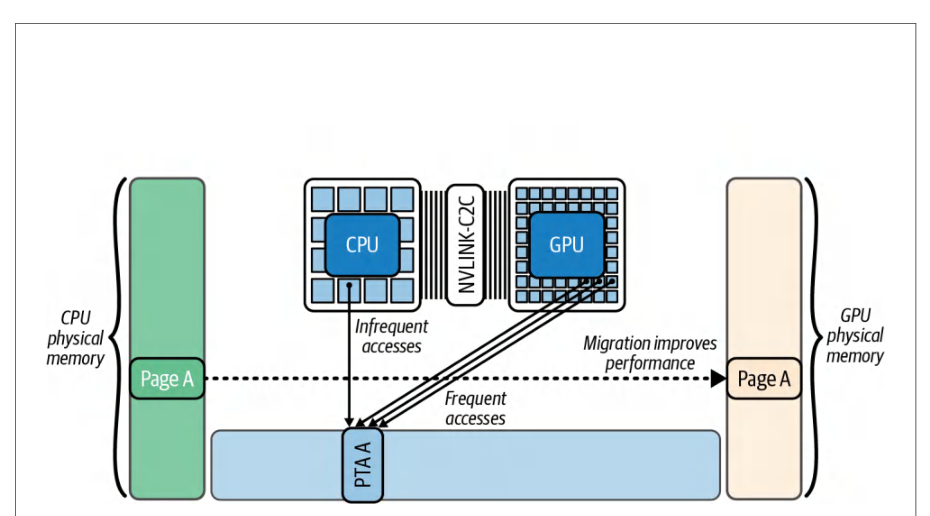
Unified Memory (also known as CUDA Managed Memory) gives you a single, coherent address space that spans both CPU and GPU, so you no longer have to juggle separate host and device buffers or issue explicit cudaMemcpy calls. Under the hood, the CUDA runtime backs every cudaMallocManaged() allocation with pages that can migrate on-demand over whatever interconnect links your CPU and GPU, as shown in Figure 6-16.统一内存(又称 CUDA 托管内存)为你提供一个跨越 CPU 和 GPU 的单一、一致的地址空间,因此你不再需要应付分离的主机与设备缓冲区,也不必发出显式的 cudaMemcpy 调用。在底层,CUDA 运行时为每个 cudaMallocManaged() 分配提供可按需迁移的页作为支撑,这些页通过连接 CPU 与 GPU 的任意互连进行迁移,如图 6-16 所示。
While accessing Unified Memory is super developer-friendly, it can cause unwanted on-demand page migrations between the CPU and the GPU. This will introduce hidden latency and execution stalls. For example, if a GPU thread accesses data that currently resides in CPU memory, the GPU will page-fault and wait while that data is transferred over the NVLink-C2C interconnect. Unified Memory performance depends greatly on the underlying hardware.虽然访问统一内存对开发者极为友好,但它可能引发 CPU 与 GPU 之间不必要的按需页迁移。这会引入隐藏的时延和执行停顿。例如,如果某个 GPU 线程访问当前驻留在 CPU 内存中的数据,GPU 将发生缺页并等待该数据通过 NVLink-C2C 互连传输完成。统一内存的性能在很大程度上取决于底层硬件。
On traditional PCIe or early NVLink systems, those migrations travel at relatively low bandwidth—often making on-fault transfers slower than a manual cudaMemcpy. But on Grace Hopper and Grace Blackwell Superchips, the NVLink-C2C fabric delivers up to ~900 GB/s between the CPU’s HBM and the GPU’s HBM3e. As such, page-fault–driven migrations come far closer to device-native speed—although they still carry nonzero latency.在传统 PCIe 或早期 NVLink 系统上,这些迁移以相对较低的带宽进行——往往使缺页触发的传输比手动 cudaMemcpy 还慢。但在 Grace Hopper 和 Grace Blackwell 超级芯片上,NVLink-C2C 互连结构在 CPU 的 HBM 与 GPU 的 HBM3e 之间可提供高达约 900 GB/s 的带宽。因此,由缺页驱动的迁移速度已远更接近设备原生速度——尽管它们仍带有非零时延。
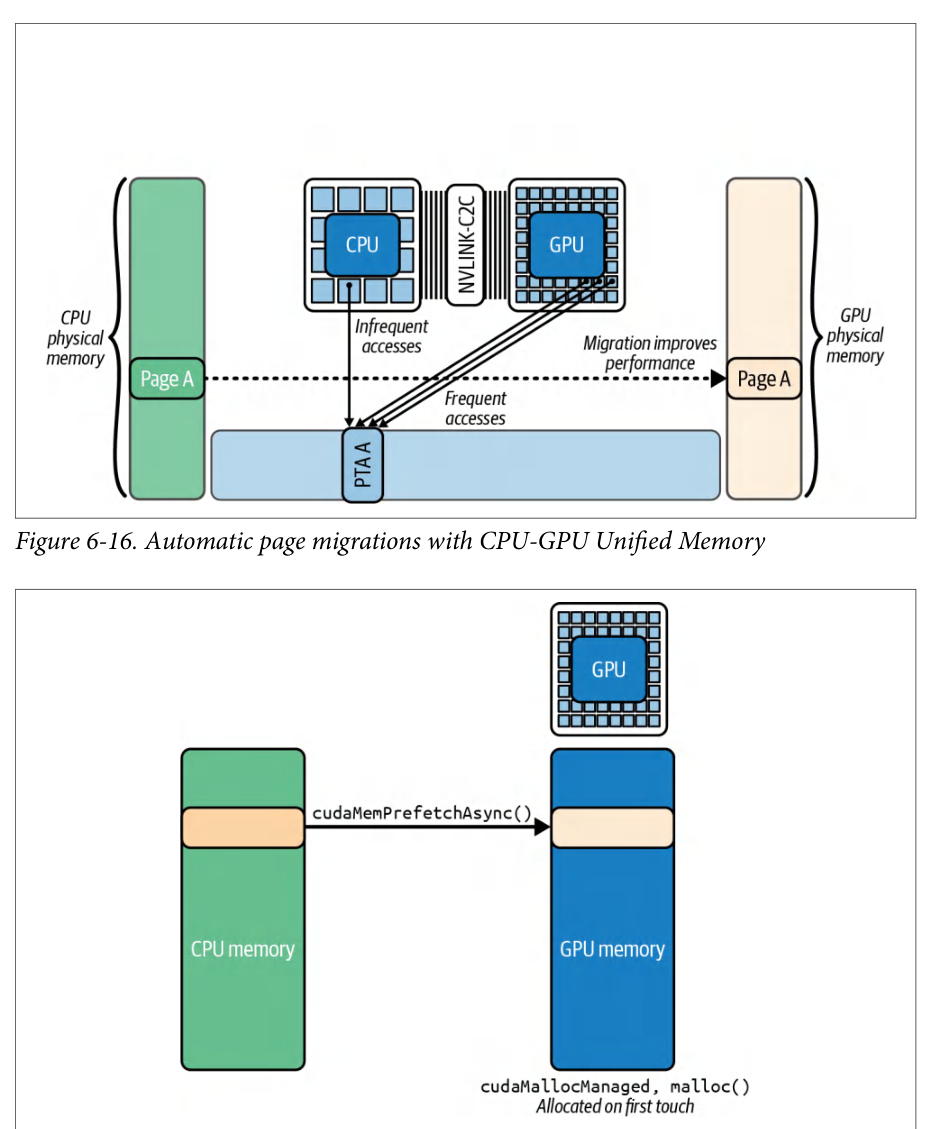
That said, any unexpected page-fault during a kernel launch will stall the GPU while the runtime moves the needed page into place. To avoid those “surprise” stalls, you can prefetch memory in advance with cudaMemPrefetchAsync(), as shown in Figure 6-17.话虽如此,内核启动期间任何意外的缺页都会使 GPU 停顿,直到运行时将所需的页移动到正确位置。为避免这些“意外”停顿,你可以用 cudaMemPrefetchAsync() 提前预取内存,如图 6-17 所示。
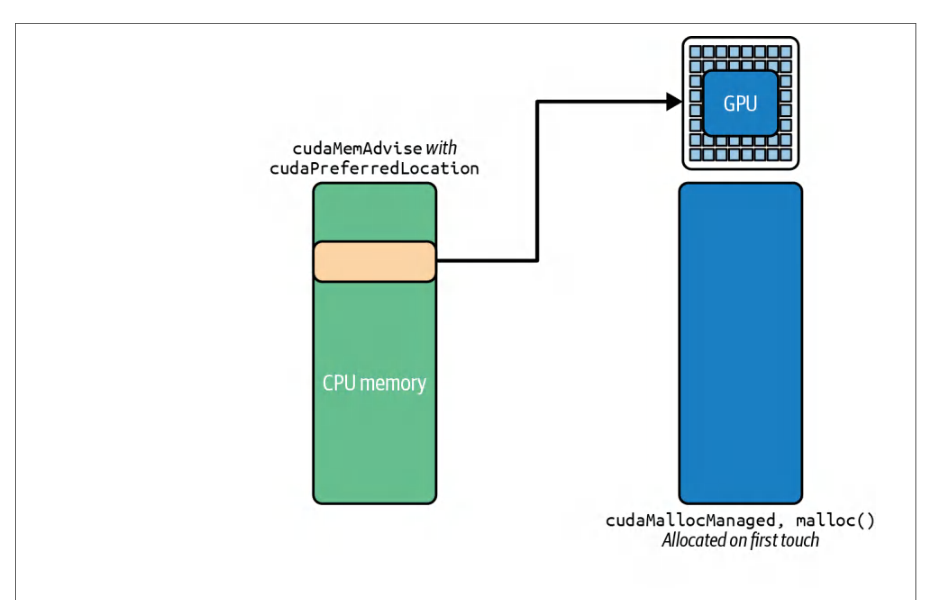
This hints to the driver to move the specified range onto the target GPU (or CPU) before you launch your kernel, turning costly first-touch migrations into overlappa-ble, asynchronous transfers. You can also give memory advice, as shown in this code:这会提示驱动在你启动内核之前将指定范围移动到目标 GPU(或 CPU)上,从而把代价高昂的首次访问迁移转变为可重叠的异步传输。你也可以提供内存建议(memory advice),如下代码所示:
cudaMemAdvise(ptr, size, cudaMemAdviseSetPreferredLocation, gpuId);
cudaMemAdvise(ptr, size, cudaMemAdviseSetReadMostly, gpuId);
Here, you can use PreferredLocation to tell the driver where you’ll mostly use the data, and ReadMostly when it’s largely read-only, as shown in Figure 6-18.在这里,你可以用 PreferredLocation 告诉驱动你主要会在哪里使用这些数据,当数据基本只读时则用 ReadMostly,如图 6-18 所示。
cudaMemPrefetchAsync()
You can also call the following to let a second GPU map those pages without triggering migrations at launch:你还可以调用以下接口,让第二个 GPU 映射这些页,而不会在启动时触发迁移:
cudaMemAdvise(ptr, size, cudaMemAdviseSetAccessedBy,
   otherGpuId);
By default, any CUDA stream or device kernel can trigger a page fault on a managed allocation. This can cause unexpected migrations and implicit synchronizations. If you know a certain buffer will be used only in one stream/GPU at a time, attaching it to that stream allows migrations to overlap with operations in other streams. Calling the following ties that memory range to the specified stream:默认情况下,任何 CUDA 流或设备内核都可能对托管分配(managed allocation)触发缺页。这可能导致意外的迁移和隐式同步。如果你确定某个缓冲区在任一时刻只会在一个流/GPU 上使用,将它附加到该流就能让迁移与其他流中的操作重叠。调用以下接口可将该内存范围绑定到指定的流:
cudaStreamAttachMemAsync(stream, ptr, 0,
    cudaMemAttachSingle);
In this case, only operations in that stream will fault and migrate its pages. This prevents other streams from accidentally stalling on it. As such, attaching a range to a particular stream defers its migrations so they overlap with only that stream’s work. This avoids cross-stream synchronization.在这种情况下,只有该流中的操作会触发缺页并迁移其页。这可以防止其他流意外地因它而停顿。因此,将某个范围附加到特定流会推迟其迁移,使其只与该流的工作重叠。这样便避免了跨流同步。
In short, explicitly prefetching managed memory and providing memory advice can eliminate most of the “surprise” stalls from Unified Memory. Instead of the GPU pausing to fetch data on demand, the data is already where it needs to be when the kernel runs.简而言之,显式预取托管内存并提供内存建议,可以消除统一内存带来的大部分“意外”停顿。GPU 不再需要暂停下来按需取数据,内核运行时数据已经位于它该在的地方。
With techniques like proactive prefetching, targeted memory advice, and stream attachment, Unified Memory can deliver performance very close to manual cuda Memcpy while preserving the simplicity of a unified address space.借助主动预取、有针对性的内存建议和流附加等技术,统一内存可以提供非常接近手动 cuda Memcpy 的性能,同时保留统一地址空间的简洁性。
保持高占用率与 GPU 利用率
Maintaining High Occupancy and GPU Utilization
GPUs sustain performance by running many warps concurrently so that when one warp stalls waiting for data, another warp can run. This ability to rapidly switch between warps allows a GPU to hide memory latency. As we described earlier, the fraction of an SM’s capacity actually occupied by active warps is called occupancy.GPU 通过并发运行大量线程束来维持性能,这样一个线程束在等待数据而停顿时,另一个线程束可以继续运行。这种在线程束之间快速切换的能力使 GPU 能够隐藏内存时延。正如前面所述,流多处理器(SM)的容量中实际被活跃线程束占用的比例称为*占用率*。
If occupancy is low (just a few active warps), an SM may sit idle while one warp is waiting on memory. This leads to poor SM utilization. On Blackwell, achieving high occupancy is a bit easier given its large register file (64K registers per SM), which can support many warps without spilling.如果占用率很低(只有少量活跃线程束),当一个线程束等待内存时,SM 可能处于空闲状态。这会导致 SM 利用率低下。在 Blackwell 上,实现高占用率要容易一些,因为它拥有较大的寄存器堆(每个 SM 64K 个寄存器),可以在不发生寄存器溢出的情况下支持大量线程束。
Conversely, high occupancy (many active warps per SM) will keep the GPU compute units busy since, while one warp waits on memory access, others will swap in to the SM and execute. This masks the long memory access delays. This is often referred to as hiding latency.相反,高占用率(每个 SM 上有大量活跃线程束)能让 GPU 计算单元保持忙碌,因为当一个线程束等待显存访问时,其他线程束会切换到该 SM 上执行。这掩盖了漫长的显存访问延迟。这通常被称为*隐藏时延*。
Let’s show an example that improves occupancy and ultimately GPU utilization, throughput, and overall kernel performance. This is one of the most fundamental rules of CUDA performance optimization: launch enough parallel work to fully occupy the GPU.下面给出一个示例,它提升了占用率,并最终提升 GPU 利用率、吞吐量和内核的整体性能。这是 CUDA 性能优化最基本的规则之一:启动足够多的并行工作,以充分占满 GPU。
If your achieved occupancy (the fraction of hardware thread slots in use) is well below the GPU’s limit and performance is poor, the first remedy is to increase parallelism—use more blocks or threads so that occupancy approaches the 80%– 100% range on modern GPUs.如果你实际达到的占用率(正在使用的硬件线程槽位占比)远低于 GPU 的上限且性能不佳,首要的补救措施是提高并行度——使用更多的线程块或线程,使占用率接近现代 GPU 上 80%–100% 的区间。
Conversely, if occupancy is already moderate to high but the kernel is bottlenecked by memory throughput, pushing it to 100% may not help. You generally need just enough warps to hide latency, and beyond that the bottleneck might lie elsewhere (e.g., memory bandwidth).相反,如果占用率已经处于中等至较高水平,但内核受限于显存吞吐量,那么把它推到 100% 可能也无济于事。通常你只需要足够多的线程束来隐藏时延,超过这个程度后,瓶颈可能就在别处(例如显存带宽)。
To illustrate the impact of occupancy, consider a very simple operation: adding two vectors of length N (computing C = A + B). We’ll examine two kernel implementations: addSequential and addParallel. addSequential uses a single thread (or a single warp) to add all N elements in a loop. addParallel uses many threads so that the additions are done concurrently across the array.为了说明占用率的影响,考虑一个非常简单的操作:将两个长度为 N 的向量相加(计算 C = A + B)。我们将考察两种内核实现:addSequential 和 addParallel。addSequential 使用单个线程(或单个线程束)在循环中累加全部 N 个元素。addParallel 使用大量线程,使加法在整个数组上并发完成。
In the sequential version, one GPU thread handles the entire workload serially, as shown here:在串行版本中,一个 GPU 线程串行处理整个工作负载,如下所示:
#include <cuda_runtime.h>
const int N = 1'000'000;
// 由单个线程完成全部 N 次加法
__global__ void addSequential(const float* A,
                              const float* B,
                                    float* C,
                              int N)
{
    if (blockIdx.x == 0 && threadIdx.x == 0) {
        for (int i = 0; i < N; ++i) {
            C[i] = A[i] + B[i];
        }
    }
}
int main()
{
    // 分配并初始化主机内存
    float* h_A = nullptr;
    float* h_B = nullptr;
    float* h_C = nullptr;
    cudaMallocHost(&h_A, N * sizeof(float));
    cudaMallocHost(&h_B, N * sizeof(float));
    cudaMallocHost(&h_C, N * sizeof(float));
    for (int i = 0; i < N; ++i) {
        h_A[i] = float(i);
        h_B[i] = float(i * 2);
    }
#include <cuda_runtime.h>
const int N = 1'000'000;
// Single thread does all N additions
__global__ void addSequential(const float* A,
                              const float* B,
                                    float* C,
                              int N)
{
    if (blockIdx.x == 0 && threadIdx.x == 0) {
        for (int i = 0; i < N; ++i) {
            C[i] = A[i] + B[i];
        }
    }
}
int main()
{
    // Allocate and initialize host
    float* h_A = nullptr;
    float* h_B = nullptr;
    float* h_C = nullptr;
    cudaMallocHost(&h_A, N * sizeof(float));
    cudaMallocHost(&h_B, N * sizeof(float));
    cudaMallocHost(&h_C, N * sizeof(float));
    for (int i = 0; i < N; ++i) {
        h_A[i] = float(i);
        h_B[i] = float(i * 2);
    }
    // 分配设备显存
    float *d_A, *d_B, *d_C;
    cudaMalloc(&d_A, N * sizeof(float));
    cudaMalloc(&d_B, N * sizeof(float));
    cudaMalloc(&d_C, N * sizeof(float));
    // 将输入复制到设备
    cudaMemcpy(d_A, h_A, N * sizeof(float), cudaMemcpyHostToDevice);
    cudaMemcpy(d_B, h_B, N * sizeof(float), cudaMemcpyHostToDevice);
    // 启动:一个线程
    // 注意:此内核假定 <<<1,1>>>
    // (一个线程块,一个线程)。
    // 运行此示例时不要更改启动配置。
    addSequential<<<1,1>>>(d_A, d_B, d_C, N);
    // 退出前确保完成
    cudaDeviceSynchronize();
    // 拷贝 d_C => h_C(回传到主机)
    cudaMemcpy(h_C, d_C, N * sizeof(float), cudaMemcpyDeviceToHost);
    // 清理
    cudaFree(d_A);
    cudaFree(d_B);
    cudaFree(d_C);
    cudaFreeHost(h_A);
    cudaFreeHost(h_B);
    cudaFreeHost(h_C);
    return 0;
}
    // Allocate device
    float *d_A, *d_B, *d_C;
    cudaMalloc(&d_A, N * sizeof(float));
    cudaMalloc(&d_B, N * sizeof(float));
    cudaMalloc(&d_C, N * sizeof(float));
    // Copy inputs to device
    cudaMemcpy(d_A, h_A, N * sizeof(float), cudaMemcpyHostToDevice);
    cudaMemcpy(d_B, h_B, N * sizeof(float), cudaMemcpyHostToDevice);
    // Launch: one thread
    // Note: This kernel assumes <<<1,1>>>
    // (one block, one thread).
    // Do not change the launch config when running this example.
    addSequential<<<1,1>>>(d_A, d_B, d_C, N);
    // Ensure completion before exit
    cudaDeviceSynchronize();
    // Copy d_C => h_C (back to host)
    cudaMemcpy(h_C, d_C, N * sizeof(float), cudaMemcpyDeviceToHost);
    // Cleanup
    cudaFree(d_A);
    cudaFree(d_B);
    cudaFree(d_C);
    cudaFreeHost(h_A);
    cudaFreeHost(h_B);
    cudaFreeHost(h_C);
    return 0;
}
In this single-threaded version, the GPU’s vast resources are mostly idle. Only one warp, or even one thread within the warp, is doing work while all others sit idle. The result is very poor occupancy and, ultimately, low performance.在这个单线程版本中,GPU 庞大的资源大部分处于空闲状态。只有一个线程束、甚至只是该线程束中的一个线程在工作,其余全部闲置。结果是占用率极低,最终性能也很差。
One must be also careful to avoid indirectly executing inefficient GPU code in high-level libraries and frameworks like PyTorch. For instance, the naive PyTorch code that follows mistakenly performs elementwise operations using a Python for-loop that issues N separate add operations on the GPU one after another:还必须小心避免在 PyTorch 这类高层库和框架中间接地执行低效的 GPU 代码。例如,下面这段朴素的 PyTorch 代码错误地使用 Python for 循环执行逐元素操作,在 GPU 上一个接一个地发起 N 次独立的加法操作:
import torch
N = 1_000_000
A = torch.arange(N, dtype=torch.float32, device='cuda')
B = 2 * A
C = torch.empty_like(A)
# 确保所有先前工作均已完成
torch.cuda.synchronize()
import torch
N = 1_000_000
A = torch.arange(N, dtype=torch.float32, device='cuda')
B = 2 * A
C = torch.empty_like(A)
# Ensure all previous work is done
torch.cuda.synchronize()
# 朴素、串行的 GPU 操作——切勿这样做
with torch.inference_mode(): # 避免不必要的 autograd 图构建
    # 这会串行启动 N 个微小的 GPU 操作
    for i in range(N):
        C[i] = A[i] + B[i]
torch.cuda.synchronize()
# Naive, Sequential GPU operations - DO NOT DO THIS
with torch.inference_mode(): # avoids unnecessary autograd graph construction
    # This launches N tiny GPU operations serially
    for i in range(N):
        C[i] = A[i] + B[i]
torch.cuda.synchronize()
This code effectively uses the GPU like a scalar, nonparallel processor. It achieves very low occupancy similar to the previous native addSequential CUDA C++ code.这段代码实际上把 GPU 当作标量、非并行的处理器来使用。它达到的占用率极低,与前面原生的 addSequential CUDA C++ 代码类似。
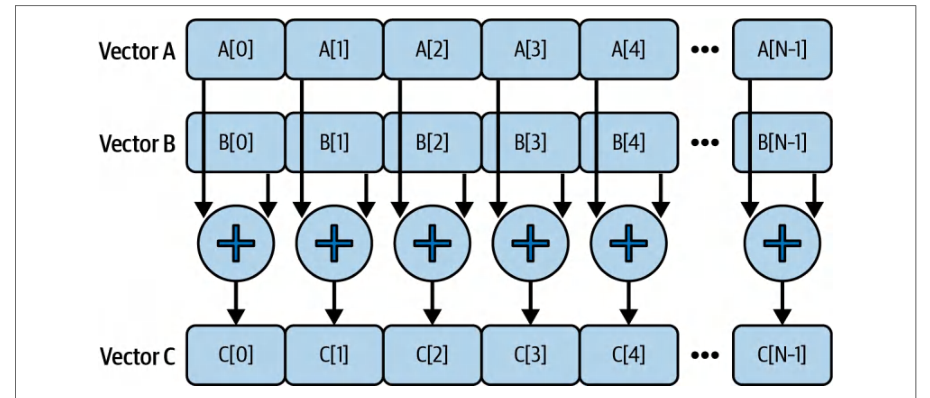
Let’s optimize the CUDA kernel and PyTorch code to implement a parallel version of the vector add operation. Figure 6-19 shows how a vectorized add operation works.下面我们优化 CUDA 内核和 PyTorch 代码,实现向量加法操作的并行版本。图 6-19 展示了向量化加法操作的工作方式。
In the following CUDA C++ code, we launch enough threads to cover all elements (<<< (N+255)/256, 256 >>>) so that 256 threads per block process N elements in parallel across however many blocks are needed:在下面的 CUDA C++ 代码中,我们启动足够多的线程覆盖所有元素(<<< (N+255)/256, 256 >>>),使每个线程块的 256 个线程在所需的任意数量线程块上并行处理 N 个元素:
#include <cuda_runtime.h>
const int N = 1'000'000;
// 每个元素一个线程
__global__ void addParallel(const float* __restrict__ A,
                            const float* __restrict__ B,
                                  float* __restrict__ C,
                            int N)
{
    int idx = blockIdx.x * blockDim.x + threadIdx.x;
    if (idx < N) {
        C[idx] = A[idx] + B[idx];
    }
#include <cuda_runtime.h>
const int N = 1'000'000;
// One thread per element
__global__ void addParallel(const float* __restrict__ A,
                            const float* __restrict__ B,
                                  float* __restrict__ C,
                            int N)
{
    int idx = blockIdx.x * blockDim.x + threadIdx.x;
    if (idx < N) {
        C[idx] = A[idx] + B[idx];
    }
}
int main()
{
  // 分配并初始化主机内存(锁页以加快 DMA)
  float* h_A = nullptr;
  float* h_B = nullptr;
  float* h_C = nullptr;
  cudaMallocHost(&h_A, N * sizeof(float));
  cudaMallocHost(&h_B, N * sizeof(float));
  cudaMallocHost(&h_C, N * sizeof(float));
  for (int i = 0; i *lt; N; ++i) { h_A[i] = float(i); h_B[i] = float(2*i); }
  // 创建非阻塞流并分配设备缓冲区
  cudaStream_t s; cudaStreamCreateWithFlags(&s, cudaStreamNonBlocking);
  float *d_A = nullptr, *d_B = nullptr, *d_C = nullptr;
  cudaMallocAsync(&d_A, N * sizeof(float), s);
  cudaMallocAsync(&d_B, N * sizeof(float), s);
  cudaMallocAsync(&d_C, N * sizeof(float), s);
  // 在同一流上执行异步 HtoD 拷贝
  cudaMemcpyAsync(d_A, h_A, N*sizeof(float), cudaMemcpyHostToDevice, s);
  cudaMemcpyAsync(d_B, h_B, N*sizeof(float), cudaMemcpyHostToDevice, s);
  // 启动(同一流)
  int threads = 256;
  int blocks  = (N + threads - 1) / threads;
  addParallel<<<blocks, threads, 0, s>>>(d_A, d_B, d_C, N);
  // 异步 DtoH 拷贝与流同步
  cudaMemcpyAsync(h_C, d_C, N*sizeof(float), cudaMemcpyDeviceToHost, s);
  cudaStreamSynchronize(s);
  // 清理(按流顺序释放)
  cudaFreeAsync(d_A, s); cudaFreeAsync(d_B, s); cudaFreeAsync(d_C, s);
  cudaStreamDestroy(s);
  cudaFreeHost(h_A); cudaFreeHost(h_B); cudaFreeHost(h_C);
  return 0;
}
}
int main()
{
  // Allocate and initialize host (pinned for faster DMA)
  float* h_A = nullptr;
  float* h_B = nullptr;
  float* h_C = nullptr;
  cudaMallocHost(&h_A, N * sizeof(float));
  cudaMallocHost(&h_B, N * sizeof(float));
  cudaMallocHost(&h_C, N * sizeof(float));
  for (int i = 0; i *lt; N; ++i) { h_A[i] = float(i); h_B[i] = float(2*i); }
  // Create a non-blocking stream and allocate device buffers
  cudaStream_t s; cudaStreamCreateWithFlags(&s, cudaStreamNonBlocking);
  float *d_A = nullptr, *d_B = nullptr, *d_C = nullptr;
  cudaMallocAsync(&d_A, N * sizeof(float), s);
  cudaMallocAsync(&d_B, N * sizeof(float), s);
  cudaMallocAsync(&d_C, N * sizeof(float), s);
  // Async HtoD copies on the same stream
  cudaMemcpyAsync(d_A, h_A, N*sizeof(float), cudaMemcpyHostToDevice, s);
  cudaMemcpyAsync(d_B, h_B, N*sizeof(float), cudaMemcpyHostToDevice, s);
  // Launch (same stream)
  int threads = 256;
  int blocks  = (N + threads - 1) / threads;
  addParallel<<<blocks, threads, 0, s>>>(d_A, d_B, d_C, N);
  // Async DtoH copy and stream sync
  cudaMemcpyAsync(h_C, d_C, N*sizeof(float), cudaMemcpyDeviceToHost, s);
  cudaStreamSynchronize(s);
  // Cleanup (stream-ordered free)
  cudaFreeAsync(d_A, s); cudaFreeAsync(d_B, s); cudaFreeAsync(d_C, s);
  cudaStreamDestroy(s);
  cudaFreeHost(h_A); cudaFreeHost(h_B); cudaFreeHost(h_C);
  return 0;
}
With a sufficiently large N, the difference in GPU utilization is significant. Now let’s optimize the PyTorch code, which launches a single vectorized kernel (A + B) that engages many threads on the GPU concurrently like the previous optimized addPar allel CUDA C++ example. Here is the parallel version of the PyTorch code:当 N 足够大时,GPU 利用率的差异十分显著。现在我们来优化 PyTorch 代码,它启动单个向量化内核(A + B),像前面优化过的 addPar allel CUDA C++ 示例那样,在 GPU 上并发地调动大量线程。下面是 PyTorch 代码的并行版本:
# add_parallel.py
import torch
N = 1_000_000
A = torch.arange(N, dtype=torch.float32, device='cuda')
B = 2 * A
torch.cuda.synchronize()
# 使用向量化操作的正确并行方式
# 启动单个 GPU 内核,并行相加所有元素
C = A + B
torch.cuda.synchronize()
torch.cuda.synchronize()
# Proper parallel approach using vectorized operation
# Launches a single GPU kernel that adds all elements in parallel
C = A + B
torch.cuda.synchronize()
To quantify the performance impact of using a parallel versus sequential implementation, we can use Nsight Systems and Nsight Compute to measure the total kernel execution time, GPU utilization, occupancy, and warp execution efficiency metrics for the two approaches. Here are the Nsight Systems (nsys) and Nsight Compute (ncu) commands:为了量化并行实现与串行实现带来的性能影响,我们可以使用 Nsight Systems 和 Nsight Compute 测量两种方法的内核总执行时间、GPU 利用率、占用率和线程束执行效率指标。以下是 Nsight Systems(nsys)和 Nsight Compute(ncu)命令:
# 串行相加
nsys profile \
  --stats=true \
  -t cuda,nvtx \
  -o sequential_nsys_report \
  ./add_sequential.py
ncu \
 --section SpeedOfLight \
 --metrics
     sm__warps_active.avg.pct_of_peak_sustained_active,gpu__time_duration.avg \
 --target-processes all \
 --print-summary per-gpu \
 -o sequential_ncu_report \
 ./add_sequential.py

# 并行相加
nsys profile \
  --stats=true \
  -t cuda,nvtx \
  -o parallel_nsys_report \
  ./add_parallel.py
ncu \
 --section SpeedOfLight \
 --metrics sm__warps_active.avg.pct_of_peak_sustained_active \
 --target-processes all \
 --print-summary per-gpu \
# Sequential add
nsys profile \
  --stats=true \
  -t cuda,nvtx \
  -o sequential_nsys_report \
  ./add_sequential.py
ncu \
 --section SpeedOfLight \
 --metrics
     sm__warps_active.avg.pct_of_peak_sustained_active,gpu__time_duration.avg \
 --target-processes all \
 --print-summary per-gpu \
 -o sequential_ncu_report \
 ./add_sequential.py

# Parallel add
nsys profile \
  --stats=true \
  -t cuda,nvtx \
  -o parallel_nsys_report \
  ./add_parallel.py
ncu \
 --section SpeedOfLight \
 --metrics sm__warps_active.avg.pct_of_peak_sustained_active \
 --target-processes all \
 --print-summary per-gpu \
| Metric指标 | add_sequentialadd_sequential | add_paralleladd_parallel |
|---|---|---|
| Kernel execution time (ms)内核执行时间(ms) | 48.2148.21 | 2.172.17 |
| GPU utilizationGPU 利用率 | 1.5%1.5% | 95%95% |
| Achieved occupancy实际占用率 | 1.3%1.3% | 38.7%38.7% |
| Warp execution efficiency线程束执行效率 | 3.1%3.1% | 100%100% |
 -o parallel_ncu_report \
 ./add_parallel.py
We use nsys to uncover where the time is spent and whether the GPU is starved or blocked. Then we use ncu to explain why the kernel is performing the way it is—perhaps due to poor occupancy, etc.我们用 nsys 找出时间花在哪里,以及 GPU 是处于饥饿还是阻塞状态。然后用 ncu 解释内核为何呈现这样的性能表现——也许是因为占用率不佳等。
If you run only nsys, you may miss fine-grained kernel inefficiencies. And if run you only ncu, you won’t know if your kernels are being fed data fast enough, for example. Table 6-6 shows the unified results.如果只运行 nsys,你可能会错过细粒度的内核低效问题。而如果只运行 ncu,你就无法知道内核是否被足够快地喂入数据,等等。表 6-6 展示了统一后的结果。
As expected, moving from a single-thread, single-warp implementation to a fully parallel, multiwarp implementation improves occupancy from 1.3% to ~38.7% on average. This reduces the runtime by about 22× from 48.21 ms down to 2.17 ms.正如预期,从单线程、单线程束实现迁移到完全并行的多线程束实现,平均占用率从 1.3% 提升到约 38.7%。这将运行时间缩短了约 22 倍,从 48.21 ms 降至 2.17 ms。
In the sequential case, only one warp, and just one thread, is doing work on a single SM. This is why we see a low 1.5% GPU utilization, whereas in the parallel case, many SMs are running multiple active warps. This increases warp execution efficiency from 3.1% to 100% since all 32 threads in a warp are doing useful work during each instruction. This improves GPU utilization from 1.5% to 95%.在串行情况下,只有一个线程束、甚至只有一个线程在单个 SM 上工作。这就是我们看到 GPU 利用率低至 1.5% 的原因;而在并行情况下,许多 SM 同时运行多个活跃线程束。由于线程束中的全部 32 个线程在每条指令执行期间都在做有效工作,线程束执行效率从 3.1% 提升到 100%。这将 GPU 利用率从 1.5% 提升到 95%。
This example shows why sufficient parallelism is critical on GPUs. No matter how fast each thread is, you need lots of threads to leverage the GPU’s throughput potential.这个例子说明了为什么在 GPU 上充足的并行度至关重要。无论每个线程有多快,你都需要大量线程才能发挥 GPU 的吞吐量潜力。
Remember that the GPU is a throughput-optimized processor that interacts with CPUs to launch the CUDA kernel—as well as the memory subsystem to load data from caches, shared memory, and global memory. As such, GPU performance greatly benefits from hiding these latencies.请记住,GPU 是一个面向吞吐量优化的处理器,它与 CPU 交互以启动 CUDA 内核,同时也与内存子系统交互以从缓存、共享内存和全局内存中加载数据。因此,隐藏这些时延能极大提升 GPU 性能。
When written properly, kernels will instruct the GPU to interleave memory loads and computations (e.g., additions) from different warps in parallel. This helps to hide memory latency across the warps.如果编写得当,内核会指示 GPU 并行地交错执行来自不同线程束的内存加载与计算(例如加法)。这有助于跨线程束隐藏内存时延。
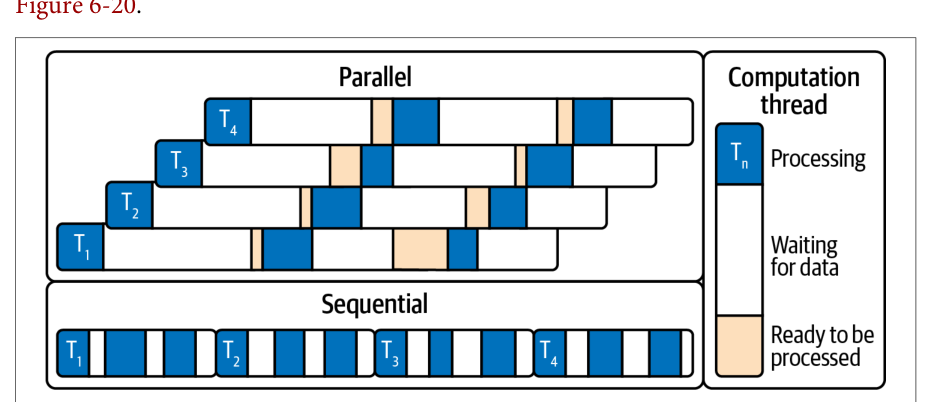
The parallel kernel running within multiple warps, in particular, benefits from warp-level latency hiding. While one warp is waiting for a memory load, another warp can be executing the add computation, while yet another could be fetching the next data, etc. We’ll explore many techniques to hide memory latency in the upcoming chapters.特别是在多个线程束中运行的并行内核,能够受益于线程束级的时延隐藏。当一个线程束在等待内存加载时,另一个线程束可以执行加法计算,还有另一个线程束可以取下一个数据,等等。我们将在后续章节中探讨许多隐藏内存时延的技术。
In the sequential kernel, there are no other warps to run while one is waiting, so the hardware pipelines often sit idle. The timeline is one long series of operations with idle gaps during memory waits. In the parallel version, those gaps are filled by other warps’ work, so the GPU is busy continuously. The comparison is shown in在串行内核中,当一个线程束等待时没有其他线程束可运行,因此硬件流水线经常处于空闲状态。其时间线是一长串连续的操作,其间在等待内存时存在空闲间隙。在并行版本中,这些间隙被其他线程束的工作填满,因此 GPU 持续忙碌。对比结果展示在
Here, the sequential timeline is one long series of operations with idle gaps during memory waits. In the parallel version, those gaps are filled by other warps’ work, so the GPU is busy continuously.在这里,串行时间线是一长串连续的操作,其间在等待内存时存在空闲间隙。在并行版本中,这些间隙被其他线程束的工作填满,因此 GPU 持续忙碌。
The key takeaway is to first ensure enough parallel work to fully occupy the GPU. High occupancy—enough warps to cover latency—maximizes throughput and minimizes idle stalls—in our example, parallelizing boosted GPU utilization to ~95%.关键要点是:首先要确保有足够的并行工作来充分占满 GPU。高占用率——即有足够的线程束来覆盖时延——可以最大化吞吐量并最小化空闲停顿;在我们的示例中,并行化将 GPU 利用率提升到了约 95%。
Once sufficient threads are launched, the next step is optimizing how efficiently each warp executes, through instruction-level parallelism and other per-thread improvements. But note: even at 100% occupancy, performance can still suffer if the workload is memory bound—that is, limited by slow memory access rather than compute.一旦启动了足够的线程,下一步就是通过指令级并行和其他针对单线程的优化,来提升每个线程束的执行效率。但要注意:即使占用率达到 100%,如果工作负载是显存受限的——即受限于缓慢的显存访问而非计算——性能仍可能受到影响。
A well-known example of a memory bound workload is the “decode” phase of an LLM. During decode, the LLM needs to move a large amount of data (model weights or parameters) from global HBM memory into the GPU registers and shared memory.显存受限工作负载的一个著名例子是 LLM 的“解码”阶段。在解码期间,LLM 需要将大量数据(模型权重或参数)从全局 HBM 显存搬移到 GPU 寄存器和共享内存中。
Since modern LLMs contain hundreds of billions of parameters (multiplied by, let’s say, 8 bits per parameter, or 1 byte), the models can be many hundreds of gigabytes in size. Moving this much data in and out of the GPU can easily saturate the memory bandwidth.由于现代 LLM 包含数千亿个参数(假设每个参数 8 位,即 1 字节),模型大小可达数百 GB。将如此多的数据搬入搬出 GPU 很容易使显存带宽饱和。
使用启动边界调优占用率
Tuning Occupancy with Launch Bounds
In some cases, simply using more threads isn’t enough—especially if each thread uses a lot of resources such as registers and shared memory. We can guide the compiler to optimize for occupancy by using CUDA’s __launch_bounds__ kernel annotation.在某些情况下,仅仅使用更多线程并不够——尤其是当每个线程占用大量资源(如寄存器和共享内存)时。我们可以使用 CUDA 的 __launch_bounds__ 内核注解来引导编译器针对占用率进行优化。
This annotation lets us specify two parameters for a kernel at compile time: a maximum number of threads per block we will launch and minimum number of thread blocks we want to keep resident on each SM. These hints influence the compiler’s register allocation and inlining decisions. An example is shown here:该注解让我们在编译期为内核指定两个参数:我们将启动的每个线程块的最大线程数,以及我们希望在每个 SM 上保持驻留的线程块最小数量。这些提示会影响编译器的寄存器分配与内联决策。示例如下:
__global__ __launch_bounds__(256, 16)
void myKernel(...) { /* ... */ }
Here, __launch_bounds__(256, 16) promises that the CUDA kernel will never be launched with more than 256 threads in a block. It also requests that the compiler allocate enough registers and inline functions so that at least 16 blocks of 256 threads, or 4,096 threads (16 blocks × 256 threads per block), can be resident on the SM simultaneously.这里,__launch_bounds__(256, 16) 承诺该 CUDA 内核绝不会以每块超过 256 个线程的方式启动。它还请求编译器分配足够的寄存器并内联函数,以便至少有 16 个 256 线程的线程块,即 4,096 个线程(16 个块 × 每块 256 个线程),能够同时驻留在 SM 上。
In practice, since current NVIDIA GPUs limit each SM to 2,048 total threads and each block to 1,024 threads, the compiler will reduce your request to the hardware maximum—in this case, 2,048 threads (8 blocks × 256 threads per block) per SM. And it will emit a warning since the 4,096 request (16 blocks × 256 threads per block) exceeds the SM’s capacity.在实践中,由于当前 NVIDIA GPU 将每个 SM 限制为总共 2,048 个线程、每个线程块限制为 1,024 个线程,编译器会将你的请求降低到硬件上限——在此例中即每个 SM 2,048 个线程(8 个块 × 每块 256 个线程)。并且由于 4,096 的请求(16 个块 × 每块 256 个线程)超出了 SM 的容量,它还会发出警告。
In practice, using __launch_bounds__ often causes the compiler to cap per-thread register usage (and to sometimes restrict unrolling or inlining) to avoid spilling and to allow higher occupancy. We are essentially trading a bit of per-thread performance and not using every last register or unrolling to the max. This is in exchange for more consistent warp throughput by keeping more warps in flight.在实践中,使用 __launch_bounds__ 往往会使编译器限制每线程的寄存器用量(有时还会限制展开或内联),以避免寄存器溢出并允许更高的占用率。我们本质上是在牺牲一点每线程性能,不再用尽最后一个寄存器或把展开做到极致,以此换取更多线程束同时在飞、从而获得更一致的线程束吞吐量。
Increasing occupancy must be balanced against per-thread resources. You want to avoid register spilling (which occurs if you force too many threads such that they run out of registers and spill to local memory, causing slow memory accesses).提高占用率必须与每线程资源相权衡。 你要避免寄存器溢出(当你强行使用过多线程,以致寄存器不够用而溢出到本地内存时就会发生,从而导致缓慢的显存访问)。
You can also determine an optimal launch configuration at runtime using the CUDA Occupancy API. For example, cudaOccupancyMaxPotentialBlockSize() will calculate the block size that produces the highest occupancy for a given kernel, considering its register and shared memory usage. Essentially, cudaOccupancyMaxPotentialBlock Size can autotune your block size for optimal occupancy, as shown here:你也可以在运行时使用 CUDA 占用率 API 确定最优的启动配置。例如,cudaOccupancyMaxPotentialBlockSize() 会在考虑内核寄存器与共享内存用量的前提下,计算出使给定内核达到最高占用率的线程块大小。本质上,cudaOccupancyMaxPotentialBlock Size 可以为你的线程块大小自动调优以获得最优占用率,如下所示:
int minGridSize = 0, bestBlockSize = 0;
// 如果你的内核使用动态共享内存(extern __shared__),
// 正确设置此项:
size_t dynSmemBytes = /* bytes per block (e.g., tiles * sizeof(T)) */ 0;
cudaOccupancyMaxPotentialBlockSize(
  &minGridSize, &bestBlockSize,
  myKernel,
  dynSmemBytes,      // 必须与内核的动态共享内存用量一致
  /* blockSizeLimit = */ 0);
// 计算一个覆盖 N 的网格,但不要低于最小网格
// 该最小网格能使占用率达到饱和
int gridSize = std::max(minGridSize, (N + bestBlockSize - 1) / bestBlockSize);
myKernel<<<gridSize, bestBlockSize, dynSmemBytes>>>(...);
int minGridSize = 0, bestBlockSize = 0;
// If your kernel uses dynamic shared memory (extern __shared__),
// set this correctly:
size_t dynSmemBytes = /* bytes per block (e.g., tiles * sizeof(T)) */ 0;
cudaOccupancyMaxPotentialBlockSize(
  &minGridSize, &bestBlockSize,
  myKernel,
  dynSmemBytes,      // must match your kernel's dynamic shared memory use
  /* blockSizeLimit = */ 0);
// Compute a grid that covers N, but don't go below the min grid
// that saturates occupancy
int gridSize = std::max(minGridSize, (N + bestBlockSize - 1) / bestBlockSize);
myKernel<<<gridSize, bestBlockSize, dynSmemBytes>>>(...);
This API computes how many threads per block would likely optimize occupancy given the kernel’s resource usage. We can then use bestBlockSize (and the suggested grid size) for our kernel launch. It’s important to note that minGridSize is the minimum grid size that saturates occupancy for this kernel on this device. It is not necessarily the right grid size to cover an input of length N. Compute gridSize = max(minGridSize, ceil_div(N, bestBlockSize)), and pass the kernel’s actual dynamic shared-memory bytes if it uses extern __shared__.该 API 会根据内核的资源用量,计算出每块多少线程可能最有利于占用率。随后我们可以在内核启动时使用 bestBlockSize(以及建议的网格大小)。需要注意的是,minGridSize 是在该设备上使此内核占用率达到饱和的最小网格大小,它未必是覆盖长度为 N 的输入所需的正确网格大小。请计算 gridSize = max(minGridSize, ceil_div(N, bestBlockSize)),并且如果内核使用了 extern __shared__,还要传入其实际的动态共享内存字节数。
When applied, the compiler’s heuristics are usually good, but __launch_bounds__ and occupancy calculators give you explicit control when needed. Use them when you know your kernel can trade some per-thread resource usage for more active warps. This helps prevent underoccupying SMs due to heavy threads.在应用时,编译器的启发式规则通常已经不错,但 __launch_bounds__ 和占用率计算器能在需要时给你显式控制。当你*确信*自己的内核可以用一些每线程资源用量换取更多活跃线程束时,就使用它们。这有助于防止因线程过重而导致 SM 占用率不足。
使用 NVIDIA Compute Sanitizer 调试功能正确性
Debugging Functional Correctness with NVIDIA Compute Sanitizer
Since CUDA applications can spawn thousands of threads per kernel, traditional debugging may fail to catch subtle memory bugs and race conditions. NVIDIA Compute Sanitizer, a functional-correctness suite included with the CUDA Toolkit, addresses these challenges by instrumenting code at runtime to find errors early in development. This reduces debugging interactions—and improves overall code reliability.由于 CUDA 应用每个内核可能启动数千个线程,传统调试可能无法捕获隐蔽的内存错误和竞态条件。NVIDIA Compute Sanitizer 是 CUDA Toolkit 附带的功能正确性套件,它在运行时对代码进行插桩,以便在开发早期发现错误,从而应对这些挑战。这减少了调试交互次数,并提升了代码的整体可靠性。
Sanitizer is invoked using the compute-sanitizer CLI and supports NVIDIA Tools Extension (NVTX) annotations for finer-grained analysis. NVTX should be used extensively for both correctness and performance analysis. To use the CLI, you can specify options with --option value and include flags like --error-exitcode to fail on errors. You can also apply filters to sanitize only specific kernels, such as using --kernel-name and --kernel-name-exclude. You can enable NVTX with --nvtx yes to help narrow the scope of your analysis and minimize false positives in memory-leak reports, for instance:Sanitizer 通过 compute-sanitizer 命令行工具调用,并支持 NVIDIA 工具扩展(NVTX)注解,以便进行更细粒度的分析。无论是正确性分析还是性能分析,都应广泛使用 NVTX。使用该命令行工具时,可以用 --option value 指定选项,并加入 --error-exitcode 等标志以便在出错时失败退出。还可以应用过滤器,仅对特定内核进行检测,例如使用 --kernel-name 和 --kernel-name-exclude。可以通过 --nvtx yes 启用 NVTX,以帮助缩小分析范围,并减少显存泄漏报告中的误报,例如:
compute-sanitizer [--tool toolname] [options] <application> [app_args]
Compute Sanitizer consists of four primary tools: memcheck, racecheck, initcheck, and synccheck. These help detect out-of-bounds memory accesses, data races, uninitialized memory reads, and synchronization issues in your CUDA code:Compute Sanitizer 由四个主要工具组成:memcheck、racecheck、initcheck 和 synccheck。它们有助于检测 CUDA 代码中的越界显存访问、数据竞争、未初始化内存读取以及同步问题:
- MemcheckMemcheck
- The memcheck tool precisely detects and attributes out-of-bounds or misaligned accesses in global, local, and shared memory; reports GPU hardware exceptions; and can identify device-side memory leaks. It supports additional checks such as
--check-device-heapfor heap allocations using command-line switches.memcheck 工具能够精确检测并定位全局内存、本地内存和共享内存中的越界或未对齐访问;报告 GPU 硬件异常;并可识别设备端显存泄漏。它还通过命令行开关支持额外检查,例如针对堆分配的--check-device-heap。
- RacecheckRacecheck
- Racecheck reports shared-memory data hazards, including Write-After-Write, Write-After-Read, and Read-After-Write, which can lead to nondeterministic behavior. Racecheck helps developers verify correct thread-to-thread communication within warps and thread blocks.Racecheck 报告共享内存中的数据冒险,包括写后写、写后读和读后写,这些冒险可能导致非确定性行为。Racecheck 帮助开发者验证线程束和线程块内线程间通信的正确性。
- InitcheckInitcheck
- Initcheck flags any access to uninitialized device global memory. This can be due to missing host-to-device copies or skipped device-side writes. This tool helps avoid subtle bugs that arise from stale or garbage data.Initcheck 会标记任何对未初始化设备全局内存的访问。这可能源于缺少主机到设备的拷贝,或跳过了设备端写入。该工具有助于避免由陈旧数据或垃圾数据引发的隐蔽错误。
- SynccheckSynccheck
- Synccheck detects invalid uses of synchronization primitives such as mismatched barriers. It identifies thread-ordering hazards that can cause deadlocks and inconsistent state across threads.Synccheck 检测同步原语的不当使用,例如屏障不匹配。它可识别可能导致死锁以及线程间状态不一致的线程顺序冒险。
In short, NVIDIA Compute Sanitizer provides a set of tools for uncovering and resolving memory, race, initialization, and synchronization bugs in CUDA applications. These tools, when integrated with CI systems, can help developers find correctness issues early. This way, they can ship reliable, high-performance code with confidence.简而言之,NVIDIA Compute Sanitizer 提供了一组工具,用于发现并解决 CUDA 应用中的内存、竞争、初始化和同步缺陷。这些工具与 CI 系统集成后,可以帮助开发者在早期发现正确性问题。这样,他们就能有信心地交付可靠、高性能的代码。
屋顶线模型:计算受限还是显存受限的工作负载
Roofline Model: Compute-Bound or Memory-Bound Workloads
A roofline model is a useful visualization that charts two hardware-imposed performance ceilings: one horizontal line at the processor’s peak floating-point rate and one diagonal line set by the peak memory bandwidth. Together, these form a “roofline” envelope that reveals whether a given kernel is limited by computation (compute bound) or data movement (memory bound).屋顶线模型(roofline model)是一种有用的可视化方法,它绘制出两条由硬件施加的性能上限:一条是位于处理器峰值浮点运算速率的水平线,另一条是由峰值显存带宽决定的斜线。二者共同构成一个“屋顶线”包络,揭示出给定内核是受计算限制(计算受限)还是受数据搬运限制(显存受限)。
Where these lines intersect is called the ridge point. This corresponds to the “arithmetic intensity” threshold at which a kernel transitions from being memory bound (left of the ridge) to compute bound (right of the ridge). Arithmetic intensity is measured as the number of FLOPS performed per byte transferred between off-chip global memory and the GPU.这两条线的交点称为*脊点*(ridge point)。它对应一个“算术强度”阈值,内核在该阈值处从显存受限(脊点左侧)转变为计算受限(脊点右侧)。算术强度的度量方式是:在片外全局内存与 GPU 之间每传输一字节所执行的 FLOPs 数量。
Let’s consider a simple example to illustrate why arithmetic intensity matters. Suppose a kernel loads two 32-bit floats (8 bytes total), adds them (1 FLOP), and writes back one 32-bit float result (4 bytes). In this case, the algorithm carries out 1 FLOP for 12 bytes of memory traffic, yielding an arithmetic intensity of 0.083 FLOPs/byte (1 FLOP/12 bytes ≈ 0.083 FLOPs per byte).让我们看一个简单的例子,以说明算术强度为何重要。假设某个内核加载两个 32 位浮点数(共 8 字节),将它们相加(1 FLOP),再写回一个 32 位浮点结果(4 字节)。在这种情况下,该算法为 12 字节的内存流量执行了 1 FLOP,因此算术强度为 0.083 FLOPs/字节(1 FLOP/12 字节 ≈ 每字节 0.083 FLOPs)。
Compare this to a GPU’s ridge point of 10 FLOPs per byte (10 FLOPs = ~80 TFLOPs ÷ 8 TB/s). This float-add kernel’s ridge point of 0.083 is orders of magnitude to the left (memory-bound side) of the roofline. This is more than 100× below that threshold, so it cannot keep the arithmetic logic units (ALUs) busy. This kernel is in the memory-bound regime, where performance is dominated by memory stalls rather than compute. Figure 6-21 shows a representative of the roofline model for Blackwell, including peak compute performance (horizontal line at ~80 FLOPs/sec) and peak memory bandwidth (diagonal line corresponding to 8 TB/s).将其与 GPU 的脊点 10 FLOPs/字节(10 FLOPs = ~80 TFLOPs ÷ 8 TB/s)相比。这个浮点加法内核的 0.083 位于屋顶线左侧(显存受限一侧)数个数量级处。它比该阈值低 100 倍以上,因此无法让算术逻辑单元(ALU)保持忙碌。该内核处于显存受限区间,其性能由内存停顿而非计算主导。图 6-21 展示了 Blackwell 的一个代表性屋顶线模型,包括峰值计算性能(约 80 FLOPs/秒的水平线)和峰值显存带宽(对应 8 TB/s 的斜线)。
Here, we see that the ridge point for the Blackwell GPU is the sustained FLOPs/sec divided by the sustained HBM bandwidth. Here, it’s the intersection point shown at 10 FLOPs/byte. Our example kernel’s arithmetic intensity is to the left along the slanted, memory-bandwidth diagonal at 0.083 FLOPs/byte. As such, this kernel lies on the slanted, memory-bandwidth ceiling of the roofline. This confirms that it is memory bound.这里我们看到,Blackwell GPU 的脊点是持续 FLOPs/秒除以持续 HBM 带宽。在这里,它就是图中所示的 10 FLOPs/字节的交点。我们示例内核的算术强度位于左侧,沿斜向的显存带宽对角线,为 0.083 FLOPs/字节。因此,该内核落在屋顶线斜向的显存带宽上限上。这证实了它是显存受限的。
To make this kernel less memory bound (and thus more compute bound), you can increase its arithmetic intensity by doing more work per byte of data. This will move the kernel to the right, which pushes performance up toward the compute roofline.要让该内核不那么受内存限制(从而更受计算限制),可以通过为每字节数据做更多工作来提高其算术强度。这会把内核向右移动,从而将性能推向计算屋顶线。
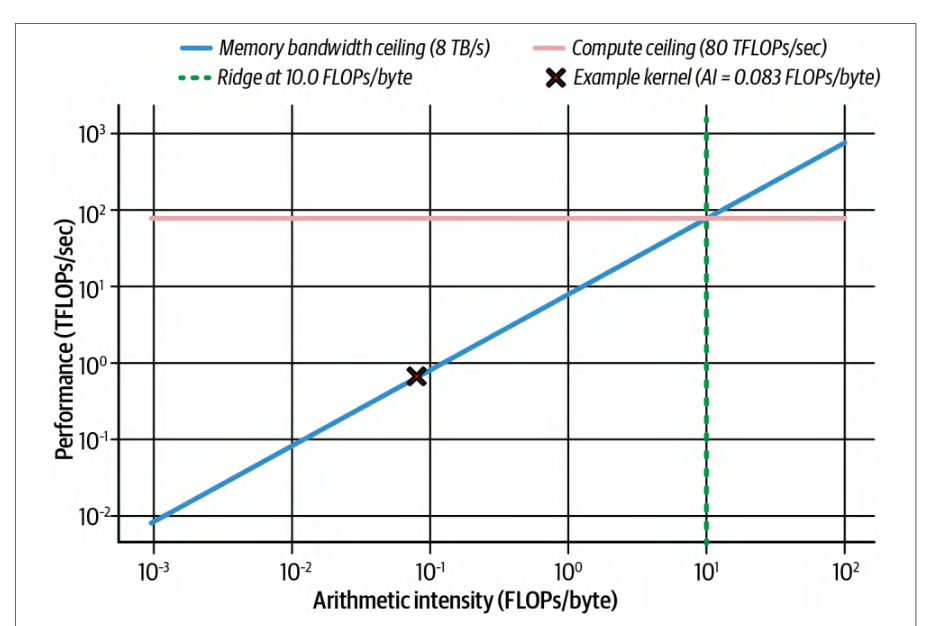
One simple way to make the kernel less memory bound is to use lower-precision data. For instance, if you used 16-bit floats (FP16) instead of 32-bit (FP32), you’d halve the bytes transferred per operation and instantly double the FLOPs/byte intensity.让内核减少显存受限的一个简单方法是使用更低精度的数据。例如,如果使用 16 位浮点数(FP16)而不是 32 位(FP32),每次操作传输的字节数将减半,FLOPs/字节强度立即翻倍。
Modern GPUs also support dedicated 8-bit floating point (FP8) Tensor Cores. Blackwell also introduced native support for 4-bit floating point (FP4) Tensor Cores for certain AI workloads. These further reduce the bytes per operation and increase the FLOPs/byte intensity even more.现代 GPU 还支持专用的 8 位浮点(FP8)张量核心。Blackwell 还针对某些 AI 工作负载引入了对 4 位浮点(FP4)张量核心的原生支持。这些进一步减少了每次操作的字节数,并更大幅度地提高了 FLOPs/字节强度。
For example, Blackwell supports FP8 Tensor Cores (1 byte per value), which doubles throughput and halves memory use relative to FP16. It also supports FP4 (half a byte per value) for some workloads like model inference.例如,Blackwell 支持 FP8 张量核心(每个值 1 字节),相对于 FP16 可将吞吐量翻倍并将显存占用减半。它还为模型推理等某些工作负载支持 FP4(每个值半个字节)。
A single 128-byte memory transaction can carry 32 FP32, 64 FP16, 128 FP8, or 256 FP4 values. Blackwell introduces hardware decompression to accelerate compressed model weights. For instance, models can be stored compressed in HBM, even beyond FP4 compression, and the hardware can decompress the weights on the fly. This effectively increases the usable memory bandwidth further when reading those weights.单次 128 字节的内存事务可以承载 32 个 FP32、64 个 FP16、128 个 FP8 或 256 个 FP4 值。Blackwell 引入了硬件解压缩来加速压缩后的模型权重。例如,模型可以以压缩形式存储在 HBM 中,压缩程度甚至可以超过 FP4,硬件能够在读取时即时解压这些权重。这在读取这些权重时进一步有效提升了可用的显存带宽。
As such, Blackwell has an architecture advantage for memory-bound workloads like transformer-based token generation. Weights are stored in a compressed 4-bit or 2-bit scheme and decompressed by hardware at load time and cast to FP16/FP32 for higher-precision aggregations and computations. This shows how lower precision can reduce the amount of data transferred, increase arithmetic intensity for your kernel, and improve overall memory throughput for your workload.因此,对于像基于 Transformer 的 token 生成这类显存受限工作负载,Blackwell 具有架构上的优势。权重以 4 位或 2 位的压缩方案存储,在加载时由硬件解压并转换为 FP16/FP32,以进行更高精度的累加与计算。这说明更低精度如何减少传输的数据量、提高内核的算术强度,并改善工作负载的整体显存吞吐量。
For memory-bound workloads, the goal is to push the kernel’s operational point to the right on the roofline to increase its arithmetic intensity and move closer to becoming compute bound. By moving closer to the compute-bound regime, your kernel can better exploit the GPU’s full floating-point horsepower.对于显存受限工作负载,目标是让内核的运行点沿屋顶线向右移动,以提高其算术强度并更接近计算受限状态。通过更接近计算受限区间,内核可以更好地发挥 GPU 的全部浮点算力。
When a kernel is memory bound, Nsight Compute will report very high DRAM bandwidth utilization alongside low achieved compute metrics such as low ALU utilization. This indicates that warps spend most of their time stalled on memory accesses.当内核受内存限制时,Nsight Compute 会报告非常高的 DRAM 带宽利用率,同时实际达到的计算指标很低,例如 ALU 利用率很低。这表明线程束的大部分时间都停滞在显存访问上。
To drill into what’s happening, it’s best to use Nsight Compute for per-kernel counters, including latencies, cache hit rates, and warp issue stalls. In addition, modern versions of Nsight Compute have range replay (with instruction-level source metrics), improved source correlation navigation, and a launch-stack size metric. These features help diagnose dependency stalls, register pressure, and launch configuration effects more quickly.要深入分析实际发生的情况,最好使用 Nsight Compute 查看逐内核计数器,包括时延、缓存命中率和线程束发射停滞。此外,现代版本的 Nsight Compute 提供范围重放(range replay,含指令级源码指标)、改进的源码关联导航,以及启动栈大小指标。这些特性有助于更快地诊断依赖停滞、寄存器压力和启动配置的影响。
You can then use Nsight Systems for a holistic timeline view showing GPU idle gaps, overlap with CPU work, and PCIe/NVLink transfers. Together they give you both the why (which stalls and which resources) and the when (how those stalls fit into your application’s overall execution.)随后你可以使用 Nsight Systems 获得整体时间线视图,展示 GPU 空闲间隙、与 CPU 工作的重叠情况以及 PCIe/NVLink 传输。两者结合,既能告诉你*为什么*(哪些停滞、哪些资源),也能告诉你*何时*(这些停滞如何嵌入应用程序的整体执行过程)。
The key is to iteratively profile and identify memory hotspots using metrics from both Nsight Compute and Nsight Systems. You should add NVTX ranges around suspect code, zoom in on timeline behavior, and use the feedback to optimize.关键在于迭代地进行性能剖析,并结合 Nsight Compute 与 Nsight Systems 的指标识别内存热点。你应当在可疑代码周围添加 NVTX 范围,放大时间线行为,并利用反馈进行优化。
For instance, you can use NVTX to label regions as “memory copy” or “kernel execution” and see them in the Nsight Systems timeline. This is incredibly useful to confirm overlapping host-device transfers with compute, as discussed earlier.例如,你可以用 NVTX 将各区域标记为“显存拷贝”或“内核执行”,并在 Nsight Systems 时间线中查看它们。如前所述,这对于确认主机—设备传输与计算的重叠非常有用。
For instance, to verify the overlap, you can mark the start/end of both the data transfer and kernel calls with NVTX markers. Nsight Systems will show these NVTX ranges on a timeline, making it easy to see overlap. With asynchronous memory copies (cudaMemcpyAsync), the data transfer overlaps with kernel execution on the GPU (see Figure 6-22), comparing a synchronous and asynchronous memory transfer.例如,为了验证重叠,你可以用 NVTX 标记数据传输与内核调用的开始/结束。Nsight Systems 会在时间线上显示这些 NVTX 范围,从而很容易看出重叠。使用异步显存拷贝(cudaMemcpyAsync)时,数据传输会与 GPU 上的内核执行重叠(见图 6-22),该图对比了同步与异步内存传输。
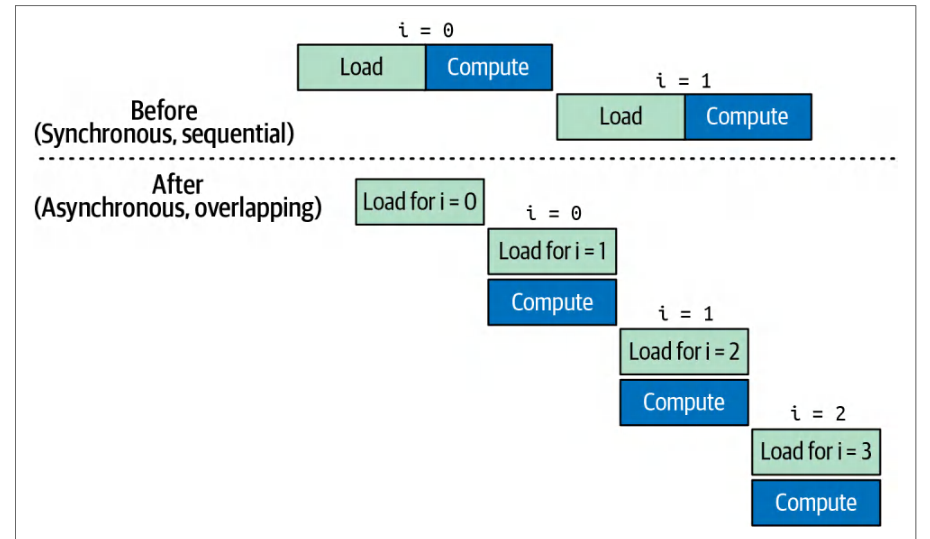
If you expect overlap but see the copies and kernels running sequentially versus parallel, then it’s something like an unwanted default-stream synchronization. Otherwise, a missing pinned-memory buffer is likely preventing true overlap.如果你期望重叠,却看到拷贝与内核串行而非并行执行,那么原因可能是意外的默认流同步。否则,很可能是缺少锁页内存缓冲区,导致无法实现真正的重叠。
When you suspect a kernel is starved for data, start by running it under Nsight Compute and Nsight Systems. In Nsight Compute you’ll see the global load efficiency metric drop. This signals that your DRAM requests aren’t being satisfied quickly enough. At the same time, the Nsight Systems timeline will reveal idle stretches between kernel launches as the GPU waits on data transfers.当你怀疑某个内核缺乏数据供给时,首先用 Nsight Compute 和 Nsight Systems 运行它。在 Nsight Compute 中,你会看到全局加载效率指标下降。这表明你的 DRAM 请求没有得到足够快的满足。同时,Nsight Systems 的时间线会显示内核启动之间的空闲时段,因为 GPU 正在等待数据传输。
Once you’ve applied the memory-hierarchy optimizations from this chapter, those idle gaps will all but disappear, and Nsight Compute will show memory pipe utilization percentage climbing toward its peak. You’ll also see a corresponding jump in end-to-end kernel throughput.一旦应用了本章介绍的显存层次结构优化,这些空闲间隙几乎会完全消失,Nsight Compute 会显示内存流水线利用率百分比向峰值攀升。你还会看到端到端内核吞吐量出现相应的跃升。
关键要点
Key Takeaways
In this chapter, you learned how to choose launch parameters that optimize occupancy, manage GPU memory asynchronously, and apply roofline analysis to distinguish compute-bound from memory-bound kernels. Here are some key takeaways worth reviewing:在本章中,你学习了如何选择可优化占用率的启动参数、如何异步管理 GPU 显存,以及如何应用屋顶线模型分析来区分计算受限与显存受限的内核。以下是一些值得回顾的关键要点:
- SIMT execution modelSIMT 执行模型
- GPUs execute threads in warps (32 threads) under the single-instruction, multiple thread (SIMT) model, with each warp issuing instructions in lockstep. High occupancy—keeping many warps in flight—hides memory and pipeline latency.GPU 在单指令多线程(SIMT)模型下以线程束(32 个线程)为单位执行线程,每个线程束以锁步方式发射指令。高占用率——保持大量线程束在飞行中——可以隐藏内存时延和流水线时延。
- Thread hierarchy: threads → locks → grids线程层次结构:线程 → 锁 → 网格
- Threads are grouped into thread blocks (up to 1,024 threads), and thread blocks form a grid to scale across millions of threads without code changes. Synchronization (
__syncthreads()or cooperative groups) enables data reuse in shared memory but incurs overhead, so minimize barriers.线程被组织成线程块(最多 1,024 个线程),线程块构成网格,从而无需修改代码即可扩展到数百万个线程。同步(__syncthreads()或协作组)可在共享内存中实现数据复用,但会带来开销,因此应尽量减少屏障。
- Occupancy versus resource limits占用率与资源限制
- Choose block sizes as multiples of 32 to avoid underfilled warps and maximize scheduler utilization. Be mindful of per-SM limits. For Blackwell, the maximum registers per thread is 255, maximum per-SM shared memory is 228 KB, maximum resident warps is 64, and maximum resident thread blocks is 32.选择 32 的倍数作为线程块大小,以避免线程束未被填满并最大化调度器利用率。注意每个 SM 的限制。对于 Blackwell,每线程最大寄存器数为 255,每 SM 最大共享内存为 228 KB,最大驻留线程束数为 64,最大驻留线程块数为 32。
- CUDA kernel-launch parametersCUDA 内核启动参数
- Start with
threadsPerBlock = 256(8 warps) for a balance of occupancy and resource use; computeblocksPerGrid = (N + threadsPerBlock – 1) /threadsPerBlockto cover all elements. Tune these values based on profiling feedback (register/register spilling, shared-memory usage, achieved occupancy).从threadsPerBlock = 256(8 个线程束)开始,以在占用率与资源使用之间取得平衡;计算blocksPerGrid = (N + threadsPerBlock – 1) /threadsPerBlock以覆盖所有元素。根据性能剖析反馈(寄存器/寄存器溢出、共享内存使用量、实际达到的占用率)调整这些值。
- Asynchronous memory management异步内存管理
- Prefer
cudaMallocAsync/cudaFreeAsyncon dedicated streams and leverage CUDA memory pools to avoid global synchronizations and OS-level overhead. PyTorch’s caching allocator follows a similar pattern for efficient tensor allocations and avoids costlycudaMalloc()andcudaFree()invocations.优先在专用流上使用cudaMallocAsync/cudaFreeAsync,并利用 CUDA 显存池来避免全局同步和操作系统级开销。PyTorch 的缓存分配器采用类似的模式来实现高效的张量分配,并避免代价高昂的cudaMalloc()和cudaFree()调用。
- GPU memory hierarchyGPU 显存层次结构
- Registers → L1/shared → L2 → global (HBM3e) → host: each level trades capacity for latency/bandwidth. Maximize data reuse in registers and shared/L1 cache.寄存器 → L1/共享内存 → L2 → 全局内存(HBM3e)→ 主机:每一级都以容量换取时延/带宽。应最大化寄存器与共享内存/L1 缓存中的数据复用。
- Unified Memory considerations统一内存的考量
- CUDA Managed Memory (Unified Memory) simplifies programming but can incur implicit page migrations; use
cudaMemPrefetchAsyncand memory advice to avoid surprise stalls.CUDA 托管内存(统一内存)简化了编程,但可能引入隐式的页迁移;使用cudaMemPrefetchAsync和内存建议来避免意外的停顿。
- Roofline model analysis屋顶线模型分析
- Arithmetic intensity (FLOPS per byte) determines whether a kernel is memory bound or compute bound. Use lower precision (FP16/FP8/FP4 and hardware decompression) to boost FLOPS/byte ratio and push kernels toward the compute roofline. Profile with Nsight Compute (per-kernel metrics) and Nsight Systems (timeline) to identify and eliminate memory stalls. Using TMEM with Blackwell unified matrix-multiply-accumulate (UMMA) can shift kernels from memory-bound to compute-bound when combined with FP8 and FP4. We’ll cover UMMA in more detail in Chapter 10.算术强度(每字节的 FLOPS 数)决定了内核是受限于内存还是受限于计算。使用更低的精度(FP16/FP8/FP4 以及硬件解压缩)来提升 FLOPS/字节比,推动内核向计算屋顶线靠拢。使用 Nsight Compute(逐内核指标)和 Nsight Systems(时间线)进行性能剖析,以识别并消除内存停顿。在 Blackwell 上,将 TMEM 与统一矩阵乘累加(UMMA)配合使用,并与 FP8 和 FP4 相结合,可将内核从受限于内存转变为受限于计算。我们将在第 10 章更详细地介绍 UMMA。
结语
Conclusion
This chapter has laid the groundwork for high-performance CUDA development by demystifying the GPU’s SIMT model, thread hierarchy, and multilevel memory system. Remember that occupancy, the ratio of active warps to the theoretical GPU maximum, is important for latency hiding.本章揭开了 GPU 的 SIMT 模型、线程层次结构和多级内存系统的面纱,为高性能 CUDA 开发奠定了基础。请记住,占用率——即活跃线程束数量与 GPU 理论最大值的比值——对于隐藏时延至关重要。
However, maximizing occupancy does not guarantee best performance in every case. GPUs can often achieve very high throughput at moderate or even low occupancy if threads have sufficient instruction-level parallelism (ILP)—or if other resources are the bottleneck.然而,最大化占用率并不总能保证最佳性能。如果线程具有足够的指令级并行(ILP),或者瓶颈在于其他资源,GPU 往往能在中等甚至较低的占用率下实现非常高的吞吐量。
While higher occupancy helps to hide latency, there are scenarios in which reducing the number of active threads will free up registers for other threads. This allows more computations per thread—and ultimately boosts throughput. Always benchmark different occupancy levels to find the optimal setting for your workload and hardware.虽然更高的占用率有助于隐藏时延,但在某些场景下,减少活跃线程数量会为其他线程释放寄存器。这允许每个线程执行更多计算,并最终提升吞吐量。务必对不同占用率水平进行基准测试,以找到适合你的工作负载和硬件的最优设置。
With these fundamentals and profiling techniques in hand, you’re now ready to dive into targeted optimizations such as avoiding warp divergency, exploiting the GPU memory hierarchy, and asynchronously prefetching memory. We’ll also dive into the TMA, which handles bulk memory transfers and frees up the GPU to focus on useful work and increase computational goodput.掌握了这些基础知识和性能剖析技术,你现在可以着手有针对性的优化,例如避免线程束发散、充分利用 GPU 显存层次结构,以及异步预取显存。我们还将深入探讨 TMA,它负责处理批量显存传输,让 GPU 腾出手来专注于有用的工作,从而提高计算有效吞吐。