内核间流水线、同步与 CUDA 流有序显存分配
Chapter 11. Inter-Kernel Pipelining, Synchronization, and CUDA Stream-Ordered Memory Allocations
本章目录
So far, we have focused on the intra-kernel tools—cuda::pipeline double-buffering, warp specialization (loader/compute/storer warps), persistent kernels, and thread-block clusters with DSMEM/TMA—to keep the SMs busy for a single kernel. In this chapter we keep those kernels and show how to pipeline across kernels and batches with CUDA streams, events, and the stream-ordered memory allocator. In short, Chapter 10 focused on hiding latency within a kernel. This chapter shows how to hide latency between kernels and between the GPU and the host.到目前为止,我们关注的都是内核内部的工具——cuda::pipeline 双缓冲、线程束专用化(加载/计算/存储线程束)、持久化内核,以及带 DSMEM/TMA 的线程块集群——目的是让 SM 在单个内核执行期间保持忙碌。本章我们保留这些内核,并展示如何借助 CUDA 流、事件和流序显存分配器(stream-ordered memory allocator)在内核之间、批次之间构建流水线。简而言之,第 10 章关注的是隐藏内核内部的时延,本章则展示如何隐藏内核之间以及 GPU 与主机之间的时延。
This kind of inter-kernel concurrency is essential for keeping all of the GPU’s engines busy in real-world workloads. To achieve peak GPU utilization with modern GPUs, we need to keep the GPU’s compute engines and direct memory access (DMA) engines busy and running in parallel.这种内核间并发对于在真实工作负载中让 GPU 的所有引擎保持忙碌至关重要。要在现代 GPU 上实现峰值 GPU 利用率,我们需要让 GPU 的计算引擎和直接显存访问(DMA)引擎保持忙碌并并行运行。
CUDA streams provide the foundation for this inter-kernel concurrency. By combining asynchronous memory operations, fine-grained synchronization, and CUDA Graphs (briefly introduced in this chapter and covered in more detail in the next chapter), you can construct highly efficient pipelines that avoid host-side stalls.CUDA 流为这种内核间并发提供了基础。通过组合异步内存操作、细粒度同步和 CUDA 图(本章简要介绍,下一章详细展开),可以构建高效流水线,避免主机侧停顿。
用 CUDA 流重叠内核执行
Overlapping Kernel Execution with CUDA Streams
A CUDA stream is a sequence of operations—kernel launches, memory copies, and memory allocations—that execute in the order they are issued. Consider launching 5 kernels from the CPU onto the GPU using 2 streams, as shown in Figure 11-1.CUDA 流是一系列操作——内核启动、显存拷贝和显存分配——按发出顺序执行。考虑如图 11-1 所示,从 CPU 使用 2 个流向 GPU 启动 5 个内核。
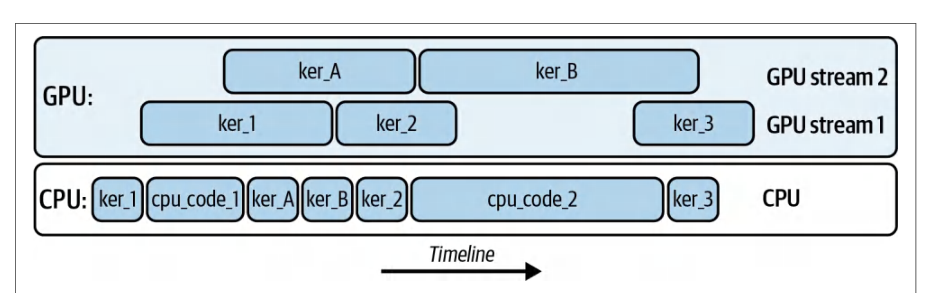
Here, we see ker_A and ker_B are running on stream 2, while ker_1, ker_2, and ker_3 are running on stream 1. All kernels may overlap with one another—and across CUDA streams—as long as hardware resources permit.这里可以看到,ker_A 和 ker_B 运行在流 2 上,而 ker_1、ker_2 和 ker_3 运行在流 1 上。只要硬件资源允许,所有内核之间——以及跨 CUDA 流——都可以相互重叠。
The CPU is able to continue performing work (cpu_code_1 and cpu_code_2) while the streams perform the kernel operations asynchronously. The code to launch these five kernels on the two CUDA streams is shown here:在各流异步执行内核操作的同时,CPU 可以继续执行自己的工作(cpu_code_1 和 cpu_code_2)。在两个 CUDA 流上启动这五个内核的代码如下:
#include <cstdio>
#include <cuda_runtime.h>
__global__ void ker_A()  { /* ... do some work ... */ }
__global__ void ker_B()  { /* ... do some work ... */ }
__global__ void ker_1()  { /* ... do some work ... */ }
__global__ void ker_2()  { /* ... do some work ... */ }
__global__ void ker_3()  { /* ... do some work ... */ }
int main() {
    // 1) 创建两个 CUDA 流
    cudaStream_t stream1, stream2;
    cudaStreamCreateWithFlags(&stream1, cudaStreamNonBlocking);
    cudaStreamCreateWithFlags(&stream2, cudaStreamNonBlocking);
    // 2) 定义网格/线程块大小
    dim3 grid(128);
    dim3 block(256);
    // 3) 在 stream1 上启动 ker_1
    ker_1<<<grid, block, 0, stream1>>>();
    // 4) CPU 代码 1 立即运行(相对于 GPU 是异步的)
    printf("CPU code 1 executing\n");
    // ... 在此处执行一些主机端工作 ...
    cpu_code_1();
#include <cstdio>
#include <cuda_runtime.h>
__global__ void ker_A()  { /* ... do some work ... */ }
__global__ void ker_B()  { /* ... do some work ... */ }
__global__ void ker_1()  { /* ... do some work ... */ }
__global__ void ker_2()  { /* ... do some work ... */ }
__global__ void ker_3()  { /* ... do some work ... */ }
int main() {
    // 1) Create two CUDA streams
    cudaStream_t stream1, stream2;
    cudaStreamCreateWithFlags(&stream1, cudaStreamNonBlocking);
    cudaStreamCreateWithFlags(&stream2, cudaStreamNonBlocking);
    // 2) Define your grid/block sizes
    dim3 grid(128);
    dim3 block(256);
    // 3) Launch ker_1 on stream1
    ker_1<<<grid, block, 0, stream1>>>();
    // 4) CPU code 1 runs immediately (asynchronously wrt GPU)
    printf("CPU code 1 executing\n");
    // ... do some host-side work here ...
    cpu_code_1();
    // 5) 在 stream2 上启动 ker_A
    ker_A<<<grid, block, 0, stream2>>>();
    // 6) 在 stream1 上启动 ker_B
    ker_B<<<grid, block, 0, stream1>>>();
    // 7) 在 stream2 上启动 ker_2
    ker_2<<<grid, block, 0, stream2>>>();
    // 8) CPU 代码 2 立即运行
    printf("CPU code 2 executing\n");
    // ... 在此处执行另一些主机端工作 ...
    cpu_code_2();
    // 9) 在 stream1 上启动 ker_3
    ker_3<<<grid, block, 0, stream1>>>();
    // 10) 等待每个流上的工作完成
    cudaStreamSynchronize(stream1);
    cudaStreamSynchronize(stream2);
    // 11) 清理
    cudaStreamDestroy(stream1);
    cudaStreamDestroy(stream2);
    return 0;
}
    // 5) Launch ker_A on stream2
    ker_A<<<grid, block, 0, stream2>>>();
    // 6) Launch ker_B on stream1
    ker_B<<<grid, block, 0, stream1>>>();
    // 7) Launch ker_2 on stream2
    ker_2<<<grid, block, 0, stream2>>>();
    // 8) CPU code 2 runs immediately
    printf("CPU code 2 executing\n");
    // ... do some other host-side work here ...
    cpu_code_2();
    // 9) Launch ker_3 on stream1
    ker_3<<<grid, block, 0, stream1>>>();
    // 10) Wait for work on each stream to finish
    cudaStreamSynchronize(stream1);
    cudaStreamSynchronize(stream2);
    // 11) Clean up
    cudaStreamDestroy(stream1);
    cudaStreamDestroy(stream2);
    return 0;
}
ker_1 is enqueued on stream1, then control returns immediately to the CPU. cpu_code_1() runs on the host while ker_1 executes on the GPU. Meanwhile, we enqueue ker_A on stream2 and ker_B on stream1. We then enqueue ker_2 on stream2, interleave cpu_code_2, and enqueue ker_3 on stream1. Finally, we synchronize on each stream to wait for all of the work to complete and then destroy the streams to clean up the resources.ker_1 被入队到 stream1,随后控制权立即返回 CPU。ker_1 在 GPU 上执行的同时,cpu_code_1() 在主机上运行。与此同时,我们把 ker_A 入队到 stream2、ker_B 入队到 stream1。接着把 ker_2 入队到 stream2,其间穿插 cpu_code_2,再把 ker_3 入队到 stream1。最后,对每个流执行同步以等待所有工作完成,然后销毁这些流以清理资源。
This example highlights five different kernel executions overlapping across two different streams. Increasing the complexity a bit, and building upon Chapter 10, following is the same warp specialization pipeline example but using CUDA streams:这个例子展示了五个不同的内核执行在两个不同流之间重叠。稍微提高一点复杂度,在第 10 章的基础上,下面是同一个线程束专用化流水线示例,但改用 CUDA 流:
// 在多个 CUDA 流中运行线程束专用化内核。
#include <cuda_runtime.h>
#include <cuda/pipeline>
#include <cooperative_groups.h>
namespace cg = cooperative_groups;
#define TILE_SIZE 128
#define TILE_ELEMS (TILE_SIZE * TILE_SIZE)
// 复用第 10 章的内容
// Run the warp-specialized kernel in multiple CUDA streams.
#include <cuda_runtime.h>
#include <cuda/pipeline>
#include <cooperative_groups.h>
namespace cg = cooperative_groups;
#define TILE_SIZE 128
#define TILE_ELEMS (TILE_SIZE * TILE_SIZE)
// re-using from Chapter 10
__global__ void warp_specialized_pipeline(const float* __restrict__ A_global,
                                          const float* __restrict__ B_global,
                                          float*       __restrict__ C_global,
                                          int numTiles);
int main() {
    const int NUM_STREAMS = 2;                   // 保持较小;按需调优
    const int batches     = 8;                   // 在途批次
    const size_t elems    = TILE_ELEMS;          // 每批元素数
    const size_t bytes    = elems * sizeof(float);
    // 创建不与遗留默认流同步的流
    cudaStream_t s[NUM_STREAMS];
    for (int i = 0; i < NUM_STREAMS; ++i)
        cudaStreamCreateWithFlags(&s[i], cudaStreamNonBlocking);
    // 分配锁页主机缓冲区,使 H2D/D2H 能够真正重叠
    float *hA = nullptr, *hB = nullptr, *hC = nullptr;
    cudaMallocHost(&hA, batches * bytes);
    cudaMallocHost(&hB, batches * bytes);
    cudaMallocHost(&hC, batches * bytes);
    // ... 初始化 hA/hB ...
    for (int b = 0; b < batches; ++b) {
        const int sid = b % NUM_STREAMS;
        float *dA = nullptr, *dB = nullptr, *dC = nullptr;
        cudaMallocAsync(&dA, bytes, s[sid]);
        cudaMallocAsync(&dB, bytes, s[sid]);
        cudaMallocAsync(&dC, bytes, s[sid]);
        cudaMemcpyAsync(dA, hA + b * elems, bytes,
                        cudaMemcpyHostToDevice, s[sid]);
        cudaMemcpyAsync(dB, hB + b * elems, bytes,
                        cudaMemcpyHostToDevice, s[sid]);
        const dim3 block(96);    // 三个线程束:loader(0)、compute(1)、storer(2)
        const dim3 grid(1);
        const size_t shmem = 3 * elems * sizeof(float); // 每个 tile 的 [A|B|C]
        // 完全按原样复用第 10 章的内核
        warp_specialized_pipeline<<<grid, block, shmem, s[sid]>>>(dA, dB, dC,
                                                                /*numTiles=*/1);
        cudaMemcpyAsync(hC+b*elems, dC, bytes, cudaMemcpyDeviceToHost, s[sid]);
        cudaFreeAsync(dA, s[sid]);
        cudaFreeAsync(dB, s[sid]);
        cudaFreeAsync(dC, s[sid]);
    }
__global__ void warp_specialized_pipeline(const float* __restrict__ A_global,
                                          const float* __restrict__ B_global,
                                          float*       __restrict__ C_global,
                                          int numTiles);
int main() {
    const int NUM_STREAMS = 2;                   // keep it small; tune as needed
    const int batches     = 8;                   // in-flight batches
    const size_t elems    = TILE_ELEMS;          // elements per batch
    const size_t bytes    = elems * sizeof(float);
    // Create streams that do NOT synchronize with the legacy default stream
    cudaStream_t s[NUM_STREAMS];
    for (int i = 0; i < NUM_STREAMS; ++i)
        cudaStreamCreateWithFlags(&s[i], cudaStreamNonBlocking);
    // Allocate pinned host buffers so H2D/D2H can truly overlap
    float *hA = nullptr, *hB = nullptr, *hC = nullptr;
    cudaMallocHost(&hA, batches * bytes);
    cudaMallocHost(&hB, batches * bytes);
    cudaMallocHost(&hC, batches * bytes);
    // ... initialize hA/hB ...
    for (int b = 0; b < batches; ++b) {
        const int sid = b % NUM_STREAMS;
        float *dA = nullptr, *dB = nullptr, *dC = nullptr;
        cudaMallocAsync(&dA, bytes, s[sid]);
        cudaMallocAsync(&dB, bytes, s[sid]);
        cudaMallocAsync(&dC, bytes, s[sid]);
        cudaMemcpyAsync(dA, hA + b * elems, bytes,
                        cudaMemcpyHostToDevice, s[sid]);
        cudaMemcpyAsync(dB, hB + b * elems, bytes,
                        cudaMemcpyHostToDevice, s[sid]);
        const dim3 block(96);    // three warps: loader(0), compute(1), storer(2)
        const dim3 grid(1);
        const size_t shmem = 3 * elems * sizeof(float); // [A|B|C] per tile
        // Reuse the Chapter 10 kernel exactly as-is
        warp_specialized_pipeline<<<grid, block, shmem, s[sid]>>>(dA, dB, dC,
                                                                /*numTiles=*/1);
        cudaMemcpyAsync(hC+b*elems, dC, bytes, cudaMemcpyDeviceToHost, s[sid]);
        cudaFreeAsync(dA, s[sid]);
        cudaFreeAsync(dB, s[sid]);
        cudaFreeAsync(dC, s[sid]);
    }
    for (int i = 0; i < NUM_STREAMS; ++i) {
        cudaStreamSynchronize(s[i]);
        cudaStreamDestroy(s[i]);
    }
    cudaFreeHost(hA); cudaFreeHost(hB); cudaFreeHost(hC);
    return 0;
}
Here, we are re-using the warp-specialized pipeline and showing how streams add a second layer of overlap such that while stream 1 computes on batch n, stream 2 is performing DMA-loads on batch b+1. At the same time, it can copy back batch b−1. The kernel’s internal cuda::pipeline overlap remains unchanged.这里我们复用了线程束专用化流水线,展示流如何增加第二层重叠:流 1 在批次 n 上计算时,流 2 正在对批次 b+1 执行 DMA 加载。同时,它还可以把批次 b−1 拷贝回来。内核内部 cuda::pipeline 的重叠保持不变。
We’ll continue to build out the complexity later in the chapter by layering in thread block clusters, but let’s first dive into how streams help to overlap compute with data transfers. This will help solidify the fundamentals of CUDA streams and their role in GPU-based performance engineering.本章稍后我们会继续叠加线程块集群来提升复杂度,但先深入探讨流如何帮助计算与数据传输重叠。这有助于夯实 CUDA 流的基础,并理解它们在基于 GPU 的性能工程中的作用。
用流重叠计算与数据传输
Using Streams to Overlap Compute with Data Transfers
For instance, you can enqueue each kernel launch and memory copy into its own stream. This allows the SMs to execute kernels while the two dedicated DMA engines (one for Host → Device transfers and one for Device → Host transfers) move data concurrently.例如,你可以把每次内核启动和显存拷贝分别入队到各自的流中。这样,两个专用 DMA 引擎(一个负责主机 → 设备传输,一个负责设备 → 主机传输)并发搬运数据的同时,SM 可以执行内核。
Since the SM compute pipeline runs independently of the two DMA engines, you can fully overlap the kernel’s computation with the two data transfers using CUDA streams. However, if the compute is fully maxed out by a kernel using all SM throughput—or a copy pipeline is saturating the memory bandwidth with excessive, additional overlapping—it will not improve performance.由于 SM 计算流水线独立于两个 DMA 引擎运行,你可以使用 CUDA 流让内核的计算与两次数据传输完全重叠。然而,如果内核已经用满全部 SM 吞吐量使计算达到饱和——或者复制流水线因过多额外的重叠操作而占满显存带宽——那么这样做并不会提升性能。
When compute and memory throughput are saturated, you’ll start seeing two concurrent operations each running at 50%, for instance, since they are both contending for the same resource. You can profile GPU utilization to identify these saturation thresholds.当计算吞吐量与显存吞吐量都已饱和时,例如你会开始看到两个并发操作各自只跑到 50%,因为它们都在争抢同一份资源。你可以对 GPU 利用率做性能剖析,以确定这些饱和阈值。
For example, consider an AI model training or inference workload that breaks work into batches. Here, you would launch a kernel on batch 0 in stream 0 at the same time that stream 1 invokes cudaMemcpyAsync() to copy batch 1 from the host to device, as shown in Figure 11-2.例如,考虑一个将工作划分为多个批次的 AI 模型训练或推理负载。此时,你在流 0 中为批次 0 启动内核,同时由流 1 调用 cudaMemcpyAsync() 将批次 1 从主机复制到设备,如图 11-2 所示。
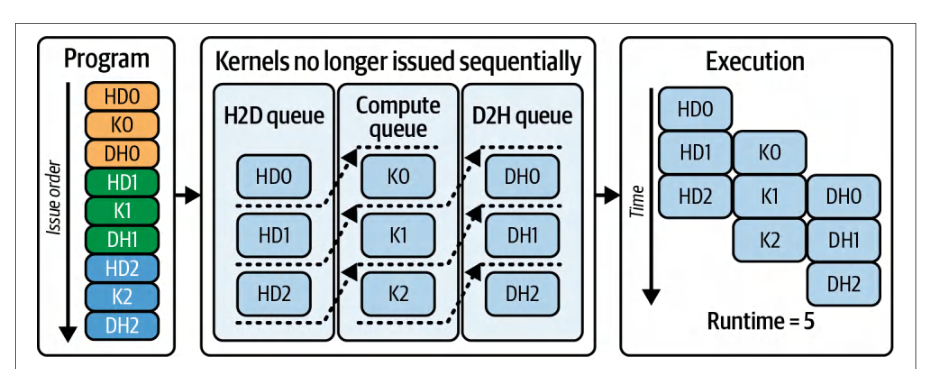
On modern GPUs with at least two copy engines (deviceProp.asyncEngine Count()), you can extend this to a three-way overlap such that stream 0 runs the kernel for batch 0, stream 1 copies batch 1 host to device, and stream 2 writes the results of the previous batch back to the host. This extends to additional streams. This pattern hides data-transfer latency behind computation, and vice versa, keeping all of the GPU’s engines busy and minimizing idle time.在至少拥有两个复制引擎(deviceProp.asyncEngine Count())的现代 GPU 上,你可以将其扩展为三路重叠:流 0 为批次 0 运行内核,流 1 将批次 1 从主机复制到设备,流 2 将上一批次的结果写回主机。这还可以进一步扩展到更多流。这种模式将数据传输时延隐藏在计算之后,反之亦然,使 GPU 的所有引擎保持忙碌,并最大限度地减少空闲时间。
In practice, your kernel must meet several requirements to achieve this concurrent behavior. First, any host pointer used in an asynchronous transfer must be page-locked, or pinned. If you call cudaMemcpyAsync() on pageable memory, the runtime performs a host-side staging copy into pinned memory that blocks the calling host thread and the enqueuing stream until staging completes.在实践中,内核必须满足若干要求才能实现这种并发行为。首先,异步传输中使用的任何主机指针都必须被页锁定,即锁页。如果你对可分页内存调用 cudaMemcpyAsync(),运行时会在主机侧执行一次到锁页内存的暂存复制,这会阻塞调用方主机线程和入队流,直到暂存完成。
This prevents that transfer from being asynchronous. While this blocks the calling host thread, the GPU can still overlap compute and copies in other streams. But that specific transfer will not overlap correctly. To achieve fully asynchronous transfers in your stream, you must use pinned host memory.这会使该次传输无法异步执行。虽然这会阻塞调用方主机线程,但 GPU 仍可在其他流中重叠计算与复制。不过该特定传输不会正确重叠。要在流中实现完全异步的传输,必须使用锁页主机内存。
Second, you should use the asynchronous allocation and deallocation routines, cuda MallocAsync() and cudaFreeAsync(), instead of the synchronous and blocking cuda Malloc() or cudaFree() calls. Frameworks like PyTorch provide the option to use其次,你应使用异步分配与释放例程 cuda MallocAsync() 和 cudaFreeAsync(),而不是同步且阻塞的 cuda Malloc() 或 cudaFree() 调用。像 PyTorch 这样的框架提供了使用
CUDA’s asynchronous, stream-ordered memory allocator. The idea is to not stall all active streams when you allocate memory. This would be very bad for performance.CUDA 的异步、流序显存分配器。其核心思想是:在分配内存时不要阻塞所有活跃的流。否则会对性能造成非常严重的影响。
The asynchronous stream-ordered allocator allows each stream to request or return device memory without waiting on other streams. Using the asynchronous allocator ensures memory operations in one stream don’t stall operations in other streams. This will avoid unnecessary global synchronization. Let’s explore the stream-ordered memory allocator in the next section.异步的流序分配器允许每个流请求或归还设备显存,而无需等待其他流。使用异步分配器可确保某个流中的显存操作不会阻塞其他流中的操作。这将避免不必要的全局同步。我们将在下一节探讨流序显存分配器。
PyTorch’s default CUDA caching allocator is stream-aware and, in normal operation (e.g., servicing allocations from its cache), it avoids device-wide synchronization. Only when it has to request more memory from the OS using cudaMalloc would a synchronization occur. In practice this means most tensor allocations and frees don’t block other streams. Enabling the cudaMallocAsync backend can further reduce fragmentation and improve reuse in many workloads, as you’ll see next.PyTorch 默认的 CUDA 缓存分配器是流感知的,在正常运行情况下(例如从其缓存中满足分配请求),它会避免设备范围的同步。只有当它必须使用 cudaMalloc 向操作系统申请更多内存时,才会发生同步。在实践中,这意味着大多数张量的分配与释放不会阻塞其他流。启用 cudaMallocAsync 后端可以进一步减少碎片并改善许多负载中的内存复用,你将在下一节看到。
流序显存分配器
Stream-Ordered Memory Allocator
In PyTorch, you can enable CUDA’s stream-ordered allocator by setting the environment variable PYTORCH_ALLOC_CONF=backend:cudaMallocAsync before launching your PyTorch script. If this variable is set, PyTorch tensor memory allocation (cuda MallocAsync()) and free (cudaFreeAsync()) operations are enqueued in separate CUDA streams in the order in which they are invoked. When this environment variant is not set, PyTorch uses its own caching allocator.在 PyTorch 中,可以在启动 PyTorch 脚本之前设置环境变量 PYTORCH_ALLOC_CONF=backend:cudaMallocAsync,从而启用 CUDA 的流序分配器。如果设置了该变量,PyTorch 的张量显存分配(cuda MallocAsync())与释放(cudaFreeAsync())操作会按照调用顺序被依次入队到各自的 CUDA 流中。如果未设置该环境变量,PyTorch 则使用其自带的缓存分配器。
If you use the legacy cudaMalloc(...), remember that it’s a blocking, device-wide operation that synchronizes the device before returning. This can stall work in other streams since every allocation forces the entire GPU to stall until the memory is reserved. This pauses all streams, limits parallelism, and destroys your workload’s performance.如果使用传统的 cudaMalloc(...),请记住它是一个阻塞式的、作用于整个设备的操作,在返回之前会同步整个设备。由于每次分配都会强制整个 GPU 停顿,直到内存被预留完成,因此这可能使其他流中的工作停滞。这会暂停所有流、限制并行性,并破坏工作负载的性能。
In contrast, using the stream-ordered allocator with cudaMallocAsync(...) simply records the allocation request in the same CUDA stream that will use it—whether the stream is performing a kernel or memory operation. It will not block the other streams. This way, memory management never serializes streams that are feeding those kernels.相比之下,使用流序分配器配合 cudaMallocAsync(...) 时,分配请求只是被记录到将要使用该内存的同一个 CUDA 流中——无论该流执行的是内核操作还是内存操作。它不会阻塞其他流。这样一来,内存管理就永远不会把那些为内核提供数据的流串行化。
In practice, stream 0 might be executing an attention kernel on batch N, stream 1 copies batch N+1 from host to device, and stream 2 enqueues a cudaMalloc Async(...) for batch N+2. Because cudaMallocAsync(...) simply appends its work into stream 2’s queue, streams 0 and 1 continue without interruption.在实践中,流 0 可能正在对第 N 个批执行注意力内核,流 1 正在将第 N+1 个批从主机拷贝到设备,而流 2 正在为第 N+2 个批入队一个 cudaMalloc Async(...)。由于 cudaMallocAsync(...) 只是把它的工作追加到流 2 的队列中,流 0 和流 1 可以不受中断地继续执行。
With the stream-aware allocator, GPU memory for each mini-batch is allocated without blocking other streams. This is important for LLM pipelines that allocate per-batch scratch space. The asynchronous allocator prevents stalls—even under heavy memory churn.借助流感知分配器,每个小批的 GPU 显存分配都不会阻塞其他流。这对于需要为每个批分配暂存空间的 LLM 流水线非常重要。即使在显存频繁换入换出的情况下,异步分配器也能防止停顿。
Allocations are satisfied from a per-device memory pool. You can tune the pool’s release threshold using cudaMemPoolSetAttribute() to trade off returning memory to the OS versus reusing it for performance. A higher threshold means the pool will keep memory allocated longer. This will reduce the number of times the memory is returned back to the OS. This leads to fewer OS calls and better performance by avoiding repetitive memory allocations and de-allocations.分配请求由每个设备各自的显存池来满足。你可以使用 cudaMemPoolSetAttribute() 调整该显存池的释放阈值,从而在将显存归还给操作系统与复用显存以提升性能之间进行权衡。阈值越高,显存池保留已分配显存的时间就越长。这会减少显存被归还给操作系统的次数。由此带来的操作系统调用更少,并通过避免反复的显存分配与释放获得更好的性能。
The following example shows how to implement stream-based overlap using the stream-ordered memory allocator with cudaMallocAsync and cudaFreeAsync and demonstrates the use of cudaMemPoolSetAttribute(). This highlights how memory allocation, data transfer, and kernel execution can be fully pipelined using CUDA streams:下面的示例展示了如何使用流序显存分配器配合 cudaMallocAsync 和 cudaFreeAsync 实现基于流的重叠执行,并演示了 cudaMemPoolSetAttribute() 的用法。这突出了如何利用 CUDA 流将显存分配、数据传输和内核执行完全流水线化:
// 初始化异步显存分配器
cudaMemPool_t pool;
int device = -1;
cudaGetDevice(&device); // 当前设备
cudaDeviceGetDefaultMemPool(&pool, device);
// 希望保留在池中的字节数,直到
// 释放回操作系统(按需调整)
uint64_t threshold =/* e.g., prop.totalGlobalMem / 2 */; // 字节
cudaMemPoolSetAttribute(pool,
  cudaMemPoolAttrReleaseThreshold, &threshold);
cudaStream_t stream1, stream2;
cudaStreamCreateWithFlags(&stream1, cudaStreamNonBlocking);
cudaStreamCreateWithFlags(&stream2, cudaStreamNonBlocking);
// initialize the async memory allocator
cudaMemPool_t pool;
int device = -1;
cudaGetDevice(&device); // Current device
cudaDeviceGetDefaultMemPool(&pool, device);
// Desired number of bytes to keep in pool before
// releasing back to the OS (tune as needed)
uint64_t threshold =/* e.g., prop.totalGlobalMem / 2 */; // bytes
cudaMemPoolSetAttribute(pool,
  cudaMemPoolAttrReleaseThreshold, &threshold);
cudaStream_t stream1, stream2;
cudaStreamCreateWithFlags(&stream1, cudaStreamNonBlocking);
cudaStreamCreateWithFlags(&stream2, cudaStreamNonBlocking);
// 使用流序异步分配来分配内存
void *d_data1, *d_result1;
void *d_data2, *d_result2;
size_t dataSizeBytes = N * sizeof(float);
// 在现代多流应用中,最佳实践是使用 cudaMallocAsync
cudaMallocAsync(&d_data1, dataSizeBytes, stream1);
cudaMallocAsync(&d_result1, dataSizeBytes, stream1);
cudaMallocAsync(&d_data2, dataSizeBytes, stream2);
cudaMallocAsync(&d_result2, dataSizeBytes, stream2);
// 异步拷贝第一个数据块,并在 stream1 中启动其内核
cudaMemcpyAsync(d_data1, h_data1, dataSizeBytes,
  cudaMemcpyHostToDevice, stream1);
computeKernel<<<gridDim, blockDim, 0,
  stream1>>>((float*)d_data1, (float*)d_result1);
cudaMemcpyAsync(h_result1, d_result1, dataSizeBytes,
  cudaMemcpyDeviceToHost, stream1);
// 并行地在 stream2 上做同样的操作
cudaMemcpyAsync(d_data2, h_data2, dataSizeBytes,
                cudaMemcpyHostToDevice, stream2);
computeKernel<<<gridDim, blockDim, 0,
  stream2>>>((float*)d_data2, (float*)d_result2);
cudaMemcpyAsync(h_result2, d_result2, dataSizeBytes,
   cudaMemcpyDeviceToHost, stream2);
// 等待两个流完成
cudaStreamSynchronize(stream1);
cudaStreamSynchronize(stream2);
// 清理
cudaFreeAsync(d_data1, stream1);
cudaFreeAsync(d_result1, stream1);
cudaFreeAsync(d_data2, stream2);
cudaFreeAsync(d_result2, stream2);
cudaStreamDestroy(stream1);
cudaStreamDestroy(stream2);
// Allocate memory using stream-ordered async allocation
void *d_data1, *d_result1;
void *d_data2, *d_result2;
size_t dataSizeBytes = N * sizeof(float);
// Use cudaMallocAsync as a best practice in modern multi-stream apps
cudaMallocAsync(&d_data1, dataSizeBytes, stream1);
cudaMallocAsync(&d_result1, dataSizeBytes, stream1);
cudaMallocAsync(&d_data2, dataSizeBytes, stream2);
cudaMallocAsync(&d_result2, dataSizeBytes, stream2);
// Asynchronously copy first chunk and launch its kernel in stream1
cudaMemcpyAsync(d_data1, h_data1, dataSizeBytes,
  cudaMemcpyHostToDevice, stream1);
computeKernel<<<gridDim, blockDim, 0,
  stream1>>>((float*)d_data1, (float*)d_result1);
cudaMemcpyAsync(h_result1, d_result1, dataSizeBytes,
  cudaMemcpyDeviceToHost, stream1);
// In parallel, do the same on stream2
cudaMemcpyAsync(d_data2, h_data2, dataSizeBytes,
                cudaMemcpyHostToDevice, stream2);
computeKernel<<<gridDim, blockDim, 0,
  stream2>>>((float*)d_data2, (float*)d_result2);
cudaMemcpyAsync(h_result2, d_result2, dataSizeBytes,
   cudaMemcpyDeviceToHost, stream2);
// Wait for both streams to finish
cudaStreamSynchronize(stream1);
cudaStreamSynchronize(stream2);
// Cleanup
cudaFreeAsync(d_data1, stream1);
cudaFreeAsync(d_result1, stream1);
cudaFreeAsync(d_data2, stream2);
cudaFreeAsync(d_result2, stream2);
cudaStreamDestroy(stream1);
cudaStreamDestroy(stream2);
Here, we create two CUDA streams (stream1 and stream2) and allocate device memory using cudaMallocAsync, ensuring that each stream has its own stream-ordered memory buffers. We then issue work for two independent data chunks.在这里,我们创建两个 CUDA 流(stream1 和 stream2),并使用 cudaMallocAsync 分配设备显存,确保每个流都拥有自己的流序显存缓冲区。随后我们为两个相互独立的数据块提交工作。
On stream1, we perform an asynchronous copy from host to device (H2D), launch a compute kernel, and then asynchronously copy the results back from device to host (D2H). Simultaneously, we do the same for a second chunk of data on stream2.在 stream1 上,我们执行从主机到设备的异步拷贝(H2D),启动一个计算内核,然后异步地将结果从设备拷贝回主机(D2H)。与此同时,我们在 stream2 上对第二个数据块执行相同的操作。
Because these operations are issued on separate streams, the GPU device overlaps work between them. stream1 executes the kernel concurrently with the H2D copy on stream2. Once the stream1 kernel completes, it can copy the data back to the host (D2H) overlapping with stream2’s kernel execution.由于这些操作在不同的流上提交,GPU 设备会在它们之间重叠执行工作。stream1 执行内核的同时,stream2 上执行 H2D 拷贝。一旦 stream1 的内核完成,它就可以将数据拷贝回主机(D2H),并与 stream2 的内核执行重叠。
Here, the memory allocations overlap with kernel computations thanks to CUDA streams and stream-ordered memory allocations. The staggered scheduling shown in this example reduces idle time and maximizes throughput. Without stream-ordered allocation, you’d either have to allocate all the memory upfront—increasing memory footprint—or incur heavy synchronization penalties.在这里,得益于 CUDA 流和流序显存分配(stream-ordered memory allocation),显存分配与内核计算相互重叠。本示例中展示的交错调度减少了空闲时间并最大化了吞吐量。如果没有流序分配,你要么必须预先分配所有内存——这会增加显存占用——要么就得承受沉重的同步开销。
With cudaMallocAsync, memory management is seamlessly integrated into CUDA streams. This allows per-stream allocations and deallocations without triggering a global device synchronization.借助 cudaMallocAsync,内存管理被无缝集成到 CUDA 流中。这允许按流进行分配和释放,而不会触发全局设备同步。
In addition, the stream-ordered allocator lets you issue fine-grained memory requests for variable-length buffers—such as token caches or intermediate activations. You can then immediately launch kernels that depend on those buffers. This happens all within the same stream.此外,流序分配器允许你为可变长度的缓冲区——例如 token 缓存或中间激活值——发出细粒度的内存请求。随后你可以立即启动依赖这些缓冲区的内核。这一切都发生在同一个流内。
Modern GPUs have a hard limit for the number of concurrent kernels that can run across all SMs on a device (up to the 128 resident-grid limit.) As discussed in Chapter 5, the modern GPU limit is 128 concurrently executing kernels per device. Once you exceed the limit of active kernels, additional kernel launches will queue until a slot frees up on one of the SMs.现代 GPU 对可在设备所有 SM 上并发运行的内核数量有硬性限制(最多 128 个常驻网格的限制)。如第 5 章所述,现代 GPU 的限制是每设备 128 个并发执行的内核。一旦超过活动内核的限制,额外的内核启动将排队,直到某个 SM 上空出一个槽位。
And remember that kernels that share an SM will only execute together if their combined registers, shared memory, and thread block requirements fit within the SM’s resource limits. Balancing chunk (tile) sizes, launch order, and per-kernel resource usage is essential.并且请记住,共享同一个 SM 的内核只有在它们的寄存器、共享内存和线程块需求之和能够容纳于该 SM 的资源限制之内时,才会一起执行。平衡数据块(瓦片)大小、启动顺序和每个内核的资源使用至关重要。
If chunks are too small, you will underutilize the copy engines and SM resources. If chunks are too large or too many kernels are enqueued simultaneously, you will exceed kernel slots or exhaust per-SM resources. This will lead to stalls.如果数据块太小,你将无法充分利用拷贝引擎和 SM 资源。如果数据块太大,或者同时入队的内核太多,你将超出内核槽位或耗尽每个 SM 的资源。这将导致停顿。
In short, when tuned correctly, however, CUDA streams, combined with the stream-ordered memory allocator (cudaMallocAsync), will ensure that data transfers, kernel execution, and memory management will overlap seamlessly. This keeps the multiple DMA engines and SMs busy without unnecessary queuing.简而言之,如果调优得当,CUDA 流结合流序显存分配器(cudaMallocAsync)可以确保数据传输、内核执行和内存管理无缝重叠。这使多个 DMA 引擎和 SM 保持忙碌,而不会产生不必要的排队。
结合 LLM 使用 CUDA 流与流序显存分配器
Using CUDA Streams and Stream-Ordered Memory Allocator with LLMs
The nonblocking behavior of CUDA streams combined with the stream-ordered memory allocator is crucial for LLM training and inference workloads. These workloads overlap computation and data movement across multiple streams to increase GPU utilization and reduce end-to-end latency.CUDA 流的非阻塞行为与流序显存分配器相结合,对 LLM 训练和推理工作负载至关重要。这些工作负载跨多个流重叠计算与数据移动,以提高 GPU 利用率并降低端到端时延。
In addition, LLMs utilize on-the-fly “scratch memory” allocations, which are facilita-ted by the stream-ordered memory allocator discussed in the previous section. For instance, when running a transformer layer, you often need extra shared memory or device memory, called scratch memory, to store the results of a matrix multiply before feeding it into the softmax operation.此外,LLM 还会使用即时分配的“暂存内存”(scratch memory),这得益于上一节讨论的流序显存分配器。例如,在运行 Transformer 层时,你通常需要额外的共享内存或设备显存,即*暂存内存*,用于在将矩阵乘法的结果送入 softmax 操作之前存储该结果。
Because different mini-batches in LLM workloads can vary in length (token count), you will want to use the stream-ordered memory allocator to provide a fresh scratch buffer on the GPU specifically for each input batch. This way, you have exactly enough space allocated for that batch’s intermediate computations—and not a single byte more.由于 LLM 工作负载中不同的小批量长度(token 数)可能各不相同,你会希望使用流序显存分配器,专门为每个输入批次在 GPU 上提供一个全新的暂存缓冲区。这样,你为该批次的中间计算分配的空间就恰好够用——一个字节也不多。
If you use the old, blocking allocation API (cudaMalloc(...) and cudaFree(...)) to allocate these scratch buffers on the fly, every single allocation or deallocation would synchronize with the entire GPU since calling cudaMalloc(...) forces a global device synchronization. As such, no overlap is possible until all pending kernels and copies finish.如果使用旧的阻塞式分配 API(cudaMalloc(...) 和 cudaFree(...))来动态分配这些暂存缓冲区,那么每一次分配或释放都会与整个 GPU 同步,因为调用 cudaMalloc(...) 会强制进行全局设备同步。因此,在所有挂起的内核和拷贝完成之前,不可能实现任何重叠。
In a pipeline where one stream is busy running an attention kernel for batch N and another stream is preparing batch N+1 for the attention kernel, calling a blocking cudaMalloc(...) on the second stream will stall all streams. Until the allocator finishes, every SM is effectively paused. This can wipe out any overlap you hoped to achieve between data transfers, computation, and memory management.在这样一个流水线中:一个流正忙于为批次 N 运行注意力内核,另一个流正在为注意力内核准备批次 N+1,此时在第二个流上调用阻塞式 cudaMalloc(...) 会让所有流停顿。在分配器完成之前,每个 SM 实际上都处于暂停状态。这会彻底抹掉你希望在数据传输、计算和内存管理之间实现的任何重叠。
The solution is to use the stream-ordered allocator with cudaMallocAsync() and cudaFreeAsync(). These APIs enqueue the work of allocating and freeing regions of device memory at the stream level. As such, they synchronize only at the stream level—and not the device level.解决方案是使用流序分配器(stream-ordered allocator),配合 cudaMallocAsync() 和 cudaFreeAsync()。这些 API 在流级别将分配和释放设备显存区域的工作入队。因此,它们只在流级别同步,而不会在设备级别同步。
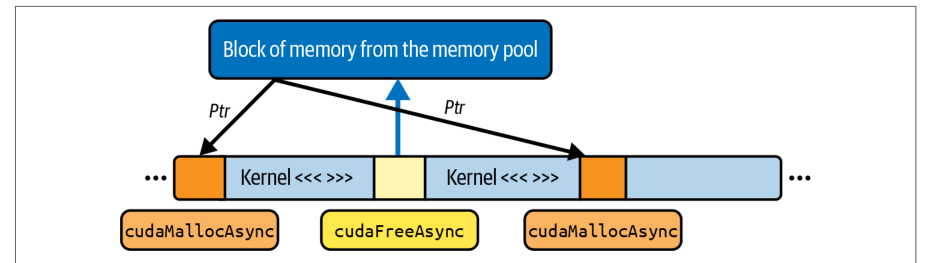
For instance, consider a stream that needs a scratch buffer of 16 MB for attention on a batch of input data. It would invoke cudaMallocAsync(&scratchPtr, scratch Bytes, stream1), which records this allocation request in its operation queue but does not force any other stream to wait, as shown in Figure 11-3.例如,假设某个流需要一块 16 MB 的暂存缓冲区,用于对一批输入数据做注意力计算。它会调用 cudaMallocAsync(&scratchPtr, scratch Bytes, stream1),该调用把这个分配请求记录到自己的操作队列中,但不会强制任何其他流等待,如图 11-3 所示。
The other streams continue launching kernels, copying data, or doing whatever they were doing—even while stream 1’s allocation is in flight. And once the CUDA runtime has reserved the memory behind the scenes, stream 1 can make progress again and launch the attention kernel into that newly allocated region—all without halting any other streams.其他流继续启动内核、拷贝数据,或者继续做它们原本在做的事情——即使流 1 的分配仍在进行中。而一旦 CUDA 运行时在后台预留好内存,流 1 就能再次推进,并把注意力内核启动到这块新分配的区域上——全程不会让任何其他流停顿。
In the context of LLM training and inference, this is particularly valuable because variable-length sequences often produce scratch-buffer size fluctuations. If batch N has 512 tokens per sequence and batch N+1 has 1,024 tokens, your attention module will need more space for batch N+1 than batch N, so reusing batch N’s allocation is not sufficient. With cudaMallocAsync(), you can enqueue a single, nonblocking allocation for the larger buffer without dragging all other streams to a stop.在 LLM 训练和推理的场景中,这一点尤其有价值,因为变长序列经常导致暂存缓冲区大小波动。如果批次 N 的每个序列有 512 个 token,而批次 N+1 有 1,024 个 token,那么注意力模块为批次 N+1 需要的空间就比批次 N 更多,因此复用批次 N 的分配并不够用。借助 cudaMallocAsync(),你可以为更大的缓冲区入队一次非阻塞分配,而不会把其他所有流拖入停顿。
Additionally, a typical LLM’s autoregressive token-by-token generation (aka decoding) phase uses a growing key/value cache. Each generated token requires appending new KV pairs to a per-sequence buffer. As the buffer grows, you need to reallocate or extend the scratch region. cudaMallocAsync(...) lets you do this in the same stream that runs the attention kernel. Meanwhile, upstream data-loading and downstream result-copying operations continue making progress in parallel, running in their own streams.此外,典型 LLM 的自回归逐 token 生成(即*解码*)阶段会使用不断增长的键/值缓存。每生成一个 token,都需要把新的 KV 对追加到每个序列各自的缓冲区中。随着缓冲区增长,你需要重新分配或扩展暂存区域。cudaMallocAsync(...) 让你可以在运行注意力内核的同一个流中完成这件事。与此同时,上游的数据加载和下游的结果拷贝操作在各自的流中并行推进。
Another use of CUDA streams in an LLM context is layerwise pipelining in large LLMs. Suppose that you divide a large, transformer-based LLM model into two halves that run on different CUDA streams—stream 0 runs layers 0–5 and stream 1 runs layers 6–11. Between these halves, you need intermediate buffers for activations.CUDA 流在 LLM 场景中的另一个用途是大型 LLM 的逐层流水线。假设你把一个大型的、基于 Transformer 的 LLM 模型分成两半,分别运行在不同的 CUDA 流上——流 0 运行第 0–5 层,流 1 运行第 6–11 层。在这两半之间,你需要用于激活值的中间缓冲区。
Each time stream 0 finishes its work on a mini-batch, it might call cudaMalloc Async(...) to grab a new buffer for the next batch’s activations. Because that call does not synchronize the device, stream 1 can continue computing layers 6–11 on the previous batch’s results while stream 0 allocates memory for the next batch’s inputs.每当流 0 完成一个小批次上的工作,它可能会调用 cudaMalloc Async(...) 为下一批次的激活值获取新的缓冲区。由于该调用不会同步设备,流 1 可以在流 0 为下一批次输入分配内存的同时,继续基于上一批次的结果计算第 6–11 层。
By contrast, if you had used the legacy cudaMalloc(...) inside that pipeline, every time you allocated a new scratch region for the next mini-batch or an expanded KV cache, the entire GPU would pause until the allocation completed. That would break any chance of overlapping computation and data movement across streams.相比之下,如果你在该流水线中使用传统的 cudaMalloc(...),那么每次为下一个小批次或扩展的 KV 缓存分配新的暂存区域时,整个 GPU 都会暂停,直到分配完成。这将彻底破坏跨流重叠计算与数据搬运的任何可能。
To summarize, in an LLM context, you frequently need temporary buffers for attention, layer normalization, softmax, KV cache, or intermediate activations. These are collectively referred to as a scratch buffer.总结来说,在 LLM 场景中,你经常需要为注意力、层归一化、softmax、KV 缓存或中间激活值准备临时缓冲区。这些缓冲区统称为*暂存缓冲区*(scratch buffer)。
Using cudaMallocAsync(...) and cudaFreeAsync(...) to manage these scratch buffers within separate streams ensures that memory management never forces a global, cross-stream stall. Instead, the allocation enqueues into the same stream as your kernel or copy operation.使用 cudaMallocAsync(...) 和 cudaFreeAsync(...) 在各自的流中管理这些暂存缓冲区,可确保内存管理永远不会造成全局的、跨流的停顿。相反,分配操作会入队到与你的内核或拷贝操作相同的流中。
This allows all other streams to continue running and keeps your attention kernels, data transfers, and any host-side work overlapping as much as possible. This maximizes GPU utilization in large-scale, real-time LLM workloads.这使得所有其他流可以继续运行,并让你的注意力内核、数据传输以及任何主机端工作尽可能多地重叠。这在大规模、实时 LLM 工作负载中可最大化 GPU 利用率。
传统默认流
Legacy Default Stream
When you do not explicitly create or specify a stream, the operations go into the legacy default stream, often called stream 0. By default, stream 0 has two important behaviors that are worth highlighting:当你没有显式创建或指定流时,操作会进入传统默认流,通常称为*流 0*。默认情况下,流 0 有两个值得强调的重要行为:
- Implicit synchronization with itself与自身的隐式同步
- Any two operations enqueued into stream 0 execute strictly one after the other. You cannot overlap two kernels or a copy and a kernel in stream 0, because stream 0 serializes all of its own commands.任何两个入队到流 0 的操作都会严格地一个接一个执行。你无法在流 0 中重叠两个内核,也无法重叠一次拷贝与一个内核,因为流 0 会串行化它自己的所有命令。
- Implicit synchronization with other streams与其他流的隐式同步
- In the legacy default stream model, any operation launched into stream 0 will wait for all previously enqueued work in every other stream to finish before it begins. Conversely, any operation launched into a nondefault stream will also block until all prior work in stream 0 has completed. In effect, stream 0 acts as a global “barrier” across the entire GPU. Even if you issue commands into different streams, once you submit something into stream 0, it forces every other stream在传统默认流模型中,任何启动到流 0 的操作都会等待其他每个流中先前入队的所有工作完成后才开始。反过来,任何启动到非默认流的操作也会阻塞,直到流 0 中所有先前的工作完成。实际上,流 0 充当了整个 GPU 上的全局“屏障”。即使你向不同的流中提交命令,一旦你向流 0 提交了内容,它就会强制其他每个流
to stall until stream 0 is caught up, and vice versa. This is very bad for performance and should be avoided when possible.停顿,直到流 0 追赶上来,反之亦然。这对性能非常不利,应尽可能避免。
Because of these implicit dependencies, putting all work into stream 0 prevents any form of concurrency. For instance, kernels and copy engines cannot overlap. As such, your GPU spends cycles idle waiting for the default-stream barrier to clear.由于这些隐式依赖关系,将所有工作都放入流 0 会阻止任何形式的并发。例如,内核与拷贝引擎无法重叠。因此,你的 GPU 会空转周期,等待默认流屏障清除。
To unlock true parallelism, you should avoid using stream 0 for anything but operations that truly need to serialize with every other stream, which is relatively rare.要释放真正的并行性,除了确实需要与所有其他流串行化的操作之外,你应避免将任何操作放入流 0,而这类操作相对少见。
现代每线程默认流
Modern Per-Thread Default Stream
To mitigate the “global barrier” behavior of the legacy default stream, CUDA introduced per-thread default streams, sometimes abbreviated PTDS (as opposed to the posttraumatic stress disorder (PTSD) that the legacy stream has given us throughout the years).为缓解传统默认流的“全局屏障”行为,CUDA 引入了每线程默认流,有时缩写为 PTDS(以区别于传统流这些年来带给我们的创伤后应激障碍(PTSD))。
Under per-thread default stream semantics, each CPU thread’s default stream is independent. In other words, when per-thread default streams are enabled, each host thread has its own implicit “stream 0.”在每线程默认流语义下,每个 CPU 线程的默认流都是独立的。换言之,启用每线程默认流后,每个主机线程都拥有自己隐式的“流 0”。
Operations enqueued into thread A’s default stream do not wait for work in thread B’s default stream. They run concurrently whenever hardware resources allow. Likewise, operations in thread B’s default stream do not wait for thread A’s default stream, and so on.入队到线程 A 默认流的操作不会等待线程 B 默认流中的工作。只要硬件资源允许,它们就会并发执行。同样,线程 B 默认流中的操作也不会等待线程 A 的默认流,依此类推。
PTDS is widely used in multithreaded CUDA applications to avoid the “host-wide barrier” issue. To enable PTDS, you can compile your code using nvcc --default-stream per-thread or set the CUDA_API_PER_THREAD_DEFAULT_STREAM=1 environment variable (before including any CUDA headers).PTDS 被广泛用于多线程 CUDA 应用中,以避免“主机级屏障”问题。要启用 PTDS,可以使用 nvcc --default-stream per-thread 编译代码,或设置 CUDA_API_PER_THREAD_DEFAULT_STREAM=1 环境变量(需在包含任何 CUDA 头文件之前设置)。
With PTDS, any kernel launch, copy, or allocation without an explicit stream parameter goes into a thread-local queue. Only commands within the same host thread’s default stream serialize, and they never impose an implicit global barrier on streams belonging to other threads.使用 PTDS 时,任何未指定显式流参数的内核启动、拷贝或分配都会进入线程本地队列。只有同一主机线程默认流内的命令才会串行化,它们绝不会对其他线程所属的流施加隐式全局屏障。
In short, by enabling per-thread default streams, the legacy default-stream synchronization barrier is removed. Each host thread’s default stream never waits on other threads’ streams. This allows full overlap of multiple kernel launches across threads.简而言之,启用每线程默认流后,传统默认流的同步屏障就被消除了。每个主机线程的默认流永远不会等待其他线程的流。这使得跨线程的多个内核启动可以完全重叠。
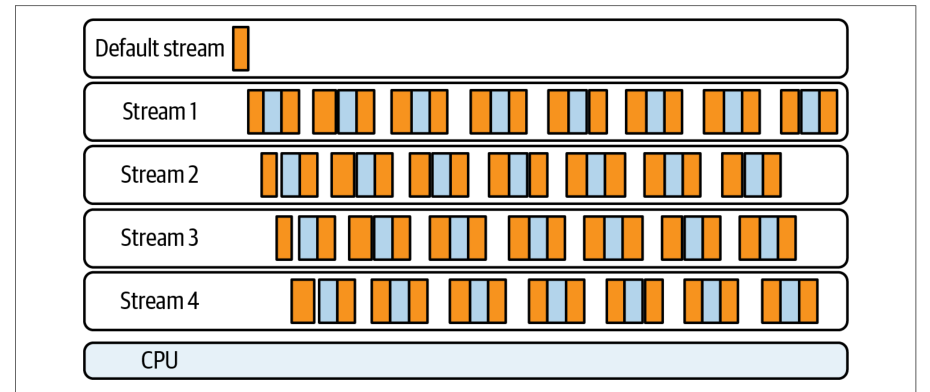
And if you issue kernel launches (or memory copies) from different CPU threads without specifying an explicit stream, the operations will overlap on the GPU whenever resources permit. This is shown in Figure 11-4.如果你从不同 CPU 线程发起内核启动(或显存拷贝)而未指定显式流,那么只要资源允许,这些操作就会在 GPU 上重叠执行。如图 11-4 所示。
默认流与显式(非默认)流
Default Versus Explicit (Nondefault) Streams
Relying on default-stream behavior will eventually cause problems. It always does. Any work enqueued into the legacy default stream (stream 0) implicitly waits for— and blocks—every other stream, and vice versa.依赖默认流的行为最终会引发问题。历来如此。任何入队到传统默认流(流 0)的工作都会隐式等待并阻塞其他所有流,反之亦然。
In performance-critical code, it’s best to create and use your own nondefault, explicit, and named streams so that nothing accidentally goes into stream 0. If you accidentally use one kernel on stream 0—or copy data into it—you can stall every other active stream. Many libraries, such as cuBLAS, Thrust, etc., accept an explicit stream parameter. It’s recommended that you always create explicit streams and use those.在性能关键的代码中,最好创建并使用自己的非默认、显式且命名的流,以免任何内容意外进入流 0。如果你不小心让某个内核运行在流 0 上——或把数据拷贝到其中——就可能拖住其他所有活跃的流。许多库(如 cuBLAS、Thrust 等)都接受显式流参数。建议始终创建显式流并使用它们。
By managing your own streams—or using per-thread defaults—you retain control over concurrency. Here is an example of creating explicit, nondefault streams in CUDA C++ (we will show how to use streams in PyTorch in Chapters 13 and 14):通过管理自己的流——或使用每线程默认流——你就能保持对并发性的控制。下面是在 CUDA C++ 中创建显式非默认流的示例(我们将在第 13 章和第 14 章展示如何在 PyTorch 中使用流):
cudaStream_t streamA, streamB;
cudaStreamCreateWithFlags(&streamA, cudaStreamNonBlocking);
cudaStreamCreateWithFlags(&streamB, cudaStreamNonBlocking);
myKernel<<<grid, block, 0, streamA>>>(...);                 // streamA
cudaMemcpyAsync(dest, src, size, cudaMemcpyHostToDevice, streamB); // streamB
Here, streamA and streamB can overlap freely. Under the legacy default-stream model (PTDS disabled), however, any later call into stream 0 forces both streamA and streamB to wait until stream 0 is empty.在这里,streamA 和 streamB 可以自由重叠。然而,在传统默认流模型下(PTDS 禁用),之后任何对 stream 0 的调用都会强制 streamA 和 streamB 等待,直到 stream 0 为空。
Similarly, any work enqueued in streamA or streamB will block if stream 0 still has pending tasks. To avoid these hidden global barriers, keep stream 0 idle and use it only for one-time operations for initial setup, final cleanup, etc.同样,如果 stream 0 仍有待处理任务,那么入队到 streamA 或 streamB 的任何工作都会被阻塞。为避免这些隐藏的全局屏障,应让 stream 0 保持空闲,仅将其用于初始设置、最终清理等一次性操作。
In short, enable per-thread default streams so that each CPU thread’s default stream no longer synchronizes with any other thread’s default stream. Then create and use explicit streams (like streamA and streamB) for all performance-critical kernels and copies.简而言之,启用每线程默认流,使每个 CPU 线程的默认流不再与任何其他线程的默认流同步。然后为所有性能关键的内核和拷贝创建并使用显式流(如 streamA 和 streamB)。
By doing both, nothing you enqueue into your explicit streams can accidentally collide with work in another explicit stream, another thread’s default stream, or the legacy default stream 0. This ensures safe, predictable overlap without implicit synchronization. Creating streams with cudaStreamNonBlocking ensures that they do not synchronize with the legacy default stream. This is required to avoid hidden barriers.同时做到这两点后,你入队到显式流中的任何内容都不会意外地与另一个显式流、另一个线程的默认流或传统默认流 0 中的工作发生冲突。这确保了安全、可预测的重叠,且没有隐式同步。使用 cudaStreamNonBlocking 创建流可确保它们不与传统默认流同步。这是避免隐藏屏障所必需的。
默认流使用的最佳实践
Best Practices for Default Stream Usage
Because default streams can be problematic for performance, let’s highlight the synchronization characteristics of each type of stream—legacy default, per-thread default, and explicit (nondefault):由于默认流可能对性能造成问题,我们来重点说明每种流的同步特性——传统默认流、每线程默认流和显式(非默认)流:
- Legacy default stream (*
cudaStreamLegacy*)传统默认流(*cudaStreamLegacy*) - This blocks and is blocked by every other stream. Do not issue work here if you need any form of concurrency.它会阻塞其他所有流,也会被其他所有流阻塞。如果你需要任何形式的并发,就不要在这里提交工作。
- Per-thread default stream (*
cudaStreamPerThread*)每线程默认流(*cudaStreamPerThread*) - Each host thread’s default stream is private. It still serializes its own commands but does not wait on or block any other thread’s default stream or explicit streams.每个主机线程的默认流都是私有的。它仍然会串行化自己的命令,但不会等待或阻塞任何其他线程的默认流或显式流。
- Explicit streams (created with *
cudaStreamCreateWithFlags()*)显式流(使用 *cudaStreamCreateWithFlags()* 创建) - Explicit streams are independent queues that only synchronize when you explicitly insert dependencies using
cudaStreamWaitEvent(), for instance.显式流是独立的队列,只有当你显式地使用cudaStreamWaitEvent()等方式插入依赖关系时,它们才会同步。
Here are some best practices to help guide your use of default and explicit (nondefault) streams:以下是一些最佳实践,可指导你使用默认流和显式(非默认)流:
- Never launch performance-critical kernels into stream 0 (legacy default) unless you* *intend to serialize all GPU work切勿将性能关键的内核启动到流 0(传统默认流)中,除非你* *有意将所有 GPU 工作串行化
- Even one stray kernel or copy into stream 0 will stall every other active stream. Older CUDA APIs, for example, might implicitly use stream 0. For example, when calling CUDA driver APIs without an explicit stream, you will likely use the legacy stream. This is another reason to migrate to newer APIs or always specify streams.哪怕只有一个误入流 0 的内核或拷贝,也会拖住其他所有活跃的流。较旧的 CUDA API 可能会隐式使用流 0。例如,在未显式指定流的情况下调用 CUDA 驱动 API 时,你很可能会用到传统流。这也是迁移到较新 API 或始终显式指定流的另一个理由。
- Enable per-thread default streams启用每线程默认流(per-thread default streams,PTDS)
- Use PTDS if your application uses multiple CPU threads that each enqueue GPU work. This avoids hidden host-side barriers between those threads’ default streams. On modern systems, you can also use
cudaStreamCreateWithFlags(&stream, cudaStreamNonBlocking)to create a stream that does not synchronize with stream 0.如果你的应用使用多个 CPU 线程、且每个线程都提交 GPU 工作,就应使用 PTDS。这样可以避免这些线程的默认流之间出现隐藏的主机端屏障。在现代系统上,你还可以使用cudaStreamCreateWithFlags(&stream, cudaStreamNonBlocking)创建一个不与流 0 同步的流。
- Create and manage explicit, nondefault streams创建并管理显式的非默认流
- Explicit streams are a best practice since they allow overlapping kernels and memory copies. Always pass a nondefault
cudaStream_tto<<<...>>>(),cudaMemcpyAsync(), orcudaMallocAsync(). This guarantees that no implicit default-stream synchronization will interfere with your pipelined workflow.显式流是最佳实践,因为它们允许内核与显存拷贝重叠执行。始终向<<<...>>>()、cudaMemcpyAsync()或cudaMallocAsync()传入非默认的cudaStream_t。这能保证不会有隐式的默认流同步干扰你的流水线化工作流。
Use cudaStreamWaitEvent() to coordinate fine-grained dependencies instead of使用 cudaStreamWaitEvent() 来协调细粒度依赖,而不是
cudaStreamSynchronize()
You should use stream events rather than cudaStreamSynchronize() on the default stream. Call cudaStreamSynchronize() only at well-defined global points (e.g., the end of a model-training epoch) to avoid stalling unrelated streams.应当使用流事件,而不是在默认流上调用 cudaStreamSynchronize()。只在明确定义的全局点(例如一个模型训练轮次结束时)调用 cudaStreamSynchronize(),以避免拖住无关的流。
- Be explicit about your stream flags明确指定你的流标志
- If you enable PTDS, set the device flags before any CUDA call. Otherwise, you remain in the legacy default-stream mode. Any mention of stream 0 will create a global barrier.如果启用 PTDS,请在任何 CUDA 调用之前设置设备标志。否则,你仍处于传统默认流模式。任何对流 0 的提及都会创建全局屏障。
Put simply, the legacy default stream (stream 0) always acts as a global barrier. Any work you enqueue there waits for, and forces, every other stream to finish, and every other stream will wait if stream 0 has pending work.简而言之,传统默认流(流 0)始终充当全局屏障。你提交到其中的任何工作都会等待其他所有流完成,并强制它们完成;而如果流 0 有未完成的工作,其他所有流也会等待。
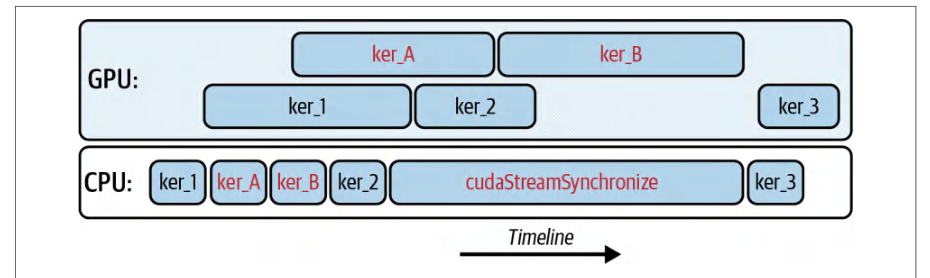
To avoid these invisible stalls, don’t put performance-critical kernels or copies into stream 0. Instead, create your own named streams using cudaStreamCreateWith Flags and launch everything into those streams so they can run independently.为避免这些不可见的停顿,不要把性能关键的内核或拷贝放入流 0。而应使用 cudaStreamCreateWith Flags 创建你自己的具名流,并把所有工作都启动到这些流中,使它们能够独立运行。
If your program has multiple CPU threads—each issuing their own GPU work—you should also enable per-thread default streams. With PTDS turned on, each thread’s “default” stream no longer synchronizes with other threads’ defaults—or with stream 0.如果你的程序有多个 CPU 线程——每个线程各自提交 GPU 工作——你还应启用每线程默认流。开启 PTDS 后,每个线程的“默认”流不再与其他线程的默认流同步,也不再与流 0 同步。
This way, even code that doesn’t explicitly create new streams won’t accidentally block any other threads’ work. In all cases, whenever you want two operations to overlap (e.g., a copy and a kernel), you should give them their own explicit, nondefault streams. Then you’ll avoid the hidden global synchronization rules of stream 0 and let the GPU run with maximum parallelism.这样一来,即使代码没有显式创建新流,也不会意外阻塞其他线程的工作。在所有情况下,只要希望两个操作重叠(例如一次拷贝和一个内核),就应当为它们各自指定显式的非默认流。这样就能避开流 0 的隐藏全局同步规则,让 GPU 以最大并行度运行。
使用事件与回调进行细粒度同步
Fine-Grained Synchronization with Events and Callbacks
Even when multiple streams and DMA engines overlap, there are times when one stream’s operation must wait for another. Consider a pair of producer-consumer streams. The producer stream 0 is loading and preparing data for the consumer stream 1 to process.即便多个流与 DMA 引擎发生重叠,有时仍需要一个流的操作等待另一个流。考虑一对生产者—消费者流:生产者流 0 正在加载并准备数据,供消费者流 1 处理。
In this case, it is tempting to synchronize these streams on the host side and block the CPU with a full cudaDeviceSynchronize(). However, this will block the CPU until all streams and all operations on the GPU complete. This is very bad for performance. You can also use cudaStreamSynchronize(), as shown in Figure 11-5, but this will block until all operations in the stream’s queue complete.在这种情况下,很容易想到在主机侧同步这些流,用完整的 cudaDeviceSynchronize() 阻塞 CPU。然而,这会阻塞 CPU,直到 GPU 上所有流和所有操作全部完成,对性能极为不利。也可以使用 cudaStreamSynchronize(),如图 11-5 所示,但它会阻塞到该流队列中的所有操作完成。
Instead, you can use CUDA events to provide a much finer-grained synchronization mechanism for streams. With CUDA events, you record a cudaEvent_t in the stream that produces data and then have the consumer stream wait for that event.取而代之,可以使用 CUDA 事件为流提供粒度细得多的同步机制。借助 CUDA 事件,你在产生数据的流中记录一个 cudaEvent_t,然后让消费者流等待该事件。
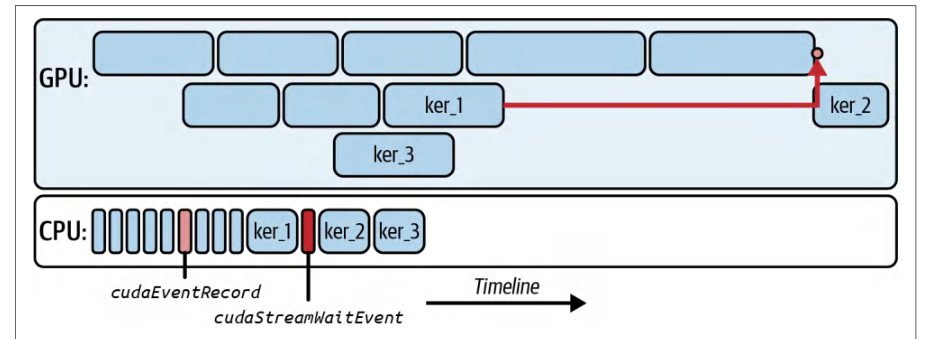
For instance, you would launch a producer kernel on stream 0 and call cudaEvent Record(doneEvent, stream0) when the data is ready to be consumed. In stream 1, you would then call cudaStreamWaitEvent(stream1, doneEvent, 0) before launching the consumer kernel. In this way, only stream 1 is stalled waiting for the event to be recorded—the host thread and all other streams will continue executing, as shown in Figure 11-6.例如,你可以在流 0 上启动生产者内核,并在数据可供消费时调用 cudaEvent Record(doneEvent, stream0)。随后在流 1 中,在启动消费者内核之前调用 cudaStreamWaitEvent(stream1, doneEvent, 0)。这样,只有流 1 会因等待事件被记录而停顿——主机线程和所有其他流将继续执行,如图 11-6 所示。
In addition to using CUDA events for interstream coordination, you can also use them to communicate between the GPU device and the CPU host. To do this, you would register a host callback with cudaLaunchHostFunc() from the host.除了使用 CUDA 事件进行流间协调外,还可以用它们在 GPU 设备与 CPU 主机之间通信。为此,需要在主机侧通过 cudaLaunchHostFunc() 注册一个主机回调。
Suppose you need to recycle a custom memory pool back on the host as soon as a GPU kernel finishes in stream 0. In this case, you would register a callback from the host with cudaLaunchHostFunc() and specify the event that you are interested in. You would then launch the kernel on stream 0.假设你需要在流 0 中的 GPU 内核一完成时,就在主机侧回收一个自定义显存池。这种情况下,你需要在主机侧通过 cudaLaunchHostFunc() 注册回调,并指定你所关注的事件,然后在流 0 上启动内核。
When the kernel is complete, it will record the event, and the host will run the callback function and update the memory pool on the CPU. All of this happens without a polling loop or a full cudaDeviceSynchronize().内核完成后会记录该事件,主机随即运行回调函数并在 CPU 上更新显存池。整个过程无需轮询循环,也无需完整的 cudaDeviceSynchronize()。
The CUDA runtime executes the callback function on a host thread once the GPU work is completed. This keeps the CPU free until the precise moment that you need it—and avoids wasting host cycles and blocking unrelated GPU work.GPU 工作完成后,CUDA 运行时会在一个主机线程上执行回调函数。这让 CPU 一直保持空闲,直到你真正需要它的那一刻——从而避免浪费主机周期,也不会阻塞无关的 GPU 工作。
You should not call any device-side GPU APIs from within the host callback launched with cudaLaunchHostFunc(). If you call cudaMemcpy(), for instance, from inside the callback, it can deadlock because the callback runs on a host thread managed by the CUDA runtime. Calling CUDA APIs from within it can deadlock because the device may be waiting for the callback to finish.不应在通过 cudaLaunchHostFunc() 启动的主机回调内部调用任何设备侧 GPU API。例如,如果在回调内部调用 cudaMemcpy(),就可能发生死锁,因为该回调运行在由 CUDA 运行时管理的主机线程上。在回调内部调用 CUDA API 可能导致死锁,因为设备可能正在等待该回调完成。
使用 CUDA 事件进行跨流同步
Using CUDA Events for Cross-Stream Synchronization
With multiple streams running in parallel, we often need to coordinate and synchronize between them. CUDA events are the primary mechanism for cross-stream synchronization without stalling the CPU or the entire device.当多个流并行运行时,我们常常需要在它们之间进行协调与同步。CUDA 事件是在不阻塞 CPU 或整个设备的前提下实现跨流同步的主要机制。
An event is like a marker that a stream records at a specific point. Other streams, or even the host, can wait on that marker and know when a certain event has happened (e.g., a kernel has finished). Unlike a full cudaDeviceSynchronize(), which blocks until all streams finish, events allow fine-grained ordering between streams.事件就像流在特定位置记录的一个标记。其他流、甚至主机都可以等待该标记,从而知道某个事件已经发生(例如某个内核已经执行完毕)。与完整的 cudaDeviceSynchronize()(它会阻塞直到所有流都结束)不同,事件允许在流之间实现细粒度的顺序控制。
Streams can be used to make sure that each transformer layer’s data is present before computing. They can also improve pipeline parallelism by ensuring GPU 0 has finished producing a tensor before GPU 1 consumes it. And all of this happens without idling other independent work.流可用于确保每个 Transformer 层的数据在计算之前已经就绪。流还能改进流水线并行:确保 GPU 0 已完成某个张量的生产后,GPU 1 才消费它。而这一切都不会让其他独立工作空转。
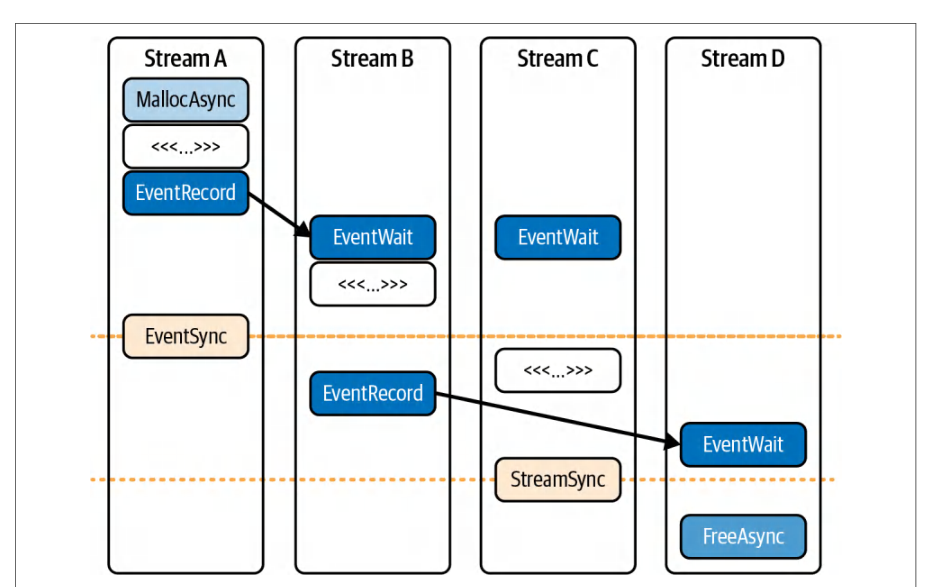
For example, consider a set of four streams (Streams A–D) that pipeline operations and depend on one another in some cases. We can enforce these dependencies using CUDA events (see Figure 11-7).例如,考虑由四个流(Streams A–D)组成的一组流,它们将操作流水化,并在某些情况下相互依赖。我们可以使用 CUDA 事件来强制实施这些依赖关系(见图 11-7)。
To ensure stream B doesn’t start processing until stream A produces the data, we can record an event in stream A and make stream B wait for that before continuing. Similarly, stream D can wait on stream B as shown here. By chaining events in this manner, we maintain correct ordering between streams while still running different batches concurrently.为确保流 B 在流 A 产出数据之前不开始处理,我们可以在流 A 中记录一个事件,并让流 B 在继续之前等待该事件。类似地,流 D 可以等待流 B,如此处所示。通过这种方式串联事件,我们在并发运行不同批次的同时,保持了流之间的正确顺序。
This event-based synchronization is heavily used in deep learning frameworks to overlap gradient computations with all-reduce communications. The compute stream records an event when gradients are ready, and a communication stream waits on that event to start an NCCL operation, thereby overlapping communication with remaining computation.这种基于事件的同步在深度学习框架中被大量使用,用于将梯度计算与全归约通信重叠起来。计算流在梯度就绪时记录一个事件,通信流等待该事件以启动 NCCL 操作,从而将通信与剩余计算重叠。
In short, CUDA events are lightweight and optimized for device signaling. A stream records an event when it reaches a specific point in its command queue. And other streams can efficiently poll/wait for it. They let us orchestrate complex dependency graphs across streams without forcing global waits. And they provide the necessary control to implement pipelined execution in multistream LLM workloads.简而言之,CUDA 事件轻量且针对设备内信号传递进行了优化。流在到达其命令队列中的特定位置时记录一个事件,其他流可以高效地轮询/等待它。它们让我们能够跨流编排复杂的依赖图,而无需强制全局等待,并提供了在多流 LLM 工作负载中实现流水化执行所需的控制能力。
使用线程束专用化(内核内)与 CUDA 流(内核间)实现流水化
Pipelining with Warp Specialization (Intra-Kernel) and CUDA Streams (Inter-Kernel)
Chapter 10 demonstrated how to use warp specialization and the CUDA Pipeline API to hide memory latency within a single kernel. In that section, we launched a single, persistent, and warp-specialized kernel in which each thread block is split into three different types of warps: loader, compute, and storer warps. These warps shared a contiguous chunk of shared memory and a two-stage (double-buffered) CUDA Pipeline (<cuda::pipeline>) object to coordinate their work.第 10 章演示了如何使用线程束专用化和 CUDA Pipeline API 在单个内核内隐藏内存时延。在该节中,我们启动了一个单一的、持久的、线程束专用化的内核,其中每个线程块被划分为三种不同类型的线程束:加载线程束、计算线程束和存储线程束。这些线程束共享一块连续的共享内存和一个两阶段(双缓冲)的 CUDA Pipeline(<cuda::pipeline>)对象来协调它们的工作。
Let’s keep that same warp-specialized device kernel and now drive multiple batches through it using separate CUDA streams. The result is a two-level pipeline as follows:让我们保留同一个线程束专用化的设备内核,现在使用独立的 CUDA 流将多个批次送入其中。结果是一个如下所示的两级流水线:
- Intra-kernel overlap (within each block)内核内重叠(在每个线程块内)
- The loader ↔ compute ↔ storer run concurrently using separate pipelines.加载 ↔ 计算 ↔ 存储通过各自的流水线并发运行。
- Inter-kernel overlap (across batches)内核间重叠(跨批次)
- While stream 0 computes on batch t, stream 1 DMA-loads batch t+1, and stream 2 returns results of batch t–1. This uses nonblocking streams, pinned host memory, and the stream-ordered allocator so allocations/copies don’t serialize other work.当流 0 在批次 t 上计算时,流 1 通过 DMA 加载批次 t+1,流 2 返回批次 t–1 的结果。这里使用了非阻塞流、锁页主机内存以及流序分配器(stream-ordered allocator),因此分配/拷贝不会使其他工作串行化。
If multiple blocks need the same tile, the thread block cluster + DSMEM path described in Chapter 10 removes redundant global loads across blocks. However, cooperative/cluster launches serialize with other cooperative kernels. The stream pattern used here targets the host ↔ device overlap and works with a noncooperative kernel.如果多个线程块需要同一个 tile,第 10 章介绍的线程块集群 + DSMEM 路径可以消除跨块的冗余全局加载。然而,协作式/集群启动会与其他协作式内核串行化。此处使用的流模式针对的是主机 ↔ 设备重叠,并且适用于非协作式内核。
The next kernel uses three warps per block (0 = loader, 1 = compute, 2 = storer) and two pipelines to ping-pong stages. Therefore, it requires 6 * TILE_SIZE * sizeof(float) dynamic shared memory ([A0|B0|C0|A1|B1|C1]). It’s worth noting that we are switching to use two independent block-scoped pipelines, each with depth 2. One is for the loader → compute (pipe_lc) handoff, and another is for compute → storer (pipe_cs).下一个内核每个线程块使用三个线程束(0 = 加载器,1 = 计算,2 = 存储器)和两条流水线来乒乓切换阶段。因此,它需要 6 * TILE_SIZE * sizeof(float) 的动态共享内存([A0|B0|C0|A1|B1|C1])。值得注意的是,我们改为使用两条独立的块作用域流水线,每条深度为 2。一条用于加载器 → 计算的(pipe_lc)交接,另一条用于计算 → 存储器的(pipe_cs)。
In addition, we are using double-buffered shared memory so the kernel can be loading tile i+1 while computing tile i and storing tile i–1. That’s why you see two cuda::pipeline objects and “[A|B|C] × 2 stages” in shared memory in the code that follows. The two pipelines are an intra-kernel choice to deepen overlap inside each kernel. (Note: you can use streams with either kernel style.) Here is the code:此外,我们使用双缓冲共享内存,使内核可以在计算 tile i 的同时加载 tile i+1,并存储 tile i–1。这就是在后续代码中你会看到两个 cuda::pipeline 对象以及共享内存中的“[A|B|C] × 2 阶段”的原因。这两条流水线是一种内核内(intra-kernel)选择,用于加深每个内核内部的重叠。(注意:两种内核风格都可以配合流使用。)代码如下:
#include <cooperative_groups.h>     // thread_block, etc.
#include <cuda/pipeline>            // CUDA Pipeline API
namespace cg = cooperative_groups;
// shmem bytes = 2(阶段)×3(缓冲区)×TILE_SIZE×sizeof(float)=6×TILE_SIZE×4
//             = 6 * 1024 * 4 = 24,576 B(24 KB)<< 227 KB SMEM
// 我们将其保持在 1024(而不调得更高),作为安全的起点
// (良好的占用率平衡)
#define TILE_SIZE 1024  // one tile = 1,024 floats per buffer (1-Dimension)
    // 向量化拷贝的对齐/大小保护检查
    static_assert((TILE_SIZE % (32 * 4)) == 0,
                  "TILE_SIZE must be multiple of 128 for float4 vectorization");
    // 如果无法保证 16B 对齐或大小,则处理
    //  尾部/不规则边缘使用回退的 4B 循环处理。
#include <cooperative_groups.h>     // thread_block, etc.
#include <cuda/pipeline>            // CUDA Pipeline API
namespace cg = cooperative_groups;
// shmem bytes = 2(stages)×3(buffers)×TILE_SIZE×sizeof(float)=6×TILE_SIZE×4
//             = 6 * 1024 * 4 = 24,576 B (24 KB) << 227 KB SMEM
// We keep this at 1024 (versus going higher) as a safe starting point
// (good occupancy balance)
#define TILE_SIZE 1024  // one tile = 1,024 floats per buffer (1-Dimension)
    // Alignment / size guards for vectorized copies
    static_assert((TILE_SIZE % (32 * 4)) == 0,
                  "TILE_SIZE must be multiple of 128 for float4 vectorization");
    // If you cannot guarantee 16B alignment or sizes, handle
    //  the tail/ragged edges with a fallback 4B loop.
// 每个线程块三个线程束:0 号负责加载,1 号负责计算,2 号负责存储。
// 两个块作用域流水线(深度均为 2)在 tile 之间实现乒乓切换。
__global__ void warp_specialized_two_pipelines(
    const float* __restrict__ A_global,
    const float* __restrict__ B_global,
    float*       __restrict__ C_global,
    int          numTiles)
{
    thread_block cta = this_thread_block();
    // 阶段 s∈{0,1}:[A_s | B_s | C_s],每个长度均为 TILE_SIZE
    extern __shared__ float shared_mem[];
    // loader -> compute 流水线(2 个在途阶段)
    __shared__ cuda::pipeline_shared_state<cuda::thread_scope_block, 2> state_lc;
    auto pipe_lc = cuda::make_pipeline(cta, &state_lc);
    // compute -> storer 流水线(2 个在途阶段)
    __shared__ cuda::pipeline_shared_state<cuda::thread_scope_block, 2> state_cs;
    auto pipe_cs = cuda::make_pipeline(cta, &state_cs);
    const int warp_id = threadIdx.x >> 5;   // 0,1,2
    const int lane_id = threadIdx.x & 31;
    // 预热由本线程块处理的第一个 tile
    const int first = blockIdx.x;
    if (warp_id == 0 && first < numTiles) {
        const int stage0 = first & 1;
        float* A0 = shared_mem + stage0 * 3 * TILE_SIZE;
        float* B0 = A0 + TILE_SIZE;
pipe_lc.producer_acquire();
#pragma unroll
for (int chunk = 0; chunk < TILE_SIZE; chunk += 32 * 4) {
    cuda::memcpy_async(
        cta,
        reinterpret_cast<float4*>(A0 + chunk) + lane_id,
        reinterpret_cast<const float4*>(A_global + size_t(first) *
          TILE_SIZE + chunk) + lane_id,
        sizeof(float4),
        pipe_lc);
    cuda::memcpy_async(
        cta,
        reinterpret_cast<float4*>(B0 + chunk) + lane_id,
        reinterpret_cast<const float4*>(B_global + size_t(first) *
          TILE_SIZE + chunk) + lane_id,
        sizeof(float4),
        pipe_lc);
}
pipe_lc.producer_commit();
    }
// Three warps per block: 0 loads, 1 computes, 2 stores.
// Two block-scoped pipelines (each depth=2) implement ping-pong across tiles.
__global__ void warp_specialized_two_pipelines(
    const float* __restrict__ A_global,
    const float* __restrict__ B_global,
    float*       __restrict__ C_global,
    int          numTiles)
{
    thread_block cta = this_thread_block();
    // Stage s∈{0,1}: [A_s | B_s | C_s], each length TILE_SIZE
    extern __shared__ float shared_mem[];
    // loader -> compute pipeline (2 in-flight stages)
    __shared__ cuda::pipeline_shared_state<cuda::thread_scope_block, 2> state_lc;
    auto pipe_lc = cuda::make_pipeline(cta, &state_lc);
    // compute -> storer pipeline (2 in-flight stages)
    __shared__ cuda::pipeline_shared_state<cuda::thread_scope_block, 2> state_cs;
    auto pipe_cs = cuda::make_pipeline(cta, &state_cs);
    const int warp_id = threadIdx.x >> 5;   // 0,1,2
    const int lane_id = threadIdx.x & 31;
    // Prime first tile handled by this block
    const int first = blockIdx.x;
    if (warp_id == 0 && first < numTiles) {
        const int stage0 = first & 1;
        float* A0 = shared_mem + stage0 * 3 * TILE_SIZE;
        float* B0 = A0 + TILE_SIZE;
pipe_lc.producer_acquire();
#pragma unroll
for (int chunk = 0; chunk < TILE_SIZE; chunk += 32 * 4) {
    cuda::memcpy_async(
        cta,
        reinterpret_cast<float4*>(A0 + chunk) + lane_id,
        reinterpret_cast<const float4*>(A_global + size_t(first) *
          TILE_SIZE + chunk) + lane_id,
        sizeof(float4),
        pipe_lc);
    cuda::memcpy_async(
        cta,
        reinterpret_cast<float4*>(B0 + chunk) + lane_id,
        reinterpret_cast<const float4*>(B_global + size_t(first) *
          TILE_SIZE + chunk) + lane_id,
        sizeof(float4),
        pipe_lc);
}
pipe_lc.producer_commit();
    }
    // 以跨步方式遍历 tile 集合;按 tile 的奇偶性乒乓切换阶段。
    for (int tile = blockIdx.x; tile < numTiles; tile += gridDim.x) {
        const size_t offset = size_t(tile) * TILE_SIZE;
        const int    stage  = tile & 1;
        float* A_buf = shared_mem + stage * 3 * TILE_SIZE;
        float* B_buf = A_buf      + TILE_SIZE;
        float* C_buf = B_buf      + TILE_SIZE;
        // loader 预取下一个 tile,同时 compute/store 处理当前 tile。
        if (warp_id == 0) {
            const int next = tile + gridDim.x;
            if (next < numTiles) {
                const int next_stage = next & 1;
                float* A_next = shared_mem + next_stage * 3 * TILE_SIZE;
                float* B_next = A_next + TILE_SIZE;
                pipe_lc.producer_acquire();
                #pragma unroll
                for (int chunk = 0; chunk < TILE_SIZE; chunk += 32 * 4) {
                    cuda::memcpy_async(
            cta,
                        reinterpret_cast<float4*>(A_next + chunk) + lane_id,
                        reinterpret_cast<const float4*>(A_global + size_t(next) *
                          TILE_SIZE + chunk) + lane_id,
                        sizeof(float4),
                        pipe_lc);
                    cuda::memcpy_async(
                        cta,
                        reinterpret_cast<float4*>(B_next + chunk) + lane_id,
                        reinterpret_cast<const float4*>(B_global + size_t(next) *
                          TILE_SIZE + chunk) + lane_id,
                        sizeof(float4),
                        pipe_lc);
                }
                pipe_lc.producer_commit();
            }
        }
        // compute 消费 loader 的输出并通知 storer
        if (warp_id == 1) {
            pipe_lc.consumer_wait();
            #pragma unroll
            for (int chunk = 0; chunk < TILE_SIZE; chunk += 32) {
                C_buf[chunk+lane_id] = A_buf[chunk+lane_id]+B_buf[chunk+lane_id];
            }
            pipe_lc.consumer_release();
            pipe_cs.producer_acquire();
            pipe_cs.producer_commit();
        }
        // storer 等待 compute 并写回
    // Walk a strided set of tiles; ping-pong stage by tile parity.
    for (int tile = blockIdx.x; tile < numTiles; tile += gridDim.x) {
        const size_t offset = size_t(tile) * TILE_SIZE;
        const int    stage  = tile & 1;
        float* A_buf = shared_mem + stage * 3 * TILE_SIZE;
        float* B_buf = A_buf      + TILE_SIZE;
        float* C_buf = B_buf      + TILE_SIZE;
        // Loader prefetches next tile while compute/store work on current.
        if (warp_id == 0) {
            const int next = tile + gridDim.x;
            if (next < numTiles) {
                const int next_stage = next & 1;
                float* A_next = shared_mem + next_stage * 3 * TILE_SIZE;
                float* B_next = A_next + TILE_SIZE;
                pipe_lc.producer_acquire();
                #pragma unroll
                for (int chunk = 0; chunk < TILE_SIZE; chunk += 32 * 4) {
                    cuda::memcpy_async(
            cta,
                        reinterpret_cast<float4*>(A_next + chunk) + lane_id,
                        reinterpret_cast<const float4*>(A_global + size_t(next) *
                          TILE_SIZE + chunk) + lane_id,
                        sizeof(float4),
                        pipe_lc);
                    cuda::memcpy_async(
                        cta,
                        reinterpret_cast<float4*>(B_next + chunk) + lane_id,
                        reinterpret_cast<const float4*>(B_global + size_t(next) *
                          TILE_SIZE + chunk) + lane_id,
                        sizeof(float4),
                        pipe_lc);
                }
                pipe_lc.producer_commit();
            }
        }
        // Compute consumes loader output and signals storer
        if (warp_id == 1) {
            pipe_lc.consumer_wait();
            #pragma unroll
            for (int chunk = 0; chunk < TILE_SIZE; chunk += 32) {
                C_buf[chunk+lane_id] = A_buf[chunk+lane_id]+B_buf[chunk+lane_id];
            }
            pipe_lc.consumer_release();
            pipe_cs.producer_acquire();
            pipe_cs.producer_commit();
        }
        // Storer waits on compute and writes back
        if (warp_id == 2) {
            pipe_cs.consumer_wait();
            #pragma unroll
            for (int chunk = 0; chunk < TILE_SIZE; chunk += 32) {
                C_global[offset + chunk + lane_id] = C_buf[chunk + lane_id];
            }
            pipe_cs.consumer_release();
        }
    }
    // 启动要求:blockDim.x = 96(3 个线程束),gridDim 按需设置,
    // 动态共享内存 = 6 * TILE_SIZE * sizeof(float)。
}
        if (warp_id == 2) {
            pipe_cs.consumer_wait();
            #pragma unroll
            for (int chunk = 0; chunk < TILE_SIZE; chunk += 32) {
                C_global[offset + chunk + lane_id] = C_buf[chunk + lane_id];
            }
            pipe_cs.consumer_release();
        }
    }
    // Launch requirements: blockDim.x = 96 (3 warps), gridDim as needed,
    // dynamic shared memory = 6 * TILE_SIZE * sizeof(float).
}
Here, we are including some performance highlights worth noting. First, we are requiring 16-byte alignment of A0, B0, A_global + base, and B_global + base. If a path isn’t 16-byte aligned, we fall back to the 4-byte loop for the misaligned prologue/ epilogue.这里我们列出了一些值得注意的性能要点。首先,我们要求 A0、B0、A_global + base 和 B_global + base 满足 16 字节对齐。如果某条路径不是 16 字节对齐,我们就回退到 4 字节循环来处理未对齐的前导/收尾部分。
Next, we are assuming the TILE_SIZE is a multiple of 128 (32 lanes × 4 floats). If not, handle the tail with a scalar loop. In addition, we use cuda::memcpy_async with float4. This preserves the pipeline’s asynchronous semantics and lowers the per-tile copy count from 4× down to 1× per lane.其次,我们假设 TILE_SIZE 是 128 的倍数(32 个 lane × 4 个 float)。如果不是,则用标量循环处理尾部。此外,我们对 float4 使用 cuda::memcpy_async。这既保持了流水线的异步语义,又将每个 tile 的拷贝次数从每个 lane 4 次降低到 1 次。
And here is the host driver, which cycles batches across nonblocking streams and uses pinned host memory and the stream-ordered allocator (cudaMallocAsync ÷ cudaFreeAsync). It launches the warp_specialized_two_pipelines in the previous kernel:下面是主机端驱动程序,它在多个非阻塞流之间轮转批次,并使用锁页主机内存和流序分配器(cudaMallocAsync ÷ cudaFreeAsync)。它启动上一个内核中的 warp_specialized_two_pipelines:
#include <cstdio>
#include <cuda_runtime.h>
#define TILE_SIZE   1024
#define NUM_STREAMS 2
#define BATCHES     8
// 设备端内核
__global__ void warp_specialized_two_pipelines(
    const float* __restrict__ A_global,
    const float* __restrict__ B_global,
    float*       __restrict__ C_global,
    int          numTiles);
int main() {
    // 创建非阻塞流(不要使用旧版默认流)
#include <cstdio>
#include <cuda_runtime.h>
#define TILE_SIZE   1024
#define NUM_STREAMS 2
#define BATCHES     8
// Device kernel
__global__ void warp_specialized_two_pipelines(
    const float* __restrict__ A_global,
    const float* __restrict__ B_global,
    float*       __restrict__ C_global,
    int          numTiles);
int main() {
    // Create nonblocking streams (do NOT use legacy default stream)
    cudaStream_t s[NUM_STREAMS];
    for (int i = 0; i < NUM_STREAMS; ++i)
        cudaStreamCreateWithFlags(&s[i], cudaStreamNonBlocking);
    // 锁页主机缓冲区,使 cudaMemcpyAsync 真正重叠执行
    float *hA = nullptr, *hB = nullptr, *hC = nullptr;
    const size_t bytesPerBatch = TILE_SIZE * sizeof(float);
    cudaMallocHost(&hA, BATCHES * bytesPerBatch);
    cudaMallocHost(&hB, BATCHES * bytesPerBatch);
    cudaMallocHost(&hC, BATCHES * bytesPerBatch);
    // 初始化输入
    for (int b = 0; b < BATCHES; ++b) {
        for (int i = 0; i < TILE_SIZE; ++i) {
            hA[b * TILE_SIZE + i] = float(i);
            hB[b * TILE_SIZE + i] = 1.0f;
        }
    }
    // 在多个流之间以轮询方式入队批次
    for (int b = 0; b < BATCHES; ++b) {
        cudaStream_t st = s[b % NUM_STREAMS];
        float *dA = nullptr, *dB = nullptr, *dC = nullptr;
        cudaMallocAsync(&dA, bytesPerBatch, st);   // 流序分配器(stream-ordered allocator)
        cudaMallocAsync(&dB, bytesPerBatch, st);
        cudaMallocAsync(&dC, bytesPerBatch, st);
        cudaMemcpyAsync(dA, hA + size_t(b) * TILE_SIZE, bytesPerBatch,
                        cudaMemcpyHostToDevice, st);
        cudaMemcpyAsync(dB, hB + size_t(b) * TILE_SIZE, bytesPerBatch,
                        cudaMemcpyHostToDevice, st);
        const dim3 block(96);         // 3 个线程束:loader/compute/storer
        const dim3 grid(1);
        const size_t shmem = 6 * TILE_SIZE * sizeof(float); //[A0|B0|C0|A1|B1|C1]
        // 在此一维示例中,每个批次就是一个瓦片(tile)
        warp_specialized_two_pipelines<<<grid, block, shmem, st>>>(
            dA, dB, dC, /*numTiles=*/1);
        cudaMemcpyAsync(hC + size_t(b) * TILE_SIZE, dC, bytesPerBatch,
                        cudaMemcpyDeviceToHost, st);
        cudaFreeAsync(dA, st);        // 流序释放
        cudaFreeAsync(dB, st);
        cudaFreeAsync(dC, st);
    }
    // 清理
    for (int i = 0; i < NUM_STREAMS; ++i) {
        cudaStreamSynchronize(s[i]);
    cudaStream_t s[NUM_STREAMS];
    for (int i = 0; i < NUM_STREAMS; ++i)
        cudaStreamCreateWithFlags(&s[i], cudaStreamNonBlocking);
    // Pinned host buffers so cudaMemcpyAsync truly overlaps
    float *hA = nullptr, *hB = nullptr, *hC = nullptr;
    const size_t bytesPerBatch = TILE_SIZE * sizeof(float);
    cudaMallocHost(&hA, BATCHES * bytesPerBatch);
    cudaMallocHost(&hB, BATCHES * bytesPerBatch);
    cudaMallocHost(&hC, BATCHES * bytesPerBatch);
    // Initialize inputs
    for (int b = 0; b < BATCHES; ++b) {
        for (int i = 0; i < TILE_SIZE; ++i) {
            hA[b * TILE_SIZE + i] = float(i);
            hB[b * TILE_SIZE + i] = 1.0f;
        }
    }
    // Enqueue batches in a round-robin across streams
    for (int b = 0; b < BATCHES; ++b) {
        cudaStream_t st = s[b % NUM_STREAMS];
        float *dA = nullptr, *dB = nullptr, *dC = nullptr;
        cudaMallocAsync(&dA, bytesPerBatch, st);   // stream-ordered allocator
        cudaMallocAsync(&dB, bytesPerBatch, st);
        cudaMallocAsync(&dC, bytesPerBatch, st);
        cudaMemcpyAsync(dA, hA + size_t(b) * TILE_SIZE, bytesPerBatch,
                        cudaMemcpyHostToDevice, st);
        cudaMemcpyAsync(dB, hB + size_t(b) * TILE_SIZE, bytesPerBatch,
                        cudaMemcpyHostToDevice, st);
        const dim3 block(96);         // 3 warps: loader/compute/storer
        const dim3 grid(1);
        const size_t shmem = 6 * TILE_SIZE * sizeof(float); //[A0|B0|C0|A1|B1|C1]
        // Each batch is one tile in this 1-D example
        warp_specialized_two_pipelines<<<grid, block, shmem, st>>>(
            dA, dB, dC, /*numTiles=*/1);
        cudaMemcpyAsync(hC + size_t(b) * TILE_SIZE, dC, bytesPerBatch,
                        cudaMemcpyDeviceToHost, st);
        cudaFreeAsync(dA, st);        // stream-ordered free
        cudaFreeAsync(dB, st);
        cudaFreeAsync(dC, st);
    }
    // Clean up
    for (int i = 0; i < NUM_STREAMS; ++i) {
        cudaStreamSynchronize(s[i]);
        cudaStreamDestroy(s[i]);
    }
    cudaFreeHost(hA); cudaFreeHost(hB); cudaFreeHost(hC);
    return 0;
}
Here, each stream carries its own sequence: allocate → H2D → kernel → D2H → free. Because allocations and copies are enqueued in stream order and the host buffers are pinned, the GPU’s copy engines can overlap H2D/D2H with the SM compute from another stream. This is the inter-kernel layer that complements the intra-kernel overlap created by warp specialization and introduced in Chapter 10.在这里,每条流都承载自己的序列:分配 → H2D → 内核 → D2H → 释放。由于分配和拷贝按流顺序入队,且主机缓冲区是锁页的,GPU 的拷贝引擎可以将 H2D/D2H 与另一条流的 SM 计算重叠起来。这就是内核间层面的重叠,它补充了由线程束专用化产生、并在第 10 章介绍的内核内重叠。
Specifically, this example shows shared memory holding two sets of three buffers of length TILE_SIZE each so that one set can be used while the next tile is prepared. A <cuda::pipeline> with two stages provides double buffering across tiles and enforces the correct ordering so the loader, compute, and storer warps can overlap on different tiles. The kernel primes the first tile before the loop and then prefetches tile i plus gridDim.x while computing tile i.具体来说,这个示例展示了共享内存中保存两组各三个长度为 TILE_SIZE 的缓冲区,以便在使用一组的同时准备下一个 tile。一个具有两个阶段的 <cuda::pipeline> 在 tile 之间提供双缓冲,并强制正确的顺序,使加载器、计算和存储线程束可以在不同 tile 上重叠。内核在循环之前先准备好第一个 tile,然后在计算 tile i 的同时预取 tile i 加 gridDim.x。
In isolation, this warp-specialized kernel hides memory latency by overlapping three roles within each tile. However, a single warp-specialized kernel can process only one batch of tiles at a time.单独来看,这个线程束专用化内核通过在每个 tile 内重叠三种角色来隐藏内存时延。然而,单个线程束专用化内核一次只能处理一批 tile。
To keep the GPU busy with multiple batches—and overlap H2D transfers, kernel computation, and D2H transfers across those batches, we launch multiple instances of this same warp-specialized kernel in separate CUDA streams. This will use the stream-ordered allocator for each batch.为了让 GPU 忙于处理多个批次,并在这些批次之间重叠 H2D 传输、内核计算和 D2H 传输,我们在不同的 CUDA 流中启动同一个线程束专用化内核的多个实例。这将为每个批次使用流序分配器(stream-ordered allocator)。
This second layer of pipelining, inter-kernel concurrency, lets us wave successive mini-batches through the GPU. This way, while one batch’s kernel is computing in stream 0, another batch’s data is still arriving in stream 1. And, concurrently, a previous batch’s results might be streaming back to the host in stream 2.这第二层流水线,即内核间并发,让我们能够将连续的小批次依次送入 GPU。这样一来,当一个批次的内核在流 0 中计算时,另一个批次的数据仍在流 1 中传输到达。同时,前一个批次的结果可能正在流 2 中回传到主机。
In practice, we pick a small number of streams, two or three, and cycle through them. Each stream allocates its own device buffers using cudaMallocAsync, copies input data asynchronously with cudaMemcpyAsync, launches the warp-specialized kernel to process those buffers, copies the results back to the host asynchronously, and then frees the buffers with cudaFreeAsync.在实践中,我们选取少量流(两到三个)并循环使用。每个流使用 cudaMallocAsync 分配自己的设备缓冲区,用 cudaMemcpyAsync 异步拷贝输入数据,启动线程束专用化内核处理这些缓冲区,异步将结果拷贝回主机,然后用 cudaFreeAsync 释放缓冲区。
Because each of these operations is enqueued in a specific stream, they can all overlap with equivalent operations in other streams. On modern GPUs with multiple copy engines and stream-ordered allocators, this pattern can substantially increase utilization by saturating every part of the chip simultaneously. The actual overlap is bounded by copy-engine counts (query cudaDeviceProp::asyncEngineCount), bandwidth, and kernel occupancy.由于这些操作各自被入队到特定的流中,它们都能与其他流中的同类操作重叠。在配备多个拷贝引擎和流序分配器的现代 GPU 上,这种模式可以同时占满芯片的各个部分,从而大幅提升利用率。实际的重叠程度受限于拷贝引擎数量(可查询 cudaDeviceProp::asyncEngineCount))、带宽和内核占用率。
As soon as the loader warp in one kernel is waiting on a global-memory fetch, the H2D copy for the next batch is in flight on the copy engine. As soon as the storer warp in a previous batch is writing back to global memory, the allocator in another stream can grab memory for the next batch without forcing a global sync.一旦某个内核中的加载线程束在等待全局内存读取,下一批次的 H2D 拷贝就已在拷贝引擎上传输。一旦前一批次的存储线程束正在写回全局内存,另一个流中的分配器就能为下一批次获取内存,而无需强制全局同步。
In essence, the warp-specialization example from Chapter 10 taught us how to make one kernel hide its memory latency by overlapping load/compute/store inside a thread block. The multistream example in this chapter builds on that by showing how to feed many of those kernels—each processing a different batch—into the GPU simultaneously by overlapping host ↔ device transfers, compute, and device ↔ host transfers across the entire pipeline.本质上,第 10 章的线程束专用化示例教会了我们如何让单个内核通过在线程块内重叠加载/计算/存储来隐藏内存时延。本章的多流示例在此基础上进一步展示了如何在整个流水线上重叠主机 ↔ 设备传输、计算和设备 ↔ 主机传输,从而将许多这样的内核(每个处理不同批次)同时送入 GPU。
Modern GPUs have multiple copy engines and perform asynchronous memory allocations. Together with Tensor Cores, they work in parallel to create a two-level pipelining strategy with intra-kernel warp specialization and inter-kernel streams. These mechanisms allow our kernels to approach peak hardware utilization for LLM workloads.现代 GPU 拥有多个拷贝引擎,并能执行异步显存分配。它们与张量核心协同并行工作,构建出内核内线程束专用化与内核间流相结合的两级流水线策略。这些机制使我们的内核在 LLM 工作负载下能够接近硬件的峰值利用率。
结合线程块集群与 CUDA 流的线程束专用化
Warp Specialization with Thread Block Clusters and CUDA Streams
We will now put everything together from this chapter—and previous chapters—to drive multiple in-flight mini-batches through multiple streams, each of which launches a cooperative thread-block-clustered, warp-specialized kernel. This represents the pinnacle of CUDA performance optimizations on the latest GPU hardware.现在,我们将把本章以及前面各章的所有内容整合起来,通过多个流驱动多个在途小批次,每个流都启动一个协作式、线程块集群化、线程束专用化的内核。这代表了最新 GPU 硬件上 CUDA 性能优化的巅峰。
Chapter 10 showed warp specialization inside a single thread block as well as combining warp specialization with thread-block clusters using DSMEM. This way, one leader thread block loads a tile once—and every block in the thread block cluster computes from that shared on-chip copy. This removes duplicate global loads.第 10 章展示了单个线程块内的线程束专用化,以及使用 DSMEM 将线程束专用化与线程块集群相结合。这样一来,一个领导者线程块只需加载一次数据块,线程块集群中的每个块都基于这份共享的片上副本进行计算。这消除了重复的全局加载。
This example reuses that exact pattern in which the leader uses a block-scoped pipeline to stage the copies. All blocks are read using cluster.map_shared_rank, so it inherits the data-reuse win.本示例复用了完全相同的模式:领导者使用块作用域的流水线来暂存拷贝。所有块都通过 cluster.map_shared_rank 读取,因此继承了数据复用的优势。
In the previous warp-specialized example with CUDA streams, each thread block was responsible for all three pipeline stages—loader, compute, and storer—within its own shared-memory region. Now, let’s extend that earlier implementation to use a thread block cluster pipeline. This way, the loader, compute, and storer warps are distributed across the thread block cluster. This is in contrast to the previous implementation, which is confined to a single thread block.在前一个使用 CUDA 流的线程束专用化示例中,每个线程块负责其自身共享内存区域内的全部三个流水线阶段——加载器、计算和存储。现在,我们把之前的实现扩展为使用线程块集群流水线。这样,加载、计算和存储线程束就分布在整个线程块集群上。这与之前局限于单个线程块的实现形成对比。
The code for the thread block cluster plus warp specialization example with CUDA streams follows. In this example, we pick NUM_STREAMS = 2 so that the host can queue two independent launches in separate CUDA streams. We reuse the same warp_speci alized_cluster_pipeline implementation from Chapter 10’s section on warp specialization with thread block clusters and add CUDA streams:下面是线程块集群加线程束专用化并结合 CUDA 流的示例代码。在此示例中,我们取 NUM_STREAMS = 2,以便主机可以在不同的 CUDA 流中排队两个独立的启动。我们复用第 10 章“线程块集群的线程束专用化”一节中的同一个 warp_speci alized_cluster_pipeline 实现,并加入 CUDA 流:
// 使用 DSMEM 跨线程块集群实现线程束专用化
// 以及块作用域流水线,从多个 CUDA 流启动
#include <cuda_runtime.h>
#include <cuda/pipeline>
#include <cooperative_groups.h>
#include <algorithm>
namespace cg = cooperative_groups;
#define TILE_SIZE   128   // 3×TILE_ELEMS×4 bytes=196,608 bytes < 227 KB SMEM
#define TILE_ELEMS  (TILE_SIZE * TILE_SIZE)
#define NUM_STREAMS 2
#define CLUSTER_BLOCKS 4  // blocks per cluster along x (tune to device)
// ---- 设备端辅助函数 ----
__device__ void compute_rows_from_ds(const float* __restrict__ A_src,
                                     const float* __restrict__ B_src,
                                     float*       __restrict__ C_dst,
                                     int row_begin, int row_end, int lane_id)
{
    for (int row = row_begin + lane_id; row < row_end; row += warpSize) {
        for (int col = 0; col < TILE_SIZE; ++col) {
            float acc = 0.0f;
            #pragma unroll
            for (int k = 0; k < TILE_SIZE; ++k) {
                acc += A_src[row * TILE_SIZE + k] * B_src[k * TILE_SIZE + col];
            }
            C_dst[row * TILE_SIZE + col] = acc;
        }
    }
}
// 集群化、线程束专用化的内核(leader 只加载一次,其他块消费 DSMEM)
extern "C"
__global__ void warp_specialized_cluster_pipeline(
    const float* __restrict__ A_global,
    const float* __restrict__ B_global,
    float*       __restrict__ C_global,
    int numTiles)
// Warp specialization across a thread block cluster using DSMEM
// and a block scoped pipeline, launched from multiple CUDA streams
#include <cuda_runtime.h>
#include <cuda/pipeline>
#include <cooperative_groups.h>
#include <algorithm>
namespace cg = cooperative_groups;
#define TILE_SIZE   128   // 3×TILE_ELEMS×4 bytes=196,608 bytes < 227 KB SMEM
#define TILE_ELEMS  (TILE_SIZE * TILE_SIZE)
#define NUM_STREAMS 2
#define CLUSTER_BLOCKS 4  // blocks per cluster along x (tune to device)
// ---- Device helpers ----
__device__ void compute_rows_from_ds(const float* __restrict__ A_src,
                                     const float* __restrict__ B_src,
                                     float*       __restrict__ C_dst,
                                     int row_begin, int row_end, int lane_id)
{
    for (int row = row_begin + lane_id; row < row_end; row += warpSize) {
        for (int col = 0; col < TILE_SIZE; ++col) {
            float acc = 0.0f;
            #pragma unroll
            for (int k = 0; k < TILE_SIZE; ++k) {
                acc += A_src[row * TILE_SIZE + k] * B_src[k * TILE_SIZE + col];
            }
            C_dst[row * TILE_SIZE + col] = acc;
        }
    }
}
// Clustered, warp-specialized kernel (leader loads once, others consume DSMEM)
extern "C"
__global__ void warp_specialized_cluster_pipeline(
    const float* __restrict__ A_global,
    const float* __restrict__ B_global,
    float*       __restrict__ C_global,
    int numTiles)
{
    thread_block cta      = this_thread_block();
    cluster_group cluster = this_cluster();
    extern __shared__ float smem[];
    float* A_tile_local = smem;
    float* B_tile_local = A_tile_local + TILE_ELEMS;
    float* C_tile_local = B_tile_local + TILE_ELEMS;
    // leader 使用块作用域流水线,每个瓦片仅暂存 A/B 一次
    __shared__ cuda::pipeline_shared_state<cuda::thread_scope_block, 2>
        pipe_state;
    auto pipe = cuda::make_pipeline(cta, &pipe_state);
    const int lane_id = threadIdx.x & 31;
    const int warp_id = threadIdx.x >> 5;
    const int cluster_rank       = cluster.block_rank();
    const dim3 cluster_dims      = cluster.dim_blocks();
    const int blocks_in_cluster  = cluster_dims.x*cluster_dims.y*cluster_dims.z;
    // 每次迭代每个集群处理一个瓦片(沿 x 方向的一维集群)
    auto loader = cg::tiled_partition<32>(cta);
    for (int tile = blockIdx.x / cluster_dims.x; tile < numTiles;
         tile += gridDim.x / cluster_dims.x) {
        const size_t offset = static_cast<size_t>(tile) * TILE_ELEMS;
        // leader 线程块的加载线程束为整个集群暂存一次 A 和 B
        if (cluster_rank == 0 && warp_id == 0) {
            pipe.producer_acquire();
            cuda::memcpy_async(loader, A_tile_local, A_global + offset,
                               cuda::aligned_size_t<32>{TILE_ELEMS
                               * sizeof(float)}, pipe);
            cuda::memcpy_async(loader, B_tile_local, B_global + offset,
                               cuda::aligned_size_t<32>{TILE_ELEMS
                               * sizeof(float)} pipe);
            pipe.producer_commit();
            // 在发布前使其在 leader 内可见
            pipe.consumer_wait();
            pipe.consumer_release();
        }
        // 发布到集群内所有块
        cluster.sync();
        const float* A_src = cluster.map_shared_rank(A_tile_local, 0);
        const float* B_src = cluster.map_shared_rank(B_tile_local, 0);
        // 在集群内将行划分给各线程块
        const int rows_per_block = (TILE_SIZE + blocks_in_cluster - 1)
                                    / blocks_in_cluster;
        const int row_begin = std::min(cluster_rank * rows_per_block, TILE_SIZE);
{
    thread_block cta      = this_thread_block();
    cluster_group cluster = this_cluster();
    extern __shared__ float smem[];
    float* A_tile_local = smem;
    float* B_tile_local = A_tile_local + TILE_ELEMS;
    float* C_tile_local = B_tile_local + TILE_ELEMS;
    // Leader uses a block-scoped pipeline to stage A/B exactly once per tile
    __shared__ cuda::pipeline_shared_state<cuda::thread_scope_block, 2>
        pipe_state;
    auto pipe = cuda::make_pipeline(cta, &pipe_state);
    const int lane_id = threadIdx.x & 31;
    const int warp_id = threadIdx.x >> 5;
    const int cluster_rank       = cluster.block_rank();
    const dim3 cluster_dims      = cluster.dim_blocks();
    const int blocks_in_cluster  = cluster_dims.x*cluster_dims.y*cluster_dims.z;
    // Each iteration handles one tile per cluster (1-D cluster along x)
    auto loader = cg::tiled_partition<32>(cta);
    for (int tile = blockIdx.x / cluster_dims.x; tile < numTiles;
         tile += gridDim.x / cluster_dims.x) {
        const size_t offset = static_cast<size_t>(tile) * TILE_ELEMS;
        // Leader block’s loader warp stages A and B once for the entire cluster
        if (cluster_rank == 0 && warp_id == 0) {
            pipe.producer_acquire();
            cuda::memcpy_async(loader, A_tile_local, A_global + offset,
                               cuda::aligned_size_t<32>{TILE_ELEMS
                               * sizeof(float)}, pipe);
            cuda::memcpy_async(loader, B_tile_local, B_global + offset,
                               cuda::aligned_size_t<32>{TILE_ELEMS
                               * sizeof(float)} pipe);
            pipe.producer_commit();
            // Make visible inside leader before publishing
            pipe.consumer_wait();
            pipe.consumer_release();
        }
        // Publish to all blocks in the cluster
        cluster.sync();
        const float* A_src = cluster.map_shared_rank(A_tile_local, 0);
        const float* B_src = cluster.map_shared_rank(B_tile_local, 0);
        // Divide rows among blocks in the cluster
        const int rows_per_block = (TILE_SIZE + blocks_in_cluster - 1)
                                    / blocks_in_cluster;
        const int row_begin = std::min(cluster_rank * rows_per_block, TILE_SIZE);
        const int row_end   = std::min(row_begin + rows_per_block, TILE_SIZE);
        // 计算线程束将本块负责的条带写入本地 SMEM
        if (warp_id == 1) {
            compute_rows_from_ds(A_src, B_src, C_tile_local,
                                 row_begin, row_end, lane_id);
        }
        // 确保存储线程束能看到已计算的行
        cta.sync();
        // 存储线程束将条带写回全局内存
        if (warp_id == 2) {
            for (int row = row_begin + lane_id; row < row_end; row += warpSize){
                for (int col = 0; col < TILE_SIZE; ++col) {
                    C_global[offset + row * TILE_SIZE + col] =
                        C_tile_local[row * TILE_SIZE + col];
                }
            }
        }
        // 本瓦片处理完毕;允许 leader 复用缓冲区
        cluster.sync();
    }
    // 动态共享内存大小:3 * TILE_ELEMS * sizeof(float)
}
// ---- 主机端驱动:按流暂存的批次 + 集群化内核启动 ----
void launch_warp_specialized_cluster_pipeline_multistream(
    const float* h_A,        // 主机输入 A:length = numBatches * batchLength
    const float* h_B,        // 主机输入 B:length = numBatches * batchLength
    float*       h_C,        // 主机输出 C:length = numBatches * batchLength
    int          batchLength,// elems per batch; must be multiple of TILE_ELEMS
    int          numBatches)
{
    // 基本校验
    if (batchLength % TILE_ELEMS != 0) {
        fprintf(stderr, "batchLength must be a multiple of TILE_ELEMS (%d)\n",
                TILE_ELEMS);
        return;
    }
    const int numTiles = batchLength / TILE_ELEMS;
    // 非阻塞流可避免旧版默认流的屏障
    cudaStream_t streams[NUM_STREAMS];
    for (int i = 0; i < NUM_STREAMS; ++i)
        cudaStreamCreateWithFlags(&streams[i], cudaStreamNonBlocking);
    // 尺寸与启动几何配置
    int device = 0;
    cudaGetDevice(&device);
        const int row_end   = std::min(row_begin + rows_per_block, TILE_SIZE);
        // Compute warp produces this block’s band into local SMEM
        if (warp_id == 1) {
            compute_rows_from_ds(A_src, B_src, C_tile_local,
                                 row_begin, row_end, lane_id);
        }
        // Ensure the storer sees computed rows
        cta.sync();
        // Storer warp writes band back to global
        if (warp_id == 2) {
            for (int row = row_begin + lane_id; row < row_end; row += warpSize){
                for (int col = 0; col < TILE_SIZE; ++col) {
                    C_global[offset + row * TILE_SIZE + col] =
                        C_tile_local[row * TILE_SIZE + col];
                }
            }
        }
        // Done with this tile; allow leader to reuse buffers
        cluster.sync();
    }
    // Dynamic shared memory size: 3 * TILE_ELEMS * sizeof(float)
}
// ---- Host driver: stream-staged batches + clustered kernel launch ----
void launch_warp_specialized_cluster_pipeline_multistream(
    const float* h_A,        // Host input A: length = numBatches * batchLength
    const float* h_B,        // Host input B: length = numBatches * batchLength
    float*       h_C,        // Host output C: length = numBatches * batchLength
    int          batchLength,// elems per batch; must be multiple of TILE_ELEMS
    int          numBatches)
{
    // Basic validation
    if (batchLength % TILE_ELEMS != 0) {
        fprintf(stderr, "batchLength must be a multiple of TILE_ELEMS (%d)\n",
                TILE_ELEMS);
        return;
    }
    const int numTiles = batchLength / TILE_ELEMS;
    // Nonblocking streams avoid legacy default-stream barriers
    cudaStream_t streams[NUM_STREAMS];
    for (int i = 0; i < NUM_STREAMS; ++i)
        cudaStreamCreateWithFlags(&streams[i], cudaStreamNonBlocking);
    // Size and launch geometry
    int device = 0;
    cudaGetDevice(&device);
    cudaDeviceProp prop{};
    cudaGetDeviceProperties(&prop, device);
    // grid.x 必须是 CLUSTER_BLOCKS 的整数倍
    const int blocksPerGrid = prop.multiProcessorCount * CLUSTER_BLOCKS;
    const dim3 blockDim(96);  // 3 个线程束:loader/compute/storer
    const size_t shmemBytes = 3ull * TILE_ELEMS * sizeof(float);
    // 集群属性
    cudaLaunchAttribute attr[2]{};
    attr[0].id = cudaLaunchAttributeClusterDimension;
    attr[0].val.clusterDim = dim3(CLUSTER_BLOCKS, 1, 1);
    attr[1].id = cudaLaunchAttributeNonPortableClusterSizeAllowed;
    attr[1].val.nonPortableClusterSizeAllowed = 1;
    // 以轮询方式将各批次入队到多个流
    for (int b = 0; b < numBatches; ++b) {
        cudaStream_t st = streams[b % NUM_STREAMS];
        float *dA = nullptr, *dB = nullptr, *dC = nullptr;
        const size_t bytes = static_cast<size_t>(batchLength) * sizeof(float);
        // 流序分配器可避免全局同步
        cudaMallocAsync(&dA, bytes, st);
        cudaMallocAsync(&dB, bytes, st);
        cudaMallocAsync(&dC, bytes, st);
        // H2D(主机指针应为锁页内存,才能实现真正的重叠)
        cudaMemcpyAsync(dA, h_A + static_cast<size_t>(b) * batchLength, bytes,
                        cudaMemcpyHostToDevice, st);
        cudaMemcpyAsync(dB, h_B + static_cast<size_t>(b) * batchLength, bytes,
                        cudaMemcpyHostToDevice, st);
        // 集群化启动配置
        void* args[] = { &dA, &dB, &dC, (void*)&numTiles };
        cudaLaunchConfig_t cfg{};
        cfg.gridDim  = dim3(blocksPerGrid);
        cfg.blockDim = blockDim;
        cfg.dynamicSmemBytes = shmemBytes;
        cfg.stream = st;
        cfg.attrs = attr;
        cfg.numAttrs = 2;
        // 启动集群化内核(协作组/集群启动)
        cudaKernel_t k;
        cudaGetKernel(&k, warp_specialized_cluster_pipeline);
        void* fptr = reinterpret_cast<void*>(k);
        cudaLaunchKernelExC(&cfg, fptr, args);
        // D2H 与清理
        cudaMemcpyAsync(h_C + static_cast<size_t>(b) * batchLength, dC, bytes,
                        cudaMemcpyDeviceToHost, st);
    cudaDeviceProp prop{};
    cudaGetDeviceProperties(&prop, device);
    // grid.x must be a multiple of CLUSTER_BLOCKS
    const int blocksPerGrid = prop.multiProcessorCount * CLUSTER_BLOCKS;
    const dim3 blockDim(96);  // 3 warps: loader/compute/storer
    const size_t shmemBytes = 3ull * TILE_ELEMS * sizeof(float);
    // Cluster attributes
    cudaLaunchAttribute attr[2]{};
    attr[0].id = cudaLaunchAttributeClusterDimension;
    attr[0].val.clusterDim = dim3(CLUSTER_BLOCKS, 1, 1);
    attr[1].id = cudaLaunchAttributeNonPortableClusterSizeAllowed;
    attr[1].val.nonPortableClusterSizeAllowed = 1;
    // Enqueue batches round-robin across streams
    for (int b = 0; b < numBatches; ++b) {
        cudaStream_t st = streams[b % NUM_STREAMS];
        float *dA = nullptr, *dB = nullptr, *dC = nullptr;
        const size_t bytes = static_cast<size_t>(batchLength) * sizeof(float);
        // Stream-ordered allocator avoids global sync
        cudaMallocAsync(&dA, bytes, st);
        cudaMallocAsync(&dB, bytes, st);
        cudaMallocAsync(&dC, bytes, st);
        // H2D (host pointers should be pinned for true overlap)
        cudaMemcpyAsync(dA, h_A + static_cast<size_t>(b) * batchLength, bytes,
                        cudaMemcpyHostToDevice, st);
        cudaMemcpyAsync(dB, h_B + static_cast<size_t>(b) * batchLength, bytes,
                        cudaMemcpyHostToDevice, st);
        // Clustered launch config
        void* args[] = { &dA, &dB, &dC, (void*)&numTiles };
        cudaLaunchConfig_t cfg{};
        cfg.gridDim  = dim3(blocksPerGrid);
        cfg.blockDim = blockDim;
        cfg.dynamicSmemBytes = shmemBytes;
        cfg.stream = st;
        cfg.attrs = attr;
        cfg.numAttrs = 2;
        // Launch the clustered kernel (cooperative/cluster launch)
        cudaKernel_t k;
        cudaGetKernel(&k, warp_specialized_cluster_pipeline);
        void* fptr = reinterpret_cast<void*>(k);
        cudaLaunchKernelExC(&cfg, fptr, args);
        // D2H and cleanup
        cudaMemcpyAsync(h_C + static_cast<size_t>(b) * batchLength, dC, bytes,
                        cudaMemcpyDeviceToHost, st);
        cudaFreeAsync(dA, st);
        cudaFreeAsync(dB, st);
        cudaFreeAsync(dC, st);
    }
    for (int i = 0; i < NUM_STREAMS; ++i) {
        cudaStreamSynchronize(streams[i]);
        cudaStreamDestroy(streams[i]);
    }
}
As in Chapter 10, we launch the kernel with a cluster dimension so that blocks join a cluster_group and can access each other’s distributed shared memory. The leader block stages its copies through a block-scoped cuda::thread_scope_block, while all blocks read the leader’s tiles using cluster.map_shared_rank.与第 10 章一样,我们以集群维度启动内核,使各线程块加入 cluster_group 并能访问彼此的分布式共享内存。领导者线程块通过块作用域的 cuda::thread_scope_block 暂存其拷贝,而所有线程块使用 cluster.map_shared_rank 读取领导者的分块。
Using cluster scope and distributed shared memory, the load stage runs once per cluster in the leader, while compute and store run concurrently across the cluster’s blocks. As before, each warp’s warp_id determines its role, and warps loop persistently over all tiles, fetching, computing, and storing in a synchronized rotation.利用集群作用域和分布式共享内存,加载阶段在领导者中每个集群只运行一次,而计算和存储则在该集群的各线程块上并发运行。与之前一样,每个线程束的 warp_id 决定其角色,各线程束持续循环遍历所有分块,以同步的轮转方式取数、计算和存储。
By adding CUDA streams and launching independent copies of this kernel in separate CUDA streams (NUM_STREAMS = 2), we keep the GPU busy on multiple batches of input data. In each stream, we perform the following steps:通过加入 CUDA 流并在不同的 CUDA 流中启动该内核的独立副本(NUM_STREAMS = 2),我们让 GPU 在多个输入数据批次上保持忙碌。在每个流中,我们执行以下步骤:
1. Allocate per-batch device buffers for each thread block to use with cudaMalloc Async.1. 使用 cudaMalloc Async 为每个线程块分配按批次划分的设备缓冲区。
2. Stage inputs from host to device with cudaMemcpyAsync.2. 使用 cudaMemcpyAsync 将输入从主机暂存到设备。
3. Launch the clustered warp-specialized kernel using cudaLaunchKernelExC.3. 使用 cudaLaunchKernelExC 启动集群化线程束专用化内核。
4. Copy the outputs back to the host with cudaMemcpyAsync.4. 使用 cudaMemcpyAsync 将输出复制回主机。
5. Free device buffers with cudaFreeAsync.5. 使用 cudaFreeAsync 释放设备缓冲区。
Because each stream enqueues its own cooperative launch along with its asynchronous copies and frees, the host can keep several mini-batches in flight even though only one cooperative kernel runs at a time. Remember that the GPU serializes cooperative kernel launches because each cooperative kernel pins every thread block simultaneously (this limitation will be reemphasized after the code example).由于每个流都将自己的协作式启动连同其异步拷贝和释放一起入队,因此即使同一时间只有一个协作式内核在运行,主机也能让多个小批次同时在途。请记住,GPU 会串行化协作式内核启动,因为每个协作式内核会同时固定每一个线程块(这一限制将在代码示例之后再次强调)。
Using multiple streams (NUM_STREAMS = 2) still lets us overlap host-side allocations and copies with the previous kernel’s execution. For instance, while stream 0’s thread block cluster works on tile n, stream 1 can asynchronously allocate buffers (cudaMalloc Async) and copy tile n+1 into device memory, and stream 2 could be writing tile n–1’s results back to the host.使用多个流(NUM_STREAMS = 2)仍可让我们将主机侧的分配和拷贝与前一个内核的执行重叠起来。例如,当流 0 的线程块集群处理分块 n 时,流 1 可以异步分配缓冲区(cudaMalloc Async)并将分块 n+1 拷贝到设备显存,而流 2 则可能在将分块 n–1 的结果写回主机。
In practice, stream 0 issues its cooperative launch and begins executing, while stream 1 can immediately enqueue its own launch. But the second launch remains pending until stream 0’s kernel finishes.在实践中,流 0 发出其协作启动并开始执行,而流 1 可以立即将自己的启动入队。但第二次启动会一直处于挂起状态,直到流 0 的内核执行完毕。
However, as soon as stream 0 completes, stream 1’s launch starts instantly. This is because its inputs were already staged by cudaMemcpyAsync—and its buffers were already allocated by cudaMallocAsync.然而,一旦流 0 完成,流 1 的启动就会立即开始。这是因为其输入已经由 cudaMemcpyAsync 暂存完毕——其缓冲区也已经由 cudaMallocAsync 分配完毕。
Combining thread block clusters, intra-kernel warp specialization (the three-stage cuda::thread_scope_cluster), and inter-kernel CUDA streams, we create two layers of pipelining that span multiple thread blocks. These two-layer pipelines push the hardware to its peak.将线程块集群、内核内线程束专用化(三阶段的 cuda::thread_scope_cluster)以及内核间 CUDA 流结合起来,我们构建出跨越多个线程块的两层流水线。这两层流水线将硬件推向峰值。
In the first layer, the thread block cluster pipeline lets loader, compute, and storer warps cooperate across all thread blocks. Thread block clusters can use TMA multicast to replicate a global memory tile transfer into the shared memory of each block within the cluster. Multicast is local to the thread block cluster. In essence, the thread block cluster fetches each tile exactly once. In the second layer, multiple streams hide host-side allocations, copies, and kernel launches behind one another.在第一层中,线程块集群流水线让加载、计算和存储线程束在所有线程块之间协同工作。线程块集群可以使用 TMA 多播,将一次全局内存瓦片传输复制到集群内每个块的共享内存中。多播仅限于线程块集群内部。本质上,线程块集群对每个瓦片只获取一次。在第二层中,多个流相互掩盖主机侧的分配、拷贝和内核启动。
In short, these combined techniques make sure that memory latency is hidden at both the grid level and the host-to-device level. This drives hardware utilization close to peak on modern GPUs—and maximizes throughput for LLM workloads.简而言之,这些组合技术确保内存时延在网格层面和主机到设备层面都被隐藏。这使现代 GPU 上的硬件利用率接近峰值——并最大化 LLM 工作负载的吞吐量。
使用 CUDA 流实现多 GPU 计算与数据传输重叠
Multi-GPU Compute and Data Transfer Overlap with CUDA Streams
When training or serving LLMs across multiple GPUs, CUDA streams let you overlap local compute, peer-to-peer transfers, collective communication, data preparation, and memory management so that no device idles. For instance, suppose you split a transformer model across two GPUs such that GPU 0 handles layers 0–3 and GPU B handles layers 4–7. On GPU A, you might write:在跨多个 GPU 训练或服务 LLM 时,CUDA 流让你能够重叠本地计算、对等传输、集合通信、数据准备和内存管理,从而不让任何设备空闲。例如,假设你将一个 Transformer 模型拆分到两个 GPU 上,使 GPU 0 处理层 0–3,GPU B 处理层 4–7。在 GPU A 上,你可能会这样写:
// GPU A 上的流 0:计算第 0–3 层
myTransformerLayers0to3<<<gridA, blockA, 0, stream0_A>>>(
    inputActivationsA, outputActivationsA);
cudaEvent_t eventA, eventFromA;
cudaEventCreateWithFlags(eventA,
    cudaEventDisableTiming); // 降低仅用于同步的事件开销
cudaEventCreateWithFlags(eventFromA,
    cudaEventDisableTiming);  // 降低仅用于同步的事件开销
cudaEventRecord(eventA, stream0_A);
// Stream 0 on GPU A: compute layers 0–3
myTransformerLayers0to3<<<gridA, blockA, 0, stream0_A>>>(
    inputActivationsA, outputActivationsA);
cudaEvent_t eventA, eventFromA;
cudaEventCreateWithFlags(eventA,
    cudaEventDisableTiming); // lowers overhead for sync-only events
cudaEventCreateWithFlags(eventFromA,
    cudaEventDisableTiming);  // lowers overhead for sync-only events
cudaEventRecord(eventA, stream0_A);
Meanwhile, on the CPU, you have already decoded or prepared the next microbatch (N+1) and issued a cudaMemcpyAsync into a pinned host buffer. This way, by the time GPU A’s stream 0 finishes the forward pass for batch N, the CPU-to-GPU copy for batch N+1 can begin immediately without waiting.与此同时,在 CPU 上,你已经解码或准备好了下一个微批(N+1),并发出了一次 cudaMemcpyAsync 到锁页主机缓冲区。这样一来,当 GPU A 的流 0 完成批 N 的前向传播时,批 N+1 的 CPU 到 GPU 拷贝就可以立即开始,无需等待。
At the same time, you call cudaStreamWaitEvent(stream1_A, eventA, 0) to ensure that stream1_A waits until outputActivationsA is ready before launching the direct NVLink/PCIe copy into GPU B’s memory, as shown here:同时,你调用 cudaStreamWaitEvent(stream1_A, eventA, 0),以确保 stream1_A 等待 outputActivationsA 就绪后,再启动直接写入 GPU B 内存的 NVLink/PCIe 拷贝,如下所示:
// GPU A 上的流 1:等待层计算完成,然后拷贝到 GPU B
cudaStreamWaitEvent(stream1_A, eventA, 0);
cudaMemcpyPeerAsync(
    destActivationsB, /*dstGPU=*/1,
    outputActivationsA, /*srcGPU=*/0,
    bytes, stream1_A);
// Stream 1 on GPU A: wait for layer computation, then copy to GPU B
cudaStreamWaitEvent(stream1_A, eventA, 0);
cudaMemcpyPeerAsync(
    destActivationsB, /*dstGPU=*/1,
    outputActivationsA, /*srcGPU=*/0,
    bytes, stream1_A);
As soon as you record eventA, GPU A’s stream0 can immediately launch the next forward kernel for batch N+1, using cudaMemcpyAsync to copy its inputs from the pinned host buffer into device memory without blocking. On GPU B, you record a matching event when the copy begins or ends:一旦你记录了 eventA,GPU A 的 stream0 就可以立即为批 N+1 启动下一个前向内核,使用 cudaMemcpyAsync 将其输入从锁页主机缓冲区非阻塞地拷贝到设备显存。在 GPU B 上,你在拷贝开始或结束时记录一个对应的事件:
// GPU A 上的流 1:对等拷贝开始后,
// 记录 eventFromA
cudaEventRecord(eventFromA, stream1_A);
// Stream 1 on GPU A: after peer copy starts,
// record eventFromA
cudaEventRecord(eventFromA, stream1_A);
Then on GPU B, you wait for data to arrive and run layers 4–7, as shown here:然后在 GPU B 上,你等待数据到达并运行层 4–7,如下所示:
// GPU B 上的流 1:等待数据到达,然后运行第 4–7 层
cudaStreamWaitEvent(stream1_B, eventFromA, 0);
myTransformerLayers4to7<<<gridB, blockB, 0, stream1_B>>>(
    destActivationsB, nextActivationsB);
// Stream 1 on GPU B: wait for data arrival, then run layers 4–7
cudaStreamWaitEvent(stream1_B, eventFromA, 0);
myTransformerLayers4to7<<<gridB, blockB, 0, stream1_B>>>(
    destActivationsB, nextActivationsB);
This explicit event-and-wait pattern guarantees that GPU B’s layers 4–7 compute only begins after the peer copy has completed. Meanwhile, GPU B’s stream0_B can simultaneously prefetch weights or perform other preparatory work.这种显式的事件与等待模式保证 GPU B 的层 4–7 计算只在对等拷贝完成之后才开始。与此同时,GPU B 的 stream0_B 可以同时预取权重或执行其他准备工作。
The P2P transfer used here runs on GPU A’s DMA copy engine and doesn’t use any of GPU A’s SMs. This way, GPU A’s compute stream can immediately proceed to batch N+1 without having to manage the data transfer.这里使用的 P2P 传输运行在 GPU A 的 DMA 拷贝引擎上,不占用 GPU A 的任何 SM。这样一来,GPU A 的计算流就可以立即继续处理批次 N+1,而无需管理数据传输。
The result is a three-way overlap: GPU A’s SMs can immediately start batch N+1 in stream0_A, GPU A’s peer DMA engine can shuttle batch N activations to GPU B in stream1_A, and GPU B’s SMs can run batch N in stream0_B or begin batch N in its stream1_B. By partitioning work into separate streams and using pinned memory on the host, we hide P2P and H2D latency behind ongoing computation and data preparation.最终形成三方重叠:GPU A 的 SM 可以在 stream0_A 中立即开始批次 N+1,GPU A 的对等 DMA 引擎可以在 stream1_A 中把批次 N 的激活值搬运到 GPU B,而 GPU B 的 SM 可以在 stream0_B 中运行批次 N,或在其 stream1_B 中开始批次 N。通过把工作划分到不同的流中,并在主机上使用锁页内存,我们将 P2P 和 H2D 时延隐藏在持续进行的计算与数据准备之后。
When it’s time to synchronize gradients or broadcast parameters across many GPUs, NCCL handles the communication at scale using low-occupancy device kernels that drive GPUDirect P2P or RDMA over NVLink, PCIe, or InfiniBand. Under the hood, NCCL breaks the tensors into multiple contiguous chunks.当需要在多块 GPU 之间同步梯度或广播参数时,NCCL 使用低占用率的设备内核来驱动 GPUDirect P2P 或基于 NVLink、PCIe 或 InfiniBand 的 RDMA,从而在大规模下完成通信。在底层,NCCL 会把张量切分成多个连续的分块(chunk)。
This design shows that each GPU can have multiple streams, including a compute stream for its primary work, a receive stream for incoming data, and a communication stream for reductions. Using dedicated streams per role—and giving communication streams higher priority—allows for optimal overlap. In fact, frameworks like PyTorch typically run NCCL collectives on these dedicated streams with higher priority for network transfers.这种设计表明,每块 GPU 都可以拥有多个流,包括用于其主要工作的计算流、用于接收传入数据的接收流,以及用于归约的通信流。为每种角色使用专用流——并赋予通信流更高的优先级——可以实现最优的重叠。事实上,像 PyTorch 这样的框架通常会在这些专用流上运行 NCCL 集合通信,并为网络传输设置更高的优先级。
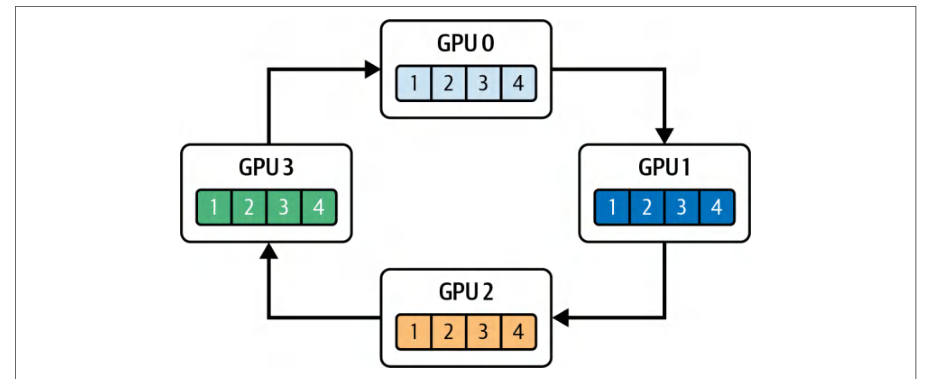
NCCL will choose a ring or tree algorithm based on NVLink or PCIe topology. Consider a four-GPU ring, as shown in Figure 11-8, with four chunks (1–4).NCCL 会根据 NVLink 或 PCIe 拓扑选择环形或树形算法。考虑如图 11-8 所示的四 GPU 环形,其中包含四个分块(1–4)。
In this ring all-reduce, each GPU sends chunk i to its neighbor (k → k+1) while receiving chunk i−1 from its other neighbor (k−1 → k), using device kernels to move and reduce chunks over NVLink or PCIe.在这个环形全归约中,每块 GPU 把分块 i 发送给它的邻居(k → k+1),同时从另一个邻居(k−1 → k)接收分块 i−1,并通过设备内核在 NVLink 或 PCIe 上搬运和归约这些分块。
By pipelining these chunked sends and receives, NCCL keeps NVLink fully saturated. While chunk i traverses from GPU 0 → GPU 1, chunk i−1 moves GPU 1 → GPU 2, and so on. This minimizes idle gaps. In code, you would see something like the following:通过将这些分块发送与接收流水线化,NCCL 使 NVLink 保持完全饱和。当分块 i 从 GPU 0 → GPU 1 传输时,分块 i−1 正从 GPU 1 → GPU 2 移动,依此类推。这最大限度地减少了空闲间隙。在代码中,你会看到类似下面的内容:
// 在每个 GPU 的高优先级通信流中:
cudaEventRecord(eventK, computeStream);
cudaStreamWaitEvent(commStream, eventK, 0);
ncclAllReduce( // 此操作是异步的
    gradBuffer, gradBuffer, numElements,
    ncclFloat, ncclSum, comm, commStream);
// In a high-priority communication stream on each GPU:
cudaEventRecord(eventK, computeStream);
cudaStreamWaitEvent(commStream, eventK, 0);
ncclAllReduce( // this is asynchronous
    gradBuffer, gradBuffer, numElements,
    ncclFloat, ncclSum, comm, commStream);
Because NCCL uses only a few SM thread blocks, it orchestrates the chunked send/ recv + reduce across NVLink or NVSwitch in a low-occupancy manner on the SMs. Meanwhile, your main compute stream running a backward pass for layer k+1, for instance, can continue running. When the all-reduce completes, the event is recorded as shown here:由于 NCCL 只使用少量 SM 线程块,它以低占用率的方式在 SM 上编排跨 NVLink 或 NVSwitch 的分块发送/接收 + 归约。与此同时,你的主计算流——例如正在为第 k+1 层执行反向传播——可以继续运行。当全归约完成时,会记录事件,如下所示:
cudaEventRecord(eventAllReduceDone, commStream); // 标记集合操作完成
cudaStreamWaitEvent(computeStream, eventAllReduceDone, 0);
// 现在在 computeStream 上应用优化器更新……
cudaEventRecord(eventAllReduceDone, commStream); // signals collective completion
cudaStreamWaitEvent(computeStream, eventAllReduceDone, 0);
// Now apply optimizer updates on computeStream...
Remember that NCCL collectives like all-reduce are asynchronous. They return control immediately. By recording an event after the call and waiting on it in the compute stream, you ensure that the compute stream doesn’t resume until the reduction is actually completed.请记住,像全归约这样的 NCCL 集合通信是异步的。它们会立即返回控制权。通过在该调用之后记录一个事件,并在计算流中等待该事件,你可以确保在归约真正完成之前,计算流不会恢复执行。
NIXL provides a unified, high-throughput API for point-to-point and disaggregated transfers across NVLink, RDMA, and storage backends, so you typically use NIXL APIs instead of calling cudaMemcpyPeerAsync yourself. NIXL moves data quickly and asynchronously across different tiers of memory and interconnects. When you invoke a NIXL operation with nixlCommStream, the data is chunked and pipelined over the network using the fastest transport mechanism available, such as GPUDirect RDMA or NVLink.NIXL 提供统一的、高吞吐量的 API,用于跨 NVLink、RDMA 和存储后端进行点对点传输与解耦传输,因此你通常使用 NIXL API,而不是自己调用 cudaMemcpyPeerAsync。NIXL 在不同层级的内存与互连之间快速、异步地搬运数据。当你通过 nixlCommStream 发起 NIXL 操作时,数据会被分块,并使用当前可用的最快传输机制(例如 GPUDirect RDMA 或 NVLink)在网络之上流水线化传输。
And like NCCL, NIXL can use dedicated high-priority streams for chunked peer-topeer and collective data transfers. This can reduce queuing delays so their copy commands hit the GPU’s DMA engines soon after they are issued—likely preempting lower-priority work.与 NCCL 一样,NIXL 也可以使用专用的高优先级流来执行分块的点对点传输和集合数据传输。这可以减少排队时延,使拷贝命令在发出后很快就能抵达 GPU 的 DMA 引擎——很可能抢占低优先级的工作。
Marking these transfer streams as high priority doesn’t mean they consume SM resources upfront. It simply guarantees that when the copy commands are ready, they’ll be issued ahead of other low-priority operations.将这些传输流标记为高优先级并不意味着它们会预先占用 SM 资源。它只是保证当拷贝命令就绪时,会先于其他低优先级操作被发出。
In practice, the copy engines then take advantage of whatever DRAM-to-DRAM bandwidth isn’t already being used by your compute kernels. As such, they effectively use only idle memory-fabric bandwidth to move data across the interconnects.在实践中,拷贝引擎随后会利用计算内核尚未使用的 DRAM-to-DRAM 带宽。因此,它们实际上只使用空闲的内存互连带宽来跨互连搬运数据。
This design maximizes overlap such that while one stream drives cudaMemcpyPeer Async transfers or NCCL reduction kernels on the copy engine, another stream’s SM kernels can continue processing forward/backward work. And a third stream can perform asynchronous allocations or event waits. This keeps all of the hardware units busy and without contention.这种设计最大化了重叠:当一个流在拷贝引擎上驱动 cudaMemcpyPeer Async 传输或 NCCL 归约内核时,另一个流的 SM 内核可以继续处理前向/反向工作。而第三个流则可以执行异步分配或事件等待。这使所有硬件单元都保持忙碌且无争用。
Peer-to-peer transfers launched using cudaMemcpyPeerAsync run entirely on the GPU’s copy engines, so they consume only DRAM-to-DRAM bandwidth and no SM cycles. Collective operations such as all-reduce, on the other hand, are implemented as device kernels that use a small number of SMs while driving interconnect bandwidth toward the peak.使用 cudaMemcpyPeerAsync 发起的点对点传输完全运行在 GPU 的拷贝引擎上,因此它们只消耗 DRAM-to-DRAM 带宽,不占用 SM 周期。另一方面,诸如全归约之类的集合操作被实现为设备内核,它们使用少量 SM,同时将互连带宽推向峰值。
At the same time, temporary buffers for activations or mixed-precision gradients are allocated and freed asynchronously to avoid global stalls. For example, inside each GPU’s compute stream, you would call the following code:与此同时,用于激活值或混合精度梯度的临时缓冲区以异步方式分配和释放,以避免全局停顿。例如,在每块 GPU 的计算流内部,你会调用如下代码:
cudaMallocAsync(&tempBuffer, tempBytes, computeStream);
// ……在内核中使用 tempBuffer……
cudaFreeAsync(tempBuffer, computeStream);
cudaMallocAsync(&tempBuffer, tempBytes, computeStream);
// ...use tempBuffer in kernels...
cudaFreeAsync(tempBuffer, computeStream);
Because the stream-ordered memory allocator records these operations without forcing a device-wide synchronization, CUDA does not pause the other streams such as P2P, NCCL, and NIXL streams when allocating or freeing memory. This makes sure that buffer management never interrupts the overlapped compute and communication pipeline.由于流序显存分配器记录这些操作而不会强制进行设备级同步,CUDA 在分配或释放内存时不会暂停其他流(例如 P2P、NCCL 和 NIXL 流)。这确保缓冲区管理永远不会中断重叠的计算与通信流水线。
After you enqueue the forward pass, backward pass, P2P copies, NCCL all-reduce, memory free, and event-wait operations for a single iteration, you can capture an execution chain (e.g., training or inference iteration) into a single CUDA Graph.在为单次迭代将前向传播、反向传播、P2P 拷贝、NCCL 全归约、内存释放和事件等待等操作入队之后,你可以把一条执行链(例如一次训练或推理迭代)捕获进单个 CUDA 图。
Specifically, when you call cudaStreamBeginCapture, every operation you enqueue into the stream (e.g., kernel launches, computations, communications, data transfers, events, etc.) are inserted as nodes in the graph. This can include ncclAllReduce(), cudaMemcpyAsync, cudaMemcpyPeerAsync, cudaMallocAsync, cudaFreeAsync, cuda EventRecord, cudaStreamWaitEvent—as well as their dependencies. You end the capture with cudaStreamEndCapture(stream, &graph). The code looks something like this:具体来说,当你调用 cudaStreamBeginCapture 时,你入队到该流中的每一个操作(例如内核启动、计算、通信、数据传输、事件等)都会作为节点插入图中。这可以包括 ncclAllReduce()、cudaMemcpyAsync、cudaMemcpyPeerAsync、cudaMallocAsync、cudaFreeAsync、cuda EventRecord、cudaStreamWaitEvent——以及它们的依赖关系。你用 cudaStreamEndCapture(stream, &graph) 结束捕获。代码大致如下:
cudaStreamBeginCapture(streamA, cudaStreamCaptureModeGlobal);
computeGradientsLayer1<<<... , 0, streamA>>>(...);
ncclAllReduce(..., comm, streamB);
computeGradientsLayer2<<<... , 0, streamA>>>(...);
ncclAllReduce(..., comm, streamB);
cudaStreamEndCapture(streamA, &graph);
When capturing work submitted to multiple streams, use cudaStreamCaptureMode Global so operations enqueued on any participating stream in the same thread are recorded into the same capture session—and cross-stream dependencies are preserved. Otherwise, only the operations enqueued on the stream passed to cudaStream BeginCapture are captured.当捕获提交到多个流的工作时,请使用 cudaStreamCaptureMode Global,这样在同一线程中任何参与流上入队的操作都会被记录到同一个捕获会话中——并且跨流依赖关系得以保留。否则,只有入队到传给 cudaStream BeginCapture 的那个流上的操作才会被捕获。
You can then instantiate and launch the graph with cudaGraphLaunch(). This will replay the entire DAG with near-zero CPU overhead. By capturing the whole multi-GPU iteration once, you eliminate per-operation enqueue and launch overhead.随后,你可以用 cudaGraphLaunch() 实例化并启动该图。这将以近乎为零的 CPU 开销重放整个有向无环图(DAG)。通过一次性捕获整个多 GPU 迭代,你消除了逐操作的入队与启动开销。
Moreover, CUDA Graphs support conditional nodes (e.g., gradient clipping), so infrequent branches stay inside the graph’s logic. We’ll cover CUDA Graphs in more detail in the next chapter, but it’s important to understand their relationship to CUDA streams, including cudaStreamBeginCapture and cudaStreamEndCapture.此外,CUDA 图支持条件节点(例如梯度裁剪),因此不常走到的分支仍保留在图自身的逻辑之内。我们将在下一章更详细地介绍 CUDA 图,但理解它们与 CUDA 流的关系很重要,包括 cudaStreamBeginCapture 和 cudaStreamEndCapture。
While you don’t need to explicitly use these CUDA stream begin and end APIs to build a CUDA Graph, they are convenient when you want to capture the graph at the same time you are enqueuing operations into your stream (we’ll cover CUDA Graphs in more detail in the next chapter).虽然构建 CUDA 图并不需要显式使用这些 CUDA 流的开始与结束 API,但当你希望在向流中入队操作的同时捕获图时,它们会很方便(我们将在下一章更详细地介绍 CUDA 图)。
CUDA streams enable finely tuned pipelines in multi-GPU systems by overlapping work across CPUs, DMA engines, and SMs. On the CPU side, cudaMemcpyAsync into pinned host buffers stages data for the next batch while the GPU executes the current workload, ensuring that inputs for batch N+1 are ready before batch N completes. At the same time, peer-to-peer transfers between GPUs (using cudaMemcpyPeerAsync) can be scheduled on dedicated streams, synchronized with cudaStreamWaitEvent to hand off activations or gradients without stalling ongoing compute.CUDA 流通过在 CPU、DMA 引擎和 SM 之间重叠工作,使多 GPU 系统能够构建精细调优的流水线。在 CPU 一侧,cudaMemcpyAsync 将数据写入锁页主机缓冲区,为下一批数据做暂存,同时 GPU 执行当前工作负载,从而确保批 N+1 的输入在批 N 完成之前就已就绪。与此同时,GPU 之间的对等传输(使用 cudaMemcpyPeerAsync)可以调度到专用流上,并通过 cudaStreamWaitEvent 进行同步,以在不阻塞正在进行计算的情况下交接激活值或梯度。
As mentioned, collective communication libraries like NCCL or NIXL are low-occupancy communication kernels that use separate streams. This way, while one GPU is reducing gradients or broadcasting parameters, other streams on that same GPU can continue executing local compute kernels (e.g., forward or backward passes for subsequent layers). In addition, using cudaMallocAsync and cudaFreeAsync in stream order prevents global synchronization for temporary buffers, letting allocation and deallocation proceed concurrently with compute and communication.如前所述,NCCL 或 NIXL 这类集合通信库是低占用率的通信内核,它们使用独立的流。这样一来,当一块 GPU 在归约梯度或广播参数时,同一块 GPU 上的其他流可以继续执行本地计算内核(例如后续层的前向或反向传播)。此外,按流顺序使用 cudaMallocAsync 和 cudaFreeAsync 可以避免为临时缓冲区进行全局同步,使分配与释放能够与计算和通信并发进行。
Capturing the entire iteration (e.g., CPU staging, P2P transfers, compute kernels, NCCL calls, allocations, frees, and events/waits) into a CUDA Graph can further reduce CPU overhead. Once the graph is instantiated, invoking cudaGraphLaunch() replays the recorded DAG in one go. This eliminates per-call enqueue overhead and preserves all dependencies automatically.将整个迭代(例如 CPU 暂存、P2P 传输、计算内核、NCCL 调用、分配、释放以及事件/等待)捕获到一个 CUDA 图中,可以进一步降低 CPU 开销。图一旦实例化,调用 cudaGraphLaunch() 即可一次性重放所记录的 DAG。这消除了逐次调用的入队开销,并自动保留所有依赖关系。
Together, these techniques ensure that each GPU’s SM pipelines, copy engines, and interconnect links remain busy. While one stream runs matrix-multiply kernels, another performs peer-to-peer copies, a third executes collective communication, and the CPU stages data for the next microbatch.这些技术共同确保每块 GPU 的 SM 流水线、拷贝引擎和互连链路都保持忙碌。当一条流运行矩阵乘法内核时,另一条流执行对等拷贝,第三条流执行集合通信,而 CPU 则为下一个微批暂存数据。
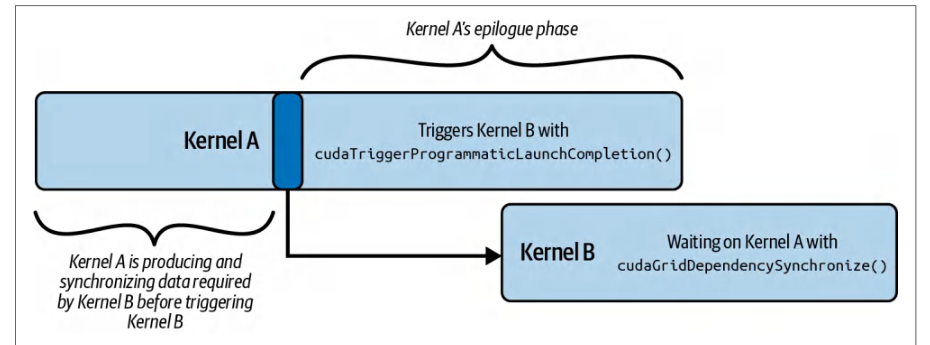
In short, you can use CUDA streams to orchestrate work across multiple layers and overlap computation, memory operations, and data transfers. This approach drives every hardware unit to its limits by hiding peer-to-peer and collective communication latencies behind active compute. Overall, CUDA streams maximize throughput, utilization, and efficiency for many AI workloads, including LLM training and inference.简而言之,你可以使用 CUDA 流在多个层之间编排工作,并重叠计算、内存操作与数据传输。这种方法通过将对等通信和集合通信的时延隐藏在活跃计算之后,把每个硬件单元都推向极限。总体而言,CUDA 流为包括 LLM 训练和推理在内的众多 AI 工作负载最大化了吞吐量、利用率和效率。
程序化依赖启动
Programmatic Dependent Launch
Another type of inter-kernel pipelining and communication is called Programmatic Dependent Launch (PDL). PDL lets a kernel trigger another kernel’s execution directly on the device using the same CUDA stream—and without involving the CPU. For instance, Kernel A, the primary kernel, can trigger Kernel B, the secondary kernel, which is waiting on a signal from Kernel A.另一种内核间流水线与通信方式称为*程序化依赖启动*(Programmatic Dependent Launch,PDL)。PDL 允许一个内核在设备上直接触发另一个内核的执行,二者使用同一个 CUDA 流,且无需 CPU 参与。例如,主内核 Kernel A 可以触发正在等待 Kernel A 信号的次内核 Kernel B。
This trigger can happen even before Kernel A finishes execution. To do this, it uses cudaTriggerProgrammaticLaunchCompletion(), as shown in Figure 11-9. Here, Kernel B is waiting on Kernel A with a call to cudaGridDependencySynchronize().这一触发甚至可以发生在 Kernel A 执行完成之前。为此,它使用 cudaTriggerProgrammaticLaunchCompletion(),如图 11-9 所示。此处,Kernel B 通过调用 cudaGridDependencySynchronize() 等待 Kernel A。
Using the constructs provided by PDL, Kernel A can signal Kernel B to execute during Kernel A’s epilogue (e.g., wrap-up) phase. This way, Kernel A can execute alongside Kernel B for a bit of time. It’s important to note that Kernel A should not trigger Kernel B to execute until Kernel A has produced and synchronized all data (e.g., L2/ shared memory/global memory) needed by Kernel B.利用 PDL 提供的这些构造,Kernel A 可以在其*尾声*(epilogue,即收尾)阶段发出信号让 Kernel B 执行。这样,Kernel A 就能与 Kernel B 并行执行一小段时间。需要注意的是,在 Kernel A 生成并同步 Kernel B 所需的全部数据(例如 L2/共享内存/全局内存中的数据)之前,不应触发 Kernel B 执行。
The code here shows Kernel A using cudaTriggerProgrammaticLaunchComple tion() to signal to Kernel B that its main work has completed. This also notifies Kernel B that all necessary global-memory flushes have occurred—and that it’s safe to continue:下面的代码展示了 Kernel A 使用 cudaTriggerProgrammaticLaunchComple tion() 向 Kernel B 发出信号,表明其主要工作已经完成。这同时通知 Kernel B:所有必要的全局内存刷新都已完成,可以安全地继续执行:
#include <cuda_runtime.h>
#include <cuda_runtime_api.h>
// 内核 A 必须在……时触发 PDL 标志
//    可以安全启动内核 B
__global__ void kernel_A(int *d_ptr) {
    // 执行产生数据的计算,这些数据由……使用
    //   内核 B

    // 发出信号,表示内核 A 的全局内存
    //   刷新已完成
    // 这使依赖它的内核 B 得以启动
    cudaTriggerProgrammaticLaunchCompletion();
    // ……任何可以与之重叠的其他工作……
    ...
}
// 内核 B 必须等待内核 A 将其内存写入
//    全局内存,并使其对内核 B 可见
__global__ void kernel_B(int *d_ptr) {
    // 等待内核 A 完成。
    // 这确保内核 B 等待
    //   内存刷新完成后再访问共享数据
    cudaGridDependencySynchronize();
    // ……对 d_ptr 的依赖工作……
    ...
}
int main() {
    // 1) 分配设备缓冲区
    int *d_ptr = nullptr;
    // 分配一个 int(示例)
    cudaMalloc((void**)&d_ptr, sizeof(int));
    // 2) 创建非阻塞流以实现最大重叠
    cudaStream_t stream;
    cudaStreamCreateWithFlags(&stream,
        cudaStreamNonBlocking);  // 非阻塞
    // 3) 定义网格/线程块大小
    dim3 gridDim(128), blockDim(256);
    // 4) 异步启动内核 A
#include <cuda_runtime.h>
#include <cuda_runtime_api.h>
// Kernel A must trigger the PDL flag when it's
//    safe to launch Kernel B
__global__ void kernel_A(int *d_ptr) {
    // Perform work that produces data used by
    //   Kernel B

    // Signals that Kernel A's global-memory
    //   flushes are complete
    // This enables dependent Kernel B's launch
    cudaTriggerProgrammaticLaunchCompletion();
    // ... any further work that can overlap with  ...
    ...
}
// Kernel B must wait for Kernel A to write its memory
//    to global memory and become visible to Kernel B
__global__ void kernel_B(int *d_ptr) {
    // Wait on Kernel A to complete.
    // This ensures the Kernel B waits for the
    //   memory flush before accessing shared data
    cudaGridDependencySynchronize();
    // ... dependent work on d_ptr ...
    ...
}
int main() {
    // 1) Allocate device buffer
    int *d_ptr = nullptr;
    // Allocate an int (example)
    cudaMalloc((void**)&d_ptr, sizeof(int));
    // 2) Create a nonblocking stream for maximum overlap
    cudaStream_t stream;
    cudaStreamCreateWithFlags(&stream,
        cudaStreamNonBlocking);  // Nonblocking
    // 3) Define grid/block sizes
    dim3 gridDim(128), blockDim(256);
    // 4) Launch Kernel A asynchronously
    kernel_A<<<gridDim, blockDim, 0,
        stream>>>(d_ptr);    // 异步启动
    // 5) 为内核 B 配置 PDL
    cudaLaunchConfig_t launch_cfg{};
    launch_cfg.gridDim           = gridDim;
    launch_cfg.blockDim          = blockDim;
    launch_cfg.dynamicSmemBytes  = 0;
    launch_cfg.stream            = stream;
    // 设置 PDL 标志,使 cudaLaunchKernelExC 与
    //   Kernel A 的收尾阶段(epilogue)重叠
    static cudaLaunchAttribute attrs[1];
    attrs[0].id  = cudaLaunchAttributeProgrammaticStreamSerialization;
    attrs[0].val.programmaticStreamSerializationAllowed =
        1;
    launch_cfg.attrs    = attrs;
    launch_cfg.numAttrs = 1;
    // 6) 打包指针参数
    void* kernelArgs[] = { &d_ptr };
    // 7) 使用 PDL 提前启动 Kernel B 内核
    // 查找 secondary_kernel 的设备指针
    cudaKernel_t kB;
    cudaGetKernel(&kB, kernel_B);
    void* funcPtr_kernel_B = reinterpret_cast<void*>(kB);
    cudaLaunchKernelExC(&launch_cfg, funcPtr_kernel_B, kernelArgs);
    // 8) 等待流中所有工作完成
    cudaStreamSynchronize(stream);
    // 9) 清理
    cudaStreamDestroy(stream);
    cudaFree(d_ptr);
    return 0;
}
    kernel_A<<<gridDim, blockDim, 0,
        stream>>>(d_ptr);    // Async launch
    // 5) Configure PDL for Kernel B
    cudaLaunchConfig_t launch_cfg{};
    launch_cfg.gridDim           = gridDim;
    launch_cfg.blockDim          = blockDim;
    launch_cfg.dynamicSmemBytes  = 0;
    launch_cfg.stream            = stream;
    // Sets the PDL flag so cudaLaunchKernelExC overlaps
    //   with Kernel A's epilogue
    static cudaLaunchAttribute attrs[1];
    attrs[0].id  = cudaLaunchAttributeProgrammaticStreamSerialization;
    attrs[0].val.programmaticStreamSerializationAllowed =
        1;
    launch_cfg.attrs    = attrs;
    launch_cfg.numAttrs = 1;
    // 6) Pack the pointer argument
    void* kernelArgs[] = { &d_ptr };
    // 7) Launch Kernel B kernel early using PDL
    // Lookup device pointer for secondary_kernel
    cudaKernel_t kB;
    cudaGetKernel(&kB, kernel_B);
    void* funcPtr_kernel_B = reinterpret_cast<void*>(kB);
    cudaLaunchKernelExC(&launch_cfg, funcPtr_kernel_B, kernelArgs);
    // 8) Wait until all work in the stream completes
    cudaStreamSynchronize(stream);
    // 9) Cleanup
    cudaStreamDestroy(stream);
    cudaFree(d_ptr);
    return 0;
}
Here, Kernel B is waiting on cudaGridDependencySynchronize() until it receives this programmatic-launch completion signal from Kernel A. Once the handoff occurs, the two kernels can overlap their execution. By pairing the trigger in Kernel A, the synchronize in Kernel B, and the launch attribute on the host, this code achieves as much overlap as possible between kernels A and B.此处,Kernel B 一直等待在 cudaGridDependencySynchronize() 上,直到收到来自 Kernel A 的这一程序化启动完成信号。一旦完成交接,两个内核就可以重叠执行。通过将 Kernel A 中的触发、Kernel B 中的同步以及主机端的启动属性配合使用,这段代码在 Kernel A 与 Kernel B 之间实现了尽可能大的重叠。
As seen in this example, you need to create a cudaLaunchConfig_t and use special attributes with the cudaLaunchKernelExC() CUDA call when using PDL. Specifically, on the host side, PDL is enabled by configuring a cudaLaunchConfig_t for Kernel B’s launch with the cudaLaunchAttributeProgrammaticStreamSerialization attribute enabled to allow early, overlapped dispatch.如本例所示,使用 PDL 时需要创建 cudaLaunchConfig_t,并在 cudaLaunchKernelExC() CUDA 调用中使用特殊属性。具体而言,在主机侧,为 Kernel B 的启动配置 cudaLaunchConfig_t 并启用 cudaLaunchAttributeProgrammaticStreamSerialization 属性,即可启用 PDL,从而允许提前的、重叠的派发。
Calling cudaLaunchKernelExC() with cudaLaunchAttributeProgrammaticStream Serialization tells the CUDA runtime that it’s safe to enqueue Kernel B—even if Kernel A isn’t fully complete. cudaLaunchKernelExC() is then used to perform the actual launch with these extended attributes, which relies on the trigger mechanism to perform the handoff.以 cudaLaunchAttributeProgrammaticStream Serialization 调用 cudaLaunchKernelExC(),会告知 CUDA 运行时可以安全地入队 Kernel B——即使 Kernel A 尚未完全结束。随后使用 cudaLaunchKernelExC() 携带这些扩展属性执行实际启动,并依赖触发机制完成交接。
结合 PDL、线程块集群与线程束专用化
Combining PDL and Thread Block Clusters with Warp Specialization
Let’s bring together three orthogonal techniques—PDL, warp-specialized pipelining, and thread block clusters—into one execution model.让我们把三种正交技术——PDL、线程束专用化流水线与线程块集群——整合到一个执行模型中。
PDL provides the mechanism for one kernel to signal completion of its prologue and trigger a dependent kernel to execute. It will then ramp down while the dependent kernel ramps up and executes.PDL 提供了一种机制,使一个内核能够发出其前导(prologue)阶段已完成的信号,并触发依赖内核执行。随后该内核逐步退出,而依赖内核逐步启动并执行。
Warp specialization subdivides each thread block into producer and consumer warps. Specifically, the producer warp asynchronously transfers tiles using TMA, while the compute warp executes matrix-multiply-accumulate (MMA) operations.线程束专用化将每个线程块划分为生产者线程束与消费者线程束。具体而言,生产者线程束使用 TMA 异步传输数据块(tile),而计算线程束执行矩阵乘累加(MMA)运算。
And thread block clusters guarantee that multiple thread blocks run on nearby groups of SMs. This facilitates multi-SM cooperation and shared-memory multicast for large-scale workloads.而线程块集群保证多个线程块运行在相邻的 SM 组上。这为大规模工作负载提供了多 SM 协作与共享内存多播的能力。
Together, this combination of inter-kernel and intra-kernel techniques hides DRAM latency, reduces kernel-boundary overheads, and maximizes Tensor Core utilization. They create a pipeline with the following characteristics:这些内核间与内核内技术组合在一起,可隐藏 DRAM 时延、降低内核边界开销,并最大化张量核心利用率。它们构建出一条具有以下特征的流水线:
- Intra-kernel pipelining内核内流水线
- Warp specialization makes sure that within each thread block, data transfers (producer warps) and compute (consumer warps) are fully overlapped using a multistage pipeline.线程束专用化确保在每个线程块内,数据传输(生产者线程束)与计算(消费者线程束)通过多级流水线完全重叠。
- Inter-kernel overlap内核间重叠
- PDL allows the prologue of a dependent GEMM kernel, potentially operating on the next layer in a neural network, to begin as soon as the primary kernel finishes prefetching data (weights)—without waiting for the full thread block to tear down.PDL 允许依赖的 GEMM 内核(可能处理神经网络中的下一层)的前导部分在主内核完成数据(权重)预取后立即开始——无需等待整个线程块拆除。
- Interblock cooperation块间协作
- Thread block clusters enable groups of thread blocks to coordinate prefetch (e.g., multicast) and perform dynamic load balancing across SMs. This way, both producer and consumer tasks are evenly distributed cluster-wide.线程块集群使成组的线程块能够协同预取(例如多播),并在各 SM 之间执行动态负载均衡。这样,生产者任务与消费者任务都能在集群范围内均匀分布。
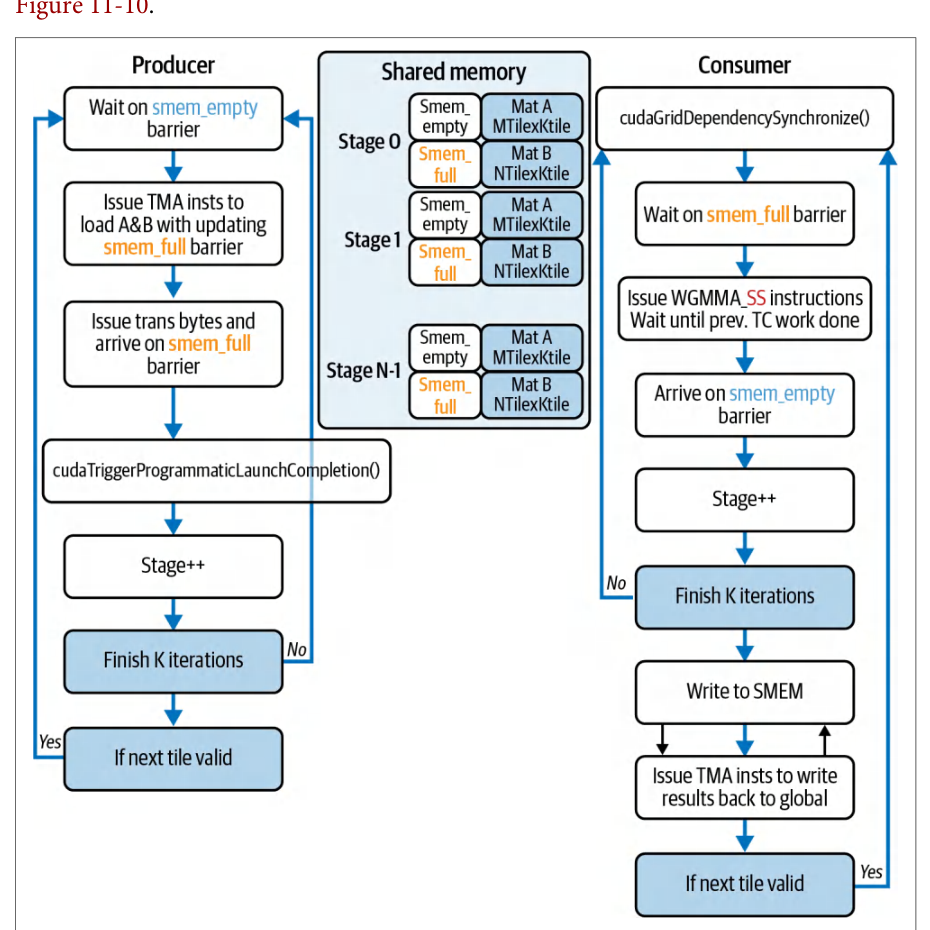
For example, you can overlap the movement of model weights (data transfer) with GEMMs (compute) inside the same kernel so that one tile is being computed while the next tile is in flight. A warp-specialized, multistage software pipeline (stages 0… N) can coordinate these roles using PDL and mbarrier primitives, as shown in例如,你可以在同一内核内将模型权重的搬运(数据传输)与 GEMM(计算)重叠,从而在计算一个瓦片(tile)的同时,下一个瓦片正在传输途中。线程束专用化的多级软件流水线(阶段 0…N)可以使用 PDL 与 mbarrier 原语协调这些角色,如下所示
Here is a CUDA C++ example that shows how to combine PDL, thread block clusters, and warp specialization with a simple TMA-style async copy + compute pipeline. Specifically, the primary kernel, primary_gemm, uses cudaTriggerProgrammatic LaunchCompletion() to signal to the secondary kernel that all memory flushes have completed and the data is ready to be consumed. As such, it’s now safe for the secondary kernel, secondary_gemm, to continue from cudaGridDependencySynchronize(), as shown here:下面是一个 CUDA C++ 示例,展示如何将 PDL、线程块集群与线程束专用化结合到一个简单的 TMA 风格异步拷贝 + 计算流水线中。具体来说,主内核 primary_gemm 使用 cudaTriggerProgrammatic LaunchCompletion() 向次级内核发出信号,表示所有内存刷新均已完成、数据已可供消费。因此,次级内核 secondary_gemm 现在可以安全地从 cudaGridDependencySynchronize() 继续执行,如下所示:
#include <cstdio>
#include <cuda_runtime.h>
// 用于集群/屏障的协作组
#include <cooperative_groups.h>
// 用于类 TMA 同步的 C++ 屏障
#include <cuda/barrier>
// 异步拷贝 API
#include <cuda/pipeline>
namespace cg = cooperative_groups;
// 示例 GEMM 的分块大小
constexpr int TILE_M = 128;
constexpr int TILE_K = 128;
constexpr int TILE_N = 128;
// 每个 CTA 内非常简单的“生产者/消费者”流水线
__global__ __cluster_dims__(2,1,1)    // 编译期由 2 个 CTA 组成的集群
void primary_gemm(const float* __restrict__ A,
                  const float* __restrict__ B,
                        float* __restrict__ C,
                  int M, int N, int K)
{
    // 识别线程块集群与块内分组
    cg::thread_block_cluster cluster = cg::this_thread_block_cluster();
    cg::thread_block       cta     = cg::this_thread_block();
    int tid = threadIdx.x + threadIdx.y * blockDim.x;
    int warpId = tid / warpSize;
    const int numProducerWarps = 1;
    // 共享内存分块缓冲区
    __shared__ float tileA[TILE_M * TILE_K];
    __shared__ float tileB[TILE_K * TILE_N];
    __shared__
    cuda::pipeline_shared_state<cuda::thread_scope_block, 1> pipe_state;
    auto pipe = cuda::make_pipeline(cta, &pipe_state);
    if (warpId < numProducerWarps) {
    pipe.producer_acquire();
    cuda::memcpy_async(cta, tileA, A, cuda::aligned_size_t<32>{TILE_M
                       * TILE_K * sizeof(float)}, pipe);
    cuda::memcpy_async(cta, tileB, B, cuda::aligned_size_t<32>{TILE_K
                       * TILE_N * sizeof(float)}, pipe);
    pipe.producer_commit();
    }
    cta.sync();
    pipe.consumer_wait();
    pipe.consumer_release();
#include <cstdio>
#include <cuda_runtime.h>
// Cooperative Groups for clusters/barriers
#include <cooperative_groups.h>
// C++ barrier for TMA-like sync
#include <cuda/barrier>
// Async copy API
#include <cuda/pipeline>
namespace cg = cooperative_groups;
// Tile size for our toy GEMM
constexpr int TILE_M = 128;
constexpr int TILE_K = 128;
constexpr int TILE_N = 128;
// A very simple “producer/consumer” pipeline within each CTA
__global__ __cluster_dims__(2,1,1)    // Compile-time cluster of 2 CTAs
void primary_gemm(const float* __restrict__ A,
                  const float* __restrict__ B,
                        float* __restrict__ C,
                  int M, int N, int K)
{
    // Identify thread-block cluster & within-block group
    cg::thread_block_cluster cluster = cg::this_thread_block_cluster();
    cg::thread_block       cta     = cg::this_thread_block();
    int tid = threadIdx.x + threadIdx.y * blockDim.x;
    int warpId = tid / warpSize;
    const int numProducerWarps = 1;
    // Shared-memory tile buffers
    __shared__ float tileA[TILE_M * TILE_K];
    __shared__ float tileB[TILE_K * TILE_N];
    __shared__
    cuda::pipeline_shared_state<cuda::thread_scope_block, 1> pipe_state;
    auto pipe = cuda::make_pipeline(cta, &pipe_state);
    if (warpId < numProducerWarps) {
    pipe.producer_acquire();
    cuda::memcpy_async(cta, tileA, A, cuda::aligned_size_t<32>{TILE_M
                       * TILE_K * sizeof(float)}, pipe);
    cuda::memcpy_async(cta, tileB, B, cuda::aligned_size_t<32>{TILE_K
                       * TILE_N * sizeof(float)}, pipe);
    pipe.producer_commit();
    }
    cta.sync();
    pipe.consumer_wait();
    pipe.consumer_release();
// ……对分块执行“计算”……
// (例如,若干次融合乘加)
do_compute();
    // 用于负载均衡的 CTA 间集群作用域同步
    cluster.sync();
    // 向依赖内核发出信号:前导阶段(prologue)已完成
    cudaTriggerProgrammaticLaunchCompletion();
    // ……执行剩余的收尾阶段工作……
    // ...
}
__global__ __cluster_dims__(2,1,1)
void secondary_gemm(const float* __restrict__ A,
                    const float* __restrict__ B,
                          float* __restrict__ C,
                    int M, int N, int K)
{
    // 启动前等待主内核的 PDL 信号
    cudaGridDependencySynchronize();
    // 与上文类似的线程束专用化流水线……
    //  (为简洁起见省略。与主逻辑重复,
    //  但从不同偏移处读取,以计算
    //  下一个 GEMM 分块。)
}
// cudaLaunchKernelExC、cudaGetKernel
#include <cuda_runtime_api.h>
// cudaLaunchConfig_t
#include <cuda/launch_config.h>
int main()
{
    // 问题维度(必须是 TILE_ 的整数倍)
    int M = TILE_M, N = TILE_N, K = TILE_K;
    // 在设备上分配并初始化矩阵 A、B、C
    float *d_A, *d_B, *d_C;
    cudaMalloc(&d_A, M*K*sizeof(float));
    cudaMalloc(&d_B, K*N*sizeof(float));
    cudaMalloc(&d_C, M*N*sizeof(float));
    // (通过 cudaMemcpy 或内核初始化 d_A、d_B……)
    // 创建非阻塞流以实现重叠
    cudaStream_t stream;
    cudaStreamCreateWithFlags(&stream,
        cudaStreamNonBlocking);
    // 启动主 GEMM
// ... perform “compute” on the tile ...
// (e.g., a few fused multiply-adds)
do_compute();
    // Inter-CTA cluster-scope sync for load balancing
    cluster.sync();
    // Signal to dependent kernel that prologue is done
    cudaTriggerProgrammaticLaunchCompletion();
    // ... perform remaining epilogue work ...
    // ...
}
__global__ __cluster_dims__(2,1,1)
void secondary_gemm(const float* __restrict__ A,
                    const float* __restrict__ B,
                          float* __restrict__ C,
                    int M, int N, int K)
{
    // Wait for primary’s PDL signal before starting
    cudaGridDependencySynchronize();
    // Similar warp-specialized pipeline as above...
    //  (Omitted for brevity. Duplicate of primary logic,
    //  but reading from different offsets to compute
    //  next GEMM tile.)
}
// cudaLaunchKernelExC, cudaGetKernel
#include <cuda_runtime_api.h>
// cudaLaunchConfig_t
#include <cuda/launch_config.h>
int main()
{
    // Problem dimensions (must be multiples of TILE_)
    int M = TILE_M, N = TILE_N, K = TILE_K;
    // Allocate and initialize matrices A, B, C on device
    float *d_A, *d_B, *d_C;
    cudaMalloc(&d_A, M*K*sizeof(float));
    cudaMalloc(&d_B, K*N*sizeof(float));
    cudaMalloc(&d_C, M*N*sizeof(float));
    // (Initialize d_A, d_B via cudaMemcpy or kernels...)
    // Create a nonblocking stream for overlap
    cudaStream_t stream;
    cudaStreamCreateWithFlags(&stream,
        cudaStreamNonBlocking);
    // Launch primary GEMM
    dim3 gridDim(M/TILE_M, N/TILE_N), blockDim(256);
    primary_gemm<<<gridDim, blockDim, 0, stream>>>(d_A,
d_B, d_C, M, N, K);
    // 为次级启动配置 PDL 属性
    cudaLaunchConfig_t launch_cfg = {};
    launch_cfg.gridDim          = gridDim;
    launch_cfg.blockDim         = blockDim;
    launch_cfg.dynamicSmemBytes = 0;
    launch_cfg.stream           = stream;
    static cudaLaunchAttribute attrs[1];
    attrs[0].id  = cudaLaunchAttributeProgrammaticStreamSerialization;
    attrs[0].val.programmaticStreamSerializationAllowed = 1;
    launch_cfg.attrs    = attrs;
    launch_cfg.numAttrs = 1;
    // 准备参数并获取函数指针
    //    用于 secondary_gemm
    void* kernelArgs[] = {&d_A, &d_B, &d_C, &M, &N, &K};
    cudaKernel_t k;
    cudaGetKernel(&k, secondary_gemm);
    void* funcPtr = reinterpret_cast<void*>(k);
    // 通过 PDL 提前入队次级 GEMM
    cudaLaunchKernelExC(&launch_cfg, funcPtr, kernelArgs);
    // 等待所有任务完成
    cudaStreamSynchronize(stream);
    // 清理
    cudaFree(d_A);
    cudaFree(d_B);
    cudaFree(d_C);
    cudaStreamDestroy(stream);
    return 0;
}
    dim3 gridDim(M/TILE_M, N/TILE_N), blockDim(256);
    primary_gemm<<<gridDim, blockDim, 0, stream>>>(d_A,
d_B, d_C, M, N, K);
    // Configure PDL attributes for secondary launch
    cudaLaunchConfig_t launch_cfg = {};
    launch_cfg.gridDim          = gridDim;
    launch_cfg.blockDim         = blockDim;
    launch_cfg.dynamicSmemBytes = 0;
    launch_cfg.stream           = stream;
    static cudaLaunchAttribute attrs[1];
    attrs[0].id  = cudaLaunchAttributeProgrammaticStreamSerialization;
    attrs[0].val.programmaticStreamSerializationAllowed = 1;
    launch_cfg.attrs    = attrs;
    launch_cfg.numAttrs = 1;
    // Prepare arguments and get function pointer
    //    for secondary_gemm
    void* kernelArgs[] = {&d_A, &d_B, &d_C, &M, &N, &K};
    cudaKernel_t k;
    cudaGetKernel(&k, secondary_gemm);
    void* funcPtr = reinterpret_cast<void*>(k);
    // Early enqueue of secondary GEMM via PDL
    cudaLaunchKernelExC(&launch_cfg, funcPtr, kernelArgs);
    // Wait for everything to finish
    cudaStreamSynchronize(stream);
    // Cleanup
    cudaFree(d_A);
    cudaFree(d_B);
    cudaFree(d_C);
    cudaStreamDestroy(stream);
    return 0;
}
On the host, you launch the primary kernel (primary_gemm) into a nonblocking stream and create a cudaLaunchConfig_t with the ProgrammaticStreamSerializa tion attribute. You use this to call cudaLaunchKernelExC for the secondary kernel (secondary_gemm).在主机端,你将主内核(primary_gemm)启动到非阻塞流中,并创建一个带有 ProgrammaticStreamSerializa tion 属性的 cudaLaunchConfig_t。你使用它来为次级内核(secondary_gemm)调用 cudaLaunchKernelExC。
Inside primary_gemm, a call to cudaTriggerProgrammaticLaunchCompletion() marks the completion of the memory flush and allows the dependent kernel’s processing to begin—even before the primary has fully torn down.在 primary_gemm 内部,调用 cudaTriggerProgrammaticLaunchCompletion() 标记内存刷新的完成,并允许依赖内核开始处理——即使主内核尚未完全拆除。
The dependent kernel then calls cudaGridDependencySynchronize(). This waits for the signal and the necessary memory flush from the primary kernel so that it can start executing in parallel with the primary kernel’s epilogue.随后依赖内核调用 cudaGridDependencySynchronize()。它会等待来自主内核的信号与必要的内存刷新,从而可以与主内核的收尾阶段(epilogue)并行开始执行。
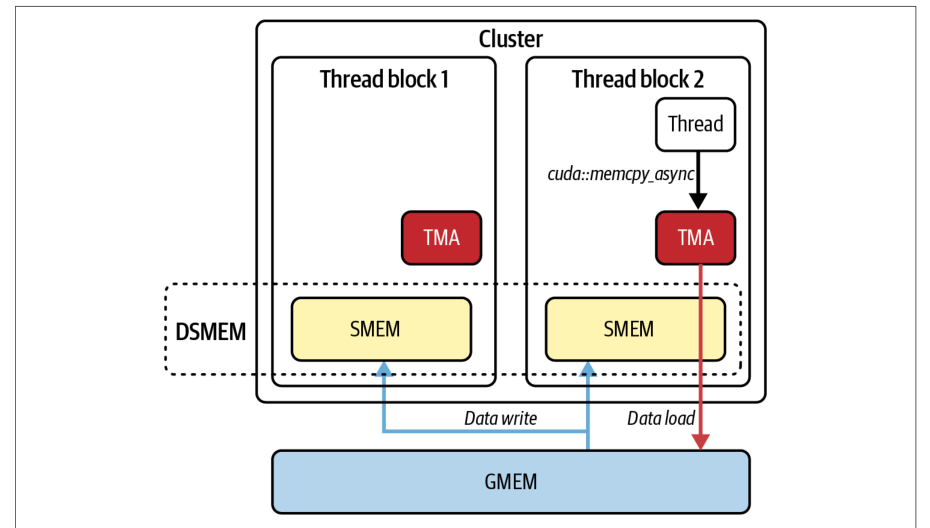
Within each thread block, we use warp specialization to overlap data movement and computation. By splitting each block into a single “producer” warp and multiple “consumer” warps, the producer issues cuda::memcpy_async calls into shared memory. This uses TMA multicast to broadcast a single DMA transfer to all thread blocks in the cluster, as shown in Figure 11-11.在每个线程块内,我们使用线程束专用化来重叠数据搬运与计算。通过将每个块拆分为一个“生产者”线程束和多个“消费者”线程束,生产者向共享内存发起 cuda::memcpy_async 调用。这会使用 TMA 多播将单次 DMA 传输广播到集群中的所有线程块,如图 11-11 所示。
While the producer warp is loading data with TMA multicast, the consumers spin on a C++ block-scope barrier (cuda::barrier<cuda::thread_scope_block>) before executing their matrix-multiply steps (do_compute()). This lets each tile’s load and its fused-multiply-add (FMA) operations interleave in a fine-grained, multistage software pipeline that hides global-memory latency inside the kernel.当生产者线程束使用 TMA 多播加载数据时,消费者线程束在 C++ 块作用域屏障(cuda::barrier<cuda::thread_scope_block>)上自旋等待,然后再执行其矩阵乘法步骤(do_compute())。这使得每个 tile 的加载与其融合乘加(FMA)运算以细粒度、多级软件流水线的方式交错进行,从而在内核内部隐藏全局内存时延。
To coordinate work across SMs, we annotate both kernels with __clus ter_dims__(2,1,1). This groups pairs of thread blocks on nearby SMs. A call to clus ter.sync() (the cooperative-group’s wrapper over PTX’s mbarrier instructions) serves as a cluster-wide barrier and shared-memory fence. This way, all of the thread blocks in the cluster see the same TMA-loaded data and can dynamically rebalance remaining tiles. This interblock cooperation prevents idle SMs and increases the benefit of the warp-specialized pipeline.为了跨 SM 协调工作,我们给两个内核都标注 __clus ter_dims__(2,1,1)。这会将成对的线程块分组到相邻的 SM 上。调用 clus ter.sync()(协作组对 PTX mbarrier 指令的封装)充当集群范围的屏障和共享内存栅栏。这样,集群中的所有线程块都能看到相同的 TMA 加载数据,并能动态重新平衡剩余的 tile。这种块间协作可避免 SM 空闲,并提升线程束专用化流水线的收益。
Let’s wrap up by revisiting the three characteristics of this high-performance GEMM pipeline:最后,让我们回顾这条高性能 GEMM 流水线的三个特征:
- Intra-kernel pipelining内核内流水线
- Achieved within each thread block using warp specialization to subdivide work so that producer warps issue
cuda::memcpy_asynctiles while consumer warps spin on a block-scope barrier. This lets data transfer and compute operations fully overlap.在每个线程块内通过线程束专用化实现:将工作细分,使生产者线程束发出cuda::memcpy_asynctile,而消费者线程束在块作用域屏障上自旋等待。这使得数据传输与计算操作完全重叠。
- Inter-kernel pipelining内核间流水线
- Uses PDL, which lets the next GEMM kernel’s processing begin (using the
cudaTriggerProgrammaticLaunchCompletion()→cudaGridDependencySynchronize()mechanism) before the primary kernel is completely torn down. This masks kernel-launch overhead.使用 PDL,使下一个 GEMM 内核的处理在主内核完全拆除之前就开始(使用cudaTriggerProgrammaticLaunchCompletion()→cudaGridDependencySynchronize()机制)。这掩盖了内核启动开销。
- Interblock cooperation块间协作
- By annotating kernels with
__cluster_dims__, this code creates thread block pairs that are coscheduled on nearby SMs. Along with callingcluster.sync()(the mbarrier-based cluster barrier), these thread blocks share TMA-multicast data and dynamically load balance work across the grid.通过给内核标注__cluster_dims__,这段代码创建了在相邻 SM 上协同调度的线程块对。结合调用cluster.sync()(基于 mbarrier 的集群屏障),这些线程块共享 TMA 多播数据,并在整个网格上动态负载均衡。
In short, by layering warp-level pipelining with TMA, cluster-level synchronization and multicast, and inter-kernel overlap using PDL, you form a highly overlapping pipeline that hides DRAM latency, masks kernel-launch overheads, and maximizes Tensor Core utilization. The result is a high-performance GEMM in every stage: within warp copies, cross-thread-block barriers, and during kernel handoffs. These operate together to keep the hardware busy and avoid stalls.简而言之,通过将线程束级流水线与 TMA、集群级同步与多播,以及使用 PDL 的内核间重叠分层叠加,你构建出一条高度重叠的流水线,可隐藏 DRAM 时延、掩盖内核启动开销,并最大化张量核心利用率。其结果是每个阶段都高性能的 GEMM:线程束内拷贝、跨线程块屏障以及内核交接期间。这些机制协同工作,让硬件保持忙碌并避免停顿。
关键要点
Key Takeaways
This chapter covered some advanced topics related to CUDA streams, stream-ordered memory allocators, event-based synchronization, inter-kernel pipelining, thread block clusters, and PDLs. These help to create highly efficient pipelines for inference and training workloads. The following are some key takeaways:本章涵盖了一些与 CUDA 流、流序显存分配器、基于事件的同步、内核间流水线、线程块集群和 PDL 相关的进阶主题。它们有助于为推理和训练工作负载构建高效的流水线。以下是一些关键要点:
- Explicit versus default streams显式流与默认流
- Avoid the legacy default stream (stream 0), which serializes all work and acts as a global barrier. Instead, create explicit non-blocking streams (
cudaStreamCreateWithFlags(..., cudaStreamNonBlocking)) so kernels and copies can run concurrently without hidden synchronizations.避免使用遗留的默认流(流 0),它会串行化所有工作,并充当全局屏障。相反,应创建显式的非阻塞流(cudaStreamCreateWithFlags(..., cudaStreamNonBlocking)),使内核和拷贝能够并发执行,而不会产生隐藏的同步。
- Stream-ordered memory allocator流序显存分配器
- Use
cudaMallocAsyncandcudaFreeAsyncto allocate/free device memory within a specific stream. This nonblocking allocator records requests in the stream’s queue, avoids global device synchronizations, and enables allocation overlap with in-flight kernels and copies.使用cudaMallocAsync和cudaFreeAsync在特定流内分配/释放设备显存。这个非阻塞分配器将请求记录在流的队列中,避免全局设备同步,并使分配能够与在飞的内核和拷贝重叠。
- Overlapping H2D, compute, and D2HH2D、计算与 D2H 的重叠
- By enqueuing asynchronous host-to-device (
cudaMemcpyAsync), kernel launches, and device-to-host copies on different streams, you can achieve three-way overlap. While one stream runs a kernel, another can copy the next batch H2D, and a third can copy results D2H. This hides latency and reduces idle periods.通过在不同流上依次入队异步主机到设备拷贝(cudaMemcpyAsync)、内核启动和设备到主机拷贝,可以实现三方重叠。当一个流运行内核时,另一个流可以将下一批数据拷贝 H2D,第三个流则可以将结果拷贝 D2H。这样可隐藏时延并减少空闲时段。
- CUDA events for fine-grained synchronization使用 CUDA 事件实现细粒度同步
- Use
cudaEventRecordandcudaStreamWaitEventto coordinate producer-consumer dependencies across streams without stalling the entire GPU or CPU. Events enable a consumer stream to wait precisely until a producer stream finishes a copy or kernel, preserving maximum concurrency.使用cudaEventRecord和cudaStreamWaitEvent跨流协调生产者-消费者依赖关系,而不会阻塞整个 GPU 或 CPU。事件使消费者流能够精确等待,直到生产者流完成某次拷贝或内核,从而保持最大并发度。
- Inter-kernel pipelining内核间流水线
- Combine warp-specialized (multirole), two-stage (double-buffered) pipeline within a kernel with multistream launches. Launching multiple instances of a warp-specialized kernel (loader → compute → storer) in separate streams feeds successive mini-batches into the GPU. This combines intra-kernel memory/ compute overlap with inter-kernel concurrency.将内核内的线程束专用化(多角色)、两阶段(双缓冲)流水线与多流启动相结合。在独立的流中启动多个线程束专用化内核实例(加载器 → 计算 → 存储器),可将连续的小批次送入 GPU。这将内核内的内存/计算重叠与内核间的并发结合起来。
- Thread block clusters with streams结合流使用线程块集群
- Extending intra-kernel warp-specialized pipelines to a grid-wide thread block cluster (cooperative launch) allows loader/compute/storer warps across blocks. Launching these cooperative kernels in multiple streams lets host-side allocations and copies for subsequent batches occur while a cooperative kernel is executing.将内核内的线程束专用化流水线扩展到网格范围的线程块集群(协作启动),可使加载器/计算/存储器线程束跨线程块工作。在多个流中启动这些协作内核,使得协作内核执行期间,主机侧可为后续批次执行分配和拷贝。
- In-kernel signaling and overlap with PDL使用 PDL 实现内核内信号与重叠
- Kernel A calls
cudaTriggerProgrammaticLaunchCompletion()once its data writes are flushed, and Kernel B usescudaGridDependencySynchronize()to wait on that signal. This allows Kernel B’s prologue to begin and overlap with A’s epilogue—without CPU intervention.内核 A 在其数据写入刷新后调用cudaTriggerProgrammaticLaunchCompletion(),内核 B 使用cudaGridDependencySynchronize()等待该信号。这使得内核 B 的前导部分可以开始,并与 A 的收尾部分重叠——无需 CPU 介入。
- Host-side PDL setup主机侧 PDL 设置
- The host configures Kernel B’s launch via
cudaLaunchKernelExC()with acudaLaunchConfig_tthat setscudaLaunchAttributeProgrammaticStreamSerialization. This allows the driver to enqueue B early and maximize inter-kernel overlap. PDL usescudaTriggerProgrammaticLaunchCompletionin the primary kernel,cudaGridDependencySynchronizein the dependent kernel, and thecudaLaunchAttributeProgrammaticStreamSerializationlaunch attribute on the host.主机通过cudaLaunchKernelExC()配置内核 B 的启动,并使用设置了cudaLaunchAttributeProgrammaticStreamSerialization的cudaLaunchConfig_t。这使驱动能够提前将 B 入队,从而最大化内核间重叠。PDL 在主内核中使用cudaTriggerProgrammaticLaunchCompletion,在依赖内核中使用cudaGridDependencySynchronize,并在主机侧使用cudaLaunchAttributeProgrammaticStreamSerialization启动属性。
结语
Conclusion
In conclusion, inter-kernel concurrency with CUDA streams has evolved from a manual optimization to an automatic feature used by modern AI frameworks and GPU runtimes. By understanding the core principles such as streams, resource occupancy, and synchronization points, developers can maximize GPU utilization.总之,基于 CUDA 流的内核间并发已从手动优化演变为现代 AI 框架和 GPU 运行时采用的自动特性。通过理解流、资源占用率和同步点等核心原理,开发者可以最大化 GPU 利用率。
Inter-kernel concurrency is critical for maximizing GPU utilization in modern workloads by overlapping kernel execution and data transfers both within a single GPU and across multiple GPUs. As hardware continues to add more parallelism—and software abstracts more of the scheduling complexity—understanding how to maximize concurrency is a critical part of getting the most from your high-performance AI system hardware.内核间并发对于在现代工作负载中最大化 GPU 利用率至关重要,它通过在单个 GPU 内以及跨多个 GPU 重叠内核执行与数据传输来实现。随着硬件不断提供更多并行性——而软件抽象掉更多调度复杂性——理解如何最大化并发是从高性能 AI 系统硬件中获取最大收益的关键一环。
This chapter demonstrated how to orchestrate kernels, memory operations, and allocations across multiple CUDA streams to keep all GPU hardware units actively running. These hardware units include compute pipelines, DMA engines, and interconnects. CUDA streams serve as the foundational mechanism to enqueue kernels, memory operations, and allocations in independent queues, allowing the GPU’s compute engines and DMA engines to run simultaneously.本章演示了如何跨多个 CUDA 流编排内核、内存操作和显存分配,使所有 GPU 硬件单元保持活跃运行。这些硬件单元包括计算流水线、DMA 引擎和互连。CUDA 流是基础机制,用于将内核、内存操作和显存分配入队到相互独立的队列中,使 GPU 的计算引擎和 DMA 引擎能够同时运行。
By avoiding the default stream’s hidden barriers, leveraging the stream-ordered allocator, employing events for precise synchronization, and combining intra-kernel warp specialization with inter-kernel multistream pipelines (extending to thread block clusters from Chapter 10), you can achieve near-peak utilization even for complex LLM workloads.通过避开默认流的隐藏屏障、利用流序分配器、使用事件进行精确同步,并将内核内线程束专用化与内核间多流流水线(扩展到第 10 章的线程块集群)相结合,即使面对复杂的 LLM 工作负载,也能实现接近峰值的利用率。
In multi-GPU contexts, overlapping peer-to-peer transfers, collective communications, and computations across distinct streams further minimize idle time. We looked back at Chapter 10 by showing how to capture these stream workflows using CUDA Graphs to reduce CPU overhead for repeated iterations.在多 GPU 场景中,跨不同流重叠点对点传输、集合通信和计算,可进一步减少空闲时间。我们回顾了第 10 章,展示了如何使用 CUDA 图捕获这些流工作流,以降低重复迭代的 CPU 开销。
In the next chapter, we will dive even deeper and build upon these principles by introducing dynamic kernel orchestration and meta-scheduling with dynamic parallelism and CUDA Graphs. We’ll coordinate entire pipelines of kernels and data movements—at runtime—to adapt to changing workloads. This dynamic resource balancing and device-side orchestration will push us to the next level of performance optimizations for large-scale AI systems.在下一章中,我们将进一步深入,并在这些原理的基础上引入动态内核编排与元调度,借助动态并行和 CUDA 图。我们将在运行时协调完整的内核流水线与数据移动,以适应不断变化的工作负载。这种动态资源均衡与设备端编排将把大规模 AI 系统的性能优化推向新的高度。