分布式网络通信调优
Chapter 4. Tuning Distributed Networking Communication
本章目录
- 重叠通信与计算(流水线化)
- 基于流的异步执行
- 降低通信频率与通信量
- 在实践中实现最大重叠
- NVIDIA Magnum IO 优化栈
- 使用 RDMA 实现高速、低开销的数据传输
- 多节点连接调优
- 多节点通信陷阱
- 用于分布式多 GPU 通信的 NCCL
- NCCL 中的拓扑感知
- NCCL 通信算法
- 分布式数据并行策略
- NCCL 通信器(Communicator)生命周期与环境变量陷阱
- NCCL 性能剖析与调试
- 网络内 SHARP 聚合
- 持久化 NCCL 用户缓冲区与零拷贝注册
- NVIDIA 的 NIXL 与解耦推理
- 分离预填充和解码推理阶段
- KV 缓存传输的智能互连路由
- 带回调的 NIXL 异步 API
- 使用 NIXL 进行 KV 缓存卸载
- NIXL 与 NVIDIA Dynamo 等高性能推理系统
- NCCL 与 NIXL
- 关键要点
- 结语
In today’s AI landscape, the need for seamless and low-latency data movement between GPUs, storage, and network interfaces is a must. In this chapter, we cover NVIDIA Magnum IO (e.g., NCCL, GPUDirect RDMA, GDS) for training and NIXL for disaggregated inference. We’ll discuss these in the context of modern GPUs and clusters like the NVL72. You’ll learn how these libraries—and their underlying supported hardware—form the critical fabric needed for ultrascale AI systems.在当今的 AI 领域,GPU、存储与网络接口之间无缝且低时延的数据移动必不可少。本章将介绍用于训练的 NVIDIA Magnum IO(例如 NCCL、GPUDirect RDMA、GDS)以及用于解耦推理的 NIXL。我们将在 NVL72 等现代 GPU 与集群的背景下讨论这些内容。你将了解这些库及其底层支持的硬件如何构成超大规模 AI 系统所需的关键互连结构。
In large-scale systems, even the fastest GPUs can be hindered by inefficient communication and data transfer from memory and disk. We discuss strategies for speeding up data transfers, proper data sharding techniques, how to work directly with fast storage subsystems, and advanced patterns for overlapping communication and computation on GPUs. Overlapping communication and computation is a common pattern that we revisit frequently throughout our journey on AI systems performance engineering.在大规模系统中,即使是速度最快的 GPU,也可能因低效的通信以及内存与磁盘间的数据传输而受阻。我们将讨论加速数据传输的策略、合理的数据分片技术、如何直接使用高速存储子系统,以及在 GPU 上重叠通信与计算的高级模式。通信与计算的重叠是一种常见模式,在我们探索 AI 系统性能工程的整个历程中会反复回顾。
We explore the importance of overlapping communication and computation using components of NVIDIA’s IO acceleration platform called Magnum IO, which includes NCCL, GPUDirect RDMA, and GPUDirect Storage (GDS). We demonstrate how to use these libraries to lower communication latency, reduce CPU overhead, and maximize throughput across all layers of a multi-node, multi-GPU AI system.我们将借助 NVIDIA 名为 Magnum IO 的 IO 加速平台的各个组件(包括 NCCL、GPUDirect RDMA 和 GPUDirect Storage(GDS))来探讨重叠通信与计算的重要性。我们将演示如何使用这些库来降低通信时延、减少 CPU 开销,并在多节点、多 GPU AI 系统的所有层面最大化吞吐量。
High-level AI frameworks like PyTorch can use these low-level libraries to overlap computation with communication. Integrating these technologies into your AI system represents a holistic approach to accelerating communication and data pipelines for both training ultrascale models and scaling distributed inference servers to power applications with billions of users.PyTorch 等高层 AI 框架可以利用这些底层库将计算与通信重叠。将这些技术集成到你的 AI 系统中,是一种加速通信与数据管线的整体性方法,既可用于训练超大规模模型,也可用于扩展分布式推理服务器,以支撑拥有数十亿用户的应用。
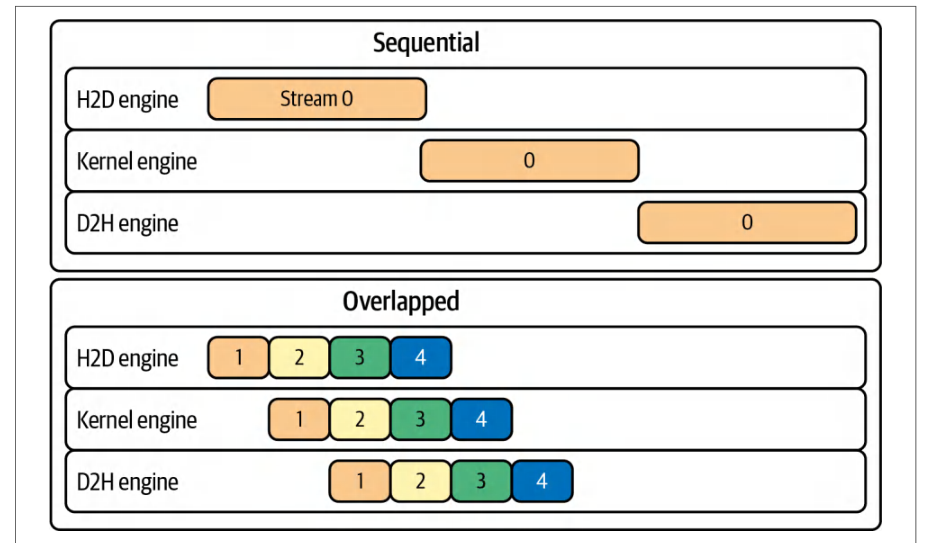
All of these optimizations ensure that every component is tuned for peak performance. Performance engineers need to carefully configure and tune the network and storage fabric to maintain a high level of GPU utilization and “goodput” (useful throughput).所有这些优化确保每个组件都经过调优以实现峰值性能。性能工程师需要仔细配置并调优网络与存储互连结构,以保持高水平的 GPU 利用率和“有效吞吐”(goodput)。
重叠通信与计算(流水线化)
Overlapping Communication and Computation (Pipelining)
Overlapping communication and computation, or pipelining, plays a key role in building efficient training and inference systems at scale. In these environments, it’s important to keep GPUs busy and spend less time waiting for data.重叠通信与计算,即*流水线化*,在构建大规模高效训练与推理系统方面发挥着关键作用。在这类环境中,让 GPU 保持忙碌、减少等待数据的时间至关重要。
The main idea is to ensure that data transfers occur concurrently with ongoing computations so that when one task finishes, the results needed for the next stage are already in progress or have been delivered. Modern frameworks such as PyTorch support asynchronous operations so that collective communication (e.g., all-reduce of gradients) can run alongside compute tasks. This reduces idle GPU time (see Figure 4-1)—and improves overall system throughput.其核心思想是确保数据传输与正在进行的计算并发执行,这样当一个任务完成时,下一阶段所需的结果已在进行中或已经送达。PyTorch 等现代框架支持异步操作,使集合通信(例如梯度的全归约)能够与计算任务并行运行。这减少了 GPU 的空闲时间(见图 4-1),并提升了整体系统吞吐量。
CUDA-based libraries exploit the power of multiple CUDA streams. While one stream executes compute-heavy matrix multiplications, another handles communication tasks such as aggregating gradients. As each layer of a neural network finishes its computation, the previous layer’s outputs are already on their way for aggregation or further processing. This overlapping ensures that the system produces results without unnecessary waiting periods and maintains a steady flow of data.基于 CUDA 的库充分利用多个 CUDA 流的强大能力。当一个流执行计算密集的矩阵乘法时,另一个流则处理诸如聚合梯度之类的通信任务。当神经网络的每一层完成其计算时,前一层的输出已经在送往聚合或进一步处理的途中。这种重叠确保系统在无需不必要等待的情况下产出结果,并保持数据的稳定流动。
Increasing the amount of compute performed between communication events can further minimize the relative overhead of communication. When the system processes larger batches of data, it performs more computation before needing to stop and exchange information.增加通信事件之间执行的计算量,可以进一步将通信的相对开销降至最低。当系统处理更大的数据批次时,它可以在需要停下来交换信息之前执行更多计算。
In distributed training, for instance, this appears as gradient accumulation, where updates from several minibatches are combined into a single synchronization step. By reducing the frequency of communication events, the system lowers the overhead of each exchange and boosts overall throughput.例如,在分布式训练中,这体现为梯度累加,即将多个小批量的更新合并为一次同步步骤。通过降低通信事件的频率,系统减少了每次交换的开销,并提升了整体吞吐量。
Another technique that supports seamless overlap between computation and communication is compression. Compression reduces the volume of data that needs to be transferred. For example, if a model compresses its gradients before sending them, the network moves a smaller amount of data. This reduces transfer time and eases congestion.另一种支持计算与通信无缝重叠的技术是压缩。压缩可以减少需要传输的数据量。例如,如果模型在发送梯度之前先对其进行压缩,网络传输的数据量就会变小。这缩短了传输时间,并缓解了拥塞。
The shorter transfer time means that the communication phase is less disruptive to the computation phase. Although compression does not directly cause overlap, it shortens the window during which data moves across the network and allows computational work to continue in parallel more effectively.更短的传输时间意味着通信阶段对计算阶段的干扰更小。尽管压缩并不直接导致重叠,但它缩短了数据在网络中传输的时间窗口,使计算工作能够更有效地并行进行。
Modern deep learning frameworks also split large tensor communications into smaller buckets to facilitate overlap. Frameworks like PyTorch automatically divide large gradients or activation tensors into several buckets that are transmitted as soon as they become available. Rather than waiting for an entire layer’s gradients to be ready, for instance, portions of them can begin their all-reduce immediately.现代深度学习框架还会将大型张量通信拆分为更小的桶(bucket)以便于重叠。像 PyTorch 这样的框架会自动将大型梯度或激活张量划分为若干个桶,一旦就绪便立即传输。例如,无需等待某一层的全部梯度准备就绪,其中一部分即可立即开始全归约。
By tuning bucket sizes and scheduling these transfers appropriately, one can achieve a higher degree of overlap and prevent communication delays from stalling the compute pipeline. Tools such as the PyTorch profiler and NVIDIA Nsight Systems offer insight into whether your computation and communication are overlapping, allowing engineers to adjust these parameters for maximal efficiency.通过调整桶大小并合理调度这些传输,可以实现更高程度的重叠,防止通信延迟阻塞计算流水线。PyTorch 性能剖析器和 NVIDIA Nsight Systems 等工具可以揭示计算与通信是否正在重叠,使工程师能够调整这些参数以获得最大效率。
By combining larger batch sizes, gradient accumulation, asynchronous transfers, compression, and bucketing into one cohesive strategy, large, distributed AI models can overcome network limitations and reduce idle time. This design minimizes synchronization events while achieving high throughput and optimal GPU utilization.将更大的批大小、梯度累加、异步传输、压缩和分桶整合为一个统一的策略,大型分布式 AI 模型便能够克服网络限制并减少空闲时间。这种设计在实现高吞吐量和最佳 GPU 利用率的同时,将同步事件降至最少。
The outcome of these optimizations is a training system that reduces overall training and inference time and makes more efficient use of available hardware resources. Engineers are freed from reinventing low-level networking routines and can focus on innovating model architectures and tuning higher-level parameters, rather than coding intricate data transfer mechanisms.这些优化的成果是一个能够缩短整体训练与推理时间、更高效利用可用硬件资源的训练系统。工程师无需重新发明底层网络例程,可以专注于创新模型架构和调优更高层的参数,而不必编写复杂的数据传输机制。
基于流的异步执行
Asynchronous Execution with Streams
Achieving overlap fundamentally relies on asynchronous execution. GPUs support multiple streams, or queues of operations, that can execute concurrently or overlap if they target different resources. One stream can handle compute kernels such as matrix multiplies, while another stream handles communication such as data copies and all-reduce calls.实现重叠从根本上依赖于异步执行。GPU 支持多个流(即操作队列),如果它们面向不同的资源,便可以并发执行或相互重叠。一个流可以处理矩阵乘法等计算内核,而另一个流则处理数据拷贝和全归约调用等通信。
By assigning work to different streams and using nonblocking operations, communication can happen in the background. For example, an all-reduce operation can be launched to a separate stream without waiting for completion.通过将工作分配到不同的流并使用非阻塞操作,通信可以在后台进行。例如,可以在单独的流上启动全归约操作,而无需等待其完成。
Meanwhile, the default stream proceeds with further computations on independent data. This requires that communication libraries such as NCCL use nonblocking calls that return control immediately. By doing this, the programmer ensures proper synchronization when needed.与此同时,默认流继续对独立数据进行后续计算。这要求 NCCL 等通信库使用能够立即返回控制权的非阻塞调用。通过这种方式,程序员可以在需要时确保正确的同步。
In practice, AI frameworks hide most of this complexity. PyTorch’s DistributedData Parallel automatically installs hooks on the backward pass so that each gradient bucket triggers an asynchronous NCCL all-reduce on a dedicated communication CUDA stream, while the default CUDA stream continues computing gradients for subsequent layers.在实践中,AI 框架隐藏了大部分此类复杂性。PyTorch 的 DistributedData Parallel 会自动在反向传播过程中安装钩子,使每个梯度桶在专用的通信 CUDA 流上触发异步 NCCL 全归约,而默认 CUDA 流则继续为后续层计算梯度。
This interleaving of computation and communication with CUDA streams creates a steady wave, or cascading pipeline, of work that hides communication latency and keeps the GPU busy at all times. To maintain proper overlapping, avoid unnecessary synchronization points with torch.cuda.synchronize() or inadvertently triggering a full device sync by moving tensors to the CPU with torch.Tensor.item(). If you do need to measure the overall iteration time, place a single synchronization at the very end of the iteration to wait for all outstanding GPU work to finish without disrupting the ongoing pipeline.通过 CUDA 流实现的计算与通信交错,形成了一股稳定的工作浪潮,即级联式流水线,它能够隐藏通信时延,并让 GPU 始终保持忙碌。为了维持恰当的重叠,应避免通过 torch.cuda.synchronize() 引入不必要的同步点,也要避免因使用 torch.Tensor.item() 将张量移至 CPU 而在无意间触发整个设备的同步。如果确实需要测量整体迭代时间,可在迭代的最末尾放置一次同步,以等待所有尚未完成的 GPU 工作结束,同时不干扰正在进行的流水线。
降低通信频率与通信量
Reducing Communication Frequency and Volume
As noted, performing more work per communication step can increase overlap and efficiency. Gradient accumulation during model training is one such technique. Instead of all-reducing gradients for every single minibatch, you accumulate gradients over a few minibatches, sum them locally, and then do one all-reduce. This effectively trades off memory to store the unreduced gradients for fewer synchronization points.如前所述,在每次通信步骤中执行更多工作可以提升重叠度与效率。模型训练期间的梯度累加就是这样一种技术。不是对每个小批量都进行梯度的全归约,而是先在若干个小批量上累加梯度,在本地求和,然后再执行一次全归约。这实际上是以用于存储未归约梯度的内存为代价,换取更少的同步点。
Consider accumulating four minibatches; you cut the all-reduce frequency by 4×. This allows more computations to happen in between synchronizations. The downside is that your effective batch size increases. This can affect model convergence and memory usage. You can often find a sweet spot that creates a good balance between communication frequency, memory usage, and convergence.以累加四个小批量为例,全归约频率将降低 4×。这使得两次同步之间可以执行更多计算。缺点是有效批大小会增大,这可能影响模型收敛和显存占用。通常可以找到一个最佳平衡点,在通信频率、显存占用与收敛之间取得良好平衡。
Another approach to reduce communication volume is compressing or quantizing the data exchanged. Techniques like gradient compression can reduce the amount of data sent in each communication without significantly impacting model quality. Less data to send means faster transfers and more opportunity to hide those transfers behind computation. The extreme of this is sparsification. When using sparsity, you send only a fraction of the gradients. This typically requires algorithmic changes to preserve accuracy, however.另一种降低通信量的方法是对交换的数据进行压缩或量化。梯度压缩等技术可以在不显著影响模型质量的前提下,减少每次通信发送的数据量。需要发送的数据越少,传输速度就越快,也越有机会将这些传输隐藏在计算之后。这种做法的极致是稀疏化(sparsification)。使用稀疏性时,只发送一部分梯度。不过,这通常需要对算法做出改动才能保持精度。
Bucketing, as implemented in PyTorch’s Distributed Data Parallel (DDP) communication mechanism, also reduces per-call overhead by grouping many small tensors into larger messages. However, bucket sizing is a trade-off. Very large buckets maximize bandwidth utilization but delay the start of communication since you wait for more gradients to accumulate before kicking off the all-reduce. Very small buckets start transfers earlier but incur more overhead due to many small NCCL calls.PyTorch 的分布式数据并行(Distributed Data Parallel,DDP)通信机制中实现的分桶(bucketing),通过将许多小张量归并为更大的消息,降低了每次调用的开销。不过,桶的大小是一种权衡。非常大的桶可以最大化带宽利用率,但会延迟通信的启动,因为需要等待更多梯度累加完毕才能开始全归约。非常小的桶能更早开始传输,但由于大量小规模的 NCCL 调用而带来更多开销。
As of this writing, the default bucket size in PyTorch DDP is 25 MB. This is a balance that overlaps well in most cases. However, if you have a model with very large layers, you might increase this to reduce overhead. If you have a model with many small layers, you might actually benefit from smaller buckets to start communication sooner. Ultimately, achieving maximal overlap may require profiling different bucket sizes to see which yields the best iteration time.截至撰写本书时,PyTorch DDP 的默认桶大小为 25 MB。这一取值在大多数情况下都能实现良好的重叠。不过,如果模型包含非常大的层,可以增大该值以减少开销;如果模型包含许多小层,使用更小的桶从而更早开始通信反而可能带来收益。归根结底,要实现最大程度的重叠,可能需要对不同的桶大小进行性能剖析,看看哪种设置能带来最佳的迭代时间。
在实践中实现最大重叠
Achieving Maximal Overlap in Practice
To see the benefit of overlapping communication with computation, let’s run through an example that compares two scenarios in which one performs gradient communication synchronously after all computation with no overlap, and one where communication is overlapped with computation such as DDP. We’ll simulate a simple distributed training step with two GPUs to illustrate the difference.为了了解通信与计算重叠的收益,我们来完整地看一个示例,比较两种场景:一种是在全部计算完成后同步执行梯度通信、毫无重叠;另一种则是像 DDP 那样让通信与计算相互重叠。我们将使用两块 GPU 模拟一个简单的分布式训练步骤,以说明两者的差异。
Suppose we don’t use DDP’s built-in overlap and instead implement distributed training manually such that each process computes all gradients locally, then performs an all-reduce on those gradients at the end of the backward pass. This will mimic the unoptimized, nonoverlapping scenario since communication happens only after all computation is done. We can simulate this using PyTorch’s distributed primitives, disabling DDP’s hooks, and explicitly calling dist.all_reduce after loss.backward().假设我们不使用 DDP 内置的重叠机制,而是手动实现分布式训练,让每个进程在本地计算所有梯度,然后在反向传播结束时对这些梯度执行一次全归约。这将模拟未优化的非重叠场景,因为通信只发生在所有计算完成之后。我们可以使用 PyTorch 的分布式原语来模拟这一过程:禁用 DDP 的钩子(hook),并在 loss.backward() 之后显式调用 dist.all_reduce。
In the code that follows, we launch two processes on gpu/rank 0 and gpu/rank 1 on a single node, in this case, with a simple model. We’ll run a forward and backward pass, then manually average gradients across the two processes:在下面的代码中,我们在单个节点的 gpu/rank 0 和 gpu/rank 1 上启动两个进程,本例中使用一个简单的模型。我们将运行一次前向传播和反向传播,然后手动在两个进程之间对梯度求平均:
import torch
import torch.nn as nn
import torch.optim as optim
import torch.distributed as dist
import torch.multiprocessing as mp
# 一个包含多层的简单模型,以产生多个梯度
class MultiLayerNet(nn.Module):
    def __init__(self, size):
        super().__init__()
        self.fc1 = nn.Linear(size, size)
        self.fc2 = nn.Linear(size, size)
        self.fc3 = nn.Linear(size, 1)
    def forward(self, x):
        x = torch.relu(self.fc1(x))
        x = torch.relu(self.fc2(x))
        return self.fc3(x)
def train_no_overlap(rank, world_size):
    dist.init_process_group("nccl", init_method="env://",
                            world_size=world_size, rank=rank)
    torch.cuda.set_device(rank)
    # 每个 rank 自行合成数据
    # (避免通过 spawn 发送大张量)
    batch_size = 256
    data = torch.randn(batch_size, 1024, device=rank)
    target = torch.randn(batch_size, 1, device=rank)
    model = MultiLayerNet(data.size(1)).to(rank)
    optimizer = optim.SGD(model.parameters(), lr=0.01)
    # 前向 + 反向(手动,无重叠)
    output = model(data)
    loss = nn.functional.mse_loss(output, target)
    loss.backward()
    # 反向传播后同步执行梯度全归约
    for p in model.parameters():
        dist.all_reduce(p.grad, op=dist.ReduceOp.SUM)
import torch
import torch.nn as nn
import torch.optim as optim
import torch.distributed as dist
import torch.multiprocessing as mp
# A simple model with multiple layers to produce multiple gradients
class MultiLayerNet(nn.Module):
    def __init__(self, size):
        super().__init__()
        self.fc1 = nn.Linear(size, size)
        self.fc2 = nn.Linear(size, size)
        self.fc3 = nn.Linear(size, 1)
    def forward(self, x):
        x = torch.relu(self.fc1(x))
        x = torch.relu(self.fc2(x))
        return self.fc3(x)
def train_no_overlap(rank, world_size):
    dist.init_process_group("nccl", init_method="env://",
                            world_size=world_size, rank=rank)
    torch.cuda.set_device(rank)
    # Each rank synthesizes its own data
    # (avoid sending big tensors via spawn)
    batch_size = 256
    data = torch.randn(batch_size, 1024, device=rank)
    target = torch.randn(batch_size, 1, device=rank)
    model = MultiLayerNet(data.size(1)).to(rank)
    optimizer = optim.SGD(model.parameters(), lr=0.01)
    # Forward + backward (manual, no overlap)
    output = model(data)
    loss = nn.functional.mse_loss(output, target)
    loss.backward()
    # Synchronous gradient all-reduce after backward
    for p in model.parameters():
        dist.all_reduce(p.grad, op=dist.ReduceOp.SUM)
        p.grad /= world_size
    optimizer.step()
    dist.destroy_process_group()
if __name__ == "__main__":
    import torch.multiprocessing as mp
    mp.set_start_method("spawn", force=True)
    world_size = min(2, torch.cuda.device_count() or 1)
    if world_size > 1:
        mp.spawn(train_no_overlap, args=(world_size,), nprocs=world_size,
                 join=True)
    else:
        train_no_overlap(0, 1)
In this code, each process computes gradients for MultiLayerNet independently. After loss.backward(), we explicitly perform an all-reduce for each parameter’s gradient to average them. This is effectively what DDP does internally, but here we wait and do it after the entire backward pass has finished—rather than doing the all-reduce concurrently during the backward pass.在这段代码中,每个进程独立计算 MultiLayerNet 的梯度。在 loss.backward() 之后,我们显式地对每个参数的梯度执行全归约以求取平均值。这实际上就是 DDP 内部所做的事情,但这里我们等到整个反向传播完成之后再执行——而不是在反向传播过程中并发地执行全归约。
If we were to time this iteration, the all-reduce operations would add directly to the iteration time since it’s not overlapping with any other steps. For example, say the forward and backward computations together take 10 ms and the gradient all-reduces take 12 ms. The total iteration time would be roughly 22 ms in this approach. In contrast, a fully overlapped implementation might achieve a total time closer to the max of these values, or 12 ms in our case. This is possible since the all-reduce communication can be almost completely hidden under the computation.如果对这次迭代计时,全归约操作会直接叠加到迭代时间上,因为它不与任何其他步骤重叠。例如,假设前向和反向计算共耗时 10 ms,梯度全归约耗时 12 ms,那么这种方法的迭代总时间约为 22 ms。相比之下,完全重叠的实现可能达到接近这两个值中最大值的总时间,即本例中的 12 ms。这是可能的,因为全归约通信几乎可以完全隐藏在计算之下。
In practice, if we profile this no-overlap case with a tool like Nsight Systems, we would see all the backward computation kernels for fc1, fc2, and fc3 execute first, and only after they complete do we see NCCL all-reduce kernels for each gradient. There is a clear separation in which compute happens first, then communication. During the communication phase, the GPUs would be idle aside from the NCCL work since no further computations are happening.在实践中,如果我们使用 Nsight Systems 之类的工具对这种无重叠情况进行剖析,会看到 fc1、fc2 和 fc3 的所有反向计算内核先执行,只有在它们完成后才会看到针对每个梯度的 NCCL 全归约内核。计算与通信之间存在清晰的先后分离:先计算,后通信。在通信阶段,除了 NCCL 工作之外,GPU 将处于空闲状态,因为没有进一步的计算在进行。
Now let’s use PyTorch’s DDP to perform the same operation with overlap. DDP will hook into the backward pass and overlap gradient reduction with backward computation. The code is similar, but we simply wrap the model with DistributedData Parallel and let it handle synchronization:现在让我们使用 PyTorch 的 DDP 以重叠方式执行相同的操作。DDP 会以钩子方式挂接到反向传播中,使梯度归约与反向计算重叠。代码与之类似,但我们只需用 DistributedData Parallel 包装模型,并让它处理同步即可:
import torch
import torch.nn as nn
import torch.optim as optim
import torch.distributed as dist
import torch.multiprocessing as mp
class MultiLayerNet(nn.Module):
    def __init__(self, size):
        super().__init__()
        self.fc1 = nn.Linear(size, size)
        self.fc2 = nn.Linear(size, size)
        self.fc3 = nn.Linear(size, 1)
    def forward(self, x):
        x = torch.relu(self.fc1(x))
        x = torch.relu(self.fc2(x))
        return self.fc3(x)
def train_ddp(rank, world_size):
    rank = int(os.environ.get("LOCAL_RANK", rank))
    torch.cuda.set_device(rank)
    dist.init_process_group("nccl", init_method="env://",
                            world_size=world_size, rank=rank)
    torch.cuda.set_device(rank)
    model = MultiLayerNet(1024).to(rank)
    ddp_model = nn.parallel.DistributedDataParallel(model, device_ids=[rank])
    optimizer = optim.SGD(ddp_model.parameters(), lr=0.01)
    # 每个 rank 各自生成自己的数据
    batch_size = 256
    data = torch.randn(batch_size, 1024, device=rank)
    target = torch.randn(batch_size, 1, device=rank)
    output = ddp_model(data)
    loss = nn.functional.mse_loss(output, target)
    loss.backward()  # DDP 在后台流上重叠梯度全归约
    optimizer.step()
    dist.destroy_process_group()
def main():
    world_size = min(2, torch.cuda.device_count() or 1)
    mp.set_start_method("spawn", force=True)
    if world_size > 1:
        mp.spawn(train_ddp, args=(world_size,), nprocs=world_size, join=True)
    else:
        print("Only one GPU present; running DDP demo with world_size=1")
        train_ddp(0, 1)
if __name__ == "__main__":
    main()
        super().__init__()
        self.fc1 = nn.Linear(size, size)
        self.fc2 = nn.Linear(size, size)
        self.fc3 = nn.Linear(size, 1)
    def forward(self, x):
        x = torch.relu(self.fc1(x))
        x = torch.relu(self.fc2(x))
        return self.fc3(x)
def train_ddp(rank, world_size):
    rank = int(os.environ.get("LOCAL_RANK", rank))
    torch.cuda.set_device(rank)
    dist.init_process_group("nccl", init_method="env://",
                            world_size=world_size, rank=rank)
    torch.cuda.set_device(rank)
    model = MultiLayerNet(1024).to(rank)
    ddp_model = nn.parallel.DistributedDataParallel(model, device_ids=[rank])
    optimizer = optim.SGD(ddp_model.parameters(), lr=0.01)
    # Each rank makes its own data
    batch_size = 256
    data = torch.randn(batch_size, 1024, device=rank)
    target = torch.randn(batch_size, 1, device=rank)
    output = ddp_model(data)
    loss = nn.functional.mse_loss(output, target)
    loss.backward()  # DDP overlaps gradient all-reduce on background stream
    optimizer.step()
    dist.destroy_process_group()
def main():
    world_size = min(2, torch.cuda.device_count() or 1)
    mp.set_start_method("spawn", force=True)
    if world_size > 1:
        mp.spawn(train_ddp, args=(world_size,), nprocs=world_size, join=True)
    else:
        print("Only one GPU present; running DDP demo with world_size=1")
        train_ddp(0, 1)
if __name__ == "__main__":
    main()
With the DDP overlapping approach, the code is simpler since we rely on Distribu tedDataParallel to handle gradient synchronization rather than writing it ourselves. When loss.backward() is called, DDP’s internal reducer splits the gradients into buckets and launches NCCL all-reduce operations as soon as each bucket is ready on a separate CUDA stream. For instance, it might all-reduce the fc3.weight and fc3.bias gradients immediately after they are computed since those are from the last layer and are computed last in the backward pass, while the fc1 and fc2 gradients from earlier layers will have already been all-reduced by the time we reach the end of the backward pass.采用 DDP 重叠方式后,代码更简单,因为我们依靠 Distribu tedDataParallel 来处理梯度同步,而无需自己编写。当调用 loss.backward() 时,DDP 内部的归约器(reducer)会将梯度划分到多个桶(bucket)中,一旦某个桶就绪,就会在单独的 CUDA 流上启动 NCCL 全归约操作。例如,fc3.weight 和 fc3.bias 的梯度在计算完成后可能立即被全归约,因为它们来自最后一层,在反向传播中最后被计算;而来自较早层的 fc1 和 fc2 梯度,等到反向传播结束时就已经完成了全归约。
| Metric指标 | No overlap (manual sync)无重叠(手动同步) | Overlap (DDP)重叠(DDP) | Notes说明 |
|---|---|---|---|
| Total backward + comm反向传播 + 通信总计 | 100% (baseline)100%(基线) | ~70% of baseline约为基线的 70% | e.g., 30% faster per iteration due to例如,每次迭代提速 30%,得益于 |
| time时间 | overlap (illustrative)重叠(示意) | ||
| Comm start time通信开始时间 | After backward complete反向传播完成后 | During backward反向传播期间 | In DDP, comm begins midway through backward在 DDP 中,通信在反向传播中途开始 |
| GPU idle during comm通信期间 GPU 是否空闲 | Yes—after backward, GPUs是——反向传播完成后,GPU | Minimal—comm runs极少——通信运行 | DDP hides most of the latencyDDP 隐藏了大部分时延 |
| phase阶段 | wait during all-reduce在全归约期间等待 | while other layers still computing同时其他层仍在计算 | |
| SM (GPU) utilizationSM(GPU)利用率 | Lower (some cycles where SMs idle during comm)较低(通信期间存在 SM 空闲的周期) | Higher (continuous activity)较高(持续活动) | Overlap keeps GPU busy more consistently重叠使 GPU 更加持续地保持忙碌 |
| Overlap achieved (% of已实现的重叠(通信被 | 0% (serial execution)0%(串行执行) | ~50% (or more)约 50%(或更高) | Rough estimate: larger models or粗略估计:更大的模型或 |
| comm covered by计算覆盖的 | batches can overlap more更大的批次可实现更多重叠 | ||
| compute)百分比) |
If the model is very small such that all gradients fit into one bucket, DDP might do only one all-reduce at the end, which wouldn’t overlap much. But with larger models and bigger batch sizes, there will be multiple buckets and significant overlap—showing even more impressive performance gains from this technique.如果模型非常小,以至于所有梯度都能放进单个桶(bucket)中,DDP 可能只在最后执行一次全归约,这样几乎不会产生重叠。但对于更大的模型和更大的批大小,则会出现多个桶并产生显著的重叠——从而使这一技术展现出更为亮眼的性能提升。
Profiling the DDP case would show NCCL all-reduce kernels interleaved with backward compute kernels. So instead of a clear two-phase split, we’d see a sawtooth pattern in the timeline with some compute happening, then some NCCL communication happening, then compute, and so on.对 DDP 场景进行性能剖析,会看到 NCCL 全归约内核与反向计算内核交错出现。因此,时间线上呈现的将不是清晰的两阶段划分,而是锯齿状模式:先是一段计算,接着是一段 NCCL 通信,然后又是计算,如此往复。
Key signs of good overlap are that the total iteration time is lower than the sum of compute + comm times, and the GPU is rarely idle waiting for communication because the all-reduces happen during the compute, as shown in Table 4-1.良好重叠的关键标志是:总迭代时间低于计算与通信时间之和,并且 GPU 很少因等待通信而空闲,因为全归约是在计算期间进行的,如表 4-1 所示。
In this example, overlapping communication with computation yields roughly a 30% iteration time improvement in our example workload. In larger training jobs, the gains would be more substantial since larger models create more potential for communication bottlenecks. PyTorch DistributedDataParallel uses 25 MiB buckets by default. This way, it launches an all-reduce for each bucket as soon as it is ready. Tuning bucket_cap_mb can help increase overlap for your specific model topology, but larger buckets increase latency for the last bucket.在本示例工作负载中,通信与计算的重叠带来了大约 30% 的迭代时间改进。在更大规模的训练任务中,收益会更加可观,因为更大的模型更容易产生通信瓶颈。PyTorch DistributedDataParallel 默认使用 25 MiB 的桶。这样,每个桶一旦就绪,它就会立即为该桶发起一次全归约。调整 bucket_cap_mb 有助于针对你的特定模型拓扑提高重叠程度,但更大的桶会增加最后一个桶的时延。
The takeaway is that a well-tuned DDP should overlap most of the gradient communication with computation. Often the only portion of communication that cannot be overlapped is the tail end, or the last gradient bucket, if it happens to finish after the last compute. Research efforts are ongoing to even overlap the optimizer step with communication or to use techniques like tensor partitioning to achieve further overlap, but PyTorch’s DDP’s default overlap strategy is often described as wait-free backpropagation (WFBP), which bucketizes gradients and launches reductions as soon as each bucket is ready.关键要点是:经过良好调优的 DDP 应当让大部分梯度通信与计算重叠。通常,唯一无法重叠的通信部分是尾部,即最后一个梯度桶——如果它恰好在最后一次计算之后才完成。目前的研究工作正致力于将优化器步骤也与通信重叠,或利用张量分区(tensor partitioning)等技术实现进一步重叠,但 PyTorch DDP 的默认重叠策略通常被称为*无等待反向传播*(wait-free backpropagation,WFBP),它将梯度分桶,并在每个桶就绪后立即发起归约。
It’s worth noting that certain coding patterns can inadvertently eliminate overlap. For instance, if you perform any operation that forces a synchronization between backward and the next iteration, you will stall the computation until all communications are done.值得注意的是,某些编码模式可能会在无意中消除重叠。例如,如果你执行了任何在反向传播与下一次迭代之间强制同步的操作,计算就会停滞,直到所有通信完成。
You should move such operations to a separate stream if possible. Also, manual calls to torch.cuda.synchronize() should be minimized and used only for accurate benchmarking—or when required for correctness. Otherwise, they will serialize GPU work and negatively impact performance. DDP’s design and PyTorch’s operations are already asynchronous and handle dependencies correctly. Explicit synchronization is rarely needed in user code.如果可能,应将此类操作移到单独的流中执行。此外,应尽量减少手动调用 torch.cuda.synchronize(),仅在需要精确基准测试或出于正确性要求时使用。否则,它们会使 GPU 工作串行化,对性能产生负面影响。DDP 的设计和 PyTorch 的操作本身已是异步的,并能正确处理依赖关系。用户代码中很少需要显式同步。
In summary, overlapping computation and communication is one of the most effective techniques for distributed performance engineering. Properly utilized, it can significantly reduce training time by hiding communication latencies behind useful work.总之,计算与通信重叠是分布式性能工程中最有效的技术之一。若运用得当,它可以通过将通信时延隐藏在有用工作之后,显著缩短训练时间。
In the following sections, we’ll explore the software and hardware infrastructure that makes this possible and how to ensure you’re getting the maximum overlap on modern systems. Next, we will overview NVIDIA’s Magnum IO stack, which includes technologies that make overlapping of compute and communication possible.在接下来的小节中,我们将探讨实现这一目标的软硬件基础设施,以及如何确保在现代系统上获得最大程度的重叠。接下来,我们将概述 NVIDIA 的 Magnum IO 技术栈,其中包含了使计算与通信重叠成为可能的多项技术。
NVIDIA Magnum IO 优化栈
NVIDIA Magnum IO Optimization Stack
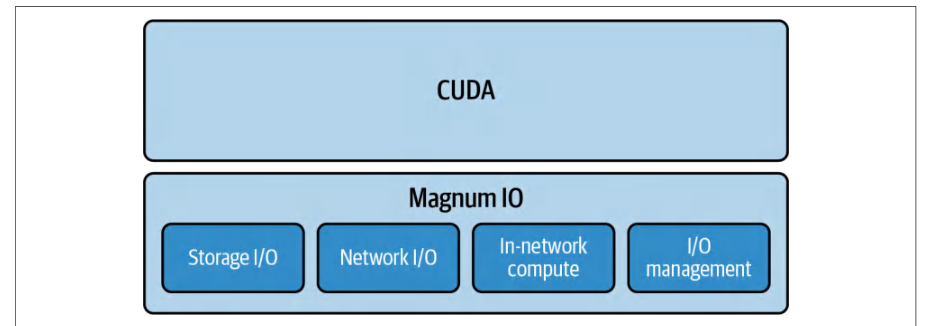
Magnum IO, NVIDIA’s overarching I/O acceleration platform, brings together a range of technologies to speed up data movement, access, and management across GPUs, CPUs, storage, and network interfaces. There are four key components of the Magnum IO architecture spanning storage, network, in-network computing, and I/O management, as shown in Figure 4-2.Magnum IO 是 NVIDIA 的总体 I/O 加速平台,它汇集了一系列技术,用于加速 GPU、CPU、存储和网络接口之间的数据移动、访问和管理。Magnum IO 架构包含四大关键组件,涵盖存储、网络、网内计算(in-network computing)和 I/O 管理,如图 4-2 所示。
Here is a description of the four components in Figure 4-2:下面对图 4-2 中的四个组件逐一说明:
- Storage I/O存储 I/O
- This is implemented by technologies such as NVIDIA GPUDirect Storage (GDS) and BlueField SNAP. These let GPUs access storage including NVMe SSDs directly without unnecessary copies through host CPU memory. We’ll dive deeper into GDS in Chapter 5.这由 NVIDIA GPUDirect Storage(GDS)和 BlueField SNAP 等技术实现。这些技术让 GPU 直接访问包括 NVMe SSD 在内的存储,而无需通过主机 CPU 内存进行不必要的拷贝。我们将在第 5 章深入介绍 GDS。
- Network I/O网络 I/O
- This includes technologies like GPUDirect RDMA, NCCL, NVSHMEM, UCX, and HPC-X (MPI/SHMEM software bundle) to enable direct, high-speed data transfers between GPUs across nodes, bypassing the CPU for internode communication.这包括 GPUDirect RDMA、NCCL、NVSHMEM、UCX 和 HPC-X(MPI/SHMEM 软件包)等技术,用于实现跨节点 GPU 之间的直接、高速数据传输,并在节点间通信中绕过 CPU。
- In-network compute网络内计算
- SHARP performs in-network reductions inside Quantum-class InfiniBand switches. The reduction arithmetic happens in the switch silicon. BlueField DPUs offload networking and can host control services such as the Subnet Manager and the SHARP Aggregation Manager. When the NCCL RDMA SHARP plugin is enabled and the fabric has SHARP firmware and an active Aggregation Manager, eligible collectives can be offloaded to the IB switches, reducing host and GPU overhead. We will cover NVIDIA SHARP in more detail in a bit.SHARP 在 Quantum 级 InfiniBand 交换机内部执行网络内归约。归约运算发生在交换机芯片中。BlueField DPU 可卸载网络,并能够承载 Subnet Manager 和 SHARP Aggregation Manager 等控制服务。当启用 NCCL RDMA SHARP 插件,且互连结构具备 SHARP 固件和处于活动状态的 Aggregation Manager 时,符合条件的集合通信可以卸载到 IB 交换机,从而降低主机和 GPU 开销。我们稍后会更详细地介绍 NVIDIA SHARP。
- I/O managementI/O 管理
- Tools like NVIDIA NetQ and Unified Fabric Manager (UFM) fall in this category, providing real-time telemetry, diagnostics, and lifecycle management for the data center’s I/O fabric.NVIDIA NetQ 和 Unified Fabric Manager(UFM)等工具属于这一类,为数据中心的 I/O 互连结构提供实时遥测、诊断和生命周期管理。
These components work together through flexible APIs and SDKs that hide much of the low-level complexity. Magnum IO’s goal is to maximize end-to-end throughput for large-scale AI and data analytics workloads. Magnum IO continues to evolve alongside new hardware.这些组件通过灵活的 API 和 SDK 协同工作,隐藏了大部分底层复杂性。Magnum IO 的目标是最大化大规模 AI 和数据分析工作负载的端到端吞吐量。Magnum IO 还在随新硬件不断演进。
Magnum IO now integrates support for NVLink Switch network domains, which enables intra-rack GPU communication at fabric scale. It also leverages advancements in InfiniBand (Quantum-2 and Quantum-X800 families) and Ethernet (Spectrum-X) to further reduce communication overhead.Magnum IO 现已集成对 NVLink Switch 网络域的支持,从而能够在交换网络规模上实现机架内 GPU 通信。它还利用 InfiniBand(Quantum-2 和 Quantum-X800 系列)和以太网(Spectrum-X)方面的进步,进一步降低通信开销。
Throughout this chapter, we will dive into several of these components such as RDMA for network transfers, NCCL for collectives, NIXL for inference data movement, and GDS for efficient data loading. Additionally, we will see how to profile and tune each of them. Let’s dive right into it!在本章中,我们将深入探讨其中若干组件,例如用于网络传输的 RDMA、用于集合通信的 NCCL、用于推理数据搬运的 NIXL,以及用于高效数据加载的 GDS。此外,我们还将了解如何对每一个组件进行剖析和调优。让我们马上深入探讨!
使用 RDMA 实现高速、低开销的数据传输
High-Speed, Low-Overhead Data Transfers with RDMA
RDMA is a technology optimized for low-latency, high-throughput data transfers. RDMA works by allowing direct memory-to-memory communication between devices without burdening the CPU with unnecessary data-copy operations. In a nutshell, RDMA bypasses much of the traditional kernel network stack and allows a NIC to directly read/write application memory. This avoids CPU involvement in each packet and reduces context switches and buffer copies. Prefer RDMA paths where available and verified. And always confirm (and continuously reconfirm) with logs and micro-benchmarks that the RDMA data path is active.RDMA 是一种针对低时延、高吞吐量数据传输而优化的技术。它的工作原理是允许设备之间直接进行内存到内存的通信,而无需让 CPU 承担不必要的数据拷贝操作。简而言之,RDMA 绕过了大部分传统内核网络协议栈,允许网卡(NIC)直接读写应用程序内存。这避免了 CPU 介入每个数据包的处理,并减少了上下文切换和缓冲区拷贝。在 RDMA 路径可用且经过验证时,应优先采用。并且始终要通过日志和微基准测试确认(并持续反复确认)RDMA 数据路径确实处于活动状态。
In container environments like Docker and Kubernetes, ensure the container has direct access to the host’s InfiniBand devices (e.g., /dev/infiniband). Otherwise, NCCL may silently fall back to TCP sockets instead of GPUDirect RDMA—and without any obvious errors to highlight the degradation. This results in throughput dropping from tens of GB/s to only a few Gb/s, with no obvious error messages.在 Docker 和 Kubernetes 等容器环境中,请确保容器能够直接访问主机的 InfiniBand 设备(例如 /dev/infiniband)。否则,NCCL 可能会静默回退到 TCP 套接字而非 GPUDirect RDMA——而且不会有任何明显的错误来提示这种性能退化。这会导致吞吐量从数十 GB/s 骤降至仅几 Gb/s,且没有任何明显的错误消息。
A related container pitfall arises when the container’s GID assignments don’t match the host, as in some “rdma-shared” Docker images. This prevents GPUDirect registration and uses CPU-driven RDMA copies instead of using true GPU-based RDMA.一个相关的容器陷阱出现在容器的 GID 分配与主机不匹配时,例如某些 “rdma-shared” Docker 镜像中的情况。这会阻止 GPUDirect 注册,导致使用由 CPU 驱动的 RDMA 拷贝,而非真正基于 GPU 的 RDMA。
The reduced throughput would show up in the profiler as an order-of-magnitude reduction in throughput. But you have to be aware of this possibility and continuously monitor your system for these types of subtle fallbacks.吞吐量的降低会在性能剖析器中表现为吞吐量出现数量级的下降。但你必须意识到这种可能性,并持续监控系统,以发现这类隐蔽的回退行为。
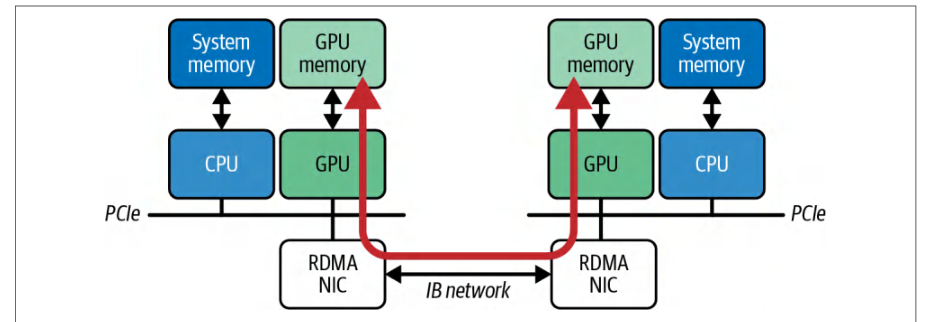
NVIDIA’s RDMA implementation for GPUs is called GPUDirect RDMA. GPUDirect RDMA lets an RDMA-capable NIC such as InfiniBand and RDMA over Converged Ethernet (RoCE) perform direct memory access (DMA) to and from the GPU’s device memory across two servers—bypassing host CPU and system RAM entirely. A data transfer with RoCE is shown in Figure 4-3.NVIDIA 面向 GPU 的 RDMA 实现称为 GPUDirect RDMA。GPUDirect RDMA 让支持 RDMA 的网卡(NIC)——例如 InfiniBand 和基于融合以太网的 RDMA(RoCE)——能够跨两台服务器与 GPU 的设备显存进行直接显存访问(DMA),完全绕过主机 CPU 和系统 RAM。基于 RoCE 的数据传输如图 4-3 所示。
By registering GPU buffers with the NIC, GPUDirect RDMA enables one-sided RDMA reads and writes between remote GPUs. This minimizes both latency and CPU overhead in multinode training.通过向 NIC 注册 GPU 缓冲区,GPUDirect RDMA 支持在远程 GPU 之间进行单边 RDMA 读写。这在多节点训练中能将时延和 CPU 开销都降到最低。
RDMA is supported inherently by InfiniBand and also by some high-speed Ethernet networks through RoCE. With RoCE, you get RDMA-like zero-copy transfers over Ethernet, assuming the network gear supports RDMA and is properly configured for it. Using RDMA with RoCE usually requires a properly configured system with the necessary drivers, including NVIDIA OFED for InfiniBand/RoCE.InfiniBand 天然支持 RDMA,一些高速以太网网络也可通过 RoCE 支持 RDMA。借助 RoCE,只要网络设备支持 RDMA 并经过正确配置,就能在以太网上获得类似 RDMA 的零拷贝传输。在 RoCE 上使用 RDMA 通常需要一个配置正确的系统并安装必要的驱动,包括面向 InfiniBand/RoCE 的 NVIDIA OFED。
The performance difference between using RDMA versus standard TCP/IP networking can be huge. For example, a modern InfiniBand link might provide latency on the order of a few microseconds for a small message, whereas standard TCP over Ethernet might incur 5–10× higher latency.使用 RDMA 与使用标准 TCP/IP 网络之间的性能差异可能非常巨大。例如,现代 InfiniBand 链路对小消息的时延可能在几微秒量级,而以太网上的标准 TCP 时延可能高出 5–10 倍。
For large transfers that are network-bandwidth-bound, RDMA on InfiniBand can sustain very high throughput on the order of hundreds of Gbps. In contrast, a typical TCP/IP network might be limited by kernel overhead and NIC speed—often 100 Gbps or less unless using 200–400 Gbps Ethernet with RDMA capabilities. TCP/IP networks also incur more overhead.对于受网络带宽限制的大型传输,InfiniBand 上的 RDMA 可以维持数百 Gbps 量级的极高吞吐量。相比之下,典型的 TCP/IP 网络可能受内核开销和 NIC 速度的限制——通常为 100 Gbps 或更低,除非使用具备 RDMA 能力的 200–400 Gbps 以太网。TCP/IP 网络还会产生更多开销。
In distributed deep learning, large-message throughput tends to matter more than tiny message latency since gradients are large, for instance. Both high bandwidth and low latency keep the protocol efficient—and the GPUs busy.在分布式深度学习中,大消息吞吐量往往比微小消息时延更重要,例如梯度就很大。高带宽与低时延二者兼备,才能让协议保持高效——也让 GPU 保持忙碌。
If you only have Ethernet available, you should use the highest bandwidth and lowest-latency configuration possible. For instance, 200+ Gbps Ethernet with RDMA (RoCE) will perform much better for all-reduce traffic than a basic 10–25 Gbps TCP network. At a minimum, ensure you are using jumbo frames such as MTU 9000. Enabling this configuration for your cluster network, data transfers will send fewer large packets instead of many small ones. This reduces CPU overhead and improves efficiency similarly to how larger disk block sizes improve sequential disk throughput.如果只有以太网可用,就应尽可能采用带宽最高、时延最低的配置。例如,对于全归约流量,具备 RDMA(RoCE)的 200+ Gbps 以太网的表现会远好于基本的 10–25 Gbps TCP 网络。至少应确保使用巨型帧,例如 MTU 9000。在集群网络上启用此配置后,数据传输将发送更少的大数据包,而非大量小数据包。这会降低 CPU 开销并提升效率,效果类似于更大的磁盘块大小能提升顺序磁盘吞吐量。
Also, it’s important to tune the TCP stack for a similar reason. You should verify that Linux sysctl parameters like net.core.rmem_max/wmem_max and the autotuning ranges net.ipv4.tcp_rmem/tcp_wmem are set high enough to fully utilize a high-bandwidth link.出于类似的原因,调优 TCP 协议栈也很重要。你应确认 Linux 的 sysctl 参数(如 net.core.rmem_max/wmem_max)以及自动调优范围 net.ipv4.tcp_rmem/tcp_wmem 设置得足够高,以充分利用高带宽链路。
And, of course, it’s important to use a modern TCP congestion control algorithm to improve throughput on high-latency links. On a well-engineered, dedicated cluster network with no external internet traffic, the default CUBIC congestion control typically performs adequately since it’s engineered to avoid congestion.当然,使用现代 TCP 拥塞控制算法来提升高时延链路上的吞吐量也很重要。在一个精心设计、无外部互联网流量的专用集群网络上,默认的 CUBIC 拥塞控制通常表现良好,因为它本身就是为避免拥塞而设计的。
In cloud or hybrid environments, be cautious of whether you truly have a controlled high-speed connection. For example, if you use AWS EC2 instances with Elastic Fabric Adapter (EFA), you get something similar to InfiniBand-level RDMA between instances deployed in the same “placement group.” But if you try to run a multinode training or inference job that spans both an on-premises data center and the cloud without direct connectivity, your traffic will likely traverse the public internet. This will introduce unpredictable latency and congestion.在云环境或混合环境中,需谨慎确认你是否真正拥有受控的高速连接。例如,如果使用配备弹性结构适配器(Elastic Fabric Adapter,EFA)的 AWS EC2 实例,那么部署在同一置放群组(placement group)中的实例之间可以获得类似 InfiniBand 级别的 RDMA。但如果你尝试在没有直接连接的情况下运行横跨本地数据中心与云端的多节点训练或推理作业,流量很可能会经过公共互联网,从而引入不可预测的时延和拥塞。
Even when using RDMA, the CPU is not completely out of the picture. The host still sets up RDMA transfers and handles communication-completion events. Therefore, proper CPU affinity is important. Remember to pin the network interrupt handling— or polling threads—to a CPU core on the same NUMA node as the NIC and, ideally, the GPU as well. For example, if an InfiniBand host channel adapter is on NUMA node 0, bind its interrupt CPU affinity cores to node 0. This reduces cross-NUMA traffic and latency for control operations.即使使用 RDMA,CPU 也并非完全无关。主机仍需设置 RDMA 传输并处理通信完成事件,因此合理的 CPU 亲和性十分重要。请记住将网络中断处理(或轮询)线程绑定到与网卡(NIC)位于同一 NUMA 节点的 CPU 核心上,理想情况下该核心也应与 GPU 位于同一 NUMA 节点。例如,如果 InfiniBand 主机通道适配器位于 NUMA 节点 0,则将其中断 CPU 亲和性核心绑定到节点 0。这可以减少跨 NUMA 流量,并降低控制操作的时延。
多节点连接调优
Tuning Multinode Connectivity
For distributed, multinode training with GPUs, it is crucial to ensure that the network is not a bottleneck. This involves using the right communication and networking technologies as previously described—as well as configuring these technologies properly. Here are some tips to adopt and pitfalls to avoid:对于基于 GPU 的分布式多节点训练,确保网络不成为瓶颈至关重要。这既涉及使用前文所述的合适通信与网络技术,也涉及对这些技术进行正确配置。以下是一些值得采纳的技巧和需要避免的陷阱:
- Understand the topology理解拓扑结构
- Use
nvidia-smi topo -mto get a basic GPU interconnect view, but for NVSwitch- and NVLink-based systems, it’s recommended to also usenvidia-smi nvlinkor Nsight Systems to understand multihop switch fabric connectivity.使用nvidia-smi topo -m获取基本的 GPU 互连视图,但对于基于 NVSwitch 和 NVLink 的系统,建议同时使用nvidia-smi nvlink或 Nsight Systems 来了解多跳交换结构连通性。
- Leverage NVLink Switch domains if available如有可用,利用 NVLink Switch 域
- The multinode NVIDIA’s GB200 and GB300 NVL72 rack solutions connect up to 72 GPUs in a single NVLink domain using NVLink Switch, which provides extremely low per-hop latency—on the order of a few hundred nanoseconds. The GB200 NVL72 architecture provides up to ~130 TB/s of all-to-all bandwidth with submicrosecond latencies across all GPUs in the rack. If your cluster includes such infrastructure, make sure your jobs are placed within the same NVLink domain to fully utilize this ultrafast interconnect. This can significantly reduce the need for slower InfiniBand and Ethernet communication between nodes. Fortunately, modern InfiniBand switches such as NVIDIA’s Quantum series provide up to 800 Gb/s per link and in-network computing features. However, NVLink’s massive intra-rack bandwidth and < 1µs latency are preferred. Keep traffic on NVLink/NVSwitch whenever possible.NVIDIA 的多节点 GB200 和 GB300 NVL72 机架解决方案使用 NVLink Switch,在单个 NVLink 域中连接多达 72 个 GPU,其每跳时延极低,约为数百纳秒量级。GB200 NVL72 架构在机架内所有 GPU 之间提供高达约 130 TB/s 的全互连带宽,并实现亚微秒级时延。如果集群包含此类基础设施,请确保作业被放置在同一 NVLink 域内,以充分利用这种超高速互连。这可以显著减少对节点间较慢的 InfiniBand 和以太网通信的需求。幸运的是,NVIDIA 的 Quantum 系列等现代 InfiniBand 交换机可提供每链路高达 800 Gb/s 的带宽以及网络内计算功能。然而,NVLink 的机架内巨大带宽和 < 1µs 时延更受青睐。尽可能将流量保留在 NVLink/NVSwitch 上。
- Use RDMA whenever possible尽可能使用 RDMA
- If running on InfiniBand or RoCE-capable hardware, make sure your communication library, such as NCCL, is actually using RDMA. NCCL will automatically use GPUDirect RDMA if available. But if RDMA is misconfigured or unsupported, NCCL may silently fall back to TCP. One red flag for this is if you notice that during all-reduce operations, GPU utilization drops and CPU utilization spikes. This indicates that the CPU is copying data for communications.如果运行在支持 InfiniBand 或 RoCE 的硬件上,请确保你的通信库(例如 NCCL)实际正在使用 RDMA。如果可用,NCCL 会自动使用 GPUDirect RDMA。但如果 RDMA 配置错误或不受支持,NCCL 可能会静默回退到 TCP。一个危险信号是,如果你注意到在全归约操作期间 GPU 利用率下降而 CPU 利用率飙升。这表明 CPU 正在为通信复制数据。
- Aggregate bandwidth with multiple NICs if available如果可用,使用多张网卡(NIC)聚合带宽
- Some servers have multiple network interfaces (NICs). NCCL can stripe traffic across multiple NICs (called multirail) to increase bandwidth. But you may need to set some environment variables like
NCCL_NSOCKS_PERTHREADandNCCL_SOCKET_NTHREADSto optimize this. We’ll discuss these in more detail in a bit. Just make sure that each NIC is on a different subnet and that NCCL can discover both. With proper setup, using two 800 Gbps NICs in parallel, for instance, gives an aggregate of 1.6 Tbps for NCCL traffic. And four such NIC links (e.g., two dual-port NICs) can achieve ~3.2 Tbps.一些服务器具有多个网络接口(NIC)。NCCL 可以将流量跨多个 NIC 条带化(称为多轨 multirail)以提高带宽。但你可能需要设置一些环境变量,例如NCCL_NSOCKS_PERTHREAD和NCCL_SOCKET_NTHREADS,以优化这一点。我们稍后会更详细地讨论这些变量。只需确保每个 NIC 位于不同的子网,并且 NCCL 能够发现两者。在正确配置下,例如并行使用两个 800 Gbps NIC,可为 NCCL 流量提供 1.6 Tbps 的聚合带宽。而四个这样的 NIC 链路(例如两个双端口 NIC)可以达到 ~3.2 Tbps。
- Utilize optimized “direct NIC” mode when available在可用时利用优化的“直接 NIC”模式
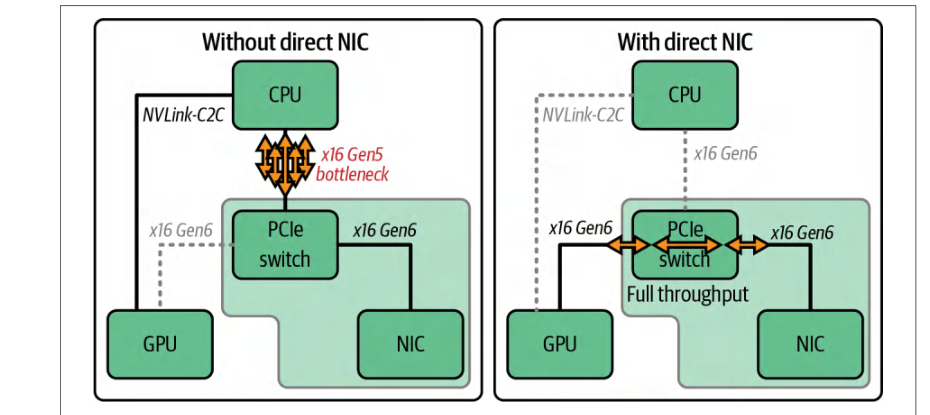
- Favor high-bandwidth, multirail NIC configurations that give each GPU or small groups of GPUs sufficient dedicated network bandwidth. Physically, NICs attach using PCIe to the host CPU or to a DPU. With modern GPU systems, NCCL supports GPU-initiated networking with InfiniBand GPUDirect Async (IBGDA) and the direct NIC path, as shown in Figure 4-4. This lets the GPU drive full-bandwidth RDMA without CPU intervention.优先采用高带宽、多轨 NIC 配置,使每个 GPU 或每组少量 GPU 拥有足够的专用网络带宽。在物理上,NIC 通过 PCIe 连接到主机 CPU 或数据处理单元(DPU)。在现代 GPU 系统中,NCCL 支持使用 InfiniBand GPUDirect Async(IBGDA)和直接 NIC 路径的 GPU 发起网络通信,如图 4-4 所示。这使 GPU 能够在没有 CPU 干预的情况下驱动全带宽 RDMA。
- Check for misconfigurations检查错误配置
- A common pitfall is a mismatch in network configuration that causes a fallback to a slower path. If RDMA is not working due to a misconfiguration, for instance, NCCL might be using TCP on a 100 Gbps Ethernet network but getting only a fraction of that due to kernel overhead. Even worse, if the cluster’s high-speed network is misidentified, traffic might go over a slower management network running only 10 Gbps Ethernet without the user realizing. Tools like NCCL’s debugging output and network interface counters (
ibstat,ifstat) can help verify which interface is being used more heavily. For modern systems with large 200–400 Gbps paths, dropping to 10 Gbps would cause a severe bottleneck.常见陷阱是网络配置不匹配,导致回退到较慢路径。例如,如果由于错误配置导致 RDMA 无法工作,NCCL 可能在 100 Gbps 以太网网络上使用 TCP,但由于内核开销只能获得其中一小部分。更糟的是,如果集群的高速网络被错误识别,流量可能在用户未察觉的情况下经由仅运行 10 Gbps 以太网的较慢管理网络。NCCL 的调试输出和网络接口计数器(ibstat、ifstat)等工具可以帮助验证哪个接口被更频繁地使用。对于具有 200–400 Gbps 大路径的现代系统,降至 10 Gbps 会造成严重瓶颈。
多节点通信陷阱
Multinode Communication Pitfalls
Scaling training across multiple nodes in a cluster introduces a new class of pitfalls. Here we highlight a few common issues and demonstrate how to fix them with concrete examples.在集群中跨多个节点扩展训练会引入一类新的陷阱。这里我们重点介绍几个常见问题,并通过具体示例演示如何修复它们。
陷阱 #1:使用受 CPU 限制的 Gloo 后端而非 NCCL
Pitfall #1: Using a CPU-bound Gloo backend instead of NCCL
PyTorch’s distributed framework supports multiple backends for communication. For multi-GPU training, NCCL is the preferred backend for NVIDIA GPUs, but there is also a fallback backend called Gloo, which uses CPUs and TCP sockets. If one mistakenly initializes ProcessGroup with Gloo for GPU training—or if NCCL fails to initialize and it falls back to Gloo, the training will still function correctly but all cross-GPU communication will go through the CPU and Ethernet stack. This results in extremely slow performance.PyTorch 的分布式框架支持多种通信后端。对于多 GPU 训练,NCCL 是 NVIDIA GPU 的首选后端,但还有一个名为 Gloo 的回退后端,它使用 CPU 和 TCP 套接字。如果错误地用 Gloo 初始化 ProcessGroup 进行 GPU 训练——或者 NCCL 初始化失败并回退到 Gloo——训练仍会正确运行,但所有跨 GPU 通信都会经过 CPU 和以太网栈。这会导致性能极慢。
Unfortunately, it’s fairly common to accidentally use this misconfiguration since the code appears to work normally and not crash. It just runs an order of magnitude slower and requires either a profiler or careful log analysis to detect. In summary, always specify NCCL for multi-GPU training to utilize RDMA communication. Fortunately, this is PyTorch’s default. Otherwise, falling back to Gloo will silently limit your performance (or even error out completely.)不幸的是,由于代码看起来正常工作且不会崩溃,意外使用这种错误配置的情况相当常见。它只是运行速度慢一个数量级,需要性能剖析器或仔细分析日志才能发现。总之,在多 GPU 训练中始终指定 NCCL,以利用 RDMA 通信。幸运的是,这是 PyTorch 的默认设置。否则,回退到 Gloo 会悄然限制性能(甚至完全报错)。
Let’s illustrate this with code. We’ll simulate two processes running on gpu/rank 0 and gpu/rank 1 on two different “nodes” connected with an 800 Gb/s (100 GB/s) Infini-Band interconnect and perform a large all-reduce of a tensor. First, we intentionally use the Gloo backend (CPU bound) for PyTorch distributed communication as shown here:我们用代码来说明这一点。我们将模拟两个进程,分别运行在两个不同“节点”上的 gpu/rank 0 和 gpu/rank 1,这两个节点通过 800 Gb/s(100 GB/s)InfiniBand 互连连接,并对一个张量执行大型全归约。首先,我们有意使用 Gloo 后端(CPU 受限)进行 PyTorch 分布式通信,如下所示:
# dist_allreduce.py
#!/usr/bin/env python
import os
import argparse
import torch
import torch.distributed as dist
def main():
    parser = argparse.ArgumentParser(description="Multi-node Gloo all-reduce")
    parser.add_argument(
        "--data-size",
        type=int,
        default=1024 * 1024 * 100,  # 100M 个浮点数 ≈ 400 MB
        help="Number of elements in the tensor",
    )
    args = parser.parse_args()
    # 通过 env:// 初始化默认 ProcessGroup
    # (使用 MASTER_ADDR、MASTER_PORT 等)
    dist.init_process_group(backend="gloo", init_method="env://")
    rank = dist.get_rank()
    world_size = dist.get_world_size()
    # 分配一个大的 CPU 张量(Gloo 受限于 CPU)
    tensor = torch.ones(args.data_size,
       dtype=torch.float32, device="cpu")
    # 预热并执行屏障(barrier)
    dist.barrier()
    # 在所有 rank 之间执行全归约(求和)
    dist.all_reduce(tensor, op=dist.ReduceOp.SUM)
    # 屏障
    dist.barrier()
    ...
    dist.destroy_process_group()
if __name__ == "__main__":
    main()
import torch
import torch.distributed as dist
def main():
    parser = argparse.ArgumentParser(description="Multi-node Gloo all-reduce")
    parser.add_argument(
        "--data-size",
        type=int,
        default=1024 * 1024 * 100,  # 100M floats ≈ 400 MB
        help="Number of elements in the tensor",
    )
    args = parser.parse_args()
    # Initialize the default ProcessGroup over env://
    # (uses MASTER_ADDR, MASTER_PORT, etc.)
    dist.init_process_group(backend="gloo", init_method="env://")
    rank = dist.get_rank()
    world_size = dist.get_world_size()
    # Allocate a large CPU tensor (Gloo is CPU-bound)
    tensor = torch.ones(args.data_size,
       dtype=torch.float32, device="cpu")
    # Warm up and barrier
    dist.barrier()
    # All-reduce (sum) across all ranks
    dist.all_reduce(tensor, op=dist.ReduceOp.SUM)
    # Barrier
    dist.barrier()
    ...
    dist.destroy_process_group()
if __name__ == "__main__":
    main()
In this code, we intentionally chose backend="gloo". The tensor (400 MB) is allocated on the CPU for each rank (device="cpu") because Gloo is CPU-bound. When you use Gloo, collectives operate on CPU memory and communicate over TCP. If you instead attempt GPU tensors with Gloo, PyTorch will stage through the CPU and be limited by that path. Either way, the result is far slower than NCCL on GPUs. This is inefficient compared to letting GPUs talk directly using RDMA.在这段代码中,我们有意选择了 backend="gloo"。由于 Gloo 是 CPU 受限的,因此每个 rank 的张量(400 MB)都分配在 CPU 上(device="cpu")。使用 Gloo 时,集合通信在 CPU 内存上操作,并通过 TCP 通信。如果你改为尝试在 Gloo 中使用 GPU 张量,PyTorch 会通过 CPU 进行暂存,并受该路径限制。无论哪种方式,结果都比 GPU 上的 NCCL 慢得多。与让 GPU 使用 RDMA 直接通信相比,这效率很低。
In the preceding code, we intentionally chose backend="gloo". If you attempt dist.all_reduce() with a Gloo process group, the run will either fall back to host-staged paths or fail depending on the build. This defeats the point of measuring GPU collectives.在上面的代码中,我们有意选择了 backend="gloo"。如果你尝试在 Gloo 进程组上调用 dist.all_reduce(),运行会根据构建方式回退到主机暂存路径或直接失败。这违背了测量 GPU 集合通信的目的。
Running this code with proper timing would yield the following:使用正确计时运行这段代码将得到以下结果:
Rank0: All-reduce of 400.0 MB took 200.00 ms (2 GB/s)
For 400 MB of data, 200 ms is quite slow since this is 2 GB/s aggregated throughput— far below expectations or 100 GB/s for our 800 Gb/s InfiniBand hardware that we’re using in this example. This indicates a lot of extra overhead incurred on the CPU path. We confirm this by profiling the CPU utilization, which, in this case, is near 100%.对于 400 MB 数据,200 ms 相当慢,因为这是 2 GB/s 的聚合吞吐量——远低于预期,也远低于本例所用 800 Gb/s InfiniBand 硬件的 100 GB/s。这表明 CPU 路径产生了大量额外开销。我们通过剖析 CPU 利用率来确认这一点,在本例中 CPU 利用率接近 100%。
Let’s change the backend to NCCL and see the difference. We simply set back end='nccl' and ensure the environment is configured to allow GPU-direct communication. Assuming NCCL is properly configured, this code will use direct GPU-to-GPU communication. The improvement is dramatic. Running the updated code with timing would show something like the following:让我们将后端改为 NCCL,看看差异。我们只需设置 back end='nccl',并确保环境配置为允许 GPU 直接通信。假设 NCCL 配置正确,这段代码将使用 GPU 到 GPU 的直接通信。改进非常显著。使用计时运行更新后的代码会显示类似以下结果:
Rank0: All-reduce of 400.0 MB took 4.00 ms (100 GB/s)
Here, we see 4 ms for 400 MB, which is 100 GB/s. This is two orders of magnitude faster—and running at the line rate limit of our 800 Gb/s InfiniBand hardware. This is far better than the 2 GB/s we saw earlier with Gloo. This demonstrates how crucial it is to use NCCL for GPU multinode communication. Using the wrong backend can degrade performance significantly. In short, use backend="nccl" so that collectives run on the GPU with GPUDirect RDMA when available.这里,我们看到 400 MB 用时 4 ms,即 100 GB/s。这快了两个数量级——并且达到了我们 800 Gb/s InfiniBand 硬件的线速上限。这远好于之前使用 Gloo 看到的 2 GB/s。这表明在 GPU 多节点通信中使用 NCCL 至关重要。使用错误的后端会显著降低性能。简而言之,请使用 backend="nccl",以便集合通信在可用时通过 GPUDirect RDMA 在 GPU 上运行。
From a GPU’s perspective, NCCL’s all-reduce collective is done by the GPU using direct memory access to the other GPU’s memory. As such, the GPU stays busy doing communication. Either the SMs will be executing some network-copy kernels or the GPU’s DMA engines will be active. In contrast, with Gloo, the GPU was essentially idle during the communication since the CPU was involved and the GPU had to wait for data to travel through the CPU’s memory buffers over TCP instead of InfiniBand.从 GPU 的角度看,NCCL 的全归约集合通信由 GPU 通过直接显存访问另一块 GPU 的内存来完成。因此,GPU 在通信期间保持忙碌。要么流多处理器(SM)正在执行某些网络拷贝内核,要么 GPU 的 DMA 引擎处于活动状态。相比之下,使用 Gloo 时,GPU 在通信期间基本处于空闲状态,因为 CPU 参与其中,GPU 必须等待数据经由 CPU 的内存缓冲区通过 TCP 传输,而不是通过 InfiniBand。
陷阱 #2:NCCL 版本不匹配
Pitfall #2: Mismatched NCCL versions
If you run PyTorch’s bundled NCCL (e.g., torch.cuda.nccl.version() == ()) against a different version of the system-installed libnccl, you will hang the system. Or worse, you will silently fall back to a slower implementation. This can be difficult to detect. Make sure you have alignment by matching nvidia-nccl-cu* packages or rebuilding PyTorch against the system NCCL and avoid these compatibility pitfalls.如果你将 PyTorch 自带的 NCCL(例如 torch.cuda.nccl.version() == ())与不同版本的系统安装 libnccl 一起运行,就会使系统挂起。或者更糟的是,你会静默回退到更慢的实现。这很难检测。请通过匹配 nvidia-nccl-cu* 包或针对系统 NCCL 重新构建 PyTorch 来确保版本一致,从而避免这些兼容性陷阱。
陷阱 #3:NCCL 引导期间的 TCP 端口耗尽
Pitfall #3: TCP port exhaustion during NCCL bootstrap
NCCL uses ephemeral TCP ports for its out-of-band setup, and if your OS’s net.ipv4.ip_local_port_range is too narrow, you can exhaust available ports, causing failed or stalled handshakes. It’s recommended that you widen your port range in /proc/sys/net/ipv4/ip_local_port_range (e.g., 50000 51000) to avoid hidden bootstrap failures. Note that modern NCCL versions have improved bootstrap handling, but it’s still best to proactively set a broad port range on large clusters.NCCL 在带外设置(out-of-band setup)过程中使用临时 TCP 端口,如果操作系统的 net.ipv4.ip_local_port_range 范围过窄,可用端口可能被耗尽,导致握手失败或停滞。建议在 /proc/sys/net/ipv4/ip_local_port_range 中扩大端口范围(例如 50000 51000),以避免隐蔽的引导(bootstrap)失败。请注意,较新版本的 NCCL 已改进了引导处理机制,但在大型集群上,最好还是主动设置一个较宽的端口范围。
陷阱 #4:网络带宽不足或网卡配置错误
Pitfall #4: Insufficient network bandwidth or misconfigured NICs
Another multinode pitfall is simply not having enough network bandwidth for the amount of data being synced—or not using all of the available interfaces. This pitfall becomes more common as GPU clusters scale. For example, saturating a single 400 Gbps link per node is easy with Blackwell GPUs.另一个多节点陷阱是:网络带宽不足以支撑待同步的数据量,或者没有用上所有可用的网络接口。随着 GPU 集群规模扩大,这一陷阱愈发常见。例如,在使用 Blackwell GPU 的情况下,每节点单条 400 Gbps 链路很容易被占满。
When profiling your workload under these unfortunate conditions, you will observe that scaling to multiple nodes significantly slows down training. In other words, the “per-GPU throughput” will drop. In this case, check the network links.在这些不利条件下对工作负载进行剖析时,你会观察到扩展到多个节点会显著拖慢训练。换言之,“单 GPU 吞吐量”会下降。这种情况下,应检查网络链路。
It’s often useful to monitor the network throughput using nvidia-smi dmon, for instance, to collect NVLink/PCIe/Network statistics. You can also use built-in tools like ethtool -S <iface> or ip -s link show <iface> for byte/packet counters, or launch interactive monitors such as iftop or nload to watch live NIC throughput.例如,使用 nvidia-smi dmon 监控网络吞吐量往往很有用,它可以收集 NVLink/PCIe/网络统计信息。你也可以使用 ethtool -S <iface> 或 ip -s link show <iface> 等内置工具查看字节/数据包计数器,或者启动 iftop、nload 等交互式监控工具,实时观察网卡吞吐量。
You can also try to utilize multiple interfaces, if available. If you’re saturating an 800 Gbps (100 GB/s) InfiniBand link, for instance, and your job needs more network throughput, consider enabling NCCL’s multi-NIC support—assuming that you have multiple NICs. Make sure that NCCL_NSOCKS_PERTHREAD and NCCL_SOCKET_NTHREADS are tuned, as these control how many parallel connections and threads NCCL uses for network transfers. In cases with multiple NICs, increasing these environment variable values from their platform-dependent defaults can help utilize both NICs.如果条件允许,你还可以尝试利用多个网络接口。例如,当一条 800 Gbps(100 GB/s)的 InfiniBand 链路已被占满,而你的作业需要更高的网络吞吐量时,可以考虑启用 NCCL 的多网卡(multi-NIC)支持——前提是你拥有多块网卡。请确保对 NCCL_NSOCKS_PERTHREAD 和 NCCL_SOCKET_NTHREADS 进行调优,因为它们控制 NCCL 在网络传输中使用的并行连接数和线程数。在配备多块网卡的情况下,将这些环境变量的值从其随平台而异的默认值调高,有助于充分利用多块网卡。
For example, if you have two NICs, you might set NCCL_NSOCKS_PERTHREAD=2 and keep NCCL_SOCKET_NTHREADS=2 (since 2 threads × 2 sockets = 4 total connections per process). However, do not arbitrarily increase these values. Remember that the product of threads and sockets should not exceed 64 per NVIDIA guidance since more threads mean more CPU usage.例如,如果你有两块网卡,可以设置 NCCL_NSOCKS_PERTHREAD=2 并保持 NCCL_SOCKET_NTHREADS=2(因为 2 线程 × 2 套接字 = 每个进程共 4 个连接)。但不要随意增大这些值。请记住,根据 NVIDIA 的指导,线程数与套接字数的乘积不应超过 64,因为线程越多意味着 CPU 占用越高。
陷阱 #5:掉队(straggler)节点或进程
Pitfall #5: Straggler nodes or processes
In multinode training, the slowest node, or GPU, will determine the overall pace because synchronization needs to wait for every node and GPU to respond. If one machine has a slower network link, or is overloaded with other tasks, it will slow down the entire job.在多节点训练中,最慢的节点或 GPU 将决定整体节奏,因为同步必须等待每个节点和每块 GPU 都响应。如果某台机器的网络链路较慢,或者因承担其他任务而过载,就会拖慢整个作业。
To avoid stragglers, it’s important to use homogeneous hardware and dedicated cluster resources for each training job, if possible. This way, your environment is predictable. If you’re running in a cloud environment, for instance, mixing different instance types or using different switch fabrics can introduce variability.为避免掉队问题,应尽可能为每个训练作业使用同构硬件和专用的集群资源。这样,你的环境才是可预测的。例如,如果在云环境中运行,混用不同实例类型或使用不同的交换网络(switch fabric)会引入不确定性。
Using monitoring tools like NVIDIA’s DCGM or InfiniBand counters on each node can help spot if one node has degraded performance due to NIC link flapping or GPU thermal throttling. It’s also useful to use collective profiling tools such as PyTorch’s torch.distributed.monitored_barrier to identify if a particular rank is consistently lagging, as shown here:在每个节点上使用 NVIDIA DCGM 之类的监控工具或 InfiniBand 计数器,有助于发现某个节点是否因网卡链路抖动(link flapping)或 GPU 热节流(thermal throttling)而出现性能下降。此外,使用 PyTorch 的 torch.distributed.monitored_barrier 等集合通信剖析工具也很有用,可以识别某个特定 rank 是否持续滞后,如下所示:
# barrier_straggler
import torch
import torch.distributed as dist
import os
import datetime
def run(rank, world_size):
    dist.init_process_group(backend="nccl", init_method="env://")
    local_rank = int(os.environ["LOCAL_RANK"])
    torch.cuda.set_device(local_rank)
    # ……在此处填入你的前向/反向计算……
    # 在迭代结束时同步之前,使用带监控的屏障:
    try:
        # 最多等待所有 rank 30 秒
        # 如果某个 rank 滞后,该 rank 上会触发超时
        dist.monitored_barrier(timeout=datetime.timedelta(seconds=30))
    except RuntimeError as e:
        print(f"Rank {rank} timed out at barrier: {e}")
    # 此时可继续执行,已知所有 rank 大致同步
    dist.destroy_process_group()
# barrier_straggler
import torch
import torch.distributed as dist
import os
import datetime
def run(rank, world_size):
    dist.init_process_group(backend="nccl", init_method="env://")
    local_rank = int(os.environ["LOCAL_RANK"])
    torch.cuda.set_device(local_rank)
    # ... your forward/backward work here ...
    # Before syncing at end of iteration, use a monitored barrier:
    try:
        # Wait up to 30 seconds for all ranks
        # if one lags, you’ll get a timeout on that rank
        dist.monitored_barrier(timeout=datetime.timedelta(seconds=30))
    except RuntimeError as e:
        print(f"Rank {rank} timed out at barrier: {e}")
    # Now proceed knowing all ranks are roughly in sync
    dist.destroy_process_group()
Here, dist.monitored_barrier(timeout=datetime.timedelta(seconds=30)) will raise an error on any GPU that doesn’t arrive within 30s. This will help you pinpoint stragglers. Combine this with NCCL_DEBUG=INFO and NCCL_ASYNC_ERROR_HANDLING=1 to get both PyTorch and NCCL logs around which rank or link is slow.在这里,dist.monitored_barrier(timeout=datetime.timedelta(seconds=30)) 会对任何未在 30 秒内到达的 GPU 抛出错误。这有助于精确定位掉队节点(straggler)。将其与 NCCL_DEBUG=INFO 和 NCCL_ASYNC_ERROR_HANDLING=1 结合使用,可以从 PyTorch 和 NCCL 双方的日志中获知哪个 rank 或链路较慢。
Modern monitoring tools like PyTorch’s torch.distributed.monitored_barrier and NCCL’s asynchronous error handling should be used to detect these types of issues quickly.应使用 PyTorch 的 torch.distributed.monitored_barrier 和 NCCL 的异步错误处理等现代监控工具来快速检测这类问题。
陷阱 #6:UCX/RDMA 下的 GPU 显存碎片化
Pitfall #6: GPU memory fragmentation under UCX/RDMA
PyTorch’s caching allocator holds onto GPU memory across iterations. In distributed settings using UCX/RDMA, these long-lived allocations can exhaust registration pools or fragment memory, causing sporadic allocation failures or performance cliffs. Monitoring torch.cuda.memory_reserved() versus memory_allocated() helps surface these edge cases:PyTorch 的缓存分配器(caching allocator)会在多次迭代之间持续占用 GPU 显存。在使用 UCX/RDMA 的分布式环境中,这些长期存在的显存分配可能耗尽注册池(registration pool)或使显存碎片化,从而引发偶发的分配失败或性能悬崖。监控 torch.cuda.memory_reserved() 与 memory_allocated() 的对比有助于发现这些边缘情况:
import torch
import torch.distributed as dist
import os
import time
def log_mem(iteration):
    reserved = torch.cuda.memory_reserved()
    allocated = torch.cuda.memory_allocated()
    print(f"[Iter {iteration:02d}] Reserved: {reserved/1e9:.3f} GB, "
          f"Allocated: {allocated/1e9:.3f} GB")
def run(rank, world_size):
    # 标准 DDP / UCX 初始化
    dist.init_process_group(backend="nccl", init_method="env://")
    rank = int(os.environ["LOCAL_RANK"])
    torch.cuda.set_device(rank)
    # 预分配一个大缓冲区,UCX 将对其注册一次并长期持有
    big_buffer = torch.empty(int(2e8), device=rank)  # ~0.8 GB
    log_mem(0)
    for i in range(1, 11):
        # 模拟每次迭代中分配大小各异的张量
        small = torch.randn(int(1e7), device=rank)  # ~40 MB
        medium = torch.randn(int(5e7), device=rank) # ~200 MB
        # 显式释放它们,使其归还到分配器缓存
        del small, medium
        torch.cuda.synchronize()
        # 释放后记录内存
        log_mem(i)
import torch
import torch.distributed as dist
import os
import time
def log_mem(iteration):
    reserved = torch.cuda.memory_reserved()
    allocated = torch.cuda.memory_allocated()
    print(f"[Iter {iteration:02d}] Reserved: {reserved/1e9:.3f} GB, "
          f"Allocated: {allocated/1e9:.3f} GB")
def run(rank, world_size):
    # Standard DDP / UCX init
    dist.init_process_group(backend="nccl", init_method="env://")
    rank = int(os.environ["LOCAL_RANK"])
    torch.cuda.set_device(rank)
    # Pre-allocate a big buffer that UCX will register once and hold
    big_buffer = torch.empty(int(2e8), device=rank)  # ~0.8 GB
    log_mem(0)
    for i in range(1, 11):
        # Simulate per-iteration tensor allocations of varying size
        small = torch.randn(int(1e7), device=rank)  # ~40 MB
        medium = torch.randn(int(5e7), device=rank) # ~200 MB
        # Free them explicitly to return to allocator cache
        del small, medium
        torch.cuda.synchronize()
        # Log memory after freeing
        log_mem(i)
        # 使用屏障,使所有 rank 同步打印
        dist.barrier()
        time.sleep(0.1)
    dist.destroy_process_group()
if __name__ == "__main__":
    run(0, 1)
        # Barrier so all ranks print in sync
        dist.barrier()
        time.sleep(0.1)
    dist.destroy_process_group()
if __name__ == "__main__":
    run(0, 1)
The output code show how the reserved memory grows each iteration as the caching allocator holds onto freed blocks. This speeds up future allocations. However, it never returns them to the OS or UCX registration pool. Allocated memory drops back to zero after each free, since no live tensors remain:输出代码显示了随着缓存分配器保留已释放的内存块,预留内存如何在每次迭代中增长。这能加快后续的显存分配。然而,它从不把这些内存块归还给操作系统或 UCX 注册池。每次释放后,已分配内存会降回零,因为不再有存活的张量:
[Iter 00] Reserved: 0.800 GB, Allocated: 0.800 GB
[Iter 01] Reserved: 1.040 GB, Allocated: 0.000 GB
[Iter 02] Reserved: 1.240 GB, Allocated: 0.000 GB
...
[Iter 10] Reserved: 1.240 GB, Allocated: 0.000 GB
To mitigate this situation, be sure to upgrade to the latest CUDA runtime. You can also try using torch.cuda.empty_cache() as a last resort to recover from fragmentation issues. However, empty_cache() is not a long-term solution. Some long-term solutions include tuning the allocator, tracking down the issue, and fixing it.为缓解这种情况,务必升级到最新的 CUDA 运行时。你也可以尝试使用 torch.cuda.empty_cache() 作为最后手段来从碎片化问题中恢复。然而,empty_cache() 并非长期解决方案。一些长期解决方案包括调优分配器、追踪问题根源并加以修复。
Let’s summarize multinode pitfalls as follows: always use NCCL for GPU communication, ensure RDMA/high-speed network is active, utilize all available bandwidth (multiple NICs if possible), use the latest NCCL that ships with CUDA to inherit the latest fixes, and watch out for any configuration that would cause a fallback to slower communication. In the next sections, we focus on NCCL specifics and how to optimize intranode and internode GPU communication.现将多节点陷阱总结如下:始终使用 NCCL 进行 GPU 通信;确保 RDMA/高速网络已启用;充分利用所有可用带宽(如有可能,使用多块网卡);使用 CUDA 附带的最新版 NCCL 以获得最新修复;并警惕任何会导致回退到较慢通信方式的配置。在接下来的小节中,我们将重点讨论 NCCL 的具体细节,以及如何优化节点内和节点间的 GPU 通信。
用于分布式多 GPU 通信的 NCCL
NCCL for Distributed Multi-GPU Communication
NVIDIA NCCL is a many-to-many communication library for operations, called collectives, used by groups of GPUs to share data. NCCL underpins most multi-GPU training workloads in NVIDIA’s ecosystem.NVIDIA NCCL 是一个多对多通信库,提供一组 GPU 用于共享数据的操作,这些操作称为*集合通信*(collectives)。在 NVIDIA 生态系统中,大多数多 GPU 训练工作负载都构建在 NCCL 之上。
NCCL provides optimized implementations of collective communication operations like all-reduce, all-gather, broadcast, and reduce-scatter that scale from a few GPUs to many thousands and, someday, millions. When performing model training and inference across multiple GPUs, data such as model weights, gradients, and activations must be exchanged quickly to keep the GPUs busy. NCCL is the library that orchestrates these exchanges efficiently.NCCL 为全归约、全收集、广播和归约散射等集合通信操作提供了优化的实现,可从几块 GPU 扩展到数千块,乃至有朝一日的数百万块。在跨多块 GPU 执行模型训练和推理时,模型权重、梯度和激活值(activations)等数据必须快速交换,以使 GPU 保持忙碌。NCCL 正是高效编排这些交换的库。
During distributed training, each GPU computes gradients on its portion of data. NCCL is then used to perform an all-reduce of these gradients across all GPUs such that each GPU updates the model weights with the averaged gradients.在分布式训练期间,每块 GPU 在其负责的那部分数据上计算梯度。随后使用 NCCL 在所有 GPU 之间对这些梯度执行全归约,使每块 GPU 都用平均后的梯度更新模型权重。
During distributed inference, GPUs need to exchange activations and other intermediate results.在分布式推理期间,GPU 需要交换激活值和其他中间结果。
In the inference case, some frameworks use NCCL’s send() and recv(), but many deployments prefer transports exposed using UCX or specialized libraries like NIXL for lower tail latency and better overlap.在推理场景中,一些框架使用 NCCL 的 send() 和 recv(),但许多部署更倾向于使用 UCX 暴露的传输层或 NIXL 等专用库,以获得更低的尾时延和更好的重叠效果。
NCCL is optimized for NVIDIA GPUs and supports communication over various interconnects such as PCIe, NVLink, NVSwitch, InfiniBand, and TCP sockets. It will automatically choose the fastest path available between any two GPUs.NCCL 针对 NVIDIA GPU 进行了优化,支持通过 PCIe、NVLink、NVSwitch、InfiniBand 和 TCP 套接字等多种互连方式进行通信。它会在任意两块 GPU 之间自动选择可用的最快路径。
Complementing NCCL is the newer NVIDIA Inference Xfer Library (NIXL), which is optimized for inference and point-to-point transfers like KV cache movement.与 NCCL 互补的是较新的 NVIDIA Inference Xfer Library(NIXL),它针对推理以及 KV 缓存移动等点对点传输进行了优化。
NIXL provides pluggable storage backends, including POSIX files and GPUDirect Storage (GDS). Object-store support such as Amazon S3 is provided through its object-store plugin and is deployment-dependent. These plugins move KV cache fragments between the memory hierarchy and the storage backends when appropriate. We’ll cover NIXL in depth in a bit—as well as in future chapters focused on tuning inference workloads.NIXL 提供可插拔的存储后端,包括 POSIX 文件和 GPUDirect Storage(GDS)。Amazon S3 等对象存储支持通过其对象存储插件提供,并取决于部署。这些插件会在适当的时候在显存层次结构和存储后端之间移动 KV 缓存片段。我们稍后会深入介绍 NIXL——未来聚焦于调优推理工作负载的章节中也会涵盖。
NCCL 中的拓扑感知
Topology Awareness in NCCL
Topology awareness plays a major role in NCCL’s performance. NCCL detects how GPUs are physically connected and optimizes its communication pattern accordingly. For example, in a system of fully connected NVLink and NVSwitches, every GPU will communicate with every other GPU using these high-speed interconnects.拓扑感知在 NCCL 的性能中起着重要作用。NCCL 会检测 GPU 的物理连接方式,并相应地优化其通信模式。例如,在由 NVLink 和 NVSwitches 全连接组成的系统中,每个 GPU 都会使用这些高速互连与其他每个 GPU 通信。
While NCCL can use a simple pattern communication like ring all-reduce to communicate with each link equally, it will automatically use a topology-aware hierarchical communication pattern to maximize communication performance. For systems with multiple NUMA node domains, for instance, NCCL might first do an intranode reduce, then a cross-node reduce, then an intranode broadcast, which is effectively a hierarchical all-reduce. The goal is to maximize traffic over the fastest interconnects.虽然 NCCL 可以使用简单的通信模式(如环形全归约)来以同等方式利用每条链路,但它会自动使用拓扑感知的层次化通信模式来最大化通信性能。例如,对于具有多个 NUMA 节点域的系统,NCCL 可能会先执行节点内归约,然后执行跨节点归约,再执行节点内广播,这实际上是一种层次化全归约。目标是最大化通过最快互连的流量。
Concretely, consider a topology in which GPUs 0–1 share an NVLink connection and GPUs 2–3 share another NVLink connection. However, any communication between the 0–1 pair and the 2–3 pair must go over a lower PCIe interconnect. In this case,具体来说,考虑一种拓扑:GPU 0–1 共享一个 NVLink 连接,GPU 2–3 共享另一个 NVLink 连接。然而,0–1 对与 2–3 对之间的任何通信都必须经过较低速的 PCIe 互连。在这种情况下,
NCCL’s hierarchy algorithm will perform the reduce collective on each NVLink-connected pair first, then do a reduce exchange across the PCIe link with one GPU from each pair, then distribute the data within each pair again. This way, the slow PCIe link handles only a fraction of the data.NCCL 的层次化算法会先在每个 NVLink 连接对上执行归约集合通信,然后使用每对中的一个 GPU 通过 PCIe 链路执行归约交换,再在每个对内部重新分发数据。这样,较慢的 PCIe 链路只处理一小部分数据。
NCCL will usually choose the most performant approach when it detects such topologies. However, in some cases, the automatic detection might not activate, for instance, if the topology choices are comparable—or if the message sizes are small, etc. It is possible to override NCCL’s algorithm selection with the environment variable NCCL_ALGO (e.g., NCCL_ALGO=NVLS,NVLSTree,Tree,Ring,PAT, etc.), but generally NCCL does a good job of automatically choosing the best path based on the topology. Manual override is usually only for specific situations like troubleshooting, research experiments, and more.当检测到此类拓扑时,NCCL 通常会选择性能最佳的方法。然而,在某些情况下,自动检测可能不会启用,例如拓扑选择相当——或者消息大小较小等。可以使用环境变量 NCCL_ALGO 覆盖 NCCL 的算法选择(例如 NCCL_ALGO=NVLS,NVLSTree,Tree,Ring,PAT 等),但通常 NCCL 能够很好地根据拓扑自动选择最佳路径。手动覆盖通常仅用于故障排查、研究实验等特定情况。
To illustrate topology effects on NCCL, consider a scenario with four GPUs on a system with two PCIe switches (GPUs 0–1 on one switch, 2–3 on another). A naive all-reduce using a single ring over all four GPUs would end up passing a lot of data over the PCIe interswitch link. This would be a major communication bottleneck. In contrast, a hierarchical approach with two separate rings of 0–1 and 2–3 combined with an exchange between one GPU from each ring/pair would reduce the communication pressure. In practice, NCCL would choose this communication pattern under the hood if it detects the slower link in the topology.为了说明拓扑对 NCCL 的影响,考虑一个场景:系统中有四个 GPU 和两个 PCIe 交换机(GPU 0–1 位于一个交换机上,2–3 位于另一个交换机上)。使用覆盖全部四个 GPU 的单个环的朴素全归约最终会在 PCIe 交换机间链路上传输大量数据。这将成为一个主要的通信瓶颈。相比之下,采用层次化方法,使用两个分别覆盖 0–1 和 2–3 的独立环,并在每个环/对中的一个 GPU 之间进行交换,会降低通信压力。在实践中,如果 NCCL 检测到拓扑中的较慢链路,它会在底层选择这种通信模式。
A quick experiment with profiling tools can reveal if NCCL is topology-optimized. Using Nsight Systems or NCCL traces, you will see multiple NCCL CUDA kernels when hierarchy is used. For instance, you would see some intragroup all-reduce kernels and some intergroup kernels. We will also see performance differences. For example, the nonoptimized, topology-unaware algorithm will achieve on the order of tens of GB/s per GPU because one stage of the all-reduce goes over the slower PCIe link, whereas the topology-aware algorithm can achieve hundreds of GB/s per GPU by utilizing NVLink fully and minimizing PCIe usage.通过性能剖析工具进行一次快速实验,即可判断 NCCL 是否经过拓扑优化。使用 Nsight Systems 或 NCCL 跟踪,可以看到在采用层次化结构时会出现多个 NCCL CUDA 内核。例如,会看到一些组内全归约内核和一些组间内核。我们还会看到性能差异。例如,未经优化且拓扑不感知的算法每 GPU 只能达到数十 GB/s 的量级,因为全归约的一个阶段需要经过较慢的 PCIe 链路;而拓扑感知算法通过充分利用 NVLink 并尽量减少 PCIe 的使用,每 GPU 可达到数百 GB/s。
Consider a naive approach: GPUs waiting on the PCIe interconnect measuring only 60% SM utilization and a total iteration time of 100 ms without overlap. In this case, many warps are stalled on memory access since they are waiting for data transfers running over the slow PCIe interconnect. In the topology-aware approach, however, SM utilization jumps to 90%, and total iteration time drops by 30% from 100 ms down to 70 ms—showing far fewer memory stall cycles. This indicates that the GPUs were much more fully utilized with less waiting for data since transfers were happening over NVLink instead of PCIe, as shown in Table 4-2.考虑一种朴素的做法:GPU 在 PCIe 互连上等待,流多处理器(SM)利用率仅为 60%,且在无重叠的情况下总迭代时间为 100 ms。在这种情况下,许多线程束因显存访问而停滞,因为它们在等待通过缓慢的 PCIe 互连进行的数据传输。而在拓扑感知方案中,SM 利用率跃升至 90%,总迭代时间从 100 ms 下降 30% 至 70 ms——这表明内存停滞周期大幅减少。这说明 GPU 的利用更加充分,等待数据的时间更少,因为数据传输是通过 NVLink 而非 PCIe 进行的,如表 4-2 所示。
| Metric指标 | Before (no overlap)之前(无重叠) | After (with overlap)之后(有重叠) |
|---|---|---|
| SM busySM 忙碌 | 60%60% | 90%90% |
| Memory stall warps内存停滞线程束 | High高 | Much lower低得多 |
| Iteration time迭代时间 | 100 ms (no overlap)100 ms(无重叠) | 70 ms (with overlap)70 ms(有重叠) |
In summary, topology awareness can make or break the performance of scaling multi-GPU systems. A rule of thumb is to keep as much communication as possible on the fastest interconnect available—likely NVLink/NVSwitch for intranode communication—and minimize transfers over slow paths such as PCIe and inter-NUMA node links.总之,拓扑感知可以决定多 GPU 系统扩展性能的成败。经验法则是:尽可能将通信保留在可用的最快互连上——节点内通信很可能是 NVLink/NVSwitch——并尽量减少通过 PCIe 和跨 NUMA 节点链路等慢路径的传输。
If your multi-GPU job isn’t scaling on one node, first verify that traffic isn’t being forced over slow paths. And remember that GPUs have only a fixed number of direct NVLink lanes. For instance, each Blackwell GPU in a GB200/GB300 NVL72 system supports 18 NVLink 5 links at ~100 GB/s each for a total of ~1.8 TB/s of GPU-to-GPU bidirectional aggregate. This is double the previous generation’s 900 GB/s.如果你的多 GPU 作业在单个节点上无法扩展,首先验证流量是否被强制走慢路径。并且要记住,GPU 只有固定数量的直接 NVLink 通道。例如,GB200/GB300 NVL72 系统中的每个 Blackwell GPU 支持 18 条 NVLink 5 链路,每条约 100 GB/s,GPU 到 GPU 双向聚合总带宽约 1.8 TB/s。这是上一代 900 GB/s 的两倍。
Communicating between devices that aren’t directly paired can drop you back to fewer lanes—or even PCIe. If data needs to cross NUMA domains, your throughput will drop significantly. In an NVL72 rack, all 72 Blackwell GPUs are part of a single NVLink Switch domain. Within an NVL72 rack, any GPU can reach any other GPU in a single NVSwitch stage at full bisection bandwidth. The GPU domain provides uniform all-to-all connectivity with NVLS support.在未直接配对设备之间通信可能回退到更少通道——甚至 PCIe。如果数据需要跨 NUMA 域,吞吐量会显著下降。在 NVL72 机架中,全部 72 个 Blackwell GPU 属于单个 NVLink Switch 域。在 NVL72 机架内,任意 GPU 都可以在单个 NVSwitch 级以全对分带宽(bisection bandwidth)到达任意其他 GPU。该 GPU 域在 NVLS 支持下提供统一全互连(all-to-all)连接。
NCCL’s hierarchy algorithm should automatically pick the highest-bandwidth routes, but you should confirm this in your profiling. If you still hit a bandwidth wall, constrain your job to a tightly connected subset of GPUs.NCCL 的层次算法应自动选择最高带宽路径,但你应在性能剖析中确认这一点。如果仍然遇到带宽墙,请将作业限制在紧密连接的 GPU 子集。
For instance, four GPUs on the same NUMA node or within a single NVSwitch island is much better than spanning all eight GPUs across slower links. The extra synchronization overhead over those limited or indirect links will often outweigh the benefit of using the additional devices.例如,同一 NUMA 节点上的四个 GPU 或单个 NVSwitch 孤岛内的四个 GPU,远优于跨较慢链路覆盖全部八个 GPU。在这些受限或间接链路上的额外同步开销通常会超过使用额外设备带来的收益。
It’s also worth mentioning that the NVIDIA superchips blur the line between CPU and GPU memory. They offer extremely fast CPU-GPU interconnects on the order of 900 GB/s NVLink-C2C between CPU and GPU in a Grace Blackwell Superchip, for instance. This allows the CPU memory to act as a high-speed extension of GPU memory.还值得一提的是,NVIDIA 超级芯片模糊了 CPU 与 GPU 显存之间的界限。例如,在 Grace Blackwell Superchip 中,它们提供极快的 CPU-GPU 互连,CPU 与 GPU 之间为约 900 GB/s 的 NVLink-C2C。这使得 CPU 内存可以作为 GPU 显存的高速扩展。
This means that even if some part of the all-reduce involves the CPU or system memory, it may still be as fast as older GPU-GPU links. The key takeaway is to optimize your intranode communication by using the fastest paths available—and minimize usage of slow paths.这意味着,即使全归约的某些部分涉及 CPU 或系统内存,它仍可能和较旧的 GPU-GPU 链路一样快。关键要点是:使用可用最快路径优化节点内通信——并尽量减少慢路径的使用。
NCCL 通信算法
NCCL Communication Algorithms
Internally, NCCL can employ different communication algorithms depending on the size of data, number of GPUs, and topology. The primary algorithms NCCL uses for collectives are Ring, Tree, CollTree, CollNet, and Parallel Aggregated Tree (PAT), among others. Let’s dive into each of these:在内部,NCCL 可以根据数据大小、GPU 数量和拓扑采用不同的通信算法。NCCL 用于集合通信的主要算法包括 Ring、Tree、CollTree、CollNet 和 Parallel Aggregated Tree(PAT)等。下面逐一深入介绍:
- Ring环形(Ring)
- In the ring all-reduce, GPUs are logically arranged in a ring. Each GPU sends data to its neighbor and receives data from its other neighbor in a pipelined fashion. For an all-reduce, each chunk of the data will circulate around the ring, accumulating partial sums. The ring algorithm has the nice property that it perfectly balances network load such that each GPU sends and receives exactly the same amount of data. It is bandwidth-optimal, as each link transmits 2 × (
data_size÷num_gpus) bytes in an all-reduce collective. The downside is latency. The total time scales with the number of GPUs since the data has to traverse all hops. Ring is often great for large messages because, when you send very large messages, the time spent actually moving bytes far outweighs the cost of actually starting the transfer. This is known as a bandwidth-dominated workload.在环形全归约中,GPU 在逻辑上被排列成环形。每个 GPU 以流水线方式向相邻 GPU 发送数据,并从另一个相邻 GPU 接收数据。对于全归约,数据的每个分块都会沿环形循环,累加部分和。环形算法具有一个良好特性:它完美平衡网络负载,使每个 GPU 发送和接收的数据量完全相同。它是带宽最优的,因为在全归约集合通信中,每条链路传输 2 × (data_size÷num_gpus) 字节。缺点在于时延。由于数据必须经过所有跳,总时间随 GPU 数量增长。环形算法通常非常适合大消息,因为当发送非常大的消息时,实际传输字节所花费的时间远远超过实际启动传输的成本。这被称为*带宽主导型工作负载(bandwidth-dominated workload)*。
- Tree and NVLSTree树形(Tree)与 NVLSTree
- In the tree algorithm, reductions and broadcasts are done in a tree structure using the spanning tree algorithm. An all-reduce is actually a reduce-scatter followed by a broadcast. A tree can complete an all-reduce in O(log N) steps for N GPUs—as opposed to O(N) for the ring. As such, a tree algorithm provides lower latency for smaller messages. However, it may not fully utilize all links for large messages because not all GPUs transmit all the time. Some GPUs are leaves of the tree and send only one time up the tree, for instance. NCCL’s tree algorithm is optimized and often used for smaller message sizes in which the total time is dominated by the transfer-startup latency. This is known as a latency-dominated workload—in contrast to the ring algorithm’s bandwidth-dominated use case for large messages. Using
NVLSTreewill enable NVLink SHARP offload.在树形算法中,归约和广播操作使用生成树算法在树形结构中完成。全归约实际上是一个归约散射后跟一个广播。对于 N 个 GPU,树形算法可以在 O(log N) 步内完成全归约——而环形算法需要 O(N) 步。因此,树形算法为较小的消息提供了更低的时延。然而,对于大消息,它可能无法充分利用所有链路,因为并非所有 GPU 都在持续传输。例如,某些 GPU 是树的叶子节点,只向上传输一次。NCCL 的树形算法经过优化,通常用于总时间由传输启动时延主导的较小消息大小。这被称为*时延主导*的*工作负载*——与环形算法针对大消息的带宽主导用例形成对比。使用NVLSTree将启用 NVLink SHARP 卸载。
- CollTree (hierarchical tree collectives)CollTree(分层树形集合通信)
- CollTree builds a two level tree to reduce latency while preserving high local bandwidth. Within each fast local domain (e.g., all GPUs on a node or within one NVSwitch island), it forms a local tree and performs a reduce scatter followed by a broadcast. A single leader from each local group then participates in a second-level tree across groups over RDMA. The two levels are pipelined so that tensor chunks that finish the local phase can immediately enter the cross group phase. Compared with a flat ring, this reduces the number of cross node steps to O(log N) and shortens latency for small and medium messages. At the same time, it still uses full bandwidth inside the node. On NVLink domains, the local tree is routed over NVSwitch and can use NVLink SHARP for in-switch aggregation when available. On InfiniBand fabrics, the cross group tree can be offloaded to SHARP when the NCCL SHARP plugin is enabled. For very large messages, Ring or parallel aggregated tree (or PAT, discussed later in this list) may achieve higher peak throughput while CollTree is preferred when cross node latency dominates.CollTree 构建一个两级树,以在保留高本地带宽的同时降低时延。在每个快速的本地域内(例如,节点上的所有 GPU 或单个 NVSwitch 岛内的 GPU),它形成一个本地树并执行归约散射后跟广播。每个本地组的一个领导者随后通过 RDMA 参与跨组的第二级树。这两个级别是流水线化的,因此完成本地阶段的张量块可以立即进入跨组阶段。与扁平环形相比,这将跨节点步数减少到 O(log N),并缩短了中小消息的时延。同时,它仍然在节点内使用全部带宽。在 NVLink 域上,本地树通过 NVSwitch 路由,并在可用时使用 NVLink SHARP 进行交换机内聚合。在 InfiniBand 结构上,当启用 NCCL SHARP 插件时,跨组树可以卸载到 SHARP。对于非常大的消息,环形或并行聚合树(PAT,稍后在此列表中讨论)可能实现更高的峰值吞吐量,而当跨节点时延占主导时,CollTree 是首选。
- CollNet (hierarchical collectives across nodes)CollNet(跨节点的分层集合通信)
- CollNet, also known as tree parallelism, combines two collective strategies to optimize communication at different scales. First, it groups GPUs that share a fast local interconnect, such as all GPUs in a single node or within an NVSwitch island. CollNet then applies a high-throughput algorithm such as a ring or local tree to aggregate the data within each group of GPUs. One designated leader GPU from each group participates in the second-level tree reduction across groups. This minimizes the number of cross-group communication rounds. By layering a local reduction on top of a global tree exchange, CollNet delivers both low latency for internode transfers and high bandwidth for intranode traffic. This makes it especially effective at reducing network load in very large, multinode GPU clusters.CollNet,也称为树形并行,结合了两种集合通信策略以在不同规模下优化通信。首先,它将共享快速本地互连的 GPU 分组,例如单个节点内的所有 GPU 或 NVSwitch 岛内的 GPU。CollNet 然后应用高吞吐量算法(如环形或本地树)来聚合每个 GPU 组内的数据。每个组中指定的一个领导者 GPU 参与跨组的第二级树形归约。这最大限度地减少了跨组通信轮数。通过将本地归约叠加在全局树形交换之上,CollNet 既为节点间传输提供了低时延,又为节点内流量提供了高带宽。这使得它在减少超大规模多节点 GPU 集群的网络负载方面特别有效。
- Parallel aggregated tree (PAT)并行聚合树(PAT)
- PAT is NCCL’s pipelined hybrid of ring and tree algorithms. As soon as one segment of the tensor has been reduced across its tree of GPUs, the next segment simultaneously begins its own tree reduction in a staggered, round-robin manner. This overlap of successive reduction phases lets PAT keep links saturated and achieve bandwidth close to a pure ring all-reduce. At the same time, it bounds transfer-startup latency to O(log N) per segment, similar to the tree algorithm. In practice, PAT splits a large message into multiple chunks, launches a tree-based reduce-scatter on chunk 1, then immediately issues the same on chunk 2, and so on. This interleaves so that there is always work in flight. The result is near–ring-level throughput for large data transfers plus tree-level latency advantages for smaller segments. It’s a best-of-both-worlds approach.PAT 是 NCCL 的环形和树形算法的流水线混合体。一旦张量的一个段在其 GPU 树上完成归约,下一个段就会以交错、轮询的方式同时开始其自身的树形归约。这种连续归约阶段的重叠使 PAT 能够保持链路饱和,并实现接近纯环形全归约的带宽。同时,它将每个段的传输启动时延限制在 O(log N),类似于树形算法。在实践中,PAT 将大消息拆分为多个块,在块 1 上启动基于树的归约散射,然后立即在块 2 上执行相同操作,依此类推。这种交错确保始终有工作在进行中。其结果是大数据传输具有接近环形级别的吞吐量,加上较小段的树形级别时延优势。这是一种两全其美的方法。
As when choosing any communication algorithm, the choice of NCCL algorithm typically comes down to message size and topology. Small messages (on the order of 10s of megabytes) favor tree algorithms since there are fewer steps. Large messages favor ring algorithms because they provide better bandwidth utilization.与选择任何通信算法时一样,NCCL 算法的选择通常取决于消息大小和拓扑。小消息(数十 MB 量级)更适合树形算法,因为步骤更少。大消息更适合环形算法,因为它们提供更好的带宽利用率。
By default, NCCL will automatically choose the best algorithm for a given collective operation, message size, and topology. NCCL supports symmetric memory optimizations and low-latency kernels that reduce all-reduce latency for small and medium messages on NVLink-connected systems. In some cases, this reduction has been measured up to ~7.6× for small and medium messages on NVLink-connected systems. These improvements, alongside algorithms like PAT, further decrease communication overhead on systems like the NVL72.默认情况下,NCCL 会为给定的集合通信操作、消息大小和拓扑自动选择最佳算法。NCCL 支持对称内存优化和低延迟内核,可降低 NVLink 连接系统上中小消息的全归约时延。在某些情况下,在 NVLink 连接系统上,中小消息的时延降低已测得高达 ~7.6×。这些改进与 PAT 等算法一起,进一步降低了 NVL72 等系统上的通信开销。
NCCL continues to evolve its communication strategies to be topology aware. For instance, NCCL can utilize NVSwitch’s hardware multicast for one-hop broadcasts within an NVLink domain. This is ideal for situations in which you need to send identical data, such as updated model weights, to all GPUs at once.NCCL 持续演进其通信策略以实现拓扑感知。例如,NCCL 可以利用 NVSwitch 的硬件多播,在 NVLink 域内进行单跳广播。这非常适合需要一次性向所有 GPU 发送相同数据(例如更新后的模型权重)的场景。
NCCL also utilizes the latest hardware advancements. For instance, it can leverage SHARP on InfiniBand and NVLink SHARP (NVLS) on NVSwitch-based fabrics. This will accelerate collectives such as all-gather and reduce-scatter on supported systems when the NCCL-SHARP plugin is configured.NCCL 还利用最新的硬件进展。例如,它可以在 InfiniBand 上利用 SHARP,并在基于 NVSwitch 的互连结构上利用 NVLink SHARP(NVLS)。在配置 NCCL-SHARP 插件后,这会在受支持系统上加速全收集和归约散射等集合通信。
Additionally, NCCL implements the PAT algorithm, which combines ringlike throughput with treelike latency, as mentioned earlier. This algorithm divides large messages into chunks, inspects the physical GPU and switch topology layout, and uses this information to interleave reduce-scatter and all-gather phases across different CUDA streams appropriately. This takes full advantage of the network topology to balance the best of both worlds: treelike latency and ringlike bandwidth when the hardware and network support it.此外,NCCL 实现了 PAT 算法,如前所述,该算法将环形吞吐量与树形时延相结合。该算法将大消息划分为块,检查物理 GPU 和交换机拓扑布局,并利用这些信息在不同 CUDA 流之间适当交错归约散射和全收集阶段。这在硬件和网络支持的情况下充分利用网络拓扑,在树形时延和环形带宽之间取得两全其美的平衡。
By default, NCCL’s communicator initialization automatically inspects the message size, interconnect topology, and GPU generation to automatically pick the fastest algorithm and protocol combination for each collective and topology. However, if profiling your workload reveals suboptimal communication, such as unexpectedly high cross-node latency, you can override the communication algorithm on a caseby-case basis by setting the NCCL_ALGO environment variable (e.g., NCCL_ALGO=NVLSTree,PAT). This will force NCCL to use a particular algorithm on that communicator. If setting this variable in code, make sure to do it before calling ncclCommInitRank().默认情况下,NCCL 的通信器初始化会自动检查消息大小、互连拓扑和 GPU 代际,从而为每个集合通信和拓扑自动选择最快的算法与协议组合。但是,如果对您的工作负载进行性能剖析后发现通信并非最优,例如跨节点时延异常高,您可以通过设置 NCCL_ALGO 环境变量(例如 NCCL_ALGO=NVLSTree,PAT)逐例覆盖通信算法。这将强制 NCCL 在该通信器上使用特定算法。如果在代码中设置此变量,请确保在调用 ncclCommInitRank() 之前完成。
分布式数据并行策略
Distributed Data Parallel Strategies
In practice, large-scale training and inferencing of multi-billion- and multi-trillion-parameter models requires a combination of parallelism strategies, including data parallel, tensor model parallel, pipeline parallel, expert parallel, context parallel, etc. These are required to scale your training clusters linearly and not waste GPU resources with excessive overhead.在实践中,对数十亿和数万亿参数模型进行大规模训练和推理需要组合多种并行策略,包括数据并行、张量模型并行、流水线并行、专家并行、上下文并行等。这些策略对于使训练集群线性扩展并避免因过多开销浪费 GPU 资源是必需的。
The key is to overlap communication with computation at every level. This includes using NCCL for all-reduce and NIXL for one-to-one transfers. Using these mechanisms, you can scale to thousands and millions of GPUs with high efficiency.关键在于在每个层级将通信与计算重叠。这包括使用 NCCL 进行全归约,以及使用 NIXL 进行一对一传输。利用这些机制,您可以高效扩展到数千乃至数百万 GPU。
When scaling to multiple GPUs on a single node, PyTorch offers both data-parallel (split the data) and model-parallel (split the model) approaches at the framework level. We’ll cover these in more detail in a later chapter, but for now, let’s compare two of the most basic data-parallel strategies from a systems performance standpoint: nn.DataParallel (DP) and torch.distributed.DistributedDataParallel (DDP). It’s important to understand their differences as choosing the wrong one can severely impact performance:当扩展到单节点上的多块 GPU 时,PyTorch 在框架层面同时提供数据并行(拆分数据)与模型并行(拆分模型)两种方式。我们将在后续章节更详细地讨论这些内容,但眼下,让我们从系统性能的角度比较两种最基本的数据并行策略:nn.DataParallel(DP)与 torch.distributed.DistributedDataParallel(DDP)。理解它们的差异很重要,因为选错会严重影响性能:
- Data parallelism (DP)数据并行(DP)
- DP is an easy-to-use API that involves a single process, or single Python thread, controlling multiple GPUs. The module automatically splits each input batch across the available GPUs. It then performs forward passes on each split, gathers the outputs back to the main GPU, and computes the aggregated loss. Finally, during the backward pass, it gathers gradients back to the main GPU, averages them, and broadcasts back to the others.DP 是一个易于使用的 API,它由单个进程(或单个 Python 线程)控制多块 GPU。该模块会自动将每个输入批次拆分到可用的 GPU 上。随后在每个分片上执行前向传播,将输出收集回主 GPU,并计算聚合后的损失。最后,在反向传播过程中,它将梯度收集回主 GPU,求平均,再广播回其他 GPU。
In DataParallel, the entire training loop is single-process. This makes it simpler to integrate since there is no need to launch multiple processes. Even though DP uses multithreading, it is limited by Python’s GIL (Global Interpreter Lock) for launching operations on different devices. As such, DP does not scale well beyond 2–4 GPUs because the single Python thread becomes a bottleneck and the GPU utilization suffers. Additionally, the gradient gathering step in DP is synchronous and does not overlap with computation. This means it behaves similarly to our “no overlap” scenario described earlier.在 DataParallel 中,整个训练循环是单进程的。这使得集成更简单,因为无需启动多个进程。尽管 DP 使用了多线程,但在不同设备上启动操作时仍受 Python 的 GIL(全局解释器锁)限制。因此,DP 在超过 2–4 块 GPU 时扩展性不佳,因为单个 Python 线程成为瓶颈,GPU 利用率随之下降。此外,DP 中的梯度收集步骤是同步的,且不与计算重叠。这意味着它的行为类似于我们前面描述的“无重叠”场景。
- Fully sharded data parallelism (FSDP)全分片数据并行(FSDP)
- FSDP avoids full model replicas by sharding activations, gradients, and parameters across GPUs, greatly reducing memory overhead. For ultrascale models, FSDP is often combined with other parallelism strategies like tensor parallel and pipeline parallel.FSDP 通过在 GPU 之间分片激活、梯度和参数,避免了完整的模型副本,从而大幅降低显存开销。对于超大规模模型,FSDP 通常与张量并行、流水线并行等其他并行策略结合使用。
- Distributed Data Parallel (DDP)分布式数据并行(DDP)
- DDP uses one process per GPU device and relies on NCCL to communicate gradients. Like most simple data parallel strategies (FSDP being the exception), each process has its own copy of the model.DDP 为每块 GPU 设备使用一个进程,并依赖 NCCL 来通信梯度。与大多数简单的数据并行策略一样(FSDP 是例外),每个进程都持有自己的一份模型副本。
During the backward pass, gradients are exchanged, or all-reduced, directly among GPUs. This all-reduce communication is typically overlapped with the backward computation, which is ideal, as we discussed earlier.在反向传播过程中,梯度直接在 GPU 之间交换,即全归约。这种全归约通信通常与反向计算重叠,正如我们前面所讨论的,这是理想的做法。
DDP avoids the GIL issue entirely by using separate processes. And NCCL’s efficient C++ kernels handle communication. The result is that DDP nearly always outperforms DP for multi-GPU training. In fact, PyTorch developers recommend using DistributedDataParallel over DataParallel for any serious multi-GPU work because DP’s Python threading, limited by the dreaded GIL, often becomes a bottleneck.DDP 通过使用独立进程完全避开了 GIL 问题,并由 NCCL 高效的 C++ 内核处理通信。结果是,在多 GPU 训练中 DDP 几乎总是优于 DP。事实上,PyTorch 开发者建议:任何严肃的多 GPU 工作都应使用 DistributedDataParallel 而非 DataParallel,因为 DP 的 Python 多线程受制于令人头疼的 GIL,常常成为瓶颈。
Let’s revisit the example from earlier, but in the context of comparing DP and DDP on a single node. We will use a simple model and measure a single training step with DP and DDP.让我们回顾前面的示例,但这次是在单节点上比较 DP 与 DDP 的语境下。我们将使用一个简单模型,分别测量 DP 和 DDP 的单次训练步骤。
In this scenario, we use DataParallel to wrap a model so that PyTorch splits each input batch and uses two GPUs. We’ll time a single training iteration:在这个场景中,我们用 DataParallel 包装模型,使 PyTorch 拆分每个输入批次并使用两块 GPU。我们将对单次训练迭代计时:
# before_dataparallel.py
import torch
import torch.nn as nn
import torch.optim as optim
# 虚拟模型和数据集
class SimpleNet(nn.Module):
    def __init__(self, input_size, hidden_size):
        super(SimpleNet, self).__init__()
        self.linear1 = nn.Linear(input_size, hidden_size)
        self.relu = nn.ReLU()
        self.linear2 = nn.Linear(hidden_size, 1)
# before_dataparallel.py
import torch
import torch.nn as nn
import torch.optim as optim
# Dummy model and dataset
class SimpleNet(nn.Module):
    def __init__(self, input_size, hidden_size):
        super(SimpleNet, self).__init__()
        self.linear1 = nn.Linear(input_size, hidden_size)
        self.relu = nn.ReLU()
        self.linear2 = nn.Linear(hidden_size, 1)
    def forward(self, x):
        return self.linear2(self.relu(self.linear1(x)))
# 设置模型和数据
input_size = 1024
hidden_size = 256
model = SimpleNet(input_size, hidden_size)
model.cuda()  # 将模型移到 GPU 0,它也会被复制到 GPU 1
model = nn.DataParallel(model)    # 使用 2 块 GPU(默认为 0 和 1)
optimizer = optim.SGD(model.parameters(), lr=0.01)
data = torch.randn(512, input_size).cuda()   # GPU0 上批大小为 512 的批次
target = torch.randn(512, 1).cuda()          # 目标位于 GPU0
# 运行单次训练步骤
output = model(data)                      # 前向(DP 在内部拆分数据)
loss = nn.functional.mse_loss(output, target)
loss.backward()                           # 反向(DP 将梯度收集到 GPU0)
optimizer.step()
    def forward(self, x):
        return self.linear2(self.relu(self.linear1(x)))
# Setup model and data
input_size = 1024
hidden_size = 256
model = SimpleNet(input_size, hidden_size)
model.cuda()  # move model to GPU 0, it will also replicate to GPU 1
model = nn.DataParallel(model)    # utilize 2 GPUs (0 and 1 by default)
optimizer = optim.SGD(model.parameters(), lr=0.01)
data = torch.randn(512, input_size).cuda()   # batch of 512 on GPU0
target = torch.randn(512, 1).cuda()          # target on GPU0
# Run a single training step
output = model(data)                      # forward (DP splits data internally)
loss = nn.functional.mse_loss(output, target)
loss.backward()                           # backward (DP gathers grads to GPU0)
optimizer.step()
Here, the forward pass of nn.DataParallel splits the input tensor (matrix) of shape [512,1024] into two tensors of size [256,1024]. One tensor is sent to GPU 0 and one is sent to GPU 1. Both GPU 1 and GPU 2 contain replicas of the same model using model.cuda() in the preceding code.这里,nn.DataParallel 的前向传播将形状为 [512,1024] 的输入张量(矩阵)拆分为两个大小为 [256,1024] 的张量。一个张量发送到 GPU 0,另一个发送到 GPU 1。GPU 1 和 GPU 2 都通过前面代码中的 model.cuda() 持有同一模型的副本。
Then DataParallel launches the forward pass on GPU 0 and GPU 1 in parallel using one thread per GPU to enqueue each replica’s computation. However, because these threads share the single Python process and contend for our nemesis, GIL, the kernel-launch calls occur sequentially in Python. Fortunately, the enqueued GPU work runs on the device concurrently.随后,DataParallel 使用每个 GPU 一个线程,在 GPU 0 和 GPU 1 上并行启动前向传播,以将每个副本的计算入队。然而,由于这些线程共享单个 Python 进程并争夺我们的宿敌 GIL,内核启动调用在 Python 中按顺序发生。幸运的是,已入队的 GPU 工作会在设备上并发运行。
After the forward pass, DataParallel gathers all per-GPU outputs onto the primary device (GPU 0) for loss calculation. During the backward pass, it similarly collects and sums gradients from all replicas onto GPU 0, broadcasts the aggregated gradients from GPU 0 back to the remaining GPUs (GPU 1 in this case), then runs the optimizer step.前向传播之后,DataParallel 将所有各 GPU 输出收集到主设备(GPU 0)上进行损失计算。在反向传播期间,它同样将所有副本的梯度收集并求和到 GPU 0,将聚合后的梯度从 GPU 0 广播回其余 GPU(本例中为 GPU 1),然后运行优化器步骤。
A couple things to highlight in this example with DataParallel. GPU 0 bears the extra burden of gathering and summing all gradients. Moreover, each gradient reduction (GPU 1 → GPU 0 and back) is performed synchronously—blocking further work on the backward pass. This design incurs two key penalties. First, the Python controller thread must serialize kernel launches on each device, which adds CPU-side overhead. Second, because gradient aggregation isn’t overlapped with ongoing computation, GPU 0 can become a performance bottleneck. Let’s now compare how DistributedDataParallel addresses these issues.在这个使用 DataParallel 的示例中,有几点值得强调。GPU 0 承担了收集和求和所有梯度的额外负担。此外,每次梯度归约(GPU 1 → GPU 0 再返回)都同步执行——会阻塞反向传播的后续工作。这种设计带来两个主要代价。首先,Python 控制线程必须串行化每个设备上的内核启动,这会增加 CPU 侧开销。其次,由于梯度聚合没有与正在进行的计算重叠,GPU 0 可能成为性能瓶颈。现在让我们比较 DistributedDataParallel 如何解决这些问题。
After switching to DistributedDataParallel, we start one process per GPU using torch.multiprocessing.spawn, for example. Each process holds its own complete model replica and works on a separate slice of the batch. In the next example, the batch size is 256. With two processes running, the effective total batch size remains at 512, which matches the DataParallel setup for a fair comparison:切换到 DistributedDataParallel 后,我们使用 torch.multiprocessing.spawn 等方式为每个 GPU 启动一个进程。每个进程持有自己的完整模型副本,并处理批次的不同切片。在下一个示例中,批大小为 256。运行两个进程时,有效总批大小仍为 512,这与 DataParallel 设置相匹配,以便进行公平比较:
# after_ddp.py
import os, time
import torch
import torch.nn as nn
import torch.optim as optim
import torch.distributed as dist
import torch.multiprocessing as mp
class SimpleNet(nn.Module):
    def __init__(self, input_size, hidden_size):
        super(SimpleNet, self).__init__()
        self.linear1 = nn.Linear(input_size, hidden_size)
        self.relu = nn.ReLU()
        self.linear2 = nn.Linear(hidden_size, 1)
    def forward(self, x):
        return self.linear2(self.relu(self.linear1(x)))
def train_ddp(rank, world_size):
    rank = int(os.environ.get("LOCAL_RANK", rank))
    torch.cuda.set_device(rank)
    dist.init_process_group("nccl",
       init_method="env://",
       world_size=world_size, rank=rank)
    model = SimpleNet(input_size=1024,
       hidden_size=256)
    model.cuda(rank)
    ddp_model =
       nn.parallel.DistributedDataParallel(model,
         device_ids=[rank])
    optimizer = optim.SGD(ddp_model.parameters(),
       lr=0.01)
    # 每个进程获得自己的那部分数据
    batch_size = 256
    data = torch.randn(batch_size, 1024).cuda(rank)
    target = torch.randn(batch_size, 1).cuda(rank)
    # 运行一次训练迭代
    output = ddp_model(data)
    loss = nn.functional.mse_loss(output, target)
    loss.backward()
    optimizer.step()
    dist.destroy_process_group()
if __name__ == "__main__":
    main()
    # Each process gets its own portion of data
    batch_size = 256
    data = torch.randn(batch_size, 1024).cuda(rank)
    target = torch.randn(batch_size, 1).cuda(rank)
    # Run one training iteration
    output = ddp_model(data)
    loss = nn.functional.mse_loss(output, target)
    loss.backward()
    optimizer.step()
    dist.destroy_process_group()
if __name__ == "__main__":
    main()
You can run this using the torchrun launcher (or your cluster’s MPI/SLURM/ Kubernetes integration) and setting the MASTER_ADDR and MASTER_PORT environment variables. Running the following script, you will see output like the following (note: these results are workload and hardware specific and will not necessarily match your results):你可以使用 torchrun 启动器(或集群的 MPI/SLURM/Kubernetes 集成)运行此示例,并设置 MASTER_ADDR 和 MASTER_PORT 环境变量。运行以下脚本,你会看到类似下面的输出(注意:这些结果取决于具体工作负载和硬件,不一定与你的结果匹配):
# 环境(常见陷阱)
export NCCL_DEBUG=INFO
export NCCL_ASYNC_ERROR_HANDLING=1
export NCCL_SOCKET_IFNAME=ib0      # 使用你的 HCA(例如 ib0、ib1)
# 可选:对于多轨 IB,设置 NIC 顺序
# 使各 rank 使用不同的轨。
# 本地启动,2 块 GPU
torchrun --standalone --nproc-per-node=2 after_ddp.py
# SLURM(示例)
srun --ntasks=$WORLD_SIZE --gpus-per-task=1 --nodes=$NNODES \
     --cpus-per-task=8 python after_ddp.py
# ## 输出:###
DDP step took 30.00 ms
# Environment (common gotchas)
export NCCL_DEBUG=INFO
export NCCL_ASYNC_ERROR_HANDLING=1
export NCCL_SOCKET_IFNAME=ib0      # use your HCA (e.g., ib0, ib1)
# Optional: for multi-rail IB, set NIC ordering
# so ranks use distinct rails.
# Local bring-up, 2 GPUs
torchrun --standalone --nproc-per-node=2 after_ddp.py
# SLURM (example)
srun --ntasks=$WORLD_SIZE --gpus-per-task=1 --nodes=$NNODES \
     --cpus-per-task=8 python after_ddp.py
### Output: ###
DDP step took 30.00 ms
While your exact number will vary, the DDP iteration is significantly faster than DP. In this case, DDP is 33% faster than DP even though they’re both processing the same amount of overall data.虽然你的具体数值会有所不同,但 DDP 迭代明显快于 DP。在本例中,尽管两者处理的整体数据量相同,DDP 仍比 DP 快 33%。
The improvement comes from multiple factors. First, each process handles half the batch without Python GIL contention, so they truly run in parallel. Next, the gradients are all-reduced using NCCL, which overlaps communication with the backward computation. Additionally, there is no extra copying of gradients to a single aggregation GPU (e.g., GPU 0) and back. Also, each GPU’s gradients are directly exchanged and averaged in place. Last, the communication work is spread across all GPUs that participate in this all-reduce collective rather than burdening a single GPU responsible for aggregating data—among many other things.改进来自多个因素。首先,每个进程处理一半批次,且没有 Python GIL 争用,因此它们真正并行运行。其次,梯度使用 NCCL 进行全归约,从而将通信与反向计算重叠。此外,不再需要将梯度额外复制到单个聚合 GPU(例如 GPU 0)再复制回来。同时,每个 GPU 的梯度会直接交换并就地平均。最后,通信工作分散到参与此全归约集合通信的所有 GPU 上,而不是让负责聚合数据的单个 GPU 承担负担——此外还有很多其他因素。
In our example, DDP required 30 ms to complete versus DP’s 45 ms. In larger models, the gap will be even bigger—especially as you scale to thousands of GPUs. DP might actually degrade superlinearly when scaling beyond 2–4 GPUs because the main thread becomes overwhelmed. DDP, on the other hand, tends to scale well to the number of GPUs, limited mostly by communication bandwidth and not by CPU or single-GPU overhead.在我们的示例中,DDP 需要 30 ms 完成,而 DP 需要 45 ms。在更大的模型中,差距会更大——尤其是扩展到数千个 GPU 时。当扩展到超过 2–4 个 GPU 时,DP 实际上可能超线性地退化,因为主线程会不堪重负。另一方面,DDP 往往能随 GPU 数量良好扩展,其限制主要来自通信带宽,而不是 CPU 或单 GPU 开销。
To sum up, one should always prefer DistributedDataParallel over DataParallel for multi-GPU training—plain and simple. The PyTorch team explicitly recommends this because of the performance and scalability benefits. The only situation where DP might be acceptable is for quick prototyping on 2 GPUs where ease of use is valued and performance is secondary.总而言之,在多 GPU 训练中,应始终优先选择 DistributedDataParallel 而不是 DataParallel——这很简单明了。PyTorch 团队明确推荐这样做,因为其具有性能和可扩展性优势。唯一可以接受 DP 的情况是在 2 个 GPU 上进行快速原型开发,此时更看重易用性,而性能是次要的。
If you care about training throughput, it takes only a few lines to switch from Data Parallel to DistributedDataParallel. You can do this even on one node with multiple GPUs. By spawning one process per GPU (e.g., torch.multiprocess ing.spawn), each process holds its own model replica and data partition.如果你关注训练吞吐量,只需几行代码即可从 Data Parallel 切换到 DistributedDataParallel。即使在一个具有多个 GPU 的节点上也可以这样做。通过为每个 GPU 启动一个进程(例如 torch.multiprocess ing.spawn),每个进程持有自己的模型副本和数据分区。
Under the hood, DDP uses asynchronous NCCL all-reduces to overlap gradient communication with computation and avoids Python GIL contention entirely. This results in much better GPU utilization and faster end-to-end iteration times. For these reasons, performance-minded engineers on multi-GPU systems almost always favor DistributedDataParallel over DataParallel.在底层,DDP 使用异步 NCCL 全归约来将梯度通信与计算重叠,并完全避免 Python GIL 争用。这会带来更好的 GPU 利用率和更快的端到端迭代时间。因此,在多 GPU 系统上,注重性能的工程师几乎总是更倾向于使用 DistributedDataParallel 而非 DataParallel。
NCCL 通信器(Communicator)生命周期与环境变量陷阱
NCCL Communicator Lifecycle and Environment Gotchas
While NCCL abstracts most low-level details, how we use NCCL in our code can still affect performance. Additionally, NCCL has many environment variables to control its behavior. Misconfiguring these variables can degrade performance or even cause hangs.尽管 NCCL 抽象了大多数底层细节,但我们在代码中使用 NCCL 的方式仍会影响性能。此外,NCCL 有许多用于控制其行为的环境变量。错误配置这些变量可能会降低性能,甚至导致挂起。
In this section, we cover common pitfalls related to NCCL communicators and environment settings. We also show how to diagnose and avoid these issues.本节介绍与 NCCL 通信器和环境设置相关的常见陷阱。我们还将展示如何诊断和避免这些问题。
陷阱 #1:过于频繁地创建 NCCL 通信器
Pitfall #1: Creating NCCL communicators too often
A NCCL communicator represents a group of GPUs, or ranks, that can communicate collectively. Creating a communicator with either C++’s ncclCommInitRank in C++ or PyTorch’s torch.distributed.init_process_group is an expensive operation. Ini-tializers require that all ranks exchange information with one another, including unique IDs, network addresses, etc. They also set up rings/trees and allocate buffers.NCCL 通信器表示一组可以进行集合通信的 GPU,即秩(rank)。使用 C++ 的 ncclCommInitRank 或 PyTorch 的 torch.distributed.init_process_group 创建通信器都是开销很大的操作。初始化器要求所有秩相互交换信息,包括唯一 ID、网络地址等。它们还会设置环/树并分配缓冲区。
If your code repeatedly initializes NCCL communicators, you’ll pay a heavy cost each time. Consider a system with 32 GPUs. If you create 32 separate NCCL communicators, one per rank, this could require 2–3 minutes as opposed to 2–3 seconds (or quicker). Communicator initialization can have worse-than-linear scaling with number of ranks because it often requires all-to-all handshakes and coordination among the many GPUs.如果你的代码重复初始化 NCCL 通信器,每次都会付出高昂代价。考虑一个具有 32 个 GPU 的系统。如果你创建 32 个独立的 NCCL 通信器,每个秩一个,这可能需要 2–3 分钟,而不是 2–3 秒(或更快)。通信器初始化相对于秩数量可能具有比线性更差的扩展性,因为它通常需要众多 GPU 之间的全对全握手和协调。
In PyTorch’s DDP, this is handled for you. You simply call init_process_group once at the start of your program and DDP will create one communicator for all processes. This is subsequently used for all collectives at each iteration.在 PyTorch 的 DDP 中,这已经为你处理好了。你只需在程序开始时调用一次 init_process_group,DDP 就会为所有进程创建一个通信器。该通信器随后会用于每次迭代中的所有集合通信。
To illustrate the cost of creating NCCL communicators on every iteration, here is a PyTorch example where someone naively initializes and destroys a NCCL process group every iteration of training:为了说明在每次迭代中创建 NCCL 通信器的代价,下面是一个 PyTorch 示例,其中有人在每次训练迭代中天真地初始化和销毁 NCCL 进程组:
import torch
import torch.distributed as dist
import torch.multiprocessing as mp
def run(rank, world_size):
    rank = int(os.environ.get("LOCAL_RANK", rank))
    device = torch.cuda.device(rank)
    for i in range(5):  # 模拟 5 次迭代
        // 这种朴素做法每次迭代都会重新初始化 NCCL
        // 迭代。这极其缓慢,不推荐!!!
        dist.init_process_group("nccl", init_method="env://",
                                 world_size=world_size, rank=rank)
        # 做一次小规模全归约以模拟一些工作
        tensor = torch.ones(1).cuda(rank)
        dist.all_reduce(tensor)
        if rank == 0:
            print(f"Iter {i} done")
        dist.destroy_process_group()
import torch
import torch.distributed as dist
import torch.multiprocessing as mp
def run(rank, world_size):
    rank = int(os.environ.get("LOCAL_RANK", rank))
    device = torch.cuda.device(rank)
    for i in range(5):  # simulate 5 iterations
        // This naive approach re-initializes NCCL each
        // iteration. THIS IS EXTREMELY SLOW AND NOT RECOMMENDED!!!
        dist.init_process_group("nccl", init_method="env://",
                                 world_size=world_size, rank=rank)
        # do a tiny all-reduce to simulate some work
        tensor = torch.ones(1).cuda(rank)
        dist.all_reduce(tensor)
        if rank == 0:
            print(f"Iter {i} done")
        dist.destroy_process_group()
If you run this, you will notice it’s extremely slow even though the all-reduce is trivial because most of the time is spent in init_process_group and destroy_process_ group. In a real scenario with more ranks, the cost multiplies.如果你运行这段代码,会注意到它极其缓慢,即使全归约本身很简单,因为大部分时间都花在 init_process_group 和 destroy_process_ group 上。在秩更多的真实场景中,成本会成倍增加。
| Metric指标 | Before (per iter)之前(每次迭代) | After (per iter)之后(每次迭代) |
|---|---|---|
| init_process_group + destroyinit_process_group + 销毁 | 48.0 ms48.0 ms | 0 ms0 ms |
| dist.all_reduce (1-element tensor)dist.all_reduce(1 元素张量) | 0.5 ms0.5 ms | 0.5 ms0.5 ms |
| Total iteration time总迭代时间 | 48.5 ms48.5 ms | 0.5 ms0.5 ms |
Since the init_process_group call is designed to be called once at startup, you should avoid any design that reinitializes it on every iteration. The fix is to initialize once outside the loop, as shown here:由于 init_process_group 调用被设计为在启动时调用一次,应避免任何在每次迭代重新初始化它的设计。修复方法是在循环外初始化一次,如下所示:
import torch
import torch.distributed as dist
import torch.multiprocessing as mp
import os
def run(rank, world_size):
    # 绑定 GPU
    rank = int(os.environ.get("LOCAL_RANK", rank))
    device = torch.cuda.device(rank)
    # 只初始化一次 NCCL 通信器
    dist.init_process_group(
        backend="nccl",
        init_method="tcp://127.0.0.1:45678",
        world_size=world_size,
        rank=rank
    )
    # 模拟 5 次训练迭代
    for i in range(5):
        tensor = torch.ones(1, device=rank)
        dist.all_reduce(tensor)
    # 结束时执行一次清理
    dist.destroy_process_group()
if __name__ == "__main__":
    world_size = 2
    mp.spawn(run, args=(world_size,), nprocs=world_size)
import torch
import torch.distributed as dist
import torch.multiprocessing as mp
import os
def run(rank, world_size):
    # Pin GPU
    rank = int(os.environ.get("LOCAL_RANK", rank))
    device = torch.cuda.device(rank)
    # Initialize NCCL communicator once
    dist.init_process_group(
        backend="nccl",
        init_method="tcp://127.0.0.1:45678",
        world_size=world_size,
        rank=rank
    )
    # Simulate 5 training iterations
    for i in range(5):
        tensor = torch.ones(1, device=rank)
        dist.all_reduce(tensor)
    # Cleanup once at the end
    dist.destroy_process_group()
if __name__ == "__main__":
    world_size = 2
    mp.spawn(run, args=(world_size,), nprocs=world_size)
By moving the communicator setup and teardown out of the loop, you eliminate the 48 ms initialization overhead incurred each iteration. This reduces total iteration time by over 98%, as shown in Table 4-3.通过将通信器(communicator)的建立与拆除移出循环,可消除每次迭代产生的 48 ms 初始化开销。如表 4-3 所示,这将总迭代时间减少了 98% 以上。
The tiny all-reduce itself remains at 0.5 ms, but previously it was completely dominated by the frequent initialization cost. In real multinode scenarios with more ranks, the savings will multiply. Initializing once is a clear performance best practice.这个很小的全归约本身仍为 0.5 ms,但此前它完全被频繁的初始化开销所主导。在拥有更多秩(rank)的真实多节点场景中,节省会成倍增加。只初始化一次是明确的性能最佳实践。
陷阱 #2:不要在每次迭代创建和销毁 NCCL 通信器
Pitfall #2: Do not create and destroy NCCL communicators on every iteration
Because NCCL communicator initialization is so expensive, be careful not to accidentally create new NCCL communicators when defining subgroups of processes for model parallelism and pipeline parallelism. Instead, create the subcommunicators once at the beginning using PyTorch’s torch.distributed.new_group() and reuse these communicators. Never create and destroy communicators on every iteration.由于 NCCL 通信器(communicator)初始化开销极大,在定义用于模型并行(model parallelism)和流水线并行的进程子组时,务必小心,不要意外创建新的 NCCL 通信器。相反,应在开始时使用 PyTorch 的 torch.distributed.new_group() 创建子通信器一次,并复用这些通信器。切勿在每次迭代时创建和销毁通信器。
If you need to create multiple communicators because, for instance, you have a dynamic runtime membership scenario or a staged initialization, NCCL provides a C++ API to initialize multiple communicators together using ncclGroupStart(), ncclCommInitRank(...), and ncclGroupEnd(). This will greatly reduce overhead.如果你需要创建多个通信器,例如存在动态运行时成员关系(membership)场景或分阶段初始化,NCCL 提供了 C++ API,可使用 ncclGroupStart()、ncclCommInitRank(...) 和 ncclGroupEnd() 一起初始化多个通信器。这会大幅降低开销。
陷阱 #3:避免通过环境变量过度调优或禁用 NCCL 功能
Pitfall #3: Avoid overtuning or disabling NCCL features with environment variables
NCCL has many environment variables such as NCCL_BUFFSIZE, NCCL_NSOCKS_PERTH READ, NCCL_P2P_LEVEL, NCCL_SHM_DISABLE, etc. It’s usually best to leave them at their defaults unless you have a specific reason. Better yet, set their values to their current defaults to be explicit and not rely on defaults! Be sure to review the release notes and adjust the values accordingly.NCCL 有许多环境变量,例如 NCCL_BUFFSIZE、NCCL_NSOCKS_PERTH READ、NCCL_P2P_LEVEL、NCCL_SHM_DISABLE 等。除非有特定原因,通常最好保持默认值。更好的做法是将它们的值显式设置为当前默认值,不要依赖默认值!务必查看发布说明并相应调整这些值。
A common mistake is to disable features while debugging and forget to reenable them in production. For example, never leave peer-to-peer (P2P) or shared-memory transports turned off in production.一个常见错误是在调试期间禁用某些功能,却忘记在生产环境中重新启用它们。例如,切勿在生产环境中让点对点(P2P)或共享内存传输保持关闭。
Disabling direct P2P GPU copies with NCCL_P2P_DISABLE=1 might help isolate a problem during troubleshooting, but it will drastically reduce intranode performance if left enabled. This is because it forces all intranode traffic to go through CPU host-staged intermediate buffers instead of GPU-direct NVLink links. This adds extra hops and CPU work that can increase latency from a few microseconds to tens of microseconds and cut bandwidth from hundreds of GB/s down to tens of GB/s.使用 NCCL_P2P_DISABLE=1 禁用直接 P2P GPU 复制可能有助于在故障排查期间隔离问题,但如果保持该禁用设置,会大幅降低节点内性能。这是因为它会迫使所有节点内流量通过 CPU 主机暂存中间缓冲区,而不是 GPU 直连 NVLink 链路。这会增加额外跳数和 CPU 工作,可能使时延从几微秒增加到几十微秒,并使带宽从数百 GB/s 降至几十 GB/s。
Likewise, leaving shared-memory exchanges disabled (NCCL_SHM_DISABLE=1) would force NCCL to not use shared memory for intranode communication. This causes a fallback to network or host-mediated copies, which incurs additional kernel-driver overhead and context switches that further increase latency and throttle throughput.同样,让共享内存交换保持禁用(NCCL_SHM_DISABLE=1)会迫使 NCCL 不在节点内通信中使用共享内存。这会导致回退到网络或主机中转复制,从而产生额外的内核驱动开销和上下文切换,进一步增加时延并限制吞吐量。
Another variable is NCCL_DEBUG. Setting NCCL_DEBUG=INFO or DEBUG is useful to log NCCL operations, as logs can hint at issues like falling back to Ethernet, for instance. But additional logging does incur overhead. Don’t run at DEBUG level in production; use it when needed. For performance reasons, however, you may want to lower the setting to WARN (default) or even just VERSION. This would silence everything except the NCCL version but will make things difficult to debug when the time comes—and it will! To tune performance, some of the useful variables include the following:另一个变量是 NCCL_DEBUG。设置 NCCL_DEBUG=INFO 或 DEBUG 有助于记录 NCCL 操作,因为日志可以提示诸如回退到以太网之类的问题。但额外日志记录确实会带来开销。不要在生产环境中以 DEBUG 级别运行;需要时再使用。不过出于性能考虑,你可能希望将该设置降低为 WARN(默认值)甚至仅 VERSION。这会屏蔽除 NCCL 版本之外的所有信息,但等到真正需要调试时会让问题变得难以排查——而那一天总会到来!为了调优性能,一些有用的变量包括:
NCCL_NSOCKS_PERTHREAD and NCCL_SOCKET_NTHREADS. As mentioned, if you have multiple NICs or very high network bandwidth, increasing these might help. If you have, say, two NICs, you might set NCCL_NSOCKS_PERTHREAD=2 so that each thread handles two sockets for a total of four connections allowed. Defaults vary by platform and build, but what matters is that the product of NCCL_NSOCKS_PERTHREAD and NCCL_SOCKET_NTHREADS must not exceed 64 per NVIDIA guidance.NCCL_NSOCKS_PERTHREAD 和 NCCL_SOCKET_NTHREADS。 如前所述,如果你有多个网络接口卡(NIC)或非常高的网络带宽,提高这些值可能会有帮助。例如,如果你有两个 NIC,可以设置 NCCL_NSOCKS_PERTHREAD=2,使每个线程处理两个套接字,从而总共允许四个连接。默认值因平台和构建而异,但重要的是,根据 NVIDIA 指南,NCCL_NSOCKS_PERTHREAD 与 NCCL_SOCKET_NTHREADS 的乘积不得超过 64。
NCCL_MIN_NCHANNELS and NCCL_MAX_NCHANNELS. These control how many subrings NCCL may use since NCCL splits data across multiple rings to use multiple NVLinks in parallel, if possible. It’s recommended to leave these values as default. On GPU systems with NVSwitch, NCCL will auto-tune the number of channels based on topology and message size. Additionally, NCCL creates the same number of subrings as channels to match the number of concurrent hardware links. Each channel corresponds to one CUDA block used for communication. As such, a higher number of channels will require more GPU resources.NCCL_MIN_NCHANNELS 和 NCCL_MAX_NCHANNELS。 这些变量控制 NCCL 可以使用多少子环,因为 NCCL 会在可能时将数据拆分到多个环中,以并行使用多条 NVLink。建议将这些值保持为默认值。在配备 NVSwitch 的 GPU 系统上,NCCL 会根据拓扑和消息大小自动调优通道数量。此外,NCCL 会创建与通道数量相同的子环,以匹配并发硬件链路的数量。每个通道对应一个用于通信的 CUDA 线程块。因此,更多的通道需要更多 GPU 资源。
NCCL_TOPO_FILE. You can set this variable with a topology file for the system to guide NCCL to make wise decisions. This is useful in complex networks or cloud environments where NCCL might not detect the topology correctly. To capture what NCCL detects at runtime, set NCCL_TOPO_DUMP_FILE to an output path and inspect the generated file.NCCL_TOPO_FILE。 你可以将此变量设置为系统拓扑文件,以指导 NCCL 做出合理决策。这在复杂网络或云环境中很有用,因为在这些环境中 NCCL 可能无法正确检测拓扑。要捕获 NCCL 在运行时检测到的内容,请将 NCCL_TOPO_DUMP_FILE 设置为输出路径,并检查生成的文件。
NCCL_MNNVL_ENABLE. Enable NVIDIA multi-node NVLink (MNNVL). This is designed for high-speed communication in systems with support for multi-node NVLink switches (e.g., NVL72 GB200/GB300).NCCL_MNNVL_ENABLE。 启用 NVIDIA 多节点 NVLink(MNNVL)。该功能旨在为支持多节点 NVLink 交换机的系统(例如 NVL72 GB200/GB300)提供高速通信。
NCCL_SHARP_DISABLE. This setting controls the usage of SHARP for in-network aggregation. We will discuss SHARP in a bit. By default, if SHARP is available and the job is configured to use it, NCCL will enable it. You can disable SHARP explicitly by setting NCCL_SHARP_DISABLE=1 for A/B testing and troubleshooting.NCCL_SHARP_DISABLE。 此设置控制是否使用 SHARP 进行网络内聚合。我们稍后会讨论 SHARP。默认情况下,如果 SHARP 可用且作业已配置为使用它,NCCL 将启用它。你可以通过设置 NCCL_SHARP_DISABLE=1 显式禁用 SHARP,以进行 A/B 测试和故障排查。
In summary, use environment defaults unless you have evidence that a specific tunable will help. And if you do change these values, make sure to document them and continuously monitor that their effects are still beneficial when upgrading to newer hardware and NCCL versions.总之,除非有证据表明特定可调项会有帮助,否则请使用环境默认值。如果你确实更改了这些值,请务必记录它们,并在升级到更新的硬件和 NCCL 版本时持续监控其效果是否仍然有益。
陷阱 #4:验证 NCCL 线程的 CPU-GPU NUMA 节点亲和性
Pitfall #4: Verify CPU-GPU NUMA-node affinity for NCCL threads
NCCL launches background CPU threads for network polling and kernel dispatch. When you start multiple processes with torch.multiprocessing or Message Passing Interface (MPI), each process inherits a CPU affinity mask that may target all cores or only a subset if bound with tools such as taskset or numactl.NCCL 会启动后台 CPU 线程,用于网络轮询和内核调度。当你使用 torch.multiprocessing 或消息传递接口(MPI)启动多个进程时,每个进程都会继承一个 CPU 亲和性掩码;如果使用 taskset 或 numactl 等工具进行绑定,该掩码可能针对所有核心,也可能只针对其中一部分核心。
NCCL normally assigns its threads to the cores nearest the GPUs they serve, but if the process is pinned to a narrow set of cores, it may collapse all NCCL threads onto a single core and suffer from poor scheduling and low throughput. To prevent this, set the environment variable NCCL_IGNORE_CPU_AFFINITY=1 so that NCCL ignores the inherited CPU affinity mask and freely spreads its worker threads across the cores in the local NUMA domain. The recommended approach is to bind each GPU process to the CPU cores for its NUMA domain and then set NCCL_IGNORE_CPU_AFFINITY=1 so that NCCL can fine-tune thread placement within those cores.NCCL 通常会将线程分配到其所服务 GPU 最近的核心,但如果进程被绑定到一组较窄的核心,它可能会将所有 NCCL 线程压缩到单个核心上,从而导致调度不佳和吞吐量低。为避免这种情况,请设置环境变量 NCCL_IGNORE_CPU_AFFINITY=1,使 NCCL 忽略继承的 CPU 亲和性掩码,并自由地将工作线程分散到本地 NUMA 域中的核心上。推荐做法是将每个 GPU 进程绑定到其 NUMA 域对应的 CPU 核心,然后设置 NCCL_IGNORE_CPU_AFFINITY=1,以便 NCCL 在这些核心内微调线程放置。
Consider a compute node with two NUMA node domains and eight GPUs. If the GPUs 0–3 are attached to the first CPU and devices 4–7 are attached to the second CPU, you would bind ranks 0–3 to the first set of CPU cores and ranks 4–7 to the second set of CPU cores. Next, you would set NCCL_IGNORE_CPU_AFFINITY=1 to ignore the inherited CPU affinity mask.考虑一个具有两个 NUMA 节点域和八个 GPU 的计算节点。如果 GPU 0–3 连接到第一个 CPU,设备 4–7 连接到第二个 CPU,则应将 rank 0–3 绑定到第一组 CPU 核心,将 rank 4–7 绑定到第二组 CPU 核心。接下来,设置 NCCL_IGNORE_CPU_AFFINITY=1 以忽略继承的 CPU 亲和性掩码。
You can also specify an explicit topology file to further reduce latency and improve throughput. If you prefer not to pin processes manually, you can rely on MPI runtime binding or job scheduler options such as SLURM --cpu-bind to ensure each rank lands on the correct cores.你还可以指定显式拓扑文件,以进一步降低时延并提高吞吐量。如果你不想手动绑定进程,可以依赖 MPI 运行时绑定或作业调度器选项,例如 SLURM --cpu-bind,以确保每个 rank 落在正确的核心上。
陷阱 #5:抵制忽略 NCCL 警告和错误的诱惑
Pitfall #5: Resist the temptation to ignore NCCL warnings and errors
NCCL prints many logs if logging is judiciously enabled. In those logs, there could be warnings about falling back to slower PCIe bandwidth, for instance. These are important warnings to address.如果审慎启用日志记录,NCCL 会打印许多日志。在这些日志中,可能会出现关于回退到较慢 PCIe 带宽的警告。这些是需要处理的重要警告。
If you see logs like “unable to enable P2P, falling back to copy,” don’t ignore these! They often indicate suboptimal conditions. If you see this warning, it means that NCCL was unable to establish direct GPU P2P between two GPUs. Perhaps because they’re on different PCIe root complexes with no support. This means that data transfers will be much slower, as they must travel through host CPU memory buffers.如果你看到类似“unable to enable P2P, falling back to copy”的日志,不要忽视这些!它们通常表示非最优条件。如果你看到此警告,这意味着 NCCL 无法在两个 GPU 之间建立直接 GPU P2P。可能是因为它们位于不支持 P2P 的不同 PCIe 根复合体上。这意味着数据传输会慢得多,因为它们必须经过主机 CPU 内存缓冲区。
Warnings could prompt you to rearrange which GPUs are used in a process. The solution would be to ensure that GPUs that need to talk to one another are on the same NUMA node or using a different pairing schema. Another example is the NCCL INFO NET/Socket: using Ethernet interface eth0 warning, which tells you which interface was picked. If that’s not the highest-performing interconnect, you might need to set NCCL_SOCKET_IFNAME explicitly. For instance, you can set NCCL_SOCKET_IFNAME=ib0 so the bootstrap handshake uses the intended fabric. You should track down why this is not being automatically set to the fastest interface. This is likely a larger issue.警告可能促使你重新安排进程中使用的 GPU。解决方案是确保需要相互通信的 GPU 位于同一 NUMA 节点上,或使用不同的配对方案。另一个示例是 NCCL INFO NET/Socket: using Ethernet interface eth0 警告,它会告诉你选择了哪个接口。如果这不是性能最高的互连,你可能需要显式设置 NCCL_SOCKET_IFNAME。例如,可以设置 NCCL_SOCKET_IFNAME=ib0,以便引导握手使用预期的 fabric。你应该追查为什么没有自动设置为最快的接口。这很可能是一个更大的问题。
陷阱 #6:NCCL 通信器挂起、错误或完全关闭
Pitfall #6: NCCL communicator hangs, errors, or shuts down completely
Occasionally, if a process crashes or one GPU rank hits an error, NCCL communicators might hang the other ranks since the collectives won’t complete. Unfortunately this is quite common in large-scale clusters given the relatively high frequency of GPU failures at scale, as described by Meta in Table 4-4.偶尔,如果进程崩溃或某个 GPU rank 遇到错误,NCCL 通信器可能会挂起其他 rank,因为集合通信无法完成。不幸的是,鉴于大规模 GPU 故障频率相对较高,这在大规模集群中相当常见,如 Meta 在表 4-4 中所述。
| Component组件 | Category类别 | Interruption count中断次数 | % of Interruptions中断占比(%) |
|---|---|---|---|
| Faulty GPU故障 GPU | GPUGPU | 148148 | 30.1%30.1% |
| GPU HBM3 memoryGPU HBM3 显存 | GPUGPU | 7272 | 17.2%17.2% |
| Software bug软件缺陷 | Dependency依赖 | 5454 | 12.9%12.9% |
| Network switch/cable网络交换机/线缆 | Network网络 | 3535 | 8.4%8.4% |
| Host maintenance主机维护 | Unplanned Maintenance计划外维护 | 3232 | 7.6%7.6% |
| GPU SRAM memoryGPU SRAM 内存 | GPUGPU | 1919 | 4.5%4.5% |
| GPU system processorGPU 系统处理器 | GPUGPU | 1717 | 4.1%4.1% |
| NIC网络接口卡(NIC) | Host主机 | 77 | 1.7%1.7% |
| NCCL watchdog timeoutsNCCL 看门狗超时 | Unknown未知 | 77 | 1.7%1.7% |
| Silent data corruption静默数据损坏 | GPUGPU | 66 | 1.4%1.4% |
| GPU thermal interface and sensorGPU 热界面与传感器 | GPUGPU | 66 | 1.4%1.4% |
| SSD固态硬盘(SSD) | Host主机 | 33 | 0.7%0.7% |
| Power supply电源 | Host主机 | 33 | 0.7%0.7% |
| Server chassis服务器机箱 | Host主机 | 22 | 0.5%0.5% |
| IO expansion boardIO 扩展板 | Host主机 | 22 | 0.5%0.5% |
| Dependency依赖 | Dependency依赖 | 22 | 0.5%0.5% |
| CPUCPU | Host主机 | 22 | 0.5%0.5% |
| System memory系统内存 | Host主机 | 22 | 0.5%0.5% |
Enabling NCCL_ASYNC_ERROR_HANDLING=1 can improve resiliency by allowing NCCL to abort on errors asynchronously, but this may incur a slight overhead. PyTorch sets this by default in recent versions when you use init_process_group. However, it’s a good idea to keep explicitly setting this value for clarity and reproducibility.启用 NCCL_ASYNC_ERROR_HANDLING=1 可以通过允许 NCCL 在发生错误时异步中止来提高弹性,但这可能会带来轻微开销。较新版本的 PyTorch 在你使用 init_process_group 时会默认设置该值。不过,为了清晰性和可复现性,最好继续显式设置该值。
It’s important to treat NCCL as a high-performance engine that just works. But be mindful of how you initialize and use NCCL. Initialize once, pin CPUs appropriately, use the environment variable to adjust affinity if needed, and be cautious with environment variables and their defaults.重要的是将 NCCL 视为一个开箱即用的高性能引擎。但要注意初始化和使用 NCCL 的方式。只初始化一次,适当进行 CPU 绑核,必要时使用环境变量调整亲和性,并谨慎对待环境变量及其默认值。
Also, one should always review NCCL release notes when upgrading. New versions often bring optimizations—especially when new networking hardware emerges. And always test after upgrading NCCL as default settings and performance might change. Typically, NCCL performance improves with each new version. But default values may sometimes change, which would require retuning your system if you have not explicitly pinned the NCCL environment variables.此外,升级时始终应查看 NCCL 发布说明。新版本通常会带来优化——尤其是在出现新的网络硬件时。升级 NCCL 后务必进行测试,因为默认设置和性能可能会发生变化。通常,NCCL 性能会随着每个新版本提升。但默认值有时会改变,如果你没有显式固定 NCCL 环境变量,就需要重新调优系统。
NCCL 性能剖析与调试
Profiling and Debugging NCCL
NCCL supports asynchronous error handling and failover for cases like network errors. To enable asynchronous error handling, set the environment variable NCCL_ASYNC_ERROR_HANDLING=1. And when debugging NCCL, make sure to also enable NCCL_DEBUG=WARN or INFO. This way, you can check for common issues like unmatched ranks or socket misconfigurations.NCCL 支持异步错误处理和故障转移,适用于网络错误等情况。要启用异步错误处理,请设置环境变量 NCCL_ASYNC_ERROR_HANDLING=1。在调试 NCCL 时,请务必同时启用 NCCL_DEBUG=WARN 或 INFO。这样,你可以检查未匹配的秩(rank)或 socket 配置错误等常见问题。
Also available to debug NCCL is the NCCL profiler plugin API. This API lets you monitor the internal timeline of GPU communications and pinpoint any lagging device or bottleneck in the system. The NCCL profiler plugin API is designed to address performance issues that become increasingly difficult to diagnose as GPU clusters scale up.NCCL 调试还可用 NCCL 性能剖析器插件 API。该 API 允许你监控 GPU 通信的内部时间线,并定位系统中任何滞后的设备或瓶颈。NCCL 性能剖析器插件 API 旨在解决随着 GPU 集群规模扩大而日益难以诊断的性能问题。
The NCCL profiler plugin can be dynamically loaded via the NCCL_PROFILER_PLUGIN interface and integrated by tools that support it. The NCCL_PROFILER_PLUGIN environment variable governs the loading and initialization of this plugin in a manner similar to other NCCL plugins.NCCL 性能剖析器插件可通过 NCCL_PROFILER_PLUGIN 接口动态加载,并由支持该接口的工具集成。NCCL_PROFILER_PLUGIN 环境变量以与其他 NCCL 插件类似的方式控制该插件的加载和初始化。
NVIDIA created this flexible API to simplify the integration of third-party profiling tools (e.g., PyTorch Kineto) with NCCL and ensure that complex communication activities are monitored and captured in a clear, hierarchical, and low-overhead manner during runtime execution. PyTorch’s Kineto can also gather NCCL activity using CUPTI and NVTX if the NCCL plugin is not enabled.NVIDIA 创建了这个灵活的 API,以简化第三方性能剖析工具(例如 PyTorch Kineto)与 NCCL 的集成,并确保在运行时执行期间以清晰、分层且低开销的方式监控和捕获复杂的通信活动。如果未启用 NCCL 插件,PyTorch 的 Kineto 也可以使用 CUPTI 和 NVTX 收集 NCCL 活动。
Once loaded, the NCCL profiler plugin configures an event activation mask, which is a 32-bit integer where each bit corresponds to a distinct NCCL event like group events, collective events, point-to-point events, and various proxy-related operations. This structure creates a natural hierarchy of events to help represent detailed performance information in a meaningful way and pinpoint issues quickly.加载后,NCCL 性能剖析器插件会配置一个事件激活掩码,这是一个 32 位整数,其中每一位对应一个不同的 NCCL 事件,如组事件、集合通信事件、点对点事件以及各种代理相关操作。这种结构创建了一个自然的事件层次结构,有助于以有意义的方式表示详细的性能信息并快速定位问题。
The NCCL profile plugin API defines five function callbacks. The init callback sets up the plugin by providing an opaque context and establishing which events should be profiled. The startEvent callback receives an event descriptor from NCCL and allocates a new event object, returning an opaque handle that NCCL uses for further operations.NCCL 性能剖析器插件 API 定义了五个函数回调。init 回调通过提供不透明上下文并确定应剖析哪些事件来设置插件。startEvent 回调从 NCCL 接收事件描述符并分配一个新的事件对象,返回一个不透明句柄,供 NCCL 用于后续操作。
The stopEvent callback marks the completion of an event so that its resources can be recycled. The recordEventState callback allows the plugin to update events as they transition through different states. The finalize callback releases all resources associated with the profiler context once profiling is complete.stopEvent 回调标记事件的完成,以便回收其资源。recordEventState 回调允许插件在事件转换不同状态时更新事件。finalize 回调在剖析完成后释放与性能剖析器上下文关联的所有资源。
网络内 SHARP 聚合
In-Network SHARP Aggregation
When using advanced network hardware that supports in-network computing, such as NVIDIA’s Scalable Hierarchical Aggregation and Reduction Protocol (SHARP), additional performance gains can be realized by offloading parts of collective operations to the network itself.当使用支持网络内计算的高级网络硬件(如 NVIDIA 的可扩展分层聚合与归约协议(SHARP))时,通过将部分集合通信操作卸载到网络本身,可以实现额外的性能提升。
SHARP is an InfiniBand in-network reduction technology used with Quantum-class InfiniBand switches using the NCCL-SHARP plugin. In NVLink domains, the analogous capability is NVLink SHARP (NVLS), which offloads collectives within the NVSwitch fabric. In modern NVLink Switch domains (e.g., NVL72), NVLS accelerates collectives and enables efficient all-to-all and broadcast across the domain (e.g., 72-GPU NVL72 domain).SHARP 是一种 InfiniBand 网络内归约技术,配合使用 NCCL-SHARP 插件的 Quantum 级 InfiniBand 交换机使用。在 NVLink 域中,类似的功能是 NVLink SHARP(NVLS),它将集合通信卸载到 NVSwitch 结构中。在现代 NVLink 交换机域(例如 NVL72)中,NVLS 加速集合通信,并实现跨域的高效全对全和广播(例如 72-GPU NVL72 域)。
In practical terms, SHARP enables collectives such as all-reduce to be partially computed by the network fabric. As data from multiple GPUs flows into the switch, it will reduce/aggregate (e.g., sum) the data and share the partially reduced result. This saves each GPU from having to redundantly transfer many intermediate results between other GPUs. This reduces the overall amount of data that each GPU must handle, which reduces latency for large MPI and NCCL collectives.实际上,SHARP 使得全归约等集合通信可以由网络结构部分计算。当来自多个 GPU 的数据流入交换机时,交换机会对数据进行归约/聚合(例如求和)并共享部分归约的结果。这节省了每个 GPU 在其他 GPU 之间冗余传输许多中间结果的需要。这减少了每个 GPU 必须处理的数据总量,从而降低了大型 MPI 和 NCCL 集合通信的时延。
Specifically, for a ring reduce-scatter operation, each GPU normally receives B (n−1)/n bytes across (n−1) hops. With in-network reduction, the switch aggregates and returns only B/n to each GPU. this results in a 1/(n−1) per-endpoint receive versus full-ring.具体而言,对于环形归约散射操作,每个 GPU 通常会在 (n−1) 个跳数上接收 B (n−1)/n 字节。借助网络内归约,交换机执行聚合并仅向每个 GPU 返回 B/n。与完整环形相比,这使每个端点的接收量变为 1/(n−1)。
For an all-gather operation, hardware multicast with NVLS lets each GPU send its B/n segment once while the network replicates it. This reduces the sender’s volume by 1/(n−1) versus the full ring. And when you overlap a multicast all-gather with an in-network reduce-scatter, the end-to-end phase time can drop by ~1/2 for bandwidth-bound phases since the network performs the aggregation and replication work instead of the endpoints. In this case, the effective wall time for a shard exchange is the max of the two operations instead of the sum.对于全收集操作,使用 NVLS 的硬件多播允许每个 GPU 仅发送一次其 B/n 分片,同时由网络进行复制。与完整环形相比,这使发送方的数据量减少 1/(n−1)。当多播全收集与网络内归约散射重叠时,对于带宽受限阶段,端到端阶段时间可降低约 ~1/2,因为网络代替端点执行聚合和复制工作。在这种情况下,分片交换的有效墙钟时间是两个操作的最大值,而不是二者之和。
In short, NVLS results in less data per endpoint and fewer serialized hops. This produces higher effective bandwidth and shorter stalls during sharded training/inference phases.简而言之,NVLS 使每个端点的数据量更少,串行跳数也更少。这会在分片训练/推理阶段产生更高的有效带宽和更短的停顿。
NCCL can offload collective operations such as all-reduce to SHARP-enabled Infini-Band fabrics by using the NCCL RDMA SHARP plugin with SHARP firmware on the switches and a SHARP Aggregation Manager running on a management server alongside the Subnet Manager. Additionally, each host must load the GPUDirect RDMA kernel module. Once the fabric and hosts are configured and the NCCL RDMA SHARP plugin is selected, NCCL can offload eligible collectives to SHARP. SHARP’s performance impact can be substantial. In some cases, NVIDIA reports 2× to 5× speedups for all-reduce on large-scale AI systems using SHARP.NCCL 可以通过使用 NCCL RDMA SHARP 插件、交换机上的 SHARP 固件,以及在管理服务器上与子网管理器(Subnet Manager)一同运行的 SHARP 聚合管理器(Aggregation Manager),将全归约等集合操作卸载到支持 SHARP 的 InfiniBand 网络结构。此外,每台主机必须加载 GPUDirect RDMA 内核模块。一旦网络结构和主机完成配置并选择 NCCL RDMA SHARP 插件,NCCL 就可以将符合条件的集合操作卸载到 SHARP。SHARP 的性能影响可能非常显著。在某些情况下,NVIDIA 报告在大规模 AI 系统上使用 SHARP 可使全归约获得 2× 到 5× 的加速。
The gains from SHARP are more pronounced at scale with many GPUs and compute nodes in which the network is usually the bottleneck. On a smaller cluster, say two to four GPU compute nodes, you might not notice as much of a performance improvement. But on 32 nodes, SHARP can reduce collective latency significantly by cutting down the number of overall communication steps.在拥有大量 GPU 和计算节点、网络通常成为瓶颈的规模下,SHARP 带来的收益更为明显。在较小的集群上,例如两到四个 GPU 计算节点,你可能不会注意到同样明显的性能提升。但在 32 个节点上,SHARP 可以通过减少总体通信步骤数量显著降低集合通信时延。
Using SHARP doesn’t typically require code changes. One can verify if SHARP is in use by looking at the NCCL logs (NCCL_DEBUG=INFO). The logs will mention SHARP if it’s being used. There are also diagnostic tools (ibv_devinfo etc.) to check if a device supports SHARP.使用 SHARP 通常不需要修改代码。可以通过查看 NCCL 日志(NCCL_DEBUG=INFO)来验证是否正在使用 SHARP。如果正在使用,日志中会提到 SHARP。还有诊断工具(ibv_devinfo 等)可以检查设备是否支持 SHARP。
In summary, SHARP moves reduction computation into the network. This further demonstrates how modern system design blurs the boundaries between computing and communication. For the performance engineer, if your cluster is running on a high-end InfiniBand network, it’s worth checking that SHARP is enabled and utilized. It can provide a “turbo button” to provide faster scaling and improved efficiency for massive all-reduce operations. SHARP complements NCCL’s GPU-centric optimizations with network-centric optimizations.总之,SHARP 将归约计算移入网络。这进一步表明现代系统设计如何模糊计算与通信之间的边界。对于性能工程师而言,如果你的集群运行在高端 InfiniBand 网络上,值得检查 SHARP 是否已启用并得到利用。它可以提供“涡轮按钮”,为大规模全归约操作带来更快的扩展性和更高的效率。SHARP 以网络为中心的优化补充了 NCCL 以 GPU 为中心的优化。
It’s worth noting that as of this writing, SHARP is primarily an InfiniBand technology. While NVIDIA’s Spectrum-X Ethernet platform improves all-reduce performance with congestion control and adaptive routing, as of this writing, it still does not expose switch-resident reduction engines similar to SHARP with InfiniBand. Public material highlights end-to-end telemetry and congestion control for improved值得注意的是,截至本书撰写时,SHARP 主要是一项 InfiniBand 技术。尽管 NVIDIA 的 Spectrum-X 以太网平台通过拥塞控制和自适应路由改善全归约性能,但截至本书撰写时,它仍未开放类似 InfiniBand 上 SHARP 的交换机驻留归约引擎。公开材料强调端到端遥测和拥塞控制,以改善
NCCL performance across large domains; it does not expose switch-resident reduction engines analogous to SHARP.NCCL 在大型域中的性能;它不会暴露类似于 SHARP 的交换机驻留归约引擎。
SHARP can sometimes incur extra memory overhead on the switches. And since there’s a finite amount of buffer for performing reductions on the switch, very large collectives with many MB or GB messages might fall back to regular methods if they exceed hardware limits.SHARP 有时会在交换机上产生额外的显存开销。并且由于交换机上用于执行归约的缓冲区数量有限,包含许多 MB 或 GB 消息的非常大的集合通信如果超过硬件限制,可能会回退到常规方法。
持久化 NCCL 用户缓冲区与零拷贝注册
Persistent NCCL User Buffers and Zero-Copy Registration
NCCL supports user buffer registration, which lets collectives operate directly on your tensor buffers without requiring internal staging. This reduces copies and internal channel pressure.NCCL 支持用户缓冲区注册,这使集合通信可以直接在您的张量缓冲区上操作,而无需内部暂存。这减少了拷贝和内部通道压力。
You can register and deregister persistent NCCL user buffers using explicit ncclComm Register() and ncclCommDeregister(). If any rank in a communication uses registered buffers, all rank must use them. Furthermore, for some algorithms the offset from the buffer head must match across the ranks.您可以使用显式的 ncclComm Register() 和 ncclCommDeregister() 来注册和注销持久化 NCCL 用户缓冲区。如果通信中的任何秩(rank)使用已注册缓冲区,则所有秩都必须使用它们。此外,对于某些算法,从缓冲区头开始的偏移量必须在各秩之间匹配。
NVIDIA 的 NIXL 与解耦推理
NVIDIA’s NIXL and Disaggregated Inference
While NCCL excels at many-to-many group communication patterns often used during model training, modern AI inference at scale has introduced new communication needs. NVIDIA’s NIXL is an open source, high-throughput, low-latency, point-topoint communication library released in early 2025.尽管 NCCL 擅长模型训练期间常用的多对多组通信模式,但大规模现代 AI 推理引入了新的通信需求。NVIDIA 的 NIXL 是一款开源、高吞吐量、低时延的点对点通信库,于 2025 年初发布。
NIXL was designed specifically to accelerate large-scale LLM distributed and disaggregated inference. We’ll cover how disaggregated inference separates different stages of inference into separate workers. Disaggregating inference uses NIXL for fast data exchange between these stages across GPUs with minimal latency and overhead.NIXL 专门设计用于加速大规模 LLM 分布式和解耦推理。我们将介绍解耦推理如何将推理的不同阶段分离到独立的工作进程(worker)中。解耦推理使用 NIXL 在这些阶段之间跨 GPU 进行快速数据交换,以实现最小化时延和开销。
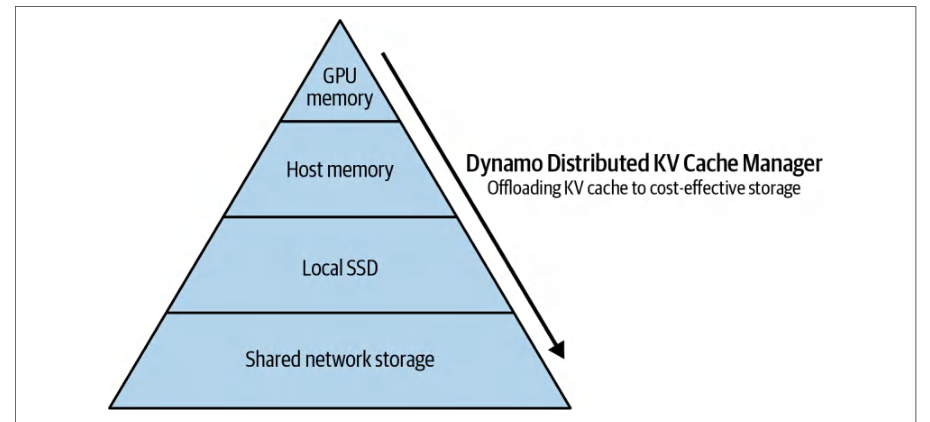
NIXL is a core component of NVIDIA’s open source Dynamo inference engine. NIXL streamlines one-to-one and one-to-few data transfers such as moving a key-value (KV) cache (shared by the disaggregated stages) with minimal latency and overhead. It complements NCCL, which is mainly used for many-to-many collectives.NIXL 是 NVIDIA 开源 Dynamo 推理引擎的核心组件。NIXL 简化了一对一和一对少数据转移,例如以最小化时延和开销移动由解耦阶段共享的键值(KV)缓存。它补充了 NCCL,后者主要用于多对多集合通信。
NIXL has a consistent asynchronous API for moving data across GPUs, CPUs, SSDs, and shared network storage. It always picks the fastest path for the placement of each cache chunk of data being moved. This hierarchy is shown in Figure 4-5 in the context of NVIDIA Dynamo’s KV Cache Manager, which uses NIXL to choose the fastest path available for each KV cache transfer.NIXL 提供一致的异步 API,用于在 GPU、CPU、SSD 和共享网络存储之间移动数据。它始终为正在移动的每个缓存数据块的放置选择最快路径。该层级结构在图 4-5 中展示,上下文为 NVIDIA Dynamo 的 KV 缓存管理器,该管理器使用 NIXL 为每次 KV 缓存传输选择可用的最快路径。
When scaling LLM inference, it’s important to efficiently transfer large data caches (e.g., transformer’s attention KV cache) between peers in a cluster of GPUs, CPUs, compute nodes, and racks. For example, with NIXL, an inference engine can offload a large (e.g., 100 GB) KV cache from a GPU to a peer using NVLink/InfiniBand with minimal overhead. This frees up the GPU to handle new requests. This is critical when serving LLMs with large context windows.在扩展 LLM 推理时,需要在由 GPU、CPU、计算节点和机架组成的集群中的对等节点之间高效传输大型数据缓存(例如 Transformer 的注意力 KV 缓存)。例如,借助 NIXL,推理引擎可以使用 NVLink/InfiniBand 以极小开销将大型(例如 100 GB)KV 缓存从 GPU 卸载到对等节点。这可以释放 GPU 以处理新请求。在为具有大上下文窗口的 LLM 提供服务时,这一点至关重要。
NIXL leverages GPUDirect RDMA to move data directly between GPUs across nodes, entirely bypassing host memory. In practice, the RDMA-capable NIC (or DPU) performs the transfer directly between GPU memories. This is why latency is so low. The CPU is not involved in the data path.NIXL 利用 GPUDirect RDMA 在跨节点的 GPU 之间直接移动数据,完全绕过主机内存。在实际应用中,支持 RDMA 的 NIC(或 DPU)直接在 GPU 显存之间执行传输。这就是时延如此之低的原因。CPU 不参与数据路径。
NCCL is still used for synchronized collective operations, but NIXL is focused on efficient one-to-one or one-to-many data transfer scenarios common in LLM inference systems. NVIDIA Dynamo uses NIXL extensively for its disaggregated inference stages of prefill and decode, as we’ll cover next.NCCL 仍用于同步集合操作,但 NIXL 专注于 LLM 推理系统中常见的高效一对一或一对多数据传输场景。NVIDIA Dynamo 在其解耦推理的预填充和解码阶段广泛使用 NIXL,我们将在下一节中介绍。
NCCL remains the standard for many-to-many collective operations common in large-scale training such as all-reduce. NIXL, however, targets one-to-one or one-tofew data transfers that are common in large-scale inference such as moving KV cache data.NCCL 仍然是大规模训练中常见的多对多集合操作(如全归约)的标准。然而,NIXL 针对的是大规模推理中常见的一对一或一对少数据传输,例如移动 KV 缓存数据。
NIXL’s use in NVIDIA’s Dynamo inference framework demonstrates NIXL’s throughput boost in multinode LLM serving scenarios. NIXL complements—not replaces— NCCL for high-performance inference pipelines.NIXL 在 NVIDIA 的 Dynamo 推理框架中的应用展示了 NIXL 在多节点 LLM 服务场景中的吞吐量提升。NIXL 补充而非取代 NCCL,以构建高性能推理流水线。
分离预填充和解码推理阶段
Separate Prefill and Decode Inference Stages
We will dive deeper into the performance details of a highly tuned inference system in a later chapter, but it’s important to understand a bit of context before going further with NIXL. The inference path of a transformer-based model is actually split into two different stages: prefill and decode.我们将在后续章节中深入探讨高度调优的推理系统的性能细节,但在进一步讨论 NIXL 之前,了解一些背景信息很重要。基于 Transformer 的模型的推理路径实际上分为两个不同的阶段:预填充和解码。
The first stage, prefill, is often compute bound as it uses many matrix multiplications to build the KV cache from the incoming request data (aka prompt). The second stage, decode, is often memory-throughput bound, as it needs to gather the model weights from GPU HBM memory to calculate the next set of tokens (aka completion or response).第一个阶段预填充通常是计算受限的,因为它使用大量矩阵乘法从传入的请求数据(即 提示词)构建 KV 缓存。第二个阶段解码通常是显存吞吐量受限的,因为它需要从 GPU HBM 显存中收集模型权重以计算下一组令牌(即 补全 或 响应)。
This prefill/decode split is implemented in common inference engines vLLM, SGLang, and NVIDIA’s Dynamo and TensorRT-LLM. The prefill (prompt ingestion) creates the KV cache, and the decode (generation) uses this cache. NIXL specifically accelerates the transfer of the KV cache between nodes in this workflow. Figure 4-6 compares the traditional “monolithic” serving model to the “disaggregated” serving model in which two stages run on different GPU-based compute nodes to increase scale and maximize throughput.这种预填充/解码分离在常见的推理引擎 vLLM、SGLang 以及 NVIDIA 的 Dynamo 和 TensorRT-LLM 中均已实现。预填充(提示词摄入)创建 KV 缓存,而 解码(生成)使用该缓存。NIXL 专门加速此工作流中 KV 缓存在节点间的传输。图 4-6 比较了传统的“单体”服务模型与“解耦”服务模型,后者在两个不同的基于 GPU 的计算节点上运行这两个阶段,以提高规模并最大化吞吐量。
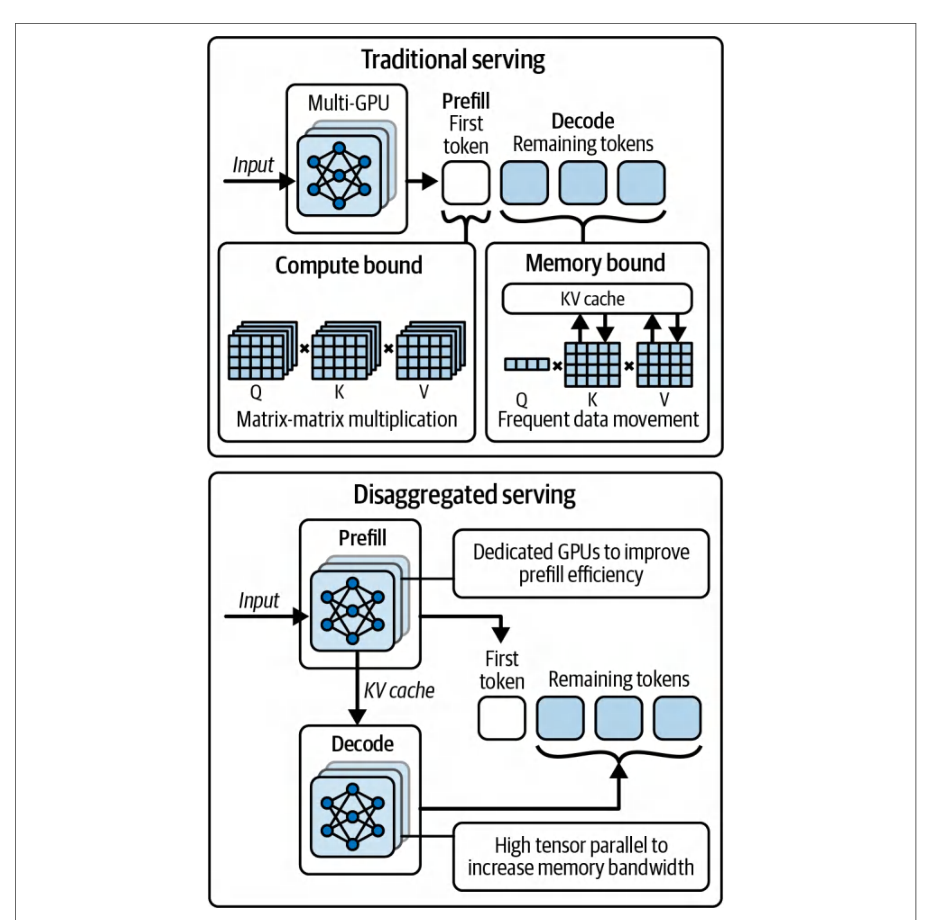
Here, the traditional setup is shown on the top, in which each GPU node handles both the prefill (compute-bound) and decode (memory-bound, I/O-bound) phases. On the bottom, the disaggregated serving configuration places the prefill workers in the GPU cluster and the decode workers in another GPU cluster.这里,顶部显示了传统设置,其中每个 GPU 节点同时处理预填充(计算受限)和解码(显存受限、I/O 受限)阶段。底部显示了解耦服务配置,将预填充工作器放置在一个 GPU 集群中,将解码工作器放置在另一个 GPU 集群中。
A GPU in the prefill cluster generates the KV cache for the input sequence and uses NIXL to transfer it to a GPU in the decode cluster. This specialization produces higher overall throughput and advanced scaling configurations.预填充集群中的 GPU 为输入序列生成 KV 缓存,并使用 NIXL 将其传输到解码集群中的 GPU。这种专业化产生了更高的整体吞吐量和先进的扩展配置。
In such cases, the KV cache, which can run into tens of gigabytes in a long prompt, must move seamlessly from one processing unit to another in near-real time. This way, the text generation happens at speeds that are unnoticeable to end users.在这种情况下,KV 缓存在长提示词中可能达到数十 GB,必须在近实时内从一个处理单元无缝移动到另一个处理单元。这样,文本生成速度快到终端用户无法察觉。
Traditional methods that pass the data through CPU memory or even storage fall short in meeting the required pace and low-latency experience. NVIDIA created NIXL to tackle this exact scenario. NIXL allows multinode inference to scale without being bottlenecked by interconnect latency.传统方法通过 CPU 内存甚至存储传递数据,无法满足所需节奏和低时延体验。NVIDIA 创建 NIXL 正是为了应对这一场景。NIXL 允许多节点推理扩展,而不受互连时延瓶颈限制。
What we really want is a high-bandwidth GPU-to-GPU direct transfer between components. And we want this communication to overlap with computation. This way, the destination GPUs can start computing the next token while they’re receiving the KV cache for the next set of input tokens from the source GPUs.我们真正需要的是组件之间高带宽的 GPU 到 GPU 直接传输。并且我们希望这种通信与计算重叠。这样,目标 GPU 可以在从源 GPU 接收下一组输入词元(token)的 KV 缓存的同时,开始计算下一个词元。
NIXL provides a direct channel for transferring data from one GPU to another or a small group of GPUs across compute nodes and even across racks. The system looks at the available pathways and always selects the one that gets the data there the quickest.NIXL 提供直接通道,用于在计算节点之间甚至机架之间,将数据从一个 GPU 传输到另一个 GPU 或一小群 GPU。系统会查看可用路径,并始终选择最快将数据送达的路径。
This intelligent routing is analogous to NCCL’s path selection but optimized for inference patterns, including one-to-one, large-message transfers. For example, in a GB200/GB300 NVL72 rack, NIXL leverages the NVSwitch network first, whereas across NVL72 racks, it will automatically switch to InfiniBand or Ethernet RDMA, depending on what is supported.这种智能路由类似于 NCCL 的路径选择,但针对推理模式进行了优化,包括一对一、大消息传输。例如,在 GB200/GB300 NVL72 机架中,NIXL 首先利用 NVSwitch 网络;而在跨 NVL72 机架时,它会根据支持情况自动切换到 InfiniBand 或 Ethernet RDMA。
In short, NIXL automatically picks the fastest lane, whether it’s NVLink/NVLink-C2C on the same board, NVSwitch across a rack domain, InfiniBand/RoCE between racks, or even direct NVMe storage access.简而言之,NIXL 会自动选择最快的通道,无论是同一板卡上的 NVLink/NVLink-C2C、跨机架域的 NVSwitch、机架之间的 InfiniBand/RoCE,还是直接的 NVMe 存储访问。
KV 缓存传输的智能互连路由
Intelligent Interconnect Routing for KV Cache Transfers
Traditionally, one might transfer this data from GPU to GPU through a CPU, but this would be too slow, as we’ve already discussed. Another option to improve performance is to require that the source and destination GPUs are on the same compute node, but this limits our scaling flexibility. NIXL was created to address this issue. It was designed for direct GPU-to-GPU transfers of large payloads like the KV cache across GPUs, compute nodes, and racks, if necessary.传统上,可以通过 CPU 在 GPU 之间传输这些数据,但正如我们已经讨论过的,这太慢了。另一种提升性能的方法是要求源 GPU 和目标 GPU 位于同一计算节点,但这会限制扩展灵活性。NIXL 正是为解决这一问题而创建。它被设计用于在必要时跨 GPU、计算节点和机架,直接进行 GPU 到 GPU 的大负载传输,例如 KV 缓存。
NIXL operates at high bandwidth and overlaps communication with computation as much as possible. This allows the destination GPUs to start generating the next set of tokens while they are receiving the KV cache from the source GPU.NIXL 以高带宽运行,并尽可能让通信与计算重叠。这使得目标 GPU 可以在从源 GPU 接收 KV 缓存的同时,开始生成下一组词元。
Additionally, NIXL is interconnect-agnostic. It will use NVLink if GPUs are in the same compute node, NVSwitch if in the same compute node, InfiniBand or Ethernet with RDMA across nodes, or even PCIe or NVMe if needed. Similar to NCCL, NIXL will always select the fastest interconnects to route the data transfer. It also supports transferring to and from different memory tiers in a unified way across GPU HBM, CPU DRAM, and even to NVMe SSD!此外,NIXL 与互连类型无关。如果 GPU 位于同一计算节点,它会使用 NVLink;如果位于同一计算节点,则使用 NVSwitch;跨节点时使用 InfiniBand 或支持 RDMA 的 Ethernet;必要时甚至使用 PCIe 或 NVMe。与 NCCL 类似,NIXL 始终选择最快的互连来路由数据传输。它还支持以统一方式在 GPU HBM、CPU DRAM 甚至 NVMe SSD 等不同内存层级之间进行传输!
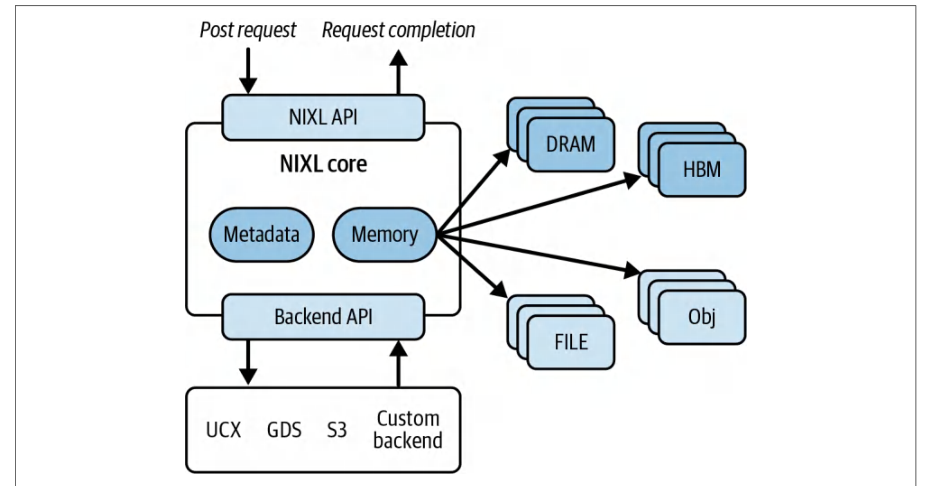
带回调的 NIXL 异步 API
NIXL Asynchronous API with Callbacks
From a developer’s perspective, NIXL offers a straightforward API. You post a transfer request with a pointer to the data and a destination—either GPUs, CPUs, or storage targets like Amazon S3. NIXL will transfer that data as fast as possible.从开发者视角看,NIXL 提供了简洁的 API。你可以提交一个传输请求,其中包含指向数据的指针和目标——可以是 GPU、CPU,或 Amazon S3 等存储目标。NIXL 会尽可能快地传输这些数据。
For instance, a NIXL transfer request could send a KV cache segment to another GPU, a CPU host memory buffer, or even an object storage service. And it can do this all within the same API, as shown in Figure 4-7.例如,NIXL 传输请求可以将 KV 缓存片段发送到另一个 GPU、CPU 主机内存缓冲区,甚至对象存储服务。并且它可以在同一个 API 中完成所有这些操作,如图 4-7 所示。
This modular design means that NIXL can adopt future transports as well. For example, it can incorporate upcoming protocols or faster storage-class memory without changing the user-facing API. Under the hood, NIXL coordinates the data movement using whatever backend is appropriate.这种模块化设计意味着 NIXL 也可以采用未来的传输方式。例如,它可以在不更改面向用户的 API 的情况下,纳入即将推出的协议或更快的存储级内存。在底层,NIXL 使用任何合适的后端来协调数据传输。
NIXL efficiently moves data between different tiers such as GPU HBM, CPU memory (DRAM), file storage (NVMe SSD), and object storage. It provides a single, unified API that automatically selects the fastest transport (e.g., GPU → GPU over NVLink, GPU → NVMe SSD with GDS, or NVSwitch fabric.) This way, you always get near line-rate performance when offloading KV cache segments.NIXL 能够在 GPU HBM、CPU 内存(DRAM)、文件存储(NVMe SSD)和对象存储等不同层级之间高效移动数据。它提供单一、统一的 API,自动选择最快的传输方式(例如,通过 NVLink 的 GPU → GPU、使用 GDS 的 GPU → NVMe SSD,或 NVSwitch 交换结构)。这样,在卸载 KV 缓存段时,你始终可以获得接近线速的性能。
Under the hood, NIXL hides all of this complexity. You register memory with regis terMem, obtain transfer descriptors with trim, prepare a nonblocking request with prepXfer, and submit it with postXfer. NIXL chooses whether to perform a direct PCIe or NVLink copy, an RDMA transfer, or a storage path such as GPUDirect Storage.在底层,NIXL 隐藏了所有这些复杂性。你使用 regis terMem 注册内存,使用 trim 获取传输描述符,使用 prepXfer 准备非阻塞请求,并使用 postXfer 提交它。NIXL 会选择执行直接 PCIe 或 NVLink 拷贝、RDMA 传输,还是 GPUDirect Storage 等存储路径。
The NIXL library is nonblocking and returns a request handle that you poll with checkXfer to detect completion. This pattern overlaps communication and computation with minimal CPU overhead. The NIXL nonblocking API allows downstream kernels to consume incoming data without blocking on the transfer itself. For example, the destination GPU can begin consuming received KV cache chunks as soon as they arrive—even while the remaining chunks are still in flight.NIXL 库是非阻塞的,并返回一个请求句柄,你可以使用 checkXfer 轮询该句柄以检测完成。这种模式以极小的 CPU 开销重叠通信和计算。NIXL 非阻塞 API 允许下游内核消费传入数据,而无需阻塞在传输本身上。例如,目标 GPU 可以在收到的 KV 缓存块到达后立即开始消费它们——即使其余块仍在传输中。
A nixlAgent is NIXL’s core transfer object. It encapsulates the endpoint configuration, memory registrations, and backend selection. It also manages metadata, connection information, and asynchronous transfer requests to and from other agents.nixlAgent 是 NIXL 的核心传输对象。它封装了端点配置、内存注册和后端选择。它还管理元数据、连接信息,以及与其他代理之间的异步传输请求。
You need two agents for a transfer because each nixlAgent instance represents one endpoint in the transfer. The source agent (agentSrc) encapsulates the context, memory registrations, and backends for the origin of the data. The destination agent (agentDst) does the same for the receiver side.一次传输需要两个代理,因为每个 nixlAgent 实例代表传输中的一个端点。源代理(agentSrc)封装了数据源头的上下文、内存注册和后端。目标代理(agentDst)对接收端执行相同操作。
With one agent per endpoint, agentSrc and agentDst, NIXL negotiates the optimal path between these endpoints and manages their independent resources and request lifecycles. These NIXL agents are shown in the following code to transfer data between a source and destination GPU:通过为每个端点提供一个代理(agentSrc 和 agentDst),NIXL 会在这些端点之间协商最优路径,并管理它们独立的资源和请求生命周期。以下代码展示了这些 NIXL 代理如何在源 GPU 和目标 GPU 之间传输数据:
// NIXL 0.5.x 风格示例:在两个 agent 之间进行非阻塞的 VRAM->VRAM 传输
#include <nixl.h>
#include <nixl_types.h>
#include <cuda_runtime.h>
#include <iostream>
#include <thread>
#include <vector>
#include <cassert>
#include <cstdint>
int main() {
    // 1) 配置 agent。GPU<->GPU 传输优先使用 UCX,
    // 若后续面向存储,可允许启用 GDS。
    nixl_agent_config cfg{};
    cfg.backends = {"UCX"};  // {"UCX","GDS"},如果你还计划进行存储传输
    cfg.thread_safe = true;  // 线程安全模式在 0.2.x 早期版本中加入
    // 2) 创建源 agent 与目标 agent
    nixlAgent agentSrc("srcAgent", cfg);
    nixlAgent agentDst("dstAgent", cfg);
    // 3) 为便于说明,在同一块 GPU 上分配简单的测试缓冲区
    int deviceId = 0;
    cudaSetDevice(deviceId);
    const size_t bytes = 1 << 20; // 1 MiB
    void* d_src = nullptr;
    void* d_dst = nullptr;
// NIXL 0.5.x style example: nonblocking VRAM->VRAM transfer between two agents
#include <nixl.h>
#include <nixl_types.h>
#include <cuda_runtime.h>
#include <iostream>
#include <thread>
#include <vector>
#include <cassert>
#include <cstdint>
int main() {
    // 1) Configure agents. Prefer UCX for GPU<->GPU,
    // allow GDS if you later target storage.
    nixl_agent_config cfg{};
    cfg.backends = {"UCX"};  // {"UCX","GDS"} if you also plan storage transfers
    cfg.thread_safe = true;  // thread-safe mode added in early 0.2.x
    // 2) Create source and destination agents
    nixlAgent agentSrc("srcAgent", cfg);
    nixlAgent agentDst("dstAgent", cfg);
    // 3) Allocate simple test buffers on the same GPU for illustration
    int deviceId = 0;
    cudaSetDevice(deviceId);
    const size_t bytes = 1 << 20; // 1 MiB
    void* d_src = nullptr;
    void* d_dst = nullptr;
    cudaMalloc(&d_src, bytes);
    cudaMalloc(&d_dst, bytes);
    // 4) 为 VRAM 构建注册描述符
    //    每个描述符使用地址、长度以及关联的设备
    nixl_desc_t srcDesc{};
    srcDesc.addr      = reinterpret_cast<uintptr_t>(d_src);
    srcDesc.len       = bytes;
    srcDesc.devId     = deviceId;
    srcDesc.seg       = VRAM_SEG;
    nixl_desc_t dstDesc{};
    dstDesc.addr      = reinterpret_cast<uintptr_t>(d_dst);
    dstDesc.len       = bytes;
    dstDesc.devId     = deviceId;
    dstDesc.seg       = VRAM_SEG;
    std::vector<nixl_desc_t> srcList{srcDesc};
    std::vector<nixl_desc_t> dstList{dstDesc};
    // 5) 向每个 agent 注册内存,并裁剪为传输描述符
    auto srcRegs = agentSrc.registerMem(srcList);
    auto dstRegs = agentDst.registerMem(dstList);
    auto srcXfer = srcRegs.trim();  // 用于传输的无元数据描述符
    auto dstXfer = dstRegs.trim();
    // 6) 准备一个从 srcAgent 到 dstAgent 的 WRITE,然后提交(非阻塞)
    nixlReqH reqHandle = nullptr;
    // 准备 + 提交
    if (agentSrc.prepXfer(NIXL_WRITE, srcXfer, dstXfer, "dstAgent", reqHandle)
      != NIXL_SUCCESS) {
        std::cerr << "prepXfer failed\n";
        return 1;
    }
    if (agentSrc.postXfer(NIXL_WRITE, srcXfer, dstXfer, "dstAgent", reqHandle)
      != NIXL_SUCCESS) {
        std::cerr << "postXfer failed\n";
        return 1;
    }
    std::cout << "Transfer posted — doing other work...\n";
    // 7) 轮询等待完成(替代已弃用的 getNotifs/poll map)
    nixl_status_t st;
    do {
        st = agentSrc.checkXfer(reqHandle);
        if (st == NIXL_INPROGRESS) std::this_thread::yield();
    } while (st == NIXL_INPROGRESS);
    if (st != NIXL_SUCCESS) {
    cudaMalloc(&d_src, bytes);
    cudaMalloc(&d_dst, bytes);
    // 4) Build registration descriptors for VRAM
    //    Each descriptor uses an address, length, and associated device
    nixl_desc_t srcDesc{};
    srcDesc.addr      = reinterpret_cast<uintptr_t>(d_src);
    srcDesc.len       = bytes;
    srcDesc.devId     = deviceId;
    srcDesc.seg       = VRAM_SEG;
    nixl_desc_t dstDesc{};
    dstDesc.addr      = reinterpret_cast<uintptr_t>(d_dst);
    dstDesc.len       = bytes;
    dstDesc.devId     = deviceId;
    dstDesc.seg       = VRAM_SEG;
    std::vector<nixl_desc_t> srcList{srcDesc};
    std::vector<nixl_desc_t> dstList{dstDesc};
    // 5) Register memory with each agent and trim to xfer descriptors
    auto srcRegs = agentSrc.registerMem(srcList);
    auto dstRegs = agentDst.registerMem(dstList);
    auto srcXfer = srcRegs.trim();  // metadata-free descriptors used for xfer
    auto dstXfer = dstRegs.trim();
    // 6) Prepare a WRITE from srcAgent->dstAgent, then post it (nonblocking)
    nixlReqH reqHandle = nullptr;
    // prepare + post
    if (agentSrc.prepXfer(NIXL_WRITE, srcXfer, dstXfer, "dstAgent", reqHandle)
      != NIXL_SUCCESS) {
        std::cerr << "prepXfer failed\n";
        return 1;
    }
    if (agentSrc.postXfer(NIXL_WRITE, srcXfer, dstXfer, "dstAgent", reqHandle)
      != NIXL_SUCCESS) {
        std::cerr << "postXfer failed\n";
        return 1;
    }
    std::cout << "Transfer posted — doing other work...\n";
    // 7) Poll for completion (replaces deprecated getNotifs/poll map)
    nixl_status_t st;
    do {
        st = agentSrc.checkXfer(reqHandle);
        if (st == NIXL_INPROGRESS) std::this_thread::yield();
    } while (st == NIXL_INPROGRESS);
    if (st != NIXL_SUCCESS) {
        std::cerr << "Transfer completed with error: " << st << "\n";
        agentSrc.releaseReqH(reqHandle);
        agentSrc.deregisterMem(srcRegs);
        agentDst.deregisterMem(dstRegs);
        cudaFree(d_src);
        cudaFree(d_dst);
        return 1;
    }
    std::cout << "Transfer completed!\n";
    // 8) 清理
    agentSrc.releaseReqH(reqHandle);
    agentSrc.deregisterMem(srcRegs);
    agentDst.deregisterMem(dstRegs);
    cudaFree(d_src);
    cudaFree(d_dst);
    return 0;
}
        std::cerr << "Transfer completed with error: " << st << "\n";
        agentSrc.releaseReqH(reqHandle);
        agentSrc.deregisterMem(srcRegs);
        agentDst.deregisterMem(dstRegs);
        cudaFree(d_src);
        cudaFree(d_dst);
        return 1;
    }
    std::cout << "Transfer completed!\n";
    // 8) Cleanup
    agentSrc.releaseReqH(reqHandle);
    agentSrc.deregisterMem(srcRegs);
    agentDst.deregisterMem(dstRegs);
    cudaFree(d_src);
    cudaFree(d_dst);
    return 0;
}
Here, the NIXL agents are initialized with names and a configuration. Memory is registered with registerMem and trimmed to transfer descriptors with trim. A nonblocking write from srcAgent to dstAgent is prepared with prepXfer and submitted with postXfer. The program continues doing other work while the transfer is in flight. Completion is detected by polling the request handle with checkXfer while yielding the thread if the request is in progress. After success, the handle is released with releaseReqH and the registrations are deregistered.在这里,NIXL 代理使用名称和配置进行初始化。内存通过 registerMem 注册,并通过 trim 裁剪为传输描述符。从 srcAgent 到 dstAgent 的非阻塞写操作通过 prepXfer 准备,并通过 postXfer 提交。在传输进行期间,程序继续执行其他工作。完成状态通过 checkXfer 轮询请求句柄来检测,如果请求仍在进行中,则让出线程。成功后,句柄通过 releaseReqH 释放,并取消注册。
Internally, NIXL uses Unified Communication X (UCX), an HPC library that provides a unified API over various interconnects that NIXL leverages for low-level transport, including InfiniBand, TCP, shared memory, etc. NIXL also uses GPUDirect RDMA and InfiniBand GPUDirect Async (IBGDA) to allow the GPU to initiate transfers without CPU involvement. This is an important optimization, as in older systems, the CPU might need to kick off the transfer—even if the data path is purely RDMA. IBGDA offloads that initiation to the GPU/NIC, which further reduces latency.在内部,NIXL 使用 Unified Communication X(UCX),这是一个 HPC 库,为各种互连提供统一 API,NIXL 利用它进行底层传输,包括 InfiniBand、TCP、共享内存等。NIXL 还使用 GPUDirect RDMA 和 InfiniBand GPUDirect Async(IBGDA),以允许 GPU 在无需 CPU 参与的情况下发起传输。这是一项重要优化,因为在较旧系统中,即使数据路径完全是 RDMA,CPU 也可能需要启动传输。IBGDA 将该启动操作卸载到 GPU/NIC,从而进一步降低时延。
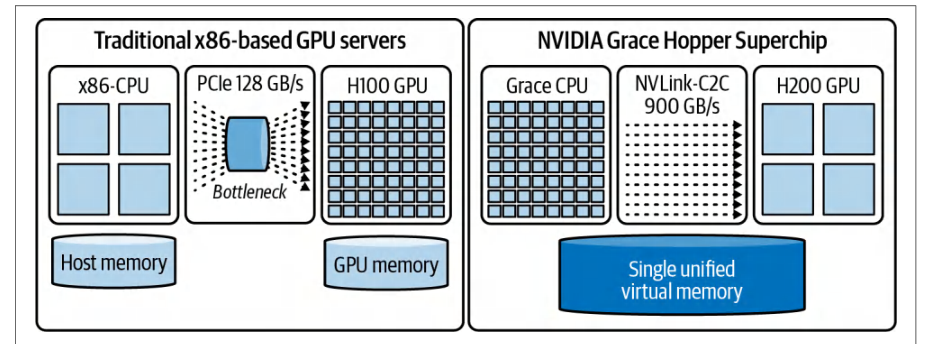
Another interesting feature of NIXL is that it avoids unnecessary copies such as staging buffers. For example, if data is in pageable CPU memory, it would choose to pin the data to prevent it from being paged out. But if the data is in GPU memory, it would just send the data directly. In other words, NIXL tries to avoid staging buffers that copy to an intermediate host buffer before transferring the data to the destination.NIXL 的另一个有趣特性是避免不必要的拷贝,例如暂存缓冲区。例如,如果数据位于可分页 CPU 内存中,它会选择将数据锁页,以防止其被换出。但如果数据位于 GPU 显存中,它会直接发送数据。换言之,NIXL 会尽量避免使用暂存缓冲区,即避免在将数据传输到目标端之前先拷贝到中间主机缓冲区。
使用 NIXL 进行 KV 缓存卸载
KV Cache Offloading with NIXL
The design motivation for NIXL is closely related to best practices for handling large memory for LLM inference. If GPUs don’t have enough memory to hold the entire KV cache for a long sequence or multiturn conversation, NIXL allows the inference server (e.g., NVIDIA Dynamo) to offload the KV cache to CPU memory—or even NVMe SSD—and bring it back as needed.NIXL 的设计动机与处理大语言模型(LLM)推理所需大内存的最佳实践密切相关。如果 GPU 没有足够内存来容纳长序列或多轮对话的完整 KV 缓存,NIXL 允许推理服务器(例如 NVIDIA Dynamo)将 KV 缓存卸载到 CPU 内存——甚至 NVMe SSD——并在需要时取回。
NIXL, in conjunction with the KV Cache Manager in Dynamo, for instance, can manage this transfer hierarchy efficiently. Consider NVIDIA’s Grace Hopper and Grace Blackwell Superchips with a huge amount of unified CPU and GPU memory shared over the fast NVLink interconnect (see Figure 4-8).例如,NIXL 与 Dynamo 中的 KV 缓存管理器(KV Cache Manager)配合,可以高效管理这种传输层级。考虑 NVIDIA 的 Grace Hopper 和 Grace Blackwell Superchip,它们通过高速 NVLink 互连共享大量 CPU 与 GPU 统一内存(见图 4-8)。
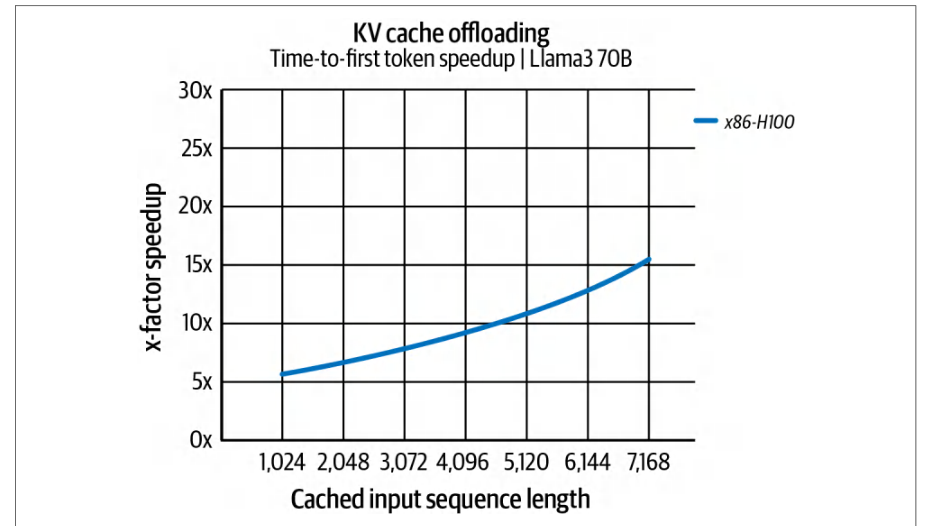
The inference server can quickly offload a large KV cache to the large CPU memory to free up the limited GPU HBM. This yields a huge boost in inference performance. Specifically, a PCIe-based x86 + H100 system can improve time-to-first-token (TTFT) latency by as much as 14× for long input sequences compared to recomputing the cache. This speedup is shown in Figure 4-9.推理服务器可以将大型 KV 缓存快速卸载到容量充裕的 CPU 内存,从而释放有限的 GPU HBM。这会带来推理性能的大幅提升。具体而言,对于长输入序列,基于 PCIe 的 x86 + H100 系统相比重新计算缓存,可将首令牌时延(TTFT)改善多达 14 倍。该加速效果如图 4-9 所示。
Furthermore, with its 900 GB/s NVLink-C2C interconnect, the ARM-based Grace Hopper Superchip delivers 2× faster TTFT latency compared to the non-superchip, x86-based H100 version described previously. This speedup is shown in Figure 4-10.此外,凭借 900 GB/s 的 NVLink-C2C 互连,基于 ARM 的 Grace Hopper 超级芯片相比前述非超级芯片的 x86 架构 H100 版本,TTFT 时延快 2 倍。该加速效果如图 4-10 所示。
These are impressive gains enabled by codesigning NIXL software with NVIDIA superchip hardware. And NIXL, designed exactly with those numbers in mind, makes offloading the KV cache a viable option by keeping transfer costs low. KV cache offloading is a key part of large-scale inference deployments, as we’ll see in an upcoming chapter—especially for massive LLMs where memory capacity is a limiting factor.这些可观的收益源自 NIXL 软件与 NVIDIA 超级芯片硬件的协同设计。而 NIXL 正是围绕这些数字设计的,它通过将传输开销保持在较低水平,使 KV 缓存卸载成为可行方案。KV 缓存卸载是大规模推理部署的关键组成部分,我们将在后续章节中看到——对于显存容量成为限制因素的超大 LLM 尤其如此。
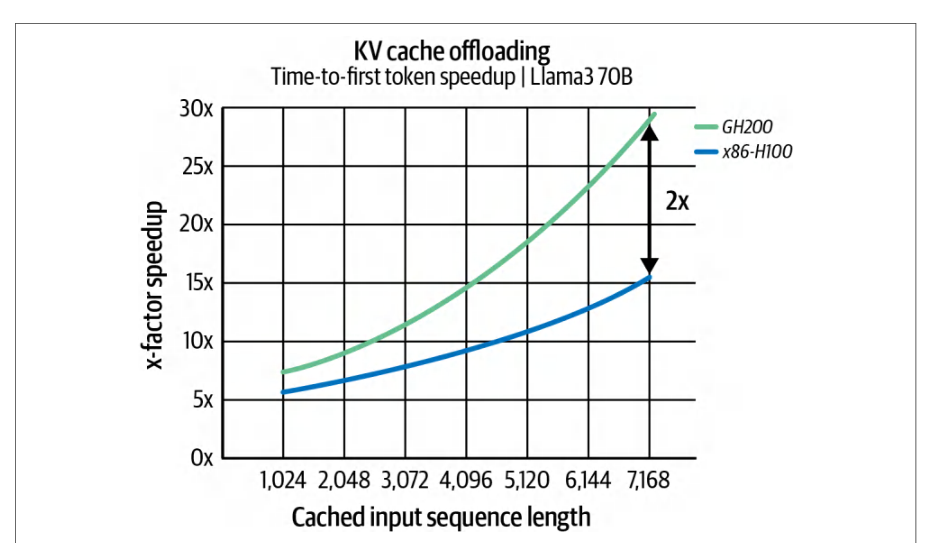
As models get bigger and workloads get more complex, having a library like NIXL to efficiently move large blobs of data asynchronously is critical. For performance engineers, if your use case involves moving large amounts of data between stages (e.g., pipeline parallelism) and other components (e.g., GPUs or storage) in a system, consider whether NCCL is sufficient or whether a specialized solution like NIXL is an option to optimize that flow of data.随着模型规模增大、工作负载愈发复杂,拥有 NIXL 这样能够异步高效搬运大块数据的库至关重要。对性能工程师而言,如果你的用例涉及在系统的各阶段之间(例如流水线并行)以及各组件之间(例如 GPU 或存储)搬运大量数据,请考虑 NCCL 是否足够,或者 NIXL 这类专用方案是否可作为优化该数据流的选项。
NIXL 与 NVIDIA Dynamo 等高性能推理系统
NIXL and High-Performance Inference Systems Like NVIDIA Dynamo
The impact of NIXL on performance is huge for distributed inference systems like NVIDIA Dynamo, also released in early 2025. According to NVIDIA’s internal testing, the open source NVIDIA Dynamo framework used NIXL to achieve up to 30× higher inference throughput on a ~680B-parameter LLM when using a 72-GPU Blackwell NVL72 rack.NIXL 对性能的影响对于像 NVIDIA Dynamo 这样的分布式推理系统是巨大的,NVIDIA Dynamo 也于 2025 年初发布。根据 NVIDIA 的内部测试,开源 NVIDIA Dynamo 框架使用 NIXL,在使用 72-GPU Blackwell NVL72 机架运行约 680B 参数的 LLM 时,实现了高达 30× 的推理吞吐量提升。
What was once a major latency barrier—shifting many gigabytes of context data between nodes—is now a relatively quick, asynchronous operation under NIXL. We will cover NVIDIA Dynamo, TensorRT, vLLM, and respective model inference optimizations in depth in a later chapter.曾经的主要时延障碍——在节点之间移动数 GB 的上下文数据——在 NIXL 下现在已成为相对快速的异步操作。我们将在后续章节深入介绍 NVIDIA Dynamo、TensorRT、vLLM 以及相应的模型推理优化。
| Aspect方面 | NCCL (collective communication)NCCL(集合通信) | NIXL (point-to-point communication)NIXL(点对点通信) |
|---|---|---|
| Primary use case主要用例 | Many-to-many collectives (e.g., all-reduce, all-gather) for tightly coupled GPU groups in training.训练中的紧耦合 GPU 组使用多对多集合通信(例如全归约、全收集)。 | One-to-one or one-to-few transfers (e.g., sending large tensors or caches) for distributed inference or pipelining.分布式推理或流水线中的一对一或一对少传输(例如发送大型张量或缓存)。 |
| Communication通信 | Synchronized collective operations—all同步集合操作——所有 | Asynchronous send/receive—one initiator, one or multiple异步发送/接收——一个发起者,一个或多个 |
| pattern模式 | participants must reach the call (barrier semantics).参与者必须到达该调用(屏障语义)。 | targets (supports one-way data movement).目标(支持单向数据传输)。 |
| Overlap with与...重叠 | Can overlap to some extent (e.g., overlap可在一定程度上重叠(例如,重叠 | Designed for maximal overlap—transfers run fully in旨在实现最大重叠——传输完全在 |
| compute计算 | backward compute with all-reduce in DDP) using separate CUDA streams.DDP 中的反向计算与全归约)使用单独的 CUDA 流。 | parallel with compute, with polling notification to detect completion.与计算并行,通过轮询通知检测完成。 |
| Topology拓扑 | Yes—auto-detects topology, uses rings/是——自动检测拓扑,使用环/ | Yes—interconnect-agnostic; automatically uses NVLink,是——与互连无关;自动使用 NVLink, |
| awareness感知 | trees and NVLink/NVSwitch optimally for collectives.树以及 NVLink/NVSwitch,以针对集合通信进行优化。 | NVSwitch, PCIe, InfiniBand/RDMA, or GDS, depending on source-dest locations.NVSwitch、PCIe、InfiniBand/RDMA 或 GDS,具体取决于源-目标位置。 |
| Data scope数据范围 | Typically small-to-medium tensors (e.g., gradients) that need aggregation across all GPUs.通常是需要跨所有 GPU 聚合的小到中等张量(例如梯度)。 | Optimized for large data blobs (e.g., hundreds of MBs or more, like LLM KV cache or model shards) that need fast point-to-point transit.针对需要快速点对点传输的大数据块(例如数百 MB 或更多,如 LLM KV 缓存或模型分片)进行了优化。 |
| Integration集成 | Integrated in training frameworks (PyTorch DDP, Horovod, etc., call NCCL under the hood).集成在训练框架中(PyTorch DDP、Horovod 等会在底层调用 NCCL)。 | Provided as an open source library used by NVIDIA Dynamo. It is developed in the Dynamo project. The developer calls the NIXL API to send/receive as needed in the inference server or custom code.作为开源库提供,供 NVIDIA Dynamo 使用。它在 Dynamo 项目中开发。开发者在推理服务器或自定义代码中按需调用 NIXL API 进行发送/接收。 |
| Example示例 | All-reduce of 100 MB of gradients across 8 GPUs in parallel.在 8 个 GPU 上并行对 100 MB 的梯度执行全归约。 | Send a 1 GB KV cache from GPU 0 to GPU 1 (or to CPU memory or an NVMe SSD) during an inference pipeline.在推理流水线期间,将 1 GB KV 缓存从 GPU 0 发送到 GPU 1(或发送到 CPU 内存或 NVMe SSD)。 |
NCCL 与 NIXL
NCCL Versus NIXL
It’s important to note that NIXL is not a replacement for NCCL but a complement. NCCL still handles synchronized collectives for GPUs working on a single task/stage in parallel, such as an all-reduce split across multiple GPUs. NIXL, on the other hand, performs asynchronous data transfers between tasks/stages—or between distinct components (e.g., GPUs, CPUs, storage) in a distributed system. Table 4-5 shows a comparison of NCCL versus NIXL.需要强调的是,NIXL 并非 NCCL 的替代品,而是其补充。NCCL 仍然负责处理并行执行单一任务/阶段的 GPU 的同步集合通信,例如跨多个 GPU 拆分的全归约。另一方面,NIXL 执行任务/阶段之间——或分布式系统中不同组件(例如 GPU、CPU、存储)之间的异步数据传输。表 4-5 展示了 NCCL 与 NIXL 的比较。
While NCCL does support peer-to-peer send()/recv() operations, it’s best suited for collective operations in synchronous training environments. NIXL, on the other hand, addresses the needs of asynchronous, point-to-point data transfers common in large-scale inference and pipeline parallelism. For instance, NVIDIA’s Dynamo inference server, discussed in a later chapter, uses NIXL to orchestrate KV cache movement across inference components, including GPUs, CPUs, and SSDs.尽管 NCCL 确实支持点对点 send()/recv() 操作,但它最适合同步训练环境中的集合操作。另一方面,NIXL 满足大规模推理和流水线并行中常见的异步点对点数据传输需求。例如,后文将讨论的 NVIDIA Dynamo 推理服务器使用 NIXL 来协调跨推理组件(包括 GPU、CPU 和 SSD)的 KV 缓存移动。
In summary, NCCL is designed to maximize collective throughput across multiple GPUs both within a single host and across nodes. It automatically selects hardware topology-aware ring and tree communication algorithms that fully saturate the given PCIe, NVLink, InfiniBand, and Ethernet links. NCCL is typically associated with ultrascale model training workloads. NIXL builds on NCCL’s high-performance principles and orchestrates asynchronous, hardware-agnostic point-to-point transfers across GPUs, CPUs, and storage devices. NIXL was designed for large-scale distributed inference workloads, including super fast KV cache data transfers.总之,NCCL 旨在最大化单个主机内以及跨节点的多个 GPU 之间的集合吞吐量。它会自动选择硬件拓扑感知的环形和树形通信算法,以完全饱和给定的 PCIe、NVLink、InfiniBand 和以太网链路。NCCL 通常与超大规模模型训练工作负载相关联。NIXL 基于 NCCL 的高性能原则,协调跨 GPU、CPU 和存储设备的异步、硬件无关的点对点传输。NIXL 专为大规模分布式推理工作负载而设计,包括超高速 KV 缓存数据传输。
关键要点
Key Takeaways
With careful engineering—and using the techniques described in this chapter—you can often reach performance at or near the physical “speed of light” hardware limits. Here are some key lessons to remember when tuning your network layer:通过精心工程化——并使用本章描述的技术——你通常可以达到物理“光速”硬件极限或接近该极限的性能。以下是调优网络层时需要记住的一些关键经验:
- Topology matters拓扑结构至关重要
- The interconnects between nodes (internode, InfiniBand) and within nodes (intranode, NVLink/NVSwitch) influence the optimal communication strategy. Consider hierarchical approaches for multinode and multi-GPU configurations. Always ensure that you’re using the fastest interconnect available—and not accidentally sending data over slow paths due to a misconfiguration or unexpected default value! In practice, check NCCL’s behavior and utilize features like SHARP for large-scale, in-network aggregations/reductions if available.节点间互连(跨节点,InfiniBand)和节点内互连(节点内,NVLink/NVSwitch)会影响最优通信策略。对于多节点和多 GPU 配置,应考虑分层方法。务必确保使用可用的最快互连——避免因配置错误或意外的默认值而意外地通过慢速路径发送数据!在实践中,请检查 NCCL 的行为,并在可用时利用 SHARP 等功能进行大规模的网络内聚合/归约。
- Tune the environment and system调优环境和系统
- Sometimes a single environment variable or OS setting can boost throughput. For instance, one can increase NIC buffers, enable/disable NCCL features and logging, and pin CPUs correctly. Performing system optimizations at the OS and driver levels (e.g., IRQ affinity) can help remove bottlenecks, as described in Chapter 3.有时,单个环境变量或操作系统设置就能提升吞吐量。例如,可以增加 NIC 缓冲区、启用/禁用 NCCL 功能和日志记录,以及正确绑定 CPU。如第 3 章所述,在操作系统和驱动程序层面执行系统优化(例如 IRQ 亲和性)有助于消除瓶颈。
- Utilize the latest hardware innovations利用最新的硬件创新
- New hardware like NVIDIA Grace Hopper and Grace Blackwell Superchips provide massive CPU memory and fast CPU-GPU interconnects. Use them for things like hosting large datasets, splitting your data, partitioning your model, and offloading large KV caches to the CPU. In-network computing like SHARP can accelerate collective operations by 2×–5×—especially at scale. Stay informed on these new compute and networking hardware innovations because they will change the optimal configuration with each new generation.NVIDIA Grace Hopper 和 Grace Blackwell Superchip 等新硬件提供了海量的 CPU 内存和快速的 CPU-GPU 互连。利用它们来托管大型数据集、拆分数据、划分模型以及将大型 KV 缓存卸载到 CPU。SHARP 等网络内计算可以将集合通信操作加速 2×–5×——尤其是在大规模场景下。请持续关注这些新的计算和网络硬件创新,因为每一代新硬件都会改变最优配置。
You want to saturate your GPUs to the point where they’re computing 100% of the time while simultaneously communicating in the background. You also want to saturate your network links with useful data. And you want to keep your disks streaming data at full throttle. All of this should happen together in perfect harmony.你希望让 GPU 满载运行,使其 100% 的时间都在计算,同时在后台进行通信。你还希望让网络链路满载传输有用数据。并且希望让磁盘全速流式传输数据。所有这些操作应当完美协调地同时进行。
Achieving all of this requires iterative tuning and validation, as well as some trade-offs like more memory usage and more code complexity. But this kind of tuning pays off with faster model training and inference—as well as better overall utilization of expensive infrastructure.实现这一切需要迭代调优和验证,以及做出一些权衡,例如增加显存使用量和代码复杂度。但这种调优能带来更快的模型训练和推理速度,并提高昂贵基础设施的整体利用率。
结语
Conclusion
The evolution of high-performance, distributed, and multi-GPU communication and storage systems represents the foundation for tuning large, complex AI systems. By utilizing specialized libraries such as NCCL for collective operations, NIXL for efficient inference data transfers, and RDMA for ultra-low-latency communication, AI systems can significantly reduce bottlenecks and increase performance.高性能、分布式及多 GPU 通信与存储系统的演进,构成了调优大型复杂 AI 系统的基础。通过利用 NCCL 等专用库执行集合操作、使用 NIXL 进行高效的推理数据传输,以及采用 RDMA 实现超低时延通信,AI 系统可以显著减少瓶颈并提升性能。
The integration of smart networking hardware like NVSwitch and SHARP-enabled InfiniBand switches translates directly into higher training and inference performance. Likewise, keeping software up-to-date is key, as newer versions of CUDA and PyTorch come with these optimizations built in for the latest GPUs and networking technology (e.g., SHARP). Utilizing NVIDIA Dynamo, vLLM, and similar serving frameworks can help deploy these improvements easily for inference workloads.集成 NVSwitch 和支持 SHARP 的 InfiniBand 交换机等智能网络硬件,可直接转化为更高的训练和推理性能。同样,保持软件更新至关重要,因为较新版本的 CUDA 和 PyTorch 已针对最新 GPU 和网络技术(例如 SHARP)内置了这些优化。利用 NVIDIA Dynamo、vLLM 及类似的推理服务框架,可以轻松地将这些改进部署到推理工作负载中。
Ultimately, this chapter highlights that no single component can provide peak performance alone. It is the careful coordination and codesign of high-speed communication, efficient data handling, and system-wide tuning that leads to scalable and robust AI systems.最终,本章强调没有任何单一组件能够独立提供峰值性能。正是高速通信、高效数据处理和系统级调优的精心协调与协同设计,才造就了可扩展且稳健的 AI 系统。
For performance engineers, the lesson is that fast data movement is as critical as raw compute power. The fastest GPU in the world provides little benefit if it’s constantly waiting for data from a CPU or another GPU.对于性能工程师而言,教训在于快速的数据移动与原始算力同样关键。如果 GPU 不断等待来自 CPU 或其他 GPU 的数据,那么即使是世界上最快的 GPU 也几乎无法发挥优势。
In the next chapter, we will explore GPU-based storage strategies and optimizations. Complementing networking protocols and libraries like RDMA, NCCL, and NIXL, GDS, and highly efficient input pipelines are part of the holistic approach to keeping the GPUs fed with continuous work.在下一章中,我们将探讨基于 GPU 的存储策略和优化。作为 RDMA、NCCL 和 NIXL 等网络协议和库的补充,GPUDirect Storage 和高效的输入流水线是保持 GPU 持续获得工作负载的整体方法的一部分。