基于 GPU 的存储 I/O 优化
Chapter 5. GPU-Based Storage I/O Optimizations
本章目录
Feeding data to the GPUs is as important as the compute itself for AI workloads. Consider a scenario with a 100-trillion-parameter model training on thousands of GPUs. Such a model might process billions of training samples, including tokens, images, audio, video, etc.对于 AI 工作负载而言,向 GPU 提供数据与计算本身同等重要。设想一个在数千个 GPU 上训练 100 万亿参数模型的场景。这样的模型可能需要处理数十亿个训练样本,包括 token、图像、音频、视频等。
This means that an enormous amount of data must be read from storage and fed to the GPUs as quickly as possible. If the storage pipeline is slow, the GPUs will starve and sit idle. This results in low utilization despite the sophisticated communication optimizations that we’ve discussed.这意味着必须从存储中读取海量数据,并尽可能快地提供给 GPU。如果存储流水线速度慢,GPU 就会因数据饥饿而闲置。尽管我们讨论过复杂的通信优化,这仍会导致利用率低下。
This chapter addresses storage and input pipeline optimizations. Specifically, it demonstrates how to read data efficiently from disk or remote storage, how to preprocess it, and how to overlap its I/O with GPU compute.本章探讨存储和输入流水线的优化。具体而言,它演示了如何高效地从磁盘或远程存储读取数据、如何对其进行预处理,以及如何将其 I/O 与 GPU 计算重叠。
快速存储与数据局部性
Fast Storage and Data Locality
Large model training jobs usually need to read huge datasets. It’s common to have on the order of billions or even trillions of training samples for large language models. This is in the range of terabytes of text data for language models and petabytes of images for vision models.大模型训练任务通常需要读取海量数据集。对于大型语言模型,拥有数十亿甚至数万亿个训练样本是很常见的。对于语言模型,这相当于 TB 级的文本数据;对于视觉模型,则相当于 PB 级的图像数据。
At ultra scale, your storage system must consistently provide massive throughput to keep up with the thousands and millions of GPUs potentially running for months at a time. Colocating NVMe SSDs within racks—or using NVMe over Fabrics (NVMe-oF) with rack-local switch topologies—minimizes network hops and improves performance consistency.在超大规模场景下,存储系统必须持续提供巨大的吞吐量,以满足可能连续运行数月之久的数千乃至数百万个 GPU 的需求。将 NVMe SSD 与机架共置——或使用具有机架本地交换拓扑的 NVMe over Fabrics (NVMe-oF)——可以减少网络跳数并提高性能一致性。
If your data lives in network-attached storage like an NFS server or cloud object storage (e.g., Amazon S3), you need to ensure that the aggregate read bandwidth from all of your compute nodes is sufficient. Consider a scenario in which each GPU needs 200 MB/s of training data to stay busy based on the model and batch size. If you have 8 GPUs total, that’s about 1.6 GB/s aggregate bandwidth needed. Modern high-end GPUs like Blackwell and Rubin demand even more bandwidth to keep them saturated.如果你的数据位于网络附加存储(如 NFS 服务器)或云对象存储(如 Amazon S3)中,你需要确保所有计算节点的聚合读取带宽足够。设想一种场景:基于模型和批大小,每个 GPU 需要 200 MB/s 的训练数据才能保持忙碌。如果你总共有 8 个 GPU,那么大约需要 1.6 GB/s 的聚合带宽。像 Blackwell 和 Rubin 这样的现代高端 GPU 需要更高的带宽才能保持饱和。
An NVIDIA Grace Blackwell GB200/GB300 NVL72 rack with 72 Blackwell GPUs connected in one NVLink domain. If each GPU needs 200 MB/s of training data to stay busy, this can require 14–20 GB/s of aggregate storage throughput to keep all 72 GPUs busy. For these types of ultrascale workloads, your storage solution needs to scale accordingly.一个 NVIDIA Grace Blackwell GB200/GB300 NVL72 机架包含 72 个 Blackwell GPU,它们在一个 NVLink 域中连接。如果每个 GPU 需要 200 MB/s 的训练数据才能保持忙碌,这可能需要 14–20 GB/s 的聚合存储吞吐量才能让所有 72 个 GPU 保持忙碌。对于这类超大规模工作负载,你的存储解决方案需要相应地扩展。
One solution is to use faster local storage such as NVMe SSDs in the same rack—or NVMe-oF network topology. Another solution is to use a parallel filesystem like Lustre or General Parallel File System (GPFS), etc., to cache the data on local SSDs. Assuming the storage system can keep up, it’s important to provision multiple data loading threads to keep the pipe saturated. Watch out for the Python GIL!一种解决方案是使用更快的本地存储,例如同一机架中的 NVMe SSD 或 NVMe-oF 网络拓扑。另一种解决方案是使用并行文件系统(如 Lustre 或 General Parallel File System (GPFS) 等),将数据缓存到本地 SSD 上。假设存储系统能够跟上,配置多个数据加载线程以保持管道饱和至关重要。注意 Python GIL!
Whenever possible, place data as physically close to the compute nodes as possible. “Close” could mean on the same physical node, such as a local NVMe SSD drive, or at least in the same rack with a high-speed interconnect with something like NVMe over Fabric (NVME-oF) or an advanced storage accelerator.尽可能将数据放置在物理上最接近计算节点的位置。“接近”可能意味着在同一物理节点上,例如本地 NVMe SSD 驱动器,或者至少在同一机架内,通过 NVMe over Fabric (NVMe-oF) 或高级存储加速器等高速互连连接。
For distributed, multinode model training, a common approach is to shard the dataset across nodes so that each node primarily reads a subset of data from its local disk. For example, if you have 100 TB of data and 10 nodes, you might presplit 10 TB to each node’s local storage. Then each node’s data loader reads only from its local 10 TB. This avoids saturating the network with redundant reads—especially if the dataset size does not easily fit in RAM.对于分布式多节点模型训练,一种常见方法是将数据集分片到各个节点,使每个节点主要从本地磁盘读取数据子集。例如,如果你有 100 TB 数据和 10 个节点,你可以预先将 10 TB 数据拆分到每个节点的本地存储中。然后,每个节点的数据加载器仅从其本地的 10 TB 数据中读取。这避免了冗余读取使网络饱和——尤其是当数据集大小无法轻松放入 RAM 时。
Frameworks like PyTorch’s DistributedSampler will coordinate workers such that each process gets a unique slice of data per epoch. This aligns well with the goal of sharding the data over multiple cluster nodes.像 PyTorch 的 DistributedSampler 这样的框架会协调工作进程,使每个进程在每个轮次(epoch)中获得唯一的数据切片。这与将数据分片到多个集群节点的目标非常契合。
顺序与随机读取模式
Sequential Versus Random Read Patterns
GPUs are extremely fast at crunching data, but they prefer that the data be read in large contiguous chunks for efficiency. Similarly, storage measures much higher throughput for large, sequential reads than for small, random reads. As such, when preparing your datasets or storage layout, try to arrange for sequential access as much as possible.GPU 处理数据的速度极快,但为了效率,它们更希望数据以大的连续块读取。类似地,存储在大块顺序读取时测得的吞吐量远高于小块随机读取。因此,在准备数据集或存储布局时,应尽可能安排顺序访问。
For instance, when training with images, avoid storing millions of individual image files since this will lead to lots of random seeks all over the disk. Consider, instead, storing them in a few large binary (e.g., Arrow, TFRecord, or Parquet) files, database files, WebDataset tar files, or equivalents. In these cases, each file contains many con-catenated samples, which is ideal.例如,在使用图像进行训练时,避免存储数百万个单独的图像文件,因为这会导致大量随机寻道遍布整个磁盘。相反,可以考虑将它们存储在少数大型二进制(例如 Arrow、TFRecord 或 Parquet)文件、数据库文件、WebDataset tar 文件或等效文件中。在这些情况下,每个文件包含许多串联的样本,这是理想的。
Reading a chunk of data from the larger files will naturally get many samples in one pass. If using an object store like Amazon S3, it’s common to combine smaller objects into larger ones ahead of time for this exact reason.从较大的文件中读取一块数据自然会通过一次遍历获取许多样本。如果使用 Amazon S3 等对象存储,正是出于这个原因,通常会提前将较小的对象合并为较大的对象。
Also, it’s important to tune the read size since reading in 1 MB chunks will yield better throughput than 4 KB chunks due to the lower per-read overhead. Many data loader libraries allow adjusting buffer size and prefetch chunk size. For example, Python’s open() uses the OS’s read-ahead buffer to accelerate sequential scans, but random reads won’t benefit much from larger buffers or buffered I/O libraries.此外,调整读取大小也很重要,因为由于每次读取开销更低,以 1 MB 块读取会比以 4 KB 块读取产生更好的吞吐量。许多数据加载器库允许调整缓冲区大小和预取块大小。例如,Python 的 open() 使用操作系统的预读缓冲区来加速顺序扫描,但随机读取不会从更大的缓冲区或缓冲 I/O 库中获益太多。
Instead, you should batch your reads into larger contiguous chunks or use a high-level dataset API (e.g., TFRecordDataset or PyTorch’s IterableDataset and Data Loader with configurable prefetch sizes). And while many of these frameworks and libraries are internally optimized for large sequential reads, tuning their buffer and prefetch parameters is still important.相反,你应该将读取批量合并为更大的连续块,或使用高级数据集 API(例如 TFRecordDataset 或 PyTorch 的 IterableDataset 和 Data Loader,它们具有可配置的预取大小)。虽然这些框架和库中的许多在内部针对大块顺序读取进行了优化,但调整其缓冲区和预取参数仍然重要。
If your access pattern still must be random, issue multiple reads in parallel using either threads calling pread() or Linux’s asynchronous I/O interfaces like io_uring. With features like preregistered buffers and polling, io_uring allows submitting batches of I/O requests with minimal kernel overhead. It can further improve random read throughput by reducing per-syscall overhead. This helps hide latency and achieve high IOPS.如果你的访问模式仍然必须是随机的,请使用调用 pread() 的线程或 Linux 的异步 I/O 接口(如 io_uring)并行发起多次读取。借助预注册缓冲区和轮询等功能,io_uring 允许以极小的内核开销提交批量 I/O 请求。它可以通过减少每次系统调用的开销来进一步提高随机读取吞吐量。这有助于隐藏时延并实现高 IOPS。
One should use a filesystem optimized for large, concurrent I/O. XFS is common on Linux NVMe servers. You should mount it with noatime to eliminate costly access-time updates on each read. For networked storage services like Amazon EFS, make sure your EFS filesystem is in Max I/O performance mode for the highest aggregate throughput. If you need consistent bandwidth, you can switch from the default Burst-ing throughput mode to Provisioned throughput. These settings ensure your I/O layer can keep up with massive, parallel AI workloads.应使用针对大型并发 I/O 优化的文件系统。XFS 在 Linux NVMe 服务器上很常见。你应使用 noatime 挂载它,以消除每次读取时昂贵的访问时间更新。对于 Amazon EFS 等网络存储服务,请确保你的 EFS 文件系统处于 Max I/O 性能模式,以获得最高的聚合吞吐量。如果你需要一致的带宽,可以从默认的 Bursting 吞吐量模式切换到 Provisioned 吞吐量。这些设置可确保你的 I/O 层能够跟上大规模并行 AI 工作负载。
为吞吐量调优 NVMe 和文件系统
Tuning NVMe and Filesystem for Throughput
Modern Linux uses a multiqueue block I/O scheduler, blk-mq, that spreads I/O across the CPU cores. For fast NVMe SSDs, you might need to tune the queue depths and number of submission queues. Usually the defaults are fine, but if you know that your workload is heavily sequential, you might use the “none” I/O scheduler.现代 Linux 使用多队列块 I/O 调度器 blk-mq,将 I/O 分散到 CPU 核心上。对于高速 NVMe SSD,你可能需要调优队列深度和提交队列数量。通常默认值即可,但如果你知道工作负载高度顺序化,可以使用“none” I/O 调度器。
The legacy completely fair queueing (CFQ) scheduler is obsolete. Modern kernels use the none or mq-deadline multiqueue scheduler by default for NVMe. This setting can be checked using /sys/block/<device>/queue/scheduler. The “none” scheduler is standard for low latency workloads. On some storage devices, you might encounter the budget fair queueing (BFQ) scheduler.传统的完全公平队列(CFQ)调度器已过时。现代内核默认对 NVMe 使用 none 或 mq-deadline 多队列调度器。可以通过 /sys/block/<device>/queue/scheduler 检查此设置。“none”调度器是低时延工作负载的标准选择。在某些存储设备上,你可能会遇到预算公平队列(BFQ)调度器。
Another tuning aspect is read ahead. The kernel will automatically read ahead extra data when it detects sequential reads. You can see the read ahead setting in /sys/ block/<device>/queue/read_ahead_kb. For example, by default it is likely set to 128 KB. If you are streaming large files, increase this to a few MB. This will improve your throughput by reducing syscall overhead and pipelining reads. This can be done using blockdev --setra on the device.另一个调优方面是预读。当内核检测到顺序读取时,会自动预读额外数据。你可以在 /sys/ block/<device>/queue/read_ahead_kb 中查看预读设置。例如,默认情况下它可能设置为 128 KB。如果你正在流式传输大文件,请将其增加到几 MB。这将通过减少系统调用开销和流水线化读取来提高吞吐量。这可以通过在设备上使用 blockdev --setra 来完成。
If using NVMe SSD disks, ensure that they are set up on the fastest interface available on your system. And make sure you have enough lanes (e.g., PCIe) so they’re not bottlenecked. Sometimes, multiple SSDs can be striped using RAID 0, for instance, to fully utilize these devices and maximize throughput—especially if a single disk cannot saturate your GPUs.如果使用 NVMe SSD 磁盘,请确保它们配置在系统可用的最快接口上。并确保你有足够的通道(例如 PCIe),以免成为瓶颈。有时,可以使用 RAID 0 对多个 SSD 进行条带化,例如,以充分利用这些设备并最大化吞吐量——特别是当单个磁盘无法饱和你的 GPU 时。
The Linux page cache will automatically cache recently read data into RAM from disk. For large datasets, you might exceed the available RAM and thrash the cache. But for moderately large datasets, warm caches can greatly speed up training.Linux 页缓存会自动将最近从磁盘读取的数据缓存到 RAM 中。对于大型数据集,你可能会超出可用 RAM 并导致缓存抖动。但对于中等大小的数据集,热缓存可以显著加速训练。
If your data—or a large portion of it—can fit into RAM (including CPU + GPU unified memory on a Grace Blackwell Superchip, for example), you should consider preloading it completely into memory at startup. This effectively creates an ultrafast inmemory cache for the GPU. This can greatly reduce disk I/O during training. However, for massive petabyte-scale datasets, that’s usually not feasible. In these cases, streaming the data with optimized I/O is the way to go.如果你的数据——或其中很大一部分——可以放入 RAM(例如,包括 Grace Blackwell Superchip 上的 CPU + GPU 统一内存),你应该考虑在启动时将其完全预加载到内存中。这实际上为 GPU 创建了一个超快的内存内缓存。这可以大大减少训练期间的磁盘 I/O。然而,对于海量的 PB 级数据集,这通常不可行。在这些情况下,使用优化的 I/O 流式传输数据是正确的方法。
Be sure to use multiple workers in data loading (e.g., PyTorch’s DataLoader(num_ workers=N)). These separate CPU threads/processes will fetch and preprocess data in parallel to feed the many GPUs in your training job. Finding the right number of workers is empirical.务必在数据加载中使用多个工作进程(例如,PyTorch 的 DataLoader(num_ workers=N))。这些独立的 CPU 线程/进程将并行获取和预处理数据,以供给训练作业中的众多 GPU。找到合适的工作进程数量需要经验。
We will dive into PyTorch performance tuning in Chapters 13 and 14, but it’s worth noting here that you should enable pin_memory=True and use non_blocking=True to enable overlapping host-to-device copies. And by setting persistent_workers=True, you avoid worker respawn overhead across epochs. It’s also useful to tune pre fetch_factor per workload. The default prefetch_factor is 2 for num_workers greater than 0.我们将在第 13 和 14 章深入探讨 PyTorch 性能调优,但这里值得指出的是,你应该启用 pin_memory=True 并使用 non_blocking=True 以实现主机到设备拷贝的重叠。通过设置 persistent_workers=True,你可以避免跨 epoch 的工作进程重启开销。针对每个工作负载调优 pre fetch_factor 也很有用。当 num_workers 大于 0 时,默认的 prefetch_factor 为 2。
Too few workers and the GPU will be idle. Too many workers and their threads will start contending for available CPU cores and I/O bandwidth. Monitor CPU usage and disk throughput. Ideally, you want near 100% utilization of disk throughput and some headroom on CPU.工作进程太少会导致 GPU 空闲。工作进程太多会导致它们的线程开始争用可用的 CPU 核心和 I/O 带宽。监控 CPU 使用率和磁盘吞吐量。理想情况下,你希望磁盘吞吐量接近 100% 利用率,并在 CPU 上留有一些余量。
使用 NVIDIA GDS
Using NVIDIA GDS
GDS is a feature that allows GPUs to read data directly from storage devices, or through the network storage stack, without creating extra copies in CPU memory. Normally, when a GPU wants to read data from an NVMe SSD, the data first goes from SSD to CPU memory. Then a CUDA call copies the data from CPU memory to GPU memory.GDS 是一项功能,允许 GPU 直接从存储设备读取数据,或通过网络存储堆栈读取数据,而无需在 CPU 内存中创建额外副本。通常,当 GPU 想要从 NVMe SSD 读取数据时,数据首先从 SSD 传输到 CPU 内存。然后 CUDA 调用将数据从 CPU 内存复制到 GPU 显存。
With GDS, the GPU can initiate a direct memory access (DMA) against the SSD or NIC to move the data into its own HBM memory. This bypasses the extra copy through the CPU’s path. GDS supports local NVMe devices and remote storage using NVMe-oF.使用 GDS,GPU 可以针对 SSD 或 NIC 发起直接显存访问(DMA),将数据移入其自身的 HBM 显存。这绕过了通过 CPU 路径的额外拷贝。GDS 支持本地 NVMe 设备以及使用 NVMe-oF 的远程存储。
In practice, GDS creates a direct DMA path that bypasses host memory bounce buffers between storage and GPU memory. This broadens the applicability of GDS to cluster filesystems and even some object storage systems. (Note: the CPU still configures and orchestrates the I/O.)在实践中,GDS 创建了一条直接 DMA 路径,绕过了存储与 GPU 显存之间的主机内存中转缓冲区。这扩大了 GDS 在集群文件系统和某些对象存储系统中的适用性。(注意:CPU 仍然负责配置和编排 I/O。)
Enabling GDS requires a modern NVIDIA GPU and a storage stack that supports direct memory access—as well as the correct NVIDIA drivers and CUDA toolkit. Typically, local NVMe SSDs or RAID volumes are used. GDS support depends on the filesystem and RDMA-capable stack. As of this writing, supported stacks include local NVMe and NVMe-oF on XFS/EXT4 with O_DIRECT, NFS over RDMA, and select parallel filesystems such as BeeGFS, WekaFS, VAST, IBM Storage Scale, and others that integrate with nvidia-fs.启用 GDS 需要现代 NVIDIA GPU 和支持直接显存访问的存储栈——以及正确的 NVIDIA 驱动和 CUDA 工具包。通常使用本地 NVMe SSD 或 RAID 卷。GDS 支持取决于文件系统和具备 RDMA 能力的栈。截至撰写本文时,支持的栈包括在 XFS/EXT4 上使用 O_DIRECT 的本地 NVMe 和 NVMe-oF、基于 RDMA 的 NFS,以及与 nvidia-fs 集成的部分并行文件系统,如 BeeGFS、WekaFS、VAST、IBM Storage Scale 等。
The application needs to use the correct APIs. You can use CUDA’s cuFile library to read files through GDS. cuFile supports features like automatic buffer alignment and integration with common filesystems.应用程序需要使用正确的 API。你可以使用 CUDA 的 cuFile 库通过 GDS 读取文件。cuFile 支持自动缓冲区对齐以及与常见文件系统的集成等功能。
In practical terms, if you have GDS set up and your read path uses cuFileRead, the data can flow from disk to GPU memory directly. This reduces CPU utilization (allowing CPUs to do other preprocessing) and can improve throughput, especially when the CPU is a bottleneck. cuFileRead integrates directly with the Linux filesystem. You can also use cuFile’s asynchronous APIs, such as cuFileReadAsync and cuFileWriteAsync to integrate storage I/O on CUDA streams (discussed in Chapter 11) for overlap and pipelining.在实际操作中,如果你已设置好 GDS 并且读取路径使用 cuFileRead,数据可以直接从磁盘流向 GPU 显存。这降低了 CPU 利用率(使 CPU 能够执行其他预处理任务)并可以提高吞吐量,尤其是在 CPU 成为瓶颈时。cuFileRead 直接与 Linux 文件系统集成。你还可以使用 cuFile 的异步 API,如 cuFileReadAsync 和 cuFileWriteAsync,将存储 I/O 集成到 CUDA 流(在第 11 章中讨论)中,以实现重叠和流水线处理。
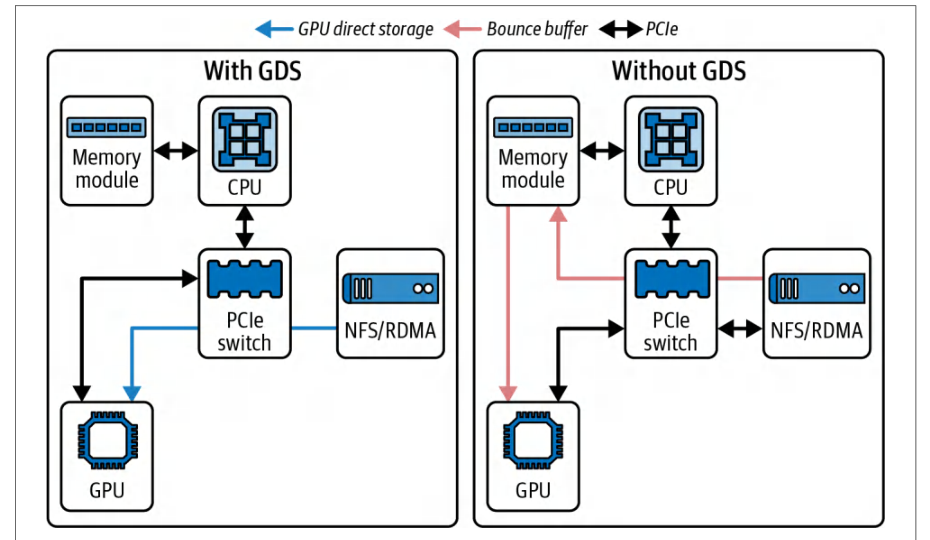
Many storage vendors like WekaIO, DDN, VAST, Cloudian, etc., have released GDS-aware solutions or plugins so their systems can deliver data using RDMA directly into GPU memory. This ecosystem support means GDS can be used by enterprise network-attached storage (NAS) and parallel filesystems out of the box.许多存储厂商,如 WekaIO、DDN、VAST、Cloudian 等,已发布支持 GDS 的解决方案或插件,以便其系统能够使用 RDMA 直接将数据交付到 GPU 显存。这种生态系统支持意味着 GDS 可以开箱即用地用于企业网络附加存储(NAS)和并行文件系统。
Reports from VAST Data show a 20% boost in read throughput using GDS on certain AI workloads. In their case, using GDS on a single A100 GPU achieved 20% higher read throughput for sequential reads, which pushed significantly closer to the 100 Gb/s link capacity per NIC when applicable. Figure 5-1 shows the architecture with and without GDS.VAST Data 的报告表明,在某些 AI 工作负载上使用 GDS 可使读取吞吐量提升 20%。在他们的案例中,在单个 A100 GPU 上使用 GDS 使顺序读取的吞吐量提高了 20%,在适用情况下显著接近每个 NIC 100 Gb/s 的链路容量。图 5-1 展示了使用和不使用 GDS 的架构。
Here on the left, we see traditional staged DMA that copies through host memory. On the right is a direct GPU pull using GDS that bypasses host memory copies and reduces CPU utilization. A report by VAST measured a 20% read-throughput boost on an NVIDIA Ampere A100 GPU and a 30%+ increase on a Hopper H100 GPU due to its higher NIC bandwidth and greater CPU burden.在左侧,我们看到传统的分阶段 DMA,通过主机内存进行拷贝。右侧是使用 GDS 的直接 GPU 拉取,绕过了主机内存拷贝并降低了 CPU 利用率。VAST 的一份报告测量到,在 NVIDIA Ampere A100 GPU 上读取吞吐量提升了 20%,而在 Hopper H100 GPU 上提升了 30% 以上,这归因于其更高的 NIC 带宽和更大的 CPU 负担。
However, GDS may need tuning, and not all workloads see a huge boost. If your CPU was easily handling the data transfers, GDS might not change throughput much. However, it will lower CPU usage, which frees up the CPU to perform data processing and other tasks. On the other hand, if the CPU is saturated with many memcpy operations, then GDS will help a lot.然而,GDS 可能需要调优,并非所有工作负载都能获得巨大提升。如果你的 CPU 能够轻松处理数据传输,GDS 可能不会显著改变吞吐量。但是,它会降低 CPU 使用率,从而释放 CPU 以执行数据处理和其他任务。另一方面,如果 CPU 因大量 memcpy 操作而饱和,那么 GDS 将大有裨益。
One has to make sure that O_DIRECT semantics and alignment are applied correctly when using GDS. Host pinned memory is not used in the storage-to-GPU data path. cuFile registers GPU device buffers, and the nvidia-fs kernel driver orchestrates DMA directly between the storage device or RDMA NIC and GPU memory. It integrates directly with the POSIX file descriptors, so you can use cuFile with regular files—including network filesystems if they support RDMA.使用 GDS 时,必须确保正确应用 O_DIRECT 语义和对齐。在存储到 GPU 的数据路径中,不使用主机锁页内存。cuFile 会注册 GPU 设备缓冲区,nvidia-fs 内核驱动会直接协调存储设备或 RDMA NIC 与 GPU 显存之间的 DMA。它与 POSIX 文件描述符直接集成,因此你可以将 cuFile 用于常规文件——包括支持 RDMA 的网络文件系统。
Consider having a tiny training batch size of 1 MB and wanting to feed 1,000 batches each second to the GPUs. This is roughly 1,000 MB/s. Doing that copy with the CPU would easily consume a few cores. With GDS, the GPU would pull that 1,000 MB/s directly from disk and free up the CPU. At higher rates—or with thousands of GPUs—this becomes even more pronounced.假设训练批大小仅为 1 MB,并且希望每秒向 GPU 提供 1,000 个批次。这大约为 1,000 MB/s。使用 CPU 完成该复制很容易消耗几个核心。使用 GDS 时,GPU 会直接从磁盘拉取这 1,000 MB/s 的数据,从而释放 CPU。在更高速率下——或者在拥有数千个 GPU 时——这种优势会更加明显。
Since training workloads are overwhelmingly read-heavy, most GDS performance gains are evaluated when reading data from storage. However, it’s important to have fast checkpoint writes as well. For RDMA-accelerated writes, the filesystem must support RDMA writes for GDS.由于训练工作负载绝大多数是读密集型,大多数 GDS 性能提升都是在从存储读取数据时进行评估的。然而,快速的检查点写入也很重要。对于 RDMA 加速写入,文件系统必须支持面向 GDS 的 RDMA 写入。
WekaFS is a well-known storage provider for ultrascale AI training workloads. They offer a parallel filesystem that ships with GDS-aware plugins for both read and write workloads over RDMA.WekaFS 是面向超大规模 AI 训练工作负载的知名存储提供商。他们提供一款并行文件系统,内置支持 GDS 的插件,可通过 RDMA 处理读取和写入工作负载。
使用 cuda-checkpoint 对 GPU 状态进行检查点
Checkpointing GPU State with cuda-checkpoint
You can checkpoint GPU state on Linux using NVIDIA’s cuda-checkpoint utility together with a CPU process checkpoint tool such as Checkpoint/Restore in User-space (CRIU). cuda-checkpoint suspends CUDA inside a running process, waits for submitted work to complete, copies device memory to host allocations managed by the driver, and releases GPU resources. This way, a CPU-side checkpointer can snapshot the process.在 Linux 上,你可以使用 NVIDIA 的 cuda-checkpoint 实用程序,并结合 Checkpoint/Restore in User-space(CRIU)等 CPU 进程检查点工具,对 GPU 状态进行检查点。cuda-checkpoint 会挂起正在运行进程中的 CUDA,等待已提交工作完成,将设备显存复制到由驱动管理的主机分配中,并释放 GPU 资源。这样,CPU 侧检查点工具就可以对该进程进行快照。
The suspend path locks CUDA driver entry points, drains outstanding work, copies device memory to host, and releases GPU resources. When estimating suspend time, consider the amount of device memory in use—as well as the host-link bandwidth available during suspend.挂起路径会锁定 CUDA 驱动入口点、排空未完成工作、将设备显存复制到主机,并释放 GPU 资源。估算挂起时间时,需要考虑正在使用的设备显存量——以及挂起期间可用的主机链路带宽。
Since the driver copies device memory into host allocations during the suspend phase, the effective suspend time is bounded by the memory image size and your platform interconnect. You should profile with Nsight Systems markers around the lock and checkpoint calls to verify actual time spent during the suspend phase.由于驱动在挂起阶段将设备显存复制到主机分配中,有效挂起时间受显存映像大小和平台互连限制。你应该在锁定和检查点调用周围使用 Nsight Systems 标记进行剖析,以验证挂起阶段实际花费的时间。
When you want the process to resume, the driver reacquires the GPUs, maps device memory to their original addresses, restores CUDA objects such as streams and contexts, and then unlocks the driver and process to allow CUDA calls to proceed.当你希望进程恢复时,驱动会重新获取 GPU,将设备显存映射到其原始地址,恢复流和上下文等 CUDA 对象,然后解锁驱动和进程,以允许 CUDA 调用继续执行。
Specifically, the CUDA Driver API exposes cuCheckpointProcessLock, cuCheckpoint ProcessCheckpoint, cuCheckpointProcessRestore, and cuCheckpointProcess Unlock. Restore requires persistence mode enabled (or a call to cuInit) and it can remap to different physical GPUs of the same chip type.具体而言,CUDA Driver API 暴露了 cuCheckpointProcessLock、cuCheckpoint ProcessCheckpoint、cuCheckpointProcessRestore 和 cuCheckpointProcess Unlock。恢复需要启用持久化模式(或调用 cuInit),并且可以重新映射到相同芯片类型的不同物理 GPU。
It’s important to note that this path is orthogonal to framework-level model checkpoints (e.g., PyTorch checkpoints). CUDA checkpoints are useful for fault tolerance, preemption, and migration of long-running training and inference jobs.重要的是,该路径与框架级模型检查点(例如 PyTorch 检查点)是正交的。CUDA 检查点适用于长时间运行的训练和推理作业的容错、抢占和迁移。
Unlike data ingestion with GDS, the checkpoint path does not DMA directly from GPU memory to storage. Instead, the device memory image is first brought into host memory by the driver during suspend. CRIU then persists that process memory to the checkpoint image. Use this to complement, not replace, your framework’s state-dict or sharded checkpoint files.与使用 GDS 进行数据摄取不同,检查点路径不会直接从 GPU 显存 DMA 到存储。相反,在挂起期间,驱动会首先将设备显存映像带入主机内存。然后 CRIU 将该进程内存持久化到检查点映像中。使用此功能来补充而非替代框架的 state-dict 或分片检查点文件。
使用 gdsio 测量 GDS
Measuring GDS with gdsio
NVIDIA provides a tool called gdsio, installed under /usr/local/cuda/gds/tools by default, to benchmark GDS throughput between disk and GPU. This is super useful.NVIDIA 提供了一个名为 gdsio 的工具,默认安装在 /usr/local/cuda/gds/tools 下,用于对磁盘与 GPU 之间的 GDS 吞吐量进行基准测试。这非常有用。
When using GDS, it’s not uncommon to see improvements on the order of 10%–20% in throughput or more—especially in CPU-constrained scenarios. Let’s take a look at an example and compare a pure CPU-mediated read (“before”) versus a direct GDS read (“after”) using NVIDIA’s gdsio tool. Here are the CLI command and throughput/latency results:使用 GDS 时,吞吐量提升 10%–20% 甚至更多并不罕见,尤其是在 CPU 受限场景中。让我们看一个示例,使用 NVIDIA 的 gdsio 工具比较纯 CPU 中介读取(“before”)与直接 GDS 读取(“after”)。以下是 CLI 命令以及吞吐量/时延结果:
# 之前(仅 Storage → CPU 内存)
# CPU 路径,主机内存,异步拷贝(-x 2)
$ /usr/local/cuda/gds/tools/gdsio \
    -f /mnt/data/large_file \
    -d 0 -w 4 -s 10G -i 1M -I 0 -x 2
Total Throughput: 8.0 GB/s
Average Latency: 1.25 ms
# Before (Storage → CPU Memory only)
# CPU path, host memory, async copies (-x 2)
$ /usr/local/cuda/gds/tools/gdsio \
    -f /mnt/data/large_file \
    -d 0 -w 4 -s 10G -i 1M -I 0 -x 2
Total Throughput: 8.0 GB/s
Average Latency: 1.25 ms
The first call shown here uses the CPU path with pinned host memory and async copies (-x 2) in read mode (-I 0) to gather a baseline. The second call below enables the GDS path (-x 0) in read mode (-I 0) for the same configuration. Make sure to use the transfer selector consistently when comparing paths. For gdsio, -x 2 measures CPU-mediated transfers, and -x 0 measures the GDS path:这里显示的第一次调用在读取模式(-I 0)下使用带有锁页主机内存和异步复制(-x 2)的 CPU 路径来收集基线。下面第二次调用在相同配置下启用读取模式(-I 0)的 GDS 路径(-x 0)。比较路径时,请确保一致地使用传输选择器。对于 gdsio,-x 2 测量 CPU 中介传输,-x 0 测量 GDS 路径:
| Path路径 | Throughput吞吐量 | Latency时延 |
|---|---|---|
| Storage → CPU (without GDS)存储 → CPU(不使用 GDS) | 8.0 GB/s8.0 GB/s | 1.25 ms1.25 ms |
| Storage → GPU (with GDS)存储 → GPU(使用 GDS) | 9.6 GB/s (+20%)9.6 GB/s (+20%) | 1.00 ms (–20%)1.00 ms (–20%) |
# 之后(使用 GPUDirect Storage 实现 Storage → GPU 显存)
#   - 相同配置,GDS 路径(-x 0)
$ /usr/local/cuda/gds/tools/gdsio \
    -f /mnt/data/large_file \
    -d 0 -w 4 -s 10G -i 1M -I 0 -x 0
Total Throughput: 9.6 GB/s
Average Latency: 1.00 ms
# After (Storage → GPU Memory using GPUDirect Storage)
#   - same config, GDS path (-x 0)
$ /usr/local/cuda/gds/tools/gdsio \
    -f /mnt/data/large_file \
    -d 0 -w 4 -s 10G -i 1M -I 0 -x 0
Total Throughput: 9.6 GB/s
Average Latency: 1.00 ms
We see that using GDS to create a direct data path from disk into GPU memory increases throughput by 20% with a corresponding decrease in average I/O latency, as shown in Table 5-1. It does this while freeing up CPU cycles previously spent moving data through host buffers. This simple benchmark shows how to verify GDS’s benefits in your system.如表 5-1 所示,使用 GDS 创建从磁盘到 GPU 显存的直接数据路径,可将吞吐量提高 20%,同时平均 I/O 时延相应降低。它在实现这一点的同时,释放了此前用于通过主机缓冲区移动数据的 CPU 周期。这个简单基准测试展示了如何在你的系统中验证 GDS 的收益。
In this example, using GDS (Storage → GPU) increased read throughput from 8.0 GB/s to 9.6 GB/s and reduced latency from 1.25 ms to 1.00 ms. This translates to ~20% improvement in both throughput (higher) and latency (lower).在此示例中,使用 GDS(存储 → GPU)将读取吞吐量从 8.0 GB/s 提高到 9.6 GB/s,并将时延从 1.25 ms 降低到 1.00 ms。这相当于吞吐量(更高)和时延(更低)均改善 ~20%。
DeepSeek 的 Fire-Flyer 文件系统
DeepSeek’s Fire-Flyer File System
DeepSeek created a custom, open source filesystem called Fire-Flyer File System (3FS) from the ground up. It was born out of their observation that AI workloads perform massive numbers of random reads.DeepSeek 从零开始构建了一个自定义的开源文件系统,名为 Fire-Flyer 文件系统(3FS)。它源于他们的一个观察:AI 工作负载会执行海量的随机读取。
These random reads make conventional read data caching ineffective—and even counterproductive—for LLM training and inference workloads. By eliminating caching and employing direct file I/O, 3FS ensures that every request goes straight to the NVMe SSD device and avoids wasteful cache management. This approach is similar to modern HPC filesystems that prioritize direct storage access. As such, 3FS minimizes kernel page-cache involvement and host memory copies during reads.这些随机读取使得传统的读数据缓存在 LLM 训练与推理工作负载上失效——甚至适得其反。通过取消缓存并采用直接文件 I/O,3FS 确保每个请求都直达 NVMe SSD 设备,避免浪费性的缓存管理。这一思路与现代 HPC 文件系统相似,后者优先考虑直接存储访问。因此,3FS 在读取过程中将内核页缓存的参与和主机内存拷贝降至最低。
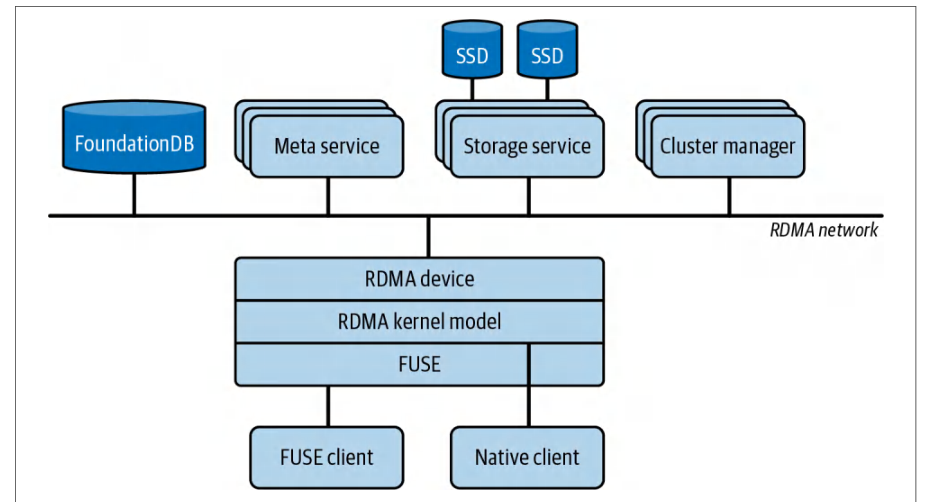
3FS consists of four key components: cluster manager, metadata service, storage service, and client. These are interconnected over an RDMA-capable fabric like Infini-Band or RoCE to minimize CPU involvement and host-side copies. These components and connections are shown in Figure 5-2.3FS 由四个关键组件构成:集群管理器、元数据服务、存储服务和客户端。它们通过支持 RDMA 的网络结构(如 InfiniBand 或 RoCE)互连,以尽量减少 CPU 参与和主机侧拷贝。这些组件与连接关系如图 5-2 所示。
3FS is a Linux-based filesystem, which allows compatibility with existing applications while leveraging RDMA reads for direct GPU-accessible data transfers. Metadata is sharded and replicated across multiple nodes for scale-out performance. Data paths bypass the OS page cache entirely to maintain optimal throughput.3FS 是基于 Linux 的文件系统,既能兼容现有应用,又能利用 RDMA 读取实现 GPU 可直接访问的数据传输。元数据经过分片并在多个节点间复制,以实现横向扩展性能。数据路径完全绕过操作系统页缓存,以保持最优吞吐量。
To feed data directly into GPU pipelines, DeepSeek integrates RDMA-based transfers in 3FS. If you require a true GDS path, use a GDS-enabled kernel filesystem client such as NVMe, NVMe-oF, BeeGFS, WekaFS, IBM Storage Scale, or VAST. This allows asynchronous, zero-copy data movement directly into GPU device memory with minimal overheads.为了将数据直接送入 GPU 流水线,DeepSeek 在 3FS 中集成了基于 RDMA 的传输。如果你需要真正的 GDS 路径,请使用支持 GDS 的内核文件系统客户端,例如 NVMe、NVMe-oF、BeeGFS、WekaFS、IBM Storage Scale 或 VAST。这样可以以极小的开销实现异步、零拷贝的数据移动,直接进入 GPU 设备显存。
3FS complements this chapter’s techniques for overlapping I/O with computation by enabling data prefetch and transfer to run concurrently with GPU kernels. 3FS effectively extends the cascading pipeline/wave concept (discussed in Chapter 4) to storage layers.3FS 使数据预取与传输能够与 GPU 内核并发执行,从而补充了本章中 I/O 与计算重叠的各项技术。3FS 实际上将(第 4 章讨论的)级联流水线/波次概念扩展到了存储层。
DeepSeek has publicly reported multi-terabyte-per-second aggregate read throughput for 3FS on large clusters, with results up to 7.3 TB/s in their environment. In another benchmark, a large 3FS cluster achieved aggregated read throughput on the order of 6.6 TB/s using a 68-node AI-HPC cluster with 10 × 16 TB NVMe SSDs and dual 100 Gb/s. It did this while concurrently serving background workloads at an additional 1.4 TB/s. This reported 3FS throughput, 6.6 TB/s, far exceeds Ceph’s ~1.1 TB/s on similar hardware.DeepSeek 公开报告称,3FS 在大型集群上实现了每秒数 TB 的聚合读取吞吐量,在其环境中结果最高达到 7.3 TB/s。在另一项基准测试中,一个大型 3FS 集群使用 68 节点的 AI-HPC 集群(配备 10 × 16 TB NVMe SSD 和双 100 Gb/s)实现了约 6.6 TB/s 的聚合读取吞吐量。与此同时,它还为后台工作负载额外提供了 1.4 TB/s 的服务。这一报告的 3FS 吞吐量 6.6 TB/s 远超 Ceph 在类似硬件上的约 1.1 TB/s。
3FS achieves this performance by coordinating I/O across nodes. This level of sustained bandwidth helps prevent the data-staging phase from becoming the bottleneck—and helps keep GPU utilization high across both training and inference workloads.3FS 通过跨节点协调 I/O 来实现这一性能。这种级别的持续带宽有助于防止数据暂存阶段成为瓶颈,并有助于在训练和推理工作负载中保持较高的 GPU 利用率。
By creating their own filesystem optimized for random reads and integrating it with RDMA-first data paths, DeepSeek demonstrates how end-to-end, full-stack performance engineering—including storage design—is essential for utilizing the full performance potential of large-scale AI systems.通过打造针对随机读取优化的自有文件系统,并将其与 RDMA 优先的数据路径集成,DeepSeek 展示了端到端的全栈性能工程——包括存储设计——对于发挥大规模 AI 系统的全部性能潜力是何等关键。
3FS shows how rethinking the storage layer can remove the last bits of I/O bottlenecks. Building your own filesystem is an advanced technique that requires a lot of upfront investment and ongoing maintenance. Instead, it’s more likely that you will start with an existing distributed filesystem or object store. Let’s discuss these next.3FS 展示了重新思考存储层如何消除 I/O 瓶颈的最后残余。构建自己的文件系统是一种高级技术,需要大量前期投入和持续维护。更可能的情况是,你会从现有的分布式文件系统或对象存储开始。接下来讨论这些。
分布式并行文件系统与对象存储
Distributed, Parallel Filesystems and Object Stores
When training on multiple nodes, a common setup is to use a shared filesystem like an NFS server, or a parallel filesystem like Lustre, GPFS, Ceph, etc. With these systems, all nodes can access the same dataset. While convenient, these filesystems can become a bottleneck if not configured properly.在多个节点上训练时,常见配置是使用 NFS 服务器等共享文件系统,或 Lustre、GPFS、Ceph 等并行文件系统。借助这些系统,所有节点都可以访问同一数据集。虽然方便,但如果配置不当,这些文件系统可能成为瓶颈。
Though it’s simple to set up, a single NFS server can easily become a throughput bottleneck if many nodes are reading at once. If you must use NFS, ensure the server has multiple fast NICs. You should also consider using multiple NFS servers to split up the dataset so that each server handles a partition of data.尽管设置简单,但如果许多节点同时读取,单个 NFS 服务器很容易成为吞吐量瓶颈。如果必须使用 NFS,请确保服务器具有多个高速 NIC。还应考虑使用多个 NFS 服务器拆分数据集,使每个服务器处理一部分数据。
For multi-GPU clusters, you should consider NFS only for modest scales such as a few nodes. For larger training clusters, a single NFS server—even a high-end implementation—is likely to become a bottleneck. This is why parallel filesystems and cloud storage caches like Amazon FSx for Lustre are preferred for modern AI training clusters.对于多 GPU 集群,只应在几个节点等适度规模下考虑使用 NFS。对于更大的训练集群,单个 NFS 服务器——即使是高端实现——也可能成为瓶颈。这就是为什么现代 AI 训练集群更倾向于使用并行文件系统和 Amazon FSx for Lustre 等云存储缓存。
NFS also has tuning parameters like rsize/wsize (read/write request sizes). It’s recommended to use the max value (e.g., 1 MB) to improve throughput. Make sure the underlying NFS storage is fast enough using NVMe SSD—and potentially in a RAID 0 configuration. And don’t forget to check the NFS client mount options. They should be tuned as well.NFS 还有 rsize/wsize(读/写请求大小)等调优参数。建议使用最大值(例如 1 MB)以提高吞吐量。确保底层 NFS 存储足够快,使用 NVMe SSD——并可能采用 RAID 0 配置。别忘了检查 NFS 客户端挂载选项,它们也应进行调优。
You can mount your NFS client with rsize=1048576,wsize=1048576,noa time,async, for instance, to use 1 MiB blocks and eliminate access-time updates (noa time). You can also add actimeo=60,lookupcache=pos to cache file attributes and directory entries for 60 seconds. These simple tweaks can vastly reduce per-request overhead and boost parallel read throughput on large, shared datasets.例如,你可以使用 rsize=1048576,wsize=1048576,noa time,async 挂载 NFS 客户端,以使用 1 MiB 块并消除访问时间更新(noa time)。你还可以添加 actimeo=60,lookupcache=pos,将文件属性和目录条目缓存 60 秒。这些简单调整可以大幅降低每次请求的开销,并提升大型共享数据集上的并行读取吞吐量。
Object storage like Amazon S3 is not a typical filesystem, but it is very common in AI workloads. Accessing object storage during training can be slow if done naively. The solution often involves staging data on local NVMe SSD storage—or using a caching layer on top of object storage (e.g., Amazon FSx for Lustre on top of S3). Tools like s5cmd and aws s3 cp let you download data before training starts.Amazon S3 等对象存储不是典型文件系统,但在 AI 工作负载中非常常见。如果在训练期间以朴素方式访问对象存储,可能会很慢。解决方案通常包括将数据暂存到本地 NVMe SSD 存储——或在对象存储之上使用缓存层(例如在 S3 之上的 Amazon FSx for Lustre)。s5cmd 和 aws s3 cp 等工具可让你在训练开始前下载数据。
You can also use a streaming library that reads objects from Amazon S3 with range requests and performs caching. If directly reading from Amazon S3, use as large requests as possible—and use multithreaded range Get operations.你还可以使用流式库,通过范围请求从 Amazon S3 读取对象并执行缓存。如果直接从 Amazon S3 读取,请使用尽可能大的请求——并使用多线程范围 Get 操作。
Parallel filesystems like Lustre and GPFS are designed for high concurrency and throughput. A Lustre setup, for instance, has multiple Object Storage Targets (OSTs) that serve data. By striping files across OSTs, you can multiply your throughput. If you have such a parallel filesystem, ensure your large data files are striped across many OSTs.Lustre 和 GPFS 等并行文件系统专为高并发和高吞吐量设计。例如,Lustre 配置具有多个提供数据的对象存储目标(OST)。通过将文件跨 OST 条带化,你可以成倍提升吞吐量。如果你拥有这样的并行文件系统,请确保大型数据文件跨许多 OST 条带化。
Striping files across implies that chunks of the file live on different servers. This allows parallel reads. For instance, you might stripe your Arrow, TFRecord, or Parquet files across 4 OSTs. If each OST gives 500 MB/s, you can achieve a theoretical peak read throughput of 2 GB/s.跨服务器条带化文件 意味着文件分块存储在不同服务器上。这允许并行读取。例如,你可以将 Arrow、TFRecord 或 Parquet 文件条带化到 4 个 OST 上。如果每个 OST 提供 500 MB/s,你可以达到 2 GB/s 的理论峰值读取吞吐量。
调优、复制与压缩数据
Tuning, Replicating, and Compressing Data
To tune these filesystems, make sure to check the documentation. For instance, lfs setstripe is used on Lustre to set striping for a large dataset across 4 or 8 OSTs to aggregate OST bandwidth.要调优这些文件系统,请务必查看文档。例如,在 Lustre 上使用 lfs setstripe 为大型数据集设置跨 4 或 8 个 OST 的条带化,以聚合 OST 带宽。
Monitor the filesystem’s I/O during training, using tools like lmt for Lustre—or vendor-specific monitoring tools. You’ll be looking to see if individual nodes in the storage cluster are hot. If so, you need to identify why. The cause is most likely a sharding issue in which many more reads/writes are ending up on a smaller number of nodes.在训练期间使用 Lustre 的 lmt 等工具或厂商专用监控工具监控文件系统的 I/O。你需要观察存储集群中的单个节点是否负载过高。如果是,则需要找出原因。原因很可能是分片问题,导致更多读写落在更少节点上。
To eliminate network reads entirely, you can, in some cases, choose to replicate the dataset onto each node in the compute cluster. This assumes you have enough storage on each node. This is an admittedly brute-force but relatively common and very effective solution to eliminate network reads entirely. You will see an immediate performance win—at the cost of extra storage.要完全消除网络读取,在某些情况下,你可以选择将数据集复制到计算集群的每个节点。这假设每个节点都有足够存储。这诚然是蛮力方案,但相对常见且非常有效,可完全消除网络读取。你会立即看到性能提升——代价是额外存储。
Another option to improve performance is to store data compressed on the filesystem or object store—and decompress them on the fly. Examples include images (JPEGs) and compressed text (Arrow and Parquet). This can save I/O bandwidth at the cost of some extra CPU or GPU cycles. However, if I/O is the bottleneck and the CPUs and GPUs are idle, this is a reasonable trade-off.另一种提升性能的选择是在文件系统或对象存储中压缩存储数据,并即时解压缩。示例包括图像(JPEG)和压缩文本(Arrow 和 Parquet)。这可以节省 I/O 带宽,代价是额外一些 CPU 或 GPU 周期。然而,如果 I/O 是瓶颈且 CPU 和 GPU 空闲,这是合理权衡。
Many data pipelines are already doing this, so you’ll just want to verify the compression ratio and make sure you’re using it at every step in the pipeline. The key is to find a balance such that the decompression step doesn’t become the bottleneck.许多数据流水线已经这样做,因此你只需验证压缩率,并确保在流水线每个步骤都使用它。关键是找到平衡,使解压缩步骤不会成为瓶颈。
Libraries like nvJPEG can decode images on GPU. Modern GPUs add an on-die Decompression Engine supporting formats such as LZ4, Snappy, and Deflate to accelerate moving and unpacking data into GPU memory. If you store compressed batches on disk, Blackwell GPUs can decompress them in-pipeline using the Decompression Engine. This frees SMs to run higher-value tasks such as compute kernels. You should favor these compression formats for I/O bound workloads.nvJPEG 等库可以在 GPU 上解码图像。现代 GPU 增加了片上解压缩引擎,支持 LZ4、Snappy 和 Deflate 等格式,以加速将数据移动并解包到 GPU 显存中。如果你将压缩批次存储在磁盘上,Blackwell GPU 可以使用解压缩引擎在流水线中对其进行解压缩。这可以释放流多处理器(SM)来运行更高价值任务,例如计算内核。对于 I/O 受限工作负载,你应优先选择这些压缩格式。
This is another way to offload arithmetic operations from the CPU to the GPU—and possibly overlap data decoding with gradient computations during training, for instance. And because of the high-bandwidth CPU-to-GPU NVLink-C2C interconnect (up to 900 GB/s bidirectional bandwidth), you can prevent CPU-assisted stages from becoming bottlenecks.这是将算术运算从 CPU 卸载到 GPU 的另一种方式——例如,在训练期间可能将数据解码与梯度计算重叠。并且由于高带宽 CPU 到 GPU 的 NVLink-C2C 互连(最高 900 GB/s 双向带宽),你可以防止 CPU 辅助阶段成为瓶颈。
Utilizing these clever software and hardware GPU offload features can further shift workloads off the CPU and keep the input data pipeline balanced. The key is still to make sure that the decompression time does not replace I/O as the bottleneck, otherwise it likely isn’t worth the extra compression computations.利用这些巧妙的软件和硬件 GPU 卸载特性,可以进一步将工作负载从 CPU 转移出去,并保持输入数据流水线平衡。关键仍然是确保解压缩时间不会取代 I/O 成为瓶颈,否则额外的压缩计算可能不值得。
监控存储 I/O
Monitoring Storage I/O
As with any performance engineering task, measurement is key. Similar to monitoring network communication, it’s important to use all of your available tools to monitor your storage pipeline communication.与任何性能工程任务一样,测量是关键。类似于监控网络通信,重要的是使用所有可用工具来监控存储流水线通信。
These tools include Linux iostat, iotop, nvme-cli, perf, and eBPF. In addition, you can use vendor-specific utilities and dashboards to monitor queues, latencies, read-ahead effects, and cache hit ratios. These will help to show local NVMe device usage and determine if you’re saturating network links when reading data from a NAS or object store.这些工具包括 Linux iostat、iotop、nvme-cli、perf 和 eBPF。此外,你可以使用厂商专用实用程序和仪表板来监控队列、时延、预读效果和缓存命中率。这些工具有助于显示本地 NVMe 设备使用情况,并确定从 NAS 或对象存储读取数据时是否使网络链路饱和。
Also consider tools like Nsight Systems to trace I/O wait times and visualize overlap with GPU kernels. Use the Nsight Systems option --trace=gds. This will capture cuFile API activity and tracing on the timeline. You can also enable GDS cuFile static tracepoints using /etc/cufile.json to see cuFile events in Nsight Systems. Kernel-mode counters for NVMe peer-to-peer DMA paths are not exposed in Nsight Systems and may not be available for all GDS stacks.还可以考虑使用 Nsight Systems 等工具来跟踪 I/O 等待时间,并可视化其与 GPU 内核的重叠情况。使用 Nsight Systems 选项 --trace=gds。这将捕获 cuFile API 活动并在时间线上进行跟踪。你还可以通过 /etc/cufile.json 启用 GDS cuFile 静态跟踪点,以便在 Nsight Systems 中查看 cuFile 事件。Nsight Systems 中未暴露 NVMe 点对点 DMA 路径的内核模式计数器,且这些计数器可能并非在所有 GDS 堆栈中都可用。
Another tool is NVIDIA’s Data Center GPU Manager (DCGM), which reports useful GPU I/O statistics. Together, these GPU-specific tools complement host OS tools and give a more complete picture of GPU starvation due to I/O.另一个工具是 NVIDIA 的数据中心 GPU 管理器(DCGM),它可报告有用的 GPU I/O 统计信息。这些 GPU 专用工具与主机操作系统工具相辅相成,从而更全面地反映因 I/O 导致的 GPU 饥饿状况。
In PyTorch, calling next(data_iterator) measures the total time your GPU sits idle waiting for the next batch. This time includes any background prefetching and the host → device copy—and not just the Python data-loading logic.在 PyTorch 中,调用 next(data_iterator) 可测量 GPU 等待下一个批次时的总空闲时间。该时间包括任何后台预取以及主机 → 设备拷贝——而不仅仅是 Python 数据加载逻辑。
If you want to isolate pure data-loading cost, you can temporarily set num_workers=0 so there’s no prefetch. Then you can time only the iterator pull. You can separately wrap your .to("cuda") or pinned-memory staging in its own timer (or use CUDA events) to capture the host → device copy overhead.如果你想隔离纯数据加载开销,可以暂时设置 num_workers=0 以禁用预取。然后你可以仅对迭代器拉取操作进行计时。你可以单独将 .to("cuda") 或锁页内存暂存操作包裹在自己的计时器中(或使用 CUDA 事件)来捕获主机 → 设备拷贝开销。
Because your bottleneck might be in the Python pipeline or in the memcpy into GPU memory, you can distinguish them by doing the following and comparing the timings with the overall “GPU idle” time:由于瓶颈可能位于 Python 流水线*或*向 GPU 显存的 memcpy 操作中,你可以通过以下步骤区分它们,并将计时结果与整体“GPU 空闲”时间进行比较:
- DataLoader versus Python costDataLoader 与 Python 开销
- Profile with
num_workers=0to see how long the Python loop and transforms themselves take. This removes any background thread scheduling.使用num_workers=0进行剖析,以查看 Python 循环和变换本身耗时多久。这会消除任何后台线程调度。
- Host → Device copy cost主机 → 设备拷贝开销
- Measure only the device-transfer time by inspecting the “Copy” lanes in Nsight Systems to quantify how long staging data into GPU buffers actually stalls the GPU. You can also wrap
torch.cuda.Eventaround your.to("cuda")calls.通过检查 Nsight Systems 中的“Copy”通道,仅测量设备传输时间,以量化将数据暂存到 GPU 缓冲区实际导致 GPU 停滞的时间。你还可以在.to("cuda")调用周围包裹torch.cuda.Event。
By comparing these two timings to your overall “GPU idle” time, you’ll know whether to speed up your Python pipeline (e.g., add workers, simplify transforms) or optimize the H2D transfer path (e.g., use pinned memory, increase interconnect bandwidth, or switch to GDS).通过将这两个计时结果与整体“GPU 空闲”时间进行比较,你将知道是应该加速 Python 流水线(例如,增加工作进程、简化变换),还是优化 H2D 传输路径(例如,使用锁页内存、增加互连带宽或切换到 GDS)。
By monitoring your storage pipeline, you might find, for instance, that your GPUs are spending 30% of their time waiting for data. In this case, the GPU’s overall throughput is limited by I/O, so you’ll want to implement some of the strategies mentioned here to reduce the I/O stalls and increase compute throughput. After tuning, for instance, maybe your GPUs are waiting only 5% of the time for data. You’d also see overall training steps per second increase proportionally—6× in this case.通过监控存储流水线,你可能会发现,例如,GPU 有 30% 的时间在等待数据。在这种情况下,GPU 的整体吞吐量受限于 I/O,因此你需要实施此处提到的一些策略来减少 I/O 停滞并提高计算吞吐量。例如,经过调优后,GPU 可能只有 5% 的时间在等待数据。你还会看到整体训练步数每秒按比例增加——在本例中为 6 倍。
Storage and I/O optimization is often about eliminating small inefficiencies that add up; for instance, a 5 ms latency here and a 10 MB too-small buffer there. But at scale, fixing these inefficiencies makes a huge difference. The bottom line is similar to earlier sections: keep the pipeline full. In this case, not just the compute pipeline but the data pipeline as well. Every component from disk to GPU memory should be monitored, profiled, analyzed, and improved to ensure that data is streaming into those GPUs as continuously as possible.存储和 I/O 优化通常旨在消除累积起来的小低效问题;例如,这里的 5 ms 时延和那里过小的 10 MB 缓冲区。但在大规模场景下,修复这些低效问题会产生巨大差异。结论与前几节类似:保持流水线满载。在本例中,不仅计算流水线要满载,数据流水线也要满载。从磁盘到 GPU 显存的每个组件都应受到监控、剖析、分析和改进,以确保数据尽可能连续地流入这些 GPU。
调优数据流水线
Tuning the Data Pipeline
In addition to raw storage I/O, the preprocessing and data loading pipeline on the CPU (or GPU) is a critical part of overall AI workload performance. A well-tuned data pipeline ensures that GPUs are never idle waiting for new data. Additionally, it’s important that the right amount of CPU work is being done in parallel to feed the GPU beast.除了原始存储 I/O 之外,CPU(或 GPU)上的预处理和数据加载流水线也是整体 AI 工作负载性能的关键部分。调优良好的数据流水线可确保 GPU 不会因等待新数据而空闲。此外,确保有适量的 CPU 工作并行执行以喂给 GPU 这一“巨兽”也很重要。
Modern deep learning frameworks provide high-level APIs to load and preprocess data. These can—and should—be tuned for performance. We will discuss general strategies and NVIDIA’s tools like DALI and NeMo for advanced data pipeline management.现代深度学习框架提供高层 API 来加载和预处理数据。这些 API 可以——也应该——针对性能进行调优。我们将讨论通用策略,以及 NVIDIA 的 DALI 和 NeMo 等用于高级数据流水线管理的工具。
高效的数据加载与预处理
Efficient Data Loading and Preprocessing
The typical data loading process in training involves reading data from storage, decoding or deserializing the data like parsing JSON and decoding JPEGs, applying some transformations like tokenizing text and cropping images, and collating the data into batches. These steps can be CPU-intensive but can also be offloaded to the GPU if they are compute-heavy. To maintain high throughput, you can employ a number of techniques described here:训练中典型的数据加载过程包括:从存储读取数据,解码或反序列化数据(例如解析 JSON、解码 JPEG),应用一些变换(例如对文本分词、裁剪图像),以及将数据拼接成批。这些步骤可能是 CPU 密集型的,但如果计算量大,也可以卸载到 GPU。为保持高吞吐量,你可以采用下面介绍的多种技术:
- Use multiple worker processes/threads使用多个工作进程/线程
- As mentioned, frameworks like PyTorch
DataLoaderlet you specifynum_workers. Each worker runs in parallel to fetch and preprocess data. Usually these are如前所述,PyTorchDataLoader等框架允许你指定num_workers。每个工作进程并行运行以获取和预处理数据。通常这些是
separate processes to avoid Python GIL issues. The main process asynchronously fetches batches from the worker processes using a queue.相互独立的进程,以避免 Python GIL 问题。主进程通过队列从工作进程异步获取批次。
- Avoid Python bottlenecks避免 Python 瓶颈
- If your data loading logic is in Python, be wary of heavy Python-level processing. If you see pure Python code being used to tokenize individual lines of text in a loop, this is a red flag. In these cases, change to vectorize the operations, if possible. Or use C++/C bindings for improved performance. Many libraries exist for these types of common tasks, including the Hugging Face Tokenizers library and TorchText. While they have Python bindings, they are written in fast Rust/C++ under the hood for speed. At this point, Python is just an easy-to-use interface on top of the C/C++ code.如果你的数据加载逻辑用 Python 编写,就要警惕繁重的 Python 层处理。如果你看到在循环中用纯 Python 代码对逐行文本进行分词,这就是一个危险信号。在这种情况下,尽可能改为向量化操作。或者使用 C++/C 绑定以提升性能。针对这类常见任务已有许多库,包括 Hugging Face Tokenizers 库和 TorchText。它们虽然提供 Python 绑定,但底层用快速的 Rust/C++ 编写以保证速度。此时,Python 只是 C/C++ 代码之上一个易用的接口。
- Overlap CPU-GPU重叠 CPU 与 GPU
- The idea is to overlap data preparation with GPU processing. In a perfect scenario, while the GPU is processing batch N, the CPU has already loaded and preprocessed batch N+1 and made it available in pinned memory. When the GPU is done processing batch N, it just DMA copies batch N+1 and starts computing immediately. Meanwhile, the CPU moves on to process batch N+2. This pipelining is crucial for performance. Most frameworks do this by default when using multiple workers, but you should monitor to ensure that it’s happening. If not, you might see the GPU go idle at the start of every iteration while it waits for more data.其思路是让数据准备与 GPU 处理重叠进行。在理想情况下,当 GPU 正在处理第 N 个批次时,CPU 已经加载并预处理完第 N+1 个批次,并将其放入锁页内存中可用。当 GPU 处理完第 N 个批次后,它只需通过 DMA 拷贝第 N+1 个批次并立即开始计算。与此同时,CPU 继续处理第 N+2 个批次。这种流水线化对性能至关重要。大多数框架在使用多个工作进程时默认会这样做,但你应当监控以确保它确实在发生。否则,你可能会看到 GPU 在每次迭代开始时因等待更多数据而空闲。
- Perform operations in batches by collating tensors通过拼接张量按批执行操作
- If possible, you want your loader to perform operations in batches instead of per sample. For example, you want to apply transformations to a whole batch of tensors at once using vectorized operations. You do this by collating the batch with a custom
collate_fn()—or perhaps in the training loop itself on the GPU. This is much better than performing these operations on each row of input data separately. However, some transformations need to be performed per sample, so you sometimes need to understand the workload before you can batch and collate effectively.如果可能,你希望加载器按批而不是按样本执行操作。例如,你希望使用向量化操作一次性对整个张量批次应用变换。为此,你可以用自定义的collate_fn()拼接批次——或者干脆在训练循环中于 GPU 上完成。这比分别对每一行输入数据执行这些操作要好得多。然而,有些变换必须按样本执行,因此有时你需要先理解工作负载,才能有效地按批拼接。
- Use memory pinning with data loading在数据加载中使用内存锁页
- Enabling
pin_memory=Truein PyTorch DataLoader makes the host → GPU (H2D) transfer faster and allows truly asynchronous.to(..., non_blocking=True)copies when the source is pinned. DMA from pinned memory avoids extra copies and page faults because the data is locked in RAM and ready for direct transfer. This is almost always beneficial when transferring data to the GPU. Make sure you set a highulimit -l(or container--ulimit memlock) to avoid allocation failures for large pinned buffers.在 PyTorch DataLoader 中启用pin_memory=True可以加快主机 → GPU(H2D)传输,并在源数据已锁页时实现真正异步的.to(..., non_blocking=True)拷贝。从锁页内存进行 DMA 可避免额外的拷贝和缺页,因为数据被锁定在 RAM 中,随时可直接传输。在向 GPU 传输数据时,这几乎总是有益的。请确保设置较高的ulimit -l(或容器--ulimit memlock),以避免大型锁页缓冲区分配失败。
- Prefetch batches预取批次
- Some frameworks let you specify a prefetch queue length. This is how many batches it should load ahead. By default, PyTorch’s DataLoader uses a conservative value such as
prefetch_factor=2. In this case, PyTorch prefetches two batches per worker. Under the hood it keeps up tonum_workers * prefetch_factorbatches queued. As such, before blocking, each worker loads two batches of data. If your workload has bursty I/O—or you see workers starving the GPU occasionally—you can increaseprefetch_factorto 4 or 8, for example. Here is a PyTorch snippet that demonstrates the PyTorchDataLoaderusing bothpin_memoryandprefetch_factor=4:有些框架允许你指定预取队列长度,即应提前加载多少个批次。默认情况下,PyTorch 的 DataLoader 使用一个保守的取值,例如prefetch_factor=2。此时,PyTorch 为每个工作进程预取两个批次。在底层,它最多保持num_workers * prefetch_factor个批次排队。因此,在发生阻塞之前,每个工作进程会加载两个批次的数据。如果你的工作负载存在突发式 I/O,或者你偶尔观察到工作进程让 GPU 处于饥饿状态,那么可以把prefetch_factor提高到 4 或 8。下面这段 PyTorch 代码演示了同时使用pin_memory和prefetch_factor=4的 PyTorchDataLoader:
import torch
from torch.utils.data import Dataset, DataLoader
# 创建 Dataset 和 DataLoader,预取 4 个批
# 每个 worker 预取到锁页 CPU 内存中。
class Synthetic(Dataset):
    def __init__(self, n, shape): self.n, self.shape = n, shape
    def __len__(self): return self.n
    def __getitem__(self, i):
        # 廉价的 CPU 侧工作;可替换为真实的解析/解码
        return torch.ones(self.shape,  dtype=torch.float32)
B, C, H, W = 32, 3, 224, 224
dataset = Synthetic(n=100_000, shape=(B, C, H, W))
loader = DataLoader(
    dataset,
    batch_size=B,
    num_workers=8,
    pin_memory=True,
    persistent_workers=True,
    prefetch_factor=4,
  )
copy_stream = torch.cuda.Stream()
compute_stream = torch.cuda.current_stream()
for batch in loader:
    with torch.cuda.stream(copy_stream):
        batch_gpu = batch.to(device, non_blocking=True)
    # 确保待处理的 H2D 拷贝在计算使用之前完成
    with torch.cuda.stream(compute_stream):
        torch.cuda.current_stream().wait_stream(copy_stream)
        outputs = model(batch_gpu)
import torch
from torch.utils.data import Dataset, DataLoader
# Create a Dataset and DataLoader that prefetches 4 batches
# per worker into pinned CPU memory.
class Synthetic(Dataset):
    def __init__(self, n, shape): self.n, self.shape = n, shape
    def __len__(self): return self.n
    def __getitem__(self, i):
        # Cheap CPU-side work; replace with real parse/decode
        return torch.ones(self.shape,  dtype=torch.float32)
B, C, H, W = 32, 3, 224, 224
dataset = Synthetic(n=100_000, shape=(B, C, H, W))
loader = DataLoader(
    dataset,
    batch_size=B,
    num_workers=8,
    pin_memory=True,
    persistent_workers=True,
    prefetch_factor=4,
  )
copy_stream = torch.cuda.Stream()
compute_stream = torch.cuda.current_stream()
for batch in loader:
    with torch.cuda.stream(copy_stream):
        batch_gpu = batch.to(device, non_blocking=True)
    # ensure pending H2D completes before compute uses it
    with torch.cuda.stream(compute_stream):
        torch.cuda.current_stream().wait_stream(copy_stream)
        outputs = model(batch_gpu)
In this example, each of the 8 worker processes preloads batches of size 4 into pinned memory. Because the host memory is pinned, the asynchronous .to(device, non_blocking=True) transfer can use DMA for high-speed data copying.在这个示例中,8 个工作进程各自把批大小为 4 的批次预加载到锁页内存中。由于主机内存是锁页的,异步的 .to(device, non_blocking=True) 传输可以使用 DMA 进行高速数据复制。
Consequently, while the GPU processes the current batch (batch N), the DataLoader is already preparing and transferring the next batch (batch N+1) in parallel. This overlap is critical. Without pinned memory, the system would need to pin the memory on the fly for each transfer, which would introduce unwanted latency. In essence, pinned memory ensures that data transfers from CPU to GPU happen more rapidly and concurrently with GPU computation, maximizing overall throughput.因此,当 GPU 处理当前批次(批次 N)时,DataLoader 已经在并行地准备并传输下一个批次(批次 N+1)。这种重叠至关重要。如果没有锁页内存,系统就需要在每次传输时临时锁定内存,这会引入不必要的时延。本质上,锁页内存确保从 CPU 到 GPU 的数据传输更快,并与 GPU 计算并发进行,从而最大化整体吞吐量。
Another option is to enable persistent_workers=True so workers stay alive and keep filling the queue across epochs. This is most effective when you loop over the same dataset many times—especially if these iterations (aka epochs) are very short. Persistent workers can also help when worker startup incurs significant overhead due to importing modules, opening files, etc. With persistent workers, you avoid the cost of spawning and tearing down processes at each epoch boundary. Your workers stay alive so they can immediately begin prefetching for the next epoch with minimal overhead.另一种选择是启用 persistent_workers=True,使工作进程保持存活,并在各个 epoch 之间持续填充队列。当你多次遍历同一数据集时,这种方式最为有效——尤其是当这些迭代(即 epoch)非常短的时候。当工作进程的启动因导入模块、打开文件等操作而产生显著开销时,持久化工作进程同样有帮助。使用持久化工作进程,可以避免在每个 epoch 边界处创建和销毁进程的开销。工作进程保持存活,因此能以最小的开销立即开始为下一个 epoch 预取数据。
A common pitfall is introducing a hidden bottleneck in your pipeline. This is relatively easy to do by adding debug logging or expensive CPU transforms. Delays may only show up under load. To catch these, first profile the DataLoader in isolation by timing how long it takes to produce 100 batches with all downstream GPU work disabled. Once you’ve measured that baseline, compare it to your target iteration time and to the total GPU-idle time measured during normal training.一个常见的陷阱是在流水线中引入隐藏的瓶颈。通过添加调试日志或开销高昂的 CPU 变换,这相对容易发生。延迟可能只在负载下才会显现。要捕捉这些延迟,首先应隔离地对 DataLoader 进行性能剖析:在禁用所有下游 GPU 工作的前提下,计时它生成 100 个批次所需的时间。测出该基线后,将其与目标迭代时间以及正常训练期间测得的总 GPU 空闲时间进行比较。
If the DataLoader alone is too slow, optimize your Python pipeline by removing per-element logging, simplifying transforms, or adding more workers. If the gap between isolated loader speed and real-run loader speed is large, you’re likely bound by host → device transfers or kernel-launch overhead.如果仅 DataLoader 本身就太慢,可以通过移除逐元素日志、简化变换或增加工作进程来优化 Python 流水线。如果隔离测试的加载器速度与真实运行时的加载器速度差距很大,那么你很可能受限于主机 → 设备传输或内核启动开销。
扩展 GPU 数量的同时扩展工作进程
Scaling Out Workers as You Scale Out Number of GPUs
As you add more GPUs, you should also expand your data pipeline, or you will starve the devices. In practice this means increasing your DataLoader’s worker count or I/O bandwidth so you can feed every GPU. This is required to raise the total batch size so that each iteration moves more samples across your larger number of devices.随着 GPU 数量的增加,你也应当扩展数据流水线,否则设备将处于饥饿状态。在实践中,这意味着增加 DataLoader 的工作进程数量或 I/O 带宽,以便为每块 GPU 提供数据。这也是提高总批大小的必要条件,从而使每次迭代在更多设备上搬运更多样本。
Scaling out compute without scaling out the ingestion pipeline resources will shift the bottleneck even further toward the data loading pipeline. In a multinode, data-parallel configuration, each rank reads a distinct shard. Together, the aggregate data loading workload scales with cluster size.只扩展计算而不扩展数据摄取流水线的资源,会使瓶颈进一步向数据加载流水线转移。在多节点、数据并行的配置中,每个 rank 读取一个不同的分片。合在一起,总体的数据加载工作负载随集群规模扩展。
To sustain the necessary throughput, you will need parallel, high-bandwidth, and distributed storage backends, as discussed earlier, to support ultrascale data sharding across the many nodes in your cluster. And recall from our discussion earlier on sharding the dataset per node. Specifically, as you add more nodes, make sure that each node’s local storage can handle its share of the dataset.为了维持所需的吞吐量,你需要如前所述的那样,采用并行、高带宽、分布式的存储后端,以支撑集群中众多节点上的超大规模数据分片。回想我们前面关于按节点对数据集进行分片的讨论。具体来说,随着你增加更多节点,要确保每个节点的本地存储能够承担其对应的那份数据集。
使用 NVIDIA DALI 进行多模态数据处理
Multimodal Data Processing with NVIDIA DALI
For complex or heavy data preprocessing, NVIDIA provides their Data Loading Library (DALI). DALI accelerates data processing by either moving it to the GPU or using optimized CPU code written in C++. It’s especially useful for image and video data where decoding and augmentation can benefit from GPU acceleration.对于复杂或繁重的数据预处理,NVIDIA 提供了数据加载库(Data Loading Library,DALI)。DALI 通过将数据处理迁移到 GPU,或使用以 C++ 编写的优化 CPU 代码来加速数据处理。它对于图像和视频数据尤其有用,因为解码和增强可以受益于 GPU 加速。
For example, DALI can decode JPEG images on the GPU and apply augmentations like random crop, resize, and normalization, all on the GPU. This is often faster than on a CPU—assuming the GPU has available cycles. This offloads processing from the CPU and reduces the number of CPU workers needed.例如,DALI 可以在 GPU 上解码 JPEG 图像,并在 GPU 上应用随机裁剪、缩放和归一化等增强操作。这通常比在 CPU 上更快——前提是 GPU 有空闲的计算周期。这样可将处理负载从 CPU 卸载,并减少所需的 CPU 工作进程数量。
DALI pipelines are defined declaratively as a static graph of operators. You subclass nvidia.dali.pipeline.Pipeline and declare your data sources and CPU/GPU ops in define_graph(). DALI then handles the execution, prefetching, and threading internally using its own thread pools and queues.DALI 流水线以声明式方式定义为由算子构成的静态图。你通过继承 nvidia.dali.pipeline.Pipeline,并在 define_graph() 中声明数据源以及 CPU/GPU 算子。随后 DALI 使用自己的线程池和队列在内部处理执行、预取和线程管理。
If your workload is input-bound (e.g., model training), integrating DALI might significantly boost throughput. However, one must integrate it into the training loop itself, which adds some complexity and has a bit of a learning curve.如果你的工作负载受输入限制(例如模型训练),集成 DALI 可能会显著提升吞吐量。不过,必须将其集成到训练循环本身之中,这会增加一些复杂性,并存在一定的学习曲线。
For many common workloads like classification, object detection, and segmentation, NVIDIA DALI provides prebuilt pipelines that decode images and videos on the GPU. This fully utilizes the GPU’s media-acceleration hardware.对于分类、目标检测和分割等许多常见工作负载,NVIDIA DALI 提供了预构建的流水线,可在 GPU 上解码图像和视频。这能充分利用 GPU 的媒体加速硬件。
Consider a data pipeline that reads images and videos, performs augmentations, and trains an object detection model. You might observe CPU usage at 800%, which is eight cores running at 100% utilization. But the GPU is still stalling occasionally.考虑一个读取图像和视频、执行增强并训练目标检测模型的数据流水线。你可能会观察到 CPU 使用率为 800%,即八个核心以 100% 的利用率运行。但 GPU 仍会偶尔停顿。
By using DALI, you might drop CPU utilization to 200%, or just two cores, to perform the file reads while the GPU does the actual image and video decoding. And the GPU can perform the reads concurrently with computations.通过使用 DALI,你可以将 CPU 利用率降至 200%,即仅用两个核心来执行文件读取,而由 GPU 完成实际的图像和视频解码。并且 GPU 可以在执行计算的同时并发地执行读取。
In practice, the real speedup depends entirely on where you place DALI in your flow. If you use DALI merely to decompress JPEGs and then immediately hand the raw pixels back to the CPU for augmentations and collation, you will incur extra host-device-host copies that can negate the performance gains of using DALI.在实践中,真正的加速完全取决于你把 DALI 放在流程中的哪个位置。如果你只是用 DALI 解压 JPEG,然后立即把原始像素交回 CPU 进行增强和拼接,就会引入额外的主机—设备—主机拷贝,这可能抵消使用 DALI 带来的性能收益。
As always, benchmark the end-to-end system under realistic conditions. Compare a CPU-only pipeline, a DALI-enabled pipeline, and a fully fused GPU-graph implementation to determine which delivers the best balance of CPU savings and GPU utilization for your model and dataset.一如既往,要在贴近真实的条件下对端到端系统进行基准测试。比较仅用 CPU 的流水线、启用 DALI 的流水线以及完全融合的 GPU 图实现,以确定哪一种能为你的模型和数据集带来 CPU 节省与 GPU 利用率之间的最佳平衡。
使用 NVIDIA NeMo Curator 构建高质量 LLM 数据集
Creating High-Quality LLM Datasets with NVIDIA NeMo Curator
NVIDIA NeMo is a toolkit for developing and training language models. Within the NeMo toolkit is the NeMo suite of libraries and frameworks, including the open source NeMo Curator framework.NVIDIA NeMo 是一个用于开发和训练语言模型的工具包。在 NeMo 工具包中,包含 NeMo 库和框架套件,其中包括开源的 NeMo Curator 框架。
Curator helps prepare large multimodal datasets for LLM training. It’s helpful when dealing with terabytes of data from different sources. Curator supports data processing steps such as cleansing, tokenizing, and shuffling.Curator 有助于为 LLM 训练准备大型多模态数据集。在处理来自不同来源的太字节级数据时,它非常有用。Curator 支持数据清洗、分词和洗牌等数据处理步骤。
NeMo Curator can distribute the dataset preprocessing across multiple GPUs or nodes. This makes use of multiple accelerators to prepare data faster—an important consideration when assembling multiterabyte training datasets.NeMo Curator 可以将数据集预处理分布在多个 GPU 或节点上。这利用了多个加速器来更快地准备数据——在组装太字节级训练数据集时,这是一个重要的考量因素。
In addition, Curator can compress and pack data into a small number of large files— or transform the data into a binary format for easier consumption by machines. It can also create new, synthetic training datasets to augment human datasets, which are relatively limited and becoming more and more scarce.此外,Curator 可以将数据压缩并打包到少量大文件中——或者将数据转换为二进制格式,以便机器更容易读取。它还可以创建新的合成训练数据集,以增强相对有限且日益稀缺的人类数据集。
With Curator doing the heavy preprocessing offline and ahead of the training process, the online training data pipeline becomes much simpler since it’s just reading the prepared data and maybe performing some lightweight, “last mile” shuffling, for instance.由于 Curator 在训练过程之前离线完成了繁重的预处理工作,在线训练数据管道变得更加简单,因为它只需读取准备好的数据,并可能执行一些轻量级的“最后一公里”洗牌操作。
NeMo Curator can also enforce data quality filters by deduplicating data and removing problematic content. This is important for both LLM training quality and for performance. Having a well-structured, preprocessed, and cleansed dataset upfront means the training pipeline has a consistent flow of well-structured and evenly sized data (e.g., padded to a fixed length), doesn’t have to tokenize text on the fly, and can avoid gnarly string processing.NeMo Curator 还可以通过数据去重和移除问题内容来强制执行数据质量过滤器。这对 LLM 训练质量和性能都很重要。预先拥有一个结构良好、经过预处理和清洗的数据集,意味着训练管道具有结构良好且大小均匀的数据(例如填充至固定长度)的一致流,无需即时对文本进行分词,并可以避免复杂的字符串处理。
If you have access to tools such as NeMo Curator, it’s wise to leverage them so that your training job is mostly GPU forward and backward passes—and not processing text and reading millions of randomly sized small files. For NeMo-based training, preprocessed datasets are typically stored as memory-mappable .bin data files with .idx index files. NeMo Curator’s DocumentDataset then reads and writes sharded JSONL or Parquet. Downstream conversion to .bin/.idx is handled when you build the indexed dataset.如果你可以使用 NeMo Curator 等工具,明智的做法是利用它们,使你的训练任务主要专注于 GPU 的前向和反向传播——而不是处理文本和读取数百万个大小随机的小文件。对于基于 NeMo 的训练,预处理后的数据集通常存储为可内存映射的 .bin 数据文件和 .idx 索引文件。NeMo Curator 的 DocumentDataset 随后读取和写入分片的 JSONL 或 Parquet。当你构建索引数据集时,会处理向 .bin/.idx 的下游转换。
In general, prepare your data before training. You should almost never be training with raw text. It might take some time to preprocess the data offline, but it pays off in the long run with faster training runs, quicker iterations, and more predictable scaling.通常,在训练之前准备好你的数据。你几乎不应该使用原始文本进行训练。离线预处理数据可能需要一些时间,但从长远来看,它能带来更快的训练运行、更快速的迭代和更可预测的扩展性。
All the techniques described here are designed to never let the data loading pipeline cause your expensive GPU cluster to sit idle. The highest-performing GPU is useless if the data pipeline cannot supply inputs fast enough. Therefore, a holistic, full-stack optimization approach is required at all layers, including storage, network, CPU, and GPU.这里描述的所有技术旨在确保数据加载管道不会导致昂贵的 GPU 集群闲置。如果数据管道无法足够快地提供输入,性能最高的 GPU 也无济于事。因此,需要在存储、网络、CPU 和 GPU 等所有层级采用整体性的全栈优化方法。
In many cases, optimizing the data pipeline yields more improvement than any algorithmic tweak. A poorly tuned input pipeline could waste 50% of your GPU time, whereas algorithmic optimizations might give only a few percent.在许多情况下,优化数据管道比任何算法调整都能带来更大的改进。一个调优不佳的输入管道可能会浪费 50% 的 GPU 时间,而算法优化可能只能带来几个百分点的提升。
持续剖析与调优工作流
Continuous Profiling and Tuning Workflow
Performance engineering is an iterative process. To ensure that your distributed training or inference application stays efficient as you scale or modify it, you should adopt a continuous profiling and tuning workflow. This means regularly collecting performance data, identifying bottlenecks, applying optimizations, and then measuring again.性能工程是一个迭代过程。为了确保你的分布式训练或推理应用在扩展或修改时保持高效,你应该采用持续剖析和调优工作流。这意味着定期收集性能数据、识别瓶颈、应用优化,然后再次测量。
Over time, hardware and software updates will change the optimal settings, so you need to continuously profile and tune. To stay ahead of this, performance-focused engineering teams often maintain performance dashboards to track metrics like samples/sec over time.随着时间推移,硬件和软件更新会改变最佳设置,因此你需要持续进行性能剖析和调优。为了保持领先,注重性能的工程团队通常会维护性能仪表板,以跟踪随时间变化的指标,例如 samples/sec。
Consider setting up automated nightly runs that profile your training and inference workloads. This way, you can catch regressions or improvements and trace them to code changes.考虑设置自动化的夜间运行,对训练和推理工作负载进行性能剖析。这样,你可以捕捉到性能回归或改进,并将其追溯到代码变更。
Let’s look at a typical workflow and set of best practices that can be applied broadly for all profiling and debugging situations—not just specific to the topics described in this chapter:让我们看看一个典型的工作流程和一组最佳实践,这些可以广泛应用于所有性能剖析和调试场景——而不仅限于本章描述的主题:
- Establish a baseline建立基线
- Start with a single GPU or a minimal setup and measure performance such as training throughput measured in samples/sec or inference latency measured in milliseconds (hopefully!). Then scale up to multiple GPUs on a single node, then multiple nodes—each time analyzing how performance is scaling using a high-level metric like overall throughput. Ideally, N GPUs give *N*x more throughput for a simple data-parallel workload. If you see much less than this, it’s a sign that your system is incurring too much overhead. The next step is to quantify the bottleneck. For instance, 8 GPUs giving only a 5× increase in throughput reveals a system that is only 62.5% efficient. This is not ideal.从单个 GPU 或最小配置开始,测量性能,例如以 samples/sec 衡量的训练吞吐量或以毫秒衡量的推理时延(希望如此!)。然后扩展到单节点上的多个 GPU,再扩展到多个节点——每次使用整体吞吐量等高级指标来分析性能扩展情况。理想情况下,N 个 GPU 对于简单的数据并行工作负载应提供 N 倍的吞吐量。如果远低于此,则表明系统产生了过多的开销。下一步是量化瓶颈。例如,8 个 GPU 仅带来 5 倍的吞吐量提升,表明系统效率仅为 62.5%。这并不理想。
- Profile the multi-GPU run for bottlenecks对多 GPU 运行进行性能剖析以查找瓶颈
- To diagnose the exact cause of the bottleneck, we dive deeper and use a system-profiling tool like Nsight Systems (
nsys) on the multi-GPU job as a whole to get an overview of where time is spent. The first step is to look at the GPU utilization timeline. Are the GPUs stalling frequently? If so, what are they waiting for? Also check CPU timelines. Is the main process lagging behind the other worker processes? Are there synchronization points where every thread is waiting? For example, if GPUs are idle during model training in a gradient all-reduce, you know communication is a bottleneck. If they are idle at the start of each iteration, perhaps data loading or a specific kernel is the bottleneck.为了诊断瓶颈的确切原因,我们深入挖掘,使用 Nsight Systems (nsys) 等系统性能剖析工具对整个多 GPU 作业进行分析,以概览时间花费在哪里。第一步是查看 GPU 利用率时间线。GPU 是否频繁停滞?如果是,它们在等待什么?还要检查 CPU 时间线。主进程是否落后于其他工作进程?是否存在所有线程都在等待的同步点?例如,如果在梯度全归约期间 GPU 在模型训练中处于空闲状态,你就知道通信是瓶颈。如果它们在每次迭代开始时处于空闲状态,那么数据加载或特定内核可能是瓶颈。
- Zoom into specific kernels if needed如有需要,深入特定内核
- If you identify that a certain GPU operation (network or compute) is running slower than expected, you can dive deeper into the kernel using Nsight Compute (
ncu) on that kernel to check its efficiency. For instance, in our earlier discussion, we looked at a NCCL kernel and saw only 60% SM utilization and high memory-stall counters when communication was traveling over PCIe instead of NVLink. After optimizing the communication to use NVLink, SM utilization rose to 90% SM busy—and measured fewer memory stalls. This kind of deep dive can confirm whether a kernel is network-bandwidth bound, memory-bandwidth bound, or compute bound. It will be one of these.如果你发现某个 GPU 操作(网络或计算)运行速度慢于预期,可以使用 Nsight Compute (ncu) 深入该内核以检查其效率。例如,在我们之前的讨论中,我们查看了一个 NCCL 内核,发现当通信通过 PCIe 而非 NVLink 传输时,SM 利用率仅为 60%,且内存停滞计数器很高。在优化通信以使用 NVLink 后,SM 利用率上升至 90% SM 忙碌——并测量到更少的内存停滞。这种深入分析可以确认内核是受网络带宽限制、显存带宽限制还是计算限制。它将是其中之一。
- Identify the cause确定原因
- Once you spot a bottleneck, map it to a set of hypothetical causes and validate (or invalidate) them one by one. For example, if the bottleneck is network bound, maybe you’re not using RDMA or your message sizes are too small or you need better overlapping, etc. If the GPU is idle waiting for other GPUs, you might have a straggler situation in which one GPU is doing more work than others due to a data imbalance. If your workload is CPU bound, perhaps the data loader is not configured correctly or there is a CPU aggregation operation that is better suited for the GPU, etc. If the bottleneck is memory bound on the GPU, maybe some kernels are transferring too much data between registers and HBM memory, so you might try reducing the batch size or introducing kernel fusion, etc.一旦发现瓶颈,将其映射到一组假设原因,并逐一验证(或排除)。例如,如果瓶颈是网络受限,可能是你没有使用 RDMA,或者消息大小太小,或者需要更好的重叠等。如果 GPU 空闲等待其他 GPU,你可能遇到了落后者(straggler)情况,即由于数据不平衡,一个 GPU 比其他 GPU 做了更多工作。如果你的工作负载是 CPU 受限的,可能是数据加载器配置不正确,或者存在更适合 GPU 的 CPU 聚合操作等。如果瓶颈是 GPU 上的显存受限,可能是某些内核在寄存器和 HBM 显存之间传输了过多数据,因此你可以尝试减小批大小或引入内核融合等。
- Apply fixes or optimizations应用修复或优化
- After running through your hypotheses and finding the actual cause, it’s now time to take action. For network and communication bottleneck fixes, ensure GPUDirect RDMA is enabled, increase
NCCL_NSOCKS_PERTHREADif you have multiple NICs and are still network-bandwidth limited, and consider compressing data using techniques like gradient compression, which we cover in a later chapter. If you are crossing NUMA nodes, try a hierarchical approach or configure the NCCL topology to use fewer GPUs per NUMA node, etc.在逐一验证各种假设并找到真正原因之后,现在就该采取行动了。对于网络与通信瓶颈的修复,要确保已启用 GPUDirect RDMA;如果你有多块网卡且仍受限于网络带宽,可增大NCCL_NSOCKS_PERTHREAD;并考虑使用梯度压缩之类的技术来压缩数据,我们会在后续章节介绍。如果你正在跨 NUMA 节点,可以尝试分层方案,或配置 NCCL 拓扑使每个 NUMA 节点使用更少的 GPU,等等。
For intranode topology issues, if your GPUs are spread across PCIe switches, try binding your job to a single NUMA node’s GPUs if possible to avoid slow interconnects—or use more topology-aware algorithms. For CPU and data issues, check if the data loader is too slow. In this case, add more worker processes/threads or move some preprocessing to the GPU using DALI, for instance. Or do more offline preprocessing ahead of time. If one GPU is slower, maybe doing extra validation or logging, try reducing the work or moving it off the critical path using asynchronous operations.对于节点内拓扑问题,如果你的 GPU 分散在多个 PCIe 交换机上,尽可能把作业绑定到单个 NUMA 节点的 GPU 上以避免慢速互连——或者使用更具拓扑感知的算法。对于 CPU 与数据问题,检查数据加载器是否过慢。这种情况下,增加更多工作进程/线程,或使用 DALI 等工具把部分预处理移到 GPU 上。或者提前做更多离线预处理。如果某块 GPU 较慢,也许是在做额外的验证或日志记录,尝试减少这部分工作,或用异步操作把它移出关键路径。
If synchronizations are an issue, remove unnecessary torch.cuda.synchronize() calls or barriers in your code that might be inadvertently serializing execution (more on this in Chapter 13). If the environment needs tuning, maybe set NCCL_IGNORE_CPU_AFFINITY=1 if needed. Or pin CPU threads to a different topology configuration, etc. With relatively little effort, one can sometimes turn very poor resource utilization into maximum utilization with just a few small changes (easier said than done, of course, but it’s good to stay positive!):如果同步是问题所在,移除代码中不必要的 torch.cuda.synchronize() 调用或屏障,它们可能无意中把执行串行化了(更多内容见第 13 章)。如果环境需要调优,必要时可设置 NCCL_IGNORE_CPU_AFFINITY=1。或者把 CPU 线程绑定到不同的拓扑配置,等等。只需相对很小的投入,有时仅靠几处小改动就能把极差的资源利用率变成最大利用率(当然,说起来容易做起来难,但保持乐观总是好的):
- Remeasure after every change每次改动后重新测量
- As with any debugging effort, it’s important to change only one or two things at a time—and then measure. Otherwise, you won’t know which change helped. When you achieve good scaling on the current configuration, note the good metric values and aim toward maintaining those good values as you scale.与任何调试工作一样,重要的是每次只改动一到两处,然后再测量。否则,你无法知道是哪一处改动起了作用。当你在当前配置上获得良好的扩展性时,记录下这些良好的指标值,并在扩展过程中力求保持这些良好值。
- Keep software updated, but always verify保持软件更新,但始终要验证
- New versions of NCCL or CUDA often bring improvements that can boost performance. For instance, a newer NCCL might automatically do something hierarchically or use a communication/computation overlap mechanism. Or a PyTorch update can reduce DDP overhead or introduce a more efficient distributed optimizer. However, each update can bring instability by shifting the optimal settings. Run your profiling workflow again and make sure you are maintaining those good metric values from your last-known-good system configuration.新版本的 NCCL 或 CUDA 往往带来可提升性能的改进。例如,较新的 NCCL 可能会自动以分层方式执行某些操作,或使用通信/计算重叠机制。又或者 PyTorch 更新可以减少 DDP 开销,或引入更高效的分布式优化器。然而,每次更新都可能因改变最优设置而带来不稳定性。重新运行你的性能剖析流程,确保维持上一次已知良好系统配置下的那些良好指标值。
- Leverage modern hardware features善用现代硬件特性
- Let’s say you are suddenly given the latest hardware with more unified memory, more memory bandwidth, and faster interconnects. The first step is to understand the new improvements and use them to your advantage. You can now use larger batch sizes of input data and fit larger models into memory. Just be sure to ramp up slowly and monitor resource utilization. If you scale up too aggressively, you will saturate the new and improved resources—and have to restart the profiling and tuning workflow all over again!假设你突然拿到了最新硬件,拥有更大的统一内存、更高的显存带宽和更快的互连。第一步是理解这些新的改进并加以利用。你现在可以使用更大的输入批大小,并把更大的模型放进内存。只是要确保循序渐进,并监控资源利用率。如果扩展得过于激进,你会把新的、改进后的资源也跑满——然后不得不从头重新开始整个性能剖析与调优流程!
- Automate monitoring in production在生产环境中自动化监控
- If you regularly run large training and inference workloads, it’s always good to have consistent monitoring setup in production to continuously profile GPU utilization, network throughput, and memory throughput over time. That way, if a job or inference request is running slower than expected due to an environment issue, kernel update, or data pipeline regression, you catch it quickly. Kubernetes and other job schedulers integrate well with monitoring tools. Set up alerts if utilization drops below some threshold, for example.如果你经常运行大规模训练和推理负载,最好在生产环境中建立一致的监控设置,持续剖析一段时间内的 GPU 利用率、网络吞吐量和显存吞吐量。这样,如果某个作业或推理请求因环境问题、内核更新或数据管道回退而运行得比预期慢,你就能迅速发现。Kubernetes 和其他作业调度器与监控工具集成良好。例如,可以设置告警,在利用率低于某个阈值时触发。
- Document and educate编写文档并开展培训
- Performance tuning often involves tacit knowledge among the team for things like which environment variables are overridden and which library versions are buggy, etc. Document these findings directly in the code or configuration file so that others, or a future you, are reminded of them every time you open up those files. For instance, note that “in this cluster configuration, we found that setting
NCCL_SOCKET_NTHREADS=2improved multinode throughput by 10%.” Hopefully, this is a standard practice.性能调优通常涉及团队中的隐性知识,例如哪些环境变量被覆盖、哪些库版本存在缺陷等。将这些发现直接记录在代码或配置文件中,以便他人或未来的你在每次打开这些文件时都能得到提醒。例如,注明“在此集群配置中,我们发现设置NCCL_SOCKET_NTHREADS=2使多节点吞吐量提高了 10%。”希望这已成为标准实践。
By continuously following this workflow, you essentially create a feedback loop: Run → Measure → Tune → Run → Measure → Tune →… This feedback loop ensures that, as you scale to more GPUs and move to better models, you continue to maintain your system’s performance and efficiency. It’s much easier to maintain good performance than to regain it after performance degrades over a period of time. It’s a constant battle to keep so many moving parts performing at the highest levels.通过持续遵循此工作流,你本质上创建了一个反馈循环:运行 → 测量 → 调优 → 运行 → 测量 → 调优 →…… 这个反馈循环确保当你扩展到更多 GPU 并转向更好的模型时,能够持续保持系统的性能和效率。维持良好的性能比在性能随时间退化后重新恢复它要容易得多。在如此多动态部件中保持最高水平的性能是一场持续的斗争。
In summary, treat performance just like a feature that needs constant testing and validation. Just like you write tests for code correctness, you should instrument tests for performance. For instance, does doubling GPUs roughly double throughput? If it doesn’t, dive in with the profiler and start the profiling and tuning workflow. It’s recommended to combine Nsight Systems for a high-level system view, Nsight Compute for low-level GPU kernel profiles, and logging for NCCL and PyTorch. Together, these will give you a comprehensive toolkit to pinpoint issues when they arise.总之,将性能视为需要持续测试和验证的功能。就像你为代码正确性编写测试一样,你也应该为性能编写测试。例如,GPU 数量翻倍是否使吞吐量大致翻倍?如果没有,请使用性能剖析器深入调查,并启动剖析和调优工作流。建议结合使用 Nsight Systems 获取高层系统视图,Nsight Compute 获取底层 GPU 内核剖析,以及 NCCL 和 PyTorch 的日志记录。这些工具共同构成了一个全面的工具箱,帮助你在问题出现时精准定位。
By the end of this process, you will have a finely tuned AI system. And as you update either code or hardware, iterate again. Performance tuning is never done in a dynamic, fast-moving environment like AI. But it gets easier when you know what to look for. This is exactly why you’re reading this book!经过这一过程,你将拥有一个精细调优的 AI 系统。当你更新代码或硬件时,再次迭代。在 AI 这样动态且快速变化的环境中,性能调优永远不会结束。但当你知道该关注什么时,事情会变得更容易。这正是你阅读本书的原因!
诊断通信受限与计算受限的工作负载
Diagnosing Communication- Versus Compute-Bound Workloads
To understand if computation or communication is the limiting factor in a model training workload, for example, you can change the ratio of computation to communication and see how this affects the achieved network throughput measured in GB/s on the NIC. Consider profiling the backward pass of a training job. It currently shows your gradient all-reduce is utilizing only 60 GB/s across a 100 GB/s NIC.为了确定在模型训练工作负载中,计算还是通信是限制因素,你可以改变计算与通信的比例,并观察这如何影响 NIC 上以 GB/s 衡量的实际网络吞吐量。考虑对训练作业的反向传播进行剖析。目前显示你的梯度全归约仅利用了 100 GB/s NIC 中的 60 GB/s。
To figure out if the network is clogged or if the GPUs are too slow in this scenario, you can fix the amount of communication and increase/decrease the amount of compute by increasing/decreasing the batch size. This is perfect because increasing the batch size does not affect the amount of data transferred during the backward pass’s gradient all-reduce. This is because the number of gradients scales with the number of model parameters—and not the batch size.为了确定在此场景下是网络拥塞还是 GPU 速度过慢,你可以固定通信量,并通过增加或减少批大小来增加或减少计算量。这非常合适,因为增加批大小不会影响反向传播中梯度全归约传输的数据量。这是因为梯度数量随模型参数数量扩展,而不随批大小扩展。
With the amount of communication fixed, reduce the batch size by half and see how this affects the achieved network throughput. If it remains at 60 GB/s, then the GPUs could have done more work, but the network isn’t letting them do more work. As such, the network is the limiting factor.在固定通信量的情况下,将批大小减半,并观察这如何影响实际网络吞吐量。如果吞吐量仍保持在 60 GB/s,则说明 GPU 本可以执行更多工作,但网络限制了它们。因此,网络是限制因素。
However, if the achieved network utilization drops below 60 GB/s to, say, 40 GB/s, the GPUs are starving the network by not finishing computations fast enough to keep the NIC busy. In this case, the network is idle, waiting for more data from the GPUs. As such, compute is the limiting factor and not the network.然而,如果实际网络利用率从 60 GB/s 下降到例如 40 GB/s,则说明 GPU 未能足够快地完成计算以保持 NIC 繁忙,从而让网络处于饥饿状态。在这种情况下,网络处于空闲状态,等待来自 GPU 的更多数据。因此,计算是限制因素,而非网络。
You can further validate this hypothesis by reversing the experiment and doubling the batch size. Again, the amount of all-reduce gradient communication stays the same. So if communication is the true limiter, you will see the NIC stay at 60 GB/s as the batch size and compute workload increase. But if compute was the limiter, the percentage of total iteration time spent in all-reduce communication will shrink relative to the growing compute time.你可以通过反转实验并将批大小加倍来进一步验证这一假设。同样,全归约梯度通信的总量保持不变。因此,如果通信是真正的限制因素,你会看到随着批大小和计算工作负载的增加,NIC 仍保持在 60 GB/s。但如果计算是限制因素,那么全归约通信在总迭代时间中所占的百分比相对于不断增长的计算时间将会缩小。
Watching both the absolute GB/s on the NIC and the relative time spent in communication relative to computation for these two experiments will pinpoint exactly which subsystem to tune. More concretely, you can plot the GB/s versus communication percentage as you increase/decrease the batch size. This will show you exactly where the roofline is and determine if the workload is communication bound (network) or compute bound (GPU SMs).观察这两个实验中 NIC 上的绝对 GB/s 以及通信相对于计算所花费的相对时间,可以精确定位需要调优的子系统。更具体地说,你可以绘制随着批大小增加/减少时的 GB/s 与通信百分比的关系图。这将向你展示屋顶线模型的确切位置,并确定工作负载是通信受限(网络)还是计算受限(GPU 流多处理器)。
关键要点
Key Takeaways
Peak performance in distributed AI comes from co-optimizing across the full stack from GPU kernels and network transfers to CPU threads and storage. A weakness in any one of these can bottleneck the whole system. Here are the key lessons to remember when tuning your storage layer:分布式 AI 的峰值性能来自于从 GPU 内核和网络传输到 CPU 线程和存储的全栈协同优化。其中任何一个环节的弱点都可能成为整个系统的瓶颈。以下是调优存储层时需要记住的关键经验:
- Scale the input data pipeline along with scaling your compute在扩展计算规模的同时扩展输入数据管道
- Don’t neglect storage and data loading when scaling up GPUs. Ensure that your storage system offers enough bandwidth—and that you are fully utilizing this bandwidth. Increase data loader parallelism inline with the increasing number of GPUs. Otherwise, you will hit a point where adding GPUs gives no speedup because your input pipeline can’t keep up.在扩展 GPU 数量时不要忽视存储和数据加载。确保你的存储系统提供足够的带宽——并且你正在充分利用这些带宽。随着 GPU 数量的增加,相应地增加数据加载器的并行度。否则,你将达到一个临界点,此时增加 GPU 不会带来加速,因为你的输入管道无法跟上。
- Use the right tools for the job使用合适的工具
- NCCL is designed for scalable collective (all-reduce, etc.) communication often used in model training. NIXL is targeted at high-throughput point-to-point and streaming transfers common in model inference. Use NIXL where token streaming dominates the workload. In contrast, prefer NCCL/NVSHMEM for bulk collective and symmetric-memory patterns. GPUDirect RDMA and GDS remove the host memory bounce buffer for network and storage I/O, respectively, while the CPU still schedules and controls transfers. Always use
DistributedDataParalleloverDataParallelfor multi-GPU training. These purpose-built libraries and frameworks exist—and are heavily tuned—to squeeze performance out of hardware. Leverage them instead of reinventing the wheel.NCCL 专为可扩展的集合通信(如全归约等)设计,常用于模型训练。NIXL 则针对模型推理中常见的高吞吐量点对点传输和流式传输。当令牌流式传输主导工作负载时,应使用 NIXL。相比之下,对于批量集合通信和对称内存模式,应优先选择 NCCL/NVSHMEM。GPUDirect RDMA 和 GDS 分别消除了网络和存储 I/O 的主机内存中转缓冲区,而 CPU 仍负责调度和控制传输。在多 GPU 训练中,务必使用DistributedDataParallel而非DataParallel。这些专用库和框架经过深度调优,旨在从硬件中榨取极致性能。请利用它们,而不是重复造轮子。
- Profile end-to-end端到端剖析
- It’s not always obvious where the bottleneck is. Use profilers like Nsight Systems, Nsight Compute, and PyTorch profiler to see where time is spent. GPUs are either compute bound, communication bound, or I/O bound. Following the profiling examples that we discussed earlier can help guide you to the source of the problem. For instance, you can verify that NCCL kernels are interwoven properly with compute and check GPU idle times in Nsight Systems.瓶颈并不总是显而易见的。使用 Nsight Systems、Nsight Compute 和 PyTorch 性能剖析器等工具来查看时间花费在哪里。GPU 要么计算受限,要么通信受限,要么 I/O 受限。遵循我们之前讨论的剖析示例可以帮助你找到问题的根源。例如,你可以在 Nsight Systems 中验证 NCCL 内核是否与计算正确交织,并检查 GPU 空闲时间。
结语
Conclusion
High-performance and distributed storage systems are a foundational component to tuning large, complex AI systems. By integrating advanced storage technologies like NVMe SSD and GDS, you can improve your data loading pipeline performance, reduce your training time, and increase the rate of experimentation and iteration.高性能分布式存储系统是调优大型复杂 AI 系统的基础组件。通过集成 NVMe SSD 和 GDS 等先进存储技术,你可以提升数据加载管道的性能,缩短训练时间,并提高实验和迭代的速度。
Addressing challenges in storage and I/O through techniques like offline preprocessing data pipelines, efficient data caching, and asynchronous communication allows modern AI deployments to sustain high throughput even as model complexity and dataset sizes scale up.通过离线预处理数据管道、高效数据缓存和异步通信等技术解决存储和 I/O 挑战,使现代 AI 部署能够在模型复杂度和数据集规模不断扩大的情况下维持高吞吐量。
For practitioners, the takeaway is that you don’t need to invent custom I/O solutions from scratch. NVIDIA and the open source community provide highly tuned, purpose-built libraries and tools so that you can focus on your model, data, and application logic rather than the low-level plumbing.对于实践者而言,关键结论是你无需从零开始发明自定义 I/O 解决方案。NVIDIA 和开源社区提供了高度调优、专用构建的库和工具,让你能够专注于模型、数据和应用程序逻辑,而非底层管道。
For performance engineers, the lesson is that fast data movement is as critical as raw compute power. The fastest GPU in the world provides little benefit if it’s constantly waiting for data from storage.对于性能工程师而言,教训是快速的数据移动与原始计算能力同样关键。如果 GPU 不断等待来自存储的数据,即使是世界上最快的 GPU 也几乎无法带来收益。
Technologies like GDS and advanced input pipelines are part of the full-stack approach to keep the data flowing smoothly and the GPUs fed with work. By leveraging these and continuously profiling and tuning, you can push a distributed AI system closer to its theoretical peak limits at scale.GDS 和高级输入管道等技术是全栈方法的一部分,旨在保持数据流畅传输并为 GPU 提供充足的工作负载。通过利用这些技术并持续进行性能剖析和调优,你可以在大规模场景下将分布式 AI 系统推向其理论峰值极限。
In the next chapters, we will build upon this foundation and dive into CUDA and PyTorch optimization strategies as well as some advanced system-tuning topics. The principles learned here will continue to apply at every layer of the stack as we continue to overlap communication/computation, utilize the fastest links possible, and get closer to the theoretical maximum hardware performance. Ultimately, this will all lead to faster time-to-insight, better utilization of resources, and cost savings.在后续章节中,我们将在此基础上深入探讨 CUDA 和 PyTorch 优化策略以及一些高级系统调优主题。这里学到的原则将继续适用于堆栈的每一层,随着我们持续重叠通信/计算、利用尽可能快的链路并逼近理论最大硬件性能。最终,这将带来更快的洞察获取时间、更好的资源利用率以及成本节约。