PyTorch 的剖析、调优与扩展
Chapter 13. Profiling, Tuning, and Scaling PyTorch
本章目录
- NVTX 标记与性能剖析工具
- 剖析 PyTorch 以定位瓶颈
- 使用 PyTorch 性能剖析器
- 使用 Nsight Systems 与 NVTX 时间线进行系统级性能剖析
- 通用矩阵乘法(GEMM)的内核屋顶线分析
- 使用 Linux perf 进行 CPU 与 GPU 性能剖析
- PyTorch 编译器(torch.compile)
- 使用 PyTorch 编译器
- 编译与手写自定义内核的对比
- 编译模式及其在速度、内存与编译时间上的权衡
- 区域编译
- 剖析与调试编译器性能问题
- PyTorch 优化的注意力机制
- PyTorch 架构优化(torchao)、量化、稀疏性与剪枝
- 使用 CUDA 流实现并发
- 通信与计算重叠
- 使用事件进行流同步
- 在 MoE 模型中使用 CUDA 流
- 使用 CUDA 图降低内核启动开销
- 捕获 CUDA 图并预分配内存
- 重放图
- CUDA 图的最佳实践
- CUDA 图树(PyTorch 编译器内部机制)
- 在 PyTorch 中剖析与调优内存
- 调优 CUDA 显存分配器
- 使用激活检查点节省内存
- 将参数卸载到 CPU 与 NVMe
- SuperOffload:优化的 CPU-GPU 超级芯片卸载
- FSDP 自动检查点与卸载
- 将 FSDP 与张量并行和流水线并行结合
- 可插拔显存分配器与跨 GPU 数据传输
- 启用点对点 DMA 与 UCX
- PyTorch 对称内存
- 优化数据输入流水线
- 使用 PyTorch 分布式进行扩展
- 结合 torch.compile 使用 DDP
- 结合 torch.compile 使用 FSDP
- 使用 torch.compile 的张量并行与流水线并行
- TorchTitan、AsyncTP、AutoParallel 与 SimpleFSDP
- 使用 HTA 进行多 GPU 性能剖析
- 持续集成与性能基准测试
- PyTorch HUD 性能仪表盘
- 性能基准测试与 MLPerf 日志记录
- 关键要点
- 结语
AI training and inference pipelines can suffer from performance bottlenecks at every layer, including Python interpreter overhead, CPU host-side data-loading stalls, CUDA kernel underutilization, and GPU device-memory contention. To optimize effectively, you need to profile at multiple levels of the stack using multiple tools that cover the entire system.AI 训练和推理流水线在每一层都可能遭遇性能瓶颈,包括 Python 解释器开销、CPU 主机侧数据加载停顿、CUDA 内核利用率不足,以及 GPU 设备显存争用。要有效优化,你需要使用覆盖整个系统的多种工具,在栈的多个层级进行性能剖析。
This chapter focuses on profiling, debugging, and system-level tuning of PyTorch workloads running on modern NVIDIA GPUs. We will explore how to identify and fix bottlenecks using PyTorch’s built-in profiler, NVIDIA’s Nsight tools, and CPU profiling with Linux perf—as well as PyTorch memory profiling and memory allocator tuning. We’ll also discuss how PyTorch uses CUDA streams for concurrency and CUDA Graphs to reduce kernel launch overhead.本章聚焦于在现代 NVIDIA GPU 上运行的 PyTorch 工作负载的性能剖析、调试与系统级调优。我们将探讨如何使用 PyTorch 内置性能剖析器、NVIDIA 的 Nsight 工具,以及基于 Linux perf 的 CPU 性能剖析来识别并修复瓶颈,此外还包括 PyTorch 内存剖析与显存分配器调优。我们还会讨论 PyTorch 如何使用 CUDA 流实现并发,以及使用 CUDA 图降低内核启动开销。
Next, we’ll show how to optimize data pipelines and scale out to multiple GPUs with PyTorch Distributed Data Parallel (DDP), Fully Sharded Data Parallel (FSDP), and other model parallelism strategies. We’ll then demonstrate how to profile multi-GPU and multinode environments, including Holistic Trace Analysis (HTA) and Perfetto.接下来,我们将展示如何优化数据流水线,并使用 PyTorch 分布式数据并行(DDP)、完全分片数据并行(FSDP)及其他模型并行策略扩展到多 GPU。随后我们会演示如何对多 GPU 和多节点环境进行性能剖析,包括整体跟踪分析(HTA)和 Perfetto。
Throughout the chapter, we emphasize performance trade-offs and quantitative examples that focus on kernel execution times, hardware utilization metrics, memory footprint, data loading efficiency, and overall cost-efficiency of scaling. By the end of this chapter, you should have an understanding of how to implement an effective, holistic approach to profiling and tuning PyTorch workloads across the entire stack.贯穿全章,我们强调性能权衡与定量示例,聚焦于内核执行时间、硬件利用率指标、显存占用、数据加载效率以及扩展的整体成本效益。到本章结束时,你应当理解如何在整个栈上对 PyTorch 工作负载实施有效、整体的性能剖析与调优方法。
NVTX 标记与性能剖析工具
NVTX Markers and Profiling Tools
To capture a holistic view of performance, it’s important to profile at multiple levels and use tools that cover the entire system. There exists a set of common tools and best practices used by practitioners and performance engineers to perform holistic profiling across all the layers in the system stack.为了获得性能的全景视图,重要的是在多个层级进行性能剖析,并使用覆盖整个系统的工具。实践者和性能工程师有一套常用的工具与最佳实践,用于在系统栈的所有层级执行整体性能剖析。
Before we get to the tools, it’s important to highlight the NVIDIA Tools Extension (NVTX) and NVTX markers. These markers denote time ranges in a profiler’s timeline view and allow different profilers to correlate events across the same phases.在介绍工具之前,有必要强调 NVIDIA 工具扩展(NVTX)与 NVTX 标记。这些标记在性能剖析器的时间线视图中标示时间区间,并让不同的性能剖析器能够跨相同阶段关联事件。
For example, an NVTX range for "forward" will appear in both PyTorch profiler traces and Nsight Systems’ timelines. This makes cross-tool analysis much easier at different layers of the stack. NVTX markers are supported by most modern AI frameworks and libraries, including PyTorch and anything related to the CUDA ecosystem.例如,"forward" 的 NVTX 区间会同时出现在 PyTorch 性能剖析器跟踪和 Nsight Systems 的时间线中。这使得在栈的不同层级进行跨工具分析变得容易得多。大多数现代 AI 框架和库都支持 NVTX 标记,包括 PyTorch 以及任何与 CUDA 生态相关的内容。
NVTX markers are injected into code using either CUDA C++, PyTorch, or any C++ or Python library that supports NVIDIA GPUs (e.g., OpenAI Triton, PyCUDA, CuPy, cuTile, cuTe, CUTLASS, etc.). Most libraries already inject NVTX markers on your behalf for critical regions of code, such as "train_step", "forward", "backward", "optimizer_step", etc. But you can also inject them yourself using torch.pro filer.record_function() and torch.cuda.nvtx.range_push() in PyTorch, for instance.NVTX 标记可通过 CUDA C++、PyTorch,或任何支持 NVIDIA GPU 的 C++ 或 Python 库(例如 OpenAI Triton、PyCUDA、CuPy、cuTile、cuTe、CUTLASS 等)注入到代码中。大多数库已经替你为关键代码区域注入了 NVTX 标记,例如 "train_step"、"forward"、"backward"、"optimizer_step" 等。不过,你也可以在 PyTorch 中使用 torch.pro filer.record_function() 和 torch.cuda.nvtx.range_push() 自行注入。
Now that we’ve described how to annotate interesting sections of your code using NVTX markers, let’s discuss the tools that can ingest, align, and visualize these markers. Common profiling tools are summarized in Table 13-1 along with their scope, key features, and typical use cases. This table can help you choose the right tool for each stage of your optimization journey.现在我们已经描述了如何使用 NVTX 标记为代码中值得关注的区段添加注解,接下来讨论能够摄取、对齐并可视化这些标记的工具。表 13-1 汇总了常用的性能剖析工具及其范围、关键特性和典型用例。该表可以帮助你为优化旅程的每个阶段选择合适的工具。
Tool Scope Features Typical use case PyTorch profiler (Kineto)工具 范围 特性 典型用例 PyTorch 性能剖析器(Kineto)
Fine-grained breakdown of model code; identify slow ops, GPU kernel launch overhead, or imbalance between forward/backward times. Nsight Systems (nsys)模型代码的细粒度分解;识别慢算子、GPU 内核启动开销,或前向/反向时间不均衡。Nsight Systems(nsys)
In-PyTorch oplevel profiling (CPU/GPU)PyTorch 内算子级性能剖析(CPU/GPU)
NVTX marker support, shape recording, memory stats, trace export, identification of compile graph breaks支持 NVTX 标记、记录形状、内存统计、跟踪导出、识别编译图断点
End-to-end view of training/ inference pipeline; detect data loader stalls, CPU-GPU overlap issues, or inter-GPU synchronization delays. Nsight Compute (ncu)训练/推理流水线的端到端视图;检测数据加载器停顿、CPU-GPU 重叠问题或 GPU 间同步延迟。Nsight Compute(ncu)
System-wide timeline (CPU, GPU, OS, I/O)系统级时间线(CPU、GPU、操作系统、I/O)
Unified timeline of CPU threads and GPU streams, NVTX integration, multiprocess supportCPU 线程与 GPU 流的统一时间线、NVTX 集成、多进程支持
GPU kernel analysis (per kernel)GPU 内核分析(逐内核)
Per-kernel hardware metrics, source correlation, roofline analysis, occupancy. and throughput reports逐内核硬件指标、源码关联、屋顶线模型分析、占用率与吞吐量报告
Deep dive into kernel efficiency after identifying hot kernels; determine if a kernel is memory bound or compute bound, and why.在定位热点内核后深入分析内核效率;判断内核是受限于内存还是受限于计算,以及原因。
Tool Scope Features Typical use case PyTorch memory profiler工具 范围 特性 典型用例 PyTorch 内存性能剖析器
Diagnose fragmentation or unexpectedly high memory usage. See which ops allocate the most memory and when, to optimize memory footprint. Linux perf CPU profiling and system events诊断显存碎片或异常高的显存占用。查看哪些算子分配的内存最多以及何时分配,以优化显存占用。Linux perf CPU 性能剖析与系统事件
GPU memory usage by operation按算子统计的 GPU 显存使用
Memory snapshot timeline, per-op peak memory, torch.cuda.memory_stats() and torch.cuda.mem_get_info() integration内存快照时间线、逐算子峰值内存、torch.cuda.memory_stats() 与 torch.cuda.mem_get_info() 集成
Identify Python overhead (interpreter time, GIL contention), CPU-side data loading bottlenecks, or host OS scheduling issues. Holistic Trace Analysis识别 Python 开销(解释器时间、GIL 争用)、CPU 侧数据加载瓶颈或宿主操作系统调度问题。整体跟踪分析(Holistic Trace Analysis)
Sampling of CPU cycles/instructions/cache, flame graphs, off-CPU (sleep) analysisCPU 周期/指令/缓存采样、火焰图、离线 CPU(睡眠)分析
Analyze multi-GPU/multinode execution holistically. Find imbalances or idle times, verify overlap of communication with computation. Chrome trace/ Perfetto整体分析多 GPU/多节点执行情况。发现不均衡或空闲时间,验证通信与计算的重叠。Chrome trace/Perfetto
Distributed training trace visualization分布式训练跟踪可视化
Browser-based Kineto trace explorer, multiworker trace aggregation; incorporates Perfetto backend基于浏览器的 Kineto 跟踪浏览器,多工作进程跟踪聚合;集成 Perfetto 后端
Inspect traces without specialized software. It’s useful for performance dashboards or remote collaboration on profiling data. TorchEval (metrics)无需专用软件即可查看跟踪。它适用于性能仪表盘,或对性能剖析数据进行远程协作。TorchEval(指标)
Offline trace viewing (web-based)离线查看跟踪(基于 Web)
Web UIs for standard trace formats, advanced filtering (Perfetto SQL engine), easy trace sharing面向标准跟踪格式的 Web UI,高级过滤(Perfetto SQL 引擎),便于共享跟踪
Log and monitor model throughput/latency alongside accuracy during training and evaluation to correlate performance with model quality. ExecuTorch Deployment runtime for mobile, embedded, and edge devices with lightweight profiling hooks and export tooling在训练和评估期间记录并监控模型的吞吐量/时延与准确率,从而将性能与模型质量关联起来。ExecuTorch 部署运行时,面向移动、嵌入式和边缘设备,提供轻量级性能剖析钩子与导出工具
Model metrics and performance logging模型指标与性能日志记录
Standardized metrics API (throughput, accuracy, etc.), easy integration标准化指标 API(吞吐量、准确率等),易于集成
Model exporting, profiling, debugging, memory analysis, visualization模型导出、性能剖析、调试、内存分析、可视化
Use it to run PyTorch models and collect runtime metrics on constrained platforms, such as mobile, embedded, and edge devices, including Meta glasses, etc.用它可在受限平台上运行 PyTorch 模型并收集运行时指标,例如移动、嵌入式和边缘设备,包括 Meta 眼镜等。
Here is a detailed description of each profiling tool in Table 13-1:以下是表 13-1 中每个性能剖析工具的详细说明:
- PyTorch profiler (Kineto)PyTorch 性能剖析器(Kineto)
- Within PyTorch, the
torch.profiler, based on the Kineto open source project, provides operator-level breakdowns of CPU and CUDA/GPU runtimes. In addition, it can record input shapes and take memory snapshots using simple Python context managers. The PyTorch profiler can capture detailed timeline traces and hardware counters across training and inference workloads using NVTX ranges to align the events. It provides end-to-end observability from Python code down to the CUDA kernels—and even provides performance tips for common issues like data-loading stalls and inefficient CUDA code.在 PyTorch 内部,基于 Kineto 开源项目的torch.profiler可提供 CPU 与 CUDA/GPU 运行时在算子级别的细分。此外,它还能使用简单的 Python 上下文管理器记录输入形状并采集内存快照。PyTorch 性能剖析器可借助 NVTX 范围对齐事件,捕获训练与推理工作负载的详细时间线跟踪和硬件计数器。它提供从 Python 代码一直到 CUDA 内核的端到端可观测性——甚至能针对数据加载停滞和低效 CUDA 代码等常见问题给出性能优化建议。
- Nsight Systems (*
nsys*)Nsight Systems(*nsys*) - For system-wide correlation, including CPU threads, GPU kernels, OS events, I/O, and interconnect traffic, NVIDIA Nsight Systems produces a unified timeline view. Its GUI and CLI reports can merge NVTX zones, Python call stacks, and CUDA streams across multiprocess and multinode runs. This makes it easy to spot where I/O and synchronization stalls might be impacting compute performance.为实现系统级关联分析——涵盖 CPU 线程、GPU 内核、操作系统事件、I/O 和互连流量——NVIDIA Nsight Systems 会生成统一的时间线视图。其 GUI 和 CLI 报告可跨多进程与多节点运行合并 NVTX 区域、Python 调用栈和 CUDA 流。这样便能轻松定位 I/O 与同步停滞可能在何处影响计算性能。
- Nsight Compute (*
ncu*)Nsight Compute(*ncu*) - Complementing Nsight Systems is NVIDIA Nsight Compute for per-kernel analysis. Nsight Compute collects detailed hardware metrics such as occupancy, memory bandwidth, and SM utilization. It can even generate roofline charts mapped to source code. Nsight Compute helps answer why a particular kernel is slow (e.g., memory bound, low occupancy) after other higher-level tools identify which kernels are the hotspots.与 Nsight Systems 互补的是用于逐内核分析的 NVIDIA Nsight Compute。Nsight Compute 采集占用率、显存带宽和 SM 利用率等详细硬件指标,甚至能生成映射到源代码的屋顶线模型图表。在其他更高层级的工具定位出热点内核之后,Nsight Compute 可帮助回答某个内核为何缓慢(例如受限于内存、占用率偏低)。
- PyTorch memory profilerPyTorch 内存性能剖析器
- PyTorch also includes a memory profiler, which you can enable with
profile_memory=Trueintorch.profiler. The PyTorch memory profiler breaks down peak and cumulative GPU memory allocations per operation. This reveals memory usage hotspots that might otherwise go unnoticed.PyTorch 还内置了显存性能剖析器,可在torch.profiler中通过profile_memory=True启用。PyTorch 显存性能剖析器按算子拆分 GPU 显存分配的峰值与累计值,从而揭示那些原本可能被忽略的显存使用热点。
- Linux *
perfLinux *perf* - On the host side, Linux’s
perftool can sample CPU hardware counters, including cycles, instructions, and cache misses—and unwind full C/C++ and Python call graphs. Starting withperf sched, you can see when CPU threads sit idle due to I/O or thread scheduling/synchronizing. This uncovers bottlenecks in data preprocessing loops, Python’s GIL, or synchronization that can starve the GPU.在主机侧,Linux 的perf工具可以采样 CPU 硬件计数器,包括周期数、指令数和缓存未命中,并能展开完整的 C/C++ 与 Python 调用图。从perf sched入手,可以看到 CPU 线程何时因 I/O 或线程调度/同步而处于空闲状态。这能揭示数据预处理循环、Python 的 GIL 或同步操作中的瓶颈——这些瓶颈会让 GPU 空等。
- Holistic Trace AnalysisHolistic Trace Analysis(HTA)
- Meta’s open source Holistic Trace Analysis (HTA) tool ingests PyTorch profiler traces to help diagnose multi-GPU bottlenecks. With HTA, one can visualize distributed training timelines with NVTX ranges alongside CUDA kernel traces. By drilling into memory allocation patterns over time, you can identify periods of idle GPU—including when GPUs are waiting on each other.Meta 开源的 Holistic Trace Analysis(HTA)工具可导入 PyTorch 性能剖析器跟踪数据,帮助诊断多 GPU 瓶颈。借助 HTA,可以将带 NVTX 区间的分布式训练时间线与 CUDA 内核跟踪一并可视化。通过深入分析随时间变化的显存分配模式,可以识别 GPU 空闲时段——包括 GPU 之间相互等待的时段。
- Chrome trace and Perfetto viewerChrome 跟踪与 Perfetto 查看器
- For web-based exploration of large PyTorch profiler trace files, you can use Chrome tracing (e.g.,
chrome://tracingin the browser) and Perfetto UIs. These will load the JSON traces and let you interactively explore timeline views and flame charts. They even let you perform fine-grained filtering and SQL queries on the trace data—down to the submillisecond level for event tracing and correlation. Chrome traces and the Perfetto UI are ideal for sharing profile results between members of your organization for cross-team analysis. (Note: Chrome’s legacy trace viewer is deprecated, so you should prefer the Perfetto web UI and SQL engine for viewing and analyzing traces.)若要在 Web 上浏览大型 PyTorch 性能剖析器跟踪文件,可以使用 Chrome tracing(例如在浏览器中打开chrome://tracing)和 Perfetto UI。它们会加载 JSON 跟踪数据,让你以交互方式查看时间线视图和火焰图,甚至能对跟踪数据执行细粒度过滤和 SQL 查询——事件跟踪与关联可精细到亚毫秒级。Chrome 跟踪与 Perfetto UI 非常适合在组织成员之间共享性能剖析结果,以便跨团队分析。(注意:Chrome 的旧版跟踪查看器已废弃,因此应优先使用 Perfetto Web UI 和 SQL 引擎来查看与分析跟踪数据。)
- TorchEval (PyTorch’s metrics library)TorchEval(PyTorch 的指标库)
- Another project, TorchEval, lets you log and monitor model throughput, latency, and quality metrics alongside training and evaluation metrics—all within a unified interface. TorchEval is PyTorch’s official metrics library and provides a simple API for end-to-end performance and quality metrics. This library makes it easy to plug into training loops and integrate across distributed environments.另一个项目 TorchEval 让你在统一界面中,将模型的吞吐量、时延和质量指标与训练、评估指标一并记录和监控。TorchEval 是 PyTorch 官方指标库,为端到端性能与质量指标提供简洁的 API。该库易于接入训练循环,并可跨分布式环境集成。
- ExecuTorchExecuTorch
- For embedded, mobile, and edge devices, the ExecuTorch project allows profiling, visualizing, and debugging PyTorch models in lightweight runtime environments like Meta glasses. ExecuTorch has a small, dynamic memory footprint and supports Linux, iOS, Android, and embedded systems. Hugging Face supports ExecuTorch through its Optimum ExecuTorch project, which makes this environment easy to integrate if you’re already using the Hugging Face ecosystem, like Hugging Face Transformers.对于嵌入式、移动端和边缘设备,ExecuTorch 项目允许在 Meta 眼镜等轻量级运行时环境中对 PyTorch 模型进行性能剖析、可视化和调试。ExecuTorch 具有很小的动态显存占用,并支持 Linux、iOS、Android 和嵌入式系统。Hugging Face 通过其 Optimum ExecuTorch 项目支持 ExecuTorch,如果你已经在使用 Hugging Face 生态系统(例如 Hugging Face Transformers),这一环境就很容易集成。
Next, let’s dive into an example of using these profilers to identify performance bottlenecks. We’ll then apply targeted optimizations and verify the performance improvements.接下来,让我们深入一个使用这些性能剖析器来识别性能瓶颈的示例。随后我们将应用有针对性的优化,并验证性能提升。
剖析 PyTorch 以定位瓶颈
Profiling PyTorch to Identify Bottlenecks
Let’s profile an example mixture-of-experts (MoE) transformer model to see these tools in action. MoEs are LLMs with multiple expert layers—each expert is a feed-forward network. Routing tokens to experts is managed by an expert gating system. We will run a single training iteration, capture detailed performance traces, and analyze the output to guide our optimizations.让我们剖析一个示例的混合专家(MoE)Transformer 模型,看看这些工具的实际效果。MoE 是带有多个专家层的 LLM——每个专家都是一个前馈网络。将 token 路由到专家由专家门控系统管理。我们将运行一次训练迭代,捕获详细的性能跟踪,并分析输出以指导我们的优化。
使用 PyTorch 性能剖析器
Using PyTorch Profiler
First, we set up the model and input. We use Hugging Face Transformers to load the model and tokenizer, move the model to GPU, and prepare a small batch of inputs, as shown here:首先,我们设置模型和输入。我们使用 Hugging Face Transformers 加载模型和分词器,将模型移到 GPU,并准备一小批输入,如下所示:
# train.py
# 设置模型与数据
model_name = "..."
tokenizer = AutoTokenizer.from_pretrained(model_name)
device = torch.device("cuda")
model = AutoModelForCausalLM.from_pretrained(model_name).to(device)
optimizer = torch.optim.AdamW(model.parameters(), lr=1e-4, fused=True)
batch_size = 4
input_texts = ["MoEs are great."] * batch_size
enc = tokenizer(input_texts, return_tensors="pt", padding=True, truncation=True)
input_ids = enc.input_ids.to(device)
attention_mask = enc.attention_mask.to(device)
labels = input_ids.clone()  # 对于 LM 训练,标签就是输入
                            # (下一 token 预测)
# train.py
# Set up model and data
model_name = "..."
tokenizer = AutoTokenizer.from_pretrained(model_name)
device = torch.device("cuda")
model = AutoModelForCausalLM.from_pretrained(model_name).to(device)
optimizer = torch.optim.AdamW(model.parameters(), lr=1e-4, fused=True)
batch_size = 4
input_texts = ["MoEs are great."] * batch_size
enc = tokenizer(input_texts, return_tensors="pt", padding=True, truncation=True)
input_ids = enc.input_ids.to(device)
attention_mask = enc.attention_mask.to(device)
labels = input_ids.clone()  # For LM training, labels are the inputs
                            # (next-token prediction)
To avoid capturing one-time setup costs, we run a few warm-up iterations before profiling. This will prepare the model for analyzing and benchmarking by compiling JIT kernels, filling caches, etc. This way, our measured iteration is representative of steady-state performance. Here is the code to prepare the model:为避免捕获一次性的初始化开销,我们在剖析之前先运行几次预热迭代。这会通过编译 JIT 内核、填充缓存等操作,为模型的分析和基准测试做好准备。这样,我们测量的迭代就能代表稳态性能。以下是准备模型的代码:
# 预热(不进行性能剖析)
for _ in range(5):
    with torch.autocast(device_type="cuda", dtype=torch.bfloat16):
        outputs = model(input_ids, attention_mask=attention_mask, labels=labels)
    loss = outputs.loss
    loss.backward()
    optimizer.step()
    optimizer.zero_grad(set_to_none=True)
# Warm-up (not profiled)
for _ in range(5):
    with torch.autocast(device_type="cuda", dtype=torch.bfloat16):
        outputs = model(input_ids, attention_mask=attention_mask, labels=labels)
    loss = outputs.loss
    loss.backward()
    optimizer.step()
    optimizer.zero_grad(set_to_none=True)
Now we profile one training iteration using PyTorch’s profiler and NVTX. We wrap the iteration in torch.profiler.profile() and mark high-level regions with record_function and NVTX ranges, including "forward", "backward", and "opti mizer_step", as shown here:现在我们使用 PyTorch 的性能剖析器和 NVTX 剖析一次训练迭代。我们将该迭代包裹在 torch.profiler.profile() 中,并用 record_function 和 NVTX 范围标记高层区域,包括 "forward"、"backward" 和 "opti mizer_step",如下所示:
from torch import profiler
with profiler.profile(
    activities=[profiler.ProfilerActivity.CPU,
                profiler.ProfilerActivity.CUDA],
    record_shapes=True,  # 记录张量形状
    profile_memory=True, # 跟踪每个算子的 GPU 显存使用量
    with_stack=True,     # 启用堆栈跟踪
from torch import profiler
with profiler.profile(
    activities=[profiler.ProfilerActivity.CPU,
                profiler.ProfilerActivity.CUDA],
    record_shapes=True,  # record tensor shapes
    profile_memory=True, # track GPU memory usage per op
    with_stack=True,     # enable stack tracing
    with_flops=True      # 采集 FLOPs 计数器
) as prof:
    with profiler.record_function("train_step"):
        # 前向传播
        torch.cuda.nvtx.range_push("forward")
        with torch.autocast(device_type="cuda", dtype=torch.bfloat16):
            outputs = model(input_ids, attention_mask=attention_mask,
                            labels=labels)
        loss = outputs.loss
        # 前向传播结束
        torch.cuda.nvtx.range_pop()
        # 反向传播与优化
        torch.cuda.nvtx.range_push("backward")
        loss.backward()
        torch.cuda.nvtx.range_push("optimizer_step")
        optimizer.step()

        # optimizer_step 结束
        torch.cuda.nvtx.range_pop()
        optimizer.zero_grad()

        # 反向传播结束
        torch.cuda.nvtx.range_pop()
    with_flops=True      # capture FLOPs counters
) as prof:
    with profiler.record_function("train_step"):
        # Forward pass
        torch.cuda.nvtx.range_push("forward")
        with torch.autocast(device_type="cuda", dtype=torch.bfloat16):
            outputs = model(input_ids, attention_mask=attention_mask,
                            labels=labels)
        loss = outputs.loss
        # end of forward
        torch.cuda.nvtx.range_pop()
        # Backward pass and optimization
        torch.cuda.nvtx.range_push("backward")
        loss.backward()
        torch.cuda.nvtx.range_push("optimizer_step")
        optimizer.step()

        # end of optimizer_step
        torch.cuda.nvtx.range_pop()
        optimizer.zero_grad()

        # end of backward
        torch.cuda.nvtx.range_pop()
In this code, the PyTorch profiler is recording all CPU and GPU activities during the train_step. We use record_function("train_step") to define a top-level region. We also insert NVTX markers for the subphases ("forward", "backward", "opti mizer_step"). These markers will appear in profiler timelines to delineate phases of the iteration.在这段代码中,PyTorch 性能剖析器记录了 train_step 期间的所有 CPU 和 GPU 活动。我们使用 record_function("train_step") 定义一个顶层区域。我们还为各子阶段("forward"、"backward"、"opti mizer_step")插入 NVTX 标记。这些标记将出现在性能剖析器时间线中,用以划分该迭代的各个阶段。
The profiler can also highlight compiled versus noncompiled regions of the model. We’ll cover the PyTorch Compiler, graph breaks, and mechanisms to mitigate graph breaks later in this chapter—as well as the next chapter.性能剖析器还可以高亮模型中已编译与未编译的区域。我们将在本章后文以及下一章介绍 PyTorch 编译器、图中断以及缓解图中断的机制。
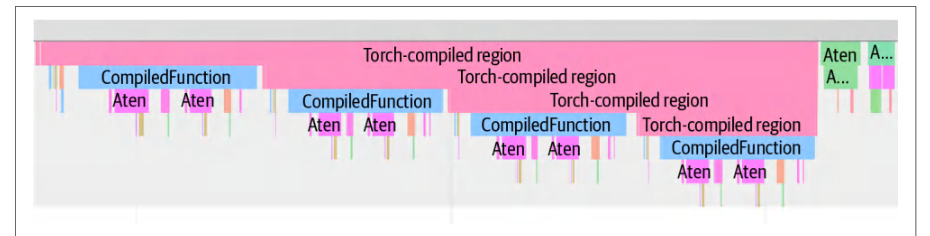
For instance, when using torch.compile, the trace will show events like Compiled Function and indicate any graph breaks (see Figure 13-1). This helps pinpoint where the model fell back to eager execution, which will guide further optimizations.例如,使用 torch.compile 时,跟踪会显示 Compiled Function 等事件,并指示任何图中断(见图 13-1)。这有助于精确定位模型回退到即时执行的位置,从而指导进一步的优化。
| Operation操作 | Self CUDA total自身 CUDA 总计 | Calls调用次数 |
|---|---|---|
| aten::matmulaten::matmul | 43.00 ms43.00 ms | 128128 |
| aten::linearaten::linear | 35.50 ms35.50 ms | 6464 |
| dispatchdispatch | 18.70 ms18.70 ms | 22 |
| combinecombine | 12.10 ms12.10 ms | 22 |
| aten::layer_normaten::layer_norm | 10.20 ms10.20 ms | 1616 |
| aten::softmaxaten::softmax | 5.70 ms5.70 ms | 44 |
| aten::scatteraten::scatter | 4.10 ms4.10 ms | 1616 |
| aten::gatheraten::gather | 3.60 ms3.60 ms | 1616 |
| aten::toaten::to | 2.90 ms2.90 ms | 88 |
| aten::add_aten::add_ | 2.20 ms2.20 ms | 6464 |
After execution, we can examine the operation-level results by calling prof.key_aver ages().table() to print a concise table of the top operators by runtime. In the next code block, we request the top 10 operations sorted by their self CUDA time, which is the time spent in each operation’s own CUDA kernels excluding child operations spawned by the kernel. The top 10 operations by CUDA execution time are summarized in Table 13-2:执行完成后,我们可以通过调用 prof.key_aver ages().table() 查看算子级结果,打印出按运行时间排序的顶层算子简表。在下一个代码块中,我们请求按自身 CUDA 时间排序的前 10 个算子,自身 CUDA 时间即每个算子自身 CUDA 内核所花费的时间,不包含该内核派生的子算子。按 CUDA 执行时间排序的前 10 个算子汇总于表 13-2:
with profiler.profile(
    activities=[ProfilerActivity.CPU,
                ProfilerActivity.CUDA],
    record_shapes=True,
    profile_memory=True,
) as prof:
    train_step(...)
...
print(
    prof.key_averages()
        .table(
            sort_by="self_cuda_time_total",
            row_limit=10,
            fields=["self_cuda_time_total",
                    "calls"]
        )
)
Here, we see that the matrix multiplication operations (aten::matmul, and its use in aten::linear) dominate the CUDA time and consume the majority of the iteration. These operations correspond to the expert feed-forward network (FFN) GEMMs. Specifically, there are 128 calls to matmul per iteration. This makes sense since we have 64 experts—and each expert does a matmul in both the forward and backward passes.在这里,我们看到矩阵乘法算子(aten::matmul,以及它在 aten::linear 中的使用)主导了 CUDA 时间,占据了该迭代的大部分。这些算子对应专家前馈网络(FFN)的 GEMM。具体来说,每次迭代有 128 次 matmul 调用。这是合理的,因为我们有 64 个专家——每个专家在前向和反向传播中各执行一次 matmul。
In Table 13-2, we see the next largest costs are from the dispatch and combine operations. These are custom C++/CUDA kernels that redistribute tokens to experts—and then gather the outputs of the expert. The dispatch operation runs twice—once in the forward pass and once in the backward pass—for a total of 18.7 ms. The combine ran twice for 12.1 ms total. Together, these two operations account for another 30.8 ms of GPU time. The remaining time is spread across other smaller ops like layer norms, activations, etc.在表 13-2 中,我们看到接下来的最大开销来自 dispatch 和 combine 算子。这些是自定义的 C++/CUDA 内核,负责将 token 重新分发到各专家——然后再收集专家的输出。dispatch 算子运行两次——一次在前向传播,一次在反向传播——总计 18.7 ms。combine 运行两次,总计 12.1 ms。两者合计又占用了 30.8 ms 的 GPU 时间。剩余时间分散在层归一化、激活等其他较小的算子上。
The key takeaway from this profiling example is that the expert FFN matmul is the top bottleneck, followed by the dispatch and combine kernels. Together, these dominate a training iteration’s runtime. To improve performance further, we should target those operations either by optimizing them directly or by reducing the number of times they’re called.这个性能剖析示例的关键结论是:专家 FFN 的 matmul 是首要瓶颈,其次是 dispatch 和 combine 内核。它们共同主导了一次训练迭代的运行时间。若要进一步提升性能,我们应针对这些算子,要么直接优化它们,要么减少它们的调用次数。
使用 Nsight Systems 与 NVTX 时间线进行系统级性能剖析
System Profiling with Nsight Systems and NVTX Timelines
The NVTX markers that we inserted make it straightforward to analyze the timeline with Nsight Systems. To aggregate metrics per phase, we can profile the code using nsys with an NVTX-based summary, as shown in the CLI command here:我们插入的 NVTX 标记使得用 Nsight Systems 分析时间线变得十分简便。要按阶段聚合指标,我们可以使用 nsys 配合基于 NVTX 的摘要来剖析代码,如下面的 CLI 命令所示:
nsys profile \
   --output=profile \
   --stats=true \
   -t cuda,nvtx \
   python train.py
Here, the -t cuda,nvtx option instructs Nsight Systems to trace both CUDA API calls and NVTX ranges. After profiling, we can open the profile.nsys-rep file (--output=profile) in the Nsight Systems GUI or use the CLI to print the NVTX summary to the terminal. We can then use the CLI to generate the NVTX GPU Projection Summary using one of the following commands on the profile.nsys-rep file, as shown here to validate ranges against projected GPU work with Nsight Systems:这里,-t cuda,nvtx 选项指示 Nsight Systems 同时跟踪 CUDA API 调用和 NVTX 范围。性能剖析完成后,我们可以在 Nsight Systems GUI 中打开 profile.nsys-rep 文件(--output=profile),或使用 CLI 将 NVTX 摘要打印到终端。随后,我们可以使用 CLI,对 profile.nsys-rep 文件执行下列命令之一来生成 NVTX GPU Projection Summary,如下所示,以便借助 Nsight Systems 对照投影出的 GPU 工作来验证各范围:
nsys stats --report=nvtx_gpu_proj_sum \
  profile.nsys-rep
# or
nsys recipe nvtx_gpu_proj_sum \
  profile.nsys-rep
You can use one of these commands in your continuous build and integration pipelines to monitor and detect any performance regressions. The results of this CLI command are summarized in Table 13-3.你可以在持续构建与集成流水线中使用这些命令之一,以监控并检测任何性能回退。该 CLI 命令的结果汇总于表 13-3。
| NVTX rangeNVTX 范围 | GPU time (ms)GPU 时间(ms) | Self GPU time (ms)自身 GPU 时间(ms) | Child GPU time (ms)子级 GPU 时间(ms) | Instances (calls)实例数(调用次数) |
|---|---|---|---|---|
| train_steptrain_step | 138.0138.0 | 0.00.0 | 138.0138.0 | 11 |
| forwardforward | 60.560.5 | 60.560.5 | 0.00.0 | 130130 |
| backwardbackward | 58.358.3 | 58.358.3 | 0.00.0 | 130130 |
| optimizer_stepoptimizer_step | 19.219.2 | 19.219.2 | 0.00.0 | 11 |
Here, we see the train_step range includes the forward, backward, and optimizer subranges. This NVTX GPU Projection Summary confirms that the total GPU time under train_step is 138 ms. This time matches the sum of the forward, backward, and optimizer_step times from the PyTorch profiler output in Table 13-2. This shows consistency between tools.这里可以看到,train_step 范围包含 forward、backward 和 optimizer 子范围。该 NVTX GPU 投影摘要确认,train_step 下的 GPU 总时间为 138 ms。该时间与表 13-2 中 PyTorch 性能剖析器输出的 forward、backward 和 optimizer_step 时间之和一致。这表明两个工具之间具有一致性。
And although Table 13-3 shows a single optimizer_step call, its NVTX range actually brackets all 64 aten::add_ CUDA kernel launches (one add_ per expert as shown in Table 13-2) under the single optimizer_step marker.并且,尽管表 13-3 只显示了一次 optimizer_step 调用,但其 NVTX 范围实际上将全部 64 次 aten::add_ CUDA 内核启动(如表 13-2 所示,每个专家一次 add_)都括在单个 optimizer_step 标记之下。
Note that Nsight Systems groups the 64 aten::add_ calls (e.g., 64-way expert parallelism strategy) into a single optimizer_step marker because it uses the CUDA Profiling Tools Interface (CUPTI) to capture NVTX push/pop events on the host. It then “projects” asynchronous GPU kernel execution times onto these CPU-defined intervals. As such, it sums the durations of every kernel with GPU start/end timestamps that fall between the corresponding push and pop calls. This produces one cumulative GPU time that exactly matches the total of the individual aten::add_ kernels.请注意,Nsight Systems 将 64 次 aten::add_ 调用(例如 64 路专家并行策略)归组到单个 optimizer_step 标记中,因为它使用 CUDA Profiling Tools Interface(CUPTI)在主机侧捕获 NVTX 的 push/pop 事件。随后,它把异步 GPU 内核的执行时间“投影”到这些由 CPU 定义的时间区间上。因此,它会累加所有 GPU 起止时间戳落在对应 push 与 pop 调用之间的内核的持续时间。这样得到的一个累计 GPU 时间与各个 aten::add_ 内核的总和完全一致。
The forward and backward ranges each have self GPU time equal to their total time since we didn’t choose to nest deeper ranges inside of them. As such, child GPU time is 0 ms. However, train_step has nearly all of its time as child GPU time since it’s just a wrapper around the nested phases.前向与反向区间的自身 GPU 时间等于其总时间,因为我们没有在其中嵌套更深的区间。因此,子 GPU 时间为 0 ms。然而,train_step 几乎全部时间都是子 GPU 时间,因为它只是对嵌套各阶段的封装。
The NVTX GPU projection summary also shows that, in each iteration, we observed 130 GPU activities inside train_step. These include kernel launches and other device operations such as memory copies, so they are not strictly one-to-one with kernels.NVTX GPU 投影摘要还显示,在每次迭代中,我们在 train_step 内观察到 130 个 GPU 活动。这些活动包括内核启动以及其他设备操作(如显存拷贝),因此它们与内核并非严格一一对应。
As you can see in Table 13-3, the 130 GPU kernel calls happen for both the backward and forward passes as well. This one-to-one correspondence between operations and NVTX instances means that our instrumentation captures every important operation.如表 13-3 所示,这 130 次 GPU 内核调用在反向和正向传播中同样出现。操作与 NVTX 实例之间的一一对应关系意味着我们的插桩捕获了每一个重要操作。
On a multi-GPU run, the Nsight Systems or HTA timeline view can reveal if NVLink or InfiniBand/Ethernet is being utilized effectively—or if a node is starved for work while waiting for communication or network delays. This would hint at suboptimal synchronization or load imbalance.在多 GPU 运行时,Nsight Systems 或 HTA 的时间线视图可以揭示 NVLink 或 InfiniBand/Ethernet 是否被有效利用——或者某个节点是否因等待通信或网络延迟而处于饥饿状态。这将暗示同步欠佳或负载不均衡。
It’s important to trace GPU communication events, including NCCL all-reduce calls and NVLink/NVSwitch activity using Nsight Systems and HTA to provide traces. These help verify that the GPUs stay busy in massive GPU domains such as an NVL72-based system.使用 Nsight Systems 和 HTA 提供跟踪,来跟踪 GPU 通信事件(包括 NCCL 全归约调用和 NVLink/NVSwitch 活动)非常重要。这些有助于验证在诸如基于 NVL72 的系统这样的大规模 GPU 域中,GPU 是否保持忙碌。
Careful profiling makes sure the system is using proper inter-GPU synchronization and balancing the workload in these large NVLink clusters. Let’s now zoom in on one of the most expensive kernels in the system: the matrix multiply, or matmul.细致的性能剖析可确保系统在这些大型 NVLink 集群中使用恰当的 GPU 间同步并均衡负载。现在,让我们聚焦于系统中最昂贵的内核之一:矩阵乘法,即 matmul。
通用矩阵乘法(GEMM)的内核屋顶线分析
Kernel Roofline Analysis for General Matrix Multiply (GEMM)
To dive deeper and analyze the expert matmul, we invoke the CLI profiler Nsight Compute (ncu) to target specific GEMM kernels by name. We’ll collect roofline-related metrics to determine if it’s compute bound or memory bound, as shown here:为了更深入地分析专家 matmul,我们调用命令行性能剖析器 Nsight Compute(ncu),按名称定位特定的 GEMM 内核。我们将收集与屋顶线模型相关的指标,以判断它是计算受限还是显存受限,如下所示:
ncu \
  --target-processes all \
  --kernel-name-regex "matmul" \
  --metrics \
    gpu__time_duration.avg, \
    gpu__dram_throughput.avg.pct_of_peak_sustained_elapsed, \
    lts__throughput.avg.pct_of_peak_sustained_elapsed, \
    sm__sass_thread_inst_executed_op_fp32_pred_on.sum, \
    sm__warps_active.avg.pct_of_peak_sustained_active \
  --csv full \
  -o matmul_roofline_report \
  python train.py
Here, we are collecting hardware counters for any kernel whose name matches “matmul”. Specifically, we collect a few key metrics, including GPU DRAM bandwidth and此处,我们为名称匹配“matmul”的任意内核收集硬件计数器。具体来说,我们收集若干关键指标,包括 GPU DRAM 带宽和
L2 bandwidth as a percent of peak (gpu__dram_throughput.avg.pct_of_peak_
sustained_elapsed, lts__throughput.avg.pct_of_peak_sustained_elapsed), FP32
instruction count as a compute proxy (sm__sass_thread_inst_executed_op_
fp32_pred_on.sum), kernel time (gpu__time_duration.avg), and achieved occupancy
(sm__warps_active.avg.pct_of_peak_sustained_active).
After applying the optimizations discussed until now, like reducing precision, fusing kernels, and increasing arithmetic intensity, we can rerun the ncu command to verify that our optimizations made a positive impact. Table 13-4 shows the comparison before and after applying these optimizations to improve arithmetic intensity.在应用了前面讨论的这些优化(例如降低精度、融合内核、提高算术强度)之后,我们可以重新运行 ncu 命令,验证这些优化是否带来了正面效果。表 13-4 展示了在应用这些用于提高算术强度的优化前后的对比。
Kernel configuration内核配置
% of peak FLOPS (SM compute throughput)占峰值 FLOPS 的百分比 (SM 计算 吞吐量)
% of peak memory BW (memory throughput)占峰值显存带宽的百分比 (显存吞吐量)
Achieved SM occupancy实测 SM 占用率
Characteristic特征
Baseline 50% 70% 60% Memory bound (stalling on memory transfers) Optimized 85% 40% 80% Compute bound (near hardware roofline)基线 50% 70% 60% 显存受限(停顿于内存传输) 优化后 85% 40% 80% 计算受限(接近硬件屋顶线)
Here we see, in the baseline run, the primary GEMM kernel achieves only about 50% of peak compute FLOPS, 70% of peak memory bandwidth, and a moderate 60% SM occupancy (average active warps per SM). This occupancy is not enough to fully hide memory latency.可以看到,在基线运行中,主要的 GEMM 内核仅达到约 50% 的峰值计算 FLOPS、70% 的峰值显存带宽,以及中等水平的 60% SM 占用率(每个 SM 的平均活跃线程束数)。这一占用率不足以完全隐藏内存时延。
The baseline metrics indicate a kernel that is memory bound since its execution is stalled by memory transfers. The result is a substantial amount of unused compute capacity, which further reinforces that this workload is not currently compute bound. The goal is to make this kernel more compute bound to take advantage of the large number of FLOPS available with this GPU.基线指标表明该内核是显存受限的,因为其执行被内存传输所停顿。其结果是大量计算能力未被使用,这进一步印证了该工作负载当前并非计算受限。目标是让该内核更偏向计算受限,从而利用该 GPU 所提供的大量 FLOPS。
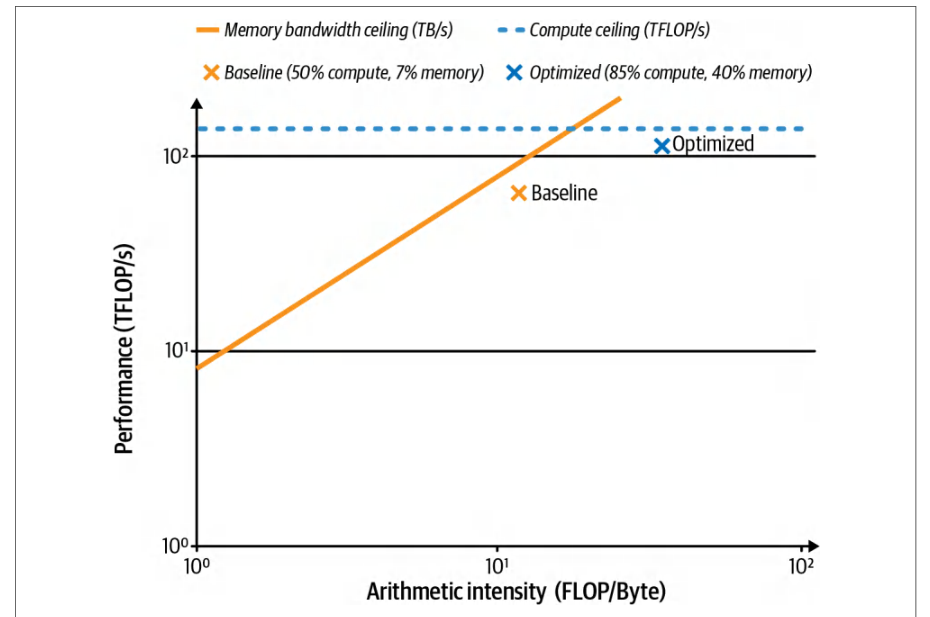
In the optimized version (e.g., fusing kernels, increasing arithmetic intensity, and reducing memory movement), the peak FLOPS increases to 85%, peak memory bandwidth drops to 40%, and occupancy increases to 80%. We effectively shifted the kernel from memory bound to compute bound—much closer to the hardware’s roofline limits, as shown in Figure 13-2.在优化版本中(例如融合内核、提高算术强度、减少内存搬运),峰值 FLOPS 提升至 85%,峰值显存带宽降至 40%,占用率提升至 80%。我们成功地将该内核从显存受限转变为计算受限——更接近硬件的屋顶线极限,如图 13-2 所示。
Up to this point, our profiling has focused on GPU performance. It’s also important to not waste time on the CPU or performing I/O. In the next section, we continue our profiling journey on the host side.到目前为止,我们的性能剖析一直聚焦于 GPU 性能。同样重要的是,不要在 CPU 上或执行 I/O 时浪费时间。在下一节中,我们将在主机侧继续性能剖析之旅。
使用 Linux perf 进行 CPU 与 GPU 性能剖析
CPU and GPU Profiling with Linux perf
To get a more holistic view of where time is being spent across both the host and device, we can use Linux perf to analyze CPU cycles, cache misses, branch misses, etc. We can then use these insights to drive a series of optimizations, apply them one by one, and measure the improvements.为了更全面地了解时间在主机与设备两端的分布,我们可以使用 Linux perf 分析 CPU 周期、缓存未命中、分支未命中等等。随后可以利用这些洞察驱动一系列优化,逐项应用并测量改进效果。
First, let’s run a lightweight perf stat to gather CPU-side statistics during the MoE training run on a node with an ARM-based Grace CPU paired with a Blackwell GPU. Here is the CLI command followed by example output:首先,我们运行一个轻量级的 perf stat,在配备 ARM 架构 Grace CPU 与 Blackwell GPU 的节点上收集 MoE 训练过程中的 CPU 侧统计信息。下面是 CLI 命令及其示例输出:
perf stat -e \
  cycles,instructions,cache-misses,branch-misses \
  python train.py
  Performance counter stats for 'python train.py':
# 已使用 0.600 个 CPU
1,200.345 msec task-clock
# 约 2.0 GHz
2,400,567,890      cycles
# 每周期 1.58 条指令
3,800,123,456      instructions
# 占所有缓存引用的 0.32%
12,345,678      cache-misses
# 占所有分支的 0.12%
4,567,890      branch-misses
 1.234567890 seconds time elapsed
perf stat -e \
  cycles,instructions,cache-misses,branch-misses \
  python train.py
  Performance counter stats for 'python train.py':
# 0.600 CPUs utilized
1,200.345 msec task-clock
# Approximately 2.0 GHz
2,400,567,890      cycles
# 1.58 insn per cycle
3,800,123,456      instructions
# 0.32% of all cache refs
12,345,678      cache-misses
# 0.12% of all branches
4,567,890      branch-misses
 1.234567890 seconds time elapsed
This report from perf stat shows the CPU utilization, cycles, instructions per cycle (IPC), and cache/branch misses. In our run, the task clock shows ~1.2 seconds with only ~60% (0.600) of a single CPU core used over the measured interval. This is expected, as the GPU is doing most of the heavy lifting. The low cache-miss and branch-miss rates hint that memory access patterns and branch prediction were relatively efficient on the CPU side for this workload.这份 perf stat 报告展示了 CPU 利用率、周期数、每周期指令数(IPC)以及缓存/分支未命中情况。在我们的运行中,任务时钟显示约 1.2 秒,而在测量区间内仅使用了单个 CPU 核心约 60%(0.600)。这符合预期,因为大部分繁重工作由 GPU 承担。较低的缓存未命中率和分支未命中率表明,对于该工作负载,CPU 侧的显存访问模式和分支预测相对高效。
However, the instructions per cycle (IPC) measurement of just 1.58 shows that the CPU is issuing well below the eight instructions per cycle theoretical maximum IPC for a single Grace CPU core (ARM Neoverse V2). This indicates potential inefficiencies such as memory latency, I/O stalls, or host-compute issues in this specific workload.然而,每周期指令数(IPC)仅为 1.58,说明 CPU 的指令发射量远低于单个 Grace CPU 核心(ARM Neoverse V2)每周期 8 条指令的理论最大 IPC。这表明在该特定工作负载中可能存在内存时延、I/O 停顿或主机端计算等低效问题。
We can explore further using perf record and perf report to pinpoint which Python and C++ functions dominate the CPU execution time during training. These CLI commands are shown here:我们可以进一步使用 perf record 和 perf report,精确定位训练期间哪些 Python 和 C++ 函数占据了主要的 CPU 执行时间。这些 CLI 命令如下所示:
perf record -F 2000 -g --call-graph dwarf -o perf.data \
    python train.py
Here, we use perf record to collect samples at 2000 Hz (-F 2000) and capture full C/C++ and Python call stacks by specifying -g --call-graph dwarf. DWARF stands for Debugging With Attributed Record Formats, and it’s a standard debugging data format embedded in compiled binary files (e.g., ELF files). The DWARF output trace is saved to perf.data (-o perf.data). We then use perf report to generate a summary report of the hottest call stacks and their sample percentages:这里,我们使用 perf record 以 2000 Hz(-F 2000)采集样本,并通过指定 -g --call-graph dwarf 捕获完整的 C/C++ 与 Python 调用栈。DWARF 代表 Debugging With Attributed Record Formats,是一种嵌入在编译后二进制文件(例如 ELF 文件)中的标准调试数据格式。DWARF 输出的跟踪记录保存到 perf.data(-o perf.data)。随后我们使用 perf report 生成最热调用栈及其样本占比的汇总报告:
perf report --stdio -n -g -i perf.data
# 样本数  命令   共享对象        符号
# ........ ........  ...................  .................................
     45.0%  python    python               py::forward <...> /src/train.py
     20.5%  python    python               aten::matmul
     10.2%  python    python               dataloader_iter_next
      8.7%  python    libnccl.so           ncclAllReduce
      5.3%  python    libc.so.6            read
      ...   ...       ...                  ...
perf report --stdio -n -g -i perf.data
# Samples  Command   Shared Object        Symbol
# ........ ........  ...................  .................................
     45.0%  python    python               py::forward <...> /src/train.py
     20.5%  python    python               aten::matmul
     10.2%  python    python               dataloader_iter_next
      8.7%  python    libnccl.so           ncclAllReduce
      5.3%  python    libc.so.6            read
      ...   ...       ...                  ...
Here, we see that the Python interpreter’s forward function, the Python side of our training loop, accounts for 45.0% of CPU samples. PyTorch’s C++ aten::matmul operation accounts for 20.5%, the DataLoader’s iterator next function for 10.2%, an NCCL all-reduce call for 8.7%, and I/O reads for 5.3%.在这里可以看到,Python 解释器的 forward 函数——即训练循环的 Python 侧——占 CPU 样本的 45.0%。PyTorch 的 C++ aten::matmul 运算占 20.5%,DataLoader 的迭代器 next 函数占 10.2%,一次 NCCL 全归约调用占 8.7%,I/O 读取占 5.3%。
These percentages tell us where to invest our optimization effort. Based on this profile, we address each bottleneck with a specific mitigation plan to improve performance of our system:这些百分比告诉我们应把优化精力投向何处。基于这份性能剖析结果,我们针对每个瓶颈制定具体的缓解方案,以提升系统性能:
- Excess Python overhead (45% in *
py::forward*)过高的 Python 开销(*py::forward* 中占 45%) - Use PyTorch’s JIT compiler using
torch.compile(discussed in the next section) to eliminate interpreter overhead and fuse Python-side operations into optimized CUDA code.使用 PyTorch 的 JIT 编译器torch.compile(将在下一节讨论),消除解释器开销,并将 Python 侧运算融合为优化后的 CUDA 代码。
- Large *
matmulhotspot (20.5% inaten::matmul*)较大的 *matmul热点(aten::matmul* 中占 20.5%) - Either use the PyTorch Compiler to optimize this code or move this critical matrix multiply into a custom CUDA C++ kernel (e.g., fused kernel) to bypass Python and use the optimized CUDA code directly.要么使用 PyTorch 编译器优化这段代码,要么将这个关键矩阵乘法移入自定义 CUDA C++ 内核(例如融合内核),绕过 Python 直接使用优化后的 CUDA 代码。
- Data loading stalls (10.2% in *
dataloader_iter_next*)数据加载停顿(*dataloader_iter_next* 中占 10.2%) - Increase PyTorch’s
DataLoader num_workers. A common guideline is one worker per CPU, but you can experiment with more to find the right level of I/O parallelization. Just make sure you don’t oversubscribe the CPU cores. You should also enablepersistent_workers=Trueso that worker processes stay alive across epochs and avoid startup overhead for each epoch. Fuse or parallelize multipletorch.utils.data.DataPipe. This can reduce Python overhead in complex data pipelines.增加 PyTorch 的DataLoader num_workers。常见的指导原则是每个 CPU 一个工作进程,但你可以尝试更多,以找到合适的 I/O 并行度。只需确保不要超额订阅 CPU 核心。还应启用persistent_workers=True,使工作进程在各 epoch 之间保持存活,避免每个 epoch 的启动开销。融合或并行化多个torch.utils.data.DataPipe。这可以减少复杂数据管道中的 Python 开销。
- Gradient synchronization overhead (8.7% in *
ncclAllReduce*)梯度同步开销(*ncclAllReduce* 中占 8.7%) - Optimize multi-GPU communication. For instance, you can increase the gradient bucket size in
DistributedDataParallel. It’s common to increase thebucket_cap_mbfrom 25 MB to 50 MB so that NCCL can launch all-reduce operations sooner and overlap them with backward computations. You can also consider gradient compression techniques or NVIDIA’s NCCL compression for 8-bit gradients to reduce bandwidth usage. These may incur a slight cost to accuracy.优化多 GPU 通信。例如,可以增大DistributedDataParallel中的梯度桶大小。通常的做法是将bucket_cap_mb从 25 MB 提高到 50 MB,以便 NCCL 能更早地启动全归约操作,并使其与反向计算重叠。还可以考虑梯度压缩技术,或 NVIDIA 针对 8 位梯度的 NCCL 压缩,以降低带宽占用。这些做法可能会带来轻微的精度损失。
- Host I/O bottleneck (5.3% in *
read syscalls*)主机 I/O 瓶颈(*read syscalls* 中占 5.3%) - Use pinned memory (
pin_memory=True) and nonblocking GPU copies (.to(device, non_blocking=True)) in the DataLoader to overlap CPU-to-GPU data transfers. Also, you can batch file reads or bundle many small files into an optimized dataset format like Arrow, WebDataset (tar shards), TFRecord, or Parquet chunks that facilitate large sequential reads. It’s best to prefer contiguous shard formats over per-sample files. Prefer pinned host buffers when using a larger prefetch depth (e.g.,prefetch_factor=4or8). Combined withpersistent_workers=True, your system will keep loader threads busy since compute-communication are overlapping efficiently. This will eliminate per-file overhead when reading many small files in large corpora.在 DataLoader 中使用锁页内存(pin_memory=True)和非阻塞 GPU 拷贝(.to(device, non_blocking=True)),以重叠 CPU 到 GPU 的数据传输。此外,还可以对文件读取进行批处理,或将大量小文件打包成 Arrow、WebDataset(tar 分片)、TFRecord 或 Parquet 分块等便于大块顺序读取的优化数据集格式。最好优先选择连续的分片格式,而不是逐样本文件。在使用较大的预取深度(例如prefetch_factor=4或8)时,优先使用锁页主机缓冲区。配合persistent_workers=True,由于计算与通信高效重叠,系统会让加载器线程保持忙碌。这将消除在大型语料库中读取大量小文件时的逐文件开销。
These approaches, combined with large OS read-ahead and NVMe SSDs, will boost I/O throughput. Also, newer filesystems and storage libraries like NVIDIA Magnum IO can help pipeline data efficiently to the GPU.这些方法结合较大的操作系统预读和 NVMe SSD,将提升 I/O 吞吐量。此外,NVIDIA Magnum IO 等较新的文件系统和存储库有助于将数据高效地流水线式送入 GPU。
After formulating this plan, you should systematically apply each optimization and measure the effect. Remember to implement and test these optimizations one by one to verify that each actually improves performance. This helps avoid situations in which multiple changes interact in unexpected ways. By isolating each change, you know which adjustments have a positive effect and which do not.制定该计划后,应当系统地逐项应用每项优化并测量其效果。请记住要逐一实现并测试这些优化,以验证每一项确实提升了性能。这有助于避免多项改动以意外方式相互作用的情况。通过隔离每一项改动,你就能知道哪些调整产生了正面效果、哪些没有。
On systems with the NVIDIA Performance Monitoring Unit (PMU) drivers present, you can use perf to sample NVIDIA chip interconnect and fabric counters alongside CPU counters, including NVLink-C2C devices exposed under /sys/bus/ event_source/devices as nvidia_nvlink_c2c*, for instance. Verify availability with perf list and by checking the nvidia_pmu entries under sysfs.在存在 NVIDIA 性能监控单元(Performance Monitoring Unit,PMU)驱动程序的系统上,你可以使用 perf 在采样 CPU 计数器的同时采样 NVIDIA 芯片互连与 fabric 计数器,例如包括以 nvidia_nvlink_c2c* 形式暴露在 /sys/bus/ event_source/devices 下的 NVLink-C2C 设备。可通过 perf list 以及检查 sysfs 下的 nvidia_pmu 条目来确认其可用性。
Once the PMU devices are present, you can collect CPU and NVIDIA events together. Use symbolic event names reported by perf list:一旦 PMU 设备就位,就可以同时采集 CPU 和 NVIDIA 事件。使用 perf list 报告的符号事件名:
perf list | grep -i nvidia
perf stat -a \
  -e nvidia_nvlink_c2c0_pmu_0/cycles/ \
  -e cycles,cache-misses \
  python train.py
Here, the cycles event on the NVLink-C2C PMU lets you correlate GPU interconnect activity with host CPU behavior. The following is example output from the preceding perf stat command, which shows the NVLink C2C PMU recorded activity during the run while the CPU incurred cycles and cache misses:在这里,NVLink-C2C PMU 上的 cycles 事件让你能够将 GPU 互连活动与主机 CPU 行为关联起来。以下是前述 perf stat 命令的示例输出,其中显示 NVLink C2C PMU 在运行期间记录到的活动,同时 CPU 产生了周期和缓存未命中。
Performance counter stats for 'python train_deepseek_v3.py':
       3,567,890,123  nvidia_nvlink_c2c0_pmu_0/cycles
          45,678,901  cycles
           7,890,123  cache-misses
       2.345678901 seconds time elapsed
Our initial profiling revealed that GPU compute (e.g., expert matrix multiplies) and GPU communication (e.g., dispatch and combine operations) are the primary bottlenecks based on the PyTorch profiler and Nsight tools. However, CPU, data loading, and GPU collective communication operations also impact performance as perf demonstrates by showing which CPU threads and interconnect PMUs are active during the slow regions.我们最初的性能剖析显示,根据 PyTorch 性能剖析器和 Nsight 工具,GPU 计算(例如专家矩阵乘法)和 GPU 通信(例如分发与合并操作)是主要瓶颈。然而,正如 perf 通过显示在缓慢区间内哪些 CPU 线程和互连 PMU 处于活动状态所表明的,CPU、数据加载和 GPU 集合通信操作也会影响性能。
In short, by combining high-level CPU throughput metrics and call graph hotspots from perf with device metrics and timelines from Nsight Systems and Nsight Compute, you can build a holistic performance story across host and device. Start by addressing the largest CPU-side bottlenecks and data stalls. Next, optimize GPU communication and tune the GPU kernels.简而言之,将 perf 提供的高层 CPU 吞吐量指标与调用图热点,同 Nsight Systems 和 Nsight Compute 提供的设备指标与时间线结合起来,你就能构建出跨越主机与设备的整体性能图景。先从解决最大的 CPU 侧瓶颈和数据停顿入手,然后再优化 GPU 通信并调优 GPU 内核。
PyTorch 编译器(torch.compile)
PyTorch Compiler (torch.compile)
One of the quickest wins in PyTorch is to use the PyTorch compiler with torch.com pile(). The compiler stack includes TorchDynamo, AOT Autograd, and TorchInductor, which capture graphs, fuse ops, and generate high-performance code for the target backend (e.g., NVIDIA GPUs).在 PyTorch 中最快的收益之一,就是使用 PyTorch 编译器 torch.com pile()。该编译器栈包含 TorchDynamo、AOT Autograd 和 TorchInductor,它们负责捕获计算图、融合算子,并针对目标后端(例如 NVIDIA GPU)生成高性能代码。
The PyTorch Compiler can eliminate a lot of Python interpreter overhead and GPU kernel launch latency by fusing together many small operations into larger kernels. After doing our baseline profiling, we enabled torch.compile on the model to see if we could get an easy speedup. Next, let’s describe this process—and the results.PyTorch 编译器可以将许多小操作融合成更大的内核,从而消除大量 Python 解释器开销和 GPU 内核启动时延。在完成基线性能剖析后,我们在模型上启用了 torch.compile,看看能否轻松获得加速。接下来,我们描述这一过程及其结果。
使用 PyTorch 编译器
Using the PyTorch Compiler
Using the PyTorch compiler with the default settings is straightforward and requires no code changes besides wrapping the model as shown here: model = torch.com pile(model). Under the hood, TorchDynamo traces the Python code, AOT Autograd captures the backward pass, and TorchInductor, which leverages OpenAI’s Triton for GPU kernel code generation (as discussed in the next chapter), produces efficient fused kernels automatically.使用默认设置的 PyTorch 编译器非常直接,除了像下面这样包装模型之外无需改动任何代码:model = torch.com pile(model)。在底层,TorchDynamo 跟踪 Python 代码,AOT Autograd 捕获反向传播,而 TorchInductor 则利用 OpenAI 的 Triton 进行 GPU 内核代码生成(将在下一章讨论),自动生成高效的融合内核。
The compiler observes our model’s forward pass and identifies many opportunities to fuse consecutive operations, such as elementwise activations, layer norms, etc. It generates fused kernels for those operations—and also for parts of the backward pass. The result is significantly fewer kernel launches and less CPU overhead per iteration.编译器观察模型的前向传播,并识别出许多融合连续操作的机会,例如逐元素激活、层归一化等。它为这些操作生成融合内核,也为反向传播的部分环节生成融合内核。结果是每次迭代的内核启动次数显著减少,CPU 开销也更低。
The compile step does introduce some overhead on the order of seconds—or even minutes for very large models—but this cost is amortized over long training jobs or repeated inference runs. Fortunately, TorchInductor caches compiled kernels so that subsequent runs don’t pay the compile cost again. The PyTorch community is also continuously working to improve compile/startup performance by allowing you to save and reuse compiled artifacts across runs. Use torch.compiler.save_ cache_artifacts() and torch.compiler .load_cache_artifacts() to persist TorchInductor outputs across runs or nodes. This reduces startup on long-running training or serving.编译步骤确实会带来数秒量级的开销——对于非常大的模型甚至可达数分钟——但这一成本会在长时间训练任务或反复推理运行中被摊薄。幸运的是,TorchInductor 会缓存已编译的内核,因此后续运行无需再次付出编译成本。PyTorch 社区也在持续改进编译/启动性能,允许你跨运行保存并复用编译产物。使用 torch.compiler.save_ cache_artifacts() 和 torch.compiler .load_cache_artifacts() 可将 TorchInductor 的输出持久化到跨运行或跨节点。这能减少长时间训练或服务时的启动时间。
One example is the PyTorch Mega-Cache feature. This is an end-to-end compile cache that lets you save compiled kernels to disk and reload them in future runs. With PyTorch Mega-Cache, you can compile once (e.g., offline) and reuse the optimized kernels across multiple training sessions. This helps to reduce startup time. You’ll still benefit from TorchInductor’s kernel optimizations like warp specialization, but you’ll avoid recompiling the graph each time.一个例子是 PyTorch Mega-Cache 特性。这是一个端到端的编译缓存,让你可以把已编译的内核保存到磁盘,并在未来的运行中重新加载。借助 PyTorch Mega-Cache,你可以只编译一次(例如离线编译),然后在多个训练会话中复用优化后的内核。这有助于缩短启动时间。你仍然能受益于 TorchInductor 的内核优化(如线程束专用化),但不必每次都重新编译计算图。
It’s worth noting that PyTorch’s Compiler applies sophisticated optimization techniques internally. For example, we mentioned warp specialization in Chapter 10. TorchInductor’s autotuner generates multiple kernel variants across tile sizes, memory access patterns, etc. It will apply techniques like memory-warp versus compute-warp specialization behind the scenes. It will then choose the fastest variant for your hardware automatically.值得注意的是,PyTorch 编译器在内部应用了复杂的优化技术。例如,我们在第 10 章提到过线程束专用化。TorchInductor 的自动调优器会针对不同的分块大小、显存访问模式等生成多个内核变体。它会在后台应用内存线程束与计算线程束专用化之类的技术,然后自动为你的硬件选择最快的变体。
TorchInductor supports prologue and epilogue fusion around GEMM kernels. For example, bias-add comes before the matmul. And, after the matmul, the epilogue consists of elementwise operations such as activation, dropout, and residual.TorchInductor 支持围绕 GEMM 内核的前置(prologue)与后置(epilogue)融合。例如,偏置加法位于 matmul 之前。而在 matmul 之后,后置部分由激活、dropout 和残差等逐元素运算构成。
By merging these kernel prologue and epilogue operations into a single optimized kernel, TorchInductor reduces memory traffic, minimizes kernel-launch overhead, and increases occupancy. You can verify this with the profiler, which will show higher SM utilization.通过将这些内核前置与后置运算合并进单个优化后的内核,TorchInductor 减少了内存流量、将内核启动开销降至最低,并提升了占用率。你可以用性能剖析器验证这一点,它会显示出更高的 SM 利用率。
This optimization complexity remains entirely transparent to the developer since PyTorch presents a clean, tensor-centric interface without exposing CUDA-level warp details. So while you won’t see “memory warp” or “compute warp” flags in the PyTorch API, just know that these techniques are being used under the hood. Once the code is compiled, you will notice the benefits of warp specialization in profiler metrics, including higher occupancy, fewer memory latency stalls, and increased SM utilization.这种优化复杂性对开发者完全透明,因为 PyTorch 提供的是干净、以张量为中心的接口,并不暴露 CUDA 层面的线程束细节。因此,虽然你不会在 PyTorch API 中看到“memory warp”或“compute warp”这类标志,但只需知道这些技术正在底层被使用。代码编译完成后,你会在性能剖析器指标中注意到线程束专用化带来的收益,包括更高的占用率、更少的内存时延停顿以及更高的 SM 利用率。
To illustrate the benefit of a compiled mode, let’s compare PyTorch’s eager mode versus compiled execution on an MoE model. We’ll time a single training iteration of the model in regular eager mode and then again with the "max-autotune" compiled mode. The code is shown here, followed by the example output:为了说明编译模式的收益,我们来比较 PyTorch 的 eager 模式与编译执行在 MoE 模型上的表现。我们将先对模型在常规 eager 模式下的单次训练迭代计时,然后再用 "max-autotune" 编译模式计时。代码如下,随后是示例输出:
import torch
from transformers import AutoModelForCausalLM, AutoTokenizer
# ---- 设置模型 ----
device = 'cuda'
model_name = "..."
tokenizer = AutoTokenizer.from_pretrained(model_name)
model = AutoModelForCausalLM.from_pretrained(model_name).to(device)
optimizer = torch.optim.AdamW(model.parameters(), lr=1e-4, fused=True)
# ---- 创建一批虚拟 token ID ----
batch_size = 4
input_texts = ["MoE's are awesome!"] * batch_size
enc = tokenizer(input_texts, return_tensors="pt", padding=True, truncation=True)
input_ids = enc.input_ids.to(device)
attention_mask = enc.attention_mask.to(device)
labels = input_ids.clone()  # 对于因果 LM,labels = input_ids
# ---- 使运行结果可确定 ----
torch.backends.cudnn.benchmark = False
torch.backends.cudnn.deterministic = True
# --- Eager 模式计时 ---
torch.cuda.synchronize()
start = torch.cuda.Event(enable_timing=True)
end = torch.cuda.Event(enable_timing=True)
for _ in range(iters_warmup):
import torch
from transformers import AutoModelForCausalLM, AutoTokenizer
# ---- Setup Model ----
device = 'cuda'
model_name = "..."
tokenizer = AutoTokenizer.from_pretrained(model_name)
model = AutoModelForCausalLM.from_pretrained(model_name).to(device)
optimizer = torch.optim.AdamW(model.parameters(), lr=1e-4, fused=True)
# ---- Create a dummy batch of token IDs ----
batch_size = 4
input_texts = ["MoE's are awesome!"] * batch_size
enc = tokenizer(input_texts, return_tensors="pt", padding=True, truncation=True)
input_ids = enc.input_ids.to(device)
attention_mask = enc.attention_mask.to(device)
labels = input_ids.clone()  # for causal LM, labels = input_ids
# ---- Make runs deterministic ----
torch.backends.cudnn.benchmark = False
torch.backends.cudnn.deterministic = True
# --- Eager timing ---
torch.cuda.synchronize()
start = torch.cuda.Event(enable_timing=True)
end = torch.cuda.Event(enable_timing=True)
for _ in range(iters_warmup):
    out = model(input_ids, attention_mask=attention_mask, labels=labels)
    loss = out.loss if hasattr(out, "loss") else out
    loss.backward()
    optimizer.step()
    optimizer.zero_grad(set_to_none=True)
torch.cuda.synchronize()
start.record()
for _ in range(iters_meas):
    out = model(input_ids, attention_mask=attention_mask, labels=labels)
    loss = out.loss if hasattr(out, "loss") else out
    loss.backward()
    optimizer.step()
    optimizer.zero_grad(set_to_none=True)
end.record()
torch.cuda.synchronize()
print(f"Eager mode step time: {start.elapsed_time(end)/iters_meas:.3f} ms")
# --- 编译模型(选择一种模式)
# 启用图树
compiled_model = torch.compile(model, mode="reduce-overhead")
# 备选方案:
# 更多调优,编译时间更长
# compiled_model = torch.compile(model, mode="max-autotune")
# 均衡
# compiled_model = torch.compile(model, mode="default")
# 预热编译后的模型
for _ in range(iters_warmup):
    out = compiled_model(input_ids, attention_mask=attention_mask, labels=labels)
    loss = out.loss if hasattr(out, "loss") else out
    loss.backward()
    optimizer.step()
    optimizer.zero_grad(set_to_none=True)
torch.cuda.synchronize()
start.record()
for _ in range(iters_meas):
    out = compiled_model(input_ids, attention_mask=attention_mask, labels=labels)
    loss = out.loss if hasattr(out, "loss") else out
    loss.backward()
    optimizer.step()
    optimizer.zero_grad(set_to_none=True)
end.record()
torch.cuda.synchronize()
print(f"Compiled mode step time: {start.elapsed_time(end)/iters_meas:.3f} ms")
    out = model(input_ids, attention_mask=attention_mask, labels=labels)
    loss = out.loss if hasattr(out, "loss") else out
    loss.backward()
    optimizer.step()
    optimizer.zero_grad(set_to_none=True)
torch.cuda.synchronize()
start.record()
for _ in range(iters_meas):
    out = model(input_ids, attention_mask=attention_mask, labels=labels)
    loss = out.loss if hasattr(out, "loss") else out
    loss.backward()
    optimizer.step()
    optimizer.zero_grad(set_to_none=True)
end.record()
torch.cuda.synchronize()
print(f"Eager mode step time: {start.elapsed_time(end)/iters_meas:.3f} ms")
# --- Compile the model (choose one mode)
# enables graph trees
compiled_model = torch.compile(model, mode="reduce-overhead")
# Alternatives:
# more tuning, longer compile
# compiled_model = torch.compile(model, mode="max-autotune")
# balanced
# compiled_model = torch.compile(model, mode="default")
# Warm-up compiled
for _ in range(iters_warmup):
    out = compiled_model(input_ids, attention_mask=attention_mask, labels=labels)
    loss = out.loss if hasattr(out, "loss") else out
    loss.backward()
    optimizer.step()
    optimizer.zero_grad(set_to_none=True)
torch.cuda.synchronize()
start.record()
for _ in range(iters_meas):
    out = compiled_model(input_ids, attention_mask=attention_mask, labels=labels)
    loss = out.loss if hasattr(out, "loss") else out
    loss.backward()
    optimizer.step()
    optimizer.zero_grad(set_to_none=True)
end.record()
torch.cuda.synchronize()
print(f"Compiled mode step time: {start.elapsed_time(end)/iters_meas:.3f} ms")
In this case, PyTorch eager mode takes roughly 248 ms per iteration. After warming up and letting the compiler perform its optimizations, the compiled mode runs in about 173 ms. Our compiled version, using "max-autotune", runs ~30% faster than eager execution. Actual speedup varies with model structure, batch size, and dynamic shapes. Dense models dominated by a single large GEMM may only see <10% speedup.在本例中,PyTorch eager 模式每次迭代大约耗时 248 ms。经过预热并让编译器完成其优化后,编译模式运行约 173 ms。我们使用 "max-autotune" 的编译版本比 eager 执行快约 30%。实际加速比会随模型结构、批大小和动态形状而变化。由单个大型 GEMM 主导的稠密模型可能只有不到 10% 的加速。
These savings come primarily from combining many small GPU kernels. Small GPU kernels are common in an MoE architecture for token dispatch/combine and per-token activation patterns. By fusing these small operations into fewer, larger kernels, we keep intermediate data in faster on-chip memory—such as registers and shared memory—rather than repeatedly moving data to and from global device memory (HBM).这些节省主要来自将许多小的 GPU 内核合并起来。在 MoE 架构中,用于 token 分发/合并(dispatch/combine)以及逐 token 激活模式的小型 GPU 内核十分常见。通过将这些小运算融合为数量更少、规模更大的内核,我们把中间数据保留在更快的片上内存——例如寄存器和共享内存——中,而不是反复地将数据搬入和搬出全局设备显存(HBM)。
In this case, many of the small operations, like dispatch/combine, activation functions, etc., are fused away by TorchInductor. If you examine the trace of the compiled run, you’ll see far fewer GPU kernels on the timeline. Instead, there will be fewer, but slightly longer-running, kernels that correspond to merged operations performing multiple steps at once.在本例中,许多小运算——例如分发/合并、激活函数等——都被 TorchInductor 融合掉了。如果你查看编译运行的跟踪,会发现在时间线上 GPU 内核数量少得多。取而代之的是数量更少、但运行时间略长的内核,它们对应着一次执行多个步骤的合并运算。
Over many iterations, the benefit is even more pronounced as the one-time compilation overhead is amortized. Profiling the compiled model’s execution shows far fewer GPU kernel launches, as many operations that were separate in eager mode are now fused together.在多次迭代中,随着一次性编译开销被摊薄,收益会更加明显。对编译模型的执行进行性能剖析会显示 GPU 内核启动次数少得多,因为许多在 eager 模式下彼此分离的运算现在已被融合在一起。
It’s worth noting that if a dense model is dominated by one massive GEMM due to a large linear layer, for example, it may see only modest gains (e.g., < 10%) from torch.compile. This is because the model is likely using Tensor Cores efficiently— and because there is little opportunity for kernel fusion and Python overhead removal.值得注意的是,如果稠密模型因某个大型线性层而被单个巨型 GEMM 主导,那么它从 torch.compile 中可能只获得有限的收益(例如 < 10%)。这是因为该模型很可能已经高效地使用了张量核心——同时也因为内核融合和消除 Python 开销的机会很少。
However, sparse architectures like MoE, with hundreds of medium-sized matmul operations, will see big wins since compilation reduces Python overhead, lowers kernel launch latency, and fuses multiple steps into optimized kernels. As such, the PyTorch compiler leads to significantly larger performance gains for MoEs compared to dense models.然而,像 MoE 这样拥有数百个中等规模 matmul 运算的稀疏架构则会获得巨大收益,因为编译减少了 Python 开销、降低了内核启动时延,并将多个步骤融合进优化后的内核。因此,与稠密模型相比,PyTorch 编译器能为 MoE 带来显著更大的性能提升。
In addition to automatic operator fusion, you can integrate user-defined custom kernels directly into the torch.compile workflow. This approach combines the best of both worlds since it uses compiler-managed graph-level optimizations for general patterns while giving you full control when needed.除了自动算子融合之外,你还可以将用户自定义内核直接集成到 torch.compile 工作流中。这种方法兼得两者之长:对通用模式使用编译器管理的图级优化,同时在需要时给予你完全的控制权。
For instance, you can write a specialized Triton or CUDA kernel for a performance-critical operation and register it as a custom operator. When the model is traced and compiled, TorchInductor will treat it as a single fused operation within the larger execution graph. The result is a combination of custom hand-tuned code embedded in a fully optimized, compiler-managed execution graph.例如,你可以为性能关键的操作编写专用的 Triton 或 CUDA 内核,并将其注册为自定义算子。当模型被跟踪并编译时,TorchInductor 会将其视为更大执行图中的一个融合操作。最终结果是将手工调优的自定义代码嵌入到完全优化、由编译器管理的执行图中。
TorchInductor’s flexibility lets your custom kernel benefit from the compiler optimizing the surrounding operations (e.g., fusion with adjacent layers, etc.). In practice, this means you can use your own high-performance kernel without losing PyTorch compiler’s ability to optimize the rest of the model.TorchInductor 的灵活性使你的自定义内核能够受益于编译器对周边操作的优化(例如与相邻层融合等)。在实践中,这意味着你可以使用自己的高性能内核,同时不会失去 PyTorch 编译器优化模型其余部分的能力。
In short, by using PyTorch compile, including its "max-autotune" mode within our training loop, you can get decent speedups on modern GPUs with relatively low effort. This can be verified holistically using torch.profiler, Linux perf, Nsight Systems, Nsight Compute, and other helpful profilers.简而言之,通过在训练循环中使用 PyTorch 编译(包括其 "max-autotune" 模式),你可以以相对较低的投入在现代 GPU 上获得可观的加速。这可以通过 torch.profiler、Linux perf、Nsight Systems、Nsight Compute 以及其他有用的性能剖析器进行整体验证。
编译与手写自定义内核的对比
Compiling Versus Writing Custom Kernels
With a compiler backend like TorchInductor, many operations will be fused into efficient kernels automatically. As we saw, simply using torch.compile gives a decent-sized boost with minimal effort. However, there may be times when the automatically generated code is not as optimal as a custom-crafted kernel—or when an operation isn’t captured by the compiler at all. This raises the question: when should you rely on the compiler’s fusion versus writing a custom CUDA kernel yourself?借助 TorchInductor 这样的编译器后端,许多操作会被自动融合为高效内核。正如我们所见,仅使用 torch.compile 就能以极小的投入获得相当可观的提升。然而,有时自动生成的代码不如手工编写的内核最优——或者某个操作根本没有被编译器捕获。这就引出了一个问题:何时应该依赖编译器的融合,何时应该自己编写自定义 CUDA 内核?
For most cases, using high-level torch.compile with graph capture—and TorchInductor under the hood—is preferred. This is much less effort than writing custom CUDA kernels—and often produces good enough performance improvement without specialized coding.在大多数情况下,首选使用带图捕获的高层 torch.compile——底层由 TorchInductor 支撑。这比编写自定义 CUDA 内核省力得多——而且通常无需专门编码就能带来足够好的性能提升。
TorchInductor already applies many advanced optimizations internally, such as fusion of elementwise operations, merging of layer operations, layout optimization, etc. Writing fused kernels by hand would be time-consuming and brittle, whereas the compiler can do these automatically in most cases.TorchInductor 内部已经应用了许多高级优化,例如逐元素操作的融合、层操作的合并、布局优化等。手工编写融合内核既耗时又脆弱,而编译器在大多数情况下可以自动完成这些工作。
If your model uses a novel operation or pattern that the compiler doesn’t handle well, you may need to write a custom kernel and integrate a custom operator with PyTorch. In the next chapter, you’ll see how to do this in more detail.如果你的模型使用了编译器处理不佳的新颖操作或模式,你可能需要编写自定义内核,并将自定义算子集成到 PyTorch 中。下一章将更详细地介绍如何做到这一点。
In short, use torch.compile as the first resort for performance tuning since it’s easy, sufficient, and relatively “free.” Creating custom kernels is the next level of optimization and is used when built-in automation isn’t enough. Only after that should you consider writing custom kernels for the remaining hotspots to fuse certain unsupported optimizer operations or specialized attention patterns. However, even for specialized attention patterns, PyTorch provides the FlexAttention API (prefill) and FlexDecoding API (decode), which are the preferred ways to implement custom attention kernels in PyTorch for training and inference, as we’ll see in an upcoming section.简而言之,将 torch.compile 作为性能调优的首选手段,因为它简单、够用且相对“免费”。创建自定义内核是下一层次的优化,用于内置自动化不够用的情况。只有在此之后,才应考虑为剩余的热点编写自定义内核,以融合某些不受支持的优化器操作或专用注意力模式。然而,即便是专用注意力模式,PyTorch 也提供了 FlexAttention API(prefill)和 FlexDecoding API(decode),它们是在 PyTorch 中为训练和推理实现自定义注意力内核的首选方式,我们将在后续小节中看到。
| Mode模式 | Description描述 | Compile time编译时间 | Extra memory额外内存 | Notable features显著特性 |
|---|---|---|---|---|
| defaultdefault | Balanced optimizations (good speed without long compile or extra mem); includes minor autotuning; may use CUDA Graphs for stable segments均衡优化(速度良好,且无需长时间编译或额外内存);包含少量自动调优;对稳定片段可能使用 CUDA 图 | Low– Medium低–中 | No否 | General fusion, basic autotuning通用融合、基础自动调优 |
| reduce-reduce- | Reduces per-iteration overhead (good for small降低每次迭代的开销(适合小 | Medium中 | Yes是 | Uses CUDA Graphs (if使用 CUDA 图(若 |
| overhead开销 | batches); ideal for inference or small batches; automatically skips CUDA Graphs if it detects dynamic shapes to preserve correctness批大小);适合推理或小批大小;若检测到动态形状则自动跳过 CUDA 图,以保证正确性 | (workspace caching)(工作区缓存) | possible) to eliminate launch overhead尽可能)消除启动开销 | |
| max-max- | Maximizes runtime performance (best for long最大化运行时性能(最适合长时间 | High (slow高(慢 | Maybe (if可能(如果 | Aggressive Triton激进的 Triton |
| autotune自动调优 | runs); longer compile time; best for aggressive tuning for a large amount of SMs and GPU memory运行);编译时间更长;最适合针对大量 SM 和 GPU 显存进行激进调优 | compile)编译) | graphs are used)使用了图) | autotuning; enables CUDA Graphs on GPU自动调优;在 GPU 上启用 CUDA 图 |
| max-max- | Does everything max-autotune does but完成 max-autotune 所做的一切,但 | High高 | No否 | Same as max-与 max- |
| autotune-autotune- | without CUDA Graph capture相同,但不进行 CUDA 图捕获 | autotune butautotune,但 | ||
| no-不 | Best for dynamic shapes or for debugging issues最适合动态形状或调试问题 | disables graphs for禁用图,以换取 | ||
| cudagraphscudagraphs | masked by CUDA Graphs被 CUDA 图掩盖 | flexibility灵活性 |
编译模式及其在速度、内存与编译时间上的权衡
Compilation Modes and Trade-Offs in Speed, Memory, and Compile Time
PyTorch provides several modes for torch.compile that tune the compiler’s aggres-siveness and capabilities for different scenarios. You can explicitly select a mode using torch.compile(model, mode="..."). The choices are "default", "reduce-overhead", "max-autotune", and "max-autotune-no-cudagraphs". Each mode provides a combination of options regarding CUDA Graphs, autotuning, and optimization level. The modes are summarized in Table 13-5.PyTorch 为 torch.compile 提供了多种模式,用于针对不同场景调整编译器的激进程度与能力。你可以使用 torch.compile(model, mode="...") 显式选择模式。可选值为 "default"、"reduce-overhead"、"max-autotune" 和 "max-autotune-no-cudagraphs"。每种模式都给出了一组关于 CUDA 图、自动调优和优化级别的选项组合。表 13-5 对这些模式进行了总结。
Here’s a detailed description of the modes in Table 13-5:以下是表 13-5 中各模式的详细说明:
default
This is the default mode if no mode is explicitly specified. This mode provides a balance of reasonably fast compiled code without excessive compile time or memory usage. It will do standard optimizations and use the default TorchInductor backend. This mode is often best for large models where compile time needs to be moderate—or when memory is tight. This mode includes minor autotuning and may use CUDA Graphs for stable segments. But it tries to balance speed and compile-time cost.这是未显式指定模式时的默认模式。该模式在编译代码速度尚可、编译时间与显存占用不过度之间取得平衡。它会执行标准优化,并使用默认的 TorchInductor 后端。对于编译时间需要适中——或内存紧张——的大型模型,该模式通常是最佳选择。该模式包含少量自动调优,并可能对稳定的片段使用 CUDA 图。但它会尽量平衡速度与编译时间开销。
reduce-overhead
This mode focuses on minimizing Python and runtime overhead. This is especially useful for small models—or models that perform a short number of executions per iteration. In these cases, even a little bit of overhead hurts performance. This mode leverages CUDA Graphs aggressively to eliminate per-iteration launch overhead. It may also allocate some extra memory for persistent use, such as workspace memory that is reused. This avoids frequent CUDA malloc and free calls. For example, it might cache a large working tensor instead of allocating it each iteration. This mode will automatically skip CUDA Graphs and fall back to eager if it detects dynamic shapes. It does this to preserve correctness.该模式侧重于最小化 Python 与运行时开销。这对于小型模型——或每次迭代执行次数很少的模型——尤其有用。在这些情况下,哪怕一点点开销都会损害性能。该模式激进地利用 CUDA 图来消除每次迭代的启动开销。它还可能分配一些额外内存以供持久使用,例如可重复使用的工作区内存。这避免了频繁的 CUDA malloc 和 free 调用。例如,它可能缓存一个大的工作张量,而不是每次迭代都分配它。如果检测到动态形状,该模式会自动跳过 CUDA 图并回退到 eager 模式。这样做是为了保证正确性。
This mode can speed up inference and training in low-latency scenarios—at the cost of some additional memory. Note that CUDA Graphs require that the graph’s memory addresses stay constant, so this mode can be used only when input sizes do not change and certain operations, such as dynamic-shape operations, are not present. Otherwise, graphs would break or be recompiled. The compiler will automatically fall back if it can’t apply a CUDA Graph in a given segment.该模式可以在低时延场景下加速推理与训练——代价是额外的内存。注意,CUDA 图要求图的内存地址保持不变,因此该模式只能在输入大小不变、且不存在动态形状运算等特定运算时使用。否则,图会失效或被重新编译。如果编译器无法在给定片段中应用 CUDA 图,它会自动回退。
max-autotune
This mode generates the fastest possible code without regard for compile time. It will run extensive autotuning of kernels by trying many tiling configurations for matrix multiplications, for instance, and utilize any known performance optimizations in TorchInductor. On modern GPUs, max-autotune also enables CUDA Graphs by default for stable execution.该模式生成尽可能快的代码,而不考虑编译时间。它会通过对内核进行大量自动调优——例如为矩阵乘法尝试多种分块配置——并利用 TorchInductor 中所有已知的性能优化。在现代 GPU 上,max-autotune 还会默认为稳定执行启用 CUDA 图。
The compilation process in this mode can be significantly longer—on the order of minutes for a large model. It’s intended for scenarios in which you compile once and run the model many times, such as running long training jobs or deploying a model that will handle a lot of requests over time. In exchange for long upfront compile times, you often get the best runtime performance. For instance, after automatic tuning, your matmuls might run with an optimal block size for your specific GPU and tensor shapes. This gives this mode an edge over default heuristics.该模式下的编译过程可能显著更长——对于大型模型可达数分钟量级。它适用于编译一次、多次运行模型的场景,例如运行长时间训练作业,或部署一个将随时间处理大量请求的模型。以较长的前期编译时间为代价,你通常能获得最佳的运行时性能。例如,经过自动调优后,你的 matmul 可能以针对特定 GPU 和特定张量形状的最优块大小运行。这使该模式优于默认启发式策略。
max-autotune-no-cudagraphs
As the name suggests, this mode is the same as max-autotune but with CUDA Graph capture disabled. This is important for cases in which CUDA Graphs interfere with desired runtime behaviors that are not compatible with CUDA Graphs. For instance, since CUDA Graphs require static shapes and memory addresses, you can’t use varying input shapes or rely on allocating new memory for each iteration.顾名思义,该模式与 max-autotune 相同,但禁用了 CUDA 图捕获。当 CUDA 图干扰了与 CUDA 图不兼容的期望运行时行为时,这一点很重要。例如,由于 CUDA 图要求静态形状和内存地址,你无法使用变化的输入形状,也不能依赖每次迭代分配新内存。
Also, when measuring performance, using CUDA Graphs can mask the overhead of launching kernels, which might not be desired in some benchmarks. So this mode allows maximal kernel optimization without CUDA Graphs. This will help maintain flexibility and allow you to debug any issues that CUDA Graphs might introduce (or mask), such as shape-dependent control flow or occasional allocator readdressing during graph capture. Use this mode when input sizes vary each iteration—or for debugging issues that might be masked by the use of CUDA Graphs.此外,在测量性能时,使用 CUDA 图可能掩盖启动内核的开销,这在某些基准测试中可能并不希望出现。因此该模式允许在不使用 CUDA 图的情况下实现最大化的内核优化。这有助于保持灵活性,并让你调试 CUDA 图可能引入(或掩盖)的任何问题,例如依赖形状的控制流,或图捕获期间分配器偶尔的重新寻址。当每次迭代的输入大小变化时——或调试可能被 CUDA 图的使用所掩盖的问题时——请使用该模式。
For most use cases, the default mode is a good start. It’s meant to give sizable speedups with minimal hassle. If you find that your model still isn’t fast enough and you can tolerate longer compilation, try reduce-overhead and max-autotune for potentially better fused kernels—especially if your model is dominated by large matmul operations that can be autotuned. max-autotune can sometimes regress latency on some models. Be sure to profile the different modes for your specific workload and hardware.对于大多数用例,默认模式是一个不错的起点。它旨在以最小的麻烦带来可观的加速。如果你发现模型仍然不够快,并且能够容忍更长的编译时间,可以尝试 reduce-overhead 和 max-autotune,以获得可能更好的融合内核——尤其是当你的模型主要由可自动调优的大型 matmul 运算主导时。max-autotune 在某些模型上有时会导致时延退化。务必针对你的具体工作负载和硬件对不同的模式进行性能剖析。
On the other hand, if you are optimizing a very small model or a portion of code where Python overhead is the bottleneck, such as a tight training loop with lots of small tensor operations, using reduce-overhead can produce the best gains by removing virtually all kernel-launch runtime overhead using CUDA Graph capture. Just be mindful of the constraints of reduce-overhead. It works best when the workload per iteration is consistent and fits the graph-capture requirements, including no dynamic shape changes, no new memory allocations, etc.另一方面,如果你正在优化一个非常小的模型,或是一段 Python 开销成为瓶颈的代码,例如包含大量小张量运算的紧凑训练循环,那么使用 reduce-overhead 可以通过 CUDA Graph 捕获消除几乎全部内核启动的运行时开销,从而带来最佳收益。只是要注意 reduce-overhead 的约束条件。当每次迭代的工作负载保持一致并满足图捕获的要求(包括没有动态形状变化、没有新的显存分配等)时,它的效果最好。
The max-autotune-no-cudagraphs mode is more of a specialized option. It’s useful if you want maximum kernel optimization but either cannot use graphs due to varying input sizes or want to measure raw kernel performance without graph amortization.max-autotune-no-cudagraphs 模式更像是一个专用选项。当你想要最大程度的内核优化,但由于输入尺寸变化而无法使用图,或者想要在不摊薄图开销的情况下测量原始内核性能时,它会很有用。
In all cases, it’s wise to profile and measure after changing the PyTorch compiler mode. The different modes exist because one size doesn’t fit all in performance engineering. Furthermore, you should monitor memory usage when choosing a mode. Modes that use CUDA Graphs will allocate large, static buffers that increase memory footprint.在所有情况下,更改 PyTorch 编译器模式后进行性能剖析和测量都是明智之举。之所以存在不同的模式,是因为在性能工程中并不存在放之四海而皆准的方案。此外,在选择模式时还应监控显存使用情况。使用 CUDA Graph 的模式会分配大型静态缓冲区,从而增加显存占用。
For extremely memory-constrained cases, you might prefer this no-graphs mode to avoid the extra memory overhead of CUDA Graphs. Next, let’s discuss how to inspect what the compiler is doing, including whether it created one graph or many—or whether it used CUDA Graphs, etc.对于内存极度受限的情况,你可能更倾向于这种无图模式,以避免 CUDA Graph 带来的额外显存开销。接下来,我们讨论如何检查编译器正在做什么,包括它创建的是一个图还是多个图——或者它是否使用了 CUDA Graph,等等。
区域编译
Regional Compilation
For models with many identical blocks, such as Transformers and MoEs, you can use regional compilation to decrease cold-start execution time. Additionally, it’s useful to reduce recompilation churn—all without sacrificing the power of kernel fusion.对于包含许多相同块的模型,例如 Transformer 和 MoE,你可以使用区域编译来缩短冷启动执行时间。此外,它还有助于减少重编译的反复开销——同时不牺牲内核融合的能力。
Specifically, regional compilation reduces compile time by compiling the repeated block (e.g., a Transformer block) once and reusing that code across all occurrences.具体来说,区域编译通过只编译一次重复的块(例如一个 Transformer 块),并在所有出现处复用该代码,从而缩短编译时间。
PyTorch supports regional compilation with torch.compiler.nested_com pile_region(). This API marks a block as a nested compile region. This region is compiled the first time and then reused for subsequent runs.PyTorch 通过 torch.compiler.nested_com pile_region() 支持区域编译。该 API 将某个块标记为嵌套编译区域。该区域在首次运行时被编译,随后在后续运行中复用。
In addition, regional compilation preserves correctness. If the compiler detects new input conditions (shape, dtype, device, stride, globals), it will transparently recompile the region.此外,区域编译还能保持正确性。如果编译器检测到新的输入条件(shape、dtype、device、stride、globals),它会透明地重新编译该区域。
Regional compilation benefits inference engines and short jobs in which startup latency matters—or when graph invalidations occur frequently. The performance of code compiled regionally is similar to the throughput of code compiled in full.区域编译对推理引擎以及启动时延至关重要的短时作业有益——或者在图失效频繁发生时有益。区域编译的代码性能与完整编译的代码吞吐量相近。
剖析与调试编译器性能问题
Profiling and Debugging Compiler Performance Issues
When using torch.compile, it’s useful to know how to debug cases in which the compiler is unable to optimize part of your model—for instance, if certain operations are not being fused and you suspect a “graph break” is causing fallback to eager execution. PyTorch provides tools to inspect these situations.使用 torch.compile 时,了解如何调试编译器无法优化模型某一部分的情况会很有用——例如,某些运算没有被融合,而你怀疑是「图断点(graph break)」导致回退到即时执行。PyTorch 提供了检查这些情况的工具。
torch._dynamo.explain(model) prints a report of any graph breaks (e.g., parts of the model not captured by TorchDynamo), the reason the graph break occurred, and which parts of the model were not captured by TorchDynamo. It will also list the operations or data-dependent control flows that were not captured by TorchDynamo and needed to be executed in the slower Python eager mode.torch._dynamo.explain(model) 会打印一份报告,列出所有图中断(graph break)(例如模型中未被 TorchDynamo 捕获的部分)、图中断发生的原因,以及模型的哪些部分未被 TorchDynamo 捕获。它还会列出未被 TorchDynamo 捕获、需要在较慢的 Python eager 模式下执行的算子或数据相关的控制流。
A common cause of graph breaks is unsupported operations in the model. The Dynamo explain() output will make suggestions on how to get more details and help diagnose the issue. Taking advantage of these hints can help pinpoint the exact operation or control flow that caused the break.图中断的一个常见原因是模型中存在不受支持的算子。Dynamo 的 explain() 输出会给出建议,说明如何获取更多细节并帮助诊断问题。利用这些提示有助于精确定位导致中断的具体算子或控制流。
Another useful technique is to set the environment variable TORCH_LOGS="+dynamo" or TORCH_LOGS="+dynamo,+inductor" before running your script. The + prefix enables verbose (DEBUG-level) logging for components like TorchDynamo and TorchInductor in the torch.compile pipeline. The verbose logs include details about graph breaks, fallbacks to eager mode, and compilation phases. If a model is unexpectedly slow with torch.compile, these logs can help identify when and where the execution is exiting the compiled graph.另一项有用的技巧是在运行脚本前设置环境变量 TORCH_LOGS="+dynamo" 或 TORCH_LOGS="+dynamo,+inductor"。+ 前缀会为 torch.compile 流水线中的 TorchDynamo 和 TorchInductor 等组件启用详细(DEBUG 级)日志。详细日志包含图中断、回退到 eager 模式以及各编译阶段的细节。如果模型在 torch.compile 下意外变慢,这些日志有助于确定执行在何时、何处退出了已编译的图。
If the model has truly dynamic shapes or dynamic control flow that can’t be resolved at compile time, you might need to guide the compiler. For example, you can break the model into sections that are compilable and leave the truly dynamic parts to run in Python.如果模型确实具有动态形状,或具有无法在编译期解析的动态控制流,你可能需要引导编译器。例如,你可以把模型拆分为若干可编译的部分,而把真正动态的部分留给 Python 执行。
To profile and benchmark the kernels generated by TorchInductor, you can specify the TORCHINDUCTOR_UNIQUE_KERNEL_NAMES=1 and TORCHINDUCTOR_BENCHMARK_KER NEL=1 environment variables. When these are set, Inductor will generate benchmark harness code for the generated kernel modules. The logs generated by this harness code can help pinpoint unexpected graph breaks and performance issues.要剖析并基准测试 TorchInductor 生成的内核,可以指定 TORCHINDUCTOR_UNIQUE_KERNEL_NAMES=1 和 TORCHINDUCTOR_BENCHMARK_KERNEL=1 这两个环境变量。设置之后,Inductor 会为生成的内核模块生成基准测试框架代码。该框架代码产生的日志有助于精确定位意外的图断裂(graph break)和性能问题。
You can also mark part of the code as torch._dynamo.mark_dynamic(tensor, dim) to let the compiler know to expect dynamic shapes. This can eliminate unnecessary graph breaks due to shape mismatches. We’ll cover these techniques in more detail in the next chapter’s deep dive into the PyTorch compiler.你还可以用 torch._dynamo.mark_dynamic(tensor, dim) 标记部分代码,让编译器知道预期会出现动态形状。这可以消除因形状不匹配而导致的不必要的图中断。我们将在下一章深入探讨 PyTorch 编译器时更详细地介绍这些技巧。
In short, when torch.compile doesn’t produce the expected speedup, you can use torch._dynamo.explain()—along with compiler logging—to identify which operations or code regions caused the fallback. From there, you will need to apply a workaround such as replacing an operation, reshaping a tensor differently, accepting less dynamic behavior, or simply disabling compilation for that specific part of the model. The result is that you keep the performance benefits for the majority of the model while still handling edge cases.简而言之,当 torch.compile 未能带来预期的加速时,你可以使用 torch._dynamo.explain() 以及编译器日志,来确定是哪些算子或代码区域导致了回退。接下来,你需要采取变通方案,例如替换某个算子、以不同方式重塑张量、接受动态性较弱的行为,或者干脆对模型的该特定部分禁用编译。这样做的结果是,你在处理边缘情况的同时,仍能为模型的大部分保留性能收益。
PyTorch 优化的注意力机制
PyTorch Optimized Attention Mechanisms
Transformer models spend significant time in their attention mechanisms. You can apply several PyTorch attention-optimization techniques to make sure it’s not a bottleneck. Here is a quick summary of a few of these techniques and when to use them:Transformer 模型在注意力机制上花费大量时间。你可以应用多种 PyTorch 注意力优化技术,确保它不会成为瓶颈。以下是其中几项技术及其适用场景的简要总结:
- Scaled dot-product attention (SDPA)缩放点积注意力(SDPA)
- PyTorch’s high-level API
torch.nn.functional.scaled_dot_product_attention, or SDPA, automatically uses the fastest available attention kernel for the given hardware (e.g., FlashAttention). Use this for a no-hassle speedup when your model’s attention pattern and dtype are supported by the selected backend (Flash, memory-efficient, or math). If it’s not supported, it will fall back to the standard attention implementation.PyTorch 的高层 APItorch.nn.functional.scaled_dot_product_attention(即 SDPA)会自动针对给定硬件选用最快的可用注意力内核(例如 FlashAttention)。当模型的注意力模式与 dtype 受所选后端(Flash、内存高效或数学实现)支持时,使用它即可轻松获得加速。若不受支持,则会回退到标准注意力实现。
- FlexAttentionFlexAttention
- A compiler-based approach for custom sparsity patterns in attention. FlexAttention can be substantially faster for specific sparse attention patterns (e.g., block-sparse or sliding-window attention) by generating optimized kernels for these patterns, as shown in Figure 13-3. Use FlexAttention for special cases that
scaled_dot_product_attentiondoes not support.一种基于编译器、用于注意力中自定义稀疏模式的方法。对于特定的稀疏注意力模式(例如块稀疏或滑动窗口注意力),FlexAttention 通过为这些模式生成优化后的内核,可以显著更快,如图 13-3 所示。对于scaled_dot_product_attention不支持的特定场景,请使用 FlexAttention。
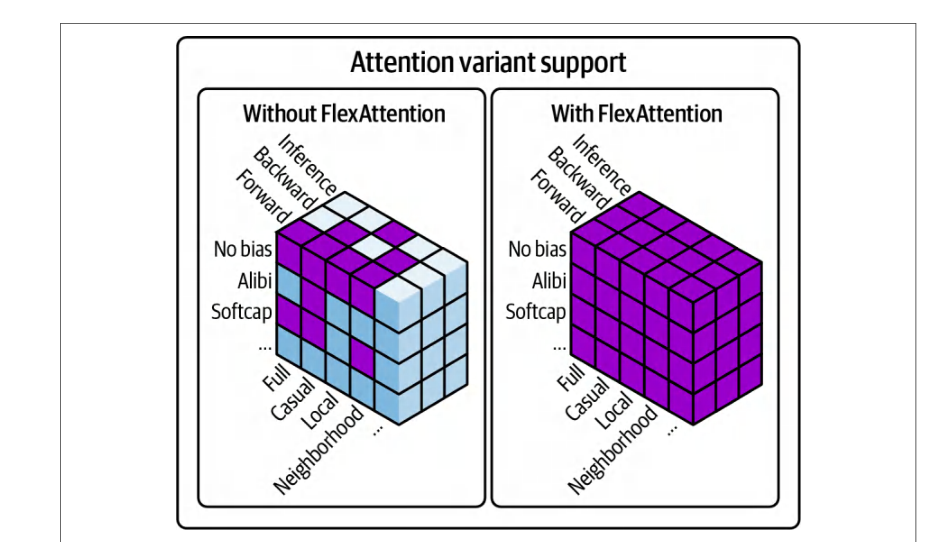
- FlexDecodingFlexDecoding
- This is a counterpart to FlexAttention that optimizes the decoding or text generation phases. FlexDecoding integrates with
torch.compileand dynamic cache layouts. It uses compile-time optimizations for the decoder side of sequence generation, including KV caching efficiently across time steps. FlexDecoding can speed up autoregressive generation by reducing redundant compute during decoding. FlexDecoding is intended for LLM inference workloads, including those with long-generation sequences. It does not change training-time attention semantics.这是 FlexAttention 的对应组件,用于优化解码或文本生成阶段。FlexDecoding 与torch.compile及动态缓存布局集成。它针对序列生成的解码器一侧使用编译期优化,包括跨时间步高效地进行 KV 缓存。FlexDecoding 可通过减少解码期间的冗余计算来加速自回归生成。FlexDecoding 面向 LLM 推理工作负载,包括生成长序列的场景。它不会改变训练时的注意力语义。
- Context parallel上下文并行
- Context Parallel shards attention along the sequence-length dimension across participating devices or ranks to scale context length. Use the
context_parallel()API to scope replacement ofscaled_dot_product_attentionwith context-parallel-aware kernels. The mechanism splits query-key-value (QKV) by sequence across ranks and synchronizes during attention, rather than parallelizing attention across threads within a single GPU.上下文并行(Context Parallel)沿序列长度维度将注意力分片到参与的各个设备或 rank 上,以扩展上下文长度。使用context_parallel()API 可将scaled_dot_product_attention的作用域替换为上下文并行感知的内核。该机制按序列在各 rank 之间切分 query-key-value(QKV),并在注意力计算期间进行同步,而不是在单个 GPU 内跨线程并行化注意力。
PyTorch 架构优化(torchao)、量化、稀疏性与剪枝
PyTorch Architecture Optimization (torchao), Quantization, Sparsity, and Pruning
PyTorch Architecture Optimization (torchao) brings together quantization, sparsity, pruning, and related numerical-debugging tools into a single namespace. Its quantization subpackage (torchao.quantization) provides common FX-graph-mode workflows, including post-training quantization (PTQ), quantization-aware training (QAT), and QConfigMapping APIs to convert and optimize models for INT8, FP8, and emerging formats.PyTorch 架构优化(torchao)将量化、稀疏性、剪枝以及相关的数值调试工具汇集到同一个命名空间下。其量化子包(torchao.quantization)提供常见的 FX 图模式工作流,包括训练后量化(PTQ)、量化感知训练(QAT),以及用于将模型转换并优化为 INT8、FP8 和新兴格式的 QConfigMapping API。
Beyond quantization, torchao supports pruning (torchao.pruning) and sparsity techniques like 2:4 and block sparsity (torchao.sparsity). These provide significant speedups with minimal loss in accuracy.除量化之外,torchao 还支持剪枝(torchao.pruning)以及 2:4 稀疏、块稀疏等稀疏性技术(torchao.sparsity)。这些技术能在精度损失极小的前提下带来显著的加速。
torch.compile() integrates with the torchao framework for quantization. Under the hood, TorchDynamo captures each submodule’s computation as an optimized graph, then TorchInductor emits hardware-aware kernels that leverage torchao. This produces consistent, end-to-end performance improvements for both model training and inference. Meanwhile, it preserves precise control over numerical formats and memory layouts. This makes it a great library for production-level performance optimizations such as quantization.torch.compile() 与 torchao 框架集成以实现量化。在底层,TorchDynamo 将每个子模块的计算捕获为优化后的图,随后 TorchInductor 生成利用 torchao 的硬件感知内核。这为模型训练和推理都带来一致的端到端性能提升。同时,它保留了对数值格式和内存布局的精确控制。这使其成为用于量化等生产级性能优化的出色库。
使用 CUDA 流实现并发
Concurrency with CUDA Streams
As covered in an earlier chapter, CUDA streams enable concurrency and overlap of operations on the GPU. By default, PyTorch schedules all operations on the device’s default stream, stream 0, sequentially. However, many tasks are independent, and, if resources permit, a GPU can perform them in parallel using multiple streams. For example, GPUs can overlap data transfers with compute—or run separate neural network branches concurrently—by using separate, nondefault streams.如前文所述,CUDA 流可实现 GPU 上操作的并发与重叠。默认情况下,PyTorch 将设备默认流(流 0)上的所有操作按顺序调度。然而,许多任务是相互独立的,如果资源允许,GPU 可以使用多个流并行执行它们。例如,GPU 可以通过使用独立的非默认流,将数据传输与计算重叠,或并发运行不同的神经网络分支。
In PyTorch, you create a stream with torch.cuda .Stream(). You can then launch work on this stream using the Python context manager, with torch.cuda .stream(stream), or by explicitly assigning operations to that stream. PyTorch will issue operations (e.g., memory transfers, CUDA kernels, etc.) into the specified stream in a FIFO order—just as it does on the default stream.在 PyTorch 中,可以使用 torch.cuda .Stream() 创建流。随后可以通过 Python 上下文管理器 torch.cuda .stream(stream) 在该流上启动工作,或显式地将操作分配到该流。PyTorch 会按 FIFO 顺序将操作(例如内存传输、CUDA 内核等)提交到指定的流中——正如它在默认流上的行为一样。
通信与计算重叠
Overlapping Communication and Computation
A common use of CUDA streams is to overlap host-to-device (H2D) data loading with GPU computation. This helps mask the data transfer latency incurred when using an external device such as a GPU—relative to the CPU running on the host.CUDA 流的一个常见用途,是让主机到设备(H2D)的数据加载与 GPU 计算重叠。这有助于掩盖使用 GPU 这类外部设备时(相对于运行在主机上的 CPU)所产生的数据传输时延。
For instance, one stream can copy the next batch of input data from CPU to GPU memory while the default stream is busy training on the current batch. By the time the default stream is ready for the next batch, the data transfer is already done, and the GPU can process this next batch. This effectively hides the I/O latency. Here is an example of using two streams, the compute_stream (default) and the transfer_ stream (nondefault), to overlap data transfer and compute in PyTorch:例如,当一个流把下一批输入数据从 CPU 复制到 GPU 显存时,默认流正忙于在当前批次上训练。等到默认流准备好处理下一批时,数据传输已经完成,GPU 就可以处理这一批数据。这有效地隐藏了 I/O 时延。下面是一个使用两个流——compute_stream(默认流)和 transfer_ stream(非默认流)——在 PyTorch 中重叠数据传输与计算的示例:
# 设置流
device = 'cuda'
# 用于 H2D 数据传输
transfer_stream = torch.cuda.Stream(device=device)
# 用于计算
compute_stream  = torch.cuda.default_stream(device=device)
# 创建迭代器,以便预加载“下一批”批次
dataloader_iter = iter(dataloader)
# 将第一批预加载到 GPU
first_batch = next(dataloader_iter, None)
if first_batch:
    with torch.cuda.stream(transfer_stream):
        next_inputs, next_labels = (
            first_batch[0].to(device, non_blocking=True),
            first_batch[1].to(device, non_blocking=True),
        )
for _ in range(len(dataloader)):
    # 1) 等待 `next` 批次传输完成,然后交换到计算变量
    # 多个拷贝引擎允许 H2D/对等拷贝并发。
    # 在 Nsight Systems 中验证并行性(Copy engines 通道)
    # 以及跟踪/性能剖析工具(HTA 等)
    compute_stream.wait_stream(transfer_stream)
    inputs, labels = next_inputs, next_labels
    # 2) 在 transfer_stream 上启动*下一*批次的传输
    batch = next(dataloader_iter, None)
    if batch:
        with torch.cuda.stream(transfer_stream):
            next_inputs, next_labels = (
                batch[0].to(device, non_blocking=True),
                batch[1].to(device, non_blocking=True),
            )
# Set up streams
device = 'cuda'
# for H2D data transfers
transfer_stream = torch.cuda.Stream(device=device)
# for compute
compute_stream  = torch.cuda.default_stream(device=device)
# Create an iterator so we can preload "next" batches
dataloader_iter = iter(dataloader)
# Preload the very first batch onto GPU
first_batch = next(dataloader_iter, None)
if first_batch:
    with torch.cuda.stream(transfer_stream):
        next_inputs, next_labels = (
            first_batch[0].to(device, non_blocking=True),
            first_batch[1].to(device, non_blocking=True),
        )
for _ in range(len(dataloader)):
    # 1) Wait for transfer of `next` batch to finish, then swap into compute var
    # Multiple copy engines allow H2D/peer copy concurrency.
    # Verify parallelism in Nsight Systems (Copy engines lanes)
    # And tracing/profiling tools (HTA, etc.)
    compute_stream.wait_stream(transfer_stream)
    inputs, labels = next_inputs, next_labels
    # 2) Kick off transfer of the *following* batch on the transfer_stream
    batch = next(dataloader_iter, None)
    if batch:
        with torch.cuda.stream(transfer_stream):
            next_inputs, next_labels = (
                batch[0].to(device, non_blocking=True),
                batch[1].to(device, non_blocking=True),
            )
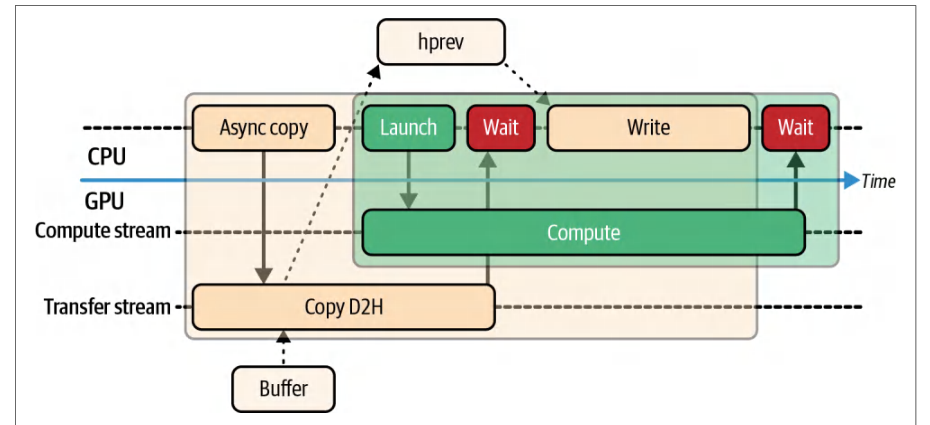
    # 3) 在 compute_stream 上运行前向/反向
    with torch.cuda.stream(compute_stream):
        outputs = model(inputs)
        loss    = loss_fn(outputs, labels)
        loss.backward()
        optimizer.step()
        optimizer.zero_grad(set_to_none=True)
    # 3) Run forward/backward on compute_stream
    with torch.cuda.stream(compute_stream):
        outputs = model(inputs)
        loss    = loss_fn(outputs, labels)
        loss.backward()
        optimizer.step()
        optimizer.zero_grad(set_to_none=True)
This example uses two CUDA streams: a dedicated transfer stream for asynchronous host-to-device copies and the default compute stream for model work. This hides H2D latency and matches PyTorch’s recommended pattern for overlapping communication and computation.该示例使用两个 CUDA 流:一个专用传输流用于异步的主机到设备复制,以及默认计算流用于模型工作。这样既隐藏了 H2D 时延,也符合 PyTorch 推荐的通信与计算重叠模式。
Specifically, while the model is processing a batch on the default stream, the next batch’s data transfer is already underway on the transfer_stream. Synchronizing with compute_stream.wait_stream(transfer_stream) before consuming the pre-loaded batch enforces correct ordering without a full device-wide barrier. And the .to(device, non_blocking=True) calls make sure that the copy uses asynchronous DMA-based copies that don’t block the calling CPU thread.具体来说,当模型在默认流上处理一个批次时,下一批次的数据传输已经在 transfer_stream 上进行。在消费预加载的批次之前用 compute_stream.wait_stream(transfer_stream) 进行同步,可以在不使用全设备范围屏障的情况下强制正确的顺序。而 .to(device, non_blocking=True) 调用则确保复制使用基于 DMA 的异步复制,不会阻塞发起调用的 CPU 线程。
Using next(dataloader_iter, None) gives explicit control over when transfers are enqueued versus when the kernel operations run. This makes sure one batch of data is moving on the transfer stream while another batch is executing on the compute stream, as shown in Figure 13-4.使用 next(dataloader_iter, None) 可以显式控制传输何时入队、内核操作何时运行。这确保一批数据在传输流上搬运的同时,另一批数据在计算流上执行,如图 13-4 所示。
Additionally, by pulling from dataloader_iter ahead of time and storing in next_inputs next_labels, this code separates batch loading (running on the CPU in transfer_stream) from batch processing (running on the GPU in compute_stream).此外,通过提前从 dataloader_iter 取出数据并存入 next_inputs next_labels,这段代码将批次加载(在 transfer_stream 中于 CPU 上运行)与批次处理(在 compute_stream 中于 GPU 上运行)分离开来。
This split means you always have one batch in flight for each stream. This decouples data loading from compute and maximizes overlap.这种拆分意味着每个流上始终有一个批次在处理中。它将数据加载与计算解耦,并最大化重叠。
使用事件进行流同步
Stream Synchronization with Events
When using multiple streams, it’s sometimes necessary to coordinate between them to make sure that one stream’s work is done before another stream uses its results, for instance. A lightweight way to synchronize specific points is using CUDA events, as discussed in Chapter 11.使用多个流时,有时需要在流之间进行协调,例如确保某个流的工作在另一个流使用其结果之前完成。同步特定点的一种轻量方式是使用 CUDA 事件,如第 11 章所述。
With CUDA events, you can record an event on one stream and make another stream wait for that event. This avoids the heavyweight full synchronization of torch.cuda.synchronize() and, instead, synchronizes only the necessary streams needed to process an individual event.借助 CUDA 事件,你可以在一个流上记录事件,并让另一个流等待该事件。这避免了 torch.cuda.synchronize() 那种重量级的完全同步,而是只同步处理单个事件所需的那些流。
In fact, even in a multi-GPU context, events can be used to synchronize work across devices. In this case, one GPU records an event on its device stream while another GPU waits for the event on its device stream. This is how NCCL handles dependencies under the hood.事实上,即使在多 GPU 场景中,事件也可用于跨设备同步工作。此时,一块 GPU 在其设备流上记录事件,另一块 GPU 则在其设备流上等待该事件。NCCL 在底层正是这样处理依赖关系的。
By using events smartly, you keep the multiple GPUs working in parallel as much as possible. Next is an example of using CUDA events to synchronize two streams, stream1 and stream2 in PyTorch:通过巧妙地使用事件,你可以让多个 GPU 尽可能保持并行工作。下面是一个在 PyTorch 中使用 CUDA 事件同步两个流 stream1 和 stream2 的示例:
# 禁用事件上的计时,因为我们仅将其用于同步。
event = torch.cuda.Event(enable_timing=False)
# 在第一个流中:
with torch.cuda.stream(stream1):
    kernel_launch(...)
    event.record()           # 在 stream1 中工作结束时记录事件
# 在另一个流中或在主机上:
stream2.wait_event(event)    # 让 stream2 等待,直到该事件被标记
with torch.cuda.stream(stream2):
    other_kernel_launch(...)
# Disable timing on the event since we’re using it purely for synchronization.
event = torch.cuda.Event(enable_timing=False)
# In first stream:
with torch.cuda.stream(stream1):
    kernel_launch(...)
    event.record()           # record event at end of work in stream1
# In another stream or on host:
stream2.wait_event(event)    # make stream2 wait until event is signaled
with torch.cuda.stream(stream2):
    other_kernel_launch(...)
In this code, we record an event at the end of some work on stream1. Later, before launching work on stream2, we call stream2.wait_event(event). This inserts a dependency such that stream2 will not execute its next kernel until the event is signaled by stream1 reaching that point. Events are useful for scheduling lightweight dependencies between streams, as they avoid heavy, global synchronizations that will stall all stream execution.在这段代码中,我们在 stream1 上某项工作的末尾记录一个事件。随后,在 stream2 上启动工作之前,我们调用 stream2.wait_event(event)。这会插入一个依赖关系,使得 stream2 在 stream1 到达该点并触发事件之前,不会执行其下一个内核。事件非常适合在流之间调度轻量级依赖,因为它们避免了会阻塞所有流执行的重量级全局同步。
Let’s revisit the PyTorch data loader/overlap example in the previous section and rewrite it to synchronize with CUDA events. We are using the same pair of streams from earlier (transfer_stream and compute_stream), but we’re adding a transfer_ done CUDA event to synchronize at a fine-grained, event-specific level:让我们回顾上一节中的 PyTorch 数据加载器/重叠示例,并将其改写为使用 CUDA 事件进行同步。我们使用与之前相同的一对流(transfer_stream 和 compute_stream),但新增了一个 transfer_ done CUDA 事件,以细粒度的、针对具体事件的方式进行同步:
import torch
device = 'cuda'
# 用于 H2D 拷贝
transfer_stream = torch.cuda.Stream(device=device)
# 用于计算
compute_stream  = torch.cuda.default_stream(device=device)
# 仅同步事件(低开销)
transfer_done = torch.cuda.Event(enable_timing=False)
# 迭代器,以便提前预加载
dataloader_iter = iter(dataloader)
# ---- 预加载第一批 ----
first_batch = next(dataloader_iter, None)
if first_batch:
    with torch.cuda.stream(transfer_stream):
        next_inputs, next_labels = (
            first_batch[0].to(device, non_blocking=True),
            first_batch[1].to(device, non_blocking=True),
        )
        # 标记 H2D 完成时刻
        transfer_done.record(stream=transfer_stream)
for _ in range(len(dataloader)):
    # ---- 同步:等待传输完成 ----
    compute_stream.wait_event(transfer_done)
    inputs, labels = next_inputs, next_labels
    # ---- 启动下一次传输 ----
    batch = next(dataloader_iter, None)
    if batch:
        with torch.cuda.stream(transfer_stream):
            next_inputs, next_labels = (
                batch[0].to(device, non_blocking=True),
                batch[1].to(device, non_blocking=True),
            )
            transfer_done.record(stream=transfer_stream)
import torch
device = 'cuda'
# for H2D copies
transfer_stream = torch.cuda.Stream(device=device)
# for compute
compute_stream  = torch.cuda.default_stream(device=device)
# sync-only event (low overhead)
transfer_done = torch.cuda.Event(enable_timing=False)
# Iterator so we can preload ahead
dataloader_iter = iter(dataloader)
# ---- Preload first batch ----
first_batch = next(dataloader_iter, None)
if first_batch:
    with torch.cuda.stream(transfer_stream):
        next_inputs, next_labels = (
            first_batch[0].to(device, non_blocking=True),
            first_batch[1].to(device, non_blocking=True),
        )
        # mark when H2D is done
        transfer_done.record(stream=transfer_stream)
for _ in range(len(dataloader)):
    # ---- Sync: wait for the transfer to complete ----
    compute_stream.wait_event(transfer_done)
    inputs, labels = next_inputs, next_labels
    # ---- Kick off next transfer ----
    batch = next(dataloader_iter, None)
    if batch:
        with torch.cuda.stream(transfer_stream):
            next_inputs, next_labels = (
                batch[0].to(device, non_blocking=True),
                batch[1].to(device, non_blocking=True),
            )
            transfer_done.record(stream=transfer_stream)
    # ---- 在计算流上执行计算 ----
    with torch.cuda.stream(compute_stream):
        outputs = model(inputs)
        loss    = loss_fn(outputs, labels)
        loss.backward()
        optimizer.step()
        optimizer.zero_grad(set_to_none=True)
    # ---- Compute on the compute stream ----
    with torch.cuda.stream(compute_stream):
        outputs = model(inputs)
        loss    = loss_fn(outputs, labels)
        loss.backward()
        optimizer.step()
        optimizer.zero_grad(set_to_none=True)
This is the same overlap pattern as the previous section, but it uses a CUDA event for the transfer → compute synchronization. This is in contrast to the wait_stream() mechanism used in the other example.这与上一节是相同的重叠模式,但它使用 CUDA 事件来完成传输 → 计算的同步。这与另一个示例中使用的 wait_stream() 机制形成对比。
This code still uses next(dataloader_iter) to preload batches ahead of time (same as the example in the previous section). This way, data transfer and compute are always overlapping.这段代码仍然使用 next(dataloader_iter) 提前预加载批次(与上一节的示例相同)。这样,数据传输与计算始终处于重叠状态。
However, in this example, the transfer_done event is recorded with trans fer_done.record(stream=transfer_stream) on the transfer_stream right after the asynchronous copy is enqueued. This timestamps the event.不过,在这个示例中,异步拷贝入队之后,紧接着就在 transfer_stream 上通过 trans fer_done.record(stream=transfer_stream) 记录了 transfer_done 事件。这为该事件打上了时间戳。
The compute_stream.wait_event(transfer_done) then stalls the compute_stream until the copy is complete and the transfer_done event is triggered. It then consumes the prefetched batch and performs its compute operations on the compute_stream.随后 compute_stream.wait_event(transfer_done) 会阻塞 compute_stream,直到拷贝完成且 transfer_done 事件被触发。之后它消费预取的批次,并在 compute_stream 上执行计算操作。
Besides data loading, CUDA streams are useful in a lot of different contexts. Let’s discuss how they’re used in MoE models.除了数据加载之外,CUDA 流在许多不同场景中都非常有用。下面我们来讨论它们在 MoE 模型中的用法。
在 MoE 模型中使用 CUDA 流
Using CUDA Streams with MoE Models
In practice, transformer-model layers are sequentially dependent, so you can’t arbitrarily run layers in parallel. However, in an MoE architecture, different experts can run concurrently on separate CUDA streams since their computations are independent.在实践中,Transformer 模型各层之间存在顺序依赖,因此不能随意并行执行各层。然而,在 MoE 架构中,不同专家可以在各自的 CUDA 流上并发运行,因为它们的计算相互独立。
Each expert processes a distinct segment of the input. At the join point, the expert outputs are aggregated. It’s essential that each expert writes only to its assigned slice of the output tensor. If two experts accidentally write to overlapping memory regions, this will introduce a race condition, which can corrupt the results—or trigger synchronization issues caused by the nondeterministic order of writes from the experts.每个专家处理输入中一个不同的片段。在汇合点,各专家的输出会被聚合。关键在于每个专家只写入输出张量中分配给它的那一片。如果两个专家意外写入重叠的内存区域,就会引入竞态条件,可能破坏结果——或者因专家写入顺序不确定而引发同步问题。
To avoid such issues, you should make sure to use proper stream-level synchronization (e.g., stream events) and verify that memory is cleanly partitioned across expert kernels. By enforcing this separation between expert execution and output aggregation, you will maintain correctness without sacrificing parallelism.为避免此类问题,应确保使用恰当的流级同步(例如流事件),并验证内存在各专家内核之间被清晰地划分。通过在专家执行与输出聚合之间强制实施这种隔离,你可以在不牺牲并行性的前提下保持正确性。
In our example, each expert could, in theory, run on its own stream—or even its own GPU if the framework is extended to multiple GPUs. In this case, synchronization— ideally using stream events—is needed when gathering the results.在我们的示例中,理论上每个专家都可以运行在自己的流上——如果框架扩展到多 GPU,甚至可以运行在自己的 GPU 上。在这种情况下,收集结果时就需要同步——理想情况下使用流事件。
Pipeline parallelism, or pipelining microbatches through different model stages on different devices, and serving multiple inference requests are two scenarios that naturally benefit from multiple streams. In a pipeline parallel workflow, for instance, each stage of the model has its own stream that processes a different microbatch concurrently. Meanwhile, it’s also communicating with neighboring stages.流水线并行(即在不同设备上的不同模型阶段之间流水化微批)以及同时服务多个推理请求,是两种天然受益于多流的场景。例如,在流水线并行工作流中,模型的每个阶段都有自己的流,并发处理不同的微批。与此同时,它还在与相邻阶段通信。
In multirequest inference serving, each request’s model execution can be launched in its own stream. With sufficient hardware resources, this can increase throughput by overlapping inference computations—at the cost of some per-request latency due to resource-sharing overhead.在多请求推理服务中,每个请求的模型执行都可以在各自的流中启动。在硬件资源充足的情况下,这可以通过重叠推理计算来提高吞吐量——代价是由于资源共享开销而带来一定的单请求时延。
In short, CUDA streams help to squeeze extra performance out of your hardware by overlapping work across multiple kernels, stages, or requests. They require careful synchronization to avoid race conditions. But, when used correctly, they can hide latency and keep a GPU more fully utilized.简而言之,CUDA 流通过跨多个内核、阶段或请求重叠工作,帮助从硬件中榨取额外性能。它们需要谨慎同步以避免竞态条件。但是,如果使用得当,它们可以隐藏时延,让 GPU 保持更高的利用率。
It’s recommended to continuously profile your code when introducing concurrency. And keep in mind that sequential execution at 100% utilization may actually perform better than parallel execution that introduces resource contention. Often, though, streams let you utilize parts of the GPU that would otherwise sit idle. Finding the right balance is important.建议在引入并发时持续对代码进行性能剖析。并请记住,100% 利用率的串行执行实际上可能比引入资源争用的并行执行表现更好。不过,流通常能让你利用 GPU 中原本闲置的部分。找到合适的平衡点很重要。
使用 CUDA 图降低内核启动开销
Reducing Kernel Launch Overhead with CUDA Graphs
We’ve seen in earlier chapters that CUDA Graphs eliminate per-iteration launch overhead, reduce CPU launch overhead, and eliminate tiny idle gaps between kernels. And removing even the smallest idle gaps leads to higher effective utilization—and more consistent iteration times. Now let’s show how to use them in PyTorch.我们在前面的章节中已经看到,CUDA 图消除了每次迭代的启动开销、降低了 CPU 启动开销,并消除了内核之间的微小空闲间隙。而即使消除最小的空闲间隙,也能带来更高的有效利用率和更一致的迭代时间。现在让我们展示如何在 PyTorch 中使用它们。
捕获 CUDA 图并预分配内存
Capturing a CUDA Graph and Preallocating Memory
PyTorch provides a torch.cuda.CUDAGraph API to capture and replay CUDA Graphs. The general usage pattern is to first warm up the model by running a few iterations normally to initialize all necessary data and allocations. Next, you create a CUDAGraph object and a dedicated, nondefault CUDA stream to isolate the capture.PyTorch 提供了 torch.cuda.CUDAGraph API 来捕获和重放 CUDA 图。一般的使用模式是:首先正常运行若干次迭代来预热模型,以初始化所有必要的数据和分配。接下来,创建一个 CUDAGraph 对象和一个专用的非默认 CUDA 流,以隔离捕获过程。
You then perform a full pass of the model’s execution to record the sequence of operations using the capture stream specified in the torch.cuda.graph() context. Once the operations are captured in the CUDA Graph, you can replay() the graph on new inputs as needed (e.g., model training or inference.)然后,你使用在 torch.cuda.graph() 上下文中指定的捕获流,执行一次完整的模型运行,以记录操作序列。一旦操作被捕获到 CUDA 图中,你就可以根据需要在新输入上 replay() 该图(例如模型训练或推理)。
Before capturing a CUDA Graph, all static memory used during capture must be preallocated—and preferably at its maximum size. These buffers include inputs, outputs, and intermediate tensors. If any new memory allocation happens during capture, the graph will fail with an error such as “operation not permitted when stream is capturing.”在捕获 CUDA 图之前,捕获期间使用的所有静态内存都必须预先分配——并且最好按最大尺寸分配。这些缓冲区包括输入、输出和中间张量。如果在捕获期间发生任何新的显存分配,图将失败并报错,例如“operation not permitted when stream is capturing”。
To reduce fragmentation and maximize contiguous memory space for these fixed buffers, you can invoke torch.cuda.empty_cache() immediately before entering the capture block. This will clear unused cached memory and give the allocator the best chance to lay out your prereserved buffers without interruption.为了减少碎片并最大化这些固定缓冲区的连续显存空间,你可以在进入捕获块之前立即调用 torch.cuda.empty_cache()。这将清除未使用的缓存内存,让分配器有最好的机会无中断地布局你预保留的缓冲区。
Remember that PyTorch’s caching allocator supports CUDA’s asynchronous allocator (cudaMallocAsync) to reuse fixed memory addresses. However, this does not bypass CUDA Graphs’ requirement to not create new allocations within the graph.请记住,PyTorch 的缓存分配器支持 CUDA 的异步分配器(cudaMallocAsync),以复用固定的内存地址。但这并不能绕过 CUDA 图的一项要求:不得在图内部创建新的分配。
You still need to allocate fixed-size buffers upfront to avoid a runtime error if you try to allocate new memory inside the graph. Make sure all tensors reach their maximum required size during the warm-up prior to graph capture. We’ll cover more about this in the upcoming graph replay section.你仍然需要预先分配固定大小的缓冲区,以避免在图内部尝试分配新内存时出现运行时错误。要确保所有张量在图捕获之前的预热阶段就达到其所需的最大尺寸。我们将在接下来的图重放一节中进一步讨论这一点。
You need to use a dedicated, nondefault stream for graph capture to avoid interference with any operations that should not be included in the CUDA Graph. Here is a code snippet demonstrating how to capture a CUDA Graph in PyTorch with a dedicated capture_stream:你需要使用专用的非默认流来进行图捕获,以避免与任何不应包含在 CUDA 图中的操作相互干扰。下面的代码片段演示了如何在 PyTorch 中使用专用的 capture_stream 捕获 CUDA 图:
g = torch.cuda.CUDAGraph()
capture_stream = torch.cuda.Stream()
# 准备静态输入与输出
static_input = torch.randn(batch_shape, device='cuda')
static_output = torch.empty(output_shape, device='cuda')
# 在 capture_stream 上执行预热步骤,以分配缓冲区而不进行记录
with torch.cuda.stream(capture_stream):
    tmp = model(static_input)
    static_output.copy_(tmp)
# 确保预热已完成
capture_stream.synchronize()
# 开始图捕获
with torch.cuda.graph(g, stream=capture_stream):
    tmp = model(static_input)
    static_output.copy_(tmp)
# 在使用该图之前确保捕获已完成
capture_stream.synchronize()
g = torch.cuda.CUDAGraph()
capture_stream = torch.cuda.Stream()
# Prepare static inputs and outputs
static_input = torch.randn(batch_shape, device='cuda')
static_output = torch.empty(output_shape, device='cuda')
# Warm-up step on capture_stream to allocate buffers without recording
with torch.cuda.stream(capture_stream):
    tmp = model(static_input)
    static_output.copy_(tmp)
# ensure warm-up is complete
capture_stream.synchronize()
# Begin graph capture
with torch.cuda.graph(g, stream=capture_stream):
    tmp = model(static_input)
    static_output.copy_(tmp)
# ensure capture is complete before using the graph
capture_stream.synchronize()
In this code, we first allocate static_input and static_output on the GPU with fixed shapes. We run one warm-up iteration on capture_stream to ensure that any memory needed inside model(static_input) is allocated—and to perform any one-time setup.在这段代码中,我们首先在 GPU 上分配形状固定的 static_input 和 static_output。我们在 capture_stream 上运行一次预热迭代,以确保 model(static_input) 内部所需的任何内存都已被分配,并完成任何一次性设置。
We then synchronize the capture_stream to make sure that the warm-up step is fully complete before beginning the actual graph capture. Next, we enter the torch.cuda.graph(...) context on the same stream and rerun the model forward pass.随后我们同步 capture_stream,以确保在开始实际的图捕获之前预热步骤已完全结束。接着,我们在同一个流上进入 torch.cuda.graph(...) 上下文,并重新运行模型的前向传播。
During the capture phase, no kernels are actually launched. Instead, the operations are just recorded into the CUDA Graph object g. After exiting the capture block, we need to synchronize once more to make sure the recording is finalized.在捕获阶段,实际上不会启动任何内核。这些操作只是被记录到 CUDA 图对象 g 中。退出捕获代码块后,我们需要再次同步,以确保记录已经完成。
When capturing a CUDA Graph, strict isolation is essential. Operations on the capture stream must not be affected by activity on any other streams. Even a seemingly unrelated kernel launch on another thread can invalidate the capture. This could lead to runtime errors like “operation not permitted when stream is capturing.”捕获 CUDA 图时,严格的隔离至关重要。捕获流上的操作不得受到任何其他流上活动的影响。即使是在另一个线程上启动的一个看似无关的内核,也可能使捕获失效。这可能导致诸如“operation not permitted when stream is capturing”之类的运行时错误。
This error happens if you accidentally perform CUDA operations on other streams while the capture is in progress. In this case, it invalidates the graph context and triggers this error. This can also happen if you launch a kernel on the capture stream that performs dynamic memory allocation, like tensor creation or calling torch.empty during capture.如果你在捕获进行期间意外地在其他流上执行 CUDA 操作,就会发生此错误。在这种情况下,它会使图上下文失效并触发该错误。如果你在捕获流上启动的内核执行动态显存分配,例如在捕获期间创建张量或调用 torch.empty,也可能发生这种情况。
After capturing the graph, it can be replayed on any stream, including the default stream—and regardless of which stream was used for capture. If you trigger any CUDA operations that depend on the graph completing fully, you must synchronize before running the operations, as shown next. Otherwise, because the graph runs asynchronously when replayed, the CUDA operations that depend on the graph results may run before the graph completes execution:捕获图之后,它可以在任意流上重放,包括默认流,且与捕获时使用的是哪个流无关。如果你要触发任何依赖于图完全执行完毕的 CUDA 操作,就必须在运行这些操作之前进行同步,如下所示。否则,由于图在重放时是异步运行的,依赖于图结果的 CUDA 操作可能会在图完成执行之前就运行:
# 重放该图,其写入 static_output
g.replay()
# 在重放该图的流上同步
torch.cuda.current_stream().synchronize()
# 现在可以安全地读取或后处理输出
print(static_output)
...
# replay the graph which writes to static_output
g.replay()
# synchronize on the stream that is replaying the graph
torch.cuda.current_stream().synchronize()
# Now it's safe to read or post-process the output
print(static_output)
...
Without this explicit synchronization, your program could proceed and incorrectly assume that the graph has finished executing and written its results to static_out put. If no synchronization is in place, the code may read stale or partially written data because the graph may not have finished writing to static_output. This scenario will cause nondeterministic behaviors, corrupted reads, subtle race conditions, and deadlocks.如果没有这种显式同步,程序可能会继续执行,并错误地认为图已经执行完毕且已将结果写入 static_out put。如果没有任何同步机制,代码就可能读取到陈旧或部分写入的数据,因为图可能尚未完成对 static_output 的写入。这种情况会导致非确定性行为、读取数据损坏、隐蔽的竞态条件以及死锁。
重放图
Replaying the Graph
To replay the graph with new data, you copy the new inputs into the preallocated input tensors, static_input, and call g.replay(). The GPU will execute the entire captured sequence of operations using the current contents of those tensors as input. The graph will place the results in the preallocated output tensor (static_output), as shown here:要用新数据重放图,需将新输入复制到预分配的输入张量 static_input 中,并调用 g.replay()。GPU 会以这些张量的当前内容作为输入,执行整个已捕获的操作序列。图会将结果放入预分配的输出张量(static_output)中,如下所示:
# 将新数据加载到预分配的输入张量中
static_input.copy_(new_batch)
# 执行已捕获的图
g.replay()
# 获取输出(若计划修改它,请克隆)
result = static_output.clone()
# load new data into pre-allocated input tensor
static_input.copy_(new_batch)
# execute the captured graph
g.replay()
# retrieve the output (clone if you plan to modify it)
result = static_output.clone()
Here, we load new_batch data into the memory space of static_input and then call g.replay(). The graph runs the exact captured operations using the current static_input data and writes the outputs into static_output. We can then use or clone static_output as needed.这里,我们将 new_batch 数据加载到 static_input 的显存空间中,然后调用 g.replay()。图使用当前的 static_input 数据运行完全相同的已捕获操作,并将输出写入 static_output。随后我们可以按需使用或克隆 static_output。
It’s recommended to validate that the graph’s output matches a normal execution for a few test inputs to make sure the capture was successful. Also, remember that you cannot directly print or call .item() on static_output without syncing. If needed, do result = static_output.cpu().numpy() after replay and outside of any asynchronous regions for debugging.建议用几个测试输入验证图的输出与常规执行结果一致,以确保捕获成功。另外请记住,在未同步的情况下,不能直接打印 static_output 或对其调用 .item()。如有需要,可在重放之后、且在任何异步区域之外执行 result = static_output.cpu().numpy() 以便调试。
Since the graph reuses the same input, output, and internal memory allocations each time, it will overwrite the same output tensor on each iteration. So if you need to preserve the output beyond a single iteration, you need to clone() the buffer, as shown in the previous code. This is why we need to make sure that the allocations in the warm-up/capture step cover the maximum sizes needed. Remember that the graph cannot handle additional memory allocations on the fly.由于图每次都会复用相同的输入、输出和内部显存分配,因此每次迭代都会覆盖同一个输出张量。所以,如果需要在单次迭代之后保留输出,就必须像前面的代码那样 clone() 该缓冲区。这也是我们需要确保预热/捕获阶段的分配覆盖所需最大尺寸的原因。请记住,图无法在运行过程中处理额外的显存分配。
It’s worth noting that after using a CUDA Graph, certain PyTorch operations will not be reflected until you recapture the graph. For instance, if you change model weights on the fly and outside of the graph, these updates won’t apply because the graph has its own copy of operations. As such, graphs work best in steady-state loops in which operations are repeated on each iteration.值得注意的是,使用 CUDA 图之后,某些 PyTorch 操作在你重新捕获图之前不会生效。例如,如果你在图之外动态修改模型权重,这些更新不会生效,因为图拥有自己的一份操作副本。因此,图最适合用于每次迭代都重复相同操作的稳态循环。
Also, when using cudaMallocAsync to preallocate memory for a CUDA Graph, it will reuse the same memory addresses during replay that it preallocated during graph capture—or during warm-up if the graph is loaded from disk, for instance. This way, subsequent graph replays do not require additional memory.此外,当使用 cudaMallocAsync 为 CUDA 图预分配内存时,它会在重放期间复用图捕获期间(或者,例如从磁盘加载图时的预热期间)预分配的相同内存地址。这样,后续的图重放就不需要额外的内存。
By default, every instance of a CUDA Graph uses its own private memory pool. This way, you’re guaranteed that each graph preallocates its own memory buffers and does not compete with other instances of the graph. In other words, two identical graphs will not compete for memory if they’re replayed concurrently since they each use their own memory pool and buffer space.默认情况下,每个 CUDA 图实例都使用自己私有的显存池。这样就能保证每个图预分配自己的内存缓冲区,不会与其他图实例竞争。换句话说,两个相同的图即使并发重放也不会争抢内存,因为它们各自使用自己的显存池和缓冲区空间。
You can choose to share a memory pool between graph instances by passing torch.cuda.graph(pool=...). However, this is useful only in very special cases when you want to purposely orchestrate related graphs to reuse the preallocated memory buffers for performance reasons. For example, consider simultaneously running multiple inference graph variants—each using a different batch size (e.g., 1, 2, 4, 8, etc.). In this case, you can reduce overall memory usage by having the shape-specialized variants reuse a single, large memory allocation for PagedAttention, which uses a varying-size tensor called block_tables.你可以通过传入 torch.cuda.graph(pool=...) 在多个图实例之间共享显存池。不过,这只在非常特殊的场景下有用,即你出于性能考虑,有意编排相互关联的图来复用预分配的内存缓冲区。例如,考虑同时运行多个推理图变体——每个变体使用不同的批大小(如 1、2、4、8 等)。在这种情况下,可以让这些按形状特化的变体复用同一块用于 PagedAttention 的大显存分配,从而降低整体显存占用;PagedAttention 使用一个名为 block_tables 的变长张量。
This approach is described in a FireworksAI blog post. Here, they compile a different CUDA Graph variant for each batch size. And, instead of creating a separate memory pool for each graph, they share a single shared memory pool across all graph variants. By compiling graphs in decreasing order of batch size, memory from the shared pool is reused from the largest variant (e.g., 8, in this case). Smaller batch-size graph variants are serviced by the larger allocated buffers from a previous iteration. This way, multiple graph variants are supported without using excessive GPU memory.这种方法在 FireworksAI 的一篇博客文章中有所描述。在该方案中,他们为每个批大小编译一个不同的 CUDA 图变体。并且,他们没有为每个图创建独立的显存池,而是在所有图变体之间共用一个显存池。通过按批大小递减的顺序编译图,共享池中的内存可以从最大的变体(本例中为 8)开始复用。批大小较小的图变体由前一次迭代中已分配的较大缓冲区来提供服务。这样一来,无需占用过多 GPU 显存即可支持多个图变体。
CUDA 图的最佳实践
Best Practices for CUDA Graphs
CUDA Graphs are a powerful way to reach peak steady-state throughput in both training and inference. They are especially useful for large deployments in which CPU overhead and kernel-launch variability are hurting performance. On modern GPUs, which execute thousands of operations extremely quickly, graphs become essential to keep the GPU devices busy and minimize per-kernel launch overhead.CUDA 图是在训练和推理中达到峰值稳态吞吐量的强大手段。对于 CPU 开销和内核启动波动正在损害性能的大型部署,它们尤其有用。在现代 GPU 上,数千个操作以极快的速度执行,图变得不可或缺,用以让 GPU 设备保持忙碌并最小化每个内核的启动开销。
It’s worth noting that PyTorch’s torch.compile uses CUDA Graphs under the hood in many cases—unless explicitly disabled. CUDA Graphs are used to minimize kernel launch overhead for compiled models. Here are a few important things to remember when using CUDA Graphs:值得注意的是,PyTorch 的 torch.compile 在许多情况下会在底层使用 CUDA 图——除非显式禁用。CUDA 图用于最小化编译模型的内核启动开销。以下是使用 CUDA 图时需要记住的几点重要事项:
- Avoid allocating memory during graph capture避免在图捕获期间分配内存
- Remember that you can’t dynamically allocate GPU memory inside the graph capture. Any tensor that’s needed should be allocated beforehand during the warm-up step, as shown previously. If your graph needs temporary buffers, use PyTorch’s graph-aware caching allocator using the
cudaMallocAsyncCUDA backend. This way, each replay reuses the same buffer addresses. Make sure these temporary tensors are created during the warm-up phase (before graph capture) using their maximum potential size. This will preallocate all the needed memory upfront.请记住,在图捕获过程中不能动态分配 GPU 显存。任何需要的张量都应像前面展示的那样,在预热步骤中提前分配好。如果你的图需要临时缓冲区,请使用 PyTorch 的图感知缓存分配器,并配合cudaMallocAsyncCUDA 后端。这样,每次重放都会复用相同的缓冲区地址。确保这些临时张量在预热阶段(图捕获之前)按其最大可能大小创建。这样就能预先分配好所有需要的显存。
- Keep the graph structure fixed保持图结构固定
- A captured graph cannot change the sequence of operations, tensor shapes, or memory sizes. If your workload has occasional shape variations, one strategy is to capture multiple graphs (e.g., one for each input size you expect) and then select the appropriate graph at runtime. Alternatively, you can disable graphs for those iterations (PyTorch’s compiler has a mode
max-autotune-no-cudagraphsfor such cases).已捕获的图无法改变操作序列、张量形状或显存大小。如果你的工作负载偶尔出现形状变化,一种策略是捕获多个图(例如,针对你预期的每种输入大小各捕获一个),然后在运行时选择合适的图。或者,你也可以对这些迭代禁用图(PyTorch 编译器为此类情况提供了max-autotune-no-cudagraphs模式)。
- Capture as much as possible尽可能多地捕获
- Include as much of the training loop as you can in the graph—ideally an entire iteration (forward pass, backward pass, optimizer step, and any all-reduce communications). The more you capture, the more CPU overhead and launch latency you eliminate.把尽可能多的训练循环内容纳入图中——理想情况下是整个迭代(前向传播、反向传播、优化器步骤以及任何全归约通信)。捕获得越多,消除的 CPU 开销和启动时延就越多。
Also, consider capturing multiple iterations in one graph if memory allows (including loop unrolling, etc.). Although this makes the graph bigger, it can often improve throughput by enabling even more optimizations across iterations. This comes at the cost of flexibility, but it’s worth exploring and profiling.另外,如果内存允许,可以考虑在一个图中捕获多次迭代(包括循环展开等)。虽然这会使图变得更大,但通常能通过实现跨迭代的更多优化来提升吞吐量。这以牺牲灵活性为代价,但值得探索并进行性能剖析。
When capturing large graphs in multi-GPU setups, use CUDA stream priorities if supported. For instance, you can set NCCL calls to a lower-priority stream if you want the compute kernels to run at a higher priority and not be delayed. Graph capture will record these priorities as well.在多 GPU 环境中捕获大型图时,如果支持,请使用 CUDA 流优先级。例如,如果你希望计算内核以更高优先级运行且不被延迟,可以把 NCCL 调用放到较低优先级的流上。图捕获也会记录这些优先级。
- Plan for memory reuse规划内存复用
- After a graph is captured, you can’t free or reallocate any tensors used by that graph—or change any of their sizes. It’s best to reserve a bit more capacity than needed by capturing with the maximum batch size that you expect. This way, a slightly larger input won’t break the graph later during replay.图被捕获之后,你无法释放或重新分配该图使用的任何张量,也无法改变它们的任何尺寸。最好按你预期使用的最大批大小进行捕获,从而预留比实际需要略多一些的容量。这样一来,稍大一点的输入就不会在后续重放期间导致图失效。
For example, if your maximum batch size is 64 but you occasionally run with 96, consider capturing with batch size 96 just to be safe. It’s usually better to capture the worst-case scenario, run smaller batches, and waste a bit of memory—rather than risking a graph failure.例如,如果你的最大批大小为 64,但偶尔会以 96 运行,那么为保险起见,可以考虑按批大小 96 进行捕获。通常更好的做法是捕获最坏情况、以更小的批运行、浪费一点内存,而不是冒图失效的风险。
When used appropriately, CUDA Graphs can provide significant speedups for large model training and inference workloads. With compute optimizations in place, let’s turn to memory optimizations in PyTorch.使用得当时,CUDA 图可以为大模型训练和推理负载带来显著的加速。计算优化已经就位,接下来我们转向 PyTorch 中的内存优化。
CUDA 图树(PyTorch 编译器内部机制)
CUDA Graph Trees (PyTorch Compiler Internal)
We’ve covered the PyTorch compiler in a previous section, but in the context of CUDA Graphs, it’s worth mentioning PyTorch’s CUDA Graph Trees. These are used by torch.compile, and specifically mode="reduce-overhead", to compile and cache separate static graphs for each input shape.我们在前面的章节已经介绍过 PyTorch 编译器,但在 CUDA 图的语境下,值得提一下 PyTorch 的 CUDA 图树。torch.compile 会使用它,具体来说是 mode="reduce-overhead",为每种输入形状编译并缓存各自独立的静态图。
Once a static graph is recorded, its tensor dimensions must remain fixed. Any new input shape will trigger a fresh recording and cache entry. To maximize cache hits and reduce graph captures, it’s recommended to keep your input shapes as consistent as possible across iterations. Fewer distinct shapes mean more reuse of the recorded graphs and less overhead.静态图一旦被记录,其张量维度就必须保持不变。任何新的输入形状都会触发一次全新的记录和缓存条目。为了最大化缓存命中率并减少图捕获次数,建议让各次迭代的输入形状尽可能保持一致。不同的形状越少,已记录图的复用就越多,开销也越小。
It’s worth noting that you don’t typically invoke the CUDA Graph Trees API directly. This is handled for you by torch.compile when specifying mode="reduce-overhead".值得注意的是,你通常不会直接调用 CUDA 图树 API。当指定 mode="reduce-overhead" 时,torch.compile 会替你处理这些。
Since CUDA Graphs require static addresses and steady control flow, full-graph capture is difficult for LLM inference, which supports variable input sizes, batch sizes and number of steps (e.g., sampling, KV cache growth, host-side decisions, etc.)由于 CUDA 图要求静态地址和稳定的控制流,全图捕获对 LLM 推理而言相当困难,因为 LLM 推理支持可变的输入大小、批大小和步数(例如采样、KV 缓存增长、主机侧决策等)。
For model training, CUDA Graph Trees allow multiple captured subgraphs to share a single memory pool across forward and backward captures. CUDA Graph Trees are also useful for inference since they allow dynamic subgraph selection depending on the input shape and batch size. This is commonly called “piecewise capture.” PyTorch leverages CUDA Graph Trees to maintain per-shape piecewise captures and manage shared pools.对于模型训练,CUDA 图树允许多个已捕获的子图在前向与反向捕获之间共享同一个显存池。CUDA 图树对推理同样有用,因为它们允许根据输入形状和批大小动态选择子图。这通常被称为“分段捕获”。PyTorch 利用 CUDA 图树来维护按形状划分的分段捕获并管理共享显存池。
在 PyTorch 中剖析与调优内存
Profiling and Tuning Memory in PyTorch
Large models can be limited by GPU memory capacity and memory bandwidth. Additionally, inefficient memory use such as memory fragmentation can hurt performance even if HBM capacity is sufficient. You can address memory issues on several fronts, including memory-allocator tuning, activation checkpointing, memory offloading, and input-pipeline optimization.大型模型可能受限于 GPU 显存容量和显存带宽。此外,即使 HBM 容量充足,显存碎片化等低效的显存使用也会损害性能。你可以从多个方面解决显存问题,包括显存分配器调优、激活检查点(activation checkpointing)、显存卸载和输入流水线优化。
Also, PyTorch has a memory profiler that’s built into torch.profiler by enabling profile_memory=True, as shown earlier. You can use this to find out which operations allocate a lot of memory—and try to address those operations first, as shown in the visualization in Figure 13-5 generated by the PyTorch memory visualizer tool.此外,PyTorch 在 torch.profiler 中内置了内存剖析器,只需启用 profile_memory=True,如前文所示。你可以用它找出哪些算子分配了大量内存,并优先处理这些算子,如图 13-5 中由 PyTorch 内存可视化工具生成的可视化结果所示。
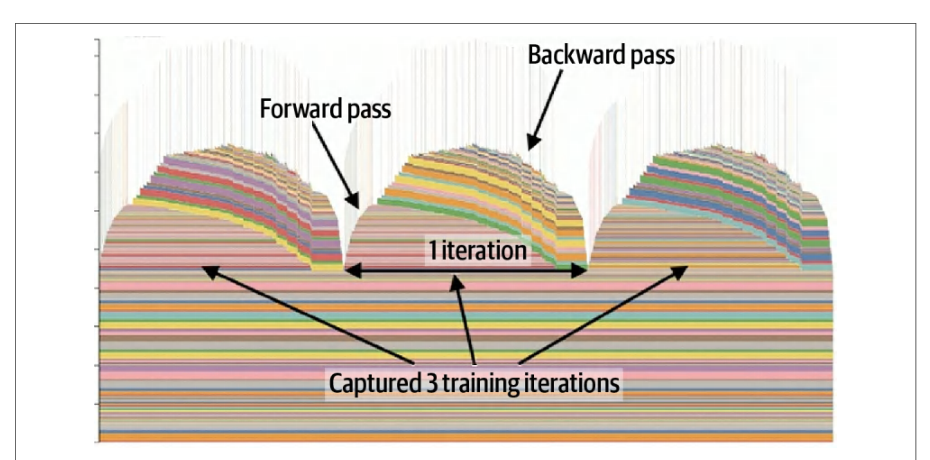
Also, NVIDIA’s Nsight System’s CUDA Memory Inspector can help visualize how memory fragmentation happens over time. Utilizing these can guide your memory-allocator tuning efforts, as we’ll explore next.此外,NVIDIA Nsight Systems 的 CUDA Memory Inspector 可以帮助可视化显存碎片随时间推移是如何产生的。利用这些工具可以指导你的显存分配器调优工作,我们接下来将对此进行探讨。
调优 CUDA 显存分配器
Tuning the CUDA Memory Allocator
PyTorch uses a caching memory allocator for CUDA memory. By default, it adapts to allocation patterns by splitting and recycling GPU memory blocks on demand. However, certain workload patterns that use variable-sized memory allocations can lead to memory fragmentation.PyTorch 对 CUDA 显存使用缓存显存分配器。默认情况下,它按需拆分和回收 GPU 显存块,以适应分配模式。然而,某些使用可变大小显存分配的工作负载模式可能导致显存碎片化。
Memory fragmentation happens when GPU memory gets split into many noncontiguous free chunks over time. This makes it difficult to allocate a large tensor even if enough total memory remains free. In MoE models, this is especially problematic because the number of tokens routed to each expert can change with every batch. As such, each expert’s output activation tensor may be a different size on every iteration.显存碎片化是指 GPU 显存随时间推移被拆分成许多不连续的空闲块。即使剩余空闲显存总量足够,也难以分配一个大张量。在 MoE 模型中,这个问题尤其严重,因为路由到每个专家的 token 数量可能每个批次都不同。因此,每个专家的输出激活张量在每次迭代中大小可能都不同。
Variable-sized memory allocations leave behind uneven, fragmented memory blocks. These fragment memory blocks accumulate across training or inference runs.可变大小的显存分配会留下大小不均、碎片化的内存块。这些碎片化内存块会在训练或推理运行过程中不断累积。
To avoid this, you should allocate a fixed-size expert output buffer upfront and size it to the maximum possible number of tokens any expert may process in your batch. Then you can reuse this buffer on every iteration.为避免这种情况,应当预先分配一个固定大小的专家输出缓冲区,并将其大小设为批次中任何专家可能处理的最大 token 数。这样就能在每次迭代中复用该缓冲区。
By keeping the buffer dimensions constant, the GPU memory allocator won’t fragment memory over time. Each expert writes into its slice of the preallocated buffer rather than triggering new allocations. This method stabilizes memory usage, improves reuse efficiency, and avoids fragmentation-related failures or slowdowns.通过保持缓冲区维度恒定,GPU 显存分配器就不会随时间推移产生显存碎片。每个专家写入预分配缓冲区中属于自己的切片,而不会触发新的分配。这种方法可以稳定显存使用、提高复用效率,并避免与碎片化相关的失败或性能下降。
You can adjust PyTorch’s allocator configuration using an environment variable to tune its behavior. Here is an example:你可以使用环境变量调整 PyTorch 的分配器配置,以调优其行为。示例如下:
export PYTORCH_ALLOC_CONF=\
max_split_size_mb:256,\
roundup_power2_divisions:[256:1,512:2,1024:4,>:8],\
backend:cudaMallocAsync
Next is a description of each specified configuration parameter in the code:下面介绍代码中各个配置参数的含义:
max_split_size_mb:256
This parameter instructs the allocator to keep large free blocks intact (up to 256 MB) rather than continually splitting them into tiny pieces. This helps reduce fragmentation. By default, PyTorch splits large allocations less aggressively. Setting max_split_size_mb explicitly allows large contiguous free blocks to be available for large neural network layers in modern LLMs.该参数指示分配器保留大的空闲块(最大 256 MB),而不是不断将其拆分成小块。这有助于减少碎片化。默认情况下,PyTorch 拆分大块分配的力度较小。显式设置 max_split_size_mb 可以让现代 LLM 中的大型神经网络层获得大的连续空闲块。
roundup_power2_divisions:[N:M,...]
This parameter controls how PyTorch’s CUDA caching allocator groups requests for tensor sizes into fixed buckets. It divides each “power-of-two” range into N equal subbuckets—for example, if a request falls between 512 MB and 1,024 MB. With 512:2 specified in the code, the range between 512 and 1,024 MB is divided into :2 buckets and rounded up to one of [512MB, 768 MB, 1 GB]. For example, in the 512 to 1,024 MB range with '512:2', a 600 MB request rounds up to 768 MB. Check allocator logs to confirm actual bucketing in your environment. This strategy reduces memory fragmentation, standardizes allocation sizes, and increases cache reuse since similar requests hit the same bucket.该参数控制 PyTorch 的 CUDA 缓存分配器如何将张量尺寸的请求归入固定桶。它把每个 2 的幂区间划分为 N 个等长子桶——例如,若某个请求落在 512 MB 到 1,024 MB 之间。在代码中指定 512:2 时,512 到 1,024 MB 的区间被划分为 :2 个桶,并向上取整到 [512MB, 768 MB, 1 GB] 之一。例如,在 512 到 1,024 MB 区间内使用 '512:2' 时,600 MB 的请求会向上取整到 768 MB。请查看分配器日志,以确认你所在环境中的实际分桶情况。该策略可减少显存碎片、统一分配尺寸,并因相似请求命中同一个桶而提高缓存复用率。
backend:cudaMallocAsync
Specifying this will enable NVIDIA’s CUDA asynchronous allocator as the underlying memory-allocation mechanism. This can help avoid synchronizations on memory free events—and can improve performance in multithreaded contexts like multiworker data loading.指定该选项将启用 NVIDIA 的 CUDA 异步分配器作为底层显存分配机制。这有助于避免在内存释放事件上发生同步,并可在多线程场景(如多工作进程数据加载)中提升性能。
By customizing a memory allocator configuration, you can maintain a steadier, more predictable memory usage pattern. You can monitor memory fragmentation with torch.cuda.memory_stats() over long runs to make sure your memory footprint stays stable and doesn’t explode in size.通过自定义显存分配器配置,你可以维持更平稳、更可预测的显存使用模式。你可以在长时间运行中使用 torch.cuda.memory_stats() 监控显存碎片,以确保显存占用保持稳定、不会急剧膨胀。
You can also use torch.cuda.mem_get_info() at runtime to get free versus total memory. This tracks fragmentation indirectly since, if free memory drops while the number of allocated tensors stays constant, fragmentation is increasing.你还可以在运行时使用 torch.cuda.mem_get_info() 获取空闲内存与总内存。这可以间接跟踪碎片情况:如果在已分配张量数量不变的情况下空闲内存下降,说明碎片在增加。
使用激活检查点节省内存
Activation Checkpointing for Memory Savings
For extremely large models, activation checkpointing, also called gradient checkpointing by some practitioners, is essential to manage memory. With a large LLM, it’s sometimes not possible to store all intermediate activations for backpropagation without running out of memory.对于超大规模模型,激活检查点(activation checkpointing,部分从业者也称为梯度检查点)对于内存管理至关重要。对于大型 LLM,有时无法为反向传播存储所有中间激活而不耗尽内存。
With activation checkpointing, instead of storing intermediate activations during the forward pass (to be used on the backward pass), you can recompute them on the fly during the backward pass only when needed. PyTorch provides torch.utils.check point to automate this. You simply wrap your model layer—or sequence of layers— and their forward activations won’t be stored.使用激活检查点时,不在前向传播过程中存储中间激活(供反向传播使用),而是仅在需要时于反向传播过程中即时重新计算它们。PyTorch 提供 torch.utils.check point 来自动完成这一过程。你只需包装模型层——或层序列——其 forward 激活就不会被存储。
You can apply checkpointing at the granularity of each transformer block and each expert Feedforward Neural Network (FFN) layer in your mode. This way, after computing each block’s forward output, you don’t need to keep those intermediate activations in memory. Instead, during the backward pass, PyTorch will rerun that block’s forward pass to regenerate the activations for gradient computation.你可以按每个 Transformer 块以及模型中每个专家前馈神经网络(FFN)层的粒度应用检查点。这样,在计算完每个块的前向输出后,无需将这些中间激活保留在内存中。相反,在反向传播过程中,PyTorch 会重新运行该块的前向传播,以重新生成用于梯度计算的激活。
It’s worth noting that you don’t have to checkpoint everything. You can just focus on the largest layers. A common strategy is checkpointing only the transformer blocks, which hold a massive number of activations, but not checkpointing the smaller layers like layer norms and embedding layers. This produces the most memory savings with minimal recompute overhead.值得注意的是,你不必对所有内容都做检查点。你可以只关注最大的层。一种常见策略是仅对 Transformer 块做检查点(它们持有大量激活),而不对层归一化、嵌入层等较小的层做检查点。这样能以最小的重计算开销获得最大的内存节省。
This trade increases compute for reduced memory usage. Fortunately, modern GPUs provide abundant FLOPS relative to the amount of HBM memory, so this technique is a natural fit for the latest generations of hardware. As such, the GPU has extra compute headroom to afford these extra recomputations.这一权衡以增加计算量换取更低的显存占用。幸运的是,现代 GPU 相对于 HBM 显存容量而言提供了充裕的 FLOPS,因此该技术天然契合最新几代硬件。由此,GPU 拥有额外的计算余量来承担这些额外的重计算。
This trade-off often proves worthwhile. Without activation checkpointing, you would need to reduce your input batch size—or the number of experts—to fit into limited GPU memory. With checkpointing, however, you can comfortably fit the model into memory and preserve the larger batch size.这一权衡通常值得。若不使用激活检查点,你将需要减小输入批大小——或减少专家数量——以适配有限的 GPU 显存。而使用检查点后,你可以轻松地将模型放入显存,并保持较大的批大小。
And while activation checkpointing slows training down a bit, it allows you to train larger model variants—and use larger input batch sizes—that would otherwise not fit into memory. Essentially, you exchange some of the GPU’s ample compute FLOPS to overcome its limited HBM capacity.虽然激活检查点(activation checkpointing)会让训练速度略有下降,但它让你能够训练更大的模型变体——并使用更大的输入批大小——而这些原本无法放入内存。本质上,你是用 GPU 充裕的计算 FLOPS 来弥补其有限的 HBM 容量。
将参数卸载到 CPU 与 NVMe
Offloading Parameters to CPU and NVMe
In addition to checkpointing, you can offload some of the models’ parameters that don’t need to be actively stored on the GPU. For instance, an MoE model has some less frequently accessed expert layers that could be offloaded to CPU memory—and transfer them to the GPU only when needed.除了检查点之外,你还可以卸载模型中一些无需常驻 GPU 的参数。例如,MoE 模型中有一些访问频率较低的专家层,可以将它们卸载到 CPU 内存,仅在需要时才传输到 GPU。
It’s important to overlap transfers with computations such that while one layer is running on GPU, it’s asynchronously prefetching the next layer’s weights from CPU or SSD. In practice, frameworks like DeepSpeed’s ZeRO-Infinity (for training) and ZeRO-Inference (for inference) can automate this prefetching. They stream model weights layer-by-layer from CPU or NVMe to GPU, minimizing peak GPU memory usage while overlapping data transfers with computation.关键在于让传输与计算重叠,使得当某一层在 GPU 上运行时,异步地从 CPU 或 SSD 预取下一层的权重。在实践中,DeepSpeed 的 ZeRO-Infinity(用于训练)和 ZeRO-Inference(用于推理)等框架可以自动完成这种预取。它们将模型权重逐层从 CPU 或 NVMe 流式传输到 GPU,在将数据传输与计算重叠的同时,最小化 GPU 峰值显存占用。
You can pin these components on the host and use asynchronous, nonblocking DMA calls like .to(device) and cudaMemcpyAsync to transfer them into the GPU while other computations are running. This will hide the extra transfer latency incurred by copying from the CPU.你可以将这些组件在主机端锁定,并使用 .to(device) 和 cudaMemcpyAsync 等异步、非阻塞的 DMA 调用,在其他计算运行的同时将它们传输到 GPU。这样可以隐藏从 CPU 拷贝所带来的额外传输时延。
NVIDIA’s Unified Memory is also an option—especially for superchip systems like Grace Blackwell GB200/GB300 with high-speed interconnects like NVLink-C2C between the CPU and GPU. In these cases, Unified Memory allows rarely used GPU memory pages to be evicted to the CPU’s system memory.NVIDIA 的统一内存(Unified Memory)也是一种选择——尤其是对于 Grace Blackwell GB200/GB300 这类超级芯片系统,其 CPU 与 GPU 之间通过 NVLink-C2C 等高速互连连接。在这些情况下,统一内存允许将很少使用的 GPU 显存页驱逐到 CPU 的系统内存中。
The OS may even swap them to NVMe/SSD if needed for capacity. NVMe should be used as a last resort through normal OS swapping, not as a primary target of Unified Memory.如有容量需要,操作系统甚至可以将它们交换到 NVMe/SSD。NVMe 应通过常规的操作系统交换作为最后手段使用,而不是作为统一内存的主要目标。
However, unified memory can introduce unpredictability due to memory paging, etc. As such, explicitly managing the offloading is often preferable to maintain full control and predictable performance.然而,统一内存会因内存分页等因素而引入不可预测性。因此,通常更倾向于显式管理卸载,以保持完全的控制权和可预测的性能。
Recent advancements like GPUDirect Storage allow GPUs to directly read from NVMe drives. This means that, in some cases, your model parameters could be paged directly from NVMe on the fly without any CPU involvement. This is useful for both training and inference serving when using massive models.GPUDirect Storage 等最新进展允许 GPU 直接从 NVMe 驱动器读取数据。这意味着在某些情况下,模型参数可以即时地从 NVMe 直接分页加载,而无需任何 CPU 参与。这在使用超大模型时对训练和推理服务都很有用。
For larger models on the order of trillions of parameters, you can offload components to NVMe storage and swap them into GPU memory just-in-time. The key is to overlap the data transfers with computations so they don’t stall the training loop.对于参数规模达到数万亿级别的更大模型,你可以将组件卸载到 NVMe 存储,并按需即时换入 GPU 显存。关键在于让数据传输与计算重叠,从而不阻塞训练循环。
SuperOffload:优化的 CPU-GPU 超级芯片卸载
SuperOffload: Optimized CPU-GPU Superchip Offload
SuperOffload is an offload system designed specifically to take advantage of CPU-GPU superchip hardware efficiencies. Superchips (e.g., Grace Hopper, Grace Blackwell, Vera Rubin, etc.) provide high-bandwidth NVLink-C2C interconnects between the CPU and GPU. Combined with a shared, coherent memory address space, a superchip-optimized offload strategy can produce huge speedups and utilization gains compared to traditional offload techniques.SuperOffload 是一个专为利用 CPU-GPU 超级芯片硬件效率而设计的卸载系统。超级芯片(如 Grace Hopper、Grace Blackwell、Vera Rubin 等)在 CPU 与 GPU 之间提供高带宽的 NVLink-C2C 互连。结合共享的一致内存地址空间,针对超级芯片优化的卸载策略相比传统卸载技术可以带来巨大的加速和利用率提升。
There are a few key innovations that SuperOffload demonstrates including speculation-then-validation (STV), heterogeneous optimization computations, superchip-aware data type conversions, and memory copies. Let’s discuss each of these next.SuperOffload 展示了若干关键创新,包括先推测后验证(speculation-then-validation,STV)、异构优化计算、超级芯片感知的数据类型转换以及显存拷贝。下面我们逐一讨论。
Compared to traditional offloading, which waits for gradient reduction and global checks before updating parameters, STV overlaps these steps by performing speculative optimizer updates on the CPU while backpropagation is running on the GPU. It then validates the results afterward. This effectively reduces synchronization stalls and improves overall GPU utilization.传统卸载需要等待梯度归约和全局检查完成后才更新参数,而 STV 则通过在 GPU 上运行反向传播的同时在 CPU 上执行推测性优化器更新来重叠这些步骤,随后再验证结果。这有效减少了同步停顿,并提升了整体 GPU 利用率。
SuperOffload uses heterogeneous optimizer computations to partition optimizer work between the CPU and GPU. For instance, it assigns compute-heavy tensors updates to the GPU while CPU cores handle lighter state updates such as momentum buffers used by the Adam optimizer. This keeps both devices busy, reduces idle cycles, and increases overall chip utilization.SuperOffload 使用异构优化器计算,将优化器的工作划分到 CPU 与 GPU 之间。例如,它把计算密集的张量更新分配给 GPU,而由 CPU 核心处理较轻量的状态更新,例如 Adam 优化器使用的动量缓冲区。这样可以让两个设备都保持忙碌,减少空闲周期,并提升整体芯片利用率。
Because NVLink-C2C provides high bandwidth between the CPU and GPU, Super-Offload can change the precision and placement strategy for tensor type casts and data transfers. By shifting type conversions and copies toward the GPU, SuperOffload takes advantage of the fast, coherent interconnects to minimize CPU-GPU transfer latency.由于 NVLink-C2C 在 CPU 与 GPU 之间提供高带宽,Super-Offload 可以改变张量类型转换与数据传输的精度和放置策略。通过将类型转换和拷贝转移到 GPU 侧,SuperOffload 利用快速、一致的互连来最小化 CPU-GPU 传输时延。
In addition, SuperOffload uses a CPU-optimized variant of the Adam optimizer called GraceAdam, which is designed for Grace’s ARM Scalable Vector Extension (SVE) architecture. SVE is a long-vector architecture used by the ARM A64 instruction set. Specifically, it has 32 vector registers and 16 predicate registers that, in combination with SuperOffload, help to improve throughput and energy efficiency for offloaded parameter updates.此外,SuperOffload 使用了 Adam 优化器的 CPU 优化变体 GraceAdam,它针对 Grace 的 ARM 可伸缩向量扩展(SVE)架构设计。SVE 是 ARM A64 指令集采用的长向量架构。具体而言,它拥有 32 个向量寄存器和 16 个谓词寄存器,与 SuperOffload 结合可提升卸载参数更新的吞吐量和能效。
FSDP 自动检查点与卸载
FSDP Automatic Checkpointing and Offloading
PyTorch’s FSDP is a distributed parallelism strategy that shards model parameters, gradients, and activations across GPUs during model training. This reduces memory overhead during training—and lets you train larger models than you could without sharding. Technically, FSDP implements the ZeRO Stage-3 strategy to shard model states across GPUs, as shown in Figure 13-6.PyTorch 的 FSDP 是一种分布式并行策略,在模型训练期间将模型参数、梯度和激活分片到多个 GPU 上。这降低了训练期间的显存开销,并让你能够训练比不分片时更大的模型。从技术上讲,FSDP 实现了 ZeRO Stage-3 策略,将模型状态分片到各 GPU 上,如图 13-6 所示。
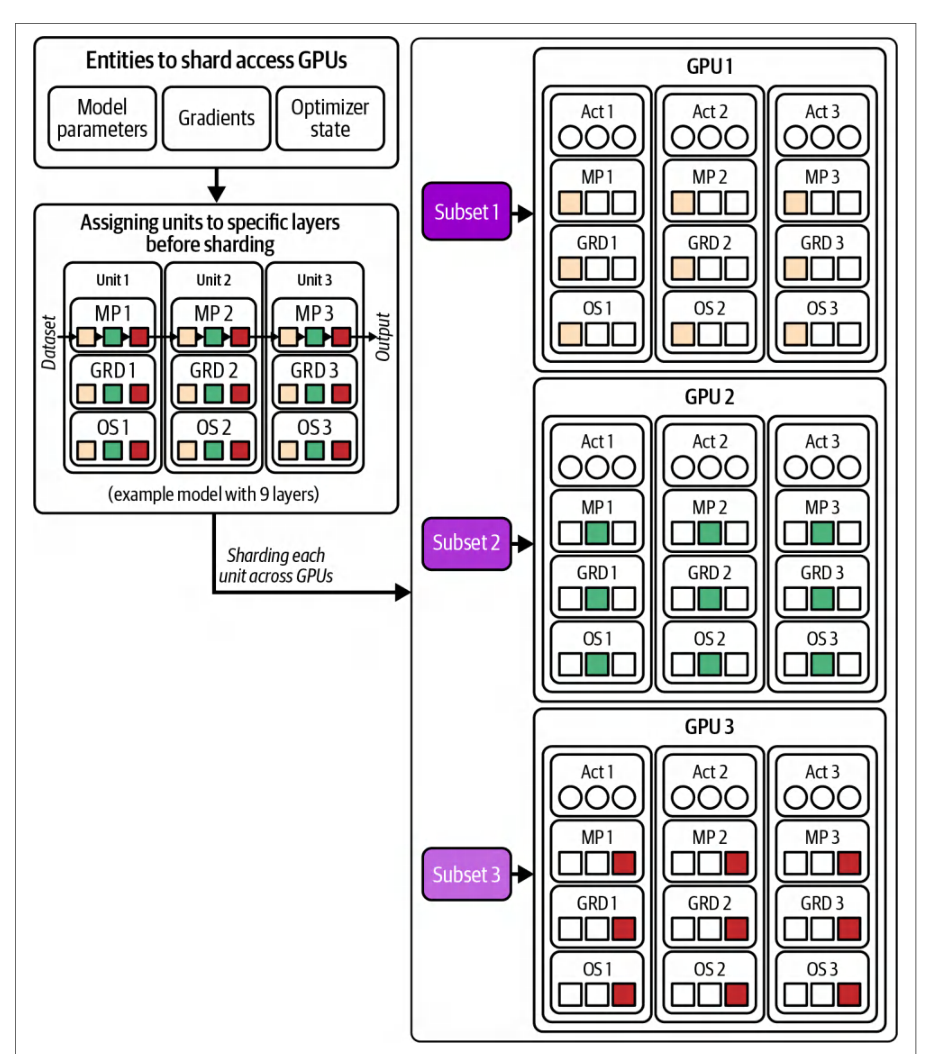
FSDP can automatically apply activation checkpointing and offload parameters/ gradients under the hood. Simply wrap the model with FSDP(), then specify the activation_checkpointing_policy and CPUOffload parameters as shown here:FSDP 可以在底层自动应用激活检查点并卸载参数/梯度。只需用 FSDP() 包装模型,然后如下所示指定 activation_checkpointing_policy 和 CPUOffload 参数:
import torch
import torch.nn as nn
import torch.distributed as dist
from torch.distributed.fsdp import (
    FullyShardedDataParallel as FSDP,
    CPUOffload, ShardingStrategy, BackwardPrefetch, MixedPrecision
)
from torch.distributed.fsdp.wrap import transformer_auto_wrap_policy
# 初始化分布式
dist.init_process_group("nccl")
torch.cuda.set_device(dist.get_rank() % torch.cuda.device_count())
# 构建模型
class MyModel(nn.Module):
    def __init__(self):
        super().__init__()
        self.layers = nn.Sequential(
            nn.Linear(4096, 4096),
            nn.ReLU(),
            nn.Linear(4096, 4096),
        )
    def forward(self, x):
        return self.layers(x)
model = MyModel().cuda()
# 如需要,自动包装 transformer 块
auto_wrap_policy = transformer_auto_wrap_policy(
    model,
    min_num_params=1e8,
)
# 使用 FSDP + 检查点 + CPU 卸载进行包装
fsdp_model = FSDP(
    model,
    auto_wrap_policy=auto_wrap_policy,
    sharding_strategy=ShardingStrategy.FULL_SHARD,
    use_orig_params=True,
    cpu_offload=CPUOffload(offload_params=True, pin_memory=True),
    mixed_precision=MixedPrecision(
        param_dtype=torch.bfloat16,
        reduce_dtype=torch.bfloat16,
        buffer_dtype=torch.bfloat16
    ),
    backward_prefetch=BackwardPrefetch.BACKWARD_PRE,
    activation_checkpointing_policy={
        nn.TransformerEncoderLayer,
        nn.TransformerDecoderLayer,
        nn.MultiheadAttention
    }
)
# 设置优化器
optimizer = torch.optim.AdamW(fsdp_model.parameters(), weight_decay=0.01)
...
    FullyShardedDataParallel as FSDP,
    CPUOffload, ShardingStrategy, BackwardPrefetch, MixedPrecision
)
from torch.distributed.fsdp.wrap import transformer_auto_wrap_policy
# Initialize distributed
dist.init_process_group("nccl")
torch.cuda.set_device(dist.get_rank() % torch.cuda.device_count())
# Build your model
class MyModel(nn.Module):
    def __init__(self):
        super().__init__()
        self.layers = nn.Sequential(
            nn.Linear(4096, 4096),
            nn.ReLU(),
            nn.Linear(4096, 4096),
        )
    def forward(self, x):
        return self.layers(x)
model = MyModel().cuda()
# Auto-wrap transformer blocks if needed
auto_wrap_policy = transformer_auto_wrap_policy(
    model,
    min_num_params=1e8,
)
# Wrap with FSDP + checkpointing + CPU offload
fsdp_model = FSDP(
    model,
    auto_wrap_policy=auto_wrap_policy,
    sharding_strategy=ShardingStrategy.FULL_SHARD,
    use_orig_params=True,
    cpu_offload=CPUOffload(offload_params=True, pin_memory=True),
    mixed_precision=MixedPrecision(
        param_dtype=torch.bfloat16,
        reduce_dtype=torch.bfloat16,
        buffer_dtype=torch.bfloat16
    ),
    backward_prefetch=BackwardPrefetch.BACKWARD_PRE,
    activation_checkpointing_policy={
        nn.TransformerEncoderLayer,
        nn.TransformerDecoderLayer,
        nn.MultiheadAttention
    }
)
# Setup optimizer
optimizer = torch.optim.AdamW(fsdp_model.parameters(), weight_decay=0.01)
...
Here we use transformer_auto_wrap_policy so that FSDP will automatically shard parameters, gradients, and optimizer states according to your transformer block structure. We also enable offloading to the CPU with CPUOffload(offload_par ams=True). This will transparently move both parameters and gradients to the CPU when they’re not needed on the GPU. This will reduce peak GPU memory usage.这里我们使用 transformer_auto_wrap_policy,使 FSDP 根据你的 Transformer 块结构自动分片参数、梯度和优化器状态。我们还通过 CPUOffload(offload_par ams=True) 启用向 CPU 的卸载。当 GPU 上不再需要参数和梯度时,这会透明地将它们移到 CPU,从而降低 GPU 峰值显存占用。
Setting activation_checkpointing_policy tells FSDP to recompute, or rematerial-ize, activations in those specific core transformer submodules. This will trade extra compute for significantly lower peak memory. This achieves the same large memory savings as manual checkpoint() wrappers and custom offload scripts but without the additional boilerplate code. FSDP even handles uneven per-GPU batch sizes, which is useful for MoE workloads.设置 activation_checkpointing_policy 会告诉 FSDP 在这些特定的核心 Transformer 子模块中重新计算(重物化)激活。这会以额外的计算换取显著更低的峰值内存。这样可获得与手动 checkpoint() 包装器和自定义卸载脚本相同的大幅内存节省,但无需额外的样板代码。FSDP 甚至能处理各 GPU 批大小不均衡的情况,这对 MoE 工作负载很有用。
FSDP also supports a hybrid sharding strategy using ShardingStrategy .HYBRID_SHARD. This strategy shards each node’s parameters, gradients, and optimizer states across the GPUs on that node while replicating those same shards onto other nodes. In essence, hybrid sharing provides higher throughput than FULL_SHARD, but at the cost of more per-node memory.FSDP 还支持使用 ShardingStrategy .HYBRID_SHARD 的混合分片(hybrid sharding)策略。该策略将每个节点的参数、梯度和优化器状态分片到该节点上的各个 GPU,同时将这些相同的分片复制到其他节点。本质上,混合分片相比 FULL_SHARD 提供更高的吞吐量,但代价是每个节点的显存占用更多。
Use HYBRID_SHARD when your interconnect is decent but not blisteringly fast. This shards parameters, grads, and optimizer states within each node—and replicates those shards across nodes. This reduces cross-node traffic at the cost of slightly higher per-node memory than full sharding.当你的互连性能尚可但并非极快时,使用 HYBRID_SHARD。它在每个节点内分片参数、梯度和优化器状态,并在节点间复制这些分片。这减少了跨节点流量,代价是每节点内存略高于完全分片。
Hybrid sharding lets you manage the memory versus communication trade-off. For instance, you can use more per-node memory than FULL_SHARD (ZeRO 3) because you hold a full local shard on each node. This reduces internode communication and often provides higher end-to-end throughput. FULL_SHARD is best when you have a very fast multinode fabric and want the smallest per-GPU memory footprint.混合分片(hybrid sharding)让你可以权衡内存与通信。例如,由于每个节点上都保留完整的本地分片,你可以使用比 FULL_SHARD(ZeRO 3)更多的单节点内存。这减少了节点间通信,通常能提供更高的端到端吞吐量。当你拥有非常快速的多节点网络结构、并希望获得最小的单 GPU 显存占用时,FULL_SHARD 是最佳选择。
When your network is slow—or you have only a handful of GPUs—you can use Shar dingStrategy.SHARD_GRAD_OP (ZeRO Stage-2) to shard only the gradients and optimizer state across all GPUs. This strategy keeps a full copy of the parameters on every GPU.当网络较慢——或者你只有少量 GPU——时,可以使用 Shar dingStrategy.SHARD_GRAD_OP(ZeRO 第 2 阶段)仅在所有 GPU 之间分片梯度和优化器状态。该策略会在每块 GPU 上保留一份完整的参数副本。
将 FSDP 与张量并行和流水线并行结合
Combining FSDP with Tensor Parallel and Pipeline Parallel
If the model is so large that a single layer won’t fit into a single GPU’s memory, you will need to combine FSDP with other parallelism strategies like tensor parallel (TP) to spread the large model layer across multiple GPUs.如果模型大到单层都无法放入单块 GPU 的内存,就需要将 FSDP 与其他并行策略(如张量并行(TP))结合,把这个巨大的模型层分散到多块 GPU 上。
You can also use FSDP across both GPUs and compute nodes by using TP within a node to split huge layers across the multiple GPUs and pipeline parallel (PP) to chain those TP-split layers together across nodes. FSDP allows these types of flexible combinations.你还可以在 GPU 和计算节点两个层面同时使用 FSDP:在节点内使用 TP 将超大层拆分到多块 GPU 上,再用流水线并行(PP)把这些经 TP 拆分的层跨节点串联起来。FSDP 支持这类灵活的组合。
In short, FSDP can reduce memory usage with far less coding effort. After applying checkpointing and offloading, you fit the model into memory and enable larger batch sizes. This will help improve GPU utilization.简而言之,FSDP 能以少得多的编码工作量降低显存占用。在应用检查点和卸载之后,你就能把模型装入内存并启用更大的批大小。这将有助于提升 GPU 利用率。
可插拔显存分配器与跨 GPU 数据传输
Pluggable Memory Allocators and Cross-GPU Data Transfers
You can configure PyTorch to use a specialized memory allocator for critical GPU communication operations like NCCL gradient all-reduce. By plugging in custom allocators with torch.cuda.MemPool, you let NCCL allocate buffers in a way that leverages dedicated hardware engines such as NVLink copy engines, InfiniBand offloads, or NVIDIA SHARP. These help improve overlap between communication and computation. For example, PyTorch supports using NCCL’s memory allocator for fast, zero-copy reductions on NVSwitch setups, as shown here:你可以配置 PyTorch,为 NCCL 梯度全归约等关键 GPU 通信操作使用专门的显存分配器。通过 torch.cuda.MemPool 插入自定义分配器,你可以让 NCCL 以能够利用 NVLink 拷贝引擎、InfiniBand 卸载或 NVIDIA SHARP 等专用硬件引擎的方式来分配缓冲区。这些都有助于改善通信与计算之间的重叠。例如,PyTorch 支持使用 NCCL 的显存分配器,在 NVSwitch 配置上实现快速、零拷贝的归约,如下所示:
import torch
import torch.distributed as dist
from torch.cuda.memory import MemPool
from torch.distributed.distributed_c10d import _get_default_group
# 初始化 NCCL 分布式后端
dist.init_process_group(backend="nccl")
torch.cuda.set_device(
  dist.get_rank() % torch.cuda.device_count()
)
# 获取此设备的 NCCL 后端对象
default_pg = _get_default_group()
backend = default_pg._get_backend(
  torch.device(f"cuda:{torch.cuda.current_device()}")
)
# 该后端通过 mem_allocator 暴露 ncclMemAlloc
nccl_allocator = backend.mem_allocator
# 使用此分配器创建专用显存池
nccl_pool = MemPool(nccl_allocator)
# 注册该显存池,使 NCCL 将其用于集合通信梯度缓冲区
backend.register_mem_pool(nccl_pool)
# 在 NCCL 操作中显式使用该显存池
with torch.cuda.use_mem_pool(nccl_pool):
    tensor = torch.randn(10_000_000, device="cuda")
    dist.all_reduce(tensor)
import torch
import torch.distributed as dist
from torch.cuda.memory import MemPool
from torch.distributed.distributed_c10d import _get_default_group
# Initialize NCCL distributed backend
dist.init_process_group(backend="nccl")
torch.cuda.set_device(
  dist.get_rank() % torch.cuda.device_count()
)
# Get the NCCL backend object for this device
default_pg = _get_default_group()
backend = default_pg._get_backend(
  torch.device(f"cuda:{torch.cuda.current_device()}")
)
# The backend exposes ncclMemAlloc using mem_allocator
nccl_allocator = backend.mem_allocator
# Create a dedicated memory pool using this allocator
nccl_pool = MemPool(nccl_allocator)
# Register the pool so NCCL uses it for collective gradient buffers
backend.register_mem_pool(nccl_pool)
# Use the pool explicitly for NCCL operations
with torch.cuda.use_mem_pool(nccl_pool):
    tensor = torch.randn(10_000_000, device="cuda")
    dist.all_reduce(tensor)
By binding NCCL’s native allocator (backend.mem_allocator) into a torch.cuda .memory.MemPool and using backend.register_mem_pool(...), PyTorch places gradient-reduction buffers directly in memory regions optimized for optimal routing through NVLink, InfiniBand, and NVIDIA SHARP-enabled hardware. This way, all-reduce operations benefit from hardware acceleration by reducing SM contention during large data reductions. This results in improved throughput for large, multi-GPU workloads.通过将 NCCL 原生分配器(backend.mem_allocator)绑定到 torch.cuda .memory.MemPool 中,并使用 backend.register_mem_pool(...),PyTorch 会把梯度归约缓冲区直接放在经过优化、可通过 NVLink、InfiniBand 和支持 NVIDIA SHARP 的硬件实现最优路由的内存区域中。这样一来,全归约操作就能受益于硬件加速,减少大数据归约期间的 SM 争用。最终为大规模多 GPU 工作负载带来吞吐量提升。
By using NCCL’s native allocator with backend.mem_allocator and wrapping it in PyTorch’s MemPool, the gradient all-reduce buffers are allocated in memory regions optimized for GPUDirect RDMA and in-network SHARP offload. This will align buffers on large page boundaries and can help place data transfers onto dedicated DMA engines—reducing SM involvement and freeing up compute capacity to perform more useful computational work.通过使用 NCCL 的原生分配器 backend.mem_allocator 并将其封装在 PyTorch 的 MemPool 中,梯度全归约缓冲区会被分配到针对 GPUDirect RDMA 和网络内 SHARP 卸载优化的内存区域。这会将缓冲区按大页边界对齐,并有助于把数据传输交给专用 DMA 引擎——减少 SM 的参与,释放计算能力去做更有用的计算工作。
As a result, NCCL collective operations like tensor-parallel reductions benefit from both hardware acceleration and lower SM contention. This significantly improves multi-GPU synchronization throughput, which reduces contention between overlapping compute and communication kernels on SMs and copy engines—especially for tensor-parallel workloads.因此,诸如张量并行归约之类的 NCCL 集合通信操作既能获得硬件加速,又能降低 SM 争用。这显著提升了多 GPU 同步吞吐量,从而减少 SM 与拷贝引擎上重叠的计算内核和通信内核之间的争用——对张量并行工作负载尤其如此。
These kinds of optimizations become more important as you push bandwidth limits. For example, Blackwell’s NVLink 5 provides up to 1.8 TB/s of bidirectional bandwidth per GPU (about 900 GB/s in each direction) in theory. Using dedicated copy engines, network hardware (SHARP), and optimized memory allocators can help approach peak network throughput and free up the SMs to achieve peak FLOPS at the same time.当你不断逼近带宽极限时,这类优化会变得更加重要。例如,Blackwell 的 NVLink 5 理论上每块 GPU 可提供高达 1.8 TB/s 的双向带宽(每个方向约 900 GB/s)。使用专用拷贝引擎、网络硬件(SHARP)以及经过优化的显存分配器,有助于逼近网络吞吐量峰值,同时释放 SM 以达成 FLOPS 峰值。
With torch.cuda.MemPool, you can also create your own memory allocator by registering a custom library (shared object, or .so). In addition, you can mix different CUDA memory allocators in the same PyTorch application, as shown here:借助 torch.cuda.MemPool,你还可以通过注册自定义库(共享对象,即 .so)来创建自己的显存分配器。此外,你可以在同一个 PyTorch 应用中混用不同的 CUDA 显存分配器,如下所示:
import torch  # PyTorch 主命名空间
import os     # 用于路径操作(此处用于 .so 扩展名)
from torch.cuda.memory import CUDAPluggableAllocator
# 1. 创建 CUDAPluggableAllocator 和 MemPool
# 构建一个可插拔分配器,调用你的 NCCL 库:
#   - allocator_path:你的 .so 文件路径
import torch  # PyTorch main namespace
import os     # for path operations (used here for .so extensions)
from torch.cuda.memory import CUDAPluggableAllocator
# 1. Create a CUDAPluggableAllocator and MemPool
# Build a pluggable allocator that calls into your NCCL library:
#   - allocator_path: path to your .so
#   - "ncclMemAlloc":用于分配的符号
#   - "ncclMemFree":用于释放的符号
# .allocator() 返回一个符合 CUB/CUDA 分配器 API 的可调用对象
allocator = CUDAPluggableAllocator(
    "./nccl_allocator.so",
    "ncclMemAlloc",
    "ncclMemFree"
).allocator()
# 将该分配器封装进 MemPool,以实现高效的子分配
pool = torch.cuda.memory.MemPool(allocator)
# 2. 开始记录事件(长时间运行时设置较高的上限)
torch.cuda.memory._record_memory_history(max_entries=100000)
# 3. 使用不同的分配器分配张量
# tensor0 使用 *默认* 的 cudaMalloc 分配器
# - 形状:(1024, 1024),可改为你需要的大小
tensor0 = torch.randn(1024, 1024, device="cuda")
# tensor1 使用 *你自己的* 基于 NCCL 的分配器(通过 MemPool)
with torch.cuda.use_mem_pool(pool):
    # 在此上下文内,所有 cuda 分配都经由 `pool`
    tensor1 = torch.randn(1024, 1024, device="cuda")
# 退出上下文后恢复默认分配器
# tensor2 再次使用 *默认* 的 cudaMalloc 分配器
tensor2 = torch.randn(1024, 1024, device="cuda")
# 4. 查看显存池统计信息
# 显存池专属快照,包含正在使用的段/块列表
pool_state = pool.snapshot()
print(f"Pool segments count: {len(pool_state)}")
# 5. 导出快照,并可选地在 PyTorch 中加载
# 内存查看器工具(https://oreil.ly/tX6gA)
torch.cuda.memory._dump_snapshot('memory_snapshot.pkl')
# 全局分配器统计信息(已分配/已保留、峰值、计数)
global_stats = torch.cuda.memory_stats()
print("Peak allocated bytes:", global_stats["allocated_bytes.all.peak"])
# 6. 停止记录
torch.cuda.memory._record_memory_history(enabled=None)
# 7. 重置峰值计数器,以便重新测量
torch.cuda.reset_peak_memory_stats()
#   - "ncclMemAlloc": symbol for allocation
#   - "ncclMemFree":  symbol for deallocation
# .allocator() returns a callable that matches the CUB/CUDA allocator API
allocator = CUDAPluggableAllocator(
    "./nccl_allocator.so",
    "ncclMemAlloc",
    "ncclMemFree"
).allocator()
# Wrap that allocator in a MemPool for efficient sub-allocations
pool = torch.cuda.memory.MemPool(allocator)
# 2. Start recording events (set a high cap for long runs)
torch.cuda.memory._record_memory_history(max_entries=100000)
# 3. Allocate tensors with different allocators
# tensor0 uses the *default* cudaMalloc allocator
# - Shape: (1024, 1024), you can change to your desired size
tensor0 = torch.randn(1024, 1024, device="cuda")
# tensor1 uses *your* NCCL-backed allocator using MemPool
with torch.cuda.use_mem_pool(pool):
    # Inside this context, all cuda allocations go through `pool`
    tensor1 = torch.randn(1024, 1024, device="cuda")
# Exiting the context restores the default allocator
# tensor2 again uses the *default* cudaMalloc allocator
tensor2 = torch.randn(1024, 1024, device="cuda")
# 4. Inspect memory pool stats
# Pool-specific snapshot with list of segments/blocks in use
pool_state = pool.snapshot()
print(f"Pool segments count: {len(pool_state)}")
# 5. Dump the snapshot and optionally load in the PyTorch
# memory viewer tool (https://oreil.ly/tX6gA)
torch.cuda.memory._dump_snapshot('memory_snapshot.pkl')
# Global allocator stats (allocated/reserved, peak, counts)
global_stats = torch.cuda.memory_stats()
print("Peak allocated bytes:", global_stats["allocated_bytes.all.peak"])
# 6. Stop recording
torch.cuda.memory._record_memory_history(enabled=None)
# 7. Reset peak counters for a fresh measurement
torch.cuda.reset_peak_memory_stats()
Here, the CUDAPluggableAllocator loads your custom .so and binds to the two symbols you specify. MemPool wraps the low-level CUDA memory allocator in a cache for memory allocations and memory frees for better performance.这里,CUDAPluggableAllocator 加载你的自定义 .so,并绑定到你指定的两个符号。MemPool 将底层 CUDA 显存分配器封装进一个用于显存分配与内存释放的缓存中,以获得更好的性能。
torch.cuda.use_mem_pool(pool) swaps in your pool for all subsequent memory allocations inside the Python context manager (e.g., with) block. Exiting the context manager block restores the previous allocator.torch.cuda.use_mem_pool(pool) 会在 Python 上下文管理器(例如 with)块内,把你指定的显存池替换用于后续所有显存分配。退出该上下文管理器块后,将恢复之前的分配器。
启用点对点 DMA 与 UCX
Enabling Peer-to-Peer DMA and UCX
When using pipeline parallel in a multi-GPU system, you typically want to move activations directly from one GPU to the next GPU using the fastest peer-to-peer (P2P) connection possible—and avoid round-trips and host CPU resources. PyTorch will probe and enable peer access automatically when tensors are moved across devices in a process. However, if you want to confirm manually, you can use torch.cuda.can_device_access_peer(i, j) to confirm PSP DMA between GPU i and GPU j. For custom C++ operations, you can enable peers explicitly with CUDA driver APIs.在多 GPU 系统中使用流水线并行时,通常希望尽可能使用最快的点对点(P2P)连接,将激活值直接从一块 GPU 移动到下一块 GPU,并避免往返传输和占用主机 CPU 资源。当张量在同一进程内跨设备移动时,PyTorch 会自动探测并启用对等访问。不过,如果你想手动确认,可以使用 torch.cuda.can_device_access_peer(i, j) 来确认 GPU i 与 GPU j 之间的 PSP DMA。对于自定义 C++ 操作,你可以通过 CUDA 驱动 API 显式启用对等访问。
Enabling P2P DMA provides efficient direct transfers without involving the GPU’s SM or CPU memory. Once enabled, cross-GPU copy_() and .to() will use the faster peer-memory path without additional code overhead, as shown here:启用 P2P DMA 可提供高效的直接传输,无需经过 GPU 的 SM 或 CPU 内存。一旦启用,跨 GPU 的 copy_() 和 .to() 将使用更快的对等内存路径,且无需额外的代码开销,如下所示:
dst.copy_(src, non_blocking=True)
# or
src.to(device="cuda:1", non_blocking=True)
These methods use cudaMemcpyPeerAsync when P2P access is enabled on your topology. For P2P transfers to work correctly, your hardware topology must support it. The GB200/GB300 NVL72 rack uses P2P-capable NVLink and NVSwitch internally, so it’s already set up for the P2P DMA out of the box.当你的拓扑上启用了 P2P 访问时,这些方法会使用 cudaMemcpyPeerAsync。要让 P2P 传输正常工作,你的硬件拓扑必须支持它。GB200/GB300 NVL72 机架内部使用支持 P2P 的 NVLink 和 NVSwitch,因此开箱即已为 P2P DMA 做好准备。
So far, we’ve discussed only multi-GPU configurations in the context of P2P data transfers. However, when using multinode GPU topologies, you need to fall back to NCCL, which communicates over the network. Sometimes this will happen over GPUDirect RDMA. But using UCX (Unified Communication X) with NCCL can improve performance. On GB200 and GB300 NVL72 topologies, NVLink and NVSwitch provide the P2P path inside the rack. Across racks, you will need to traverse the network fabric with UCX-enabled NCCL transports.到目前为止,我们在讨论 P2P 数据传输时只涉及多 GPU 配置。然而,在使用多节点 GPU 拓扑时,你需要回退到通过网络通信的 NCCL。有时这会通过 GPUDirect RDMA 进行。但将 UCX(Unified Communication X)与 NCCL 配合使用可以提升性能。在 GB200 和 GB300 NVL72 拓扑上,NVLink 和 NVSwitch 提供机架内部的 P2P 路径。跨机架时,你需要借助启用 UCX 的 NCCL 传输穿越网络结构。
To route cross-node transfers through UCX, install the NCCL-UCX plugin and set NCCL_PLUGIN_P2P=ucx. Many environments also require NCCL_NET=UCX and appropriate UCX_TLS transport selections configured for your fabric. This enables hardware offloads and improves pipelining on InfiniBand fabrics between NVL72 racks.要让跨节点传输经由 UCX 路由,请安装 NCCL-UCX 插件并设置 NCCL_PLUGIN_P2P=ucx。许多环境还要求设置 NCCL_NET=UCX,并针对你的网络结构配置合适的 UCX_TLS 传输选择。这样可启用硬件卸载,并改善 NVL72 机架之间 InfiniBand 网络结构上的流水线效率。
The following is an example configuration for the NCCL-UCX plugin:以下是 NCCL-UCX 插件的一个示例配置:
export NCCL_NET=UCX
export NCCL_PLUGIN_P2P=ucx
# UCX 传输方式因网络结构而异。
# 以下是可安全起步的默认值:
export UCX_TLS=rc,self,gdr_copy,cuda_copy
export NCCL_NET=UCX
export NCCL_PLUGIN_P2P=ucx
# UCX transports vary by fabric.
# These are safe defaults to start with:
export UCX_TLS=rc,self,gdr_copy,cuda_copy
If your application needs to scale across multiple nodes or racks training terabyte-scale models, inference massive LLMs across many tenants, or manage data-intensive pipelines, UCX is essential. And using NCCL with UCX provides high-throughput, low-latency, cross-node communication that supports both hardware offloads (RDMA) and intelligent topology awareness. UCX is a core part of production-level AI infrastructure, and it’s essential when scaling beyond a single NVLink domain.如果你的应用需要跨多个节点或机架扩展以训练 TB 级模型、面向众多租户推理大规模 LLM,或管理数据密集型流水线,那么 UCX 必不可少。将 NCCL 与 UCX 配合使用,可提供高吞吐、低时延的跨节点通信,同时支持硬件卸载(RDMA)和智能的拓扑感知。UCX 是生产级 AI 基础设施的核心组成部分,在扩展到单个 NVLink 域之外时至关重要。
In short, direct P2P DMA communication and UCX achieve better overlap with compute compared to an equivalent send/recv call using NCCL. This is a relatively low-level optimization, but if you have the right topology with dedicated high-speed interconnects such as NVLink/NVSwitch, this can improve system performance greatly.简而言之,与使用 NCCL 的等效 send/recv 调用相比,直接的 P2P DMA 通信和 UCX 能与计算实现更好的重叠。这是一种相对底层的优化,但如果你拥有合适的拓扑以及 NVLink/NVSwitch 等专用高速互连,这可以大幅提升系统性能。
PyTorch 对称内存
PyTorch Symmetric Memory
Symmetric memory is a programming model that exposes a partitioned global address space across GPUs so that kernels can do one-sided puts and gets. This lets them invoke ultra-low-latency, cross-GPU, direct-access collectives without CPU handshakes or interventions. Essentially, symmetric memory allocates buffers that are directly addressable from any GPU in the group—without requiring explicit peer-topeer copies.对称内存(symmetric memory)是一种编程模型,它在多个 GPU 之间暴露一个分区的全局地址空间,使内核可以执行单边的 put 和 get 操作。这使内核能够调用超低时延、跨 GPU 的直接访问集合通信,而无需 CPU 握手或干预。本质上,对称显存分配的缓冲区可由组内任意 GPU 直接寻址——无需显式的点对点拷贝。
When using symmetric memory, you can perform all-to-all operations like MoE token shuffles completely on-device. Since no CPU is involved, the entire all-to-all can be captured by a CUDA Graph. Without symmetric memory, an all-to-all triggers a host synchronization that leads to device-to-host (D2H) gaps in the timeline. This will create an unwanted break in the CUDA Graph.使用对称内存时,可以完全在设备上执行 all-to-all 操作,例如 MoE 的 token 重排。由于不涉及 CPU,整个 all-to-all 可以被 CUDA 图捕获。若不使用对称内存,all-to-all 会触发主机同步,从而在时间线上产生设备到主机(D2H)的空隙。这会在 CUDA 图中造成不希望的断点。
You can allocate symmetric tensors, perform a rendezvous across a process group to obtain remote access handles, and then call direct-access collectives (e.g., all_to_all_v, one_shot_all_reduce). Additionally, you can launch kernels that perform one-sided reads/writes using the remote access handles. Combined with OpenAI Triton and NVSHMEM (triton.nvshmem.put()/get()), symmetric memory is a powerful communication mechanism for custom, in-kernel data transfers.你可以分配对称张量,在进程组内执行会合(rendezvous)以获取远程访问句柄,然后调用直接访问集合通信(例如 all_to_all_v、one_shot_all_reduce)。此外,你还可以启动内核,使用这些远程访问句柄执行单边读/写。结合 OpenAI Triton 与 NVSHMEM(triton.nvshmem.put()/get()),对称内存是一种强大的通信机制,适用于自定义的内核内数据传输。
优化数据输入流水线
Optimizing the Data Input Pipeline
With the model’s memory and compute covered, let’s turn to the data input pipeline. A common cause of inefficiency is GPUs sitting idle waiting for data. PyTorch’s Data-Loader supports spawning multiple worker threads or processes to load and preprocess data (e.g., text tokenization) in parallel while training a model. Make sure to specify pin_memory=True so that the host CPU memory-to-GPU device transfers use page-locked (pinned) memory.在讨论了模型的内存与计算之后,接下来转向数据输入流水线。效率低下的一个常见原因是 GPU 空闲等待数据。PyTorch 的 DataLoader 支持派生多个工作线程或进程,在训练模型的同时并行加载和预处理数据(例如文本分词)。务必指定 pin_memory=True,以便主机 CPU 内存到 GPU 设备的传输使用页锁定(锁页)内存。
If you don’t pin memory, you may see high CPU utilization in the data-loader process and low GPU utilization in the training process. This is doubly bad. These nonideal utilizations are observable with tools like htop and Nsight Systems. You’ll see CPU threads busy performing data loading while the GPU sits idle.如果不使用锁页内存,你可能会看到数据加载器进程的 CPU 利用率很高,而训练进程的 GPU 利用率很低。这是双重糟糕的情况。使用 htop 和 Nsight Systems 等工具可以观察到这些不理想的利用率。你会看到 CPU 线程忙于执行数据加载,而 GPU 处于空闲状态。
This indicates that data loading isn’t keeping up for every iteration. You can address this by increasing the value of the DataLoader’s num_workers parameter until the data queue has enough batches ready. A common heuristic is 4 workers per GPU for CPU-bound data pipelines, but the optimal number can vary based on your workload.这表明数据加载跟不上每一次迭代。你可以通过增大 DataLoader 的 num_workers 参数值来解决,直到数据队列中准备好足够多的批次。对于 CPU 受限的数据流水线,一个常见的经验法则是每个 GPU 4 个工作进程,但最优数量会因工作负载而异。
To find the optimal number, you can do a quick sweep (e.g., 4, 8, 16, 32) to find the point where adding more workers no longer helps. Keep an eye on CPU saturation. If all cores are at 100%, more workers won’t help.要找到最优数量,可以做一次快速扫描(例如 4、8、16、32),找出增加工作进程不再带来收益的拐点。同时留意 CPU 饱和情况。如果所有核心都达到 100%,增加工作进程也无济于事。
Remember that NVLink C2C superchip systems like Grace Hopper, Grace Blackwell, and Vera Rubin provide a large, coherent, high-bandwidth CPU–GPU memory address space. In these environments, page-locked pin_memory=True is often less critical because transfers already use a high-bandwidth coherent path.请记住,Grace Hopper、Grace Blackwell 和 Vera Rubin 等 NVLink C2C 超级芯片系统提供了大容量、一致、高带宽的 CPU–GPU 显存地址空间。在这些环境中,页锁定的 pin_memory=True 往往不那么关键,因为传输已经使用高带宽的一致性路径。
Pinned memory may still be required to maximize overlap for pageable host-todevice copies in non-coherent paths. While unified memory and coherent mappings may reduce the need for pinning on NVLink-C2C systems, it’s important to measure performance of your workload.对于非一致性路径中的可分页主机到设备拷贝,可能仍然需要锁页内存来最大化重叠。尽管统一内存和一致性映射可能降低 NVLink-C2C 系统上对锁页的需求,但测量你的工作负载性能仍然很重要。
Even with CPU-GPU superchip architectures, it’s still recommended to combine pin_memory=True (or large pages) with non_blocking=True and persistent_work ers=True when the loader thread is CPU-bound. Using persistent_workers=True avoids process respawns across epochs. This is helpful with tokenization-heavy workloads such as LLM training and inference. Use Nsight Systems to profile and verify actual overlap. Before removing pinning, be sure to enable large pages on the host and confirm that H2D traffic overlaps compute.即使采用 CPU-GPU 超级芯片架构,当加载器线程受限于 CPU 时,仍建议将 pin_memory=True(或大页)与 non_blocking=True 和 persistent_work ers=True 结合使用。使用 persistent_workers=True 可以避免跨 epoch 重新创建进程。这对 LLM 训练和推理等分词密集型工作负载很有帮助。使用 Nsight Systems 进行性能剖析并验证实际的重叠情况。在移除锁页之前,务必在主机上启用大页,并确认 H2D 传输与计算发生重叠。
The CPU and GPU share a coherent memory space, so transfers already use a high-speed path without explicit pinning. In contrast, on standard (nonsuperchip) CPU + GPU systems without such hardware coherence, enabling pin_memory=True will page-lock the host memory and provide a noticeable increase in data transfer throughput.CPU 与 GPU 共享一致的内存空间,因此传输已经走高速路径,无需显式锁页。相比之下,在标准(非超级芯片)CPU + GPU 系统上,由于没有这种硬件一致性,启用 pin_memory=True 会将主机内存锁定为页,并显著提升数据传输吞吐量。
Another technique to improve data-loading responsiveness is increasing the Data-Loader’s prefetch_factor. This controls how many batches each worker preloads ahead of time and is calculated as prefetch_factor * num_workers. This means that while your model is busy processing the current batch, workers are already loading and caching subsequent batches.另一种提升数据加载响应能力的技术是增大 DataLoader 的 prefetch_factor。它控制每个工作进程提前预加载多少个批,计算方式为 prefetch_factor * num_workers。这意味着当模型忙于处理当前批时,工作进程已经在加载并缓存后续的批。
Prefetching keeps the data pipeline full and avoids idle GPU time. You should adjust prefetch_factor alongside num_workers based on your dataset and hardware capabilities. Verify with profiling to avoid overfetching and causing unnecessary memory utilization.预取可让数据流水线保持满载,避免 GPU 空转。应根据数据集和硬件能力,将 prefetch_factor 与 num_workers 一起调整。通过性能剖析进行验证,以避免过度预取造成不必要的显存占用。
You can also precompute tokenized datasets and store the tokenized dataset on disk to avoid heavy processing in the data-loader loop. Tools like Hugging Face’s Data set.cache() and WebDataset allow you to preprocess the files once and reuse them. Also, consider using mixed precision and compression for your datasets to reduce I/O bandwidth needs.你也可以预先计算分词后的数据集,并将分词后的数据集存储在磁盘上,以避免在数据加载器循环中进行繁重的处理。Hugging Face 的 Data set.cache() 和 WebDataset 等工具允许你只预处理一次文件并重复使用。此外,考虑对数据集使用混合精度和压缩,以降低 I/O 带宽需求。
There’s also PyTorch’s native TorchData with DataPipes. This provides good composability and integrates with the PyTorch scheduler to overlap with training computations.还有 PyTorch 原生的 TorchData 与 DataPipes。它提供了良好的可组合性,并与 PyTorch 调度器集成,从而与训练计算重叠。
Another useful tool is NVIDIA Data Loading Library (DALI). DALI can perform CPU or GPU preprocessing in parallel with training. It’s especially useful for image/ video data (e.g., decoding and augmentations) and can feed data through a CUDA pipeline directly to your training code. It’s a useful tool for on-the-fly data transformations that benefit from being offloaded to the GPU.另一个有用的工具是 NVIDIA 数据加载库(DALI)。DALI 可以与训练并行地执行 CPU 或 GPU 预处理。它对图像/视频数据(例如解码和数据增强)尤其有用,并可通过 CUDA 流水线将数据直接送入训练代码。对于适合卸载到 GPU 的即时数据变换,它是一个有用的工具。
The goal in all cases is to overlap data loading with GPU compute as much as possible. By profiling with Nsight Systems, you can confirm that the data loader is working in parallel with the GPU. The Nsight Systems’ timeline should show one CPU thread constantly loading/preprocessing the next batch while many GPU streams perform the training steps. Also, verify that there are no gaps in which the GPU is waiting for data. This makes sure that your GPU SMs remain busy nearly 100% of the time doing useful training work.在所有情况下,目标都是尽可能让数据加载与 GPU 计算重叠。通过 Nsight Systems 进行性能剖析,你可以确认数据加载器与 GPU 并行工作。Nsight Systems 的时间线应显示一个 CPU 线程持续加载/预处理下一批,同时多个 GPU 流执行训练步骤。此外,还要确认不存在 GPU 等待数据的空隙。这能确保 GPU 的 SM 几乎 100% 的时间都在忙于有用的训练工作。
Assuming memory constraints are addressed with activation checkpointing and offloading, you can increase the input batch size per GPU. By using a larger batch, you can increase arithmetic intensity, improve GPU utilization, and reduce the relative overhead of communications in multi-GPU training since there are fewer steps per epoch.假设已通过激活检查点和卸载解决了内存限制,你可以增大每 GPU 的输入批大小。使用更大的批可以提高算术强度、改善 GPU 利用率,并减少多 GPU 训练中通信的相对开销,因为每个 epoch 的步数更少。
However, too large of a batch size can affect convergence by pushing the optimizer toward a sharp minima, which reduces generalization. When increasing the batch size significantly, make sure to monitor your GPU memory usage. Remember that gradient accumulation increases the effective batch size (batch_size * accumula tion_steps). PyTorch’s TorchEval metrics can help determine if a larger batch size is hurting validation loss or not.然而,批大小过大会把优化器推向尖锐极小值(sharp minima),从而降低泛化能力,进而影响收敛。在显著增大批大小时,务必监控 GPU 显存使用情况。请记住,梯度累加会增大有效批大小(batch_size * accumula tion_steps)。PyTorch 的 TorchEval 指标有助于判断更大的批大小是否正在损害验证损失。
You can potentially minimize the instability effect of a large batch size by adjusting hyperparameters accordingly. For instance, you can change the learning rate, apply a linear learning-rate scaling with a warm-up period, or use a large-batch optimizer like LAMB.你可以通过相应地调整超参数,尽量减小大批大小带来的不稳定影响。例如,可以调整学习率、采用带预热期的线性学习率缩放,或使用 LAMB 之类的大批大小优化器。
In short, if memory allows—and the other memory optimizations from previous sections have already been implemented and verified—increasing the batch size can increase arithmetic intensity and better utilize the GPU.简而言之,如果内存允许——并且前几节介绍的其他内存优化措施已经实施并验证——那么增大批大小可以提高算术强度,更好地利用 GPU。
使用 PyTorch 分布式进行扩展
Scaling with PyTorch Distributed
Scaling and profiling PyTorch with multiple GPUs and compute nodes typically uses PyTorch’s distributed libraries like PyTorch DDP and FSDP. The good news is that PyTorch’s compiler can work with these parallelism approaches, but there are some nuances, as described next.使用多个 GPU 和计算节点对 PyTorch 进行扩展与性能剖析,通常要用到 PyTorch 的分布式库,如 PyTorch DDP 和 FSDP。好消息是,PyTorch 编译器可以与这些并行方式配合工作,但其中存在一些细微之处,下面将逐一说明。
结合 torch.compile 使用 DDP
DDP with torch.compile
When using DistributedDataParallel, which synchronizes gradients between GPUs using the all-reduce collective, PyTorch automatically creates graph breaks at the synchronization points. In practice, DDP divides gradients into buckets and overlaps communication with computation. PyTorch’s design is to compile each bucket’s backward computation as a separate graph so that, between those graphs, it can perform the all-reduce.在使用 DistributedDataParallel 时——它通过全归约集合通信在 GPU 之间同步梯度——PyTorch 会自动在同步点处产生图断开。在实践中,DDP 将梯度划分为多个桶,并使通信与计算重叠。PyTorch 的设计是将每个桶的反向计算编译为独立的图,以便在这些图之间执行全归约。
In the torch._dynamo.explain(model, ...) output, you will see graph breaks related to all-reduce and torch.distributed operations. This is expected since each bucket’s work is compiled—and the all-reduce happens in between subgraphs. This way, the communication overlap is preserved, which is critical for performance.在 torch._dynamo.explain(model, ...) 的输出中,你会看到与全归约和 torch.distributed 操作相关的图断开。这是预期之内的,因为每个桶的工作都会被编译,而全归约发生在子图之间。这样便保留了通信重叠,而这对性能至关重要。
If you use DDP with the compiler, make sure your DDP bucket size is reasonable. By default, DDP buckets are 25 MB. If you choose to override this default and use one giant bucket for all gradients, then one giant graph is created with one big all-reduce at the end. This leads to fewer, larger graph segments with minimal opportunity to interleave communication and computation.如果将 DDP 与编译器一起使用,请确保 DDP 的桶大小合理。默认情况下,DDP 的桶大小为 25 MB。如果你选择覆盖此默认值,用一个巨大的桶容纳所有梯度,那么就会创建一张巨大的图,并在末尾执行一次大规模全归约。这会导致图分段更少、更大,几乎没有交错执行通信与计算的机会。
It’s tempting to use a single bucket so the entire backward pass happens in a single graph for maximum kernel fusion, for example. However, you will lose overlap opportunities. It’s recommended to profile the system and find the right balance for your workload and hardware environment.例如,为了获得最大程度的内核融合,人们很容易想到使用单个桶,让整个反向传播在单张图中完成。然而,你会失去重叠的机会。建议对系统进行性能剖析,针对你的工作负载和硬件环境找到合适的平衡点。
结合 torch.compile 使用 FSDP
FSDP with torch.compile
PyTorch’s FSDP parallelism strategy shards model parameters, gradients, and optimizer states across GPUs. It performs an all-gather collective during the forward pass and a reduce-scatter during the backward pass. This allows larger models to fit into GPU memory relative to using DDP.PyTorch 的 FSDP 并行策略将模型参数、梯度和优化器状态分片到各个 GPU 上。它在正向传播期间执行全收集集合通信,在反向传播期间执行归约散射。与使用 DDP 相比,这使得更大的模型能够装入 GPU 显存。
With torch.compile, FSDP can be even more efficient, but it requires careful wrapping to maximize compute-communication overlap. It’s recommended that you wrap each transformer block—and not just a single low-level layer—in its own FSDP module using use_orig_params=True. This way, TorchDynamo inserts a graph break at each shard boundary when communication is needed.借助 torch.compile,FSDP 可以更加高效,但需要谨慎地包装,才能最大化计算与通信的重叠。建议将每个 transformer 块——而不仅仅是单个底层层——用 use_orig_params=True 包装进各自的 FSDP 模块。这样,当需要通信时,TorchDynamo 会在每个分片边界插入一个图断点(graph break)。
Each block’s forward and backward computation then executes as a single compiled graph with the all-gather (forward) and reduce-scatter (backward) communication happening between those graphs. This mirrors DDP’s bucketed approach, which compiles each communication chunk separately. This allows appropriate overlap between compute and communication steps.随后,每个块的前向与反向计算都作为单个编译图执行,而全收集(前向)与归约散射(反向)通信则发生在这些图之间。这与 DDP 的分桶方式类似——DDP 会分别编译每个通信分块。这使得计算步骤与通信步骤之间能够实现恰当的重叠。
This is in contrast to wrapping the full model in a single FSDP instance, which is tempting. If you do this, TorchDynamo will produce fewer, larger graphs. This results in fewer communication points, fewer communication-compute overlap opportunities, and limited inter-graph fusion across both the forward and backward phases.这与将整个模型包装进单个 FSDP 实例的做法形成对比——后者虽然很诱人。如果这样做,TorchDynamo 会产生更少、更大的图。这会导致通信点更少、通信与计算重叠的机会更少,并且在前向与反向两个阶段中跨图融合的能力都受到限制。
By wrapping your model with FSDP at a transformer-block granularity, you facilitate maximum overlap in your training pipelines. This is because each block’s compute-intensive logic is compiled and fused. And this compute is overlapped with the communication needed to link the blocks together.以 transformer 块为粒度用 FSDP 包装模型,可以促成训练流水线中的最大化重叠。这是因为每个块的计算密集型逻辑都被编译并融合,而这些计算又与将各块连接起来所需的通信相互重叠。
PyTorch provides a transformer_auto_wrap_policy callable in torch.distributed .fsdp.wrap to make it straightforward to apply FSDP to every TransformerBlock in your model without manual nesting. With block-level sharding, only one block’s full weights are materialized in memory at a time. The all-gather and reduce-scatter collectives are interleaved and hidden behind each block’s computation. Here is an endto-end example using PyTorch that defines an autowrap policy, wraps a sample transformer block, and runs an example of the forward and backward steps:PyTorch 在 torch.distributed .fsdp.wrap 中提供了 transformer_auto_wrap_policy 可调用对象,使得无需手动嵌套即可将 FSDP 轻松应用于模型中的每个 TransformerBlock。采用块级分片时,同一时刻内存中只驻留一个块的完整权重。全收集与归约散射集合通信被交错安排,并隐藏在各块的计算之后。下面是一个使用 PyTorch 的端到端示例,它定义自动包装策略、包装一个示例 transformer 块,并运行前向与反向步骤的示例:
import torch
import torch.nn as nn
import torch.distributed as dist
from torch.distributed.fsdp import FullyShardedDataParallel as FSDP,
    CPUOffload, ShardingStrategy, BackwardPrefetch, MixedPrecision
from torch.distributed.fsdp.wrap import transformer_auto_wrap_policy
from torch.distributed.algorithms._checkpoint.checkpoint_wrapper
    import apply_activation_checkpointing, checkpoint_wrapper
# Blackwell/Hopper 级 GPU 优先使用 BF16;为提升速度允许 TF32 矩阵乘法
# 前提是数值上安全。
# 在允许时使 FP32 矩阵乘法使用 TF32
torch.set_float32_matmul_precision('high') # {'highest'|'high'|'medium'}
# 以可减少 Python/启动开销的模式编译模型,并
# 启用 CUDA 图
compiled_model = torch.compile(model, mode="reduce-overhead")
# 自动包装 Transformer 块;调整下面的集合以匹配模型的块类
auto_wrap_policy = torch.partial(
    transformer_auto_wrap_policy,
    transformer_layer_cls={
        nn.TransformerEncoderLayer,
        nn.TransformerDecoderLayer,
        nn.MultiheadAttention,
import torch
import torch.nn as nn
import torch.distributed as dist
from torch.distributed.fsdp import FullyShardedDataParallel as FSDP,
    CPUOffload, ShardingStrategy, BackwardPrefetch, MixedPrecision
from torch.distributed.fsdp.wrap import transformer_auto_wrap_policy
from torch.distributed.algorithms._checkpoint.checkpoint_wrapper
    import apply_activation_checkpointing, checkpoint_wrapper
# Prefer BF16 for Blackwell/Hopper-class GPUs; allow TF32 matmul for speed
# where numerically safe.
# enables TF32 use for FP32 matmuls when allowed
torch.set_float32_matmul_precision('high') # {'highest'|'high'|'medium'}
# Compile the model with a mode that reduces Python/launch overhead and
# enables CUDA Graphs
compiled_model = torch.compile(model, mode="reduce-overhead")
# Auto-wrap transformer blocks; adjust set below to match model’s block classes
auto_wrap_policy = torch.partial(
    transformer_auto_wrap_policy,
    transformer_layer_cls={
        nn.TransformerEncoderLayer,
        nn.TransformerDecoderLayer,
        nn.MultiheadAttention,
    },
    min_num_params=int(1e8),
)
# 为目标模块启用可选的激活检查点
def _ckpt_check_fn(m: nn.Module) -> bool:
    return isinstance(m, (nn.TransformerEncoderLayer,
                          nn.TransformerDecoderLayer,
                          nn.MultiheadAttention))
apply_activation_checkpointing(
    compiled_model,
    checkpoint_wrapper_fn=checkpoint_wrapper,
    check_fn=_ckpt_check_fn,
)
# 使用参数类型正确的 FSDP 包装器;显式指定 MixedPrecision
fsdp_model = FSDP(
    compiled_model,
    auto_wrap_policy=auto_wrap_policy,
    sharding_strategy=ShardingStrategy.HYBRID_SHARD,
    cpu_offload=CPUOffload(offload_params=True),
    use_orig_params=True,
    mixed_precision=MixedPrecision(param_dtype=torch.bfloat16,
                                   reduce_dtype=torch.bfloat16,
                                   buffer_dtype=torch.bfloat16),
    backward_prefetch=BackwardPrefetch.BACKWARD_PRE,
)
# 示例输入
batch = torch.randn(8, 128, dtype=torch.float32, device='cuda')
labels = torch.empty(8, 128, dtype=torch.long, device='cuda').random_(0, 100)
optimizer = torch.optim.AdamW(fsdp_model.parameters(), lr=1e-4, fused=True)
# 前向 + 反向
outputs = fsdp_model(batch)
loss    = nn.CrossEntropyLoss()(outputs.view(-1, outputs.size(-1)),
                                labels.view(-1))
loss.backward()
optimizer.step()
optimizer.zero_grad(set_to_none=True)
    },
    min_num_params=int(1e8),
)
# Optional activation checkpointing for target modules
def _ckpt_check_fn(m: nn.Module) -> bool:
    return isinstance(m, (nn.TransformerEncoderLayer,
                          nn.TransformerDecoderLayer,
                          nn.MultiheadAttention))
apply_activation_checkpointing(
    compiled_model,
    checkpoint_wrapper_fn=checkpoint_wrapper,
    check_fn=_ckpt_check_fn,
)
# FSDP wrapper with correct argument types; MixedPrecision explicitly specified
fsdp_model = FSDP(
    compiled_model,
    auto_wrap_policy=auto_wrap_policy,
    sharding_strategy=ShardingStrategy.HYBRID_SHARD,
    cpu_offload=CPUOffload(offload_params=True),
    use_orig_params=True,
    mixed_precision=MixedPrecision(param_dtype=torch.bfloat16,
                                   reduce_dtype=torch.bfloat16,
                                   buffer_dtype=torch.bfloat16),
    backward_prefetch=BackwardPrefetch.BACKWARD_PRE,
)
# Example input
batch = torch.randn(8, 128, dtype=torch.float32, device='cuda')
labels = torch.empty(8, 128, dtype=torch.long, device='cuda').random_(0, 100)
optimizer = torch.optim.AdamW(fsdp_model.parameters(), lr=1e-4, fused=True)
# Forward + backward
outputs = fsdp_model(batch)
loss    = nn.CrossEntropyLoss()(outputs.view(-1, outputs.size(-1)),
                                labels.view(-1))
loss.backward()
optimizer.step()
optimizer.zero_grad(set_to_none=True)
Here, transformer_layer_cls is set to your block class so that each block is independently sharded. Wrapping at block granularity means each forward pass will invoke all-gather for only the current block, and then it will drop its shards. As such, only one block’s parameters and optimizer states are fully materialized at a time, reducing peak memory footprint by up to the block-size fraction of total parameters.这里,transformer_layer_cls 被设置为你的块类,从而每个块都被独立分片。以块为粒度进行包装意味着每次前向传播只会为当前块调用全收集,随后便释放其分片。因此,同一时刻只有一个块的参数与优化器状态被完整实体化,从而将峰值显存占用最多降低到总参数中一个块所占的比例。
Additionally, as each block’s computation runs, the next block’s weights can be prefetched or moved asynchronously. This hides communication latency behind block computations.此外,在每个块的计算执行时,下一个块的权重可以被预取或异步传输。这将通信时延隐藏在块计算之后。
Note that the training loop does not change. The auto_wrap_policy abstracts away manual nesting, so you need to specify your block class only once and let FSDP handle the rest—including per-block communication—under the hood.请注意,训练循环无需改动。auto_wrap_policy 抽象掉了手动嵌套,因此你只需指定一次块类,其余工作——包括逐块通信——都由 FSDP 在底层处理。
In short, wrapping FSDP at the transformer-block level provides better performance and memory efficiency. Each compiled block uses less peak memory due to its fused, optimized kernels. Communication is overlapped appropriately with computation. And FSDP’s sharding and on-demand, layer-wise all-gather collectives mean that only one block’s weights exist fully in memory at a time—and only when they’re needed during each forward and backward pass.简而言之,在 transformer 块级别包装 FSDP 可以带来更好的性能与显存效率。每个编译后的块因其融合且优化的内核而占用更少的峰值内存。通信与计算得到恰当的重叠。而 FSDP 的分片与按需、逐层的全收集集合通信意味着同一时刻内存中只有一个块的权重完整存在——且仅在每次前向与反向传播需要它们时才存在。
使用 torch.compile 的张量并行与流水线并行
Tensor and Pipeline Parallelism with torch.compile
Tensor parallel and pipeline parallel are orthogonal to torch.compile. As long as the cross-GPU communication operations are recognized by TorchDynamo as collective calls, Dynamo will either trace them or break them accordingly.张量并行与流水线并行与 torch.compile 是正交的。只要跨 GPU 通信操作被 TorchDynamo 识别为集合通信调用,Dynamo 就会相应地对其做跟踪或断开。
The PyTorch compiler is mostly focused on optimizing the compute within each segment. It doesn’t (currently) fuse communication operations or change their schedule—except for the natural overlapping, as described earlier. Specifically, Torch-Inductor chooses cublasLt/cuDNN/Triton kernels for compute but leaves NCCL collectives (and their ordering) to the distributed strategy. When using any distributed training strategy, you should always test with and without torch.compile to ensure you get expected results. Always validate overlap with profiler traces when enabling compilation.PyTorch 编译器主要专注于优化每个分段内部的计算。它(目前)不会融合通信操作,也不会改变其调度——除了前面描述的自然重叠之外。具体来说,Torch-Inductor 为计算选择 cublasLt/cuDNN/Triton 内核,但把 NCCL 集合通信(及其顺序)留给分布式策略处理。使用任何分布式训练策略时,都应始终在有和没有 torch.compile 两种情况下分别测试,以确保得到预期结果。启用编译时,务必用性能剖析器跟踪验证重叠情况。
It’s recommended to use torch.compile to optimize compute within each layer or bucket—and trust the distributed strategy (DDP, FSDP, TP, PP, etc.) to handle the between-GPU communication as usual. Keep an eye on any all-reduce-related warnings in TorchDynamo’s explain() output, but just remember that PyTorch’s design tries to ensure overlap is preserved. As such, you shouldn’t need to make too many changes as torch.compile’s support for distributed training is relatively mature.建议使用 torch.compile 优化每一层或每个桶内的计算——并信任分布式策略(DDP、FSDP、TP、PP 等)照常处理 GPU 之间的通信。留意 TorchDynamo 的 explain() 输出中任何与全归约相关的警告,但请记住,PyTorch 的设计会尽量保证重叠得以保留。因此,由于 torch.compile 对分布式训练的支持已相对成熟,你不需要做太多改动。
TorchTitan、AsyncTP、AutoParallel 与 SimpleFSDP
TorchTitan, AsyncTP, AutoParallel, and SimpleFSDP
TorchTitan is a popular PyTorch-based set of reference implementations for large-scale model training. It provides a set of scalable recipes that compose multiple distributed training strategies including FSDP, tensor parallel, and asynchronous tensor parallel (AsyncTP).TorchTitan 是一套流行的、基于 PyTorch 的大规模模型训练参考实现。它提供了一组可扩展的配方,组合了多种分布式训练策略,包括 FSDP、张量并行和异步张量并行(AsyncTP)。
Specifically, AsyncTP uses dual streams and an SM-wave aware schedule to stagger TP collectives and overlap late-arriving TP all-gathers with the next wave’s matmuls. This overlap helps to hide communication and scheduling gaps that occur in traditional TP. Teams are seeing speedups in both forward-pass and end-to-end speedups when using these types of asynchronous parallelism strategies. Make sure to use asynchronous parallelism only where you can validate numerics and scaling.具体来说,AsyncTP 使用双流和感知 SM 波次的调度,将 TP 集合通信错开,并把迟到的 TP 全收集与下一波次的矩阵乘法重叠。这种重叠有助于隐藏传统 TP 中出现的通信与调度空隙。团队在使用这类异步并行策略时,在前向传播和端到端两方面都获得了加速。请确保只在能够验证数值正确性和扩展性的地方使用异步并行。
You can enable AsyncTP through torch.compile. This will make matmuls eligible to be lowered into fused all-gathers and reduce-scatters. AsyncTP composes well with torch.compile so that the fused compute kernels run in lock-step with the scheduled communication.你可以通过 torch.compile 启用 AsyncTP。这会使矩阵乘法有资格被下沉为融合的全收集和归约散射。AsyncTP 与 torch.compile 组合良好,使融合的计算内核与调度好的通信步调一致地运行。
AutoParallel is another PyTorch initiative that automatically plans and applies different combinations of FSDP, Tensor Parallel, and Pipeline Parallel to a model graph.AutoParallel 是 PyTorch 的另一项计划,它自动规划并将 FSDP、张量并行和流水线并行的不同组合应用到模型图上。
AutoParallel builds on the operator-strategy system for DTensor, PyTorch’s native PyTorch sharding primitive that underpins PyTorch’s composable tensor and pipeline parallel approaches. DTensor is used heavily in the TorchTitan reference implementations.AutoParallel 构建在 DTensor 的算子-策略系统之上,DTensor 是 PyTorch 原生的分片原语,支撑着 PyTorch 可组合的张量并行与流水线并行方法。DTensor 在 TorchTitan 参考实现中被大量使用。
Using a heuristic-based selection mechanism, AutoParallel applies sharding and partitioning using different parallelism plans that consider the specific memory and communication costs for the given workload.AutoParallel 使用基于启发式的选择机制,采用不同的并行方案来应用分片与划分,这些方案会考虑给定工作负载的具体内存与通信开销。
You should use AutoParallel for large models and complex clusters to help reduce manual parallelization tuning—and it composes well with TorchTitan.对于大模型和复杂集群,应使用 AutoParallel 来帮助减少手动并行调优——并且它与 TorchTitan 组合良好。
SimpleFSDP reimplements FSDP in a torch.compile-friendly way using DTensor and techniques like selective activation checkpointing. The compiler helps trace and optimize compute and communication overlap using TorchInductor to bucket and reorder intermediate representation (IR) nodes.SimpleFSDP 以对 torch.compile 友好的方式重新实现了 FSDP,使用 DTensor 以及选择性激活检查点等技术。编译器借助 TorchInductor 对中间表示(IR)节点进行分桶和重排序,从而帮助跟踪并优化计算与通信的重叠。
In TorchTitan experiments, SimpleFSDP reduced memory usage by up to ~28%. And when composed with other distributed techniques, it improved training throughput by up to ~69% versus the traditional FSDP2 eager path.在 TorchTitan 实验中,SimpleFSDP 将显存占用最多降低约 28%。当与其他分布式技术组合时,相比传统的 FSDP2 eager 路径,它将训练吞吐量最多提升约 69%。
使用 HTA 进行多 GPU 性能剖析
Multi-GPU Profiling with HTA
As you scale to millions of GPUs, wrangling millions of separate traces and profiles can become unwieldy. Meta’s HTA helps to merge and visualize multiworker traces. HTA, open sourced by Meta AI, ingests the JSON traces produced by torch.pro filer from each GPU/rank and presents a unified timeline.当你扩展到数百万个 GPU 时,处理数百万条独立的跟踪和性能剖析数据会变得难以驾驭。Meta 的 HTA 有助于合并并可视化多工作进程(multiworker)的跟踪数据。HTA 由 Meta AI 开源,它读取每个 GPU/rank 上 torch.pro filer 生成的 JSON 跟踪文件,并呈现统一的时间线。
With HTA, you can, for example, see all 8 GPUs’ traces aligned by time. NVTX markers from each rank are aligned and visible. This way, you might notice that rank 0 enters the “backward” pass at time T, but rank 1 only enters at T+1—perhaps because rank 1 was waiting for rank 0 in an all-reduce. Or you might see that rank 0 has a gap during which ranks 1–7 are busy in computations—perhaps indicating a load imbalance if rank 0 finishes early and is sitting idle.借助 HTA,例如,你可以看到全部 8 个 GPU 的跟踪数据按时间对齐。来自各个 rank 的 NVTX 标记会对齐并可见。这样,你可能会注意到 rank 0 在时刻 T 进入“反向”传播,而 rank 1 直到 T+1 才进入——也许是因为 rank 1 在全归约中等待 rank 0。或者你可能会看到 rank 0 存在一段间隙,而在此期间 rank 1–7 都忙于计算——如果 rank 0 提前完成并处于空闲状态,这可能表明存在负载不均衡。
HTA also provides a report of GPU idle times—and even offers suggestions for improving efficiency through overlap. For distributed training, HTA is super useful for pinpointing stragglers and synchronization issues.HTA 还会提供 GPU 空闲时间报告——甚至给出通过重叠(overlap)提升效率的建议。对于分布式训练,HTA 在定位掉队者(straggler)和同步问题方面极其有用。
Using HTA typically involves generating traces from each rank using mechanisms like torch.profiler.schedule to record traces for a few iterations on each GPU and then saving the results in a shared location. After loading these traces into the HTA tool, you can see a timeline of each thread, operation overlaps, and even memory usage per rank.使用 HTA 通常包括:借助 torch.profiler.schedule 等机制从每个 rank 生成跟踪数据,在每个 GPU 上记录若干次迭代的跟踪,然后将结果保存到共享位置。将这些跟踪数据加载到 HTA 工具后,你可以查看每个线程的时间线、操作重叠情况,甚至每个 rank 的显存使用情况。
You can use HTA to confirm that your all-reduce optimizations are working, for instance. In this case, the traces before optimization show a clear sequential pattern such that the backward pass computation finishes, then a gap occurs while waiting for the all-reduce to complete, then another computation begins. After increasing bucket size and overlapping, HTA should show a smaller gap since most of the communication now happens concurrently with the remaining backward-pass computations.例如,你可以用 HTA 确认全归约优化是否生效。在这种情况下,优化前的跟踪数据显示出明显的串行模式:反向传播计算结束,随后在等待全归约完成期间出现一段间隙,然后另一段计算开始。增大 bucket 大小并实现重叠之后,HTA 应显示出更小的间隙,因为大部分通信现在与剩余的反向传播计算并发进行。
In short, HTA is designed for PyTorch multi-GPU profiling. It’s recommended to use HTA for deep analysis of training loop behavior in a distributed PyTorch environment across multiple GPUs and compute nodes.简而言之,HTA 专为 PyTorch 多 GPU 性能剖析而设计。建议在跨多个 GPU 和计算节点的分布式 PyTorch 环境中,使用 HTA 对训练循环行为进行深入分析。
持续集成与性能基准测试
Continuous Integration and Performance Benchmarking
After applying all your optimizations, it’s critical to sustain them and continuously check for performance regressions. As code and configurations evolve (e.g., new PyTorch releases, new model features, code refactorings, etc.), it’s easy for performance to regress if not tracked.在应用了所有优化之后,保持这些优化成果并持续检查性能回退至关重要。随着代码和配置不断演进(例如新的 PyTorch 版本、新的模型特性、代码重构等),如果不加以跟踪,性能很容易回退。
You should set up a simple performance regression continuous integration (CI) using TorchBench and GitHub Actions to automatically catch slowdowns. TorchBench is an open source suite of PyTorch model benchmarks. TorchBench also includes popular models and benchmarks that run with torch.compile to also track compiler performance.你应当使用 TorchBench 和 GitHub Actions 搭建一个简单的性能回退持续集成(CI),以自动捕获性能下降。TorchBench 是一个开源的 PyTorch 模型基准测试套件。TorchBench 还包含通过 torch.compile 运行的流行模型和基准测试,从而也能跟踪编译器性能。
You can also extend TorchBench with your own model—or a smaller proxy model. For instance, you can fork TorchBench locally, add your model, and run TorchBench as part of your build and CI workflows. This way, you have a first-class performance-regression job that continuously runs—either on a schedule or with every code commit.你还可以用自己的模型——或更小的代理模型——扩展 TorchBench。例如,你可以在本地 fork TorchBench,加入自己的模型,并将 TorchBench 作为构建和 CI 工作流的一部分运行。这样,你就拥有了一个持续运行的一等性能回退作业——可以按计划运行,也可以在每次代码提交时运行。
The performance-regression job loads your model—or potentially a smaller but representative variant of your model—runs a few iterations, and measures throughput, for instance, in tokens/sec or samples/sec. The CI job compares this against a stored baseline number and fails the CI build if throughput drops below a certain threshold. Here is a GitHub Action snippet that defines a TorchBench-based performance-regression job:该性能回退作业会加载你的模型——或者可能是你模型的一个更小但具有代表性的变体——运行若干次迭代,并测量吞吐量,例如以 tokens/sec 或 samples/sec 为单位。CI 作业会将此与存储的基线数值进行比较,如果吞吐量降至某个阈值以下,则使 CI 构建失败。下面是一个 GitHub Action 片段,定义了一个基于 TorchBench 的性能回退作业:
- name: Run MoE benchmark
  run: |
    torchbench run --model moe --iters 10 --batch-size 4 --json results.json
- name: Compare throughput
  run: |
    python scripts/compare_perf.py baseline.json results.json
The first step runs our MoE benchmark for 10 iterations and batch size 4. This short run is enough to gauge performance in CI. However, for final numbers, you’ll want to measure longer runs. We keep it short to fit CI time limits.第一步运行我们的 MoE 基准测试,迭代 10 次、批大小为 4。这次短时间运行足以在 CI 中评估性能。不过,若需要最终数据,则应测量更长时间的运行。我们保持短时间运行以适配 CI 的时间限制。
Here, the output is a JSON file, --json results.json. The second step runs a small script to compare the new results with a baseline JSON stored on the main branch, for example. If the new commit was, say, ≥ 5% slower, we would flag it as a regression and fail the CI build.这里,输出是一个 JSON 文件,--json results.json。第二步运行一个小脚本,将新结果与存放在 main 分支上的基线 JSON 进行比较。例如,如果新提交慢了 ≥ 5%,我们就会将其标记为性能回退(regression)并使 CI 构建失败。
You should also write correctness unit tests to make sure that optimized custom kernels produce the same results as PyTorch’s equivalent operations. In particular, test edge cases and random seeds.你还应编写正确性单元测试,确保优化后的自定义内核产生与 PyTorch 等效操作相同的结果。尤其要测试边界情况和随机种子。
A custom kernel might pass basic tests but fail on extreme inputs with very large values that can cause overflow if not handled properly. Use PyTorch’s torch.allclose with strict tolerances for numerical accuracy checks on your optimizations. This way, you catch any correctness issues early.自定义内核可能通过基础测试,但在数值极大的极端输入上失败——若处理不当,这些值会导致溢出。使用 PyTorch 的 torch.allclose 并设置严格的容差,对你的优化进行数值精度检查。这样就能尽早发现任何正确性问题。
It’s also useful to log memory usage and data loading times as part of the CI workflow. For example, you should capture torch.cuda.max_memory_allocated() during the run—as well as timing the actual data loading. Remember that performance optimizations are multidimensional. A change that speeds up computations by 20% but increases memory usage by 200% might produce a net negative improvement in practice.将显存使用量和数据加载时间记录到 CI 工作流中也很有用。例如,你应在运行期间捕获 torch.cuda.max_memory_allocated(),同时为实际的数据加载计时。请记住,性能优化是多维的。一项改动若使计算速度提升 20%,却使显存使用量增加 200%,在实践中可能带来净负面的改进。
And remember that software is not perfect. Even PyTorch updates can inadvertently change the performance profile of your workload. For example, a newer version of PyTorch might alter kernel-fusion patterns or scheduling heuristics.还要记住,软件并不完美。即便是 PyTorch 的更新,也可能无意中改变你的工作负载的性能特征。例如,较新版本的 PyTorch 可能改变内核融合模式或调度启发式策略。
If this type of update causes a 5% slowdown in your model, you want to catch this early, adjust your code, and report it upstream as a PyTorch issue. While this is more common for custom or less used LLMs that are not included in PyTorch’s regular performance tests, it’s something to keep an eye on.如果这类更新导致你的模型变慢 5%,你希望尽早发现、调整代码,并作为 PyTorch issue 上报给上游。虽然这种情况在自定义或较少使用的 LLM 上更常见——它们未被纳入 PyTorch 的常规性能测试——但仍值得持续关注。
The PyTorch team is usually very responsive to performance regressions. They often push fixes in nightly builds once alerted. By catching regressions early, you can even contribute a fix yourself—or at least provide an informative report.PyTorch 团队通常对性能回退响应非常迅速。一旦收到提醒,他们往往会在 nightly 构建中推送修复。通过尽早发现回退,你甚至可以自己贡献修复——或者至少提供一份信息充分的报告。
In short, it’s not enough to optimize once. You need to protect the effectiveness of your optimizations as the system evolves, new performance optimizations are applied, and new features are added. By integrating performance testing into your CI, any code change that hurts performance will be immediately visible and addressed. This will give you the confidence that your performance gains aren’t going to silently erode with the next code refactor.简而言之,只优化一次是不够的。随着系统演进、新的性能优化被应用、新功能被加入,你需要保护优化成果的有效性。将性能测试集成到 CI 中,任何损害性能的代码改动都会立即显现并得到处理。这能让你确信,你的性能收益不会在下一次代码重构中悄然流失。
Beyond your own CI, it’s useful to keep an eye on PyTorch’s performance heads-up display (HUD). This is a public dashboard that tracks the performance of common models using PyTorch’s CI system, as we’ll discuss next.除了你自己的 CI 之外,关注 PyTorch 的性能 heads-up display(HUD)也很有用。这是一个公开仪表盘,使用 PyTorch 的 CI 系统跟踪常见模型的性能,我们接下来会讨论。
PyTorch HUD 性能仪表盘
PyTorch HUD Performance Dashboard
While optimizing, it’s useful to have visibility into performance changes over time in the broader framework. PyTorch’s open source performance HUD provides real-time feedback from nightly benchmark runs. This web UI shows build statuses, test results, and performance metrics for the PyTorch repository across multiple hardware backends, including NVIDIA GPUs, AMD GPUs, and CPUs—as well as many common models.在优化过程中,能够了解更广泛框架中性能随时间的变化是很有用的。PyTorch 的开源性能 HUD 提供来自每夜基准测试运行的实时反馈。这个 Web UI 展示了 PyTorch 仓库在多种硬件后端(包括 NVIDIA GPU、AMD GPU 和 CPU)以及众多常见模型上的构建状态、测试结果和性能指标。
PyTorch engineers, and anyone in the community, can rely on the HUD to detect regressions. If a new commit causes any model’s tokens/sec to drop significantly, the HUD marks it in red as an early warning. This prompts a deeper investigation into the changes that caused the regression.PyTorch 工程师以及社区中的任何人都可以依靠 HUD 来检测性能回退。如果某个新提交导致任何模型的 tokens/sec 显著下降,HUD 会将其标记为红色作为早期预警。这会促使人们深入调查导致该回退的改动。
Typically the threshold for HUD is around a 5% regression. Minor noise fluctuations are normal, but anything beyond that threshold will trigger an investigation. HUD also includes trend lines. So if you see a gradual performance decay over weeks due to many small commits, for example, this will also be flagged for investigation.通常 HUD 的阈值约为 5% 的回退。轻微的噪声波动是正常的,但任何超过该阈值的情况都会触发调查。HUD 还包含趋势线。因此,举例来说,如果你看到由于许多小提交而在数周内出现性能逐渐衰减,这也会被标记出来以供调查。
By navigating to the Benchmarks → vLLM section of the HUD, you can see benchmark results for various language models. The dashboard tracks metrics over time, such as compilation time, memory usage, throughput (tokens per second), and FLOPS utilization for each model and hardware type, as shown in Figure 13-7.通过导航到 HUD 的 Benchmarks → vLLM 部分,你可以看到各种语言模型的基准测试结果。该仪表盘会随时间跟踪各项指标,例如每个模型和硬件类型的编译时间、显存使用量、吞吐量(每秒 token 数)以及 FLOPS 利用率,如图 13-7 所示。
For example, you might see that, after a certain date, throughput dropped while memory usage increased. This indicates a potential increase in memory fragmentation—or that a less efficient kernel was picked. HUD helps correlate these types of changes directly with GitHub commits.例如,你可能会看到在某个日期之后,吞吐量下降而显存使用量上升。这表明显存碎片可能增加——或者选择了效率较低的内核。HUD 有助于将这类变化直接与 GitHub 提交关联起来。
It’s useful to monitor HUD to gauge if upstream PyTorch changes might affect your model. If your model is not included directly in the HUD, a model with a similar architecture may serve as a proxy. Also, HUD is open source, so you can mimic it yourself for your own model, hardware, and environment.监控 HUD 有助于判断上游 PyTorch 的改动是否可能影响你的模型。如果你的模型没有直接包含在 HUD 中,架构相似的模型可以作为代理。此外,HUD 是开源的,因此你可以针对自己的模型、硬件和环境仿照它搭建一套。
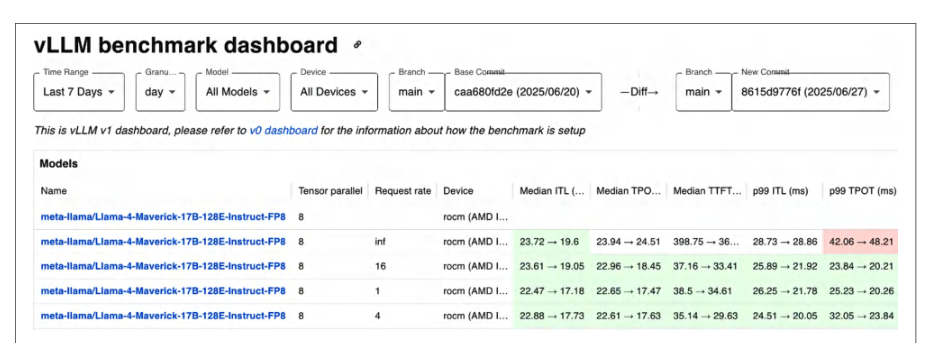
Each data point on the chart is generated by comparing a performance benchmark between a base commit and the latest commit on PyTorch’s main branch. The dashboard allows selecting the time range (e.g., last 7 days, 30 days) and granularity (hourly, daily, weekly) to zoom in or out to show trends over time.图表上的每个数据点都是通过比较基础提交与 PyTorch main 分支上最新提交之间的性能基准测试而生成的。该仪表盘允许选择时间范围(例如最近 7 天、30 天)和粒度(每小时、每天、每周),以便放大或缩小以显示随时间变化的趋势。
The HUD’s implementation is open source in the pytorch/test-infra repository. It uses a combination of Python scripts and Grafana dashboards. You can run a mini-HUD internally by collecting your model’s performance data over time and visualizing it. Even a simple spreadsheet or Grafana instance can mimic this type of visualization. The key is to track the same metrics consistently.HUD 的实现开源于 pytorch/test-infra 仓库。它结合使用了 Python 脚本和 Grafana 仪表盘。你可以通过随时间收集模型的性能数据并将其可视化,在内部运行一个迷你 HUD。即使是一个简单的电子表格或 Grafana 实例也能模拟这类可视化。关键在于持续一致地跟踪相同的指标。
It’s fairly straightforward to add or modify dashboards, contribute new YAML configs, and update benchmark scripts in the CI. In principle, if you want to track your custom model in the HUD, you could add a benchmark for it and have it run in PyTorch’s CI. This way, any PyTorch change that affects your model’s performance will show up in the chart.添加或修改仪表盘、贡献新的 YAML 配置以及在 CI 中更新基准测试脚本都相当直接。原则上,如果你想在 HUD 中跟踪自己的自定义模型,可以为其添加一个基准测试并让它在 PyTorch 的 CI 中运行。这样,任何影响你模型性能的 PyTorch 改动都会显示在图表中。
性能基准测试与 MLPerf 日志记录
Performance Benchmarks and MLPerf Logging
Beyond ad hoc benchmarks and CI, industry-standard benchmarks like MLPerf provide valuable feedback and encourage good practices. MLPerf Training and Inference benchmarks push state-of-the-art performance with rigorous logging to make sure the results are trustworthy and hold up to apples-to-apples comparisons. Even if you’re not entering the competition, the MLPerf logging methodology is useful for your own system’s performance analysis.除了临时性基准测试和 CI 之外,像 MLPerf 这样的行业标准基准测试能提供有价值的反馈并鼓励良好实践。MLPerf 训练和推理基准测试以严格的日志记录推动最先进的性能,以确保结果可信并经受得住同类对比。即使你不参加竞赛,MLPerf 的日志记录方法对你自己的系统性能分析也很有用。
MLPerf logging standardizes the output of key events and metrics during a training run. Each log entry is a JSON object printed with a prefix like :::MLL. Entries include key-value pairs along with metadata. In PyTorch, you can use the open source MLPerf Logging library on GitHub to format your output to MLPerf standards.MLPerf 日志记录(MLPerf Logging)对训练运行期间的关键事件与指标输出进行了标准化。每条日志条目都是一个 JSON 对象,打印时带有类似 :::MLL 的前缀。条目中包含键值对以及元数据。在 PyTorch 中,你可以使用 GitHub 上的开源 MLPerf Logging 库,将输出格式化为 MLPerf 标准。
In an MLPerf training run, the log includes entries for initialization start time, training start time, each epoch’s time, end of training time, final accuracy, etc. Everything is timestamped to the millisecond and labeled properly.在一次 MLPerf 训练运行中,日志包含初始化开始时间、训练开始时间、每个 epoch 的时间、训练结束时间、最终精度等条目。所有内容都精确到毫秒打上时间戳,并被正确标注。
The MLPerf compliance scripts parse these logs to verify the run obeyed the rules. For instance, there should be no hyperparameter changes after the start; you must use the proper number of epochs, etc.MLPerf 合规性脚本会解析这些日志,以验证本次运行遵守了规则。例如,开始之后不应有任何超参数变更;必须使用正确的 epoch 数量,等等。
The log will also include calculated throughput—and whether the run achieved a target accuracy within the allowed time. This ensures fairness since you can’t claim a throughput number without also meeting the accuracy requirement.日志中还会包含计算出的吞吐量——以及本次运行是否在允许的时间内达到了目标精度。这保证了公平性,因为你不能在未满足精度要求的情况下宣称某个吞吐量数字。
Some MLPerf logs, especially in research submissions, include a breakdown of each epoch and iteration timing. This level of detail isn’t required for the competition, but it’s very useful internally. For instance, you can log how much of each iteration was spent in the forward pass, backward pass, and communication such as all-reduce. You can also log averages of these timings across all nodes in a multinode cluster to pinpoint distributed bottlenecks.某些 MLPerf 日志,尤其是研究类提交中的日志,会包含每个 epoch 与每次迭代的耗时分解。这种详细程度并非比赛所要求,但在内部非常有用。例如,你可以记录每次迭代中前向传播、反向传播以及 all-reduce 等通信各占用了多少时间。你还可以记录多节点集群中所有节点上这些耗时的平均值,以精确定位分布式瓶颈。
Here is a small example snippet of an MLPerf JSON log. This is followed by example Table 13-6, which is derived from these logs and includes the percentage of each component relative to the overall step time:下面是一小段 MLPerf JSON 日志的示例片段。其后是示例表 13-6,该表由这些日志导出,并包含各组成部分相对于整体步骤时间的百分比:
{
  "step_time_ms": 24.0,
  "forward_ms": 10.5,
  "backward_ms": 9.0,
  "allreduce_ms": 4.0,
  "other_ms": 0.5
}
| Step component步骤组成部分 | Time per iteration (ms)每次迭代时间(ms) | Percentage of step占步骤的百分比 |
|---|---|---|
| Forward pass前向传播 | 10.5 ms10.5 ms | 43.8%43.8% |
| Backward pass反向传播 | 9.0 ms9.0 ms | 37.5%37.5% |
| All-reduce (grad sync)全归约(梯度同步) | 4.0 ms4.0 ms | 16.7%16.7% |
| Other overhead其他开销 | 0.5 ms0.5 ms | 2.1%2.1% |
| Total step time总步时间 | 24.0 ms24.0 ms | 100%100% |
In this example 24 ms training step, the computation (forward and backward) takes 19.5 ms (10.5 ms + 9.0 ms), or 81.3% (43.8% + 37.5%) of the step time. The communication (gradient all-reduce) takes 4.0 ms (16.7%), and other overhead (e.g., data loading) takes 0.5 ms (2.1%) of the step time.在这个 24 ms 训练步的示例中,计算(前向与反向)耗时 19.5 ms(10.5 ms + 9.0 ms),占步时间的 81.3%(43.8% + 37.5%)。通信(梯度全归约)耗时 4.0 ms(16.7%),其他开销(例如数据加载)耗时 0.5 ms,占步时间的 2.1%。
Such a breakdown is extremely useful, as it tells us that roughly one-sixth of the time is spent in gradient synchronization. If we wanted to speed up training further, we could focus on overlapping or reducing the all-reduce time.这样的拆解极其有用,因为它告诉我们大约六分之一的时间花在了梯度同步上。如果我们想进一步加速训练,就可以着眼于重叠或减少全归约时间。
For instance, we could try activation compression or try to better overlap communication with computation using techniques like asynchronous all-reduce or pipeline parallelism to reduce the 4 ms spent in all-reduce. If “other overhead” were large enough, we would target data loading, which we’d address differently.例如,我们可以尝试激活压缩,或者使用异步全归约、流水线并行等技术更好地将通信与计算重叠,以减少全归约所花的 4 ms。如果“其他开销”足够大,我们就会把目标对准数据加载,而处理方式会有所不同。
MLPerf optimizations for all-reduce include techniques like delayed all-reduce (called slack) or overlapping multiple smaller all-reduces with computation. These are advanced tricks beyond the scope of this discussion, but the point is that this type of breakdown directs you to exactly where you need to optimize.MLPerf 针对全归约的优化包括延迟全归约(称为 slack)或将多个较小的全归约与计算重叠等技术。这些是高级技巧,超出了本讨论的范围,但要点在于:这类拆解能直接把你引向真正需要优化的地方。
While MLPerf Logging is specific to competition rules, the general practice of structured logging, performance metrics, and timing breakdowns can be applied to your own training and inference simulations. For example, you can instrument your training loop to log a JSON line each epoch with additional metrics like throughput, latency, GPU utilization (from nvidia-smi), etc.虽然 MLPerf Logging 是竞赛规则所特有的,但结构化日志、性能指标与时间拆解的一般实践可以应用到你自己训练与推理的模拟中。例如,你可以对训练循环进行插桩,在每个轮次(epoch)记录一行 JSON,附带吞吐量、时延、GPU 利用率(来自 nvidia-smi)等额外指标。
Over a long training run, these logs become a treasure trove for post-training analysis. You can plot how performance changed from day 1 to day 7 of training to determine if the job slowed down due to memory fragmentation. Or you can see how different phases scale, including data loading, compute, etc.在漫长的训练过程中,这些日志会成为训练后分析的宝库。你可以绘制性能从训练第 1 天到第 7 天的变化曲线,判断作业是否因显存碎片而变慢。你也可以观察不同阶段(包括数据加载、计算等)的扩展情况。
By logging metrics and not just the final accuracy, you make your results reproducible and debuggable. If someone retrains your model later and it’s slower, the logs will help pinpoint the problem. Maybe the data input layer is slower. Or maybe they’re using a different hardware config. This practice goes hand-in-hand with CI, which encourages a log, monitor, and compare methodology.通过记录指标而不只是最终准确率,你使结果可复现、可调试。如果之后有人重新训练你的模型而速度更慢,日志将有助于精确定位问题。也许是数据输入层变慢了,也许他们使用了不同的硬件配置。这一实践与 CI 相辅相成,后者倡导“记录、监控、比较”的方法论。
By instrumenting your pipelines to emit JSON logs of various timing components, you can track improvements as you implement your optimizations. This also makes it easier to communicate bottlenecks—and performance-tuning results—with the team in a standardized way.通过对流水线进行插桩,输出包含各项计时组件的 JSON 日志,你就能在实施优化时跟踪改进情况。这也能让你以标准化的方式与团队沟通瓶颈以及性能调优结果。
关键要点
Key Takeaways
PyTorch’s relative simplicity and high level of abstraction can sometimes lead to a false sense of performance safety. As such, it’s surprisingly easy to introduce subtle performance bugs during development. Here is a summary of common PyTorch performance pitfalls—and how to address them:PyTorch 相对简单且抽象层次较高,有时会让人对性能产生虚假的安全感。因此,在开发过程中引入隐蔽的性能缺陷出奇地容易。以下是常见的 PyTorch 性能陷阱及其应对方法的总结:
- Maintain a profile-first approach坚持剖析优先的方法
- At ultrascale, bottlenecks can hide at any layer—Python overhead, PyTorch framework scheduling, CPU data-loading stalls, GPU kernel inefficiencies, memory issues, etc. Relying on intuition alone often misses the true hotspots. Use a holistic profiling strategy with multiple tools (as we did in this chapter) to capture performance at every level. Modern profilers have low-overhead modes that can be used in production to catch regressions. Combining these with hardware metrics like GPU SM utilization from
nvidia-smi, you can identify the bottlenecks with confidence and prioritize optimizations correctly—rather than optimizing in the wrong place.在超大规模场景下,瓶颈可能隐藏在任何一层——Python 开销、PyTorch 框架调度、CPU 数据加载停顿、GPU 内核效率低下、内存问题等。仅凭直觉往往会错过真正的热点。应采用多工具的整体剖析策略(正如本章所做的那样),在每个层级上捕获性能表现。现代性能剖析器提供低开销模式,可在生产环境中用于捕获性能回退。将这些与硬件指标(例如来自nvidia-smi的 GPU SM 利用率)结合,你就能有把握地定位瓶颈并正确地排定优化优先级,而不是在错误的地方做优化。
- Prefer compile mode versus versus eager mode优先选择编译模式(compile mode)而非即时模式(eager mode)
- In eager mode, every tiny operation is launched as its own kernel. This incurs Python dispatch and GPU launch overhead each time. Instead, use PyTorch’s JIT compilation with
torch.compile. With essentially a one-line change (model =torch.compile(model)), PyTorch can capture the model graph and generate fused, optimized code.在即时模式下,每个细小的操作都会作为独立内核启动。每次都会带来 Python 调度和 GPU 启动开销。应改用 PyTorch 的 JIT 编译,即torch.compile。基本上只需改动一行(model =torch.compile(model)),PyTorch 就能捕获模型图并生成融合后的优化代码。
- Use the highest optimization compiler mode that your workload allows使用工作负载所允许的最高优化编译器模式
- For long-running jobs,
max-autotuneoften wins on steady-state speed, butreduce-overheadcan be better for small batches or dynamic shapes. Validate modes on your workload. CUDA Graphs inmax-autotunecan mask launch overhead and are incompatible with frequently changing shapes.对于长时间运行的任务,max-autotune通常在稳态速度上更胜一筹,但对于小批大小或动态形状,reduce-overhead可能更好。请在你的工作负载上验证各模式。max-autotune中的 CUDA 图可以掩盖启动开销,但与频繁变化的形状不兼容。
- Save compiled artifacts to reuse保存编译产物以便复用
- If startup time is a concern, it’s best to cache the compiled artifacts for reuse later. To do this, you can use
torch.compiler.save_cache_artifacts()andload_cache_artifacts(). For long-running jobs on multinode fleets, it’s recommended to persist compiler artifacts as a “mega-cache” in a shared path (e.g.,TORCHINDUCTOR_CACHE_DIRenvironment variable) mounted at identical locations across nodes. This will help avoid cold starts when new nodes are started.如果启动时间是关注点,最好缓存编译产物以便后续复用。为此,可以使用torch.compiler.save_cache_artifacts()和load_cache_artifacts()。对于多节点集群上的长时间运行任务,建议将编译器产物作为“mega-cache”持久化到共享路径(例如TORCHINDUCTOR_CACHE_DIR环境变量),并在各节点挂载到相同位置。这有助于在新节点启动时避免冷启动。
- Avoid synchronization gotchas避免同步陷阱
- PyTorch is designed for usability, which means it’s easy to inadvertently write code that forces synchronization between CPU and GPU. For example, calling
tensor.item()on a CUDA tensor to retrieve a Python value will synchronize the GPU. Usetorch.cuda.Stream.wait_stream()with stream events instead of forcing synchronizations when coordinating between streams. Similarly, transferring data from GPU to CPU without usingnon_blocking=Truewill cause a synchronization. Use asynchronous transfers and let the profilers guide you to any hidden synchronizations.PyTorch 以易用性为设计目标,这意味着很容易不经意间写出强制 CPU 与 GPU 之间同步的代码。例如,在 CUDA 张量上调用tensor.item()获取 Python 值会同步 GPU。在流之间协调时,应使用torch.cuda.Stream.wait_stream()配合流事件,而不是强制同步。同样,从 GPU 向 CPU 传输数据时若不使用non_blocking=True,也会引发同步。应使用异步传输,并让性能剖析器引导你发现任何隐藏的同步。
- Avoid Python-side profiling with *
time.time()*, as this will implicitly synchronize避免使用 *time.time()* 在 Python 侧做性能剖析,因为它会隐式同步 - Timing GPU code blocks with
time.time()as this includes a synchronization. It’s better to usetorch.cuda.Event(enable_timing=True)for timing GPU code without extraneous synchronizations.用time.time()为 GPU 代码块计时会包含一次同步。更好的做法是使用torch.cuda.Event(enable_timing=True)为 GPU 代码计时,从而避免多余的同步。
- Utilize the Tensor Cores利用张量核心
- It’s surprisingly easy, and not ideal, to fall back to full FP32—and not use the Tensor Cores—without realizing it. To ensure you are using the Tensor Cores, wrap the forward pass and loss computation in
torch.autocastand choose a lower-precisiondtypeso that GEMMs can use the Tensor Cores. (Note thatautocastdoes not change the storagedtypeof model weights unless you explicitly cast the model. Instead, it selects computedtypes for eligible operations and leaves numerically sensitive operations infloat32.)不知不觉中回退到完整 FP32——因而不使用张量核心——出奇地容易,而且并不理想。为确保使用张量核心,请用torch.autocast包裹前向传播和损失计算,并选择精度更低的dtype,使 GEMM 能够使用张量核心。(注意,除非显式转换模型,autocast不会改变模型权重的存储dtype;它只为符合条件的算子选择计算dtype,而将数值敏感的操作保留为float32。)
- Use TF32 over FP32 to activate the Tensor Cores使用 TF32 而非 FP32 以激活张量核心
- For
FP32workloads that can tolerate TF32 precision, usetorch.set_float32_matmul_precision()with either"high"or"medium"to enable TF32. This setting maps totorch.backends.cuda.matmul.fp32_precisionunder the hood on CUDA devices. On modern GPUs, TF32 uses Tensor Cores, which is ideal. Be sure to verify that your kernel uses Tensor Cores with Nsight Compute’s SpeedOfLight view or thesm__inst_executed_pipe_tensormetric. (Note: using"highest"will enforce trueFP32and disableTF32, so be careful. This can be useful for debugging but is discouraged if your goal is to improve performance.)对于能够容忍 TF32 精度的FP32工作负载,使用torch.set_float32_matmul_precision()并设为"high"或"medium"以启用 TF32。在 CUDA 设备上,该设置底层映射到torch.backends.cuda.matmul.fp32_precision。在现代 GPU 上,TF32 会使用张量核心,这是理想选择。务必通过 Nsight Compute 的 SpeedOfLight 视图或sm__inst_executed_pipe_tensor指标验证你的内核确实使用了张量核心。(注意:使用"highest"会强制真正的FP32并禁用TF32,因此要小心。这对调试有用,但如果目标是提升性能,则不推荐。)
- Verify the Tensor Cores are actually being used验证张量核心确实被使用
- To verify that kernels are using the Tensor Cores and the intended
dtype, you should use your profilers. In PyTorch, inspect operator timing withtorch.profiler, then use Nsight Compute to confirm Tensor pipeline activity. The SpeedOfLight and Compute Workload Analysis sections in Nsight Compute will report Tensor pipeline utilization and a kernel-execution timeline using performance monitor (PM) sampling.要验证内核是否使用了张量核心以及预期的dtype,应当使用性能剖析器。在 PyTorch 中,用torch.profiler检查算子耗时,然后用 Nsight Compute 确认张量流水线活动。Nsight Compute 中的 SpeedOfLight 和 Compute Workload Analysis 部分会报告张量流水线利用率,并给出基于性能监视器(PM)采样的内核执行时间线。
- Prefer BF16 over FP16 when possible尽可能优先使用 BF16 而非 FP16
- Prefer
dtype=torch.bfloat16on modern GPUs becauseBF16keeps theFP32exponent range and normally does not require gradient scaling. If you must train in FP16, enabletorch.cuda.amp.GradScalerand verify no overflow/underflow in logs. BF16 generally avoids scaling on modern GPU Tensor Cores.在现代 GPU 上优先使用dtype=torch.bfloat16,因为BF16保留了FP32的指数范围,通常不需要梯度缩放。如果必须用 FP16 训练,请启用torch.cuda.amp.GradScaler并检查日志中是否有溢出/下溢。在现代 GPU 张量核心上,BF16 通常无需缩放。
- Fuse small operations融合小算子
- Many model computations involve long sequences of small elementwise or matrix operations. These small operations each incur extra memory reads/writes and launch overhead. Use
torch.profilerto spot many small (e.g., < 1 ms) operations in a row. If you see a pattern like linear → gelu → dropout, consider replacing it with a fused module or relying ontorch.compileto fuse it. And, for any operations that it misses, consider writing custom fused kernels. Each custom fusion can save a few percent. Together, these small “last mile” gains will add up.许多模型计算涉及一长串小的逐元素或矩阵运算。这些小运算每一个都会带来额外的内存读写和启动开销。使用torch.profiler找出连续出现的许多小算子(例如 < 1 ms)。如果看到 linear → gelu → dropout 这样的模式,考虑用融合模块替换,或依靠torch.compile进行融合。对于它遗漏的任何算子,考虑编写自定义融合内核。每次自定义融合都能节省几个百分点。这些“最后一公里”的小收益加在一起会相当可观。
- Reduce memory fragmentation减少显存碎片
- If your training job or inference pipeline runs for days/weeks/months, memory fragmentation can become an issue—especially since tensor sizes vary from iteration to iteration in most LLM applications. Consider using memory pooling libraries like PyTorch’s caching allocator that can allocate all large tensors upfront. The fewer distinct allocation sizes you have, the better. So reuse and stick to constant shapes when possible. Proactively manage memory by tuning the CUDA allocator with environment variables (e.g.,
max_split_size_mb). And avoid breaking large chunks into many small pieces, preallocate frequently used buffers at a fixed maximum size, and reuse buffers to keep allocation sizes consistent. These practices will keep memory usage stable over time and prevent fragmentation-related slowdowns and crashes.如果你的训练任务或推理流水线要运行数天/数周/数月,显存碎片可能成为问题——尤其因为在大多数 LLM 应用中张量大小会随迭代而变化。考虑使用显存池化库,例如 PyTorch 的缓存分配器,它可以预先分配所有大张量。不同的分配尺寸越少越好。因此尽可能复用并坚持固定形状。通过环境变量(例如max_split_size_mb)调整 CUDA 分配器来主动管理内存。避免把大块拆成许多小块,按固定的最大尺寸预分配常用缓冲区,并复用缓冲区以保持分配尺寸一致。这些做法能让显存使用随时间保持稳定,并防止与碎片相关的性能下降和崩溃。
- Use activation checkpointing使用激活检查点
- By default, PyTorch saves all activations needed for the backward pass, which consumes enormous memory for large models. Consider using activation checkpointing to trade compute for memory.
torch.utils.checkpointmakes it easy to apply by wrapping segments of your forward pass so their activations aren’t saved. They’ll just be recomputed in the backward pass. This will reduce memory usage at the cost of extra compute. However, this is usually worthwhile since默认情况下,PyTorch 会保存反向传播所需的全部激活值,这对大模型而言会消耗巨量内存。可以考虑使用激活检查点(activation checkpointing),以计算换内存。torch.utils.checkpoint让这一做法易于应用:只需包装前向传播中的若干片段,这些片段的激活值便不会被保存,而是在反向传播中重新计算。这会以额外的计算为代价降低显存占用。不过,这通常是值得的,因为
GPU memory is at more of a premium than compute for modern GPUs. This is almost mandatory for models above tens of billions of parameters on modern GPU hardware. Also remember that you can mix precision. For instance, you might keep a few critical activations in higher precision to preserve accuracy and recompute others in lower precision to save memory and time.对于现代 GPU 而言,GPU 显存比计算更为稀缺。在现代 GPU 硬件上,对于参数量超过数百亿的模型,这几乎是必需的。同时请记住,你可以混合使用不同精度。例如,你可以将少数关键激活值保持为较高精度以维持准确率,而将其他激活值以较低精度重新计算,以节省显存和时间。
- Offload memory to CPU or NVMe storage将内存卸载到 CPU 或 NVMe 存储
- Model parameters, gradients, optimizer states, and activations all compete for limited GPU VRAM. Even with large HBM, a multi-hundred-billion-parameter model will exceed it—even at reduced precision. Leverage the system’s memory hierarchy and offload less frequently used data to CPU RAM or NVMe disk— and bring them back in only when needed. These data transfers can be streamed and overlapped with computations using asynchronous copies. Monitor interconnect throughput when you do this to make sure you’re not saturating the link.模型参数、梯度、优化器状态和激活值都在争夺有限的 GPU 显存。即便拥有大容量 HBM,一个数千亿参数的模型也会超出其容量——即使采用降低后的精度也是如此。利用系统的显存层级,将不常使用的数据卸载到 CPU 内存或 NVMe 磁盘,并仅在需要时将其取回。这些数据传输可以通过异步拷贝进行流式处理并与计算重叠。这样做时要监控互连吞吐量,确保没有把链路打满。
- Reduce input pipeline stalls减少输入流水线停顿
- Even a perfectly optimized training loop can be bottlenecked if the input pipeline can’t feed data fast enough. This typically manifests as bubbles of idle GPU time waiting for the next batch. This is often obvious in profiling since most tools show gaps before iterations—or CPU threads busy in data loading code while the GPU sits idle. Maximize data throughput using a sufficient number of Data-Loader workers and
prefetch_factorsize.即使训练循环优化得完美无缺,如果输入流水线无法足够快地供给数据,仍会形成瓶颈。这通常表现为 GPU 空闲等待下一批数据的空泡。在性能剖析中这往往很明显,因为大多数工具会显示迭代前的空隙——或者 CPU 线程忙于数据加载代码而 GPU 处于空闲。使用足够数量的 DataLoader 工作进程和合适的prefetch_factor大小来最大化数据吞吐量。
It’s important to utilize all CPU cores for data loading and preparation. Use pin_memory=True and nonblocking transfers for faster H2D copies. Preprocess your dataset (e.g., tokenization) offline so the data loader does minimal work. Also, you can increase the DataLoader prefetch_factor. It’s recommended to continuously fetch additional batches slightly ahead of their usage.重要的是利用所有 CPU 核心进行数据加载和准备。使用 pin_memory=True 和非阻塞传输以加快 H2D 拷贝。离线预处理数据集(例如分词),使数据加载器的工作量最小化。此外,你可以增大 DataLoader 的 prefetch_factor。建议持续地略微提前于使用时机获取额外的批次。
- Profile and possibly offload CPU-side data transformations剖析并视情况卸载 CPU 侧的数据变换
- Since Python data transformations (e.g., tokenization) can be surprisingly slow, make sure these host-side transformations are vectorized. Consider using optimized C++ libraries when available. And potentially offload complex transformations to the GPU using libraries like NVIDIA DALI.由于 Python 数据变换(例如分词)可能慢得出人意料,请确保这些主机侧变换是向量化的。在有可用的优化 C++ 库时考虑使用它们。并且可以考虑使用 NVIDIA DALI 之类的库将复杂变换卸载到 GPU。
- Optimize multi-GPU and multinode communication优化多 GPU 与多节点通信
- Distributed training often hits a ceiling due to communication overhead if not managed properly. Use optimized PyTorch distributed implementations like DDP, which overlaps communication with computation by default. Tune the gradient
bucket_cap_mbto find the optimal bucket size for overlap. Larger buckets (e.g., 50 MB instead of the default 25 MB) can reduce per-message overhead and better overlap if your network can handle it.如果管理不当,分布式训练常常会因通信开销而触及上限。使用经过优化的 PyTorch 分布式实现,例如 DDP,它默认会将通信与计算重叠。调整梯度的bucket_cap_mb以找到重叠效果最佳的分桶大小。更大的桶(例如用 50 MB 代替默认的 25 MB)可以减少每条消息的开销,并在网络能够承受时实现更好的重叠。
- Monitor network bandwidth监控网络带宽
- If it’s maxed out, you can explore activation compression techniques to reduce bandwidth usage. Be sure to overlap the all-reduce collective with backward computation so you can hide the communication time. For multinode, consider the topology and place processes that frequently communicate on the same node or switch to reduce latency.如果带宽已被打满,你可以探索激活压缩技术以减少带宽占用。务必让全归约集合通信与反向计算重叠,从而隐藏通信时间。对于多节点场景,要考虑拓扑结构,将频繁通信的进程放置在同一节点或同一交换机上以降低时延。
- Avoid “bit rot” over time避免随时间推移出现“位腐化”(bit rot)
- It’s easy for performance to regress due to ongoing code changes, framework updates, and new application features. For instance, a minor refactoring might introduce an unexpected synchronization, or a PyTorch upgrade might change an operation’s implementation. Treat performance as a first-class metric and set up continuous integration tests, dashboards, and alerts to monitor performance. Every code commit (or daily/weekly run) should include a quick performance benchmark to catch performance regressions.由于代码持续变更、框架更新以及新增应用功能,性能很容易出现回退。例如,一次小的重构可能引入意料之外的同步,或者一次 PyTorch 升级可能改变某个算子的实现。应把性能当作一等指标,建立持续集成测试、仪表盘和告警来监控性能。每次代码提交(或每日/每周运行)都应包含一次快速的性能基准测试,以捕获性能回退。
- Update your baselines whenever hardware changes硬件发生变更时及时更新基线
- If you move from the B200 to the GB300, for example, make sure to reestablish your performance baseline and thresholds. New hardware will handle certain patterns better or worse. Recalibrate and adjust your alerts accordingly.例如,当你从 B200 迁移到 GB300 时,务必重新建立性能基线与阈值。新硬件对某些模式的支撑会更好,对另一些则会更差。应相应地重新校准并调整告警。
- Use tools like TorchBench or custom timing scripts in automated workflows在自动化工作流中使用 TorchBench 或自定义计时脚本等工具
- Keep an eye on external signals from PyTorch’s nightly performance benchmarks (reported in the public HUD regressions dashboard)—especially for models similar to yours. If a general regression happens in PyTorch, you’ll know before upgrading. Whenever a slowdown is detected, investigate immediately, identify the root cause (e.g., your code or an upstream change), mitigate it (e.g., revert or adapt the code), and report it upstream (e.g., PyTorch, Triton, NVIDIA, etc.) so the respective community can address the issue and benefit from the fix. Also, maintain correctness tests for your optimizations so you don’t silently break accuracy. By making performance-regression testing part of your workflow, your speedup will last the test of time.关注 PyTorch 每夜性能基准测试发出的外部信号(公布在公开的 HUD 回退仪表盘上)——尤其是与你模型相似的模型。如果 PyTorch 出现普遍性回退,你就能在升级之前知晓。一旦检测到性能变慢,应立即排查、定位根因(例如是你的代码还是上游变更)、加以缓解(例如回滚或调整代码),并向上游(例如 PyTorch、Triton、NVIDIA 等)报告,使相应社区能够解决问题并从修复中受益。同时,为你的优化维护正确性测试,以免悄无声息地破坏精度。把性能回退测试纳入工作流,你的加速成果才能经受时间的考验。
结语
Conclusion
It’s important to combine microlevel profilng (e.g., per-operator and per-kernel) with macrolevel benchmarking (e.g., end-to-end throughput and latency). This way, you have a comprehensive view of system performance. It’s as important to optimize individual kernels as it is to tune your complete, end-to-end training and inference pipeline—and keep it tuned over time. This holistic approach is critical as hardware evolves.重要的是将微观层面的性能剖析(例如按算子、按内核)与宏观层面的基准测试(例如端到端吞吐量和时延)结合起来。这样你才能对系统性能有全面的认识。优化单个内核与调优完整的端到端训练和推理流水线同样重要——并且要长期保持调优状态。随着硬件演进,这种整体性方法至关重要。
The fundamentals in this chapter will help you adapt to new platforms. Always profile, identify bottlenecks, and apply the appropriate optimizations at each level of the stack. By systematically applying compiler and memory optimizations, you can significantly boost your workload’s performance closer to the hardware limits—while still maintaining acceptable accuracy.本章介绍的基础知识将帮助你适应新平台。始终进行性能剖析、识别瓶颈,并在技术栈的每一层施加恰当的优化。通过系统地应用编译器优化和内存优化,你可以显著提升工作负载性能,使其更接近硬件极限——同时仍保持可接受的精度。
As we showed, careful profiling will identify the true bottlenecks. And targeted optimizations can produce large speedups in training and inference performance. It’s also important to set up automation to protect these gains against performance regressions over time.正如我们所展示的,细致的性能剖析能找出真正的瓶颈。有针对性的优化可以为训练和推理性能带来大幅加速。同样重要的是建立自动化机制,保护这些收益不随时间推移而出现性能回退。
This end-to-end optimization journey required effort at every level of the stack. The end result is an optimized, efficient, and regression-resistant system that produces maximum performance from modern GPU hardware, scales to multinode cluster and rack-level topologies, and adapts to future advancements in hardware, software, and algorithms.这段端到端优化之旅需要在技术栈的每一层付出努力。最终得到的是一个经过优化、高效且抗回退的系统,它从现代 GPU 硬件中释放出最大性能,可扩展到多节点集群与机架级拓扑,并能适应未来硬件、软件和算法的进步。