动态调度、CUDA 图与设备发起的内核编排
Chapter 12. Dynamic Scheduling, CUDA Graphs, and Device-Initiated Kernel Orchestration
本章目录
So far, we have unlocked compute and memory throughput at the individual kernel level. Now it’s time to orchestrate these kernels so the GPU never goes idle.到目前为止,我们已经在单个内核层面释放了计算与显存吞吐量。现在该编排这些内核,让 GPU 永不空闲。
In this chapter, we move from scheduling on the host to scheduling on the device itself. We’ll explore dynamic work queues driven by fast L2-cache atomics, collapse repeated kernel launches, and use CUDA Graphs for batching fixed pipelines and minimizing CPU handshakes.在本章中,我们将从主机侧调度转向设备自身调度。我们将探索由快速的 L2 缓存原子操作驱动的动态工作队列,合并重复的内核启动,并使用 CUDA 图对固定流水线进行批处理并最小化 CPU 握手开销。
Then we’ll push orchestration even further, with device-side graph launches and dynamic parallelism. These let the GPU decide what to run next without needing to call back to the CPU.随后,我们将通过设备侧图启动和动态并行把编排推进得更远。这些技术让 GPU 无需回调 CPU 即可决定接下来运行什么。
Finally, we’ll dive into a multi-GPU environment by overlapping peer-to-peer copies, NCCL collectives, CUDA-aware MPI, and NVSHMEM one-sided puts/gets. This way, clusters of GPUs behave like one giant, shared-memory coprocessor. For instance, NVIDIA’s DGX GB200 NVL72 system connects 36 Grace CPUs and 72 Blackwell GPUs into a single NVLink domain with unified addressing and up to 30 TB of combined CPU and GPU unified memory within that domain. It enables remote HBM access across the NVLink fabric inside the 72-GPU domain. Larger NVLink network topologies can extend beyond a single rack.最后,我们将深入多 GPU 环境,重叠点对点拷贝、NCCL 集合通信、CUDA 感知的 MPI 以及 NVSHMEM 单边 put/get 操作。这样一来,GPU 集群就像一台巨大的共享内存协处理器。例如,NVIDIA 的 DGX GB200 NVL72 系统将 36 颗 Grace CPU 和 72 颗 Blackwell GPU 连接成单个 NVLink 域,具备统一寻址能力,该域内 CPU 与 GPU 统一内存合计最高可达 30 TB。它支持在 72 GPU 域内跨 NVLink 互联结构进行远程 HBM 访问。更大的 NVLink 网络拓扑可以扩展到单个机架之外。
Along the way, we’ll tie each technique back to roofline analysis, helping you choose the right tool—streams, graphs, atomics, or dynamic kernels—to increase your kernel’s operational intensity. This will help improve your workload’s overall performance.在此过程中,我们会把每种技术都联系回屋顶线模型分析,帮助你选择合适的工具——流、图、原子操作或动态内核——以提升内核的操作强度。这将有助于改善工作负载的整体性能。
By the end of this chapter, you will have an understanding of dynamic, device-side, and graph-based kernel orchestration techniques that keep every SM fed across multi-GPU clusters.到本章结束时,你将理解动态的、设备侧的以及基于图的内核编排技术,这些技术能让多 GPU 集群中的每个 SM 都保持有活可干。
使用原子工作队列的动态调度
Dynamic Scheduling with Atomic Work Queues
Uneven work assignments between threads can leave some SMs idle while others are still busy. This wastes compute resources and reduces overall throughput.线程之间工作分配不均会导致部分 SM 空闲,而其他 SM 仍在忙碌。这浪费了计算资源,并降低了整体吞吐量。
Imbalance often occurs when different threads or blocks process variable amounts of work due to input-dependent loops or conditional workloads. Some blocks complete quickly, leaving their SMs idle, while other SMs continue with longer-running blocks. On modern GPUs with hundreds of SMs, idle periods can leave many SMs idle if work is not evenly distributed. This can significantly hurt performance.当不同线程或线程块因依赖输入的循环或条件工作负载而处理数量不一的工作时,负载不均衡便常常出现。一些线程块很快完成,使其所在的 SM 空闲,而其他 SM 仍在执行耗时更长的线程块。在拥有数百个 SM 的现代 GPU 上,如果工作分配不均,空闲时段可能让大量 SM 处于闲置状态。这会显著损害性能。
By the time the longest-running work finishes, a portion of the GPU has been idle. This reduces the achieved occupancy since many cycles ran with no active warps. Remember that you can use Nsight Systems to profile and show these idle gaps clearly on the GPU timeline.等到运行时间最长的工作结束时,GPU 已有一部分处于空闲状态。这会降低实际达到的占用率,因为许多周期内没有活跃线程束在运行。请记住,你可以使用 Nsight Systems 进行性能剖析,并在 GPU 时间线上清晰地显示这些空闲间隙。
You can also compare active SM cycles to total elapsed SM cycles to gauge underutilization. Nsight Compute provides this as a single metric, which represents the fraction of time that at least one warp was active. A low active-to-elapsed ratio indicates that many cycles ran with no active warps. In other words, the GPU was often idle.你还可以将活跃 SM 周期数与 SM 总经过周期数进行比较,以衡量利用不足的程度。Nsight Compute 将其作为单一指标提供,表示至少有一个线程束处于活跃状态的时间占比。活跃与经过周期之比偏低,说明许多周期内没有活跃线程束。换言之,GPU 经常处于空闲状态。
In addition to Nsight Systems, you can use Nsight Compute to inspect achieved occupancy (the average fraction of active warps per SM relative to the hardware maximum) or the SM Active cycles percentage (the fraction of time at least one warp was active) to quantify this underutilization.除 Nsight Systems 之外,你还可以使用 Nsight Compute 检查实际达到的占用率(每个 SM 上活跃线程束数量相对硬件上限的平均占比)或 SM Active cycles 百分比(至少有一个线程束活跃的时间占比),以量化这种利用不足。
Next, we’ll discuss how to implement atomic queues to allocate work dynamically inside a kernel. These are important to balance arbitrary workloads across all SMs to avoid idle threads. Before we do that, we need to introduce atomic counters.接下来,我们将讨论如何实现原子队列,以在内核内部动态分配工作。这对于在全部 SM 之间均衡任意工作负载、避免线程空闲非常重要。在此之前,我们需要先介绍原子计数器。
原子计数器
Atomic Counters
Atomic counters are the foundation for atomic queues, which allow dynamic work allocation.原子计数器是原子队列的基础,而原子队列支持动态工作分配。
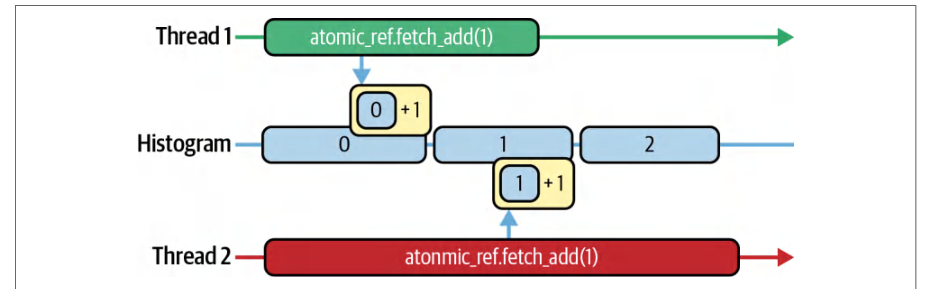
On modern GPUs, global atomics are serviced and serialized in the on-device L2 cache. This reduces latency versus DRAM round trips when the target line is resident. Atomic counters still incur latency and serialize under contention. But uncontended atomicAdd operations happen extremely quickly by remaining on-chip. An example of two threads incrementing an atomic is shown in Figure 12-1.在现代 GPU 上,全局原子操作在设备端 L2 缓存中处理并串行化。当目标缓存行驻留时,相比 DRAM 往返可降低时延。原子计数器仍会产生时延,并在竞争下串行化。但无竞争的 atomicAdd 操作因保持在片上而执行得极快。图 12-1 展示了两个线程递增一个原子计数器的示例。
However, atomicAdd does not come for free. It still has latency and, under contention, can serialize threads waiting on the same memory address. As such, the L2 needs to serialize the updates as well. This creates a hotspot, which needs to be optimized. Nsight Compute can help you quantify the cost.然而,atomicAdd 并非没有代价。它仍有时延,并且在竞争情况下会串行化等待同一内存地址的线程。因此,L2 也需要串行化这些更新。这会产生热点,需要加以优化。Nsight Compute 可以帮助你量化这一开销。
In the Memory Workload Analysis section of Nsight Compute, you’ll find atomic_transactions and atomic_transactions_per_request. The atomic transactions counter represents the total number of L2-cache atomic transactions, including any replays caused by contention. The atomic transactions per request metric, or contention ratio, represents the average number of L2 transactions generated by each atomicAdd instruction.在 Nsight Compute 的 Memory Workload Analysis 部分,你会找到 atomic_transactions 和 atomic_transactions_per_request。原子事务计数器表示 L2 缓存原子事务的总数,包括由竞争引起的任何重放。每请求原子事务指标(即竞争比)表示每条 atomicAdd 指令平均生成的 L2 事务数。
When every atomicAdd fires exactly one L2 transaction, your atomic_transac tions_per_request hovers around 1.0, which means it’s paying the bare minimum. If this ratio climbs above 1.0, it signals that the threads are stalling and retrying atomic updates instead of doing useful work. Each retry indicates contention.当每次 atomicAdd 恰好触发一次 L2 事务时,你的 atomic_transac tions_per_request 会徘徊在 1.0 附近,这意味着它付出的开销已是最低限度。如果该比值攀升到 1.0 以上,就说明线程正在停顿并重试原子更新,而不是在做有用的工作。每一次重试都意味着存在竞争。
The optimization here is to amortize your atomics by grabbing work in batches. So instead of each thread, or warp, performing an atomicAdd, you batch a group of tasks per atomic. Here is the before and after with a batch size of 32:这里的优化方法是批量获取工作,从而摊销原子操作的开销。因此,不是每个线程或线程束执行一次 atomicAdd,而是每次原子操作批量领取一组任务。下面是批大小为 32 的优化前后对比:
// 批处理前
int idx = atomicAdd(&queue_head, 1);
if (idx < N) process(data[idx]);
// 批处理后
const int batchSize = 32;
int start = atomicAdd(&queue_head, batchSize);
for (int i = start; i < start + batchSize && i < N; ++i) {
    process(data[i]);
}
// Before batching
int idx = atomicAdd(&queue_head, 1);
if (idx < N) process(data[idx]);
// After batching
const int batchSize = 32;
int start = atomicAdd(&queue_head, batchSize);
for (int i = start; i < start + batchSize && i < N; ++i) {
    process(data[i]);
}
Now a single atomic update awards a warp (or thread block) a whole slice of work— 32 items in this example—before touching the counter again. You still pay one L2 transaction per batch, but you do 32× as much useful work in between.现在一次原子更新就为线程束(或线程块)分配一整片工作——本例中为 32 项——之后才再次访问计数器。每批仍然只付出一次 L2 事务,但中间完成了 32 倍的有用工作。
In practice, only one thread per warp performs this atomicAdd to fetch the next batch start index. The thread then broadcasts it to the rest of the warp (e.g., using __shfl_sync). The entire warp then processes those 32 items in parallel. This produces one atomic operation per warp instead of per thread, drastically reducing contention.在实践中,每个线程束只有一条线程执行该 atomicAdd 来获取下一批的起始索引。该线程随后将其广播给线程束中的其余线程(例如使用 __shfl_sync)。整个线程束再并行处理这 32 项。这样每个线程束只产生一次原子操作,而非每个线程一次,从而大幅降低竞争。
In Nsight Compute you’ll see atomic_transactions plummet and your transactions-per-request collapse back toward 1.0. This proves that you’ve traded costly contention for sustained computation.在 Nsight Compute 中,你会看到 atomic_transactions 骤降,每请求事务数回落到接近 1.0。这证明你已用持续的计算取代了代价高昂的竞争。
With modern GPUs in which L2-cache atomics are exceptionally fast, even a modest batch size of 8 or 16 can eliminate most contention due to the high L2 bandwidth. That said, always verify that you haven’t simply shifted the bottleneck elsewhere.在现代 GPU 上,L2 缓存原子操作极快,得益于高 L2 带宽,即使批大小仅为 8 或 16 也能消除大部分竞争。话虽如此,始终要确认你没有只是把瓶颈转移到了别处。
To verify that this optimization hasn’t negatively affected other performance metrics, use Nsight Compute’s Warp Stall Reasons and Register Pressure reports to make sure your fused loop isn’t now limited by register spills or shared-memory bank conflicts.为确认该优化没有对其他性能指标产生负面影响,使用 Nsight Compute 的 Warp Stall Reasons 和 Register Pressure 报告,确保融合后的循环现在没有受限于寄存器溢出或共享内存存储体冲突。
In short, by batching work per atomic operation, you keep the GPU’s many warps busy doing real computation. This is in contrast to queuing up at a single counter that can’t keep up.简而言之,通过按每次原子操作批量领取工作,可以让 GPU 的大量线程束持续忙于真正的计算。这与在单个跟不上节奏的计数器上排队形成对比。
原子队列
Atomic Queues
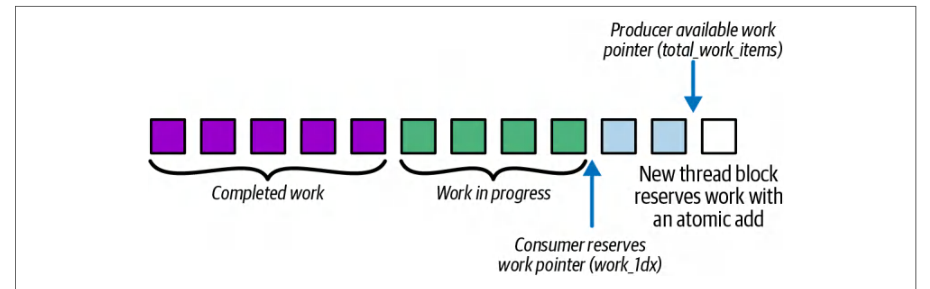
Let’s now use a global atomic counter to coordinate a dynamic work queue. The goal is to use the atomic counter and atomicAdd to balance arbitrary workloads across all SMs so that no thread, or warp, sits idle. An example of this dynamic work queue is shown in Figure 12-2.现在让我们使用一个全局原子计数器来协调动态工作队列。目标是利用原子计数器和 atomicAdd 在所有 SM 之间均衡任意负载,使任何线程或线程束都不会空闲。图 12-2 展示了这种动态工作队列的示例。
In the next code example (computeKernel), each thread computes a different number of iterations based on idx % 256. Threads with a small value for idx % 256 do very little work, while threads with a large value for idx % 256 will do a lot of work. As a result of this imbalance, threads finish at different times, and some SMs go idle waiting for the longest threads to complete. Here is the code that uses a static, uneven workload per thread:在下一个代码示例(computeKernel)中,每个线程根据 idx % 256 计算不同数量的迭代。idx % 256 值较小的线程做的工作很少,而 idx % 256 值较大的线程则会做大量工作。由于这种不均衡,各线程在不同时间完成,一些 SM 会空闲下来等待耗时最长的线程结束。以下是使用静态、不均衡的每线程工作负载的代码:
// uneven_static.cu
#include <cuda_runtime.h>
#include <cmath>
__global__ void computeKernel(const float* input, float* output, int N) {
    int idx = blockIdx.x * blockDim.x + threadIdx.x;
    if (idx < N) {
        // 每个线程根据 idx 执行数量可变的工作
        int work = idx % 256;
        float result = 0.0f;
        for (int i = 0; i < work; ++i) {
            result += sinf(input[idx]) * cosf(input[idx]);
        }
        output[idx] = result;
    }
}
int main() {
    const int N = 1<<20;
    float* h_in = nullptr;
// uneven_static.cu
#include <cuda_runtime.h>
#include <cmath>
__global__ void computeKernel(const float* input, float* output, int N) {
    int idx = blockIdx.x * blockDim.x + threadIdx.x;
    if (idx < N) {
        // Each thread does a variable amount of work based on idx
        int work = idx % 256;
        float result = 0.0f;
        for (int i = 0; i < work; ++i) {
            result += sinf(input[idx]) * cosf(input[idx]);
        }
        output[idx] = result;
    }
}
int main() {
    const int N = 1<<20;
    float* h_in = nullptr;
    float* h_out = nullptr;
    cudaMallocHost(&h_in, N * sizeof(float));
    cudaMallocHost(&h_out, N * sizeof(float));
    for (int i = 0; i < N; ++i) h_in[i] = float(i) / N;
    float *d_in, *d_out;
    cudaMalloc(&d_in, N * sizeof(float));
    cudaMalloc(&d_out, N * sizeof(float));
    cudaMemcpy(d_in, h_in, N * sizeof(float), cudaMemcpyHostToDevice);
    dim3 block(256), grid((N + 255) / 256);
    computeKernel<<<grid, block>>>(d_in, d_out, N);
    cudaDeviceSynchronize();
    cudaMemcpy(h_out, d_out, N * sizeof(float), cudaMemcpyDeviceToHost);
    cudaFree(d_in);
    cudaFree(d_out);
    cudaFreeHost(h_in);
    cudaFreeHost(h_out);
    return 0;
}
In the optimized dynamic task dispatch version shown next, a single global counter (in device memory) is used as a warp-level work queue. We turn the counter into a persistent warp-level work queue using batched atomics. This way, the warps that finish early immediately fetch another batch instead of idling:在接下来展示的优化版动态任务分发中,使用一个(位于设备显存中的)全局计数器作为线程束级工作队列。我们通过批量原子操作把这个计数器变成持久的线程束级工作队列。这样,提前完成的线程束会立即领取下一批任务,而不是空转:
// uneven_dynamic.cu
#include <cuda_runtime.h>
__device__ unsigned int globalIndex = 0;
// 线程束批量动态队列:每个活跃线程束 1 次原子操作
__global__ void computeKernelDynamicBatch(const float* input,
                                          float* output,
                                          int N) {
  // lane id 位于 [0,31] 区间
  int lane = threadIdx.x & (warpSize - 1);
  while (true) {
    // 每次迭代选出一个活跃的领导者(安全地处理分支发散)
// uneven_dynamic.cu
#include <cuda_runtime.h>
__device__ unsigned int globalIndex = 0;
// Warp-batched dynamic queue: 1 atomic per active warp
__global__ void computeKernelDynamicBatch(const float* input,
                                          float* output,
                                          int N) {
  // lane id in [0,31]
  int lane = threadIdx.x & (warpSize - 1);
  while (true) {
    // Elect an active leader each iteration (handles divergence safely)
    unsigned mask = __activemask();
    int leader = __ffs(mask) - 1;
    // 线程束领导者以原子方式为整个线程束获取一段连续批次
    unsigned int base = 0;
    if (lane == leader) {
      base = atomicAdd(&globalIndex, warpSize);
    }
    // 将起始索引广播到该线程束内所有活跃 lane
    base = __shfl_sync(mask, base, leader);
    unsigned int idx = base + lane;
    if (idx >= (unsigned)N) break;  // 动态终止
    // 将不变量提升到循环次数可变的循环之外
    // 注意:在 Blackwell 上也可以使用 __sincosf
    float s = sinf(input[idx]);
    float c = cosf(input[idx]);
    int   work = idx % 256;
    float result = 0.0f;
    #pragma unroll 1
    for (int i = 0; i < work; ++i) {
      result += s * c;
    }
    output[idx] = result;
    // 循环持续到 counter >= N
  }
}
int main() {
    const int N = 1 << 20;
    float *d_in, *d_out;
    cudaMalloc(&d_in,  N * sizeof(float));
    cudaMalloc(&d_out, N * sizeof(float));
    // 用于真实数据路径的主机缓冲区(锁页)
    float *h_in = nullptr, *h_out = nullptr;
    cudaMallocHost(&h_in,  N * sizeof(float));
    cudaMallocHost(&h_out, N * sizeof(float));
    for (int i = 0; i < N; ++i) {
        h_in[i] = static_cast<float>(i % 1000);
    }
    // 将输入复制到设备
    cudaMemcpy(d_in, h_in, N * sizeof(float),
        cudaMemcpyHostToDevice);
    // 重置全局计数器
    unsigned int zero = 0;
    // 如果重复调用该内核(例如在循环中),
    // 则在每次启动前将 'globalIndex' 重置为 0。
    unsigned mask = __activemask();
    int leader = __ffs(mask) - 1;
    // Warp leader atomically grabs a contiguous batch for the whole warp
    unsigned int base = 0;
    if (lane == leader) {
      base = atomicAdd(&globalIndex, warpSize);
    }
    // Broadcast starting index to all active lanes in the warp
    base = __shfl_sync(mask, base, leader);
    unsigned int idx = base + lane;
    if (idx >= (unsigned)N) break;  // dynamic termination
    // Hoist invariants out of the variable trip-count loop
    // Note: You can also use __sincosf on Blackwell
    float s = sinf(input[idx]);
    float c = cosf(input[idx]);
    int   work = idx % 256;
    float result = 0.0f;
    #pragma unroll 1
    for (int i = 0; i < work; ++i) {
      result += s * c;
    }
    output[idx] = result;
    // loop continues until counter >= N
  }
}
int main() {
    const int N = 1 << 20;
    float *d_in, *d_out;
    cudaMalloc(&d_in,  N * sizeof(float));
    cudaMalloc(&d_out, N * sizeof(float));
    // Host buffers (pinned) for a realistic data path
    float *h_in = nullptr, *h_out = nullptr;
    cudaMallocHost(&h_in,  N * sizeof(float));
    cudaMallocHost(&h_out, N * sizeof(float));
    for (int i = 0; i < N; ++i) {
        h_in[i] = static_cast<float>(i % 1000);
    }
    // Copy inputs to device
    cudaMemcpy(d_in, h_in, N * sizeof(float),
        cudaMemcpyHostToDevice);
    // Reset global counter
    unsigned int zero = 0;
    // If you call this kernel repeatedly (e.g., in a loop),
    // reset 'globalIndex' to 0 before each launch.
    cudaMemcpyToSymbol(globalIndex, &zero,
        sizeof(unsigned int));
    // 以每线程块 256 个线程启动
    dim3 block(256), grid((N + 255) / 256);
    cudaStream_t stream;
    cudaStreamCreateWithFlags(&stream, cudaStreamNonBlocking);
    computeKernelDynamicBatch<<<grid, block, 0, stream>>>(d_in, d_out, N);
    cudaStreamSynchronize(stream);
    cudaStreamDestroy(stream);
    cudaDeviceSynchronize();
    // 将结果复制回来并清理
    cudaMemcpy(h_out, d_out, N * sizeof(float),
               cudaMemcpyDeviceToHost);
    cudaFree(d_in);
    cudaFree(d_out);
    cudaFreeHost(h_in);
    cudaFreeHost(h_out);
    return 0;
}
    cudaMemcpyToSymbol(globalIndex, &zero,
        sizeof(unsigned int));
    // Launch with 256 threads per block
    dim3 block(256), grid((N + 255) / 256);
    cudaStream_t stream;
    cudaStreamCreateWithFlags(&stream, cudaStreamNonBlocking);
    computeKernelDynamicBatch<<<grid, block, 0, stream>>>(d_in, d_out, N);
    cudaStreamSynchronize(stream);
    cudaStreamDestroy(stream);
    cudaDeviceSynchronize();
    // Copy results back and clean up
    cudaMemcpy(h_out, d_out, N * sizeof(float),
               cudaMemcpyDeviceToHost);
    cudaFree(d_in);
    cudaFree(d_out);
    cudaFreeHost(h_in);
    cudaFreeHost(h_out);
    return 0;
}
Each warp atomically claims the next batch of tasks of size warpSize (32 threads) from the global queue and processes them in a loop. This makes sure that no SM ever goes idle. This code performs dynamic work distribution implemented with a single global atomic work queue.每个线程束以原子方式从全局队列中领取下一批大小为 warpSize(32 个线程)的任务,并在循环中处理它们。这确保任何 SM 都不会空闲。这段代码实现了用单个全局原子工作队列完成的动态工作分配。
Here, each warp repeatedly pulls the next batch base index from that global counter. The first thread (if (lane==0)) of each warp, called the warp leader, performs an atomic add to get the starting index of this contiguous block using base=atomic Add(&globalIndex, warpSize). It then broadcasts this base to the rest of its warp using __shfl_sync(__activemask(), base, 0), as described earlier in the chapter.在这里,每个线程束反复从该全局计数器取出下一批的基索引。每个线程束的第一个线程(if (lane==0))称为线程束领导者(warp leader),它执行一次原子加,通过 base=atomic Add(&globalIndex, warpSize) 获得这个连续块的起始索引。然后它使用 __shfl_sync(__activemask(), base, 0) 把这个基值广播给同一线程束的其他线程,正如本章前面所述。
In other words, instead of each thread being tied to a fixed element index, every warp now grabs a contiguous block of tasks from a shared counter. It then computes using idx = base + lane.换句话说,现在不再是每个线程绑定到固定的元素索引,而是每个线程束从共享计数器中抓取一个连续的任务块,然后用 idx = base + lane 进行计算。
All threads in that warp execute the same sin/cos loop for their dynamically fetched indices. As such, work is no longer preassigned per thread. Instead, work is pulled and balanced at runtime using the global atomic queue.该线程束中的所有线程针对各自动态获取的索引执行相同的 sin/cos 循环。因此,工作不再预先分配给每个线程,而是在运行时通过全局原子队列拉取并均衡。
Remember that the if (idx >= N) bounds check will cause the warp to exit when there’s no more work to do. This prevents out-of-bounds memory accesses. Otherwise, each thread in the warp executes the exact same sin/cos loop as in the static version.请记住,当没有更多工作可做时,if (idx >= N) 边界检查会让线程束退出。这可以防止越界显存访问。除此之外,线程束中的每个线程执行的 sin/cos 循环与静态版本完全相同。
In a simple microbenchmark with N = 1 << 20 and work = idx % 256, the statically assigned kernel took about 200 ms, whereas the dynamic-queue version ran in roughly 100 ms. This 2× speedup is a result of eliminating SM idle time and reducing atomic contention. Nsight Compute defines active SM cycles as the fraction of elapsed cycles with at least one active warp.在一个 N = 1 << 20、work = idx % 256 的简单微基准测试中,静态分配的内核耗时约 200 ms,而动态队列版本运行约 100 ms。这 2 倍加速源于消除了 SM 空闲时间并减少了原子竞争。Nsight Compute 将活跃 SM 周期定义为:在已流逝周期中,至少有一个活跃线程束的周期所占的比例。
The speedup will vary depending on the work imbalance, but dynamic work distribution is an optimization worth exploring any time your profiling shows warp-idle stalls, low achieved occupancy, or visible timeline gaps from uneven per-task runtimes. In these scenarios, especially with moderate imbalance, you can often get a 10%–20% speedup.加速幅度会随工作不均衡程度而变化,但只要性能剖析显示存在线程束空闲停顿、实际达到的占用率偏低,或时间线上出现由各任务运行时间不均导致的明显空隙,动态工作分配就是一项值得尝试的优化。在这些场景下,尤其是负载不均衡程度中等时,通常可以获得 10%–20% 的加速。
In short, dynamic work distribution ensures near-uniform SM utilization since every warp keeps fetching and processing new tasks until the counter exceeds N. This is in contrast to many warps finishing long before the slowest ones and leaving hardware resources unused.简而言之,动态工作分配可确保接近均匀的 SM 利用率,因为每个线程束都会持续获取并处理新任务,直到计数器超过 N。这与许多线程束远早于最慢的线程束完成、从而使硬件资源闲置的情况形成对比。
CUDA 图
CUDA Graphs
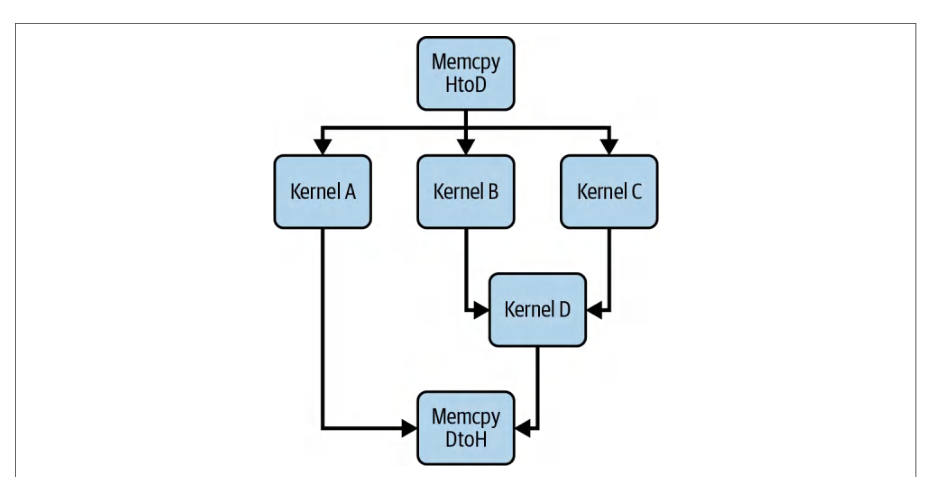
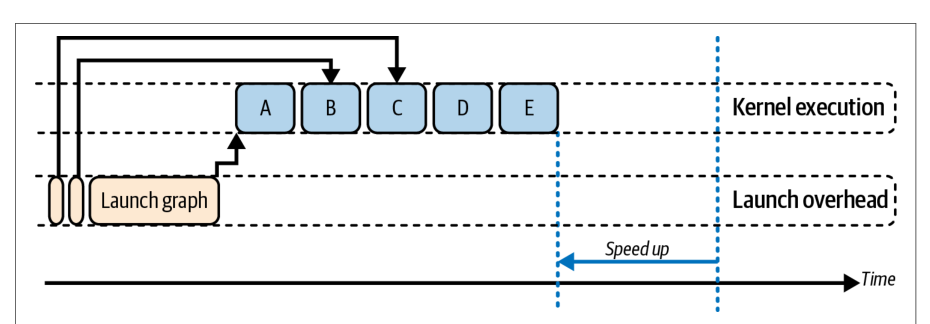
When your pipeline consists of multiple kernels, copies, stream-event records, and callbacks, launching them one by one on the host every iteration still incurs CPU overhead. CUDA Graphs let you capture that entire workflow once and replay it repeatedly with essentially zero CPU overhead. Figure 12-3 compares kernel launches without (top) and with (bottom) CUDA Graphs.当你的流水线由多个内核、拷贝、流事件记录和回调组成时,每次迭代都在主机上逐个启动它们仍会带来 CPU 开销。CUDA 图让你可以一次性捕获整个工作流,并以几乎为零的 CPU 开销反复重放。图 12-3 对比了不使用(上)与使用(下)CUDA 图的内核启动情况。
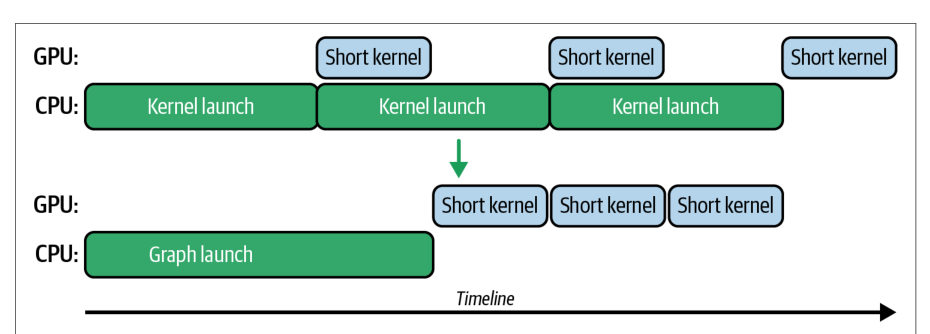
Why use CUDA Graphs? First, they cut down launch overhead. Multiple small kernels or copies can be launched with essentially one CPU call. Second, they enable better scheduling on the GPU. The work is submitted as a batch, so the CUDA driver can potentially reduce some internal latency between operations.为什么要使用 CUDA 图?首先,它们降低了启动开销。多个小内核或拷贝基本上可以用一次 CPU 调用启动。其次,它们能在 GPU 上实现更好的调度。工作以批的形式提交,因此 CUDA 驱动程序有可能减少操作之间的一些内部时延。
Also, with CUDA Graphs, dependencies are known upfront, so there’s less need for the CPU to synchronize in between. In the context of memory transfers, a CUDA Graph ensures that asynchronous copies and kernel executions are linked as dependencies correctly without any manual synchronization. It doesn’t inherently overlap copies and kernels more so than normal streams would, but a CUDA Graph streamlines their execution.此外,使用 CUDA 图时,依赖关系是预先已知的,因此 CPU 在中间进行同步的需求更少。在内存传输的场景下,CUDA 图确保异步拷贝与内核执行被正确地链接为依赖关系,而无需任何手动同步。它本身并不会比普通流更多地重叠拷贝与内核,但 CUDA 图简化了它们的执行。
PyTorch、推理引擎与 CUDA 图
PyTorch, Inference Engines, and CUDA Graphs
AI frameworks like PyTorch leverage CUDA Graphs under the hood for static portions of deep learning models. Specifically, PyTorch supports a torch.cuda.Graph context for capturing a sequence of operations. In addition, PyTorch continues to optimize its internals to use CUDA Graphs for predictable portions of code.像 PyTorch 这样的 AI 框架在底层利用 CUDA 图来处理深度学习模型中的静态部分。具体而言,PyTorch 支持 torch.cuda.Graph 上下文来捕获一系列操作。此外,PyTorch 持续优化其内部实现,以便对可预测的代码部分使用 CUDA 图。
High-performance inference engines like vLLM and NVIDIA’s TensorRT-LLM can also leverage CUDA Graphs by capturing a model’s execution into a set of predefined graphs for different sequence-length ranges and input-batch sizes. When graph capture is enabled, these systems often bucket or pad inputs to match supported graph batch sizes so that captured graphs can be replayed with fixed shapes. This can significantly reduce latency for large-scale, production inference workloads.像 vLLM 和 NVIDIA 的 TensorRT-LLM 这样的高性能推理引擎,也可以通过将模型执行捕获为一组针对不同序列长度范围和输入批大小的预定义图来利用 CUDA 图。启用图捕获后,这些系统通常会对输入进行分桶或填充,以匹配所支持的图批大小,从而使捕获的图能够以固定形状重放。这可以显著降低大规模生产推理工作负载的时延。
For example, you would capture one CUDA Graph per batch size during startup or model-load time. Then, at runtime, you would launch the precaptured graph that matches the incoming request’s batch size.例如,你会在启动或模型加载期间为每个批大小捕获一个 CUDA 图。然后在运行时,启动与传入请求的批大小相匹配的预捕获图。
CUDA 图的显存池
Memory Pools for CUDA Graphs
One important consideration is memory management with CUDA Graphs. Memory operations inside a CUDA Graph obey the same rules as in CUDA streams. If you allocate GPU memory inside the capture, that allocation becomes part of the graph execution.一个重要考量是 CUDA 图的显存管理。CUDA 图内部的显存操作遵循与 CUDA 流相同的规则。如果在捕获过程中分配 GPU 显存,该分配就会成为图执行的一部分。
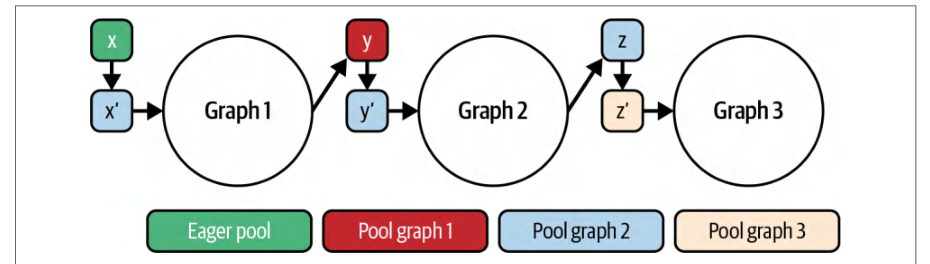
You generally want to avoid allocating GPU memory inside your graph and preallocating memory outside of the graph. Many frameworks, such as PyTorch, use static memory pools with CUDA Graphs, as shown in Figure 12-4. The use of static memory pools keeps memory allocations from becoming part of the captured graph sequence.通常应避免在图内部署 GPU 显存分配,而应在图外部预先分配显存。许多框架(如 PyTorch)配合 CUDA 图使用静态显存池,如图 12-4 所示。使用静态显存池可避免显存分配成为被捕获的图序列的一部分。
While CUDA Graphs won’t make an individual memory copy or kernel execution faster, they can automatically overlap independent data transfers and computations within the graph—similar to CUDA streams. This eliminates the per-iteration CPU scheduling and is made possible since the dependency graph is known upfront.虽然 CUDA 图不会让单次显存拷贝或内核执行变得更快,但它们可以在图内自动重叠独立的数据传输与计算——类似于 CUDA 流。这消除了每次迭代的 CPU 调度开销,之所以可行是因为依赖图在事先已知。
使用 CUDA 流捕获 CUDA 图
Capturing a CUDA Graph with a CUDA Stream
To capture a graph, you call cudaStreamBeginCapture() on a stream, enqueue all your memory transfers (cudaMemcpyAsync()), kernel launches, events (cudaEvent Record()), and callbacks (cudaLaunchHostFunc()), then call cudaStreamEndCap ture() to create a CUDA Graph definition (cudaGraph_t).要捕获图,需在某个流上调用 cudaStreamBeginCapture(),将所有内存传输(cudaMemcpyAsync())、内核启动、事件(cudaEvent Record())和回调(cudaLaunchHostFunc())入队,然后调用 cudaStreamEndCap ture() 创建 CUDA 图定义(cudaGraph_t)。
The CUDA driver can then launch the CUDA Graph with cudaGraphLaunch() every iteration. Because the CUDA driver knows the entire dependency graph in advance, it replays the prebuilt stream sequence directly on the GPU. This incurs minimal launch overhead.随后 CUDA 驱动可以在每次迭代中用 cudaGraphLaunch() 启动该 CUDA 图。由于 CUDA 驱动事先知道整个依赖图,它会直接在 GPU 上重放预先构建的流序列。这样启动开销极小。
Even if only some of your pipeline is repetitive, CUDA Graphs can capture that portion. For example, if you always perform a Host → Device copy, followed by two kernels, followed by a Device → Host copy, you can capture just that subgraph and replay it with a single function call.即使流水线中只有一部分是重复的,CUDA 图也可以捕获该部分。例如,如果你总是执行一次 Host → Device 拷贝,随后两个内核,再随后一次 Device → Host 拷贝,那么你可以只捕获这个子图,并用一次函数调用重放它。
To replay the CUDA Graph, you supply the stream handles, and the GPU executes the sequence of operations without additional CPU instructions. This ties directly to inter-kernel concurrency because CUDA Graphs let you maintain complex overlapping behavior by mixing asynchronous copies, fine-grained event barriers, and kernels—while removing the CPU as a bottleneck entirely.要重放 CUDA 图,你提供流句柄,GPU 便执行该操作序列,无需额外的 CPU 指令。这与内核间并发直接相关,因为 CUDA 图让你通过混合异步拷贝、细粒度事件屏障和内核来维持复杂的重叠行为——同时彻底消除 CPU 瓶颈。
Typically, you do a replay dry run to ensure correctness. You would instantiate the graph by creating a cudaGraphExec_t executable graph and then launch it with a single graph-replay invocation. When you launch the captured graph, the runtime will execute all the operations in the correct order on the GPU.通常,你会进行一次重放试运行以确保正确性。你会通过创建 cudaGraphExec_t 可执行图来实例化该图,然后用一次图重放调用启动它。当你启动已捕获的图时,运行时会在 GPU 上按正确顺序执行所有操作。
To show the usage of CUDA Graphs, consider a simple sequence of kernels. Here we show a code snippet for capturing and launching a CUDA Graph in both C++ and PyTorch:为展示 CUDA 图的用法,考虑一个简单的内核序列。下面给出在 C++ 和 PyTorch 中捕获并启动 CUDA 图的代码片段:
cudaStream_t stream;
cudaStreamCreateWithFlags(&stream, cudaStreamNonBlocking);
cudaGraph_t graph;
cudaGraphExec_t instance;
cudaStreamBeginCapture(stream, cudaStreamCaptureModeGlobal);
// 照常在 'stream' 上入队操作
cudaStream_t stream;
cudaStreamCreateWithFlags(&stream, cudaStreamNonBlocking);
cudaGraph_t graph;
cudaGraphExec_t instance;
cudaStreamBeginCapture(stream, cudaStreamCaptureModeGlobal);
// Enqueue operations on 'stream' as usual
kernelA<<<grid, block, 0, stream>>>(d_X);
kernelB<<<grid, block, 0, stream>>>(d_Y);
kernelC<<<grid, block, 0, stream>>>(d_Z);
cudaStreamEndCapture(stream, &graph);
cudaGraphInstantiate(&instance, graph, nullptr, nullptr, 0);
// 现在可以在循环中启动 'instance'
for (int iter = 0; iter < 100; ++iter) {
    cudaGraphLaunch(instance, stream);
    // 无需逐内核同步;图会保证依赖关系
}
cudaStreamSynchronize(stream);
// (完成后销毁 graph 和 instance)
cudaGraphExecDestroy(instance);
cudaGraphDestroy(graph);
kernelA<<<grid, block, 0, stream>>>(d_X);
kernelB<<<grid, block, 0, stream>>>(d_Y);
kernelC<<<grid, block, 0, stream>>>(d_Z);
cudaStreamEndCapture(stream, &graph);
cudaGraphInstantiate(&instance, graph, nullptr, nullptr, 0);
// Now 'instance' can be launched in a loop
for (int iter = 0; iter < 100; ++iter) {
    cudaGraphLaunch(instance, stream);
    // No per-kernel sync needed; graph ensures dependencies
}
cudaStreamSynchronize(stream);
// (Destroy graph and instance when done)
cudaGraphExecDestroy(instance);
cudaGraphDestroy(graph);
In this pseudocode, we begin capturing on a CUDA stream, launch three kernels (A, B, and C) in sequence on that stream, and end capture to obtain a graph. Then we instantiate the graph.在这段伪代码中,我们在一个 CUDA 流上开始捕获,在该流上依次启动三个内核(A、B 和 C),然后结束捕获以获得一个图。接着我们实例化该图。
Now we can replay the entire sequence A → B → C by calling cudaGraph Launch (instance, stream) as many times as we want. We only pay for the cost of a single launch per iteration instead of three separate launches. And the GPU executes kernels A, B, and C in the same sequence they were recorded, or back-to-back in this case. We will synchronize after the loop to ensure that all iterations are complete.现在,我们可以通过调用 cudaGraph Launch (instance, stream) 任意多次来重放整个序列 A → B → C。每次迭代只需付出一次启动的代价,而不是三次独立启动。GPU 会按照记录时的相同顺序执行内核 A、B 和 C,在此例中即为背靠背执行。我们将在循环之后进行同步,以确保所有迭代都已完成。
As mentioned earlier, high-level AI frameworks like PyTorch support CUDA Graphs. PyTorch provides Python developers with near-native CUDA performance without requiring deep knowledge of CUDA C++. Here, we show PyTorch’s torch.cuda.Graph context manager to capture and replay operations:如前所述,PyTorch 等高层 AI 框架支持 CUDA 图。PyTorch 让 Python 开发者无需深入了解 CUDA C++,即可获得接近原生的 CUDA 性能。这里,我们展示如何用 PyTorch 的 torch.cuda.Graph 上下文管理器来捕获并重放操作:
import torch, time
X = torch.randn(1<<20, device='cuda')
# 定义用于参考的操作
def opA(x): return x * 1.1
def opB(x): return x + 2.0
def opC(x): return x.sqrt()
# 使用持久缓冲区以保证指针稳定性
static_x = torch.empty_like(X)
static_y = torch.empty_like(X)
static_z = torch.empty_like(X)
static_w = torch.empty_like(X)
# 预热一次,以初始化 CUDA 内核和缓存
_ = opC(opB(opA(X)))
torch.cuda.synchronize()
import torch, time
X = torch.randn(1<<20, device='cuda')
# Define operations for reference
def opA(x): return x * 1.1
def opB(x): return x + 2.0
def opC(x): return x.sqrt()
# Persistent buffers for pointer stability
static_x = torch.empty_like(X)
static_y = torch.empty_like(X)
static_z = torch.empty_like(X)
static_w = torch.empty_like(X)
# Warm up once to initialize CUDA kernels and caches
_ = opC(opB(opA(X)))
torch.cuda.synchronize()
# 在捕获前填充静态输入
static_x.copy_(X)
# 捕获图
g = torch.cuda.CUDAGraph()
stream = torch.cuda.Stream()
torch.cuda.synchronize()
with torch.cuda.graph(g, stream=stream):
    # 使用输出参数依次记录 A、B、C,以避免显存分配
    torch.mul(static_x, 1.1, out=static_y)
    torch.add(static_y, 2.0, out=static_z)
    torch.sqrt(static_z, out=static_w)
# 重放捕获的图 100 次
for i in range(100):
    # 如果输入发生变化,在重放前将新值复制到 static_x
    # static_x.copy_(new_X)
    g.replay()
# Seed the static input before capture
static_x.copy_(X)
# Capture the graph
g = torch.cuda.CUDAGraph()
stream = torch.cuda.Stream()
torch.cuda.synchronize()
with torch.cuda.graph(g, stream=stream):
    # Record A then B then C using out parameters to avoid allocations
    torch.mul(static_x, 1.1, out=static_y)
    torch.add(static_y, 2.0, out=static_z)
    torch.sqrt(static_z, out=static_w)
# Replay the captured graph 100 times
for i in range(100):
    # If inputs change, copy new values into static_x before replay
    # static_x.copy_(new_X)
    g.replay()
In production you should allocate persistent input and output buffers so captured kernels see fixed memory addresses. For example, create在生产环境中,应当分配持久的输入与输出缓冲区,使被捕获的内核看到固定的内存地址。例如,创建
static_y =
torch.empty_like(X) before capture, and then inside the graph write static_y.copy_(opA(X)). This avoids allocations during capture and satisfies the stability rules of CUDA Graph pointers. PyTorch CUDA Graphs requires that replay uses the same memory addresses for captured tensors.在捕获之前创建 torch.empty_like(X),然后在图内部写入 static_y.copy_(opA(X))。这样可避免捕获期间的显存分配,并满足 CUDA 图指针的稳定性规则。PyTorch CUDA 图要求重放时对被捕获的张量使用相同的内存地址。
In this PyTorch example, we define operations opA, opB, and opC. In practice, these could be neural network layers or any GPU operation. We run one warm-up pass opC(opB(opA(X))) to ensure that all kernels, memory allocations, and library contexts (e.g., cuBLAS/cuDNN) are initialized upfront. This is needed because a CUDA Graphs capture won’t record these lazy setup steps.在这个 PyTorch 示例中,我们定义了操作 opA、opB 和 opC。在实践中,它们可以是神经网络层或任意 GPU 操作。我们运行一次预热 opC(opB(opA(X))),以确保所有内核、显存分配和库上下文(例如 cuBLAS/cuDNN)都已预先初始化。这是必需的,因为 CUDA 图捕获不会记录这些惰性初始化步骤。
We first warm up the GPU by running the sequence once to initialize all kernels and libraries. Then we capture the forward (A), transform (B), and backward (C) operations into a single torch.cuda.CUDAGraph by enclosing them in the with torch.cuda.graph(g, stream=stream): Python context manager block on a fresh CUDA stream. After capture, calling g.replay() 100 times launches the entire A → B → C pipeline with one host call per iteration. The results are summarized in我们首先运行一次该序列来预热 GPU,初始化所有内核与库。然后,在一个全新的 CUDA 流上,通过把前向(A)、变换(B)和后向(C)操作包在 with torch.cuda.graph(g, stream=stream): Python 上下文管理器代码块中,将它们捕获进单个 torch.cuda.CUDAGraph。捕获完成后,调用 g.replay() 100 次,每次迭代只需一次主机调用即可启动整个 A → B → C 流水线。结果汇总于
| Metric指标 | Before CUDA Graphs使用 CUDA 图之前 | After CUDA Graphs使用 CUDA 图之后 |
|---|---|---|
| CPU launch calls per 100 iterations每 100 次迭代的 CPU 启动调用次数 | 300 separate kernel launches300 次独立的内核启动 | 100 graph replays (1 per iteration)100 次图重放(每次迭代 1 次) |
| Host synchronization calls主机同步调用次数 | 300 cudaDeviceSynchronize calls300 次 cudaDeviceSynchronize 调用 | 00 |
| Average GPU idle between kernels内核之间的平均 GPU 空闲时间 | ~3 µs gaps per iteration每次迭代约 3 µs 的间隙 | 0 µs (continuous back-to-back execution)0 µs(连续背靠背执行) |
| End-to-end iteration latency端到端迭代时延 | ~1.00 ms约 1.00 ms | ~0.75 ms (25% faster)约 0.75 ms(快 25%) |
Here we see that CUDA Graphs eliminate per-iteration CPU scheduling and host-device handshakes. This is because the GPU work for each iteration is batched into a single g.replay() call instead of three separate kernel launches. As a result, iterations execute 25% faster since the CPU simply issues lightweight replay commands and stays fully asynchronous to the GPU.可以看到,CUDA 图消除了每次迭代的 CPU 调度和主机—设备握手。这是因为每次迭代的 GPU 工作被批处理为单次 g.replay() 调用,而不是三次独立的内核启动。因此,迭代执行速度提升了 25%,因为 CPU 只需发出轻量的重放命令,并与 GPU 保持完全异步。
There are some common pitfalls when using CUDA Graphs, and it’s important to handle them appropriately. For example, if your workload size changes, a captured graph might not be valid. This would require a recapture or a call to cudaGraphExec Update, which we cover in the next section.使用 CUDA 图时存在一些常见陷阱,妥善处理它们很重要。例如,如果工作负载规模发生变化,已捕获的图可能不再有效。这需要重新捕获,或调用 cudaGraphExec Update,我们将在下一节介绍。
Certain CUDA API calls—like allocating memory and host-device synchronization primitives—should generally not be included in a graph capture. While modern versions of CUDA Graphs support limited memory management operations inside a captured graph, it’s recommended to perform all memory allocations before the capture. You must also ensure that the data used in the graph remains at the same memory addresses.某些 CUDA API 调用——例如分配内存和主机—设备同步原语——通常不应包含在图捕获中。虽然现代版本的 CUDA 图支持在已捕获的图内执行有限的内存管理操作,但建议在捕获之前完成所有显存分配。还必须确保图中使用的数据始终位于相同的内存地址。
You should also avoid including any host-side callbacks or unsupported operations inside a CUDA Graphs capture. This includes things like print(), random number generator (RNG) calls, nested captures, and new memory allocations. This is because the graph must record a pure, deterministic sequence of GPU work.还应避免在 CUDA 图捕获中包含任何主机侧回调或不支持的操作。这包括 print()、随机数生成器(RNG)调用、嵌套捕获以及新的显存分配等。这是因为图必须记录一段纯粹、确定性的 GPU 工作序列。
In addition, all tensors used in the capture must already be allocated at fixed addresses with fixed shapes. Resizing or calling cudaMalloc during capture will break the graph.此外,捕获中使用的所有张量必须已在固定地址上以固定形状分配完毕。在捕获期间调整大小或调用 cudaMalloc 会破坏图。
动态图更新
Dynamic Graph Update
Once you’ve recorded a CUDA Graph, you don’t need to throw it away just because some launch parameters change. Instead of recapturing, you call the graph-update API to update grid/block dimensions, pointer addresses, or kernel parameters directly in the existing graph. The graph-update API includes cudaGraphExecUpdate and the lower-level cudaGraphExecKernelNodeSetParams.录制好一个 CUDA 图之后,不必仅仅因为某些启动参数发生变化就把它丢弃。无需重新捕获,你可以调用图更新 API,直接在现有图中更新网格/线程块维度、指针地址或内核参数。图更新 API 包括 cudaGraphExecUpdate 以及更底层的 cudaGraphExecKernelNodeSetParams。
cudaGraphExecUpdate lets you swap a kernel node with a new one of the same shape. For example, you can swap in a different fused kernel implementation—as long as it’s the same shape. The CUDA runtime will validate your tweaks and let you replay the modified graph immediately. This avoids the cost of a full capture.cudaGraphExecUpdate 允许你用一个形状相同的新内核节点替换原有的内核节点。例如,你可以换入另一种融合内核实现——只要形状相同即可。CUDA 运行时将校验你的改动,并允许你立即重放修改后的图。这避免了完整捕获的开销。
For example, consider our three-kernel A → B → C graph from earlier, using your maximum batch size. During each inference loop, you simply update Kernel B’s launch dimensions to match the current batch, then replay the same graph. This reduces overhead for semistatic workloads in which the overall pipeline is fixed but a few parameters may vary.例如,回顾前面那个按最大批大小构建的三内核 A → B → C 图。在每次推理循环中,你只需将内核 B 的启动维度更新为与当前批大小匹配,然后重放同一个图。对于整体流水线固定、但少数参数可能变化的半静态工作负载,这可以降低开销。
In practice, a typical workflow is three steps. First, capture a template graph using the maximum expected sizes (e.g., the largest batch). For example, you might capture your graph with a maximum batch size of 128. Later, if a request comes in with batch 64, you call cudaGraphExecUpdate to adjust the launch parameters to 64—and perhaps update the memory pointers to a smaller buffer.在实践中,典型工作流分为三步。首先,使用预期的最大尺寸(例如最大的批)捕获一个模板图。例如,你可以按最大批大小 128 捕获图。之后,如果来了一个批大小为 64 的请求,你调用 cudaGraphExecUpdate 将启动参数调整为 64——并且可能将内存指针更新为指向更小的缓冲区。
Using cudaGraphExecUpdate keeps you from having to rebuild the graph when kernel parameters, grid/block dimensions, or memory addresses change. And it takes only a few microseconds, so you preserve the fast sub-100 µs launch overhead of a CUDA Graph replay. In addition, you maintain the flexibility of adjusting key parameters at runtime. Note that incompatible changes will return an error status and require recapture.使用 cudaGraphExecUpdate 可以让你在内核参数、网格/线程块维度或内存地址发生变化时无需重建图。而且它只需几微秒,因此你能保持 CUDA 图重放那种低于 100 µs 的快速启动开销。此外,你还保留了在运行时调整关键参数的灵活性。请注意,不兼容的更改将返回错误状态,并需要重新捕获。
If you do need to change the graph’s structure to specify a different number of kernels, for instance, you can fall back to a recapture-then-update workflow. In this case, you wrap one iteration of your code with cudaStreamBeginCapture and cudaStreamEndCapture to build the new graph. Then use the lighter-weight cudaGraphExecUpdate for minor tweaks on subsequent runs.如果你确实需要改变图的结构,例如指定不同数量的内核,可以退回到“先重新捕获、再更新”的工作流。在这种情况下,你用 cudaStreamBeginCapture 和 cudaStreamEndCapture 包裹代码的一次迭代来构建新图。然后在后续运行中使用更轻量的 cudaGraphExecUpdate 做小幅调整。
In effect, dynamic graph updates let you create “parameterized” or conditional execution paths entirely on the GPU. Whenever you have a high-frequency loop of GPU work but only a few changing parameters, like batch size, you can capture once, update quickly, and enjoy both minimal CPU overhead and the adaptability that your use case requires.实际上,动态图更新让你可以完全在 GPU 上创建“参数化”或条件化的执行路径。只要你有一个高频的 GPU 工作循环,而只有少数参数(如批大小)会变化,你就可以捕获一次、快速更新,同时享受极低的 CPU 开销和用例所需的适应性。
设备端发起的 CUDA 图启动
Device-Initiated CUDA Graph Launch
Now that you understand how to launch and adapt a captured pipeline from the CPU with low overhead, the next step is to remove the CPU from the launch decision entirely. With device-initiated CUDA Graph launches, a running GPU kernel can trigger a prerecorded graph directly on the device and avoid the host entirely.既然你已经了解如何以低开销从 CPU 启动并调整已捕获的流水线,下一步就是彻底将 CPU 从启动决策中移除。借助设备端发起的 CUDA 图启动,一个正在运行的 GPU 内核可以直接在设备上触发预先录制的图,从而完全避开主机。
To enable device-side launch, first capture the graph as usual on the host. Then instantiate it with cudaGraphInstantiate and pass cudaGraphInstantiateFlag DeviceLaunch. After instantiation, upload the executable with cudaGraphUpload on a host stream before any device-side launch.要启用设备端启动,首先照常在主机上捕获图。然后用 cudaGraphInstantiate 实例化它,并传入 cudaGraphInstantiateFlag 的 DeviceLaunch。实例化之后,在任何设备端启动之前,先在主机流上用 cudaGraphUpload 上传可执行图。
You then upload the graph to GPU memory using cudaGraphUpload. This must be done before the GPU can launch the graph. (Attempting a device launch without uploading the graph will cause an error.)随后你使用 cudaGraphUpload 将图上传到 GPU 显存。这一步必须在 GPU 能够启动该图之前完成。(未上传图就尝试设备端启动会导致错误。)
In practice, this embeds a “graph launch” node, or calls the device-side graph API, inside your persistent or dynamic kernel. When the time comes, the GPU will kick off the entire graph on a stream that it owns, as shown in Figure 12-5.在实践中,这会在持久化内核或动态内核中嵌入一个“图启动”节点,或调用设备端图 API。时机到来时,GPU 会在它自己拥有的流上启动整个图,如图 12-5 所示。
Device-initiated graph launches keep data-driven workflows completely on the GPU. Your kernel is responsible for computing the decision conditions, not the CPU. As such, it can spawn the next graph directly, eliminate CPU round trips, and further reduce latency.设备发起的图启动让数据驱动的工作流完全留在 GPU 上。由内核负责计算决策条件,而不是 CPU。因此,它可以直接派生下一个图,消除 CPU 往返,进一步降低时延。
Because the graph is already resident on the GPU and no CPU-GPU handshake is needed, device-initiated launches remove host scheduling from the critical path and can reduce end-to-end latency in host-bound loops. In practice, device-initiated CUDA graph launches have shown roughly 2× lower launch latency compared to equivalent host-side graph launches. And the overhead stays flat even as the graph grows in size or complexity.由于图已经驻留在 GPU 上,且无需 CPU-GPU 握手,设备发起的启动将主机调度从关键路径上移除,可降低受限于主机的循环的端到端时延。在实践中,与等效的主机侧图启动相比,设备发起的 CUDA 图启动的启动时延约低 2 倍。而且即使图的规模或复杂度增长,这部分开销也保持平稳。
Device-launch graph latency is not impacted by how many nodes or parallel branches are in the graph. This is in contrast to host-launch graph latency, which would increase with a larger graph due to CPU scheduling overhead.设备启动的图时延不受图中节点数量或并行分支数量的影响。这与主机启动的图时延形成对比:由于 CPU 调度开销,后者会随图变大而增加。
In addition, device launches scale well with graph width. As more parallel nodes are added, host-side launching would suffer from additional synchronization costs, but the device launch latency remains nearly flat.此外,设备启动在图宽度方面扩展性良好。随着并行节点增多,主机侧启动会承受额外的同步开销,而设备启动的时延几乎保持平稳。
Debugging device-launched graphs can be tricky, but tools like Nsight Systems will show the child graphs on the GPU timeline as separate streams of work. It’s recommended to use NVTX markers in the parent kernel before and after cuda Graph Launch calls to mark where device launches occur. This can help verify that the graphs run as expected in relation to the parent thread.调试设备启动的图可能比较棘手,但 Nsight Systems 等工具会在 GPU 时间线上将子图显示为独立的工作流。建议在父内核中于 cuda Graph Launch 调用前后添加 NVTX 标记,以标出设备启动发生的位置。这有助于验证图相对于父线程是否按预期运行。
Inside your device code, you launch the graph with the simple API, cuda Graph Launch(graphExec, stream). The runtime uses special, reserved cudaStream_t values to distinguish between the following supported launch modes: “fire-and-forget” (cudaStreamGraphFireAndForget), “tail” (cudaStreamGraphTailLaunch), and “sibling” (cudaStreamGraphFireAndForgetAsSibling). These modes will automatically enforce the correct ordering in the CUDA stream without any host intervention.在设备代码中,使用简单的 API cuda Graph Launch(graphExec, stream) 启动图。运行时使用特殊的保留 cudaStream_t 值来区分以下受支持的启动模式:“即发即忘”(cudaStreamGraphFireAndForget)、“尾部”(cudaStreamGraphTailLaunch)和“同级”(cudaStreamGraphFireAndForgetAsSibling)。这些模式会在无需任何主机干预的情况下自动在 CUDA 流中强制执行正确的顺序。
In a fire-and-forget launch, the child graph begins executing immediately and concurrently with the launching parent kernel. The parent kernel doesn’t wait for the child to finish—much like launching an independent thread of work. Fire-and-forget launches are useful for spawning asynchronous tasks from within a kernel.在即发即忘启动中,子图立即开始执行,并与发起启动的父内核并发运行。父内核不等待子图完成——很像启动一个独立的工作线程。即发即忘启动适合从内核内部派生异步任务。
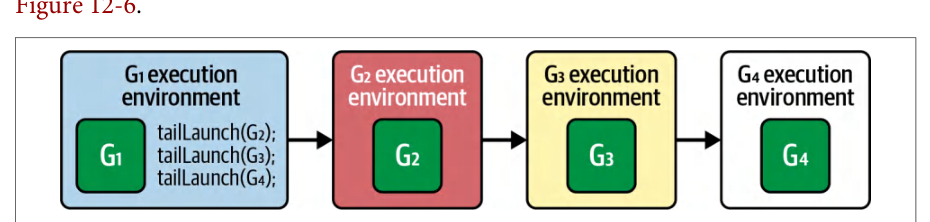
By contrast, a device-initiated graph tail launch defers execution of the graph until the launching kernel reaches a synchronization point or completes. This effectively queues the graph to run after the current kernel as a continuation, as shown in相比之下,设备发起的图尾部启动会将图的执行推迟到发起启动的内核到达同步点或完成之后。这实际上是把该图作为延续排入队列,在当前内核之后运行,如图所示
Tail launches are especially powerful when implementing GPU-resident work schedulers. A persistent “scheduler” kernel can tail-launch a graph, then relaunch itself once that graph finishes. This technique effectively creates a loop on the GPU without requiring host re-invocation. To relaunch itself, the kernel calls cudaGetCurrent GraphExec() to get a handle to its own executing graph. It then launches the graph using cudaGraphLaunch(..., cudaStreamGraphTailLaunch) to enqueue itself again.在实现驻留 GPU 的工作调度器时,尾部启动尤为强大。一个持久化的“调度器”内核可以尾部启动一个图,然后在该图完成后重新启动自身。这项技术实际上在 GPU 上创建了一个循环,无需主机重新调用。为重新启动自身,内核调用 cudaGetCurrent GraphExec() 获取自身正在执行的图的句柄,然后使用 cudaGraphLaunch(..., cudaStreamGraphTailLaunch) 启动该图,从而将自身再次入队。
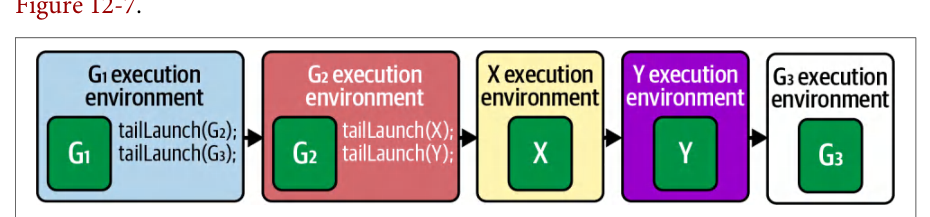
Additionally, tail graphs can perform additional tail launches. In this case, the new tail launches will execute before the previous graph’s tail launch, as shown in此外,尾部图还可以执行额外的尾部启动。在这种情况下,新的尾部启动会在前一个图的尾部启动之前执行,如图所示
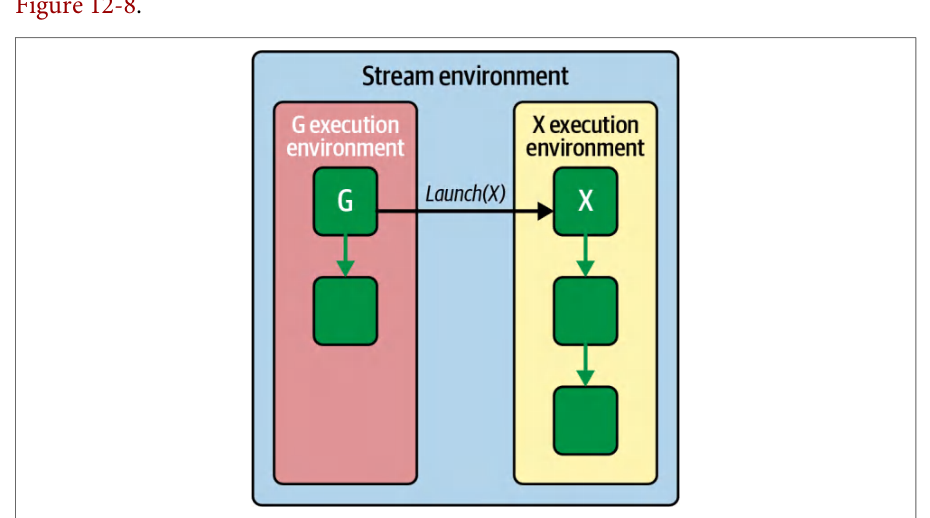
A sibling launch is a variation of fire-and-forget in which the launched graph executes as a peer to the parent graph—instead of as a child. Additionally, the sibling runs in the parent’s stream environment. This means it runs immediately and independently but without delaying any tail launches of the parent graph, as shown in同级启动是即发即忘(fire-and-forget)的一种变体,其中被启动的图作为父图的同级而非子级执行。此外,同级图在父图的流环境中运行。这意味着它会立即且独立地运行,但不会延迟父图的任何尾部启动,如图所示
For this mode, you can use cudaGraphLaunch(graphExec, cudaStreamGraphFireAnd ForgetAsSibling) to launch in “sibling mode.” This submits the graph as a sibling of the current graph’s execution environment.对于此模式,你可以使用 cudaGraphLaunch(graphExec, cudaStreamGraphFireAnd ForgetAsSibling) 以“同级模式”启动。这会将图作为当前图执行环境的同级提交。
When using device-initiated CUDA Graphs, you need to carefully manage dependencies. For instance, if the launched kernel must consume results from the graph, a tail launch is appropriate because the parent kernel will pause until the graph’s work is done. In contrast, if the launched graph is more of a side task, the fire-and-forget mode allows the parent kernel to proceed without waiting.使用设备发起的 CUDA 图时,需要谨慎管理依赖关系。例如,如果被启动的内核必须消费该图的结果,则尾部启动是合适的,因为父内核会暂停,直到该图的工作完成。相反,如果被启动的图更像是一个附带任务,则即发即忘模式允许父内核继续执行而无需等待。
In practice, device-initiated CUDA Graphs open up new patterns. For example, imagine a GPU compression pipeline where a kernel must choose between different compression algorithms based on data content. Rather than ending the kernel and telling the CPU to launch the chosen compression kernel, the GPU kernel can directly launch a prerecorded graph corresponding to, say, “LZ compression” or “Huffman compression.”在实践中,设备发起的 CUDA 图开辟了新的模式。例如,设想一个 GPU 压缩流水线,其中内核必须根据数据内容在不同的压缩算法之间做出选择。GPU 内核无需结束自身并通知 CPU 启动所选定的压缩内核,而是可以直接启动与(比如)“LZ 压缩”或“Huffman 压缩”相对应的预录制图。
In this compression example, the GPU never idles waiting for the CPU to decide. Let’s take a look at another useful pattern that combines atomic queues/counters and device-initiated, tail-launched CUDA Graphs for LLM inference scheduling inside of a persistent kernel.在这个压缩示例中,GPU 从不会空闲等待 CPU 做出决定。让我们看看另一种有用的模式,它结合了原子队列/计数器与设备发起的、尾部启动的 CUDA 图,用于在持久化内核内部进行 LLM 推理调度。
用于内核内持久化调度的原子队列与设备发起 CUDA 图
Atomic Queues and Device-Initiated CUDA Graphs for In-Kernel Persistent Scheduling
We can combine our atomic-counter work queue from earlier with device-initiated graph tail launches. Consider an LLM inference loop use case, which uses a CUDA Graph to perform a decode by capturing a graph that includes the transformer-block’s forward pass (attention + feed-forward).我们可以将前面介绍的原子计数器工作队列与设备发起的图尾部启动结合起来。考虑一个 LLM 推理循环用例,它使用 CUDA 图来执行解码:捕获一个包含 Transformer 块前向传播(注意力 + 前馈)的图。
A lightweight, persistent scheduler kernel can use atomicAdd(&queueHead,1) to claim the next work item. It then tail-launches the precaptured decode CUDA Graph to compute the output and immediately loops back for the next item in the queue.一个轻量级的持久化调度器内核可以使用 atomicAdd(&queueHead,1) 来认领下一个工作项。随后它尾部启动预先捕获的解码 CUDA 图以计算输出,并立即循环回去处理队列中的下一个项。
When each CUDA Graph completes, the in-kernel scheduler loop grabs the next index using atomicAdd(&queueHead,1) and tail-launches another decode graph. This effectively creates a fully GPU-resident scheduler that both decides and executes tasks without touching the CPU.当每个 CUDA 图完成时,内核内的调度器循环使用 atomicAdd(&queueHead,1) 获取下一个索引,并尾部启动另一个解码图。这实际上创建了一个完全驻留于 GPU 的调度器,它既决定任务又执行任务,全程无需接触 CPU。
By chaining these tail launches, each token is processed start-to-finish on the device with virtually zero CPU overhead. And since the CPU never reenters the critical path, SMs remain fully utilized, per-token latency drops, and you can adapt to different sequence lengths and batch sizes on the fly. To do this, you simply update graph parameters or switch between prerecorded graphs.通过将这些尾部启动串联起来,每个 token 都在设备上从头到尾处理,CPU 开销几乎为零。而且由于 CPU 从不重新进入关键路径,流多处理器(SM)保持充分利用,每 token 时延下降,并且你可以即时适应不同的序列长度和批大小。为此,你只需更新图参数或在预录制图之间切换。
条件图节点
Conditional Graph Nodes
In a traditional CUDA Graph, every node and its dependencies are fixed at capture time, forcing any decision-making logic back to the host. Conditional graph nodes break this rigidity by deferring branch decisions to the GPU itself—based on a small “condition handle” associated with the node.在传统的 CUDA 图中,每个节点及其依赖关系都在捕获时固定下来,迫使任何决策逻辑都回到主机端。条件图节点(conditional graph nodes)打破了这种僵化:它把分支决策推迟到 GPU 自身,依据与该节点关联的一个小型“条件句柄”来做出判断。
As the graph executes, the GPU evaluates that handle and selectively runs one of its body subgraphs (or loops through it) without ever returning control to the CPU. Specifically, conditional graph nodes let you embed the control flow (IF, IF/ELSE, WHILE, SWITCH) directly into CUDA Graphs to run on the GPU device. Conditional graph nodes eliminate host round trips and can provide significant performance gains on modern GPUs.在图执行过程中,GPU 会评估该句柄,并有选择地运行其某个主体子图(或对其循环),全程无需将控制权交还给 CPU。具体而言,条件图节点允许你将控制流(IF、IF/ELSE、WHILE、SWITCH)直接嵌入 CUDA 图,在 GPU 设备上运行。条件图节点消除了主机往返,在现代 GPU 上可带来显著的性能提升。
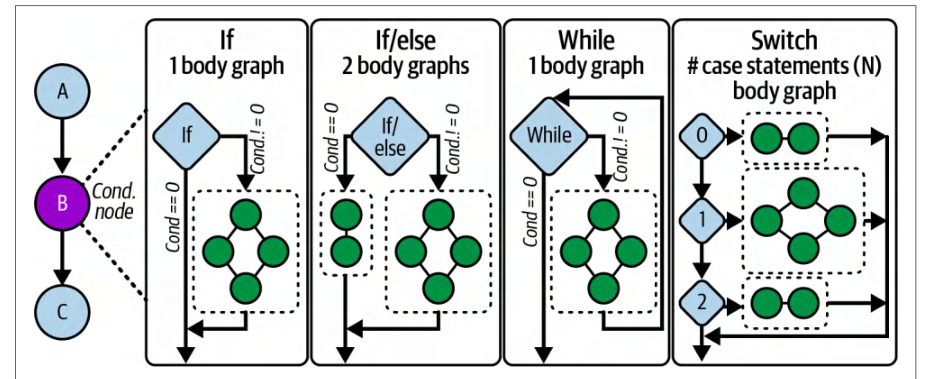
In essence, conditional graph nodes let you control graph execution based on values computed in device kernels—all without involving the CPU. This capability allows complex branching workflows to be implemented as a single, repeatable graph launch. CUDA Graphs support multiple types of conditional nodes, as shown in Figure 12-9:本质上,条件图节点让你能够依据设备内核中计算出的值来控制图的执行——全程不涉及 CPU。这一能力使复杂的分支工作流可以作为单次、可重复的图启动来实现。CUDA 图支持多种类型的条件节点,如图 12-9 所示:
- IFIF
- Executes its single-body graph exactly once when the condition is nonzero.当条件非零时,恰好执行一次其单主体图。
- IF/ELSEIF/ELSE
- By specifying two body graphs, one is chosen when the condition is true, the other when false.通过指定两个主体图,条件为真时选择其中一个,为假时选择另一个。
- WHILEWHILE
- Repeatedly executes its body graph as long as the condition remains nonzero, checking again after each iteration.只要条件保持非零,就重复执行其主体图,并在每次迭代后再次检查。
- SWITCHSWITCH
- Holds N body graphs and executes the ith one when the condition equals i; if the condition ≥ N, it skips execution altogether.持有 N 个主体图,当条件等于 i 时执行第 i 个;若条件 ≥ N,则完全跳过执行。
Next is an example showing how to create and populate an IF conditional node. Note the use of cudaGraphSetConditional to write the flag that controls the IF node. In this case, the condition checks if the sum is greater than a given threshold. This way, if the data meets the given criteria (flag = 1u), it runs the next subgraph. Otherwise, if the condition is not met, the conditional node does not run the subgraph:下面是一个示例,展示如何创建并填充一个 IF 条件节点。注意使用 cudaGraphSetConditional 写入控制该 IF 节点的标志。在此例中,条件检查求和结果是否大于给定阈值。这样,如果数据满足给定条件(flag = 1u),就运行下一个子图;否则,若条件不满足,条件节点就不运行该子图:
#include <cuda_runtime.h>
#include <cstdio>
// 计算并设置条件句柄的设备内核
__global__ void setHandle(cudaGraphConditionalHandle handle,
                          int *data, size_t N) {
#include <cuda_runtime.h>
#include <cstdio>
// Device kernel that computes and sets the condition handle
__global__ void setHandle(cudaGraphConditionalHandle handle,
                          int *data, size_t N) {
    // 示例阈值
    constexpr int threshold   = 123456;
    // 测试数据之和是否超过阈值
    //     使用自定义的 reduce_sum() 函数
    //     (建议使用以下方式实现
    //     CUB 的 DeviceReduce::Sum 例程。)
    unsigned int flag =
        (reduce_sum(data, N) > threshold) ? 1u : 0u;
    cudaGraphSetConditional(handle, flag);
}
// 一个简单的执行体内核,仅当 flag != 0 时运行
__global__ void bodyKernel() {
    printf("Conditional body executed on GPU!\n");
}
int main() {
    cudaStream_t stream;
    cudaStreamCreateWithFlags(&stream,
        cudaStreamNonBlocking);
    // 1) 创建图
    cudaGraph_t graph;
    cudaGraphCreate(&graph, 0);
    // 2) 创建与图关联的条件句柄
    cudaGraphConditionalHandle condHandle;
    cudaGraphConditionalHandleCreate(&condHandle, graph);
    // 3) 添加上游内核节点以设置该句柄
    cudaGraphNode_t setNode;
    cudaKernelNodeParams setParams = {};
    setParams.func          = (void*)setHandle;
    setParams.gridDim       = dim3(1);
    setParams.blockDim      = dim3(32);
    // 4) 分配输入数据
    constexpr size_t N              = 1 << 20;
    int*             d_data         = nullptr;
    cudaMalloc(&d_data, N * sizeof(int));

    void* setArgs[] = { &condHandle, &d_data, &N };
    setParams.kernelParams  = setArgs;
    cudaGraphAddKernelNode(&setNode, graph, nullptr, 0,
        &setParams);
    // 5) 添加 IF 条件节点
    cudaGraphNode_t condNode;
    cudaConditionalNodeParams ifParams = {};
    ifParams.handle = condHandle;
    // Example threshold
    constexpr int threshold   = 123456;
    // Test whether the sum of data exceeds a threshold
    //     using a custom reduce_sum() function
    //     (recommended to implement this with
    //     CUB's DeviceReduce::Sum routine.)
    unsigned int flag =
        (reduce_sum(data, N) > threshold) ? 1u : 0u;
    cudaGraphSetConditional(handle, flag);
}
// A simple body kernel that runs only if flag != 0
__global__ void bodyKernel() {
    printf("Conditional body executed on GPU!\n");
}
int main() {
    cudaStream_t stream;
    cudaStreamCreateWithFlags(&stream,
        cudaStreamNonBlocking);
    // 1) Create the graph
    cudaGraph_t graph;
    cudaGraphCreate(&graph, 0);
    // 2) Create a condition handle associated with graph
    cudaGraphConditionalHandle condHandle;
    cudaGraphConditionalHandleCreate(&condHandle, graph);
    // 3) Add the upstream kernel node to set the handle
    cudaGraphNode_t setNode;
    cudaKernelNodeParams setParams = {};
    setParams.func          = (void*)setHandle;
    setParams.gridDim       = dim3(1);
    setParams.blockDim      = dim3(32);
    // 4) Allocate input data
    constexpr size_t N              = 1 << 20;
    int*             d_data         = nullptr;
    cudaMalloc(&d_data, N * sizeof(int));

    void* setArgs[] = { &condHandle, &d_data, &N };
    setParams.kernelParams  = setArgs;
    cudaGraphAddKernelNode(&setNode, graph, nullptr, 0,
        &setParams);
    // 5) Add the IF conditional node
    cudaGraphNode_t condNode;
    cudaConditionalNodeParams ifParams = {};
    ifParams.handle = condHandle;
    ifParams.type   = cudaGraphCondTypeIf;
    // 本例中为单节点主体图
    ifParams.size   = 1;
    cudaGraphAddConditionalNode(&condNode,
                                graph,
                                &setNode,
                                1,
                                &ifParams);
    // 6) 填充主体图:一个打印消息的内核
    cudaGraph_t bodyGraph = ifParams.phGraphOut[0];
    cudaGraphNode_t bodyNode;
    cudaKernelNodeParams bodyParams = {};
    bodyParams.func         = (void*)bodyKernel;
    bodyParams.gridDim      = dim3(1);
    bodyParams.blockDim     = dim3(32);
    cudaGraphAddKernelNode(&bodyNode, bodyGraph, nullptr,
        0, &bodyParams);
    // 7) 实例化图、上传图并在设备上启动图
    cudaGraphExec_t graphExec;
    cudaGraphInstantiate(&graphExec, graph, nullptr, nullptr,
    cudaGraphInstantiateFlagDeviceLaunch);
    cudaGraphUpload(graphExec, stream);
    cudaGraphLaunch(graphExec, stream);
    // 8) 等待完成并清理
    cudaStreamSynchronize(stream);
    cudaGraphExecDestroy(graphExec);
    cudaGraphDestroy(graph);
    cudaStreamDestroy(stream);
    cudaFree(d_data);
    return 0;
}
    ifParams.type   = cudaGraphCondTypeIf;
    // One-node body graph, in this case
    ifParams.size   = 1;
    cudaGraphAddConditionalNode(&condNode,
                                graph,
                                &setNode,
                                1,
                                &ifParams);
    // 6) Populate the body graph: one kernel that prints a message
    cudaGraph_t bodyGraph = ifParams.phGraphOut[0];
    cudaGraphNode_t bodyNode;
    cudaKernelNodeParams bodyParams = {};
    bodyParams.func         = (void*)bodyKernel;
    bodyParams.gridDim      = dim3(1);
    bodyParams.blockDim     = dim3(32);
    cudaGraphAddKernelNode(&bodyNode, bodyGraph, nullptr,
        0, &bodyParams);
    // 7) Instantiate, upload, and launch the graph on the device
    cudaGraphExec_t graphExec;
    cudaGraphInstantiate(&graphExec, graph, nullptr, nullptr,
    cudaGraphInstantiateFlagDeviceLaunch);
    cudaGraphUpload(graphExec, stream);
    cudaGraphLaunch(graphExec, stream);
    // 8) Wait for completion and clean up
    cudaStreamSynchronize(stream);
    cudaGraphExecDestroy(graphExec);
    cudaGraphDestroy(graph);
    cudaStreamDestroy(stream);
    cudaFree(d_data);
    return 0;
}
Here, we create a new CUDA Graph with cudaGraphCreate, which will hold all subsequent nodes. We then create a condition handle using cudaGraphConditional HandleCreate. (This associates a small integer value to the graph that can be set on the device.)这里,我们用 cudaGraphCreate 创建一个新的 CUDA 图,它将容纳后续所有节点。然后使用 cudaGraphConditional HandleCreate 创建一个条件句柄。(这会将一个小整数值关联到该图,并可在设备上设置。)
An upstream kernel, setHandle, is then added. This kernel runs on one thread to avoid race conditions. It then calls cudaGraphSetConditional to write the flag that controls the IF node.随后添加一个上游内核 setHandle。该内核在单个线程上运行,以避免竞态条件。它随后调用 cudaGraphSetConditional 写入控制 IF 节点的标志。
The IF conditional node is added with cudaGraphAddConditionalNode—specifying cudaGraphCondTypeIf and size=1. This defines how many conditional branches or iterations we plan to support.IF 条件节点通过 cudaGraphAddConditionalNode 添加——指定 cudaGraphCondTypeIf 和 size=1。这定义了计划支持多少个条件分支或迭代。
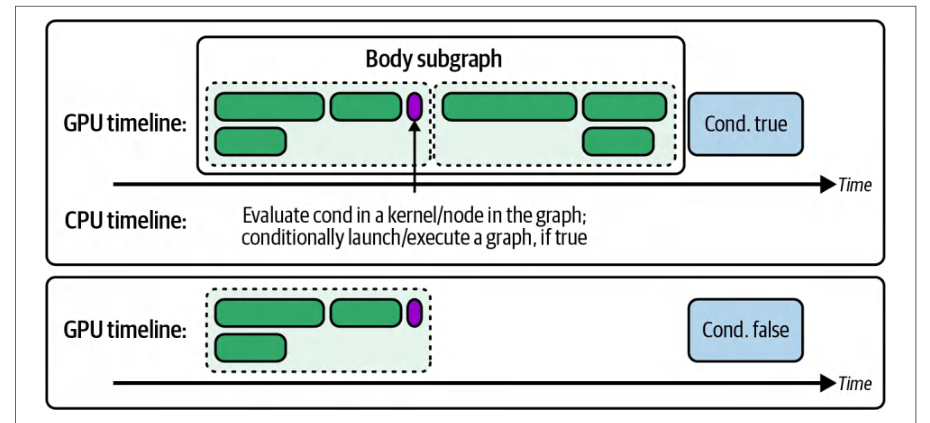
Here, we allocate one empty subgraph (body) to be executed if the conditional flag returns nonzero. The body graph is retrieved from ifParams.phGraphOut[0] and populates it by adding bodyKernel, which simply prints a message when executed.这里,我们分配一个空子图(body),在条件标志返回非零值时执行。主体图从 ifParams.phGraphOut[0] 获取,并通过添加 bodyKernel 来填充它,该内核在执行时仅打印一条消息。
After graph construction, call cudaGraphInstantiate to produce an executable graph object. To launch a graph from device code, you must instantiate it with the cudaGraphInstantiateFlagDeviceLaunch flag and upload it with cudaGraphUpload before any device-side launch.图构建完成后,调用 cudaGraphInstantiate 生成可执行的图对象。要从设备代码启动图,必须使用 cudaGraphInstantiateFlagDeviceLaunch 标志实例化它,并在任何设备端启动之前用 cudaGraphUpload 上传。
Launching with cudaGraphLaunch on a CUDA stream triggers execution of the upstream set-handle kernel, the conditional check, and then, if the flag was set, the body kernel. And all of this happens directly on the GPU, as shown in Figure 12-10.在 CUDA 流上使用 cudaGraphLaunch 启动会触发上游 set-handle 内核、条件检查的执行,然后如果标志已置位,则执行主体内核。而这一切都直接在 GPU 上发生,如图 12-10 所示。
We then synchronize the stream with cudaStreamSynchronize to wait for completion. Finally, we clean up by destroying the instantiated graph, the graph itself, and the stream.随后我们用 cudaStreamSynchronize 同步流以等待完成。最后,我们通过销毁已实例化的图、图本身以及流来进行清理。
To minimize race conditions, it’s important to always set the condition in a single thread (e.g., if (threadIdx.x == 0)). And make sure that the preceding kernels flush memory to make the value visible before the conditional node executes.为尽量减少竞态条件,务必始终在单个线程中设置条件(例如 if (threadIdx.x == 0))。并确保前面的内核刷新内存,使该值在条件节点执行前可见。
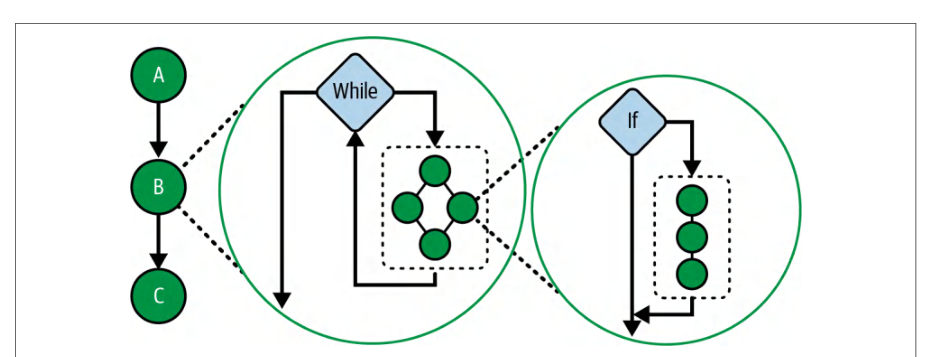
Conditional nodes can be nested as well. For instance, a WHILE node’s body can contain an IF node, as shown in Figure 12-11. This allows multilevel decision logic without requiring CPU hops.条件节点也可以嵌套。例如,WHILE 节点的主体可以包含一个 IF 节点,如图 12-11 所示。这使得多级决策逻辑无需 CPU 介入。
In short, you should use conditional graph nodes to keep decisions on the GPU, reduce CPU overhead, and express complex control flow directly in your CUDA Graph. Because graph creation costs can be amortized over many iterations, representing dynamic workflows entirely on-device can produce significant performance improvements.简而言之,应当使用条件图节点将决策保留在 GPU 上、降低 CPU 开销,并直接在 CUDA 图中表达复杂的控制流。由于图创建成本可以在多次迭代中摊销,将动态工作流完全在设备端表达可以带来显著的性能提升。
动态并行
Dynamic Parallelism
Previously, we saw how the device-initiated CUDA Graph launches capture and replay fixed sequences of operations with minimal CPU involvement. But that model expects that your entire execution flow is known ahead of time, which isn’t always possible. Many workloads change shape at runtime based on input data, intermediate results, or problem complexity. That’s where Dynamic parallelism (DP) comes in.前面我们看到了设备发起的 CUDA 图启动如何以最少的 CPU 参与捕获并重放固定的操作序列。但该模型要求整个执行流程事先已知,而这并不总是可行。许多工作负载会根据输入数据、中间结果或问题复杂度在运行时改变形态。这正是动态并行(Dynamic Parallelism,DP)的用武之地。
DP gives your GPU kernels the power to spawn new work for themselves instead of waiting on the CPU. Whereas CUDA Graphs require you to know your entire pipeline in advance, DP lets a running “parent” kernel examine its own outputs and decide on the fly how many “child” kernels to launch next. This is a game-changer for truly irregular problems—hierarchical reductions, adaptive mesh refinement, and graph traversals—where the number of subsequent tasks becomes clear only as you process your data.动态并行(DP)让 GPU 内核有能力为自身派生新的工作,而不必等待 CPU。CUDA 图要求你事先知道整条流水线,而 DP 则允许正在运行的“父”内核检查自身的输出,并当场决定接下来要启动多少个“子”内核。对于真正不规则的问题——层次化归约、自适应网格细化以及图遍历——这是一项颠覆性的改变,因为在这些问题中,后续任务的数量只有在你处理数据的过程中才会变得清晰。
Imagine an inference pipeline that occasionally needs a special “plugin” model evaluation for certain inputs. In a CPU-driven flow, you’d run Kernel A, copy its results back to the host, decide whether to launch Kernel B, and then issue that launch— leaving the GPU idle during the round trip. With DP, Kernel A inspects its outputs and, if the condition holds, launches Kernel B directly on the device. The entire decision-and-dispatch happens inside one GPU-resident workload, collapsing the idle gap and keeping SMs busy.设想一条推理流水线,它偶尔需要针对某些输入执行一个特殊的“插件”模型评估。在 CPU 驱动的流程中,你会先运行内核 A,把结果复制回主机,判断是否要启动内核 B,然后发出该启动——在往返期间让 GPU 处于空闲状态。使用 DP 时,内核 A 检查自己的输出,若条件成立,就直接在设备上启动内核 B。整个决策与派发过程都发生在一个驻留于 GPU 的工作负载内部,从而消除空闲间隙,让 SM 保持忙碌。
In the context of an LLM, most tokens follow the standard transformer path, but some require an auxiliary attention block. A DP-enabled transformer kernel can detect those special tokens at runtime and tail-launch the extra attention kernel only for those positions—no host intervention, no wasted cycles. NVIDIA’s libraries already exploit DP for similar patterns in adaptive algorithms: new subtasks emerge dynamically as data flows through the computation.在 LLM 的语境下,大多数 token 走标准的 Transformer 路径,但有些 token 需要额外的注意力块。启用 DP 的 Transformer 内核可以在运行时检测出这些特殊 token,并仅针对这些位置尾部启动(tail-launch)额外的注意力内核——无需主机干预,也不浪费周期。NVIDIA 的库已经在自适应算法的类似模式中利用了 DP:随着数据在计算中流动,新的子任务会动态涌现。
You’ll know DP is right for you when your profiler timeline shows a back-to-back pattern like Kernel A → GPU idle gap → Kernel B. Here, the idle time corresponds to the CPU preparing the next launch. Replacing that gap with a device-side launch keeps every SM occupied and slashes the latency between dependent stages.当你的性能剖析器时间线呈现出 Kernel A → GPU idle gap → Kernel B 这样的背靠背模式时,就说明 DP 适合你的场景。这里的空闲时间对应 CPU 准备下一次启动的过程。用设备端启动填补这一间隙,可以让每个 SM 都保持占用,并大幅削减相互依赖阶段之间的时延。
Of course, the performance benefits of DP don’t come for free. Each child launch uses GPU scheduling resources and requires additional stack space. To avoid “stack overflow” errors, you may need to bump the runtime stack size with cudaDeviceSet Limit(cudaLimitStackSize, newSize). CUDA will warn you if you hit its default limit.当然,DP 的性能收益并非免费得来。每次子内核启动都会占用 GPU 调度资源,并需要额外的栈空间。为避免“栈溢出”错误,你可能需要用 cudaDeviceSet Limit(cudaLimitStackSize, newSize) 调高运行时栈大小。如果触及默认上限,CUDA 会给出警告。
On a related note, CUDA has a maximum limit on how many child-kernel launches can be pending. By default, CUDA allows 2,048 outstanding device launches at one time. However, this is configurable.与此相关的一点是,CUDA 对可挂起的子内核启动数量设有上限。默认情况下,CUDA 允许同时有 2,048 个未完成的设备端启动。不过,这个值是可配置的。
If a parent kernel needs to spawn more than 2,048 child kernels because it’s using a large loop to launch thousands of tiny kernels, you can raise this limit using the API cudaDeviceSetLimit(cudaLimitDevRuntimePendingLaunchCount, newLimit). Otherwise, exceeding the default 2,048 limit will cause a runtime error. In practice, the default value is usually enough for most uses. But it’s an important consideration for extreme cases.如果父内核因为使用一个大循环启动数千个微小内核而需要派生超过 2,048 个子内核,你可以用 API cudaDeviceSetLimit(cudaLimitDevRuntimePendingLaunchCount, newLimit) 提高该上限。否则,超过默认的 2,048 上限将导致运行时错误。在实践中,默认值对大多数用途通常已经足够。但对于极端情况,这是一个重要的考量。
Because DP adds some instruction-level overhead, it’s best reserved for cases where static orchestration like persistent kernels, streams, or CUDA Graphs would otherwise leave the GPU idling while the CPU decides the next step. In other words, when your workload is truly a fixed sequence of operations, you’re often better off capturing it as a CUDA Graph and replaying it device-side.由于 DP 会带来一些指令级开销,最好把它保留给这样的场景:静态编排(如持久化内核、流或 CUDA 图)会让 GPU 在 CPU 决定下一步时处于空闲。换言之,当你的工作负载确实是一组固定的操作序列时,通常更好的做法是把它捕获为 CUDA 图并在设备端重放。
When your work emerges dynamically from the data itself, DP lets you keep both scheduling and execution entirely on the GPU. This will deliver better scaling and lower end-to-end latency for nested, data-dependent, or unpredictable parallelism.当工作从数据本身动态涌现时,DP 让你把调度和执行都完全留在 GPU 上。对于嵌套的、数据依赖的或不可预测的并行性,这将带来更好的扩展性和更低的端到端时延。
Let’s compare two implementations of a simple parent-child workflow. The host-driven version shown next launches a parent kernel, waits for it to finish, then issues two child kernels from the CPU. This leaves the GPU idle during those decision gaps:下面比较一个简单父子工作流的两种实现。接下来展示的主机驱动版本先启动一个父内核,等待其结束,然后从 CPU 发出两个子内核。这使得 GPU 在这些决策间隙中处于空闲状态:
// dp_host_launched.cu
#include <cuda_runtime.h>
__global__ void childKernel(float* data, int N) {
    int idx = blockIdx.x * blockDim.x + threadIdx.x;
    if (idx < N) {
        data[idx] = data[idx] * data[idx];
    }
}
__global__ void parentKernel(float* data, int N) {
    // 父内核执行准备工作。此处由 CPU 决定子内核的启动。
    if (threadIdx.x == 0 && blockIdx.x == 0) {
        // 可在此处标记区域或计算标志
    }
}
int main() {
    const int N = 1 << 20;
    float* d_data;
    cudaMalloc(&d_data, N * sizeof(float));
    // ... 初始化 d_data ...
    // 1) 启动父内核并等待
    cudaStream_t s; cudaStreamCreateWithFlags(&s, cudaStreamNonBlocking);
    parentKernel<<<1,1,0,s>>>(d_data, N);
    cudaStreamSynchronize(s);
    // 2) CPU 将工作对半拆分并启动子内核
    int half = N / 2;
// dp_host_launched.cu
#include <cuda_runtime.h>
__global__ void childKernel(float* data, int N) {
    int idx = blockIdx.x * blockDim.x + threadIdx.x;
    if (idx < N) {
        data[idx] = data[idx] * data[idx];
    }
}
__global__ void parentKernel(float* data, int N) {
    // Parent does setup work. Here, CPU decides on child launches.
    if (threadIdx.x == 0 && blockIdx.x == 0) {
        // maybe mark regions or compute flags here
    }
}
int main() {
    const int N = 1 << 20;
    float* d_data;
    cudaMalloc(&d_data, N * sizeof(float));
    // ... initialize d_data ...
    // 1) Launch parent and wait
    cudaStream_t s; cudaStreamCreateWithFlags(&s, cudaStreamNonBlocking);
    parentKernel<<<1,1,0,s>>>(d_data, N);
    cudaStreamSynchronize(s);
    // 2) CPU splits work in half and launches children
    int half = N / 2;
    childKernel<<<(half+255)/256,256>>>(d_data,     half);
    childKernel<<<(half+255)/256,256>>>(d_data+half, half);
    cudaStreamSynchronize(s);
    cudaStreamDestroy(s);
    cudaFree(d_data);
    return 0;
}
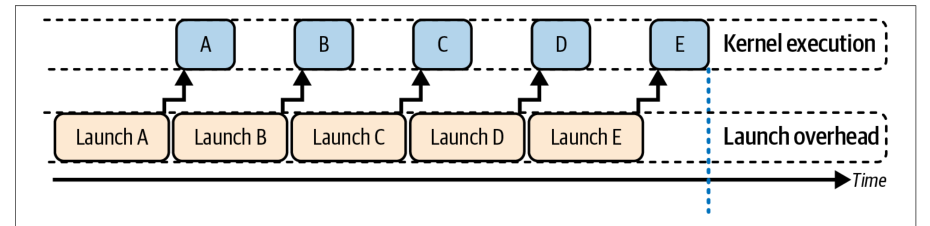
In the host-driven version, the GPU runs parentKernel and then idles while the CPU prepares and launches each childKernel in turn. Note the explicit cudaDevice Synchronize() calls after the parent and between children. These calls lead to idle gaps that should be eliminated, as shown in Figure 12-12.在主机驱动版本中,GPU 运行 parentKernel,随后在 CPU 依次准备并启动每个 childKernel 期间处于空闲。注意在父内核之后以及子内核之间显式调用了 cudaDevice Synchronize()。这些调用会导致空闲间隙,应当予以消除,如图 12-12 所示。
In contrast, the device-launched DP version lets the parent-kernel spawn its children on the device. This approach requires no host synchronization between the parent and child kernel launches. This way, the parent’s child-kernel launches implicitly queue the children and synchronize only at the end, as shown in the code here:相比之下,设备端启动的 DP 版本让父内核在设备上派生其子内核。这种方法不需要在父内核与子内核启动之间进行主机同步。这样,父内核的子内核启动会隐式地将子内核排队,并且只在最后才同步,如下面的代码所示:
// dp_device_launched.cu
// 动态并行(dynamic parallelism)要求使用 -rdc=true 启用可重定位设备代码。
#include <cuda_runtime.h>
__global__ void childKernel(float* data, int n) {
    int idx = blockIdx.x * blockDim.x + threadIdx.x;
    if (idx < n) {
        data[idx] = data[idx] * data[idx];
    }
}
__global__ void parentKernel(float* data, int n) {
    // 从单个线程启动子内核,以避免重复启动。
    if (blockIdx.x == 0 && threadIdx.x == 0) {
        const int threadsPerBlock = 256;
        const int firstHalfCount  = n / 2;
        const int secondHalfCount = n - firstHalfCount;
        const int blocksFirst  = (firstHalfCount  + threadsPerBlock - 1)
                                  / threadsPerBlock;
// dp_device_launched.cu
// Dynamic parallelism requires relocatable device code enabled with -rdc=true.
#include <cuda_runtime.h>
__global__ void childKernel(float* data, int n) {
    int idx = blockIdx.x * blockDim.x + threadIdx.x;
    if (idx < n) {
        data[idx] = data[idx] * data[idx];
    }
}
__global__ void parentKernel(float* data, int n) {
    // Launch children from a single thread to avoid duplicate launches.
    if (blockIdx.x == 0 && threadIdx.x == 0) {
        const int threadsPerBlock = 256;
        const int firstHalfCount  = n / 2;
        const int secondHalfCount = n - firstHalfCount;
        const int blocksFirst  = (firstHalfCount  + threadsPerBlock - 1)
                                  / threadsPerBlock;
        const int blocksSecond = (secondHalfCount + threadsPerBlock - 1)
                                  / threadsPerBlock;
        // 设备端启动的子内核。
        // 无需在设备端调用 cudaDeviceSynchronize。
        childKernel<<<blocksFirst,  threadsPerBlock>>>(data,
                                                       firstHalfCount);
        childKernel<<<blocksSecond, threadsPerBlock>>>(data + firstHalfCount,
                                                       secondHalfCount);
        // 父内核要等到两个子内核都完成后才会结束。
    }
}
int main() {
    const int N = 1024 * 1024;    // 100 万个元素,为清晰起见不使用位移操作
    float* d_data = nullptr;
    cudaMalloc(&d_data, N * sizeof(float));
    // 初始化为零,作为一种具体且有效的初始化。
    cudaMemset(d_data, 0, N * sizeof(float));
    // 在默认流上启动父内核。
    parentKernel<<<1, 1>>>(d_data, N);
    // 不使用 cudaDeviceSynchronize 等待完成,而是改为同步流。
    cudaStreamSynchronize(0);
    cudaFree(d_data);
    return 0;
}
        const int blocksSecond = (secondHalfCount + threadsPerBlock - 1)
                                  / threadsPerBlock;
        // Device launched child kernels.
        // No device side cudaDeviceSynchronize is needed.
        childKernel<<<blocksFirst,  threadsPerBlock>>>(data,
                                                       firstHalfCount);
        childKernel<<<blocksSecond, threadsPerBlock>>>(data + firstHalfCount,
                                                       secondHalfCount);
        // Parent kernel will not finish until both children finish.
    }
}
int main() {
    const int N = 1024 * 1024;    // 1M elements, avoids bit shifting for clarity
    float* d_data = nullptr;
    cudaMalloc(&d_data, N * sizeof(float));
    // Initialize to zero as a concrete, valid initialization.
    cudaMemset(d_data, 0, N * sizeof(float));
    // Launch parent on the default stream.
    parentKernel<<<1, 1>>>(d_data, N);
    // Wait for completion without cudaDeviceSynchronize. Sync stream instead.
    cudaStreamSynchronize(0);
    cudaFree(d_data);
    return 0;
}
Here, the parentKernel issues both child launches directly on the GPU. The host submits only one kernel and then waits once. When the parent kernel completes, the device runtime makes sure that all launched child kernels are complete before moving on.在这里,parentKernel 直接在 GPU 上发出两次子内核启动。主机只提交一个内核,然后等待一次。当父内核完成时,设备端运行时会确保所有已启动的子内核都已完成,然后才继续推进。
With the device-side DP approach, there are no idle gaps for CPU decision making. As such, it collapses the latency between dependent stages and keeps SMs busy end to end. This increases GPU utilization at the slight cost of a small amount of per-launch overhead incurred on the device, as you see in Figure 12-13’s timeline.采用设备端 DP 方法时,不存在用于 CPU 决策的空闲间隙。因此,它压缩了相互依赖阶段之间的时延,并使 SM 自始至终保持忙碌。这提升了 GPU 利用率,代价是设备上产生少量每次启动开销,如图 12-13 的时间线所示。
| Metric指标 | Before (host launch)之前(主机启动) | After (device launch)之后(设备启动) |
|---|---|---|
| Total host launches主机启动总次数 | 33 | 11 |
| Average launch overhead per call每次调用的平均启动开销 | ~20 µs约 20 µs | ~25 µs约 25 µs |
| GPU idle cycles (during sequence)GPU 空闲周期数(序列执行期间) | ~40%~40% | ~5%~5% |
| Overall execution time总执行时间 | 1.00 ms1.00 ms | 0.75 ms0.75 ms |
In our simple two-child example, the host-driven version issues three separate launches (1 parent + 2 children). In this case, the GPU idles while the CPU decides when to launch each child kernel.在我们这个简单的双子内核示例中,主机驱动版本会发起三次独立的启动(1 个父内核 + 2 个子内核)。在这种情况下,当 CPU 决定何时启动每个子内核时,GPU 处于空闲状态。
This is in contrast to the device-driven DP version that performs just one host-side launch for the parent kernel. The parent kernel then spawns both children on the GPU without further host intervention. Table 12-2 compares performance for the host-driven and device-driven DP child launches.这与设备驱动的动态并行(DP)版本形成对比:后者对父内核只执行一次主机侧启动。随后父内核在 GPU 上派生出两个子内核,无需主机进一步介入。表 12-2 对比了主机驱动与设备驱动 DP 子内核启动的性能。
Here, we see that by moving the child dispatch into the GPU, DP eliminates roughly 35% of the idle time and reduces total runtime by about 25%. The slight rise in per-launch cost (20 µs → 25 µs) reflects the GPU’s on-device scheduling overhead. However, this overhead is negligible compared to the savings from removing multiple CPU-GPU handshakes.可以看到,通过把子内核的分发移入 GPU,DP 消除了约 35% 的空闲时间,并将总运行时间缩短约 25%。每次启动开销略有上升(20 µs → 25 µs),这反映了 GPU 的设备端调度开销。不过,与省去多次 CPU-GPU 握手所带来的节省相比,这一开销可以忽略不计。
An additional benefit of GPU-driven launches is improved data locality since intermediate results never have to be copied back to the CPU between stages. In our example, the data computed by the parent kernel is immediately usable by the child kernels without leaving GPU memory. This avoids extra memory transfers and preserves cache data. No CPU intervention also means fewer chances for cache eviction or DRAM refetch of data that would have been reused on the GPU.GPU 驱动启动的另一个好处是改善了数据局部性,因为中间结果在各阶段之间完全不必复制回 CPU。在我们的示例中,父内核计算出的数据无需离开 GPU 显存即可被子内核立即使用。这避免了额外的内存传输,并保留了缓存数据。无需 CPU 介入也意味着,那些本可在 GPU 上复用的数据被逐出缓存或从 DRAM 重新读取的机会更少。
In short, DP transforms a stop-start host-driven workflow into a seamless GPU-resident pipeline, sustaining high SM utilization and minimizing host-GPU简而言之,DP 将走走停停的主机驱动工作流转变为无缝的 GPU 常驻流水线,持续保持高 SM 利用率,并最大限度减少主机与 GPU 之间的
coordination. And remember that dynamic parallelism, like other advanced techniques, should be tested for impact.协调。另外请记住,动态并行与其他高级技术一样,应当测试其实际影响。
While DP eliminates CPU interaction, a device-initiated kernel launch still has roughly the same order of overhead as a host launch. As such, not all algorithms will see gains. In fact, some algorithms may even run slower with DP—especially if the work from the launched kernel is too small to amortize the overhead. In other words, device-side launch overhead might negate DP’s benefits for some small kernels.尽管 DP 消除了 CPU 交互,但设备发起的内核启动其开销仍与主机启动大致处于同一量级。因此,并非所有算法都能获得收益。事实上,某些算法在使用 DP 后甚至可能运行得更慢——尤其是当被启动内核的工作量太小、不足以摊薄开销时。换言之,对于某些小内核,设备侧启动开销可能会抵消 DP 带来的收益。
Having covered single-GPU orchestration, we next turn to multi-GPU and multinode scenarios, where interconnect bandwidths and collective operations extend our roofline considerations to the cluster level.讨论完单 GPU 编排之后,接下来转向多 GPU 与多节点场景——在这些场景中,互连带宽和集合通信操作把我们的屋顶线模型考量扩展到集群层面。
跨多 GPU 与集群节点编排(NVSHMEM)
Orchestrate Across Multiple GPUs and Cluster Nodes (NVSHMEM)
When you scale from one GPU to many, the core goal remains the same: keep every device busy by hiding data movement behind useful work. Once the host has dispatched a task to each GPU, whether through separate CPU threads, asynchronous launches, or a multi-GPU graph, the GPUs take over. While one stream on each device drives computation, a second stream can shuttle data peer-to-peer over NVLink or PCIe without ever involving host memory.从一块 GPU 扩展到多块 GPU 时,核心目标始终不变:让每个设备都保持忙碌,用有用的工作掩盖数据搬运。一旦主机把任务分派给各块 GPU——无论是通过独立的 CPU 线程、异步启动,还是多 GPU 图——GPU 就接管了后续工作。每块设备上一个流驱动计算,另一个流则可以通过 NVLink 或 PCIe 在对等设备之间搬运数据,全程无需经过主机内存。
This means that, at scale, you must overlap peer-to-peer transfers with computation. It’s important to note that even with NVLink, the bandwidth and latency are not equal to on-device HBM. This communication must therefore be hidden with overlap.这意味着,在规模化场景下,必须让对等传输与计算重叠。需要注意的是,即便使用 NVLink,其带宽和时延也不等同于设备上的 HBM。因此这类通信必须通过重叠来隐藏。
In practice, as the cluster size grows, overlapping work with data transfer is absolutely essential to scaling the environment linearly. For straightforward hand-offs, you can use GPUDirect Peer Access to move large blocks of memory in the background, as shown here:在实践中,随着集群规模扩大,让工作与数据传输重叠对于环境实现线性扩展是绝对必要的。对于简单的交接,可以使用 GPUDirect Peer Access 在后台搬运大块内存,如下所示:
cudaMemcpyPeerAsync(dest_ptr, dest_gpu, src_ptr, src_gpu, size, comm_stream);
When you need collective communication such as gradient all-reduces in PyTorch Distributed Data Parallel (DDP), you launch NCCL’s nonblocking routines on a separate stream using NCCL’s asynchronous collective calls. NCCL then arranges your tensors into rings or trees that saturate every NVLink and NVSwitch path—all while your compute kernels continue running on their own streams.当你需要集合通信(例如 PyTorch 分布式数据并行(DDP)中的梯度全归约)时,可以使用 NCCL 的异步集合调用,在单独的流上启动 NCCL 的非阻塞例程。随后 NCCL 会把你的张量组织成环或树的结构,以打满每一条 NVLink 和 NVSwitch 通路——与此同时,你的计算内核仍在自己的流上继续运行。
If your MPI library is CUDA-aware and recognizes GPU device pointers, it will automatically use GPUDirect RDMA to send data over InfiniBand using calls like the one here:如果你的 MPI 库支持 CUDA 并能识别 GPU 设备指针,它就会自动使用 GPUDirect RDMA,通过如下调用经 InfiniBand 发送数据:
MPI_Send(device_buf, count, MPI_FLOAT, peer_rank, ...);
This CUDA-awareness in MPI (and NCCL) means GPU data moves directly across the network using GPUDirect RDMA over InfiniBand without staging through host memory. (Note that within a node, peer copies run over NVLink or PCIe using GPU-Direct Peer-to-Peer.)MPI(以及 NCCL)具备的这种 CUDA 感知能力意味着,GPU 数据会经由 InfiniBand 上的 GPUDirect RDMA 直接在网络中传输,无需暂存到主机内存。(注意,在节点内部,对等拷贝通过 GPU-Direct Peer-to-Peer 走 NVLink 或 PCIe。)
Using these primitives and avoiding the CPU helps decrease data transfer latency and achieve near-wire-speed for GPU-to-GPU transfers. As a result, internode data transfer and communication can properly overlap with GPU computations.使用这些原语并避开 CPU,有助于降低数据传输时延,使 GPU 到 GPU 的传输接近线速。因此,节点间的数据传输与通信可以恰当地与 GPU 计算重叠。
使用 NVSHMEM 实现细粒度的 GPU 间显存共享
Fine-Grained GPU-to-GPU Memory Sharing with NVSHMEM
For workloads needing ultratight, event-driven coordination, such as dynamic task queues and fine-grained event notifications, NVIDIA’s NVIDIA SHMEM (NVSHMEM) library is an excellent option. It treats each GPU as a processing element (PE) in a partitioned global address space (PGAS).对于需要极紧密、事件驱动协调的工作负载,例如动态任务队列和细粒度事件通知,NVIDIA 的 NVIDIA SHMEM(NVSHMEM)库是一个极佳选择。它把每块 GPU 视为分区全局地址空间(PGAS)中的一个处理单元(PE)。
With PGAS, a GPU can directly write into another GPU’s memory from device code, bypassing the CPU. Latency depends on the interconnect, with NVLink generally lower than PCIe or network transports. Here is the classic send-and-signal pattern using NVSHMEM:借助 PGAS,一块 GPU 可以在设备代码中直接写入另一块 GPU 的内存,从而绕过 CPU。时延取决于互连方式,NVLink 通常低于 PCIe 或网络传输。下面是使用 NVSHMEM 的经典发送并置位模式:
#include <cstdio>
#include <cuda_runtime.h>
#include <nvshmem.h>
#include <nvshmemx.h>
// 对称缓冲区对应的设备符号
__device__ int   *remote_flag;
__device__ float *remote_data;
//-----------------------------------------------------------------------------
// GPU 0:先发送数据,再向 GPU 1 发信号
//-----------------------------------------------------------------------------
__global__ void sender_kernel(float *local_data, int dest_pe) {
    int idx = blockIdx.x * blockDim.x + threadIdx.x;
    float value = local_data[idx];
    // 1) 将负载数据放入 dest_pe 上的 remote_data[1]
    nvshmem_float_p(remote_data + 1, value, dest_pe);
    // 2) 等待 RMA 完成后再设置标志位
    nvshmem_quiet();
#include <cstdio>
#include <cuda_runtime.h>
#include <nvshmem.h>
#include <nvshmemx.h>
// Device symbols for the symmetric buffers
__device__ int   *remote_flag;
__device__ float *remote_data;
//-----------------------------------------------------------------------------
// GPU 0: send data then signal GPU 1
//-----------------------------------------------------------------------------
__global__ void sender_kernel(float *local_data, int dest_pe) {
    int idx = blockIdx.x * blockDim.x + threadIdx.x;
    float value = local_data[idx];
    // 1) Put the payload into remote_data[1] on dest_pe
    nvshmem_float_p(remote_data + 1, value, dest_pe);
    // 2) Wait for the RMA to complete before setting the flag
    nvshmem_quiet();
    // 3) 通过在 dest_pe 上设置 remote_flag[0] = 1 来通知完成
    nvshmem_int_p(remote_flag + 0, 1, dest_pe);
}
//-----------------------------------------------------------------------------
// GPU 1:等待标志位,然后消费负载数据
//-----------------------------------------------------------------------------
__global__ void receiver_kernel(float *recv_buffer) {
    // 1) 自旋等待,直到 remote_flag[0] == 1
    nvshmem_int_wait_until(remote_flag + 0,
        NVSHMEM_CMP_EQ, 1);
    // 2) 标志位一旦置位,remote_data[1] 处的负载数据即为有效
    float val = remote_data[1];
    recv_buffer[0] = val * 2.0f;
}
//-----------------------------------------------------------------------------
// 主机侧初始化与清理
//-----------------------------------------------------------------------------
int main(int argc, char **argv) {
    // 1) 初始化 NVSHMEM 运行时
    nvshmem_init();
    // 2) 确定本 PE 的 rank,并绑定到对应的 GPU
    int mype = nvshmem_my_pe();
    cudaSetDevice(mype);
    // 3) 在每个 PE 上分配对称缓冲区
    //    - 两个 int 用于标志位
    //    - 两个 float 用于数据负载
    int   *flag_buf = (int*)   nvshmem_malloc(2 * sizeof(int));
    float *data_buf = (float*) nvshmem_malloc(2 * sizeof(float));
    // 4) 将 PE 0 上的标志位清零并同步
    nvshmem_barrier_all();
    if (mype == 0) {
        int zeros[2] = {0, 0};
        cudaMemcpy(flag_buf, zeros, 2 * sizeof(int),
                   cudaMemcpyHostToDevice);
    }
    nvshmem_barrier_all();
    // 5) 注册设备指针以供内核使用
    cudaMemcpyToSymbol(remote_flag, &flag_buf, sizeof(int*));
    cudaMemcpyToSymbol(remote_data, &data_buf, sizeof(float*));
    // 6) 启动发送方或接收方内核
    dim3 grid(1), block(128);
    if (mype == 0) {
        // 发送方的输入缓冲区示例
        float *local_data;
        cudaMalloc(&local_data, 128 * sizeof(float));
    // 3) Signal completion by setting remote_flag[0] = 1 on dest_pe
    nvshmem_int_p(remote_flag + 0, 1, dest_pe);
}
//-----------------------------------------------------------------------------
// GPU 1: wait for flag then consume payload
//-----------------------------------------------------------------------------
__global__ void receiver_kernel(float *recv_buffer) {
    // 1) Spin until remote_flag[0] == 1
    nvshmem_int_wait_until(remote_flag + 0,
        NVSHMEM_CMP_EQ, 1);
    // 2) Once flag is set, the payload at remote_data[1] is valid
    float val = remote_data[1];
    recv_buffer[0] = val * 2.0f;
}
//-----------------------------------------------------------------------------
// Host-side setup and teardown
//-----------------------------------------------------------------------------
int main(int argc, char **argv) {
    // 1) Initialize the NVSHMEM runtime
    nvshmem_init();
    // 2) Determine this PE’s rank and bind to the matching GPU
    int mype = nvshmem_my_pe();
    cudaSetDevice(mype);
    // 3) Allocate symmetric buffers on each PE
    //    - Two ints for the flag
    //    - Two floats for the data payload
    int   *flag_buf = (int*)   nvshmem_malloc(2 * sizeof(int));
    float *data_buf = (float*) nvshmem_malloc(2 * sizeof(float));
    // 4) Zero out flags on PE 0 and synchronize
    nvshmem_barrier_all();
    if (mype == 0) {
        int zeros[2] = {0, 0};
        cudaMemcpy(flag_buf, zeros, 2 * sizeof(int),
                   cudaMemcpyHostToDevice);
    }
    nvshmem_barrier_all();
    // 5) Register the device pointers for use in kernels
    cudaMemcpyToSymbol(remote_flag, &flag_buf, sizeof(int*));
    cudaMemcpyToSymbol(remote_data, &data_buf, sizeof(float*));
    // 6) Launch either the sender or receiver kernel
    dim3 grid(1), block(128);
    if (mype == 0) {
        // Example input buffer for the sender
        float *local_data;
        cudaMalloc(&local_data, 128 * sizeof(float));
        // ... 按需初始化 local_data ...
        sender_kernel<<<grid, block>>>(local_data, 1);
        cudaFree(local_data);
    } else {
        float *recv_buffer;
        cudaMalloc(&recv_buffer, sizeof(float));
        receiver_kernel<<<grid, block>>>(recv_buffer);
        cudaFree(recv_buffer);
    }
    // 7) 等待所有 GPU 工作完成
    cudaDeviceSynchronize();
    // 8) 清理 NVSHMEM 资源
    nvshmem_free(flag_buf);
    nvshmem_free(data_buf);
    nvshmem_finalize();
    return 0;
}
        // ... initialize local_data as needed ...
        sender_kernel<<<grid, block>>>(local_data, 1);
        cudaFree(local_data);
    } else {
        float *recv_buffer;
        cudaMalloc(&recv_buffer, sizeof(float));
        receiver_kernel<<<grid, block>>>(recv_buffer);
        cudaFree(recv_buffer);
    }
    // 7) Wait for all GPU work to finish
    cudaDeviceSynchronize();
    // 8) Clean up NVSHMEM resources
    nvshmem_free(flag_buf);
    nvshmem_free(data_buf);
    nvshmem_finalize();
    return 0;
}
Here, the one-sided remote memory operations happen entirely on-device. GPU/PE 0 writes its result straight into GPU/PE 1’s memory and flips a flag there. Specifically, GPU/PE 0 issues a nvshmem_float_p to write payload data directly into GPU/PE 1’s memory, calls nvshmem_quiet() to ensure completion, then uses nvshmem_int_p to flip a flag.在这里,单边远程内存操作完全在设备上完成。GPU/PE 0 把结果直接写入 GPU/PE 1 的内存,并在那里翻转一个标志位。具体来说,GPU/PE 0 发出 nvshmem_float_p 把载荷数据直接写入 GPU/PE 1 的内存,调用 nvshmem_quiet() 确保完成,然后用 nvshmem_int_p 翻转标志位。
Meanwhile, GPU/PE 1’s kernel spins on nvshmem_int_wait_until() and, as soon as the flag is set, reads the payload. This requires no CPU intervention or extra copies— just hardware-accelerated, GPU-to-GPU transfers over NVLink.与此同时,GPU/PE 1 的内核在 nvshmem_int_wait_until() 上自旋等待,一旦标志位被置位,就读取数据载荷。这不需要 CPU 介入,也不需要额外的拷贝——只需通过 NVLink 进行硬件加速的 GPU 到 GPU 传输。
Since NVSHMEM communication uses GPU-initiated, one-sided operations over NVLink or PCIe, it eliminates host staging. As such, NVSHMEM communication can achieve near-peak wire speed. This is because NVSHMEM one-sided operations bypass the CPU as well as the software overhead of kernel launches. Essentially, NVSHMEM turns formerly multistep communications into a single hardware transaction.由于 NVSHMEM 通信使用由 GPU 发起、经由 NVLink 或 PCIe 传输的单边操作,因此它消除了主机暂存。正因如此,NVSHMEM 通信可以达到接近峰值的线速。这是因为 NVSHMEM 单边操作既绕过了 CPU,也绕过了内核启动的软件开销。本质上,NVSHMEM 将过去需要多步完成的通信转变为单次硬件事务。
Of course, with great power comes great responsibility. Because NVSHMEM is essentially GPU-level shared-memory programming, you must carefully manage synchronization and avoid races. Additionally, overusing global barriers can also stall all GPUs on the slowest peer.当然,能力越大,责任越大。由于 NVSHMEM 本质上是 GPU 级别的共享内存编程,你必须谨慎管理同步并避免竞态。此外,过度使用全局屏障还会让所有 GPU 都被最慢的那个对等节点拖住。
In practice, avoid over-synchronizing. Use NVSHMEM’s fine-grained signals or point-to-point synchronization when possible. This is in contrast to always calling nvshmem_barrier_all().在实践中,应避免过度同步。尽可能使用 NVSHMEM 的细粒度信号或点对点同步,而不是动辄调用 nvshmem_barrier_all()。
Modern implementations of NVSHMEM provide efficiency improvements for these synchronization routines. However, they are still a synchronization point that can become a bottleneck if misused. NVSHMEM provides fine-grained primitives such as nvshmem_wait_until for waiting on device variables and signal operations like nvshmem_signal_fetch, nvshmem_signal_wait_until, or the nvshmemx_signal_op variants for point-to-point synchronization when only a subset of devices needs to coordinate. The low-level details showing NVSHMEM sharing data and synchronizing with signals between a sender and a receiver GPU are shown in Figure 12-14.NVSHMEM 的现代实现针对这些同步例程提供了效率改进。但它们仍然是同步点,一旦误用就可能成为瓶颈。NVSHMEM 提供了细粒度原语,例如用于等待设备变量的 nvshmem_wait_until,以及当只有一部分设备需要协调时用于点对点同步的信号操作,如 nvshmem_signal_fetch、nvshmem_signal_wait_until 或 nvshmemx_signal_op 系列变体。图 12-14 展示了 NVSHMEM 在发送方 GPU 与接收方 GPU 之间共享数据并用信号同步的底层细节。
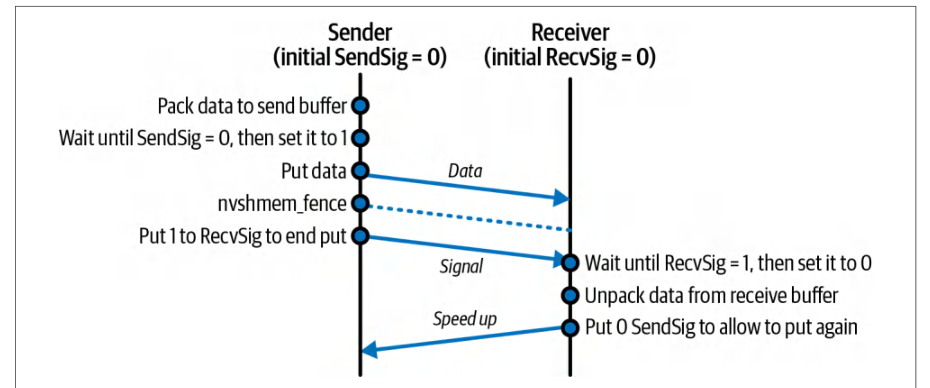
NVSHMEM shines when workloads are irregular or data-dependent, such as graph algorithms, dynamic load balancing, and discrete-event simulations. In these cases, static graphs and collectives are not sufficient.当工作负载不规则或依赖数据时,例如图算法、动态负载均衡和离散事件仿真,NVSHMEM 才能大放异彩。在这些场景中,静态图和集合操作并不够用。
Kernels that use NVSHMEM can be captured inside CUDA Graphs like any other kernel. The NVSHMEM device operations occur inside those kernels and are not separate graph nodes. However, NVSHMEM’s true strength is in letting kernels adapt and coordinate on the fly, without a fixed communication script used by a graph.使用 NVSHMEM 的内核可以像其他任何内核一样被捕获进 CUDA 图。NVSHMEM 的设备端操作发生在这些内核内部,并不是独立的图节点。然而,NVSHMEM 的真正优势在于让内核在运行过程中动态调整与协调,而不依赖图中固定的通信脚本。
In short, NVSHMEM transforms a cluster of GPUs into a shared-memory domain, enabling device-only kernel launches, data transfers, and synchronization at latencies and throughputs that far outpace any CPU-mediated approach.简而言之,NVSHMEM 将一组 GPU 集群转变为一个共享内存域,使仅由设备完成的内核启动、数据传输和同步成为可能,其时延和吞吐量远超任何经由 CPU 中转的方式。
Imagine a two-stage transformer inference pipeline (attention + multilayer perceptron) that does the following: GPU 0 computes attention, then NVSHMEM puts its activations to GPU 1 and signals. GPU 1, running a persistent kernel, sees the flag and begins the MLP stage.设想一个两阶段的 Transformer 推理流水线(注意力 + 多层感知机):GPU 0 计算注意力,然后 NVSHMEM 将其激活值 put 到 GPU 1 并发出信号。GPU 1 运行着常驻内核,看到标志位后便开始 MLP 阶段。
Because GPU 0 immediately moves on to batch 2 while GPU 1 is still on batch 1, after a few iterations both devices are working in perfect tandem. Each handoff is hidden behind active compute warps. This drives near-100% utilization without incurring host stalls.由于 GPU 0 在 GPU 1 仍处理批次 1 时就立即转向批次 2,经过几次迭代后,两块设备便完美地协同工作。每次交接都被活跃的计算线程束掩盖。这带来了接近 100% 的利用率,且不会引入主机停顿。
When you need flexible load balancing, NVSHMEM’s atomic operations let each PE grab work dynamically. A PE is an OS process that is part of a parallel NVSHMEM application.当你需要灵活的负载均衡时,NVSHMEM 的原子操作可以让每个 PE 动态地领取工作。PE 是并行 NVSHMEM 应用中的一个操作系统进程。
The code here shows each GPU pulling the next index from a global counter, processing the chunk, then looping. This enables true work-stealing entirely on the device— without host coordination:下面的代码展示了每块 GPU 从全局计数器中取出下一个索引、处理该数据块、然后循环的过程。这使得真正的工作窃取完全在设备端完成——无需主机协调:
__global__ void work_steal_kernel(/*...*/, int *queue_head, Task *tasks) {
    while (true) {
        // 原子地领取下一个任务索引
        int idx = nvshmem_int_atomic_inc(queue_head);
        if (idx >= N_tasks) break;
        // 处理 tasks[idx]...
    }
}
__global__ void work_steal_kernel(/*...*/, int *queue_head, Task *tasks) {
    while (true) {
        // Atomically claim the next task index
        int idx = nvshmem_int_atomic_inc(queue_head);
        if (idx >= N_tasks) break;
        // Process tasks[idx]...
    }
}
For scenarios that require the lowest possible jitter, such as a tight multi-GPU collective or synchronous model-parallel step, you can launch one cooperative kernel using NVSHMEM and spanning all GPUs by using nvshmemx_collective_launch() to start the sender and received kernels on GPU 0 and GPU 1 simultaneously. This allows the to coordinate using NVSHMEM without any host intervention. Then, you can use NVSHMEM’s device-side barriers, as shown here:对于需要尽可能低抖动的场景,例如紧密的多 GPU 集合通信或同步的模型并行步骤,你可以使用 NVSHMEM 启动一个跨越所有 GPU 的协作内核,通过 nvshmemx_collective_launch() 在 GPU 0 和 GPU 1 上同时启动发送方内核和接收方内核。这使它们能够在没有任何主机干预的情况下使用 NVSHMEM 进行协调。随后,你可以使用 NVSHMEM 的设备端屏障,如下所示:
__global__ void synchronized_step_kernel(/*...*/) {
    nvshmem_barrier_all();
    // 所有 GPU 在此以锁步方式推进
    // ...
}
__global__ void synchronized_step_kernel(/*...*/) {
    nvshmem_barrier_all();
    // All GPUs proceed in lockstep here
    // ...
}
Here, every PE enters nvshmem_barrier_all() together and then continues simultaneously. This guarantees perfectly aligned execution across the cluster.在这里,每个 PE 一起进入 nvshmem_barrier_all(),然后同时继续执行。这保证了整个集群中完全对齐的执行。
使用 NCCL 与 CUDA 图捕获多 GPU 集合通信
Capturing Multi-GPU Collectives with NCCL and CUDA Graphs
When you need bulk collective operations such as broadcasts, reductions, and all-to-all transfers, NVIDIA’s NCCL library is the go-to on multi-GPU systems. Traditionally, each GPU launches an ncclAllReduce or similar collective from the host. It then waits (synchronizes) before proceeding to the next compute phase. This sequential host orchestration adds overhead and idle time between the forward and backward passes.当你需要广播、归约和全对全传输等批量集合操作时,NVIDIA 的 NCCL 库是多 GPU 系统上的首选。传统上,每个 GPU 从主机启动 ncclAllReduce 或类似的集合通信,然后等待(同步)之后才进入下一个计算阶段。这种串行的主机编排会在前向和反向传播之间增加开销和空闲时间。
However, NCCL calls can also be recorded into CUDA Graphs just like kernels. This lets you “bake in” your forward kernels, the all-reduce, and your backward kernels into a single graph that you replay each iteration:不过,NCCL 调用也可以像内核一样被记录进 CUDA 图。这让你可以把前向内核、全归约和反向内核“烘焙”进单个图,并在每次迭代时重放:
cudaStreamBeginCapture(captureStream,
    cudaStreamCaptureModeGlobal);
forwardKernel<<<...>>>(...);
ncclAllReduce(sendBuf, recvBuf, count, ncclFloat,
    ncclSum, comm, captureStream);
backwardKernel<<<...>>>(...);
cudaStreamEndCapture(captureStream, &graph);
// 在启动前实例化并上传
cudaGraphExec_t graphExec;
cudaGraphInstantiate(&graphExec, graph, ...);
cudaGraphUpload(graphExec, captureStream);
// 每个训练步:
cudaGraphLaunch(graphExec, captureStream);
cudaStreamBeginCapture(captureStream,
    cudaStreamCaptureModeGlobal);
forwardKernel<<<...>>>(...);
ncclAllReduce(sendBuf, recvBuf, count, ncclFloat,
    ncclSum, comm, captureStream);
backwardKernel<<<...>>>(...);
cudaStreamEndCapture(captureStream, &graph);
// Instantiate and upload before launching
cudaGraphExec_t graphExec;
cudaGraphInstantiate(&graphExec, graph, ...);
cudaGraphUpload(graphExec, captureStream);
// Each training step:
cudaGraphLaunch(graphExec, captureStream);
Notice the use of the same capture stream for all operations—including NCCL. Using a graph, NCCL calls become graph nodes just like kernels. Because each process is replaying an identical graph, NCCL’s internal logic finds peers and executes the all-reduce without additional host coordination. This graph-captured all-reduce is especially powerful on large clusters, as it eliminates per-iteration launch jitter and keeps all GPUs busy overlapping compute and network operations.注意,所有操作——包括 NCCL——都使用了同一个捕获流。使用图之后,NCCL 调用就像内核一样成为图节点。由于每个进程重放的是完全相同的图,NCCL 的内部逻辑会自行找到对端并执行全归约,无需额外的主机协调。这种图捕获的全归约在大型集群上尤其强大,因为它消除了每次迭代的启动抖动,并让所有 GPU 保持忙碌,实现计算与网络操作的重叠。
Because each GPU launches the same graph, including its collective node, NCCL internally rendezvous across ranks without extra host intervention. The host’s per-iteration work drops to a single cudaGraphLaunch, which reduces CPU overhead and launch jitter.由于每个 GPU 启动的是同一个图(包括其中的集合通信节点),NCCL 会在内部跨 rank 完成会合,无需额外的主机干预。主机每次迭代的工作量降至一次 cudaGraphLaunch,从而降低了 CPU 开销和启动抖动。
On top of reduced CPU load, capturing your all-reduce inside a graph allows true overlap of communication and computation across multiple GPUs and compute nodes. Suppose you split gradient computation into two passes, layers 1 through L/2 and layers (L/2 + 1) through *L, *and map them to separate streams, as shown here:除了降低 CPU 负载之外,将全归约捕获进图还能让通信与计算在多个 GPU 和计算节点之间实现真正的重叠。假设你把梯度计算拆分为两趟:第 1 层到第 L/2 层,以及第(L/2 + 1)层到第 L 层,并将它们映射到不同的流,如下所示:
// 捕获过程中的伪代码:
computeGradientsLayer1<<<...>>>(..., streamA);
ncclAllReduce(..., comm, streamB);       // 在 streamB 中,与 streamA 重叠执行
computeGradientsLayer2<<<...>>>(..., streamA);
ncclAllReduce(..., comm, streamB);
// Pseudocode in capture:
computeGradientsLayer1<<<...>>>(..., streamA);
ncclAllReduce(..., comm, streamB);       // in streamB, overlaps with streamA
computeGradientsLayer2<<<...>>>(..., streamA);
ncclAllReduce(..., comm, streamB);
Since these nodes are captured with their unique stream assignments and dependencies, the CUDA driver can overlap NCCL’s network transfers on streamB with independent work on streamA. This bucketed-all-reduce pattern consistently hides communication latency behind computation, improving multi-GPU scaling.由于这些节点在捕获时带有各自独有的流分配和依赖关系,CUDA 驱动可以将 streamB 上的 NCCL 网络传输与 streamA 上的独立工作重叠起来。这种分桶全归约模式能够持续地将通信时延隐藏在计算之后,从而改善多 GPU 扩展性。
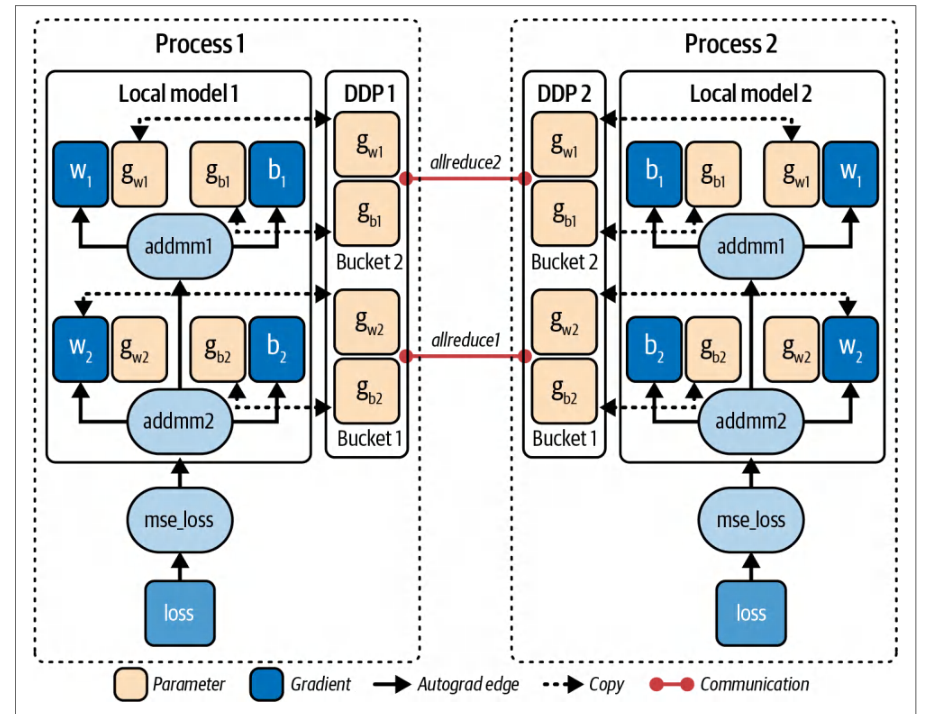
In practice, this bucketed all-reduce approach is standard in large-model training. By overlapping chunks of gradient reduction with computation of the next layers, you hide nearly all network time. An example of a bucketed all-reduce with DDP running in separate processes (process 1 and process 2) is shown in Figure 12-15.在实践中,这种分桶全归约(bucketed all-reduce)方法是大型模型训练的标准做法。通过将梯度归约的分块与下一层的计算重叠,几乎可以隐藏全部网络时间。图 12-15 展示了在独立进程(进程 1 和进程 2)中运行 DDP 的分桶全归约示例。
Modern libraries like PyTorch DDP implement variants of this approach automatically. But capturing a CUDA Graph can further reduce CPU overhead and provide more deterministic performance.像 PyTorch DDP 这样的现代库会自动实现该方法的变体。但捕获 CUDA 图可以进一步降低 CPU 开销,并提供更具确定性的性能。
Keep in mind a few considerations for using CUDA Graphs in multi-GPU environments. First, all participating GPUs must record and replay collectives in the identical sequence to avoid deadlock—much like MPI’s collective rules in which all ranks must enter the collective in the same order.在多 GPU 环境中使用 CUDA 图时,有几点需要考虑。首先,所有参与的 GPU 必须以完全相同的顺序录制和重放集合通信,以避免死锁——这与 MPI 的集合通信规则非常相似,即所有 rank 必须以相同顺序进入集合通信。
Next, while CUDA Graphs pin and reuse GPU buffers, make sure allocations for your gradients and communication buffers are done before capture. Also, as discussed earlier, if you need to modify parameters in your graph, such as batch size, you can use cudaGraphExecUpdate to patch those parameters without a full recapture.其次,由于 CUDA 图会固定并复用 GPU 缓冲区,请确保梯度缓冲区和通信缓冲区的分配在捕获之前完成。此外,如前所述,如果需要修改图中的参数(例如批大小),可以使用 cudaGraphExecUpdate 修补这些参数,而无需完全重新捕获。
In practice, capturing NCCL plus compute in a graph can cut per-step CPU time and speed up large-model training across many GPUs. At a massive scale, with hundreds of thousands of GPUs, these savings compound—creating tighter synchronization and higher utilization across the whole cluster.在实践中,将 NCCL 与计算一起捕获到图中,可以减少每步的 CPU 时间,并加速跨多 GPU 的大型模型训练。在数十万 GPU 的超大规模场景下,这些节省会不断累积——在整个集群中形成更紧密的同步和更高的利用率。
N 个 GPU 扩展的模式
Pattern for N-GPU Scaling
Whether you’re using simple peer copies, NCCL rings, or NVSHMEM one-sided atomics, the pattern of scaling to many GPUs is always the same. The system should dispatch kernels once, pipeline and overlap your data transfers with compute, and scale linearly—especially with the host CPU off the critical path.无论你使用的是简单的对等拷贝、NCCL 环形算法,还是 NVSHMEM 的单边原子操作,扩展到多个 GPU 的模式始终相同。系统应当只派发一次内核,将数据传输与计算流水化并重叠,并实现线性扩展——尤其是在将主机 CPU 移出关键路径的情况下。
For example, 4 GPUs should ideally behave like a single GPU that is 4× faster— assuming you can keep all the GPUs fed with data in parallel (see Figure 12-16) and the host out of the loop. If you can do this, you should achieve near-linear speedups by properly overlapping communication computation. Without overlap, scaling will plateau once the communication time equals the computation time.例如,理想情况下,4 个 GPU 应当表现得像单个快 4 倍的 GPU——前提是你能并行地为所有 GPU 提供数据(见图 12-16),并让主机不参与其中。如果做到这一点,通过恰当地重叠通信与计算,就应当获得接近线性的加速。若没有重叠,一旦通信时间等于计算时间,扩展就会进入平台期。
As you increase GPUs, you need to use more aggressive pipelining of data transfers and computations—and use less CPU-side orchestration and synchronization. As such, you should offload more orchestration to the devices using asynchronous copies, NCCL collectives in graphs, and NVSHMEM’s PGAS primitives. This shifts even more responsibility to software.随着 GPU 数量增加,你需要对数据传输和计算采用更激进的流水化——并减少 CPU 侧的编排与同步。因此,你应当利用异步拷贝、图中的 NCCL 集合通信以及 NVSHMEM 的 PGAS 原语,将更多编排工作卸载到设备上。这会把更多责任转移到软件上。
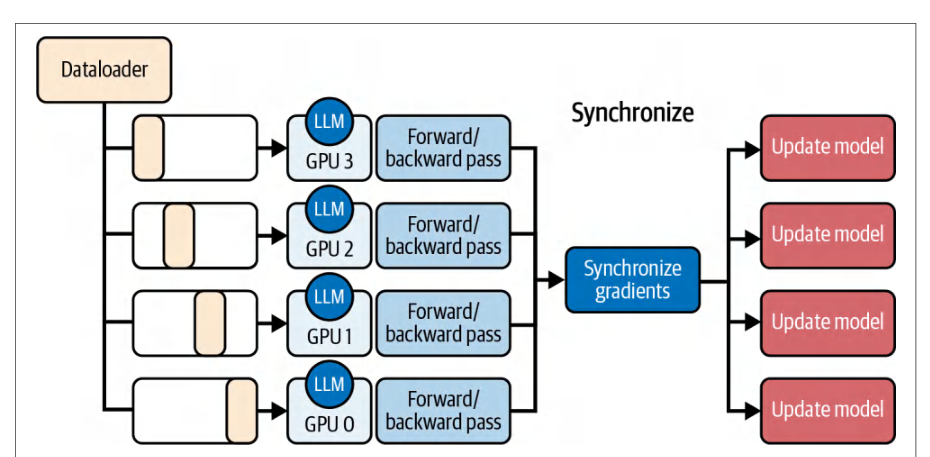
Applying these techniques, you can eliminate the CPU bottleneck, saturate the fast interconnects, max out the compute FLOPS, and build truly low-latency multi-GPU pipelines. Next, let’s revisit roofline models in the context of dynamic and device-side scheduling and orchestration.应用这些技术,你可以消除 CPU 瓶颈、充分利用高速互连、将计算 FLOPS 发挥到极致,并构建真正低时延的多 GPU 流水线。接下来,让我们在动态调度与设备侧调度和编排的背景下重新审视屋顶线模型。
屋顶线模型指导的调度与编排决策
Roofline-Guided Scheduling and Orchestration Decisions
Over the last couple of chapters, we have collected a solid set of orchestration techniques, including CUDA streams, kernel fusion, persistent kernels, CUDA Graphs, dynamic parallelism, and more. The roofline model helps decide which tool will likely give the biggest win for your situation.在过去几章中,我们已经积累了一套扎实的编排技术,包括 CUDA 流、内核融合、持久化内核、CUDA 图、动态并行等。屋顶线模型有助于判断哪种工具最有可能为你的场景带来最大收益。
At its heart, roofline boils down to operational arithmetic intensity, or the ratio of FLOPS performed to bytes moved. It consists of two hardware “ceilings”: memory roof (sloped) showing the peak throughput if you’re limited by bandwidth, and compute roof (flat) marking the peak arithmetic rate when you’re ALU-bound, as shown in Figure 12-17.本质上,屋顶线模型归结为实际运行中的算术强度,即执行的 FLOPS 与搬运的字节数之比。它由两个硬件“天花板”构成:内存屋顶(斜线)表示当受带宽限制时的峰值吞吐量,计算屋顶(水平线)表示当受 ALU 限制时的峰值算术速率,如图 12-17 所示。
If your kernel lies near the memory roof (e.g., low FLOPS/byte) and is therefore memory bound, the best optimizations are those that hide or overlap memory transfers with computation. That means you should use asynchronous copies with CUDA streams—or even run multiple memory-bound kernels concurrently. This way, you can better saturate different parts of the memory system.如果你的内核位于内存屋顶附近(例如较低的 FLOPS/字节),因而属于显存受限,那么最好的优化就是隐藏内存传输或使其与计算重叠。这意味着你应当使用配合 CUDA 流的异步拷贝——甚至并发运行多个显存受限内核。这样你就能更好地打满内存系统的不同部分。
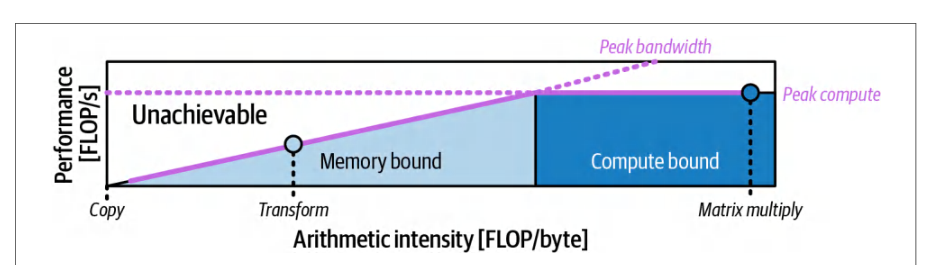
In contrast, a high-intensity kernel sitting under the compute roof needs to keep its ALUs busy. Here kernel fusion shines by combining separate add+scale (our fused example from earlier) into one pass to increase FLOPS per byte, shift the point right-wards on the roofline plot, and push the kernel toward a higher percentage of peak FLOP/s.相比之下,位于计算屋顶下方的高强度内核需要让 ALU 保持忙碌。此时内核融合的优势就体现出来:把独立的 add+scale(我们前面的融合示例)合并为一次遍历,从而提高每字节的 FLOPS,使该点在屋顶线图上向右移动,并推动内核达到更高的峰值 FLOP/s 百分比。
Likewise, persistent kernels, thread block clusters, and device-initiated CUDA Graphs don’t change your intensity number, but they reduce idle gaps caused by repeated launches. This pushes your kernel’s performance closer to the flat compute ceiling.同样,持久化内核、线程块集群以及设备端发起的 CUDA 图并不会改变你的强度数值,但它们减少了重复启动造成的空闲间隙。这会把内核性能推向水平的计算天花板。
Many real workloads fall in between. They are neither strongly memory bound nor compute bound. In those cases, concurrency is your friend. By launching several modest-intensity kernels in parallel, whether using streams, concurrent graphs, or multiple persistent kernels, you are combining them such that the aggregate-throughput point sits higher on both axes. This better utilizes the device’s resources.许多真实工作负载处于两者之间。它们既不是强显存受限,也不是计算受限。在这些情况下,并发是你的朋友。通过并行启动多个中等强度的内核——无论是使用流、并发图还是多个持久化内核——你实际上是在把它们组合起来,使聚合吞吐量点位于两个轴上更高的位置。这能更好地利用设备资源。
Thorough roofline analysis requires disciplined measurement. Use Nsight Compute to count FLOPS and bytes transferred, plot your kernel’s point, and see how far it lies below each roofline.彻底的屋顶线分析需要严谨的测量。使用 Nsight Compute 统计 FLOPS 和传输的字节数,绘制内核的点,并查看它距离每条屋顶线有多远。
If the workload is memory bound, reach for streams, overlap, and maybe reduce precision (FP16, FP8, FP4) to reduce the denominator in the arithmetic intensity equa-tion (e.g., the number of bytes transferred.)如果工作负载是显存受限的,就采用流、重叠,或许还可以降低精度(FP16、FP8、FP4)以减小算术强度等式中的分母(例如传输的字节数)。
And if your kernel is compute bound but not hitting peak FLOPS due to launch overhead or idle periods, focus on reducing launch overhead. As we’ve learned, you can do this by fusing operations into one kernel, using persistent kernels, capturing CUDA Graphs, or performing device-side launches. This will keep the ALUs fed.而如果你的内核是计算受限的,但因启动开销或空闲期而未能达到峰值 FLOPS,那就专注于降低启动开销。正如我们所学到的,你可以通过把操作融合进一个内核、使用持久化内核、捕获 CUDA 图或执行设备端启动来实现这一点。这将让 ALU 保持有活可干。
If your kernel sits well under both roofs and is neither fully memory nor compute bound, then try to increase concurrency. Run multiple kernels and streams in parallel. This will better utilize all of your system resources.如果你的内核远低于两个屋顶,既不完全显存受限也不完全计算受限,那么就尝试提高并发度。并行运行多个内核和流。这将更好地利用你的全部系统资源。
With this quantitative guidance, you can pick the right orchestration strategy for your kernel rather than trying every trick all at once. Just remember to validate that each optimization moves you closer to the hardware’s true potential. Always measure after applying an optimization.有了这些定量指导,你就可以为自己的内核选择正确的编排策略,而不是一次性尝试所有技巧。只需记住验证每项优化是否让你更接近硬件的真实潜力。应用优化之后一定要进行测量。
The roofline model guides expectations, but real performance measurements, including compute throughput, achieved occupancy, memory throughput, etc., will tell the full story. A roofline analysis combined with iterative and continuous profiling will verify that your chosen optimization strategies are actually effective.屋顶线模型给出的是预期,但真实的性能测量——包括计算吞吐量、实际达到的占用率、显存吞吐量等——才能说明全部情况。屋顶线分析结合迭代式、持续性的性能剖析,将验证你所选的优化策略是否真正有效。
关键要点
Key Takeaways
Achieving peak GPU performance hinges on weaving together computation and data movement with minimal overhead. Efficient orchestration streamlines complex workloads across CPU and GPU, ensuring neither side stalls the other. Here are some key takeaways from this chapter:要实现 GPU 峰值性能,关键在于以最小开销将计算与数据搬运交织在一起。高效的编排能够理顺 CPU 与 GPU 之间的复杂工作负载,确保任何一方都不会阻塞另一方。以下是本章的一些关键要点:
- Dynamic scheduling with L2-cache atomic queues使用 L2 缓存原子队列的动态调度
- L2-cache atomics on modern GPUs are exceptionally fast. Use fast L2-cache atomics with batched increments to balance irregular workloads on-GPU. This batched-work allocation reduces contention and keeps warps busy by eliminating warp idle gaps. It can significantly boost throughput up to ~2× in extreme imbalance cases but typically between 10% and 30%. Even a modest batch size of 8 or 16 can eliminate most contention due to the high L2 bandwidth.现代 GPU 上的 L2 缓存原子操作速度极快。使用带批量递增的快速 L2 缓存原子操作,可在 GPU 上均衡不规则工作负载。这种批量工作分配减少了竞争,并通过消除线程束空闲间隙让线程束保持忙碌。在极端不均衡的情况下,它可将吞吐量显著提升至约 2×,但通常提升幅度在 10% 到 30% 之间。由于 L2 带宽很高,即使批大小只有 8 或 16,也能消除大部分竞争。
- CUDA Graphs for fixed pipelines用于固定流水线的 CUDA 图
- Record a sequence of GPU operations once and then replay it with a single host call each iteration. This reduces per-iteration CPU scheduling overhead, often a 20%–30% latency reduction (more at a larger scale). Make sure you’re achieving maximum overlap of dependent operations on the GPU.将一系列 GPU 操作录制一次,然后在每次迭代时用单次主机调用重放。这降低了每次迭代的 CPU 调度开销,通常可减少 20%–30% 的时延(规模越大收益越明显)。请确保在 GPU 上实现了依赖操作之间的最大重叠。
- Low-overhead launch with CUDA Graphs使用 CUDA 图实现低开销启动
- Capture a sequence of asynchronous copies, kernel launches, event records, and allocations in a CUDA Graph (
cudaStreamBeginCapture/cudaStreamEndCapture). Replaying the graph withcudaGraphLauncheliminates per-call CPU enqueue overhead while preserving all interstream dependencies, further reducing runtime bottlenecks.将一系列异步拷贝、内核启动、事件记录和显存分配捕获到一个 CUDA 图中(cudaStreamBeginCapture/cudaStreamEndCapture)。用cudaGraphLaunch重放该图,可消除每次调用的 CPU 入队开销,同时保留所有流间依赖关系,进一步减少运行时瓶颈。
- Device-side orchestration设备端编排
- Launch work from the GPU itself by tail-launching a prerecorded CUDA Graph or using dynamic parallelism to spawn child kernels. This eliminates CPU scheduling gaps entirely and allows the GPU to remain busy end to end with no host intervention.通过尾部启动预先录制的 CUDA 图,或使用动态并行派生子内核,从 GPU 自身发起工作。这完全消除了 CPU 调度间隙,使 GPU 在无需主机介入的情况下端到端保持忙碌。
- Multi-GPU overlap多 GPU 重叠
- Always overlap communication with computation. Use separate streams to pipeline GPU peer-to-peer transfers (
cudaMemcpyPeerAsync), NCCL collectives, CUDA-aware MPI (RDMA), or NVSHMEM one-sided operations. This hides communication latency behind useful work and can approach linear scaling across many GPUs under favorable compute-to-communication ratios and adequate overlap—and even across cluster nodes—when overlap is sufficient.始终让通信与计算重叠。使用独立的流来流水化 GPU 对等传输(cudaMemcpyPeerAsync)、NCCL 集合通信、CUDA-aware MPI(RDMA)或 NVSHMEM 单边操作。这将通信时延隐藏在有效工作之后,在计算通信比有利且重叠充分的情况下,可在多 GPU 上接近线性扩展——甚至在跨集群节点时也是如此。
- Roofline-guided choices屋顶线模型指导的选择
- Let the roofline chart drive your strategy. If your kernel is memory bound, focus on overlap and reducing data movement with asynchronous memcopies and mixed precision like FP8/FP4. If it’s compute bound but underachieving due to overhead, use launch-reduction techniques like kernel fusion, persistent kernels, and CUDA Graphs to approach the compute ceiling. For kernels in-between, increase concurrency by running multiple operations in parallel to utilize all hardware units. Always verify with profiling that the chosen optimization moves the needle.让屋顶线模型图来驱动你的策略。如果你的内核受限于内存,就专注于重叠,并通过异步显存拷贝和 FP8/FP4 等混合精度来减少数据搬运。如果内核受限于计算,但因开销而未能充分发挥,就使用内核融合、持久化内核和 CUDA 图等减少启动次数的技术来逼近计算上限。对于介于两者之间的内核,通过并行运行多个操作来提高并发度,以利用所有硬件单元。始终通过性能剖析验证所选优化确实带来了改善。
By weaving these techniques together—dynamic dispatch, cooperative kernels, graph capture/replay, and GPU-native memory sharing—you create pipelines that saturate every part of the GPU cluster for ultrascale AI workloads.通过将这些技术交织在一起——动态调度、协作内核、图捕获/重放以及 GPU 原生内存共享——你就能构建出为超大规模 AI 工作负载充分压榨 GPU 集群每一部分的流水线。
结语
Conclusion
In this chapter, we moved beyond single-kernel optimizations and explored end-to-end orchestration techniques. We covered how to launch work entirely on the device with dynamic parallelism, capture complex workflows in CUDA Graphs, and coordinate many GPUs using NCCL and NVSHMEM. Each technique shares the same goal: keep every engine fueled with work, hide latency, and collapse host–device gaps so that your hardware runs flat-out.在本章中,我们超越了单内核优化,探索了端到端的编排技术。我们介绍了如何借助动态并行完全在设备上启动工作、如何在 CUDA 图中捕获复杂的工作流,以及如何使用 NCCL 和 NVSHMEM 协调多块 GPU。每项技术都指向同一个目标:让每个引擎都有活可干、隐藏时延、消除主机与设备之间的差距,从而让硬件满负荷运转。
NVIDIA’s modern GPU platforms blur the line between CPU and GPU more than ever. The Grace Blackwell and Vera Rubin Superchips, for example, connect the CPU with multiple GPUs using coherent NVLink with enormous bandwidth.NVIDIA 的现代 GPU 平台比以往任何时候都更模糊了 CPU 与 GPU 之间的界限。例如,Grace Blackwell 和 Vera Rubin Superchip 通过具有巨大带宽的一致性 NVLink 将 CPU 与多块 GPU 连接起来。
But even as hardware reduces CPU-GPU barriers, the responsibility still falls on software to fully exploit this high-performance hardware. The approaches in this chapter, whether with CUDA in C++ or higher-level library APIs, are how we take advantage of these advancements.但即便硬件缩小了 CPU 与 GPU 之间的障碍,充分利用这一高性能硬件的责任仍然落在软件身上。本章介绍的方法——无论是使用 C++ 中的 CUDA,还是使用更高层的库 API——正是我们利用这些进步的方式。
In the next chapter, we’ll see how PyTorch integrates many of these ideas, including streams, graphs, asynchronous operations, and optimized kernels, so you can achieve this performance in just a few lines of Python. Let’s dive into the PyTorch ecosystem and understand why it’s so popular for implementing high-performance AI workloads.在下一章中,我们将看到 PyTorch 如何集成其中的许多理念,包括流、图、异步操作和经过优化的内核,使你只需几行 Python 代码就能获得这样的性能。让我们深入 PyTorch 生态,理解它为何在实现高性能 AI 工作负载方面如此受欢迎。